
Monetize
Monetization
Set up subscriptions, pay-per-usage, and other pricing models to monetize your AI agents.
Pickaxe is the first platform that lets you truly monetize your AI agents — putting them out into the world and building real, agent-powered businesses.
Monetization models
Pickaxe supports several ways to charge for access to your tools:
Subscription
Gate different agents with different usage levels based on a daily, weekly, monthly, or yearly subscription. Great for recurring revenue and tiered product offerings.
Pay-per-usage
Sell credits or uses to your users. When they run out, they can upgrade and buy more. This model works well for tools with variable usage patterns.
One-time payment
Charge a single upfront fee for access. This often works best paired with a pay-per-usage option to help cover ongoing AI usage costs.
External payments
Link users to an external site to complete payments if you prefer to use a third-party payment provider, then manage access manually.
How to set it up
- Go to the Access page (under Users in the sidebar).
- Create a member access group.
- In the group editor's Setup tab, toggle on Monetization.
- Choose a Pricing Plan — a one time purchase or a subscription (daily, weekly, monthly, or yearly) — and set your price.
- Connect your Stripe account by clicking Connect to Stripe if you haven't already. If you don't have a Stripe account yet, follow the on-screen instructions to set one up.
- Set the group's Usage Limit so each purchase maps to a clear allowance of uses or credits.
Choosing a currency
Prices are charged in your workspace's currency, set once under Settings → User → Payments with the Currency dropdown: US Dollar, Euro, British Pound, Japanese Yen, Australian Dollar, Canadian Dollar, or Chinese Yuan. The dropdown appears once your Stripe account is connected and active, and new access groups inherit whatever you pick — so set it before you price your first group.
What happens when users hit their limit
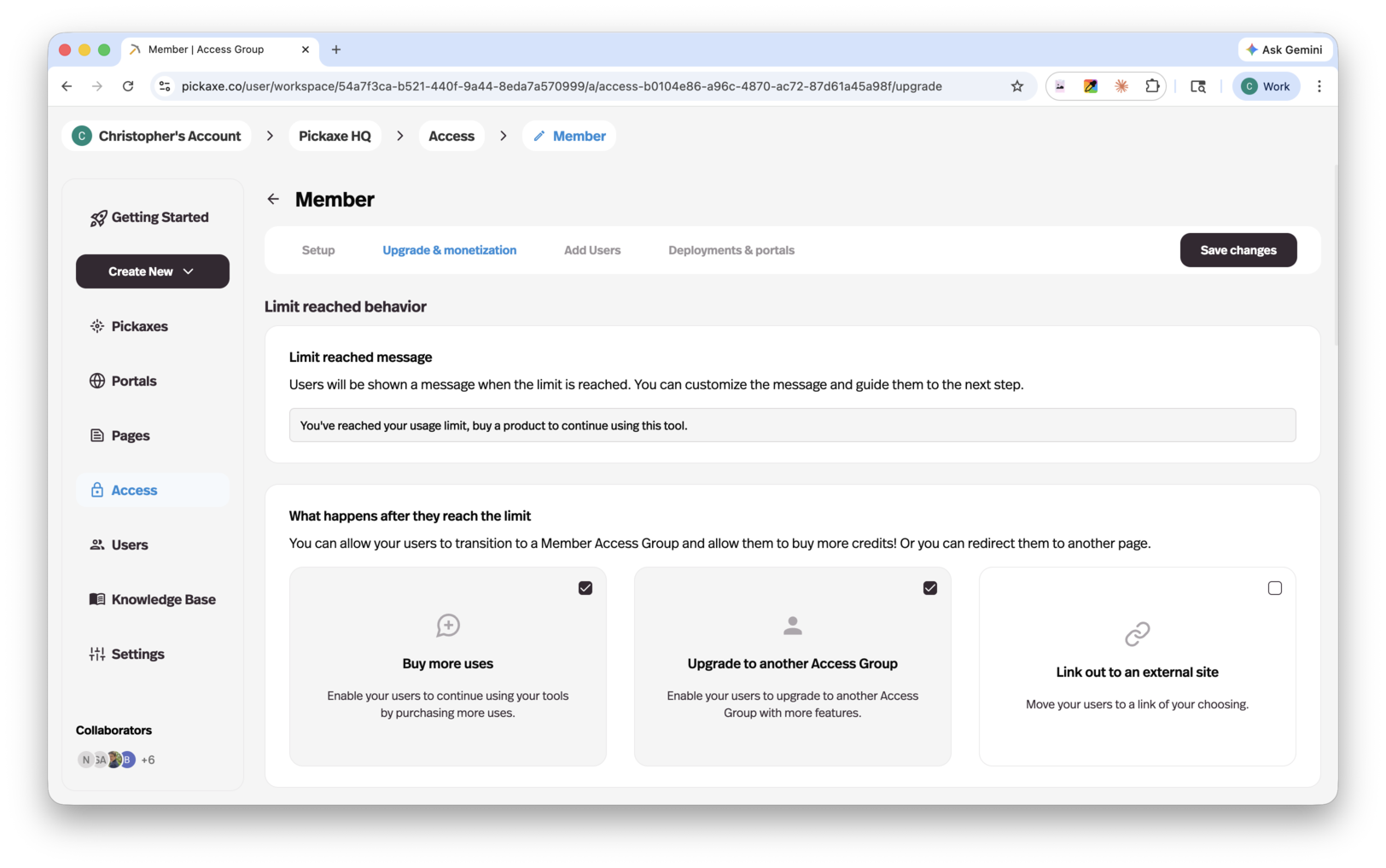
The group editor's Upgrade tab controls what happens when a user reaches their usage limit. Set the limit reached message, then enable any of:
- Buy more uses or credits — let them purchase additional usage within their current group. The packages and pricing are configured in Settings → User → Control AI usage cost.
- Upgrade to another access group — prompt them to move to a higher tier with more access.
- Link out to an external site — send them to a third-party payment page with a customizable button label. External checkout is manual: you grant the access or credits after purchase.
The Pricing Page Preview at the bottom of the Upgrade tab shows the pricing page exactly as your users will see it — click any card to customize it.
Offers
If you want to sell one-off access to specific tools rather than managing full access group tiers, you can use Offers. Offers let you sell ad hoc access to individual agents, pages, or folders of content — great for creators with a variety of products who don't want to create separate portals or access groups for each one.
You configure offers from the Lock tab in the portal editor. See the full Offers page for details.
Processing fees
Pickaxe charges a processing fee on all payments processed through the platform. The fee depends on your plan:
| Plan | Processing fee |
|---|---|
| Gold | 10% |
| Pro | 8% |