
For a consultant or creator building a paid AI business, my choice in Pickaxe vs CustomGPT.ai is Pickaxe. It combines cited knowledge answers with branded portals, access groups, flexible monetization, governance controls, and Actions that can use the owner’s or each user’s connected accounts.
The advantage is what you can package around your expertise: several useful tools, access for different customers, and a way to charge for the service. Pickaxe’s Portals and monetization controls address that job directly.
This comparison appears on Pickaxe's blog. I reviewed public documentation and pricing on October 19, 2026; the screenshots below come from official help pages, and the pilots are proposed evaluation plans, not measured results.
I am focusing on one purchase: delivering a knowledge assistant to clients. This is not a benchmark or a complete enterprise procurement review, and CustomGPT.ai is a separate product from OpenAI's custom GPTs.
Pickaxe vs CustomGPT.ai: why I would start with Pickaxe
Pickaxe is the stronger starting point for turning expertise into a client product. Here are the advantages I would put first in this purchase:
- A complete client destination. Bundle agents and pages in a branded portal, with access groups and an upgrade path around the work customers came to do.
- Built-in ways to sell. Configure subscriptions, one-time access, usage packages, and individual tool offers instead of treating checkout and entitlement as a separate application project.
- Branding at a lower subscription tier. Gold includes white labeling and a custom domain at $37 per month with monthly billing; CustomGPT.ai lists branding removal on its $499 monthly Premium tier. This compares the branding gate, not equivalent usage allowances.
- Room to build a client portfolio. Pickaxe lists unlimited agents on its paid plans and unlimited workspaces on Pro, with usage charged separately. That supports organizing distinct client products without treating each additional tool as another agent slot.
- Control who can do what. Invite approvals, per-user usage budgets, content locks, and owner-versus-user app connections let me shape access and execution around the service.
| Reader and job | Pickaxe fit | CustomGPT.ai fit | Starting point |
|---|---|---|---|
| Consultant selling a paid AI toolkit | Portal, member access, usage and charging | Knowledge agent plus a verified commercial and billing arrangement | Start with Pickaxe |
| Creator selling several tools under one brand | Agents, pages, gated folders and individual offers | Separate knowledge agents; verify the product and checkout layer | Start with Pickaxe |
| Agency managing separate client products | Pro workspaces, model choice and account-scoped Actions | Plan agent limits plus the required access and billing setup | Start with Pickaxe |
| Team building a cited knowledge assistant | Per-document citation controls, PDF page links and retrieval inspection | Citation display, source controls; PDF viewer on Enterprise | Both support citations; start with Pickaxe for the broader client product |
| Team with corporate identity requirements | Scope the required identity and plan | Enabled Teams/IdP route for external users | Compare the configured identity routes |
| Existing knowledge service plus a new customer product | Possible customer destination | Possible existing retrieval service | Use both only after validating the boundary |
The evidence behind those recommendations is the documented Pickaxe portal workflow, its access and charging setup, and CustomGPT.ai's citation controls and external identity access. Plan qualifications follow below.
Citations are a shared capability, not a reason to assume CustomGPT.ai is better. Pickaxe adds the access, monetization and account-ownership controls I want around a knowledge assistant.
Building and choosing models
Pickaxe's Agent Builder combines instructions, models, knowledge, and Actions in Build, with Auto for suggested changes and Preview for checking behavior. I would use that flexibility to give each client task its own focused tool, then bring those tools together in a portal.
CustomGPT.ai's website-agent setup begins with a URL or sitemap and indexing. Its persona guidance adds behavioral instructions around retrieved content.
| Requirement | Pickaxe | CustomGPT.ai |
|---|---|---|
| Assemble a focused assistant | Build brings model, prompt, knowledge and Actions together | Website/sitemap indexing plus persona configuration |
| Choose a supported provider and model | Best fit for a self-serve model shortlist: picker and supported capability filters | Capability modes vary by tier; full model picker documented for Enterprise |
| Try changes before release | Preview, including testing as a selected user | Documented agent preview and deployed testing; scope by surface |
| Prove answer quality | Verify in pilot | Verify in pilot |
Sources for model rows: Pickaxe model controls and CustomGPT.ai's plan-specific capabilities. CustomGPT.ai distinguishes capability modes from full model selection; do not assume its Enterprise picker is included on Standard.
Model flexibility is a practical Pickaxe advantage. The documented picker lets me browse providers and filter for capabilities such as Actions, image upload, and reasoning, then change the supported model without rebuilding the product.
I would use that control to match a routine drafting tool and a more demanding research assistant to different cost and capability needs. Keep the source set and acceptance questions fixed when comparing their outputs.
Neither a provider list nor a large context window establishes accuracy. Ask whether the selected model can use the required tools on the actual plan, and whether changing it changes the usage meter.
Knowledge, citations, and changing documents
Pickaxe supports source citations too. In Build → Knowledge Base, each document has a Citations switch separate from its On/Off control, alongside the Knowledge Explorer for inspecting retrieval.
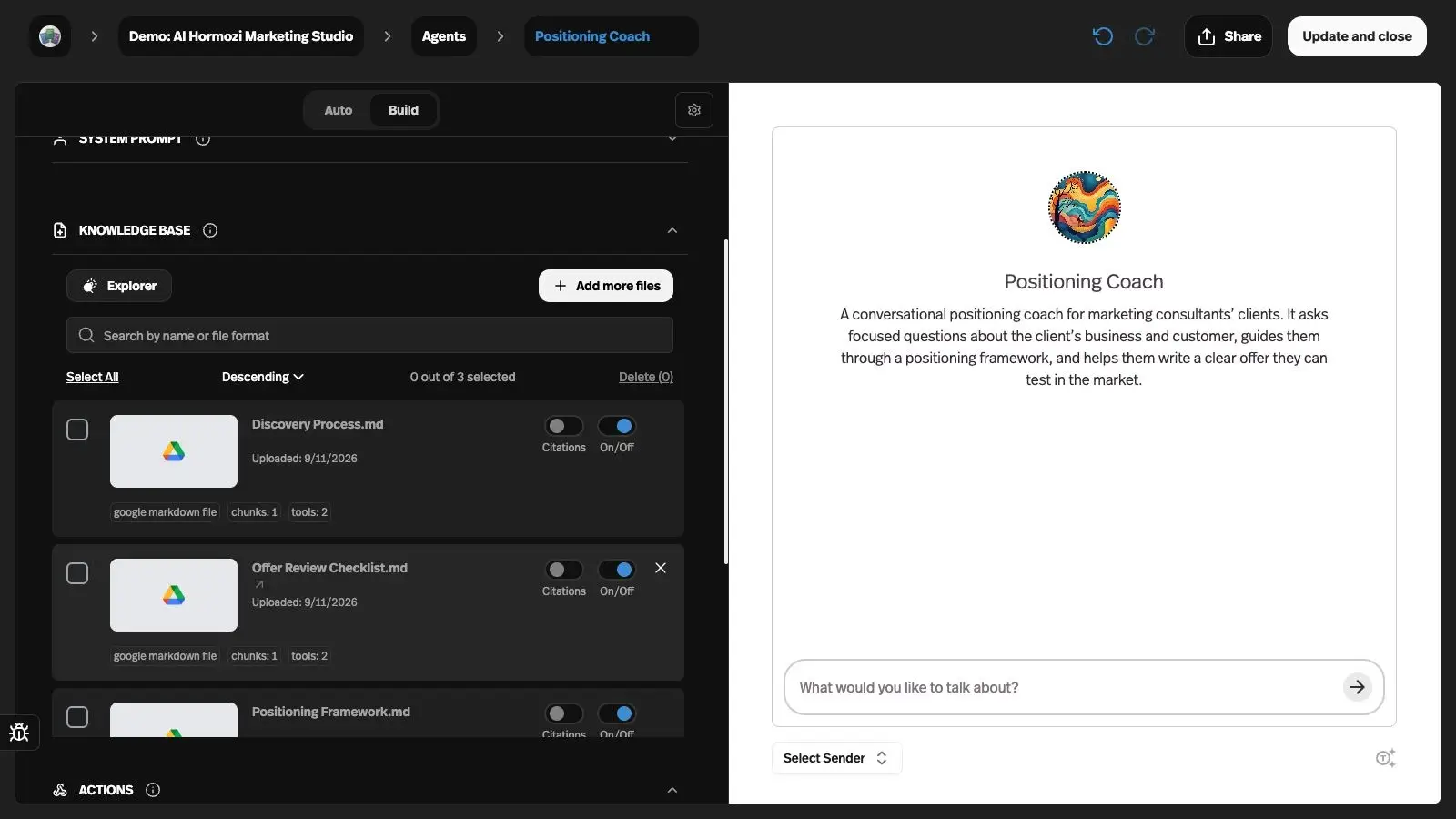
Citable PDF sources can include a link to the relevant page when page metadata is available. The citation and PDF verification note records the checked controls and source-link behavior; no live answer-quality benchmark is implied.
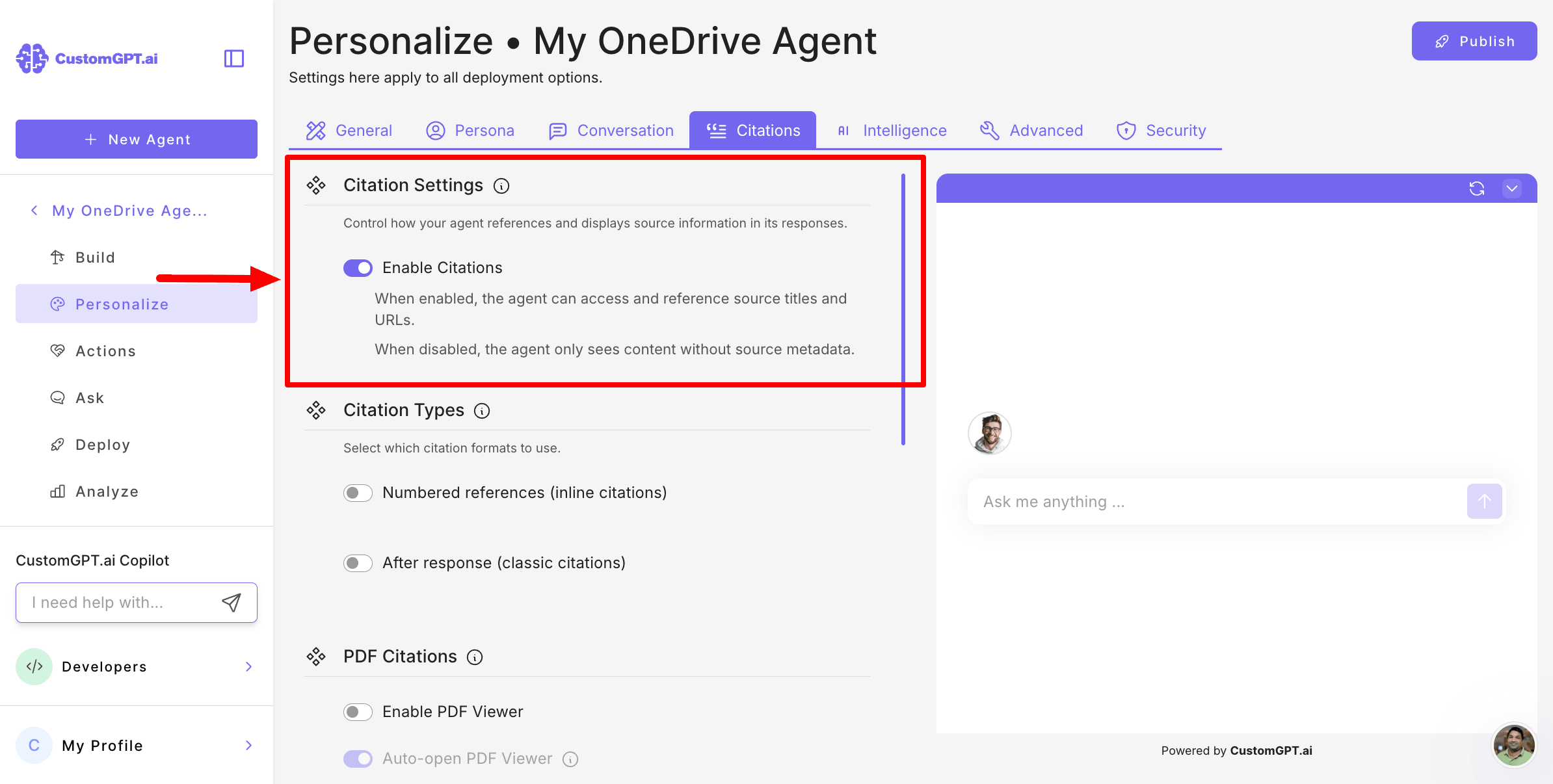
CustomGPT.ai also offers source references, with numbered and after-response display options. Those are presentation choices, not evidence that it has citations while Pickaxe does not.
| Requirement | Pickaxe | CustomGPT.ai |
|---|---|---|
| Inspect retrieval | Knowledge Explorer exposes chunks and semantic search | Source and content settings; inspect cited material |
| Configure source citations | Per-document Citations switch; select which sources may be cited | Numbered references and after-response citation options |
| Follow a PDF source reference | PDF source links can include the cited page when page metadata is available | Enterprise PDF viewer in deployed agents; text-PDF highlights |
| Keep website material current | Website auto-sync with documented selection rules | Website auto-sync on Premium and above; manual refresh |
| Remove obsolete material | Remove sources and check changed answers; sync behavior depends on source type | Remove content and check answers with the selected sync settings |
Sources: Pickaxe knowledge and sync controls, CustomGPT.ai citation settings, Enterprise PDF viewer qualifications, website auto-sync, and manual refresh.
Pickaxe’s page links and CustomGPT.ai’s embedded PDF viewer are different interfaces. Neither establishes better grounding, so I would compare the same questions and documents rather than award a feature win for different controls.
For a client product, Pickaxe combines that knowledge workflow with access groups, billing and Actions. That broader functionality matters more to my recommendation than a particular citation display.
I would test a changed policy and a withdrawn document before approving either product. Our guide to preparing an AI knowledge base explains why source cleanup comes before model tuning.
Actions, account authority, and confirmation
Pickaxe gives me more ways to connect the client product to real work. Its Action Library covers app integrations, custom Actions, agent-to-agent calls, and MCP connections to services such as Zapier, Make and n8n.
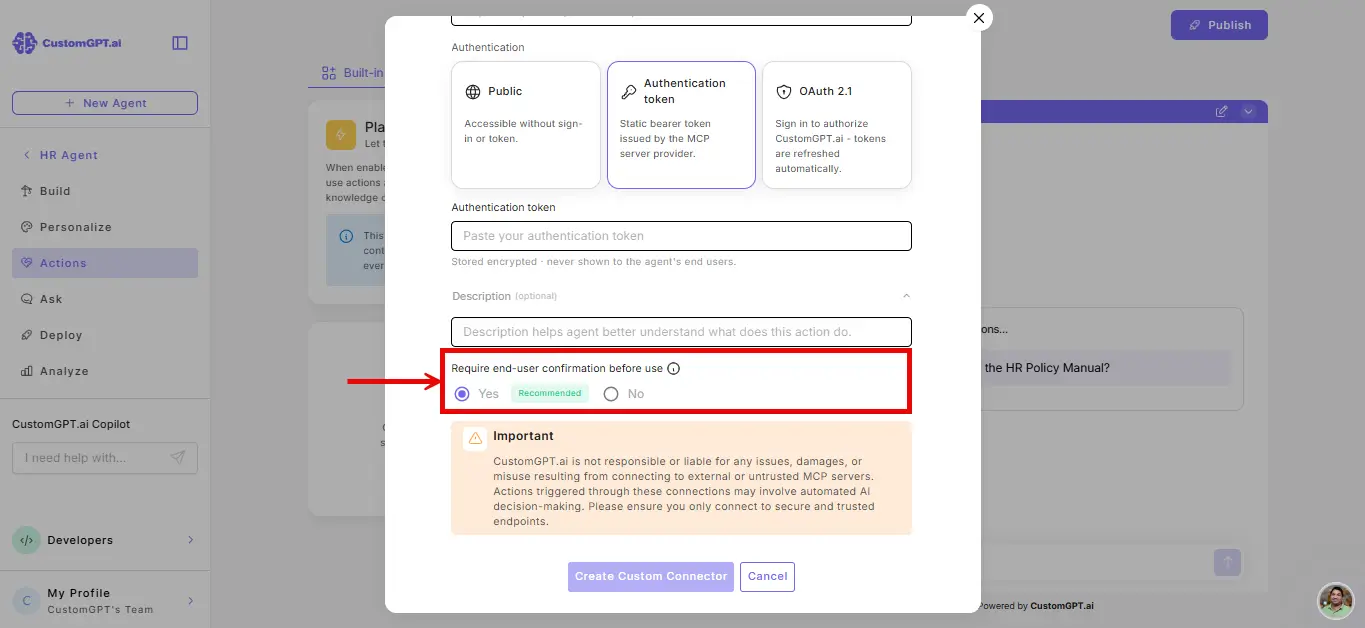
CustomGPT.ai documents custom MCP connectors as well as curated connectors. Its setup includes an explicit choice to require the end user's confirmation before execution.
| Requirement | Pickaxe | CustomGPT.ai |
|---|---|---|
| Reach an external system | App integrations, custom tools, other agents and MCP workflows | Curated and custom MCP connectors |
| Choose whose app account is used | Owner or end-user credentials: explicit choice in the connection flow | Token and OAuth connector setup; confirm credential scope |
| Ask before a connector executes | Verify the particular Action and implement required gate | Documented Yes/No connector confirmation setting; extra query debit |
| Understand connected-tool limits | Gold: three actions per agent; Pro: unlimited connections | One enabled connector without Plan & Act; enabled limits vary with mode and plan |
| Run unattended | Agentic Runtimes scheduling is a provisioned beta | Scheduled Tasks on Premium/Enterprise with Plan & Act; no automatic failure retry or alert |
Sources: Pickaxe Actions, Pickaxe plan gates, CustomGPT.ai's confirmation setting, connector limits and costs, and scheduled-task behavior.
A confirmation prompt and an authorization check do different jobs. The person clicking Yes must already be entitled to the target record; a connector should enforce that boundary outside the agent's generated text.
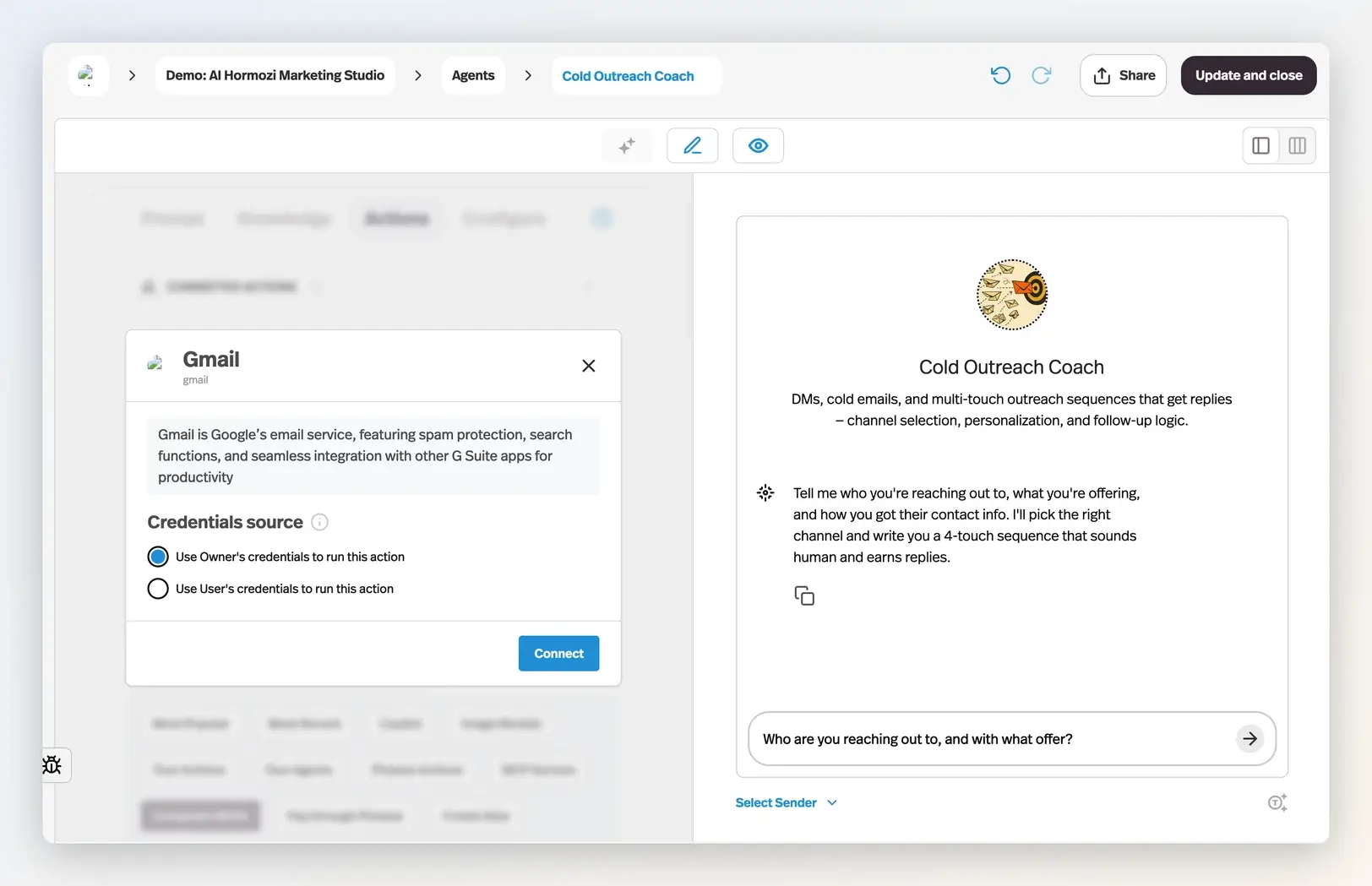
Pickaxe’s connection setup makes account ownership explicit: use Owner’s credentials to log leads in my CRM, or User’s credentials so each customer acts in their own Gmail or Notion. I can reset the owner or user connections, disable a connection, or disconnect it; shared-connection resets show which other agents are affected.
Scheduling is also qualified. CustomGPT.ai documents Scheduled Tasks on Premium and Enterprise with Plan & Act, while Pickaxe's Agentic Runtimes guide describes scheduled execution in a provisioned beta that requires a setup call.
That beta is not a default prerequisite for the standard Pickaxe knowledge-and-portal workflow in this guide. If unattended operation is the actual purchase, evaluate its provisioning, failure handling, and costs as a separate requirement.
Access groups, client governance, and branded delivery
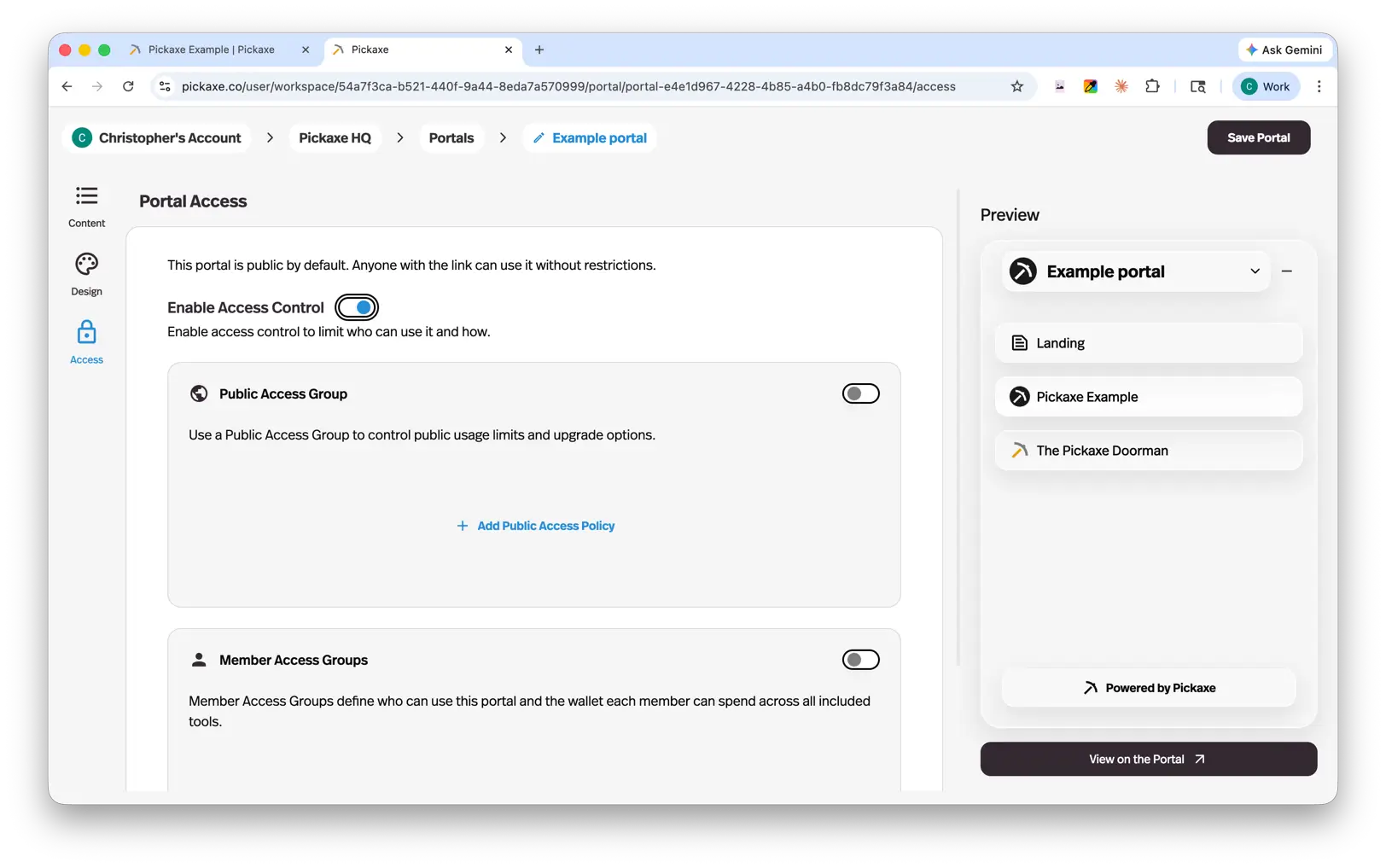
Branded delivery is one of Pickaxe’s clearest advantages for this buyer. A Portal brings agents and pages together, while access groups define public, member, or invite-only entry.
| Requirement | Pickaxe | CustomGPT.ai |
|---|---|---|
| Publish a branded customer destination | Best fit for a packaged client toolkit: portals containing agents and pages | Public links, embeds and chat; confirm required custom-domain surface |
| Control who can enter | Public, member and invite-only groups, each with its own access rules | Public agent or qualified private deployment; Teams/IdP setup for external corporate login |
| Approve private client access | Invite or approve users; manage private groups and their usage allowances | Private deployment, team roles and configured IdP routes; verify the audience and plan |
| Make exceptions to content locks | Whitelist selected access groups for locked agents, pages or folders | Verify an equivalent customer-entitlement layer for the intended deployment |
| Operate without builder access | Customers use deployed portal or agent | External IdP users can chat without a CustomGPT.ai account under that configured route |
| Remove vendor branding | Better fit for entry-level white labeling: Gold and above | Premium and above |
| Build a custom application around an API | Gold request fee; Pro includes API access, AI usage separate | RAG API listed on Standard; plan rate limits and usage still apply |
Sources: Pickaxe access groups and login methods, embeds, plan-specific domains and APIs, CustomGPT.ai's public deployment, private deployment, and IdP access overview.
These are practical governance controls, not just a branded login. Invite-only groups let me approve access, while member groups assign per-user budgets and upgrades; content-lock whitelists let selected groups bypass a purchase or upgrade gate.
CustomGPT.ai’s regular private deployment uses its accounts; its separate external IdP route can avoid that with enabled Teams functionality, configured SSO, roles, and account-side setup. That corporate-login option still needs to be scoped separately from a paid membership product.
The payoff for a small consulting service is less separate application assembly around login, onboarding, and return visits. Our custom client portal guide makes the same practical point: the destination needs useful work inside it, not merely a branded login screen.
Charging customers and enforcing their allowance
Pickaxe's monetization workflow connects a member access group to a price and usage limit, with Stripe connected for platform checkout. The Upgrade tab controls buying more usage, moving to another group, or linking to an external payment destination.
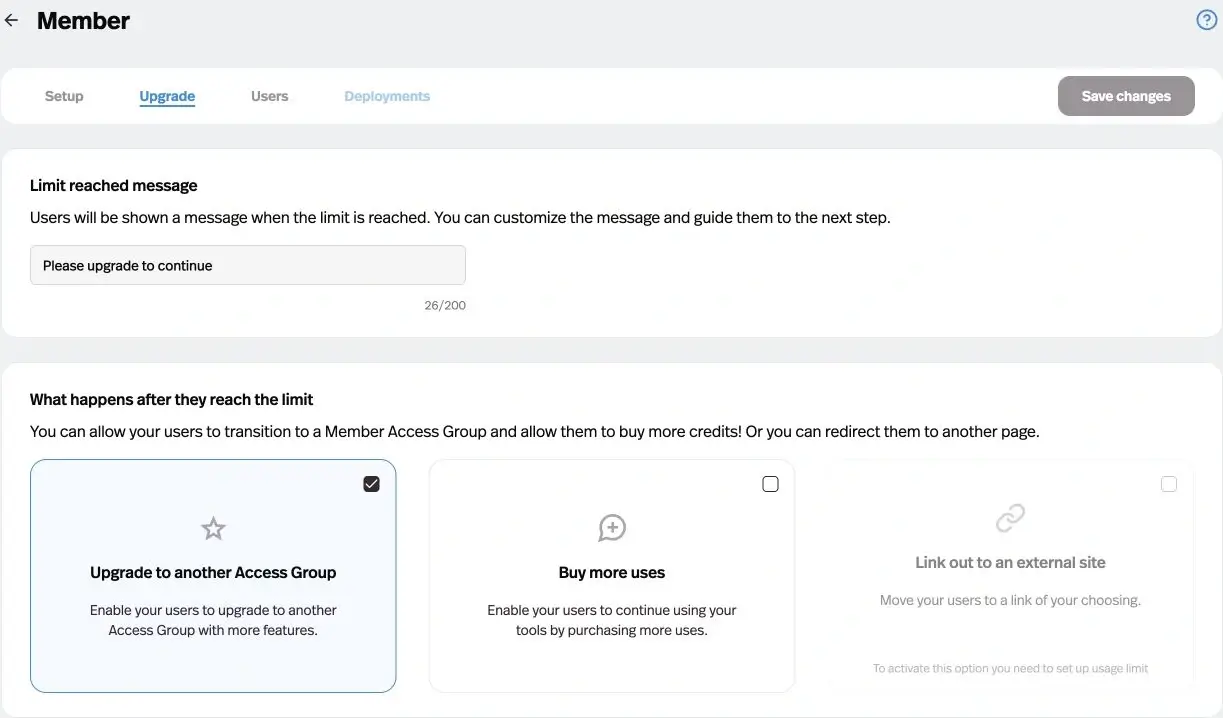
Offers provide another packaging option: lock an agent, page, or folder and sell access to that content. This is useful when the customer buys individual tools rather than climbing one subscription ladder.
Pickaxe’s monetization goes beyond a single paywall. Member groups combine subscription tiers, per-user usage budgets, top-ups and upgrade paths; Offers add individual purchases and optional credits.
| Customer product requirement | Pickaxe | CustomGPT.ai |
|---|---|---|
| Sell tiered memberships | Built-in subscriptions and access-group upgrade paths | Agent access licenses are documented; a matching native subscription-and-entitlement flow was not established |
| Control each customer’s allowance | Per-user wallets in credits or uses, with top-up packages | Platform query allowance; verify the separate customer billing and usage layer |
| Sell a specific tool or bundle | Offers for an agent, page or folder, with configurable price and added credits | Verify the external checkout and entitlement implementation for this packaging |
| Support private paid client work | Monetized invite-only groups; invitation/approval remains required | Scope private deployment and commercial arrangement separately |
Sources: monetization setup, member wallets and upgrade rules, offer settings, paid invite-only groups, and CustomGPT.ai access licenses. Invite-only groups support purchases and top-ups but do not offer self-serve upgrades between groups.
For example, a proposed consulting toolkit could include a policy assistant in a monthly membership and sell access to a separate planning tool as an Offer. The value is having the product packaging available alongside the agents, with the actual price and allowance chosen for that service.
CustomGPT.ai’s API documents agent access licenses, but that endpoint alone does not establish a native recurring checkout, payment reconciliation, or customer top-up workflow.
For that delivery model, Pickaxe provides a documented native customer-commerce workflow. With CustomGPT.ai, confirm the billing and entitlement implementation and the commercial arrangement before quoting the same product.
The linked CustomGPT.ai terms include a service-reselling permission requirement. Confirm the written permission or applicable reseller program for your delivery model before quoting a branded resale offering.
Build the client experience around the answer
Try one useful agent with a portal, access group, and a clear allowance.
Pickaxe vs CustomGPT.ai pricing
The following are published USD prices checked October 19, 2026. Monthly billing and annual billing are shown separately; tax treatment and regional checkout eligibility need confirmation, and annual equivalents require an annual commitment.
| Plan | Monthly billing | Annual billing equivalent | Included allowance and qualification |
|---|---|---|---|
| Pickaxe Gold | $37/month | $29/month | Three workspaces; $15 monthly AI credits; three actions per agent; API 1¢/request |
| Pickaxe Pro | $147/month | $116/month | Unlimited workspaces and action connections; $50 monthly AI credits; included API access |
| CustomGPT.ai Standard | $99/month | $89/month | 1,000 monthly queries; RAG API; separate document/storage/processing limits |
| CustomGPT.ai Premium | $499/month | $449/month | 5,000 monthly queries; website auto-sync and branding removal; other limits remain |
| Custom agreements | Quote required | Quote required | Confirm identity, security, support, commercial rights and actual usage terms |
| Customer payment fees | Separate from subscription | Separate from subscription | Pickaxe Gold 10%, Pro 8%; budget Stripe and other applicable charges separately |
Sources: Pickaxe pricing, Pickaxe payment fees, and CustomGPT.ai pricing. Pickaxe API request charges on Gold are separate from AI usage; “included API” on Pro does not mean free model consumption.
CustomGPT.ai's current pricing page lists Standard with ten agents and Premium with twenty-five. Its usage documentation agrees, while the separate trial landing page still shows different limits.
Use the current pricing and usage pages for planning, then confirm the purchased entitlement at checkout.
For a branded launch, Pickaxe’s lower white-labeling gate stands out. Its Gold tier includes white labeling and a custom domain, while CustomGPT.ai places branding removal on Premium; the pricing sources above support that feature-level comparison.
I would also count the built-in portal and monetization workflow when comparing the subscription. Usage meters, payment fees, domain surfaces, and account emails still need to be checked before quoting the complete service.
Why queries, credits, and uses do not compare directly
Pickaxe's Credits & Usage guide separates uses from credits. A use is a customer input; credits track usage cost more closely, and the customer-facing package can include a margin.
CustomGPT.ai's allowance is a weighted query budget. Context depth, selected model, agentic actions, and confirmation can change how much one message consumes.
Do not divide a subscription by the headline allowance and call the result the cost of a completed customer task. A task may need retrieval, a confirmation, an action, another answer, and a retry.
There are inconsistencies in the current model-multiplier guide and an arithmetic error in a connector-cost example. For a purchase decision, I would confirm the configured debit with support and inspect usage from the pilot rather than silently selecting a convenient example.
Use this worksheet: platform subscription, actual model or weighted-query consumption, API and external-tool charges, payment fees, then implementation and maintenance. Keep customer revenue in its own column.
When an allowance is exhausted, the handling matters as much as the subtotal. CustomGPT.ai documents separate query add-ons, while Pickaxe lets the builder configure the customer's limit-reached path; neither is a promise of unlimited work at a fixed price.
Small, growing, and agency cost scenarios
These are hypothetical monthly workloads, not customer results or benchmarks. Each client has one assistant and twenty short source documents, maintained by two builders. For the conditional Premium arithmetic, assume GPT-4.1, Balanced context, Plan & Act off, one-credit normal responses, and no web search or other paid actions.
| Scenario | Clients, builders, initial turns | Connector calls, confirmations, retries | Conditional Premium query total |
|---|---|---|---|
| Small | 1 client; 2 builders; 400 initial turns | 40 calls; 40 confirmations; 8 plain-message retries | 400 + 40 + 40 + 8 = 488 |
| Growing | 3 clients; 2 builders; 2,000 initial turns | 200 calls; 200 confirmations; 40 plain-message retries | 2,000 + 200 + 200 + 40 = 2,440 |
| Agency portfolio | 5 clients; 2 builders; 6,000 initial turns | 600 calls; 600 confirmations; 120 plain-message retries | 6,000 + 600 + 600 + 120 = 7,320 |
The query column is conditional arithmetic using a one-credit base and the documented Premium connector rules plus confirmation debit: initial turns plus connector calls, confirmation interactions, and plain-message retries. It excludes Plan & Act, deeper context, other paid actions, and model multipliers; those configurations require a different calculation.
For the portfolio example, that gives 6,000 + 600 + 600 + 120 = 7,320 query credits. Under those explicit assumptions, Premium plus the documented 2,500-query add-on provides 7,500 credits for an illustrative monthly-billed subscription subtotal of $499 + $375 = $874.
That does not prove the workflow fits every other limit or the contract. Validate the debit first, confirm whether one account can serve that portfolio under its agreement, and price the customer identity and billing implementation separately.
For a separate Pickaxe example, assume those five clients need independent workspaces, actual platform AI usage totals $60, and monthly customer receipts are $2,500. Pro’s published $50 included credits would leave a hypothetical $10 usage top-up.
Using the documented Pro payment fee, the illustrative subtotal is $147 + $10 + (8% × $2,500) = $357, before any additional payment charges applicable at checkout, external apps, taxes, and labor. The $60 usage input is an assumption to replace with observed consumption, not a conversion from CustomGPT.ai queries.
For the small and growing cases, calculate Pickaxe using the same worksheet and the number of separate workspaces actually needed. Do not charge five independent clients as though all must share one knowledge and credential boundary just to make an entry plan fit.
The two subtotals price different meters and assumptions, so they are not an apples-to-apples savings claim. Our AI service pricing guide is useful for turning verified delivery costs into an allowance and maintenance fee that the customer can understand.
Proposed pilot: a paid client knowledge assistant
I would begin with a synthetic consulting client, one maintainer, a current policy pack, a retired policy, and one low-risk ticket-creation tool. The deliverable is a branded assistant that answers from approved material and creates a follow-up only for the signed-in member.
- Write the contract. Define an acceptable answer, the required source reference, the allowed ticket fields, the customer's allowance, and the owner of a failed request.
- Build the Pickaxe version. Connect the approved documents to the agent, configure the ticket Action's account ownership, then publish a portal with a member group and a test payment configuration.
- Build the CustomGPT.ai version. Index the same material, enable citations, connect the bounded tool, and choose the confirmed external identity or membership integration. Obtain any required commercial permission.
- Change one source. Replace the synthetic cancellation rule, run the applicable refresh, and check the answer and citation again. Keep both versions in the test record so the change is observable.
- Break one dependency. Return a controlled error from the ticket endpoint. The answer must explain the failure and avoid claiming success; retrying must not create a duplicate ticket.
- Try the denied user. Use an account with no entitlement and an expired membership. Test direct links as well as the portal page, and record what happens after sign-out.
Finish by reaching the allowance and walking through the upgrade or top-up path. A successful payment should produce the intended access, and a canceled or failed payment needs a clearly defined state.
The acceptance record should include expected output, actual output, source version, identity, tool result, usage debit, and operator intervention. These are proposed checks; no result is claimed here.
Proposed pilot: document answers for an organization
The second pilot compares cited knowledge answers and governed access for an internal team. Both products support source references, so use the same synthetic policies, denied user and deliberately unanswerable question.
Enable Pickaxe’s source citation controls and check the referenced passage, including PDF page links when available. Check CustomGPT.ai’s source references under its actual plan; its embedded PDF viewer requires Enterprise and has text-highlighting limitations.
Configure the relevant source-sync behavior and a permitted identity route. Then remove a partner's access, update the policy, and repeat the same questions from both a permitted and denied account.
On Pickaxe, add an invite-only group, assign the intended budget and review conversation resources in Activity. Use the Knowledge Explorer to investigate misses, then test the owner-versus-user connection on a bounded Action.
For either platform, assign a person to resolve missing or contradictory source material. A model should not decide which department's unpublished draft overrides an approved policy.
My proposed release gate is simple: no access leak or fabricated action success in the test set, usable citations on the reference questions, and a named owner for every unresolved answer. This is an acceptance policy, not a statistical guarantee.
Our AI agent evaluation guide explains how to preserve expected answers and rerun them after changes. Keep retrieval correctness, permission enforcement, and user experience as distinct evaluation categories.
Operations and failure handling
| Operational need | Pickaxe | CustomGPT.ai |
|---|---|---|
| Review usage and failures | Activity, conversation insights and resource summaries | Account analytics, queries, deployment source and status filters |
| Export conversation records | Markdown, PDF and Word activity downloads | JSON, XLSX and CSV conversation export |
| Restore a whole application elsewhere | No verified one-click cross-platform migration | No verified one-click cross-platform migration |
| Recover an external write | Verify success in the target system; make retries idempotent | Same requirement; scheduled runs have documented retry/alert limitations |
| Choose the better operator experience | Verify in pilot: assign ownership and exercise failures | Verify in pilot: assign ownership and exercise failures |
Sources: Pickaxe Activity and exports, CustomGPT.ai's account analytics, conversation exports, and scheduled-run limitations.
CustomGPT.ai explicitly says a scheduled run does not automatically retry or send a failure alert. If the business depends on unattended work, someone must own monitoring and recovery around that behavior.
For both products, I would keep a source register, a credential owner, and a release log. Exporting conversation history does not create a restorable copy of the application, and an analytics dashboard does not prove an external write succeeded.
Maintenance should cover source corrections, revoked connections, exhausted budgets, changed access, and model updates. Define what the client can change safely and what requires review before rollout.
Security, privacy, and client boundaries
For a client portfolio, I would start with separate workspace boundaries and appropriately scoped credentials. Pickaxe’s key documentation distinguishes personal and workspace credentials, so a one-workspace integration can use a narrower key kept server-side.
Pickaxe also provides Activity insights and user administration: review conversation resources and Action usage, choose how memories are collected and used, and ban an email or IP when needed. These controls support running a client product after launch.
The Pickaxe Trust Center describes its SOC 2 Type II Security examination and access-management practices, with the full report available by request. That audit scope does not certify answer accuracy or every customer’s configuration.
CustomGPT.ai’s security page makes vendor claims about encryption, no model training, per-agent isolation, and SOC 2 Type 2; private reports and contractual scope still need procurement review.
Its API-key guide documents agent-specific restrictions, while the content-tag guide describes filtering the material available to a query. I would not treat a client-supplied tag as a security boundary without verifying who can set or override it.
For retention, CustomGPT.ai documents plan-specific conversation settings. Pickaxe's public privacy policy describes data handling and distinguishes Enterprise agreements; I would request the actual retention, deletion, subprocessors, and training terms for the intended account.
I have not verified a self-serve contract that makes either product suitable for every regulated workload. Keep client-sensitive documents out of a pilot until the required agreement, access design, and deletion behavior are established.
Migration without losing access or billing
Start with originals: prompts, approved source files, source URLs, connector descriptions, and the list of customers entitled to each tool. Keep an independent copy of this register regardless of the platform you choose.
CustomGPT.ai documents conversation exports in JSON, XLSX, or CSV; Pickaxe documents activity exports in Markdown, PDF, or Word. Those exports support review and recordkeeping, not a promise that prompts, embeddings, customer accounts, or subscription objects move automatically.
I would rebuild a small replacement, replay the evaluation set, and migrate one consenting customer group before redirecting the full audience. Reconnect credentials explicitly instead of copying a broad API key into the new environment.
Make the billing cutover its own checklist: who owns the existing subscription, when access ends, whether the next invoice is suppressed, and how the customer reaches support. Do not issue a new charge merely because an agent was rebuilt successfully.
Preserve the old deployment until the agreed overlap period ends, then revoke unused credentials and verify deletion or retention separately. Neither platform's reviewed documentation establishes a universal one-click migration between these complete applications.
When using both makes sense
I would build on Pickaxe alone first for a new paid client product. A second platform becomes worth considering if an organization already has a maintained CustomGPT.ai service and a specific reason to preserve it behind the Pickaxe customer destination.
That is an architecture to validate, not a turnkey integration claim. Confirm API access, commercial permission, identity propagation, rate limits, citation preservation, and the combined cost before committing to it.
The practical risk is duplicated authority. Decide which system owns the customer's entitlement, which decides source access, and which records a completed action; otherwise removing access in one place can leave another route open.
If the combined version requires two knowledge copies and two identity systems without preserving a valuable capability, I would simplify. Integration is worth its maintenance only when it retains something the customer actually needs.
My recommendation for the first purchase
I would choose Pickaxe for a consultant, creator, or agency building a paid AI service. The combined portal, customer access, offers, payments, model choice, and Actions make a stronger case for this job than buying a knowledge assistant and assembling the commercial product around it.
Source citations alone are not a reason to choose CustomGPT.ai over Pickaxe. I would choose Pickaxe for the additional access-group governance, richer product monetization, and explicit choice of whose app accounts an Action uses.
Buyer FAQ
Is CustomGPT.ai the same as OpenAI custom GPTs?
No. This comparison covers CustomGPT.ai's separately operated business-agent platform and its own documentation, plans, and APIs. It is not a guide to a GPT inside ChatGPT.
Does CustomGPT.ai only answer questions?
No. Its current documentation includes connectors, tool execution, confirmation, and scheduled tasks with plan and mode qualifications. Evaluate those capabilities for your workflow rather than relying on older descriptions of a passive document bot.
Does Pickaxe support citations and PDF source references?
Yes. Pickaxe has per-document citation controls and can provide PDF page links when the source has page metadata. Both products still need checking against the source passage; citation formatting alone does not establish better answers.
Which option is cheaper for an agency?
Pickaxe has a lower published entry point for white labeling and includes the client packaging I would otherwise need to assemble. Total cost still depends on workspaces, AI usage, payment fees, and implementation; use the separate-meter worksheet and replace its assumptions with actual pilot consumption.
What should I build first?
Build one useful assistant around a clean source pack, a bounded Action, and a clearly defined customer allowance. If a paid client service is the goal, start a Pickaxe workspace and verify the complete signup-to-answer-to-upgrade path before expanding it.