
Pickaxe vs Gumloop comes down to who will use the agent, whose accounts it will act through, and who pays when it runs. I would choose Pickaxe for a branded AI service sold to clients, and put Gumloop on the shortlist for a team operating agents across its own business tools.
Both can connect models, knowledge, and actions. The decision gets interesting after the first useful answer: customer access, shared credentials, approval steps, usage budgets, and the maintenance work that follows.
This is a documentation-based comparison on Pickaxe's blog, checked October 8, 2026. I reviewed public documentation and pricing. The six product screenshots come from official help docs; the walkthroughs and arithmetic are proposed examples, not paid-account tests or measured results.
How to read the highlights: a tinted cell marks the better documented fit for that specific job. It is my recommendation, not a benchmark score; ties and plan-dependent decisions stay explicit.
Pickaxe vs Gumloop: my recommendation by job
For a consultant selling a knowledge assistant, I want the customer to encounter a coherent product: their brand, a clear allowance, and a way to purchase access. Pickaxe documents that path through Portals, member access groups, and Stripe-connected monetization.
For an operations team, I care more about how an agent starts, which connected identity it uses, and how a person approves a change. Gumloop's agent configuration and trigger documentation make it a serious option for that work.
On smaller screens, scroll the tables horizontally to read every column.
| Your job | Pickaxe fit | Gumloop fit |
|---|---|---|
| Sell a branded knowledge assistant | Best fit: Pickaxe. Portal, access groups, and paid offers in one product. | Hosted chat is available; a seller checkout needs separate verification or implementation. |
| Run internal work across business apps | Actions can call your systems or external workflows. | Best fit: Gumloop. Agent triggers, connectors, reusable skills, and tool approvals. |
| Answer from selected documents | Workspace library attached to chosen agents. | Brain sources scoped to the agent. Both: test retrieval and permissions. |
| Sell a client service backed by internal operations | Own the client portal and commercial access. | Operate the internal task. Consider both: verify the integration and its total cost. |
The recommendations follow the product roles above. Delivery and knowledge details are supported by Pickaxe deployments, Gumloop Hosted Pages, and Gumloop Brain.
Start with the delivery contract
Before choosing a builder, I would write a short delivery contract. Name the person operating it, the person maintaining it, the connected accounts, the permitted actions, and the party responsible for usage charges.
A client asking for “an AI assistant” may mean an employee tool inside Slack. Another may mean a paid product for hundreds of unrelated customers. Those requests share a chat box but create different account and support responsibilities.
- Audience: employees, invited clients, paying members, or anonymous visitors?
- Identity: the seller's account, a shared service account, or each user's own login?
- Authority: read documents, draft a record, or commit a change?
- Budget: who absorbs long conversations, retries, and external tool charges?
- Exit: what gets exported, recreated, or revoked when the engagement ends?
My preference is to settle these choices before the prompt. A polished answer cannot repair a deployment in which a customer unexpectedly needs another subscription or an employee can reach the wrong client's files.
Our white-label AI tools guide explores the difference between changing a logo and delivering a client product. Here, I am narrowing that distinction to these two platforms.
Start with one client workflow
Build a focused assistant, then review its access and usage settings.
Building: configured assistants and operating agents
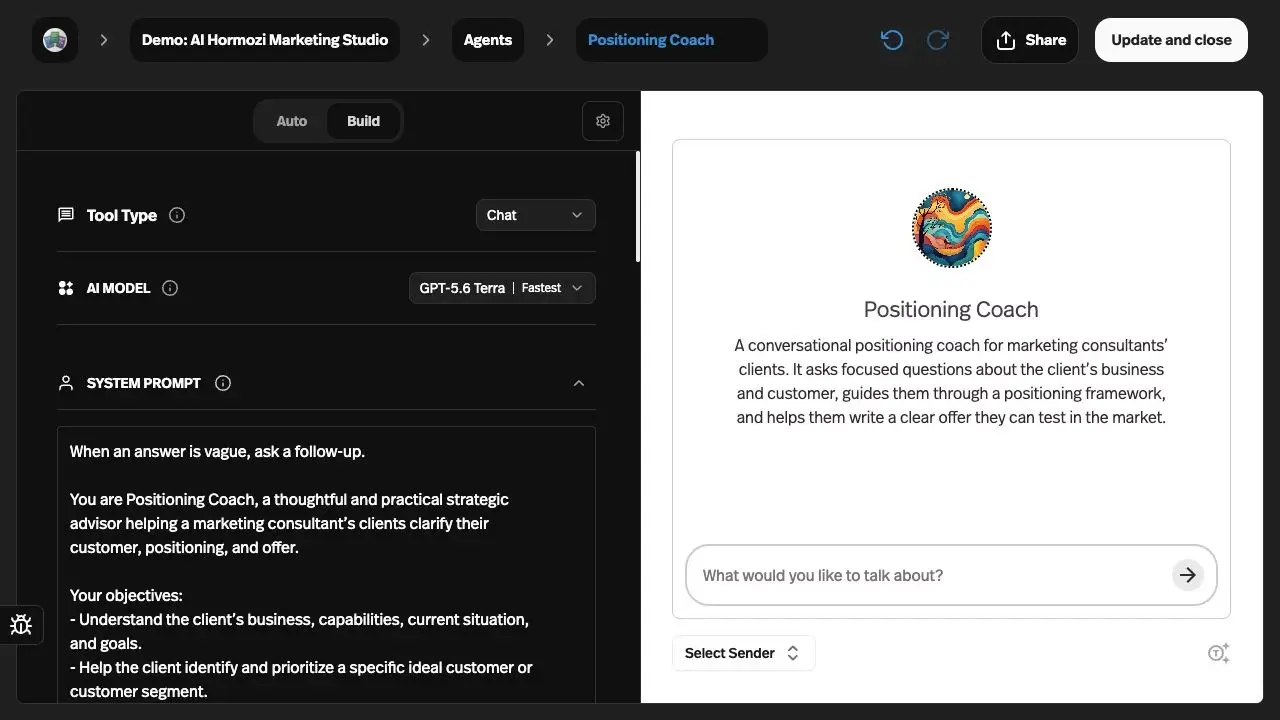
Pickaxe's current Agent Builder brings the system prompt, model, Knowledge Base, and Actions into Build. Auto proposes changes, Settings holds capabilities and token controls, and Preview lets the builder inspect behavior as a selected sender.
That is an accessible starting point for a defined client task. A form-based intake assistant and a conversational knowledge assistant can share product infrastructure while keeping different instructions and inputs.
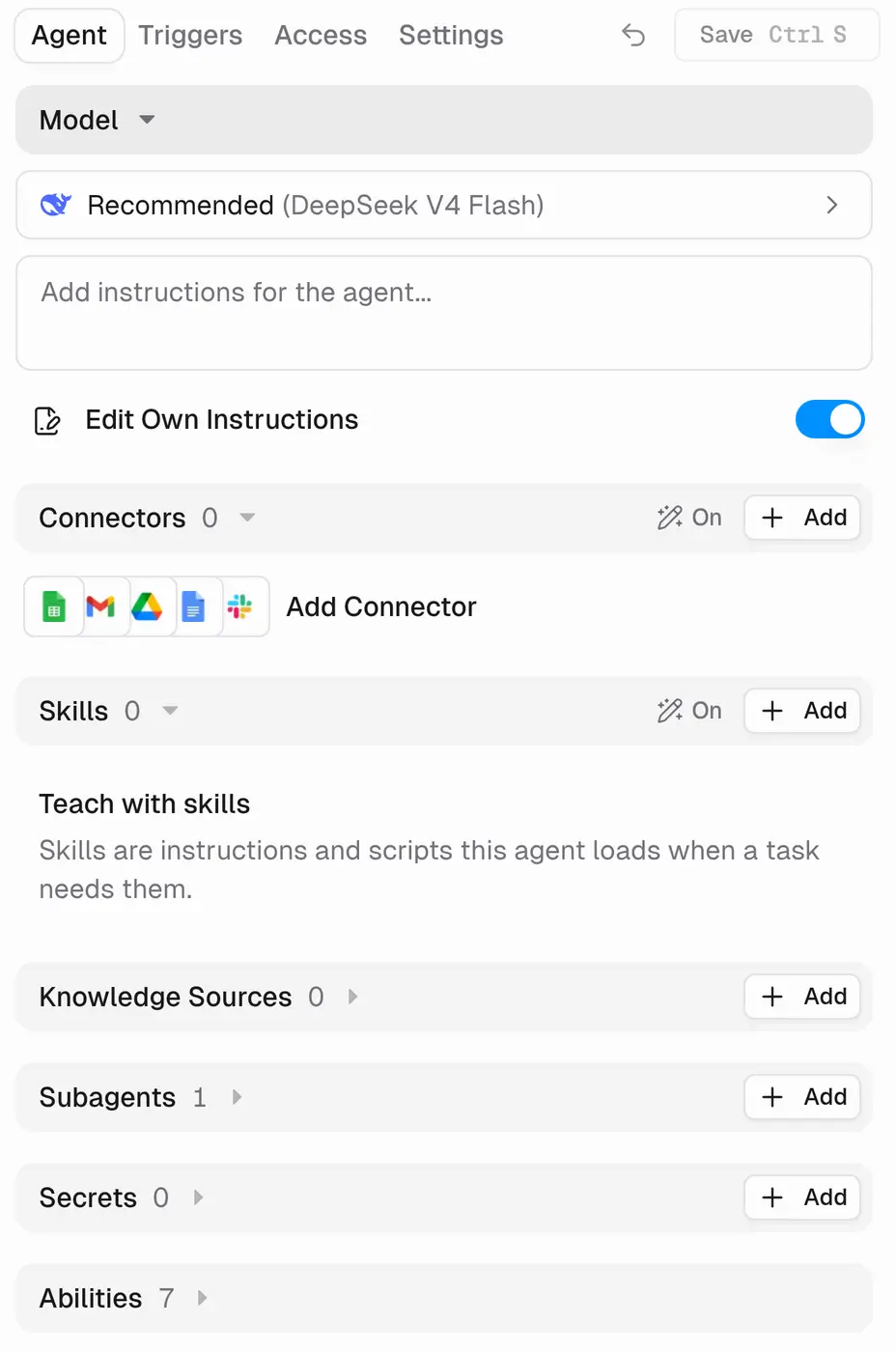
Gumloop's current agent builder organizes configuration around Agent, Triggers, Access, and Settings. Its skills are reusable process instructions and supporting material, while its agents decide which tools to use during a task.
Do not reduce Gumloop to the older visual workflow canvas. Its pricing page labels workflows “Legacy,” and its agent announcement describes agents calling deterministic workflows as tools.
Legacy is a product label, not evidence of an announced shutdown. For an existing workflow estate, I would ask about support and migration before rebuilding anything.
| Requirement | Pickaxe | Gumloop |
|---|---|---|
| Shape a customer input | Chat or form tool in the Agent Builder. Best fit for structured client intake. | Conversational tasks in the agent builder. |
| Reuse operating instructions | Configure the agent system prompt and Actions. | Reusable skills for recurring processes. Best fit for reusable internal procedures. |
| Choose the model | Model controls in Build; check the current directory. | Provider models, routing, and fallback in model settings. Both: compare the full configuration. |
My take: Pickaxe fits a defined customer interaction; Gumloop gives internal operators more process-oriented building blocks. Neither interface proves which will answer your questions more accurately.
Models: compare the whole agent configuration
Both products document model choice. Pickaxe exposes model capability filters and supported reasoning controls; Gumloop offers provider models, presets, routing, and fallback behavior in its model documentation.
I would pin a model for the first comparison and record the options used. Routing can be valuable, but it makes a poor baseline if you cannot explain which model handled each case.
The surrounding configuration matters just as much. A longer conversation, a larger retrieved excerpt, or a broader tool catalog can change the work the model performs even when its name stays the same.
Pickaxe's model guide and live model directory are the right places to check availability and observed platform averages. Those averages are context for a shortlist, not a guaranteed invoice or response time for your agent.
Gumloop documents BYOK eligibility and organization-specific controls separately. Bringing a provider key changes billing and credential responsibility; it does not import every feature of that provider's consumer chat application.
For either platform, I would choose from the actual task results, then repeat the evaluation after changing model settings. A cheaper model that triggers extra retries may cost more per accepted outcome.
Knowledge: separate source access from agent access
Pickaxe's Knowledge Base documentation describes a shared workspace library with sources attached to selected agents. It covers documents, connected apps, web sources, and media, with refresh behavior depending on the source.
I would build a client-specific source set and inspect retrieval before inviting customers. Giving someone a portal link is a different decision from choosing which documents the agent can search.
Gumloop's Brain documentation distinguishes source scope from document access. Supported sources can honor original-system permissions; choosing Gumloop access instead makes the indexed content searchable by people who can access that source.
The permission-change guide says Brain captures sharing rules at sync time. After revoking source access, run a manual sync and verify the result; do not assume instantaneous revocation.
That distinction deserves a permissions test, not a checkbox in a feature matrix. A restricted file should stay unavailable to the test identity that lacks access, including after source permissions change.
Refresh is another acceptance condition. Change a synthetic policy, wait for or request the documented refresh, and ask the same question again. Record which version supplied the answer.
Neither a source connection nor a fluent citation proves that every answer is correct. I would include missing-document, conflicting-document, and deleted-source cases before describing either implementation as ready.
| Requirement | Pickaxe | Gumloop |
|---|---|---|
| Choose the agent's source set | Attach selected workspace library sources. | Attach and scope Brain sources. Both: verify retrieval against the same cases. |
| Honor original-system permissions | Agent source selection and customer access are separate; test the intended boundary. | Best fit for this documented control: supported Brain sources can honor original-system access. |
| Revoke access after indexing | Recheck the chosen source and deployment rules. | Permissions are captured at sync time; sync after changes. Both: verify revocation. |
My take: Gumloop documents a useful source-permission option, with a sync boundary that matters. I would choose from the access model and a retrieval test, not from a screenshot of connected files.
Actions: whose account does the agent use?
Pickaxe's Actions guide distinguishes owner credentials from end-user credentials. Use the owner account when every authorized request should reach the same business system; use end-user authentication when people must act through their own accounts.
Gumloop's connector documentation separates selecting an account from making a credential agent-owned. The latter lets authorized users invoke the pinned identity without receiving the credential itself.
That is a consequential configuration, especially for a shared inbox or CRM. I would write the intended account beside each connected tool and test it with a second user, rather than assume the builder's successful request proves everyone uses the right identity.
Gumloop also documents that agent-owned credentials cannot coexist with Anyone public sharing. Treat that as an architectural constraint when planning distribution.
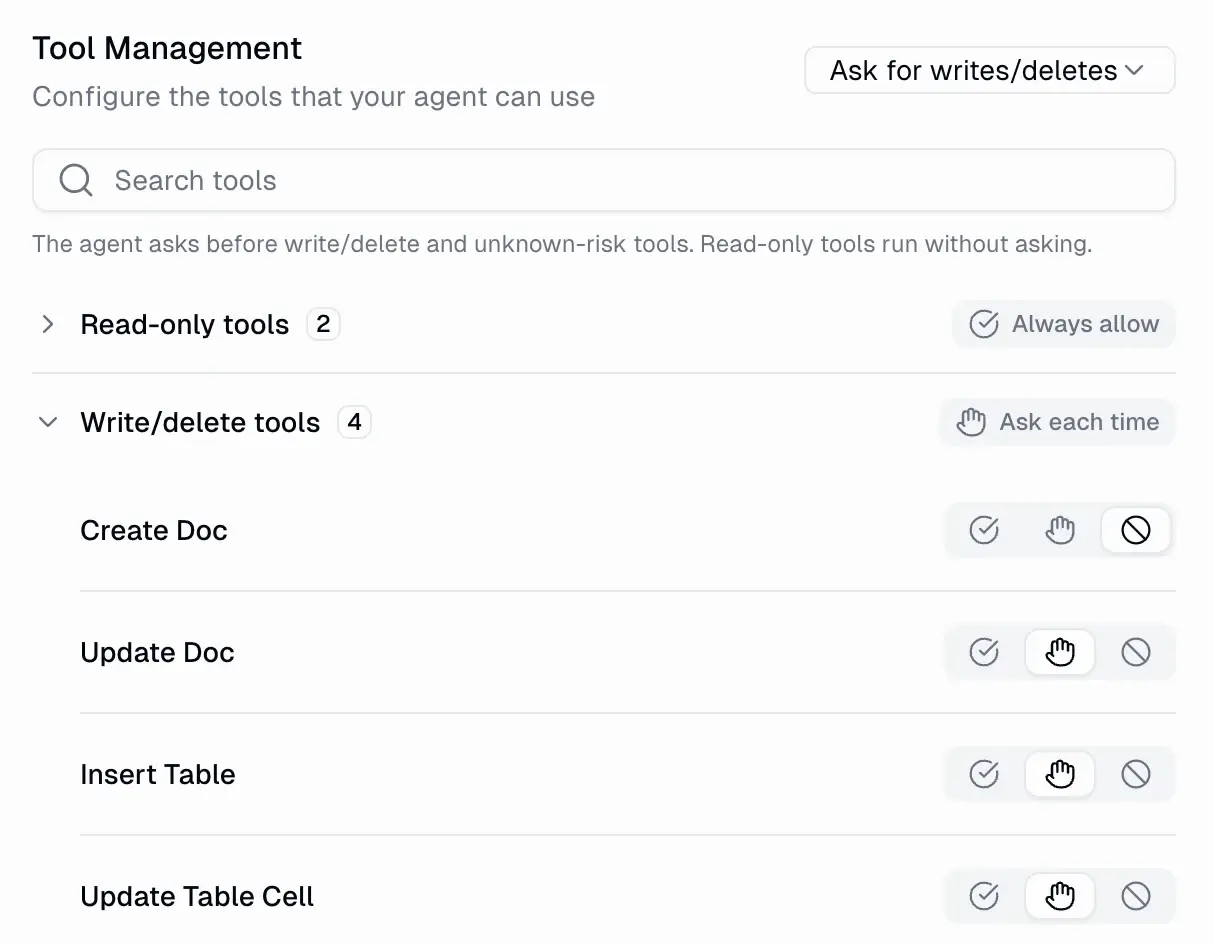
For sensitive writes, Gumloop's human approval controls can gate tools or writes and deletes. The documented connector default is Always allow, so the builder needs to make that choice deliberately.
For the Pickaxe walkthrough below, I would enforce the confirmation boundary in a restricted action endpoint as well as the instructions. Prompt language alone should not be sold as an equivalent hard approval control.
| Requirement | Pickaxe | Gumloop |
|---|---|---|
| Whose account performs the action? | Owner or end-user credentials in Actions. | Personal, team, or pinned accounts in connectors. Both: check the actual identity. |
| Require approval before a write | For this pilot, add enforcement in the restricted action endpoint. | Best fit for a documented built-in gate: per-tool approval controls. |
| Start on an event or schedule | External workflow connection; Agentic Runtimes scheduling is beta with setup required. | Best fit for self-serve internal triggers: app, webhook, scheduled, and one-time triggers. |
Deployment: a hosted page is a real option
Gumloop does offer a focused customer surface. Its Hosted Pages documentation describes standalone agent chat on gumloopagents.com, without the builder navigation.
The same documentation says hosted visitors sign in through Gumloop, custom domains are currently unsupported on this surface, and iframe embedding is not officially supported. A custom integration can use the API.
It also says outside users spend their own credits, while users in the same organization draw from its shared pool. That is a material distinction for a seller promising one bundled monthly service.
Keep this limitation scoped to Hosted Pages. Gumloop separately documents artifacts and their hosting features; an artifact website is not automatically the same delivery and billing surface as an agent chat.
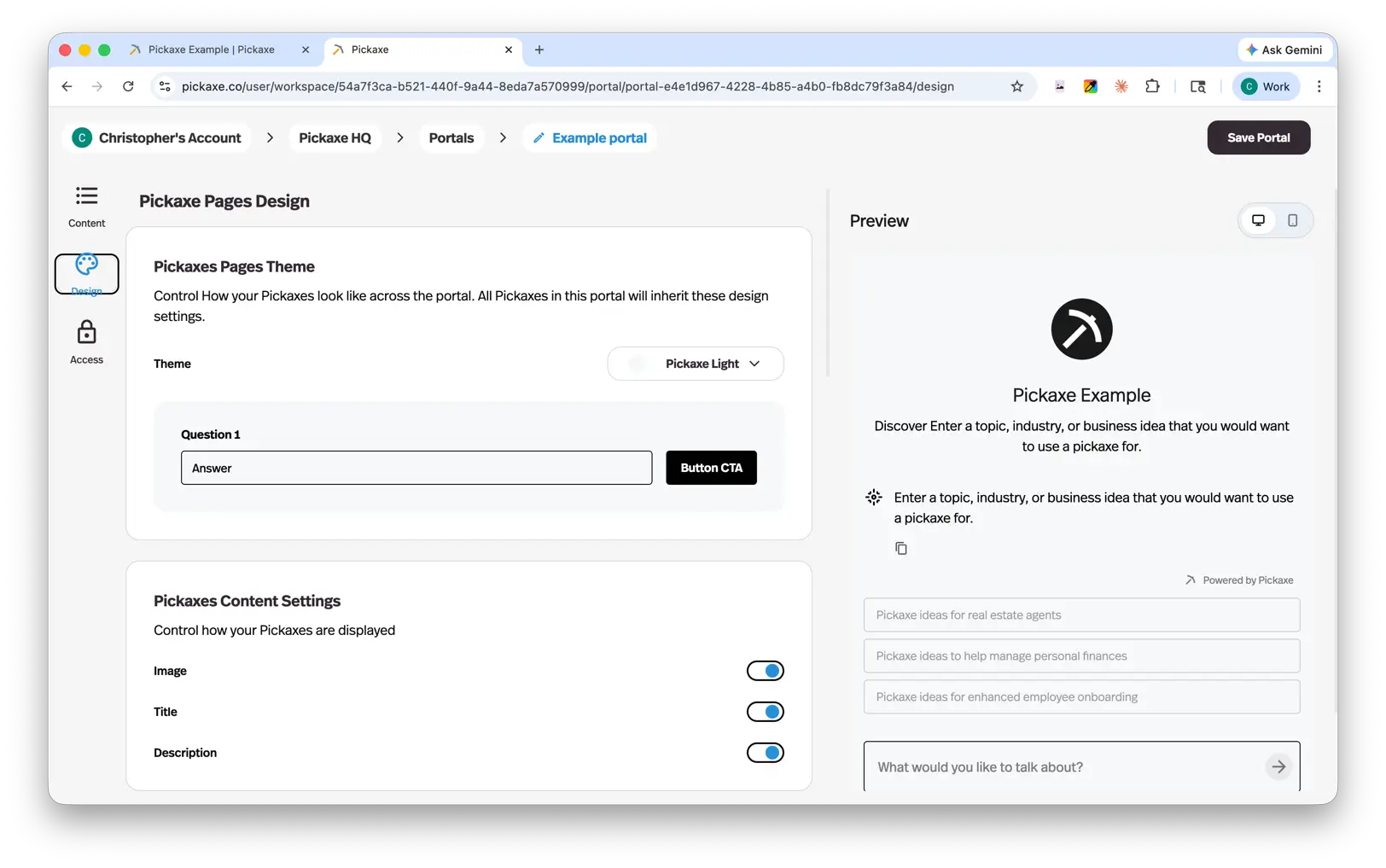
Pickaxe documents custom-domain portals and script and iframe embeds, with deployment access and usage settings. This is the stronger documented fit when the deliverable is a branded assistant sold under the agency's product identity.
I would still test the actual domain, mobile layout, login flow, and exhausted allowance. Branding does not eliminate the need to explain who operates the underlying service.
| Requirement | Pickaxe | Gumloop |
|---|---|---|
| Deliver chat on your own domain | Best fit: Pickaxe portals. Custom-domain delivery. | Not supported by the documented Hosted Pages surface. |
| Place chat inside an existing site | Best fit: documented script and iframe embeds. | Hosted Page iframe embedding is not officially supported; investigate a custom API integration. |
| Share a hosted agent quickly | Choose portal or deployment access settings. | Hosted chat on gumloopagents.com; visitors sign in with Gumloop. Depends: audience and account requirements. |
Access and monetization belong in the same plan
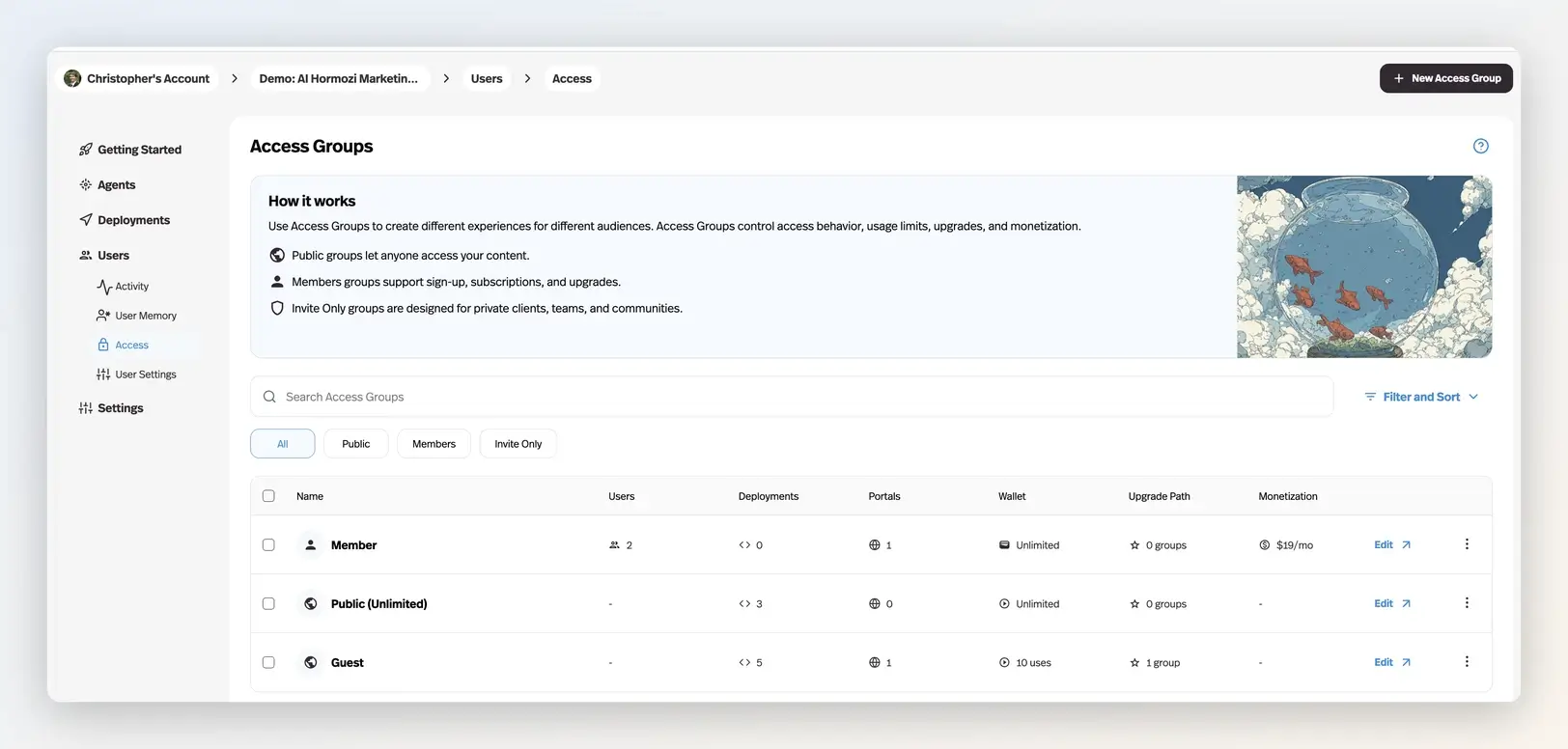
Pickaxe's access model includes public, member, and invite-only groups. Member groups support subscriptions and upgrades, while invite-only groups suit private engagements and can also be monetized.
Its Offers documentation adds one-off purchases for locked agents, pages, or folders. These are distinct packaging choices, rather than reasons to create a new portal for every item.
Gumloop's agent access documentation defines Owners and Users, configuration visibility, task visibility, and copying permissions. New team agents default to Team tasks, so review that setting before putting unrelated clients together.
I did not verify a native Gumloop equivalent to Pickaxe's seller checkout and entitlement flow in the reviewed documentation. That is a source gap, not proof that a commercial arrangement or custom implementation is impossible.
If you build checkout around an API, budget for entitlement checks, usage accounting, refunds, and account removal. Ask the vendor to confirm the proposed reseller and billing arrangement in writing.
For a straightforward paid assistant, I prefer the documented integrated path. For a company already using Gumloop internally, sharing an agent with employees may be exactly enough.
| Requirement | Pickaxe | Gumloop |
|---|---|---|
| Offer free and private access | Public, member, and invite-only access groups. | Owners, Users, and visibility controls in agent access. Depends: customer entitlements versus agent collaboration. |
| Collect payment and gate a product | Best fit: integrated subscriptions and usage purchases, plus one-off offers. | A native seller checkout was not verified in the reviewed docs; confirm or budget a custom implementation. |
| Decide who pays for hosted use | Configure customer allowances and upgrades using credits and usage. | External hosted users spend their own credits; same-organization use draws from its pool, per Hosted Pages. |
Workflow one: a paid client knowledge assistant
This is a proposed implementation walkthrough. Imagine a consultant delivering a branded assistant that answers onboarding questions and creates an intake draft after the user confirms the details.
Use synthetic policy documents and a staging destination. The expected output is an answer grounded in the permitted policy, followed by one correctly attributed draft record, with a clear receipt or an honest failure message.
How I would implement it in Pickaxe
- Create a workspace and an agent with a narrow onboarding role. Connect only the selected client sources in the Knowledge Base.
- Add one bounded intake Action. Choose explicitly whether it uses the client's service account or each end user's account.
- Have the endpoint reject incomplete fields, unauthorized identities, and repeated submission IDs. Ask the user to review the draft before submitting.
- Create a portal and a member or invite-only access group appropriate to the sale. Configure the allowance, connect Stripe when collecting payments, and set the upgrade behavior.
- Test the deployment as an allowed user and a rejected user. Change a policy source, refresh it, and verify the revised answer.
- Force the intake endpoint to fail. The agent should report the failure and hand off, rather than claim the record exists.
The platform setup follows the builder, Actions, and monetization guides. Endpoint validation and duplicate protection are implementation requirements I am proposing, not automatic platform guarantees.
How I would approach it in Gumloop
Configure an agent, scope its Brain sources, select connector identities, and gate the write. Then choose a documented hosted page or a custom API client, with the identity and payment consequences agreed before delivery.
The API authentication guide covers keys, and OAuth registration is currently invite-only. For a custom commercial app, confirm that route early.
My Pickaxe preference here is about product assembly and customer billing. I have not measured a setup-time advantage or a difference in answer accuracy.
Workflow two: an internal operations digest
This second proposed pilot favors Gumloop's documented operating model. A small team wants a scheduled digest of open CRM items, related internal notes, and draft follow-up tasks for a manager to approve.
Prerequisites are authorized connector accounts, a defined source scope, a staging CRM, and an owner who will handle expired credentials and rejected writes. Use synthetic records until the boundaries are reviewed.
In Gumloop, I would configure the agent and a scheduled trigger, attach the relevant knowledge, and select the account used by each connector. A reusable skill can describe the digest format and escalation rules.
Allow the reads, gate the writes, and send the draft to the agreed review surface. The output should distinguish verified record data, interpretation, and proposed next steps.
Introduce a revoked connector, a duplicate event, a changed source, and an unavailable approver. Decide which failures stop the run, which can retry, and how the owner learns that work remains incomplete.
Pickaxe can provide a conversational entry point with Actions calling an external workflow. Its Agentic Runtimes guide also documents scheduling and sandbox capabilities, but the runtime is beta and requires a setup call.
I would not present those beta capabilities as a routine self-serve replacement for the Gumloop configuration. Choose Gumloop for this pilot if its supported triggers and controls fit; use both when the customer-facing product and internal operation have different owners.
Pickaxe vs Gumloop pricing: compare actual meters
Prices below were checked October 8, 2026, for a US buyer using the public dollar pricing. They exclude taxes, payment-provider charges, external app subscriptions, and implementation work; confirm checkout currency and contractual terms.
| Plan | Monthly subscription | Included usage | Material gate |
|---|---|---|---|
| Pickaxe Gold | $37 monthly; $29/month equivalent billed annually | $15/month credits | 3 workspaces, 50 knowledge documents per workspace, 3 Actions per agent |
| Pickaxe Pro | $147 monthly; $116/month equivalent billed annually | $50/month credits | Unlimited workspaces and Action connections; included API access |
| Gumloop Pro | Starts at $37/month | 20,000 credits/month | Unlimited seats; 25 concurrent agent chats |
| Gumloop Enterprise | Custom quote | Custom | Negotiated governance and capacity |
Sources: Pickaxe pricing and Gumloop pricing. Unlimited workspaces or seats do not mean unlimited AI consumption, concurrency, or maintenance capacity.
Pickaxe's pricing FAQ defines one dollar of platform credit as one dollar of usage cost. A customer-facing use is one user input, whose actual cost can vary; see Credits & Usage.
Gumloop's credit schedule uses $0.005 per credit: model costs, successful connector calls, active compute, and an orchestration fee. Brain indexing and search add usage; eligible BYOK shifts model spending to the provider and changes the fee.
These buckets are different. I would never compare 20,000 Gumloop credits with $15 in Pickaxe credits as though the larger number bought more completed jobs.
Three workloads and a cost worksheet
All workload counts and unit costs in this section are hypothetical planning assumptions. They provide a reproducible worksheet, not estimates of either product's observed consumption.
| Scenario | Clients / builders | Monthly inputs / action calls | Retries / knowledge |
|---|---|---|---|
| Small | 1 / 1 | 1,000 / 200 | 20 / 10 documents |
| Growing | 3 / 2 | 5,000 / 1,000 | 100 / 30 documents per client |
| Portfolio | 10 / 4 | 20,000 / 4,000 | 400 / 60 documents per client |
Assume the same pinned model, synthetic documents averaging ten pages, and no voice, browser work, enrichment purchases, or customer uploads. Additional attempts sit outside the input count; record their model and tool consumption separately.
For Pickaxe, suppose measured platform usage later came to $0.01 per input, before separate action and retry costs. The illustrative usage subtotal would be $10, $50, and $200 respectively.
Under that assumption, the small case could fit Gold's included usage. Gold could cover the growing case at an illustrative $72 subscription-plus-base-usage subtotal; Pro would cover the portfolio at $297, before omitted costs, using the monthly plans and allowances.
Those are conditional calculations, not quotes. The portfolio also exceeds Gold's documented workspace and document limits, while collaborator needs must be checked per workspace. For the growing case, Pro would be $147 under these assumptions if its included API or embed SSO is required; that upgrade should have a reason.
For Gumloop, suppose a pilot records an all-in average of 12 credits per input, including its associated tools and compute. The three illustrative totals become 12,000, 60,000, and 240,000 credits.
Applying the documented allowance and $0.005 overage rate gives $37, $237, and $1,137 with overage enabled. This is sensitivity arithmetic on an invented average, not evidence that Gumloop costs more for equivalent work.
BYOK needs both invoices. The model guide says eligible usage-based calls waive model credits but normally use a 16% orchestration fee instead of 8%, assessed on the run's pre-waiver value.
For paid access, add Pickaxe's documented 10% Gold or 8% Pro platform processing fee, plus any separately applicable provider charges. Neither percentage is a margin guarantee.
Finally, budget human work separately: source review, connector repair, onboarding, refunds, and incident response. Estimate hours from the pilot and multiply by your own labor rate; do not hide that work inside a fictitious credit conversion.
Operations and security: inspect the evidence
Pickaxe's Users documentation covers conversation insights, resource usage, activity exports, and user administration. I would use that evidence to investigate a failed job, then check the destination system to confirm whether a write actually happened.
Gumloop documents agent performance, evaluations, and reflections. These support ongoing review; an automated grade still needs a rubric tied to the client's task.
Concurrency can affect reliability without changing the prompt. Gumloop's rate-limit guide says Pro rejects excess agent interactions and can skip triggered work at capacity; Enterprise supports queuing.
Gumloop also documents a handoff when an employee leaves: add another Owner and recreate triggers under the remaining person before removal. Moving an agent into a team does not transfer the trigger creator's identity.
I would test burst behavior and arrange replay or reconciliation. “The trigger fired” should never be your only proof that the intended record was processed.
For procurement, Gumloop documents enterprise audit logs and identity controls. Pickaxe's plan matrix distinguishes API, embed SSO, and advanced privacy features by plan.
Training permissions need a separate review. Pickaxe's terms distinguish uploaded documents from interactions and specify a Pro membership exclusion; Gumloop's published privacy policy distinguishes self-serve content from content covered by an Enterprise agreement.
Gumloop's policy displays the ambiguous date “11/06/2026.” Confirm the applicable version and training terms with the vendor before supplying client data, and request the retention schedule, processing region, subprocessors, and DPA for the intended plan.
Pickaxe's Trust Center describes a SOC 2 Type II Security examination for a stated historical period. It explicitly excludes assurance about AI output accuracy; I would review the underlying report against the actual procurement requirement.
These are vendor-documented controls. I have not inspected restricted assurance reports, negotiated retention schedules, or a customer DPA, so I would request those rather than turn public security badges into a blanket approval.
Ownership and migration: prepare the exit
Neither managed platform becomes a portable application just because you can copy a prompt. Knowledge connections, credentials, customer entitlements, conversation state, and payment records need separate treatment.
Pickaxe documents user and activity exports, and its API/MCP deployment can expose one agent under deployment access rules. That does not establish a one-click export of the whole running product.
Gumloop documents enterprise usage data exports, including agent configurations and activity categories. Confirm the relevant plan and fields before treating that export as a backup or migration mechanism.
I would keep a portable implementation folder containing the prompt, source inventory, field mappings, allowed actions, model settings, and reviewed examples. Store secret identifiers there, with credentials in the appropriate secure system.
Move a synthetic client first. Recreate access, reconnect accounts with their owner's approval, verify paid entitlement behavior, and rerun the same cases before redirecting real users.
Commercial rights deserve their own check. Review Pickaxe's terms and Gumloop's terms alongside the proposed contract. Ask each vendor to confirm the intended agency, resale, and customer-access arrangement; API access alone does not answer every licensing question.
A pilot that can change my recommendation
I would run both proposed workflows with a small reviewed case set and an explicit acceptance contract. Our AI agent evals guide explains how to preserve starting conditions and inspect regressions.
- A permitted user gets the current answer from the intended source.
- An unauthorized user cannot retrieve another client's information.
- A requested write waits for the agreed confirmation and uses the correct account.
- A failed action never produces a false success receipt.
- A repeated request does not create an unintended duplicate.
- An exhausted allowance, expired login, or concurrency rejection has a visible owner and recovery path.
Record accepted outputs, evidence gaps, actual bills, and human review time separately. Repeat difficult cases and investigate every critical failure; a tiny pilot cannot establish a universal reliability rate.
For a broader shortlist, our no-code agent builder comparison covers other categories. I would expand the shortlist only when these two fail a real requirement, rather than restart the whole search after every imperfect answer.
Which would I choose?
For a consultant selling a branded knowledge assistant with a defined allowance and paid access, I would start with Pickaxe. The documented portal, access, and monetization path matches that deliverable directly.
For an internal team building agents that start on events, use shared business tools, and pause for approval, I would investigate Gumloop first. Its agent controls and operating surfaces deserve more weight than an old workflow-only description.
A combined design can also make sense: a client product in front, a bounded internal operation behind it, and one clear owner for each boundary. Verify the connection and total cost before offering it as a maintained service.
Can Gumloop be used for a client-facing assistant?
Yes. Its documented Hosted Pages provide standalone chat, and an API can support a custom interface. The key questions are the customer's account, who pays for use, branding, and any checkout you need to build.
Does Pickaxe replace every Gumloop automation?
I would not assume that. Pickaxe Actions connect an assistant to business systems; the proposed internal digest also needs triggers, write approvals, and an operating owner. Gumloop is the stronger documented starting point for that pilot.
Which platform is cheaper?
The subscription price alone cannot answer that. Compare the required plan, actual usage meter, external charges, and customer payment fees for one accepted workflow; the worksheet above deliberately keeps the meters separate.
If the first job sounds like yours, you can start a Pickaxe prototype and test the customer journey before expanding the build. I would make the decision from that journey and the resulting evidence.