
Pickaxe vs Botpress comes down to what you are delivering: a paid AI product for clients, or a support operation with deliberate conversation logic. I would start with Pickaxe for branded portals and customer subscriptions, and Botpress for a support agent that needs visual workflows and a human team behind it.
I looked through both products' current documentation, pricing, and delivery controls. Both connect models, knowledge, and tools; the useful differences appear when you decide who gets access, how a failed action is handled, and who maintains the service.
This is a documentation-based comparison published by Pickaxe, checked October 16, 2026. The screenshots are authentic official documentation images, not captures of my own production deployments; the walkthroughs below are proposed pilots, not measured tests.
Pickaxe vs Botpress: my recommendation by job
A tinted cell identifies my better-fit recommendation for the requirement in that row. It is a scoped editorial judgment, not an accuracy score; scroll tables horizontally on a small screen.
| Your job | Pickaxe fit | Botpress fit | Start here |
|---|---|---|---|
| Sell a branded advisory tool | Best fit for paid client access | Custom delivery layer to verify | Pickaxe |
| Operate a support queue | Connect an escalation workflow | Best fit for support routing | Botpress |
| Answer from approved documents | Selected agent sources | Scoped knowledge tools | Both: retrieval pilot |
| Sell tools and operate support | Own the paid product | Own support operations | Both, with an integration contract |
These starting points follow Pickaxe's portal documentation, its paid-access setup, and Botpress's Autonomous Node and human handoff documentation.
Choose both only when you can name two separate responsibilities. A paid advisory portal and a public support desk can coexist, but connecting them adds identity, data-transfer, and support work.
Write the delivery contract before choosing the builder
My first question would be: what does the customer receive after the invoice is paid? A branded collection of tools, a support widget, and an internally operated assistant create different obligations.
For a paid knowledge service, the product includes registration, an allowance, access to the right material, and a clear upgrade route. For support, the product includes a conversation owner, escalation rules, and evidence that an action actually succeeded.
- Audience: public visitors, invited client employees, or paying members?
- Authority: answer questions, draft changes, or commit changes to a business system?
- Identity: the agency's account, the client's account, or each end user's account?
- Maintenance: who updates sources, fixes failed integrations, and responds to a billing incident?
I would put those answers in the proposal before arguing about models. Our guide to building a useful client portal covers the surrounding customer experience; this comparison narrows the choice to two implementation paths.
Build one useful client tool
Review its access, usage allowance, and failure path before expanding.
Building: a configured product or an explicit conversation graph
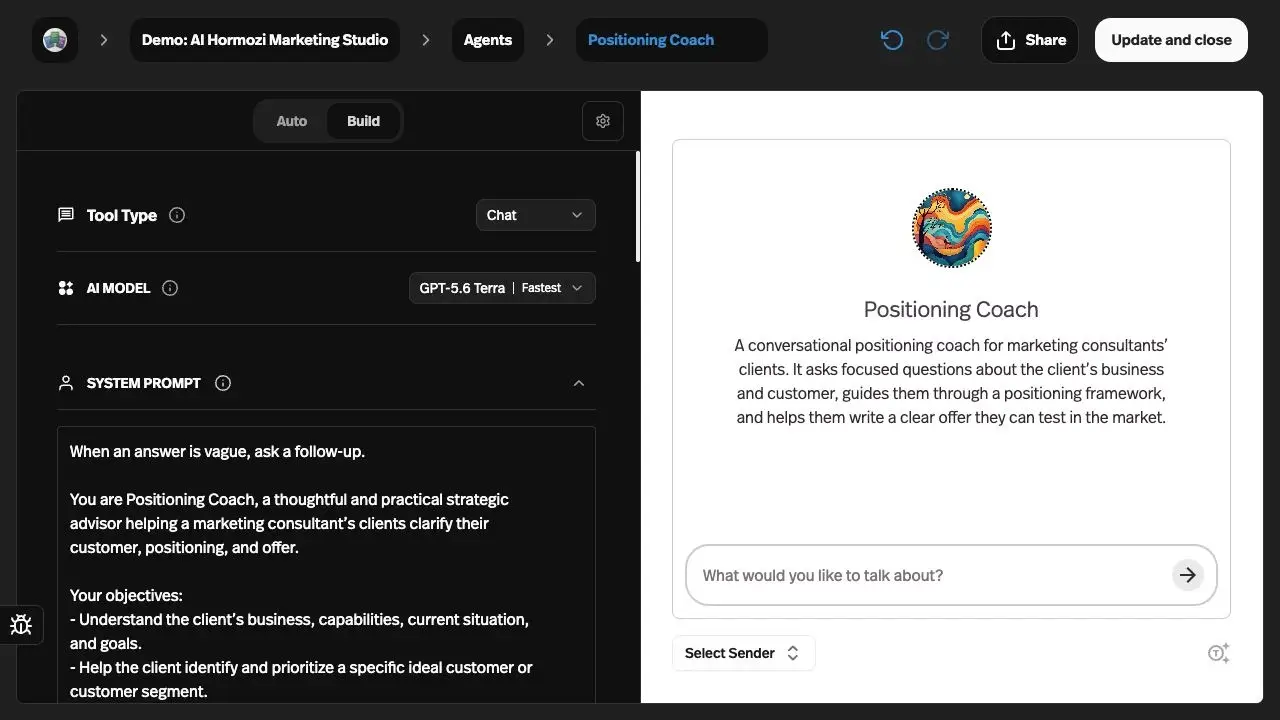
Pickaxe's Agent Builder puts Tool Type, Model, and System prompt in Build, beside Preview. Auto suggests changes, while Settings contains capabilities, token controls, and knowledge settings.
Botpress Studio combines standard nodes that execute cards sequentially with autonomous nodes that choose tools using a model. Its workflows group reusable parts of a conversation, including special paths for errors and timeouts.
| Requirement | Pickaxe | Botpress |
|---|---|---|
| Define the customer interaction | Best fit for a configured chat or form product | Autonomous node and conversation canvas |
| Control step order | Prompt, tool design, or connected workflow | Best fit for explicit node/card sequences |
| Inspect before release | Preview with Select Sender | Emulator and node inspection |
| Advanced implementation | Custom Actions and MCP connections | Custom Actions, code, and reusable workflows |
My take: Pickaxe gives a consultant a direct route from a defined task to a customer product. Botpress is the better fit when the graph itself is part of the service specification, such as collecting required fields before entering a particular support path.
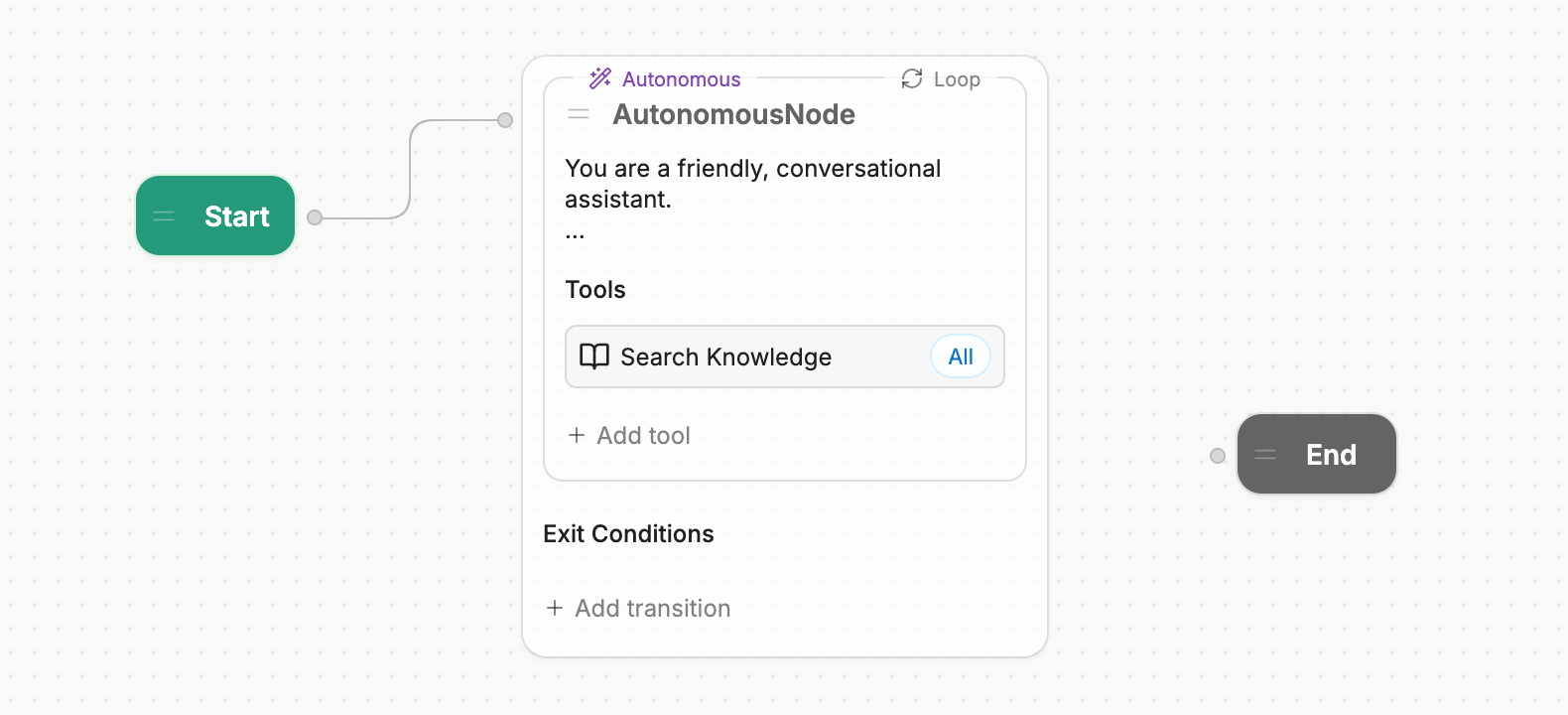
Neither interface guarantees reliability. A canvas can still contain a bad transition, and a well-written system prompt can still call a tool with the wrong arguments.
Models: compare the configuration, not a provider count
Pickaxe documents a model picker with capability filters and supported reasoning or search controls. I would check the live model directory for the exact model needed rather than treating an old screenshot label as a current availability promise.
Botpress's Bot Settings distinguish model roles, including autonomous responses, retrieval, and fallback. Individual autonomous nodes can override their response and retrieval models.
That makes “supports my model” an incomplete buying question. Ask which part of the workflow uses it, whether the fallback changes behavior, and which bill receives the usage.
I have not verified equivalent bring-your-own-key terms across both products and every provider. If direct provider billing is a requirement, confirm that exact integration and plan before signing off.
For a proposed comparison, keep the source documents and acceptance cases constant, record the selected model configuration, then inspect incorrect tool choices and unsupported answers. Our AI agent evaluation guide explains how to separate response quality from actual task completion.
Knowledge: source freshness needs a deliberate check
Both products can answer from selected material. The important question is whether the deployed agent retrieves the right version and refuses to use material outside the client's scope.
| Requirement | Pickaxe | Botpress |
|---|---|---|
| Connect sources | Files, web, media, and connected apps | Websites, documents, tables, integrations |
| Limit retrieval scope | Attach selected workspace files to an agent | Select knowledge bases per search tool |
| Refresh changing material | Source-specific sync and refresh controls | Website recrawl scheduling; integration-specific sync |
| Investigate a weak answer | Knowledge Explorer and conversation resources | Query/results logs and node inspection |
| Better answer quality | Verify in pilot | Verify in pilot |
Sources for these rows: Pickaxe Knowledge Base, Botpress knowledge search, and Botpress source and recrawl settings. Refresh behavior depends on source type and configuration.
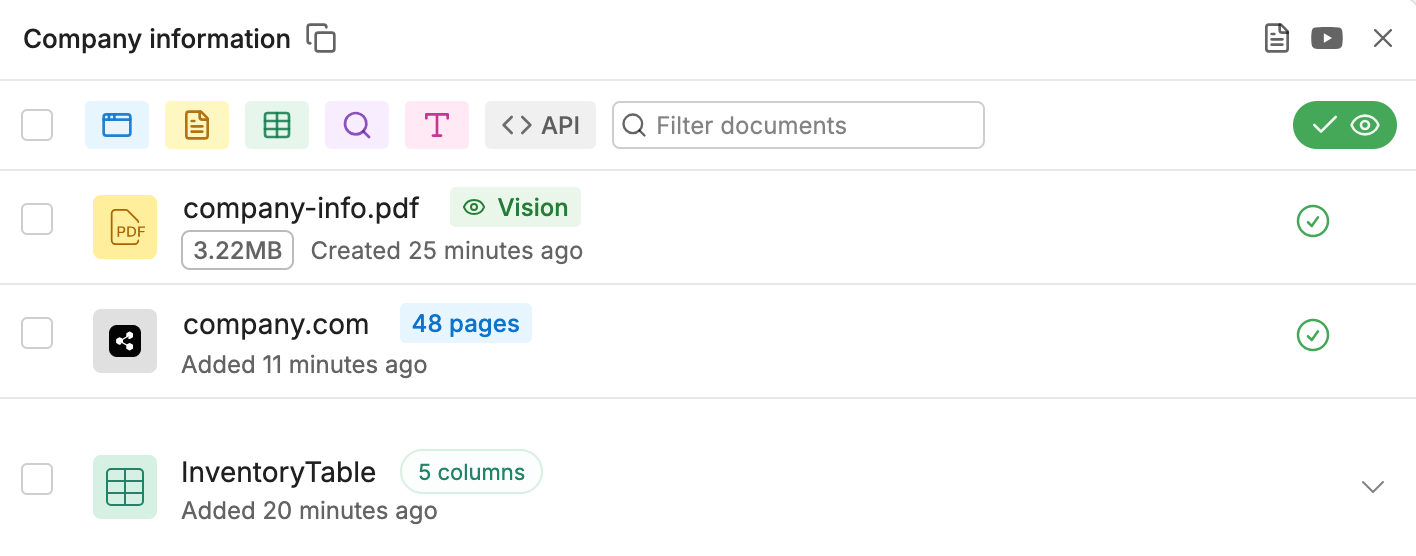
I would upload a synthetic policy, ask a question it answers, change the policy, and repeat after the configured refresh. Save the retrieved source and the answer, not just a screenshot of the upload succeeding.
Also ask about a deliberately absent policy. A useful client agent should make the missing information visible instead of borrowing a plausible rule from general model knowledge.
Our knowledge-base setup guide goes deeper on preparing the material. This remains a “verify in pilot” category, not a documentation-based retrieval-quality victory for either product.
Actions: make the account and failure path explicit
Pickaxe's Actions documentation describes a library, custom tools, MCP connections, and account connection choices. The distinction between a builder connection and an end-user connection matters more than how many integrations appear in a catalog.
Botpress supports integration cards, reusable custom Actions, and code. Its Action editor exposes input and output schemas, while the autonomous node can choose a tool or use manually supplied inputs.
| Requirement | Pickaxe | Botpress |
|---|---|---|
| Choose tools during conversation | Model-selected Actions and trigger instructions | Autonomous node selects available tools |
| Force a known sequence | Connect a workflow for ordered execution | Best fit for explicit cards and transitions |
| Bind the right identity | Builder or end-user connections, where supported | Integration credentials and action inputs |
| Schedule work | External workflow; runtime beta requires provisioning | Fixed Schedule trigger, with trigger-test limitations |
| Recover after a failure | Verify chosen connector and destination state | Design Error/Timeout paths and inspect logs |
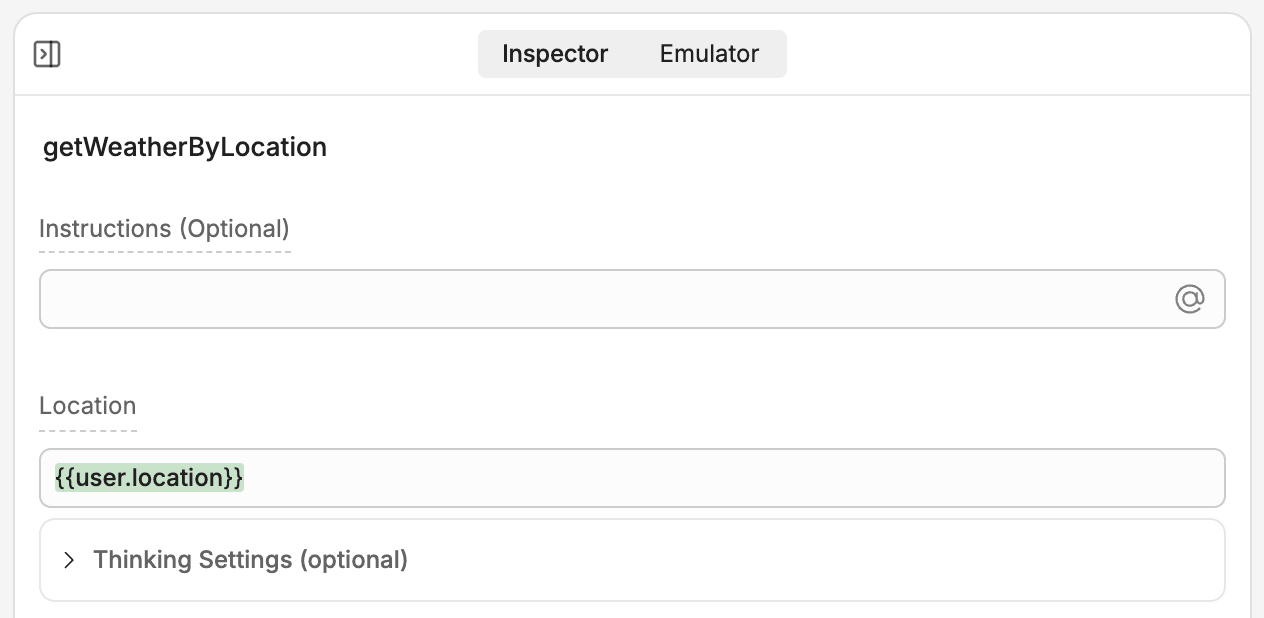
Scheduling needs a separate scope check. Botpress documents a Fixed Schedule trigger with testing restrictions; Pickaxe's Agentic Runtimes include scheduled tasks but require beta provisioning by a call. Do not assume those runtime features are enabled for an ordinary workspace.
For either product, I would start with an action that creates a draft request in a synthetic system. Require a success identifier before the agent says it completed the task.
A timeout after a write is particularly revealing. Check the destination before retrying so a slow response does not become a duplicate booking or duplicate ticket.
These are implementation recommendations, not promises of built-in idempotency or automatic retries on every connector. The maintenance owner needs to verify authentication expiry, error reporting, and recovery in the chosen integration.
Delivery and access: the strongest reason to choose Pickaxe
Pickaxe documents portals containing agents and pages, custom domains, and access groups. Its member groups and Stripe-connected monetization make a paid customer product a first-class configuration task.
| Requirement | Pickaxe | Botpress |
|---|---|---|
| Paid customer product | Best fit: portals, paid groups, offers | Checkout and entitlement layer to verify/build |
| Hosted branded destination | Portal custom domain on paid plans | Webchat in your site; help-center domain by plan |
| Website embed | Documented embed deployment | Documented script and React Webchat |
| Operator permissions | Workspace collaborators; separate end-user groups | Team+ agent access control and workspace roles |
| User identity through an API | Caller must enforce identity; key is deployment-scoped | Implement application identity for the selected API |
| Connect other channels | Deployment and plan dependent | Integration and plan dependent |
Sources: Pickaxe access groups, monetization, Botpress Webchat, and Botpress workspace-member access control. Plan gates are checked against each platform's pricing page below.
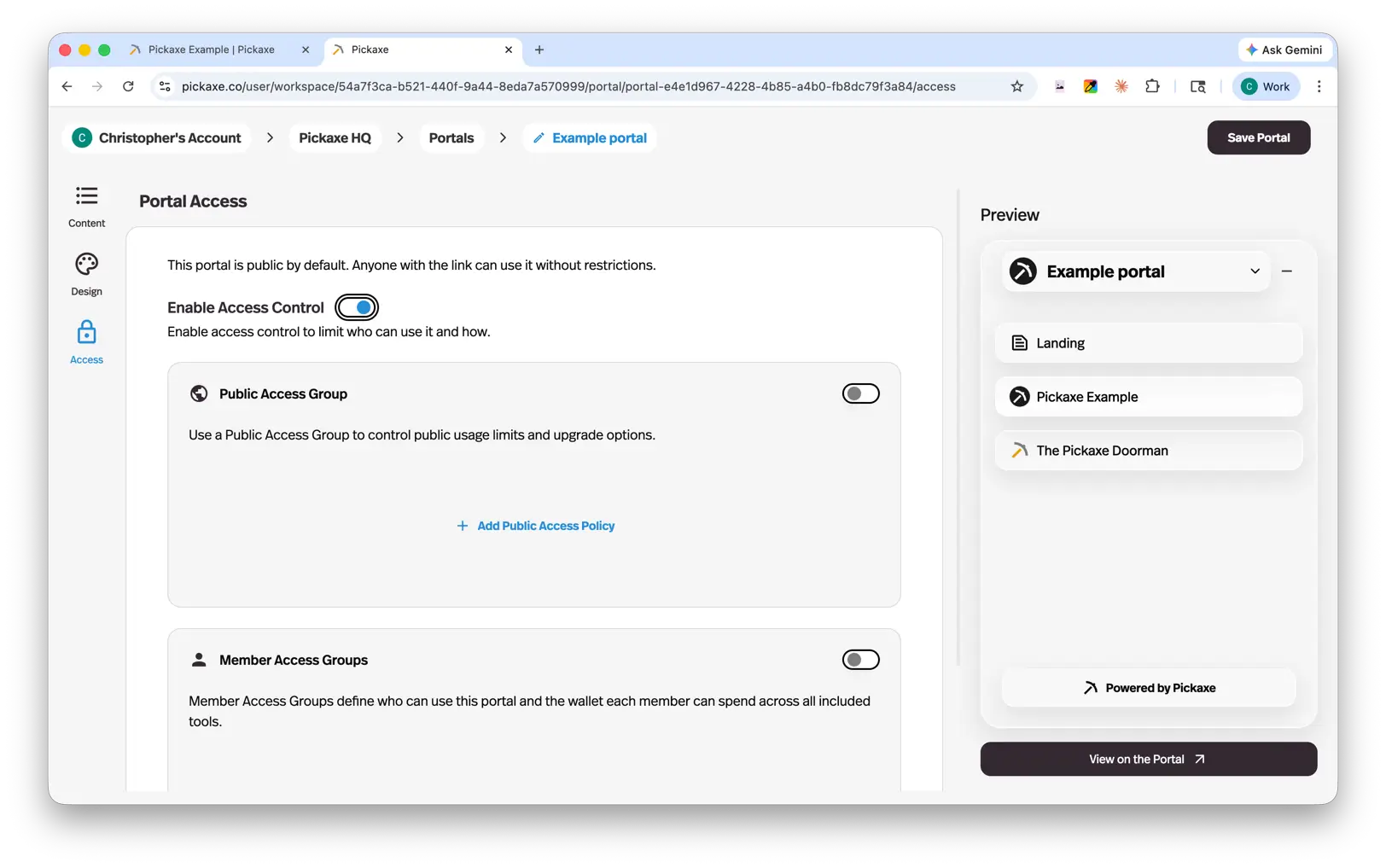
The distinction is the buyer's access system. Botpress's workspace roles govern the people building and operating bots; they should not be mistaken for a checkout that sells end customers a monthly allowance.
A custom application around Botpress can supply membership and payment enforcement. I would ask to see that implementation and its operating cost rather than infer that Webchat alone provides it.
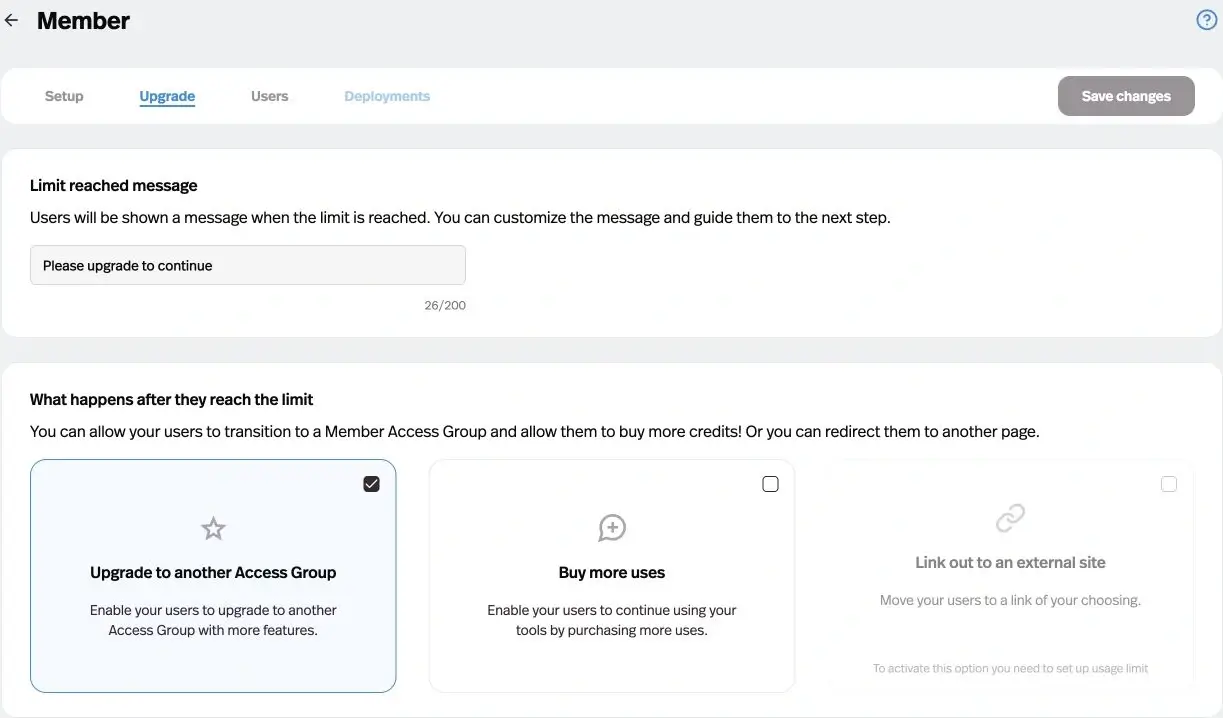
Pickaxe still needs careful configuration. A portal menu is not a tenant-isolation test, and an API token is not an end-user identity guarantee.
The API/MCP guide says a deployment key authenticates the deployment; caller-supplied user IDs can attribute usage, so a custom application must enforce the end user's identity itself. That qualification matters when building outside the hosted portal.
Support operations: the stronger reason to choose Botpress
Botpress's handoff guide directs new workspaces to Botpress Desk, while existing workspaces can keep the legacy HITL integration. An older HITL screenshot is not a reliable setup guide for a new account.
The Desk product page describes routing, assignment, conversation management, and help-center workflows. Those are vendor-described capabilities, not measured resolution results.
| Requirement | Pickaxe | Botpress |
|---|---|---|
| Conversation review | Activity insights, resources, costs, exports | Conversations, events, issues, analytics |
| Human support queue | Implement defined escalation and external handling | Best fit: Desk for new workspaces |
| Customer membership lifecycle | Best fit: access groups and usage upgrades | Separate customer entitlement implementation |
| Version recovery | Keep independent configuration and source copies | Documented Studio versions; confirm plan limits |
| Administrative export | Conversation/user exports; verify complete app portability | Bot archive and data APIs; confirm plan and integrations |
Sources for operations: Pickaxe user activity and exports, Botpress monitoring, and inspection and issue logs. Pickaxe's Actions guide describes a Slack escalation example, which is a different workflow from an integrated helpdesk.
I would choose Botpress first when a support manager needs to own the queue and conversation routing. If the primary deliverable is a paid advisory tool with occasional follow-up, I would keep the portal central and implement a bounded escalation path.
A channel label also needs a plan check. Do not infer voice availability from a general channels page or assume every deployment has the same human takeover behavior.
Security and ownership: verify the actual deployment surface
My checklist would cover the data sent to model providers, conversation retention, deletion, administrator access, credential ownership, and the documents the client needs for procurement. A security badge does not answer those configuration questions.
The Pickaxe terms distinguish Pro data-training treatment from other tiers and separately qualify beta services. I would resolve those terms with the client before using sensitive material, rather than assume identical treatment across plans.
Botpress publishes a Trust Center with controls and access-requested reports. Its retention documentation distinguishes logs, conversations, messages, events, and files; confirm the applicable policy and any negotiated exceptions.
For credentials in Studio, Botpress documents encrypted configuration variables that autonomous nodes cannot read directly. That does not remove the need to restrict what the action using those credentials can do.
For client separation, prefer an explicit workspace and credential plan. Test a user from client A against client B's knowledge, links, exported activity, and actions; a prompt telling the agent to “keep things private” is insufficient.
Pickaxe vs Botpress pricing: keep the meters separate
The table records public USD prices checked October 16, 2026, using annual billing where stated. These are monthly equivalents of annual commitments, not month-to-month checkout quotes; taxes, regional payment charges, and negotiated terms are excluded.
| Public plan | Annual-billing monthly equivalent | Included meter and important extras |
|---|---|---|
| Pickaxe Gold | $29 USD | 3 workspaces; $15 monthly AI credits; 3 Actions/agent; 10% platform payment fee |
| Pickaxe Pro | $116 USD | $50 monthly AI credits; unlimited workspaces/Actions; 8% platform payment fee |
| Botpress Plus | $150 USD | 250 conversations/month; $25 AI usage; 3 seats; $65/100-conversation packs |
| Botpress Team | $750 USD | 1,500 conversations/month; $150 AI usage; unlimited seats; $50/100-conversation packs |
Pricing sources: Pickaxe plans and allowances, Pickaxe platform payment fees, and Botpress plans, packs, and AI top-ups.
Pickaxe defines a use as one user input; credits track underlying AI usage more closely. Those end-user packaging choices do not make a use equivalent to a Botpress conversation.
Botpress's current FAQ counts an exchange with at least two end-user messages as a conversation and includes emulator and human-assisted conversations. Paid conversation packs recharge automatically near the allowance threshold; budget the checkout behavior as well as the nominal quota.
Its May pricing announcement says legacy workspaces retain earlier pricing. Where that announcement's bundled-AI language sounds unlimited, I would budget from the current pricing page's explicit allowance and AI top-up rules and confirm the workspace's bill.
Additional costs depend on delivery. Gold lists Agent and Workspace API calls at 1¢ per request, while Pro includes that access; external tools can have their own bills. Botpress lists storage add-ons and AI top-up purchases, so included AI usage should not be read as an unlimited model budget. Confirm these items in the linked pricing pages for the selected workspace.
Workload examples: a subscription is only one line item
These are hypothetical monthly workloads in one workspace, not customer results or equivalent performance tests. Each uses a text model, a 20 MB synthetic document set, and one attempted action per conversation, with an additional retry allowance equal to 10% of action attempts.
| Illustrative workload | People and monthly traffic | Actions, retries, data |
|---|---|---|
| Small | 10 customers; 1 builder; 100 conversations; 800 user inputs | 100 action attempts + 10 retries; 20 MB |
| Growing | 100 customers; 2 builders; 1,000 conversations; 8,000 user inputs | 1,000 attempts + 100 retries; 20 MB |
| Agency portfolio | 10 clients / 1,000 customers; 4 builders; 3,000 conversations; 24,000 user inputs | 3,000 attempts + 300 retries; 20 MB per client |
For transparent arithmetic, assume the table's conversation counts are already billable Botpress conversations, ignore the early recharge trigger, and buy only the packs needed to cover volume. At 1,000 conversations, Plus's quota-covering subtotal is $150 + 8 × $65 = $670; Team's is $750.
At 3,000 conversations, Plus becomes $150 + 28 × $65 = $1,970, while Team becomes $750 + 15 × $50 = $1,500. Actual pack purchases can occur sooner under the recharge rule; these plan-and-pack calculations exclude additional AI spend, storage, and implementation.
For Pickaxe, suppose measured total platform usage later comes to a hypothetical $40 for the growing scenario. Gold's plan-plus-extra-usage subtotal would be $29 + max($0, $40 - $15) = $54, before payment fees and other services, using the published credit allowance.
That $40 is an assumed input, not a price for 8,000 messages or a token benchmark. The defensible estimate requires the actual model, context lengths, tool charges, and retries.
For a hypothetical $1,000 in customer payments, the documented platform fee adds $100 on Gold or $80 on Pro, before any separate payment-provider charges. Do not hide that cost when selling a low-margin subscription.
An agency portfolio also needs a workspace decision. The scenario uses four builders, which makes Botpress Plus's seat allowance insufficient; ten separately isolated client workspaces create a different subscription calculation from ten bots in one workspace.
Proposed pilot one: sell a bounded client knowledge service
Create a fictional consultancy portal with a synthetic service guide, onboarding checklist, and two client-specific policy documents. The input is a member's question; the expected output is a grounded answer or a draft follow-up request, delivered through the client's branded portal.
- Prepare access: create two member groups and attach only the intended agents and sources. Use a test payment setup where available, with no real customer charge.
- Build the task: configure instructions, a supported model, and one draft-request action using a nonproduction account.
- Package the service: configure the portal and an allowance, then inspect signup, upgrade, and limit-reached behavior.
- Change the evidence: replace a policy and verify the configured refresh before accepting answers about it.
- Break an action: revoke the test credential and confirm that the response reports an unresolved request instead of claiming success.
Pickaxe's documented portal, access, and billing controls make it my starting point for this pilot. With Botpress, explicitly include the surrounding membership, checkout, and entitlement implementation in the project scope.
For the same pilot on Botpress, use the documented knowledge and action controls, embed Webchat in the membership site, and have the application check paid access before allowing requests. The surrounding application must own identity and payment state; test a canceled member and a forged user identifier before rollout.
The agency builder owns integration recovery; the client's service owner approves the policy and escalation wording. Acceptance requires both people to inspect the result, including a denied cross-client request.
Proposed pilot two: operate support with a human escalation
Use a fictional retailer with synthetic orders and a returns policy. The customer asks about an order; the expected output is a permitted status answer, a draft request for review, or a handoff to a named support queue.
- Design the routes: use knowledge answering for policy questions, a controlled workflow for required order fields, and a separate path for exceptions.
- Keep actions bounded: connect a read-only order lookup and a draft case action. Leave refunds disabled during the pilot.
- Connect the destination: publish to the intended website channel and configure Desk for a new Botpress workspace, verifying the selected plan and operator permissions.
- Force recovery: test a missing order, a revoked credential, a slow response after a write, and an unavailable human operator.
- Review the record: check the conversation, destination case, assignee, and what the customer was told.
This is where I would evaluate Botpress first. Its workflow and support operating surface fit the job, but the pilot still has to establish whether the client's actual queue rules work.
A Pickaxe implementation can connect actions and an external support workflow. Scope that as an integration with its own owner and failure behavior; do not sell a Slack notification as an equivalent live-agent queue.
Migration: exportable content still needs a rebuild plan
Botpress documents bot archive import and export, including workflows and configuration, with integrations needing restoration. A Botpress archive is not a portable application that automatically imports into another vendor.
Its pricing matrix and export guide present different levels of plan detail, so confirm export availability for the exact workspace before relying on it. Keep independent copies of source documents and a connector inventory. Its Versions guide documents restoration and warns that it overwrites current work; confirm the current saved-version allowance rather than adopting old plan labels.
Pickaxe documents conversation and user exports in its Users guide. I have not verified a general one-click export of the complete standard agent application into Botpress, so I would budget for rebuilding instructions, source connections, tools, and access rules.
Separate billing migration from prompt migration. Preserve customer entitlements, cancellation handling, and support contact details, then test the replacement with a small consenting group before directing everyone to it.
Our Chatbase alternatives guide is useful if the two-product shortlist turns out to be too narrow. A different helpdesk, workflow builder, or knowledge product may solve the original problem with less migration work.
My buying recommendation
Choose Pickaxe when the commercial deliverable is access to useful AI tools. Portals, customer groups, usage packaging, and Stripe-connected charging make that path concrete, while the builder and Actions cover a focused client interaction.
Choose Botpress when the service depends on support routing and explicit conversational logic. Studio's mix of autonomous and controlled paths, paired with Desk for new-workspace handoff, deserves a serious pilot.
Choose both only after drawing the boundary between the paid product and the support operation. Decide which system owns customer identity and which owns a support case; otherwise the integration can become two partial sources of truth.
For a broader shortlist, compare our no-code AI agent builders. For this decision, I would bring one real acceptance contract to each platform before committing to the larger rollout.
Buyer FAQ
Is Botpress still a self-hosted alternative?
For new deployments, its v12 documentation says self-hosted versions are sunset and directs new users to Botpress Cloud. Do not rely on older comparison pages describing the current product as a new self-hosted purchase.
Can I charge customers for a Botpress agent?
You can scope a commercial service around a bot, but verify the contract and implement the required customer checkout and entitlement controls. The reviewed Studio and Webchat docs do not establish the same native paid-member portal workflow documented by Pickaxe.
Does white labeling mean the same thing on both?
No. Inspect the exact surface: widget branding, portal domain, account emails, operator dashboard, and customer billing. The pricing tables above qualify the documented paid features; they are not a promise that every surface loses every vendor reference.
Which is cheaper?
There is no honest answer without the workload and required plan. Count builder seats, workspace boundaries, billable conversations, actual AI cost, tools, payment fees, and the work needed to operate the delivery system.
What would I try first?
Pick the pilot that matches what you are selling, then test access denial and a failed action as carefully as a successful answer. If a branded paid service is the goal, start a Pickaxe workspace and build one bounded tool before expanding the product.