This guide covers AI agent knowledge base design and RAG: choosing sources, preparing documents, retrieving context, and testing answers. For the current Pickaxe interface, follow the separate document upload walkthrough or Knowledge Base help page.
Your AI agent doesn't know anything about your business.
It knows an enormous amount about the world in general. It does not know your refund policy, your pricing tiers, the name of the person who handles enterprise contracts, or the fact that you stopped selling the Starter plan in March.
A knowledge base is how you fix that. It's the difference between an agent that sounds confident and an agent that's actually right.
I've watched a lot of people bounce off this step. Not because it's hard: the AI agent knowledge base setup itself takes about twenty minutes: but because the moment you start reading about it you get buried in vocabulary. Embeddings. Cosine similarity. Vector stores. Chunk overlap. Reciprocal rank fusion.
None of that is required to get a working knowledge base. Some of it is worth understanding later, when your agent starts giving weird answers and you need to know which dial to turn.
So this guide does both. First we get a knowledge base working. Then we go back and explain what was happening underneath, in plain English, so you can debug it when it misbehaves.
What a knowledge base actually is (and what it isn't)
A knowledge base is a pile of your documents that your agent can search at the moment someone asks a question.
That's genuinely it. You upload files. The system indexes them. When a user asks something, the system finds the handful of passages most likely to contain the answer and hands them to the model along with the question.
The model then answers using those passages instead of guessing from memory.
Three things it is not, because these are the misconceptions that cause the most confusion:
It's not training. Nothing about the model changes. You are not teaching it anything permanent. You're handing it a reference sheet at question time, the way you'd slide a binder across a desk.
It's not memory. Memory is what the agent remembers about a specific user across conversations: their name, their plan, what they asked last Tuesday. A knowledge base is shared reference material, the same for everyone. If you want the distinction properly, we wrote a whole guide on how AI agent memory works.
It's not a database query. The agent isn't running SQL against your documents. It's doing fuzzy similarity matching, which is why it can find "how do I get my money back" inside a document that only ever says "refunds are processed within 14 days."
That fuzziness is the superpower and the failure mode, in equal measure.
Why bother? The case in three numbers
The honest argument for a knowledge base is that ungrounded models make things up, and they do it in a tone of complete confidence.
Stanford HAI's benchmarking of legal AI tools found purpose-built, retrieval-backed legal research products still hallucinated on more than one in six queries: and those are systems built by companies whose entire business is accuracy. General-purpose models with no grounding at all did considerably worse.
Grounding helps a lot, though it's not a cure. Vendors and practitioners generally report hallucination reductions in the 40–70% range once answers are tied to retrieved source documents, with the wide spread reflecting how much the quality of the underlying corpus matters.
And the failure mode that actually kills deployments isn't hallucination: it's staleness. A model trained a year ago will confidently quote last year's prices. A knowledge base you updated this morning won't.
That last point is the one I'd lead with if I were pitching this internally. Correcting a knowledge base takes thirty seconds. Correcting a model takes a retraining run.
RAG without the jargon: what happens when someone asks a question
RAG stands for retrieval-augmented generation. It's a 2020 idea from a Facebook AI Research paper that has since become the default way to give a language model access to information it wasn't trained on.
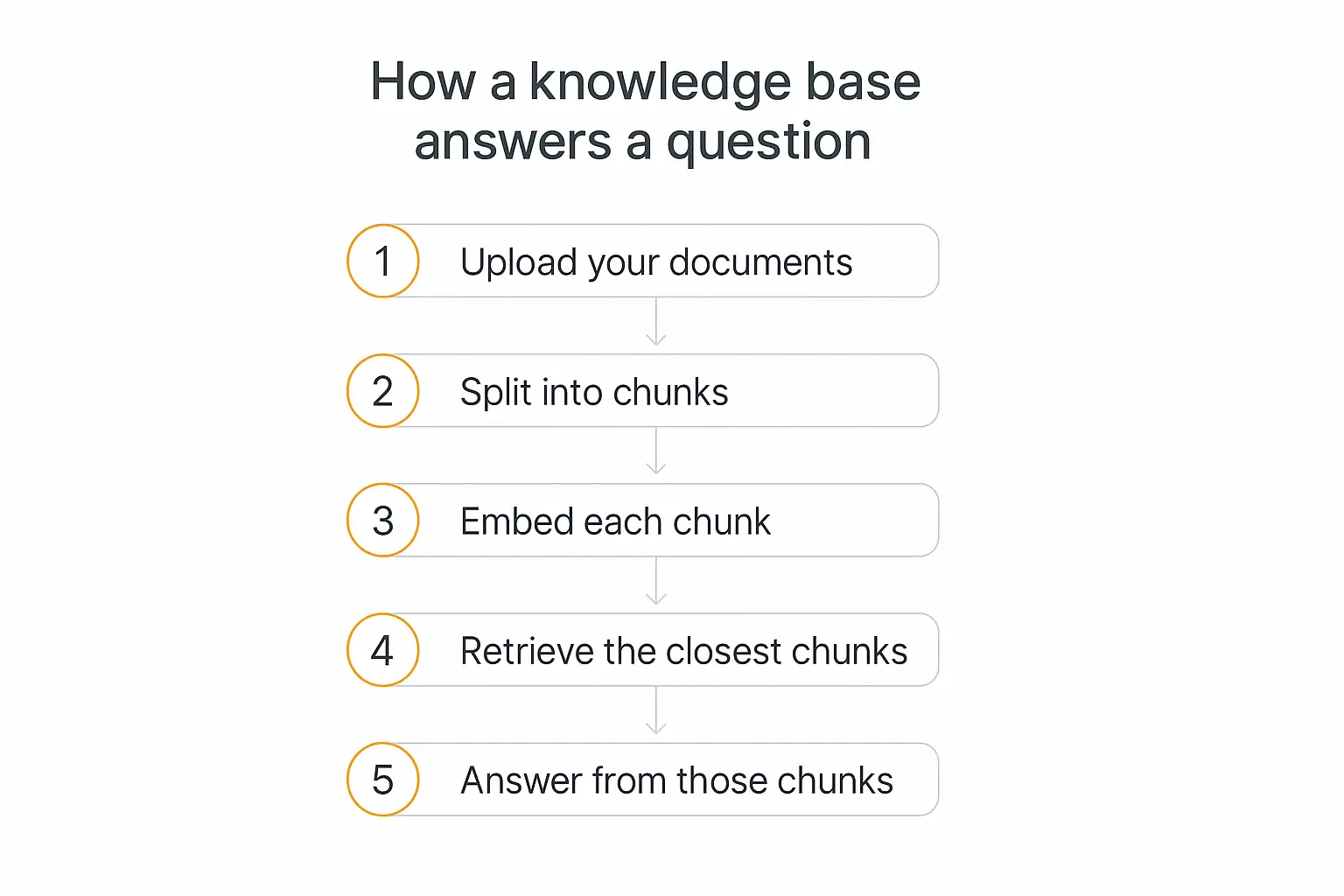
Strip the acronym and it's a five-step loop.
1. You upload documents
PDFs, Word docs, web pages, spreadsheets, transcripts. Whatever holds the answers.
2. They get split into chunks
A 40-page PDF is useless as a single unit: you can't hand the model 40 pages every time someone asks one question. So the document gets cut into passages of a few hundred words each. If you would rather buy a managed layer than build this yourself, we compared the best AI knowledge base tools.
These are chunks. They're the atomic unit of everything that follows, which is why chunking gets its own section later.
3. Each chunk gets an embedding
An embedding is a list of numbers that represents what a passage means. Passages about similar things get similar numbers, even when they share no words at all.
"Cancel my subscription" and "end my membership" land close together. "Cancel my subscription" and "canceled flights to Denver" land far apart, despite sharing a word.
If you want the mechanics, OpenAI's embeddings guide is the clearest short explanation I've found. But for practical purposes: embeddings are how a computer measures "these two things are about the same topic."
4. The question retrieves the closest chunks
When a user asks something, their question gets embedded too. The system compares it against every chunk and pulls back the closest few: usually somewhere between three and ten.
5. The model answers from those chunks
Those retrieved passages get pasted into the prompt, invisibly, above the user's question. The model reads them and answers.
That's the whole thing. Every "AI trained on your data" product you've ever seen is doing some version of these five steps, and most of them are doing it with no more sophistication than what I just described.
What to put in: and what to leave out
This is where most knowledge bases go wrong, and it happens before you touch a single setting.
The instinct is to dump everything in. Every doc, every wiki page, every exported Slack channel, on the theory that more knowledge means better answers.
It doesn't. More documents means more chances to retrieve the wrong one.
Retrieval doesn't know which of your three pricing documents is current. It knows which one looks most like the question. If the outdated one happens to phrase things more similarly, that's the one your agent will quote.
A tight corpus of 30 accurate documents outperforms 300 mixed-quality ones, reliably and by a wide margin.
Good candidates
- Policy and procedure docs: refunds, shipping, SLAs, escalation paths
- Product documentation: features, limits, setup guides, known issues
- Pricing and plan details, assuming exactly one document is authoritative
- Vetted FAQs: support tickets are a goldmine here, once cleaned
- Onboarding material and internal playbooks
- Case studies and past proposals, if the agent needs to reference prior work
Bad candidates
- Anything superseded. Old contracts, deprecated docs, "v1 (archive)" files. Delete them from the corpus, not just from your mental model of it.
- Raw meeting transcripts. They're full of half-formed ideas that got rejected ten minutes later. The agent can't tell a decision from a discarded suggestion.
- Big spreadsheets. Retrieval on tabular data is genuinely bad: rows lose their headers when chunked. Convert the important numbers into prose, or hand the agent a real lookup tool instead.
- Scanned image PDFs with no text layer. They extract as nothing. This one catches people constantly.
- Anything with credentials or personal data you wouldn't want an agent to surface in a chat window.
The rule I use: if a new hire would be misled by a document, so will the agent. New hires at least ask follow-up questions.
How to add a knowledge base to your AI agent, step by step
Here's the actual setup. I'll use Pickaxe for the specifics because that's what I build on and the steps are concrete, but the sequence transfers to any platform: the labels just move around.
Step 1: Decide what the agent is for, before you upload anything
An agent that answers billing questions needs a different corpus than one that helps users configure the product. Trying to do both from one pile is how you end up with an agent that's mediocre at each.
Write the one-sentence job description first. Everything you upload should serve that sentence.
Step 2: Gather and clean the source files
Put the candidate documents in one folder. Then do a pass most people skip: open each one and check that a stranger could read it cold.
Strip the headers and footers that repeat on every page. Delete the "DRAFT: do not circulate" watermark text. Make sure acronyms are defined somewhere in the same document, because a chunk that says "the ERP handles this" is useless if "ERP" is only expanded on page 1 and this chunk came from page 30.
This is the highest-leverage hour you'll spend. Genuinely.
Step 3: Choose the level: workspace or agent
Pickaxe splits the Knowledge Base into two levels, and the distinction matters more than it sounds.
Workspace-level knowledge is a shared library any agent in the workspace can draw from: but it isn't attached automatically. You still opt each agent in.
Agent-level knowledge belongs to one agent only.
Company-wide facts (brand voice, policies, who we are) go at workspace level. Job-specific material goes on the agent. This keeps a support agent from retrieving your sales battlecards mid-conversation.
Step 4: Upload the sources
In the Agent Builder, open Build → Knowledge Base. You can add:
- Files: pdf, docx, txt, md, pptx, xml, csv, json
- URLs: point it at a docs site or a specific page
- Media: mp3, mp4, and YouTube content get transcribed; png, jpg, webp, gif get read
- Raw text: paste in the thing that only lives in your head
- RSS feeds: for anything that publishes on a schedule
- Connected apps: Notion, Google Drive, OneNote, and OneDrive/SharePoint sync directly
The connected-app route is worth taking seriously if your team already maintains docs somewhere. Sources refresh daily, so the agent tracks the source of truth instead of a snapshot you'll forget to re-upload.
Step 5: Write context instructions for each source
This is the step that separates a knowledge base that works from one that technically functions.
Each source can carry an instruction telling the agent how to treat it. Use them.
- "This is the current pricing sheet. It overrides pricing mentioned anywhere else."
- "Style guide. Match this tone. Do not quote it to users."
- "2025 case studies. Reference for examples only: do not present as current pricing or availability."
Without these, every document has equal authority and conflicts get resolved by whichever passage happened to score higher. With them, you're telling the agent what to trust.
Step 6: Point the instructions at the knowledge base
Uploading files doesn't automatically change behavior. The agent's Role Prompt has to tell it what to do with them.
Something like:
Answer questions using the knowledge base provided. If the knowledge base doesn't cover something, say "I don't have that information" and offer to connect the user with a person. Never guess at pricing, dates, or policy details.
That last sentence does an enormous amount of work. An agent that says "I don't know" is worth more than one that improvises, and models will happily improvise unless told not to.
For a deeper treatment of writing instructions that actually stick, our guide on prompt engineering for AI agents covers the patterns.
Step 7: Set the token budget
There's a finite amount of room in the model's context, and Pickaxe fills it in a fixed order called waterfall allocation: Memory fills first, then End-User Docs, then Knowledge Base gets whatever's left.
Worth knowing, because if you've got generous memory settings and users uploading their own files, your knowledge base can end up with less room than you assumed. The Configure tab is where you rebalance it.
Step 8: Test with real questions
Open the Preview tab and ask the twenty questions your users actually ask. Not the questions you wish they'd ask.
Pull them from support tickets if you have them. We'll get into what to do when the answers are wrong further down.
Upload a few docs and see what your agent does with them
Build the agent, attach the knowledge base, test it in the browser: no code anywhere in the loop.
Chunking, explained without the jargon
Chunking is where your documents get cut into pieces. It sounds like a technical detail and it is quietly the single biggest lever on answer quality.
Here's the tension.
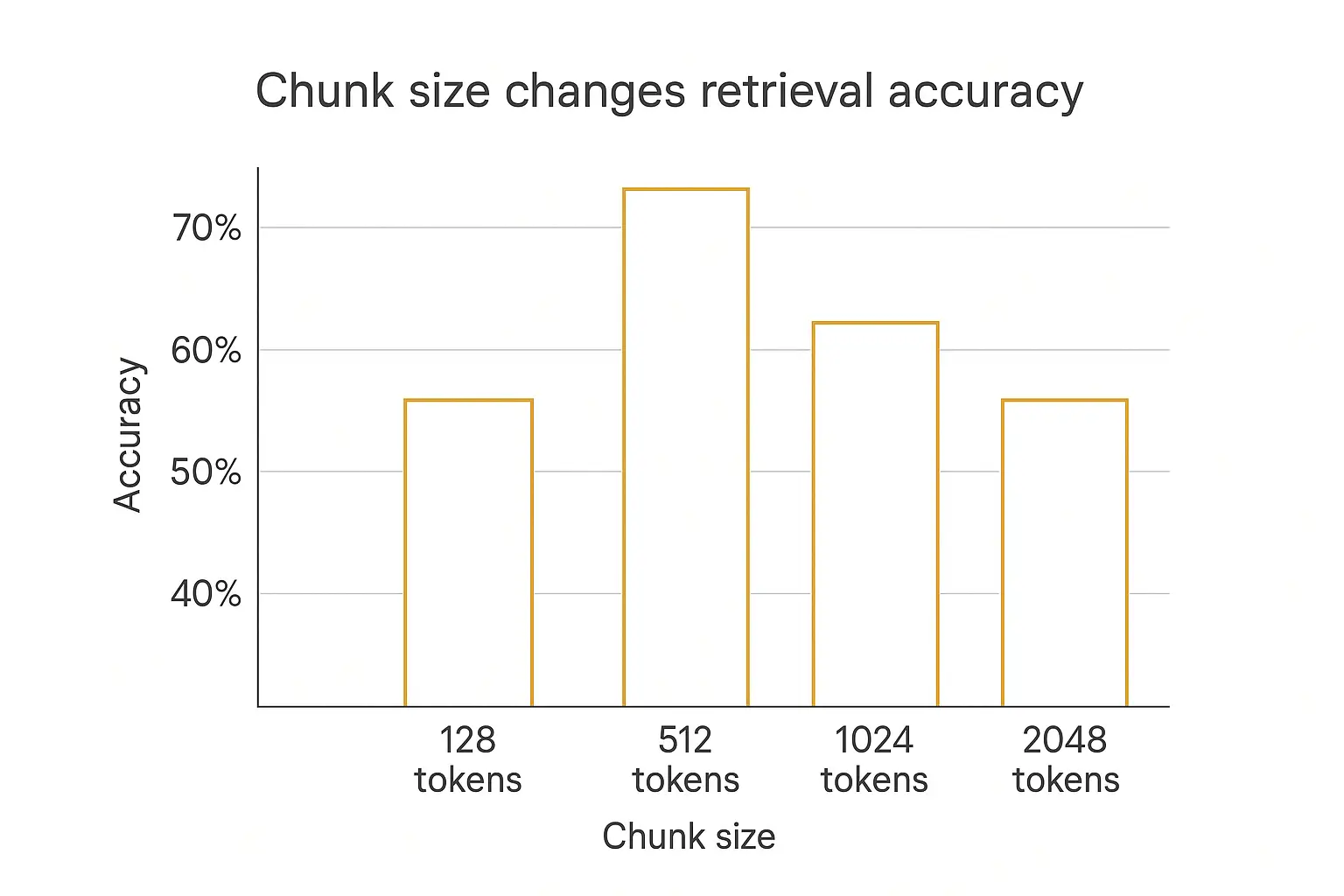
Small chunks retrieve precisely but answer poorly. A 100-word chunk matches a narrow question beautifully, then turns out to be missing the sentence that actually contained the answer.
Large chunks answer well but retrieve badly. A 2,000-word chunk almost certainly contains the answer somewhere, but its embedding is a blurry average of eight different topics, so it doesn't match anything cleanly.
Chunk size is a setting to evaluate against your documents and question set, not a universal optimum. I would preserve coherent sections, test retrieval on actual questions, and inspect whether the needed passage reaches the model.
The chart above shows the shape of that curve rather than exact figures from any one benchmark, but the shape is what matters: accuracy peaks in the middle and falls off in both directions.
How the chunk boundary gets chosen
Where you cut matters as much as how big the pieces are.
| Method | How it cuts | Best for |
|---|---|---|
| Fixed-size | Every N tokens, regardless of content | Nothing, really: it's the fallback |
| Recursive | Prefers paragraph breaks, then sentences, then words | The sane default for most documents |
| Document-aware | Splits on headings and section boundaries | Structured docs: manuals, policies, wikis |
| Semantic | Splits where the topic shifts | Long unstructured prose; slower and pricier to build |
| Hierarchical | Small chunks to find, larger parents to answer | Big corpora where precision and context both matter |
Most managed platforms: Pickaxe included: handle this for you with sensible defaults. You'll rarely tune it by hand.
What you can control is the input. Well-structured documents chunk well; walls of text don't. Clear headings, short sections, and one topic per section will do more for retrieval quality than any parameter you could tweak.
The trick that actually moves the needle
Anthropic published a technique called contextual retrieval that's worth knowing about even if you never implement it yourself.
The problem it solves: a chunk that reads "the fee is waived in this case" is meaningless in isolation. Which fee? Which case?
The fix is to prepend a one-line, model-generated summary of where the chunk sits in its parent document before embedding it. Anthropic reported a 49% reduction in retrieval failures, rising to 67% when combined with reranking.
You can approximate the same effect manually and for free: make sure each section of your documents states its own subject instead of relying on the heading three pages up. Write "Enterprise plan overage fees" as a section header, not "Overages."
How retrieval finds the right chunk
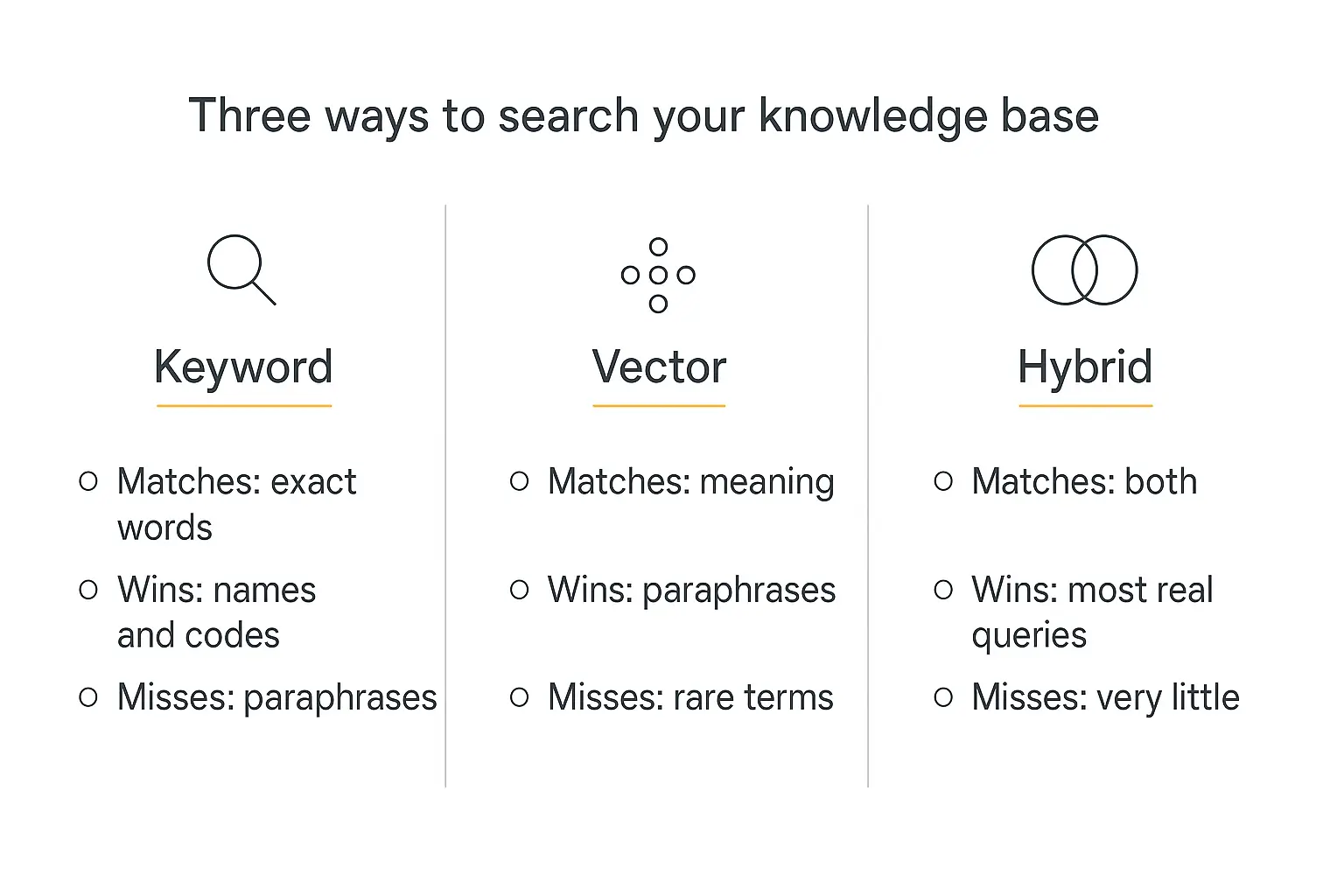
Once your documents are chunked and embedded, something has to decide which chunks come back. There are three approaches, and knowing which one you're using explains most retrieval weirdness.
Keyword search
The classic. Matches literal terms, usually with an algorithm called BM25 that weights rare words more heavily than common ones.
Great at: product codes, proper nouns, error messages, part numbers: anything where the exact string matters.
Bad at: paraphrases. Ask about "getting my money back" and it won't find the refunds page.
Vector search
Matches meaning via embeddings. This is what most people mean by "RAG."
Great at: paraphrases, synonyms, conceptually related phrasing.
Bad at: rare exact terms. Ask about error code "E-4471" and vector search may cheerfully return a chunk about error code "E-4417," because to an embedding those look nearly identical.
Hybrid search
Runs both, then fuses the two ranked lists: typically with Reciprocal Rank Fusion, which rewards results both methods agreed on without needing to normalize their scores.
The evidence here is one-sided. InfoQ's write-up on hybrid retrieval and Microsoft's Azure AI Search documentation both land in the same place: hybrid beats either method alone on realistic query mixes, because real users write queries that are part concept and part exact term. To choose the storage layer for that approach, compare the retrieval and operating tradeoffs in my vector database guide.
Reranking
One more layer worth knowing. A reranker takes the top ~50 candidates and rescores them with a slower, more careful model that reads the question and each chunk together rather than comparing pre-computed vectors.
It's the highest-precision step in the pipeline and, per Superlinked's analysis, one of the largest single contributors to final ranking quality.
On a managed platform you generally don't configure any of this. It's still worth knowing which knob is which, because it tells you what kind of question your agent will struggle with.
Nine ways knowledge bases fail: and what to do about each
Everything below I've either hit myself or watched someone hit. The fix is almost never "use a better model."
| Symptom | Actual cause | Fix |
|---|---|---|
| Agent says it doesn't know something that's definitely in a document | The PDF is a scan with no text layer | Run OCR, or re-export the document as real text |
| Answers quote outdated policy | The old version is still in the corpus | Delete superseded docs: don't just add the new one |
| Answers are vague and hedge constantly | Retrieved chunks are related but not specific | Tighten chunk boundaries; add explicit section headers |
| Agent invents details | Nothing relevant was retrieved and the prompt didn't forbid guessing | Add an explicit "say I don't know" rule to the instructions |
| Numbers come back wrong | Table rows got chunked away from their headers | Move key figures into prose, or use an Action to query real data |
| Right topic, wrong document | Multiple documents cover the same ground | Consolidate to one authoritative source per topic |
| Works in testing, fails for users | You tested with insider phrasing | Test with verbatim support-ticket language |
| Long answers drift off-topic mid-response | Too many chunks stuffed into context | Retrieve fewer, better chunks: see below |
| Quality degrades as you add documents | More candidates means more chances to retrieve a near-miss | Prune the corpus; quality beats volume every time |
That eighth row deserves a note, because it's counterintuitive.
Chroma's research on context rot found that model performance degrades as input length grows: even well within the advertised context window, and even on tasks the model handles easily at shorter lengths.
Retrieving twenty chunks instead of five doesn't make your agent smarter. It usually makes it worse.
How to test a knowledge base before you ship it
Most people test by asking a few questions, nodding, and shipping. Then the first real user asks something sideways and the whole thing falls over.
A better routine takes an hour.
Build a question set
Write 20–30 questions with known correct answers. Pull the phrasing from real support tickets, sales calls, or your own inbox: not from your documentation, because documentation phrasing is exactly what retrieval finds easily.
Include the awkward ones deliberately:
- Questions with no answer in the corpus: the agent should decline, not improvise
- Questions where two documents disagree: it should follow your context instructions
- Questions using a customer's words, not your internal vocabulary
- Multi-part questions that need two different documents at once
Score two things separately
When an answer is wrong, there are two possible culprits, and conflating them wastes hours.
Did retrieval find the right passage? If not, the problem is your corpus or your chunking. Adding a better model will not help.
Did the model use the passage correctly? If the right chunk came back and the answer was still wrong, the problem is your instructions or your model choice.
Teams doing this at scale use frameworks like Ragas, which scores retrieval and generation independently. For a first agent, a spreadsheet with three columns: question, expected answer, actual answer: genuinely does the job.
Re-test after every corpus change
Adding one document changes retrieval for every question, because it's a new competitor in every similarity comparison. Run the question set again.
Our guide on testing and debugging AI agents before deployment goes deeper on building the harness, and AI agent analytics covers what to watch once real traffic starts.
A worked example: support agent for a small SaaS
Abstract advice only goes so far. Here's what a real corpus looks like for a fairly typical case: a support agent for a 12-person software company.
The corpus (nine documents)
- Pricing and plans: one document, marked authoritative
- Refund and cancellation policy
- Getting started guide: the first-run walkthrough
- Integrations list: what connects to what, with limits
- Known issues and workarounds: updated weekly by the on-call engineer
- Troubleshooting: login and access
- Troubleshooting: billing and invoices
- Security and compliance one-pager: the answer to every procurement email
- Escalation rules: what the agent should hand to a human, and how
Nine documents. Not ninety. Each one has an owner and a last-reviewed date in its header.
The context instructions
Three of those documents carry instructions that do real work:
- Pricing: "Authoritative source for all pricing. If any other document mentions a price, this one wins."
- Known issues: "Current bugs and workarounds. Always check here before telling a user something should work."
- Escalation rules: "Internal routing rules. Follow them, but never quote this document to a user."
Three questions, three outcomes
"Can I get a refund if I cancel halfway through the year?": retrieval pulls the refund policy plus a chunk of the pricing doc covering annual billing. The agent answers correctly and cites both.
"Does this work with Salesforce?": retrieval pulls the integrations list, which says yes, and the known-issues doc, which notes the Salesforce sync is currently degraded. The agent answers yes with the caveat. This is the case that justifies the whole setup: the answer nobody would have thought to write.
"What's my current invoice total?": nothing in the corpus can answer this, because it's per-user live data. The agent declines and offers to escalate, exactly as instructed. That's a success, not a failure.
The third case is the one teams get wrong most often. They keep adding documents trying to make the agent answer it, when what they actually need is an Action wired into the billing system.
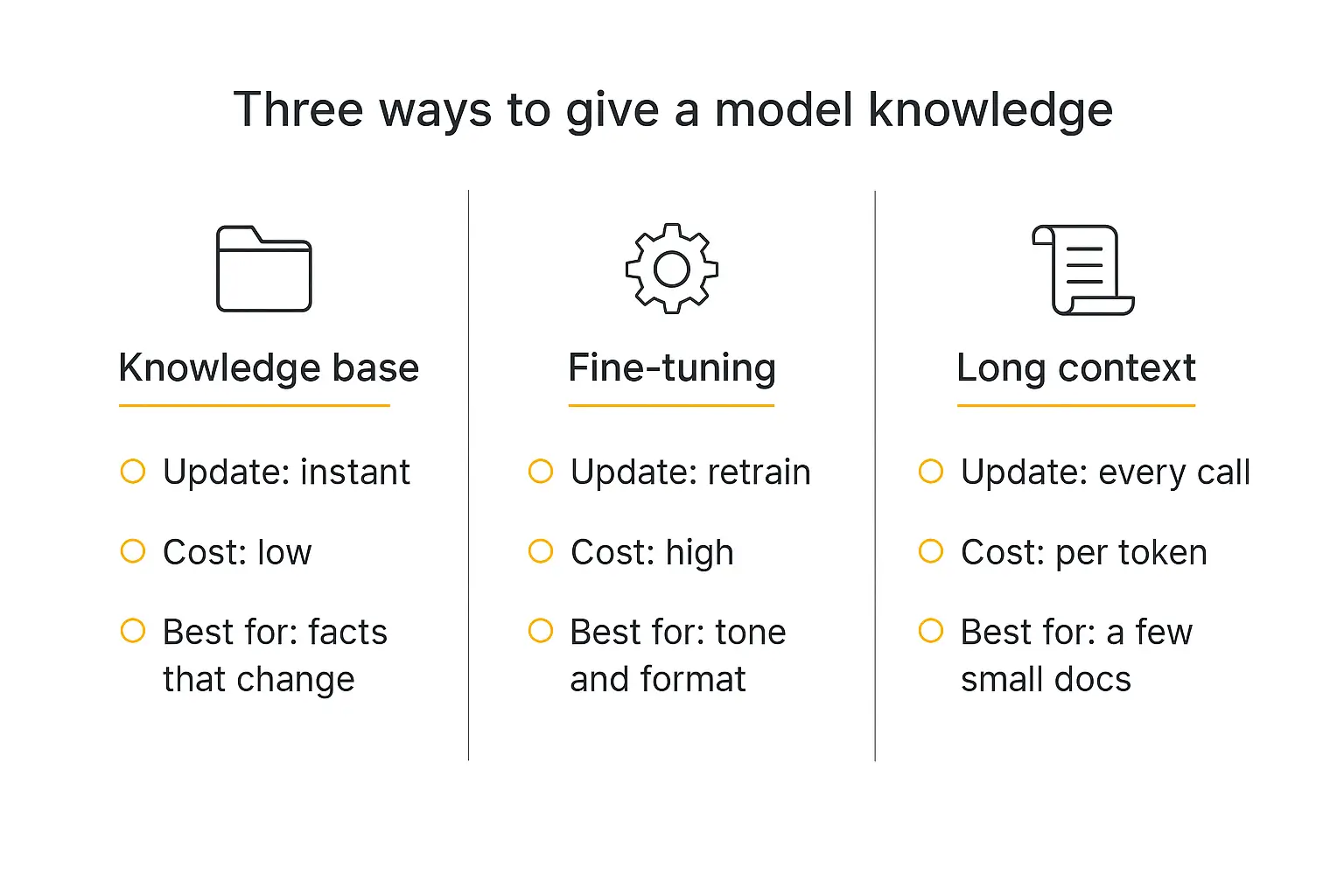
Knowledge base vs fine-tuning vs long context
Three ways to get information into a model. They solve different problems and people mix them up constantly.
| Knowledge base (RAG) | Fine-tuning | Long context | |
|---|---|---|---|
| What it changes | What the model can look up | How the model behaves | What's in front of it right now |
| Update speed | Instant: reupload a file | Hours to days: retraining run | Instant, but per request |
| Cost profile | Low, mostly storage | High up front, cheap per call | Pay per token, every single call |
| Scales to | Millions of documents | Any size, but fixed at train time | A few hundred pages at best |
| Can cite sources | Yes | No | Yes |
| Best for | Facts that change | Tone, format, specialized style | One-off analysis of a specific document |
The "just use a long context window" argument comes up every time a model ships with a bigger window, and it's tempting: a million tokens sounds like enough to skip retrieval entirely.
Two problems. It costs a fortune at scale, because you pay for every token on every call. And, per the context-rot research above, models don't actually use enormous contexts as reliably as the headline number implies.
Long context is excellent for "analyze this one contract." It's a poor substitute for a searchable corpus.
Fine-tuning is the one people reach for wrongly most often. If your agent's problem is that it doesn't know your prices, fine-tuning is the wrong tool: it changes style, not facts.
In practice these compose. Most solid production agents use a knowledge base for facts, prompt instructions for behavior, and Actions for anything live. Our breakdown of the AI agent tech stack maps how the layers fit together.
When a knowledge base isn't the right answer
Worth saying plainly, because a knowledge base gets recommended for problems it can't solve.
Live data doesn't belong in a knowledge base. Order status, inventory counts, account balances, today's calendar. These change faster than any index refresh. Use an Action that queries the real system.
Precise arithmetic doesn't either. Retrieval finds passages; it doesn't compute. If the agent needs to total line items, give it a calculation tool.
Neither do per-user facts. "What plan am I on" isn't knowledge base territory: that's memory or a lookup, and it should be scoped to that user.
The clean mental model: knowledge base for what's true in general, Actions for what's true right now, memory for what's true about this person.
Actions are also how agents reach live systems through emerging standards like the Model Context Protocol, which is worth understanding if you're wiring an agent into real tooling.
Knowledge base, Actions, and deployment in one place
Ground an agent in your docs, connect it to live systems, then put it on your site, in Slack, or behind a paywall.
Keeping it fresh
A knowledge base is not a project. It's a thing you maintain, and the maintenance burden is the part nobody budgets for.
Three habits that keep it honest:
Connect sources instead of uploading snapshots. If your docs live in Notion or Google Drive, connect them. Pickaxe refreshes connected sources daily, which means the corpus tracks the source of truth rather than drifting away from it the moment someone edits a page.
Give every document an owner. Not a process: a person. Unowned documents rot silently and nobody notices until an agent quotes one at a customer.
Watch the "I don't know" rate. If declines are climbing, users are asking about something your corpus doesn't cover. That's not a failure: it's a content roadmap, handed to you for free.
This is roughly the instinct behind Andrej Karpathy's "LLM wiki" idea, which went genuinely viral in April 2026 and collected millions of views: treat the knowledge base as a living, model-maintained document set that gets compiled and refined over time, rather than a folder you dumped files into once. Several good write-ups unpack the architecture.
You don't need to build a self-maintaining wiki to benefit from the idea. Just stop treating the corpus as finished.
Security, access, and who sees what
One thing to get right before you point an agent at internal documents.
Everything in a knowledge base is reachable by anyone who can talk to that agent. There's no per-user filtering inside a single corpus: if the salary band document is in there, a sufficiently persistent user can surface it.
The fix is architectural, not clever prompting. Separate agents for separate audiences, each with its own corpus, sitting behind the right access group.
In Pickaxe that means a public agent with public docs, and an internal agent behind a member access group with the sensitive material. Different agents, different knowledge, different doors.
Prompt-level instructions like "never reveal salary information" are a speed bump, not a lock. Don't rely on them.
Worth a scan of our writeup on AI agent security risks if the corpus contains anything you'd be unhappy to see quoted back.
Frequently asked questions
How many documents do I need to start?
Five to ten good ones. Seriously. Ship a narrow agent that's right, then expand: the failure mode of starting with 200 documents is that you can't tell which one is causing bad answers.
Do I need a vector database?
Not if you're using a managed platform: it's handled for you. You'd only pick your own (Pinecone, Weaviate, Chroma, pgvector) if you're building the pipeline from scratch and need direct control over indexing.
Does the knowledge base make the agent slower?
Marginally. Retrieval adds a few hundred milliseconds. It's usually offset by shorter answers, because a grounded agent stops padding.
Can the agent tell users which document an answer came from?
Yes, if you ask it to in the instructions. Citations are one of the strongest trust signals you can add: we covered the pattern in building a research agent that cites its sources.
What formats work best?
Clean text: markdown, plain text, well-structured Word docs. Text-layer PDFs are fine. Scanned PDFs, image-heavy slide decks, and complex spreadsheets are where extraction quality drops off.
How often should I update it?
Whenever the underlying facts change. Connected sources refresh daily on their own; manual uploads need a calendar reminder and an owner.
Which model should I pair it with?
For most knowledge-base work, a mid-tier model is plenty: the hard part is retrieval, not reasoning. Save the expensive models for agents doing multi-step analysis. Compare options on the models page, and our guide to mixing models across providers covers routing by task.
Where to start
If I were setting this up tomorrow, here's the order.
Pick one narrow job for the agent. Gather five to ten documents that serve exactly that job. Clean them: headers, acronyms, one topic per section.
Upload them, write a context instruction on each, and tell the agent to decline rather than guess. Then test with twenty real questions and fix what breaks.
That's a working knowledge base, and it'll take an afternoon.
What it won't be is finished. The corpus is the product: the model is interchangeable, the platform is interchangeable, but the quality of what you put in front of it is the whole game.
Most people spend their time on the wrong side of that equation. Spend it on the documents.
If you want to try the whole loop: knowledge base, Actions, and a deployed agent your users can actually reach: Pickaxe does the retrieval plumbing for you so you can spend the afternoon on the corpus instead. When it's working, embedding it on your site takes about five minutes.
.png)