

For an agency selling a branded AI service, my Pickaxe vs Workato recommendation starts with the customer: choose Pickaxe for the paid portal, and evaluate Workato for the operational workflows behind it.
I looked through both products’ current documentation because “they both build agents” hides the decision that matters: who owns the interface, credentials, payments, and recovery when a request fails?
This is a documentation-based comparison checked November 3, 2026. Screenshots come from official help pages; they show controls, not measured performance or access on every plan, and the walkthroughs below are proposed pilots.
Pickaxe vs Workato: functionality at a glance
My strongest reason to choose Pickaxe is the connection between the agent and the business around it. You can put useful knowledge behind an interface, connect customer access, and charge for that access without separately assembling the customer application.
| Functionality | Pickaxe | Workato |
|---|---|---|
| Build an agent | System prompt, model picker, knowledge, Actions, Preview | Agent Studio job description, model, knowledge, skills, Test mode |
| Ground answers | Files, web and connected sources; citation and retrieval controls | Knowledge bases with ingestion recipes and metadata; skills for exact records |
| Act in apps | Owner or end-user account connections; custom APIs and MCP | Recipe-based skills; builder connection or Verified User Access |
| Sell a branded AI service | ✓ Best fit for paid client access: portals, access groups, Stripe billing and Offers | Custom interface and Embedded options exist; commercial app, checkout and entitlement design need separate scoping |
| Coordinate back-office work | Actions can call external workflows; Personal Agents add runtime workflows | Best fit for recipe-led orchestration: deterministic recipes and goal-directed genies together |
| Delivery channels | Portals, pages, embeds, direct links and plan-dependent messaging/API | Slack, Teams, Workato GO, and custom chat interface/Headless API |
| Governance | Access groups, user controls and plan-dependent SSO/API features | Project collaborator roles, end-user groups, skill permissions and conversation traces |
| Billing | Platform subscription, AI usage credits, payment fees and possible API charges | Workato credits across capability-specific metrics; self-service or contracted editions |
Overview evidence: Pickaxe building, knowledge, Actions, portals, billing customers, and plan qualifications; Workato building, governance, orchestration, custom UI, and usage metrics.
Best for a consultant: Pickaxe when your deliverable is an expertise product a client logs into. Best for an integration team: Workato when the deliverable is a maintained process spanning business systems.
Best for a product team: compare Workato Embedded if integrations are part of an existing application. Do not mistake that product for a ready-made subscription portal, or assume it cannot serve external customers.
Building and models: compare the configuration you will maintain
The practical starting point in Pickaxe is the current Agent Builder’s Build panel. Choose the agent type, interface and model, write the system prompt, connect knowledge and Actions, then inspect behavior in Preview.
Auto can suggest changes for review; Settings holds additional controls. Older videos and articles show a different layout, so I would use the current text instructions when following a tutorial.
Workato starts with a genie’s goal and job description, then attaches knowledge and enterprise skills. Its Test mode supports repeatable scenarios, but skills can act on live connected systems; use sandbox connections for write tests.
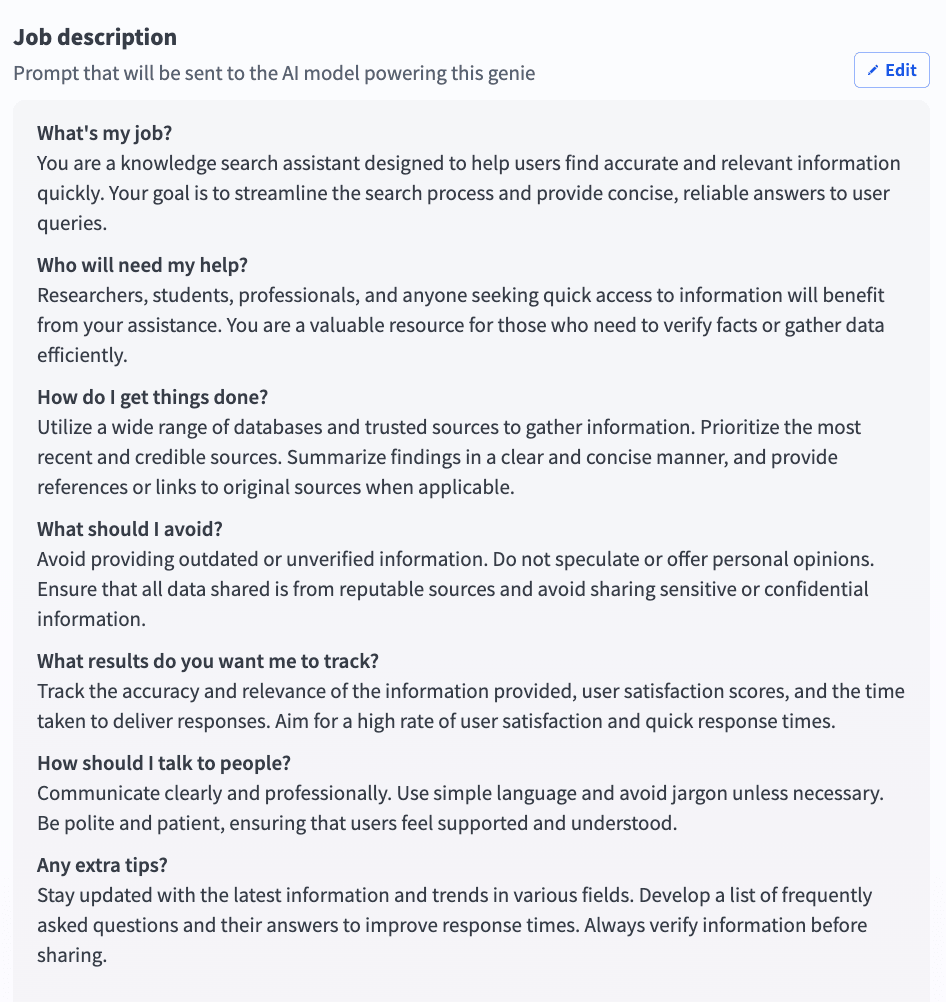
I would save a small acceptance set before changing either model: a supported question, an unsupported question, a tool request and a denied request. Re-run it whenever instructions, model settings or knowledge change.
There is no evidence here that one product gives inherently better answers. The useful comparison is whether the maintainer can see, reproduce and correct the behavior their client actually needs.
Knowledge: shared capability, different ingestion work
Both platforms can ground agents in company information. A source picker, a knowledge recipe and a semantic index are implementation choices; none is proof that the next answer is accurate.
| Requirement | Pickaxe | Workato |
|---|---|---|
| Connect and refresh sources | Files, web and connected apps, with documented sync behavior | Knowledge recipes sync application content into knowledge bases |
| Inspect retrieval | Knowledge Explorer shows chunks and query results; citation and document availability controls | Conversation response details expose knowledge lookups and other actions |
| Exact business data | Use an Action for current records or a bounded app lookup | Use skills for deterministic record lookups, counts and filtered queries |
| Client separation | Connect only approved sources to the intended agent and access boundary | Scope knowledge, metadata and skill authorization to the intended user/project; verify in pilot |
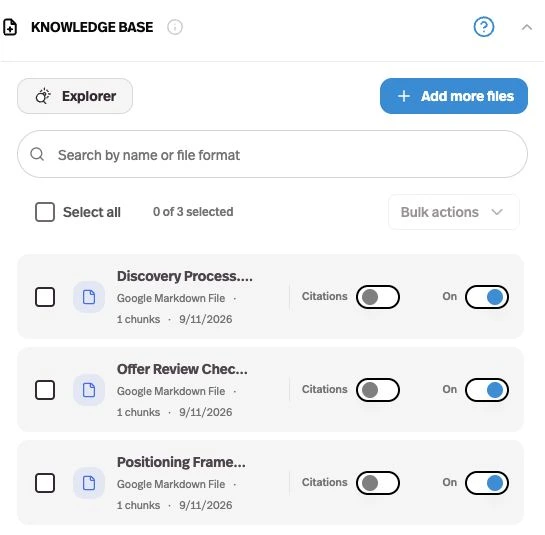
Pickaxe’s knowledge guide distinguishes automatic source sync from selecting which files an agent can use. Shared workspace documents are available to connect, rather than automatically included in every agent.
For Workato, I would give each knowledge base a clear purpose and use a knowledge recipe to handle updates. Its knowledge-versus-skills guide explains why retrieving a policy passage differs from asking for every overdue invoice.
My acceptance test is a changed policy: replace one eligibility rule, confirm ingestion, ask the old question again, and inspect the evidence. Then remove a source and check that the agent stops relying on it.
A second test asks for another client’s document by its exact title. The expected result is a denial or no disclosure, even when the model is persuaded that sharing would be helpful.
Actions and orchestration: whose account does the work?
This is where a superficial comparison often becomes unfair. Pickaxe documents both Owner and End user app connections, so individual account access is a shared capability to evaluate, not an automatic Workato win.
| Requirement | Pickaxe | Workato |
|---|---|---|
| Account ownership | Owner runs through builder account; End user connects their own account | Builder connection or Verified User Access with supported OAuth authorization-code connections |
| Connect a workflow | Action Library, custom APIs, other agents and MCP servers | Enterprise skills built as recipes; MCP server skills also documented |
| Unattended coordination | Personal Agent runtime capabilities; validate the deployed job and failure handling | Recipe assigns a task and resumes with returned output; VUA and Business approvals are not supported in this invocation |
| Failure recovery | Design bounded actions, inspect results and implement safe retry behavior | Use recipe controls and run history; external side effects still require application-level duplicate protection |
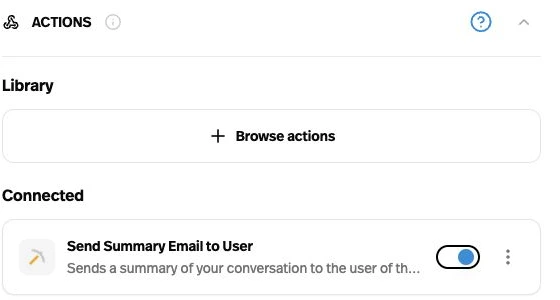
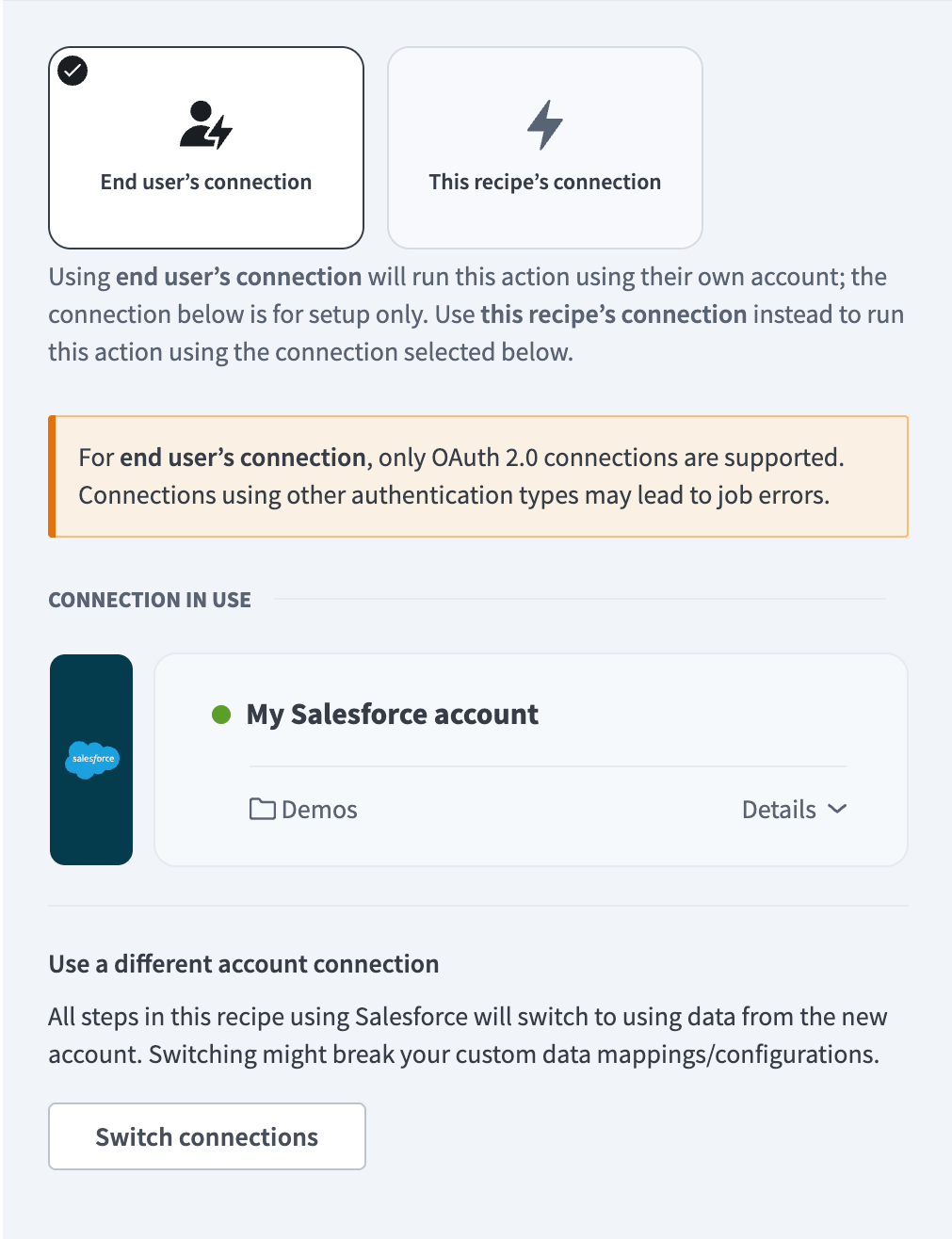
Workato’s Verified User Access documentation matters because it describes where user identity does and does not propagate. In particular, do not design an unattended Assign task to genie path assuming an interactive user can authorize a skill halfway through it.
For either product, a “create ticket” action should return a stable ticket identifier. If the external app succeeds but the response is lost, a retry must look up the prior request or use a supported idempotency key instead of blindly creating another ticket.
That is an application design requirement, not a claimed built-in guarantee from either platform. The same rule applies when an agent calls a workflow engine through MCP.
For more detail on dividing predictable steps from reasoning, I would read the AI agent architecture patterns guide before selecting the largest connector catalog.
Delivery and monetization: a client product needs more than chat
For paid client delivery, Pickaxe’s advantage is concrete: the portal, membership, usage allowance and purchase path are connected product features. This is the part I would prioritize if the buyer is paying for ongoing access to expertise.
| Requirement | Pickaxe | Workato |
|---|---|---|
| Branded destination | Hosted portal or custom domain; agents and pages in one destination | Custom application frontend/backend over Headless API; confirm availability |
| Paid membership | ✓ Best fit for paid memberships: Stripe-connected access groups with subscriptions or one-time purchase | Embedded integrations support commercial product delivery; checkout and entitlements require separate design/contract review |
| One-off product access | ✓ Best fit for individual paid tools: Offers lock an agent, page or folder | Scope the surrounding application and access system; no native equivalent is assumed absent |
| Identity and access | Guest, member and invite-only groups; plan-dependent embed SSO | Collaborator permissions and end-user groups; custom interface authentication needs explicit setup |
Workato can serve a custom application through its Headless API. Its custom chat UI guide explicitly includes a credential-holding backend, streamed responses and frontend recovery, and says access is available to select users.
That is a meaningful option for an engineering team with an existing product. It is also additional ownership: someone must maintain login, UI behavior, entitlement checks, billing integration and the relationship between the authenticated customer and the genie.
Workato Embedded is another distinct route for product teams distributing integrations. I would obtain written scope for external users, customer workspaces, branding and commercial rights rather than applying a direct-customer subscription to a resale scenario.
For Pickaxe, I would configure access before inviting customers. The custom client portal guide is useful for planning the destination and the first useful task, rather than treating the portal as a collection of unrelated agents.
Operations, security and ownership after launch
A buyer should know who can change the agent, who can use it, and who can inspect its history. Those are three different permissions, even when one small team initially holds all three.
| Requirement | Pickaxe | Workato |
|---|---|---|
| Customer and builder controls | User records, usage and conversation visibility; plan-specific collaborators | Separate builder collaborator privileges and end-user group access |
| Debugging | Preview as a selected sender; inspect source retrieval and Action setup | Conversation, response and run details expose skill calls and inputs/outputs |
| Contract review | Privacy policy and terms; confirm deployment-specific retention and provider handling | Trust center and legal documents; confirm region, retention and AI terms |
| Migration | API credentials and documented surfaces; verify export coverage for your data | Recipe lifecycle packages; separately verify coverage for genie assets, connections and customer records |
I would give Workato particular consideration for an organization that needs project-scoped integration ownership and detailed execution traces. Its conversation documentation also warns that raw skill and knowledge inputs can expose sensitive data through job history.
That makes access to logs part of the design. Restrict who can inspect payloads, use synthetic information during the pilot, and agree on retention and deletion before importing client material.
For both vendors, ask about the exact region and subprocessors for your chosen configuration. A trust badge or a hosted application does not establish that every external model and connected app follows the same processing arrangement.
Keep an exit pack outside the platform: instruction text, approved source originals, action schemas, credential ownership, acceptance cases and a customer-access inventory. This is a proposed maintenance practice, not a claim that either product exports every item in one click.
Pickaxe vs Workato pricing: keep the meters separate
The following prices are USD public listings checked November 3, 2026, for the US-facing pages. Tax treatment and region-specific checkout charges are not established here; confirm them before purchase.
| Plan or component | Public amount and interval | What still changes the bill |
|---|---|---|
| Pickaxe Gold | $37 monthly, or $29/month billed annually; $15 monthly AI credits | Workspace/action allowances, extra AI usage, 10% Pickaxe payment fee, API requests where applicable |
| Pickaxe Pro | $147 monthly, or $116/month billed annually; $50 monthly AI credits | Extra AI usage, 8% Pickaxe payment fee, external service bills |
| Workato Free | 50,000-credit one-time grant | Not a recurring monthly allowance; do not extrapolate production capacity from the grant |
| Workato Pro self-service | $75/month for 2,500 credits; higher monthly packages available | Capability-specific activity converts to Workato credits; unused monthly credits expire |
| Workato Enterprise / Embedded | Obtain the applicable quote and commercial scope | Edition, usage conversions, seats, add-ons, external customers and negotiated terms |
Pricing evidence: Pickaxe plans and allowances, Pickaxe processing fees, Workato self-service billing, and Workato edition, usage and add-on model. Stripe or other service charges need their own confirmation; the platform fee is not an all-in payment-processing quote.
Pickaxe’s workspace AI credits map to usage cost; customer-facing uses are a different allowance that you set. Workato credits are a common billing unit across capabilities, not dollars of Pickaxe AI usage.
Workato’s Genie usage rules count input prompts as Genie actions and include directly invoked skills, with exceptions such as recipe functions, IDP and Event streams. The general rules also count successfully repeated operations and successful work completed before a later failure.
I would not publish a dollar cost per identical “message” without measuring the chosen models and obtaining the applicable Workato conversion schedule. The following sizing inputs are hypothetical, not measured customer traffic or vendor capacity limits.
| Scenario | Customers, builders and knowledge | Monthly activity to measure |
|---|---|---|
| Small service | 1 client; 1 builder; 20 short approved documents | 1,000 user messages; 200 bounded action calls; 10 attempted retries |
| Growing service | 5 clients; 2 builders; 100 documents per client | 10,000 messages; 2,000 action calls; 100 attempted retries |
| Agency portfolio | 20 clients; 4 builders; 250 documents per client | 50,000 messages; 10,000 action calls; 500 attempted retries |
For each scenario, assume one chosen model, a short answer target and no images or audio; record actual input/output tokens and retrieval context rather than assuming every message has the same cost. Builder seats are separate from customers, and external-user licensing needs confirmation.
On Pickaxe, estimate the subscription plus AI usage above included credits, relevant API charges, payment fees and external services. On Workato, inventory Genie actions, workflow Tasks and any other billable capabilities, then apply the account’s credit conversion and edition terms.
My comparison worksheet would also include implementation and monthly support hours. A lower software invoice is not a lower total cost if the team must build and maintain a customer application around it.
Two proposed pilots that expose the real tradeoff
I would run these with synthetic documents and sandbox app records. Neither walkthrough describes a live benchmark, a customer deployment, or observed accuracy results.
Pilot A: a paid advisory portal
The buyer is a consultant selling access to a documented operating playbook. Inputs are approved policy files, a customer question and a request to create a follow-up ticket; outputs are a grounded answer and a ticket identifier.
- In Pickaxe, build a focused agent, attach only approved sources, enable the intended citations, and connect one ticket Action with a narrowly scoped account.
- Create the portal and access group, connect Stripe, set the usage allowance, and decide whether a subscription or an Offer fits the actual product.
- Invite a test customer and an unauthorized user. Check content access, allowance exhaustion and the path to buy more usage before accepting real payments.
- Change a source document and repeat the original question. Force an Action failure and require an honest failure response instead of a fabricated success.
- Repeat the customer goal in Workato only after confirming custom interface or Embedded scope. Budget the application, identity and payment work separately from the genie itself.
The consultant owns instructions and source updates; the integration maintainer owns the ticket endpoint and retry behavior. For this job, my preference is Pickaxe because paid delivery is already part of the product’s documented setup.
Pilot B: an internal cross-app request
The buyer is an operations team receiving a request in Slack, reading an exact CRM record, consulting an approved policy, and opening a sandbox task after the right authorization. The output must include the record and task IDs plus a traceable final status.
- In Workato, define the deterministic record lookup and write steps as skills or recipes. Configure the genie’s role, knowledge and Slack access for the intended employee group.
- Choose builder-owned or verified end-user credentials based on the target app and the invocation. Keep interactive approval flows separate from unsupported unattended orchestration paths.
- Test a denied user, a missing record, an expired connection and a successful write followed by a lost response. Inspect the execution trail and verify duplicate protection.
- In Pickaxe, evaluate the same goal with an Action and the supported deployment/runtime. If an external workflow handles recovery, include that workflow’s cost and maintenance owner.
- Assign an operations owner for monitoring, connector changes and incident response. A conversational success message is insufficient evidence that the task exists.
I would favor Workato here when the enterprise process and integration operating model are the main deliverable. For the approval boundary itself, the human-in-the-loop guide helps define what the person is authorizing.
Start with one useful client task
Build the agent, then test its knowledge, action and access boundary.
Which platform I would choose, and when to combine them
I would choose Pickaxe when the customer is buying access to a branded AI service. The portal, content gating, billing configuration and usage allowance form a coherent starting point for that business.
I would choose Workato when the organization is buying a maintained integration process with agent reasoning inside it. Existing enterprise connections and operational ownership can matter more than having a ready-made public destination.
I would consider both when the paid portal needs to invoke a governed back-office workflow. That is a proposed architecture, not a verified native Pickaxe-to-Workato integration: confirm the actual API or MCP endpoint, authentication, commercial permissions and failure behavior.
Keep one system authoritative for entitlement and one for execution status. Pass a server-validated customer identifier and request identifier across the boundary; do not let a user’s chat message decide which client’s records the workflow can access.
For the business side, the AI services pricing guide can help separate setup, access and ongoing support. Price the responsibility you actually take on, including the process that handles mistakes.
Buyer FAQ
Is Workato only available through enterprise sales?
No. The current self-service guide documents Free and Pro plans with online signup; Enterprise and Embedded requirements still need their own scope. Do not reuse older “contact sales only” comparisons as a current price list.
Can both platforms act through the end user’s account?
Yes, in supported configurations. Pickaxe Actions distinguishes Owner and End user connections; Workato Verified User Access has authentication and invocation constraints that need testing on the intended surface.
Can Workato power a customer-facing AI application?
Yes, the custom chat UI documentation describes an application built over Headless API, with availability to confirm. Embedded integrations are a separate commercial route; neither should be treated as automatically included checkout and paid membership.
Does a portal or knowledge base guarantee client isolation?
No interface alone establishes that boundary. Test unauthorized access, source selection, app permissions and logs with synthetic records, and make the application enforce identity rather than accepting a claim in a prompt.
What should I build first?
Choose one paid customer task or one internal operational process, then run the relevant pilot above. If your goal is a paid knowledge-based service, start with a focused Pickaxe agent and expand only after its access, cost and failure behavior are clear.