

For Pickaxe vs MindStudio, I would choose Pickaxe to sell a branded AI service with customer accounts, subscriptions, and usage allowances. I would shortlist MindStudio when the main deliverable is a visual, multi-step workflow and the team wants to configure its execution block by block.
Both products can build agents, use different models, retrieve knowledge, and connect external tools. The deciding question is what you have to assemble around the agent before a customer can actually use and pay for it.
This article appears on Pickaxe’s blog. I compared public documentation and current pricing, rather than running a customer deployment or measuring either platform’s reliability.
The screenshots below are official documentation images. I inspected MindStudio’s public app, but its editor required login; these images show documented controls, not a completed live test.
| Requirement | Pickaxe | MindStudio |
|---|---|---|
| Agent creation | Chat and form agents with prompts, knowledge, Actions, and Preview | Visual workflows, blocks, variables, forms, and custom functions |
| Models | Model picker and agent-specific settings | Workflow default model and per-block overrides |
| Knowledge | Connected sources, citations, search modes, Knowledge Explorer | Data Sources and explicit Query Data Source blocks |
| External tools | App connections, custom Actions, other agents, MCP | Integration blocks, HTTP requests, functions, API and MCP |
| Paid client product | ✓ Best fit for memberships: portals, paid access groups, allowances, top-ups, and Offers | Authorize/Capture Payment blocks support per-run charging; external paid-app assembly is a separate design |
| Branded delivery | ✓ Best fit for a managed client storefront: portals, custom domains, and white labeling on Gold and above | Web apps and signed embeds documented; custom domains listed under Business |
| Permissions | Public, member, and invite-only customer groups; separate builder collaborators | Workspace roles, agent guests, and external managed users |
| Operations | User activity, API/MCP cost reporting, connection management | Debugger, Evaluations, Profiler, Usage Explorer, budgets |
| Hosting | Managed platform; verify special requirements before quoting | Managed service; Business lists self-hosting as a quoted option |
Overview sources: builder, portals, Actions, monetization, MindStudio editor, payments, signed embeds, and both Pickaxe pricing and MindStudio pricing.
Pickaxe vs MindStudio: start with who buys the result
A consultant selling an assistant and an operations team automating research can ask for the same demo. Both may want a document upload, a useful answer, and a connection to another app.
Their next steps are different. The consultant needs a place to package expertise, admit customers, charge for access, and explain what happens when an allowance runs out.
The operations team may care more about which step runs first, which variable reaches the next block, and how to inspect an error halfway through a job. I would write those requirements down before comparing screenshots.
- Choose Pickaxe first for a coaching assistant, client research hub, paid document tool, or multi-agent membership.
- Shortlist MindStudio for a workflow whose explicit sequence, branching, and step-level development are central to the purchase.
- Evaluate both when a paid portal launches substantial back-office automation. Decide which system owns identity, entitlement, and the final customer experience.
These are buying recommendations, not claims that either product is unable to serve the other use case. A useful pilot should expose the extra setup that your particular business requires.
For the broader category, my guide to no-code AI agent builders compares different platform shapes. This page narrows the decision to these two products and one sellable client service.
Building: configure a client agent or design its workflow
Pickaxe puts the agent’s model, system prompt, knowledge, and Actions together in the Build panel. Auto can suggest changes, Settings holds additional controls, and Preview lets you inspect the experience before updating the agent.
| Requirement | Pickaxe | MindStudio |
|---|---|---|
| Main editing surface | Build panel, Auto assistance, Settings, Preview | Explorer, workflow canvas, prompts, blocks, and variables |
| Customer inputs | Chat or form agent; form prompt frame | User Inputs; Interface Designer has a Custom (Beta) option |
| Model selection | Agent model picker with supported reasoning/search controls | Underlying workflow model; individual AI blocks can override it |
| Custom logic | Actions, connected agents, and external workflows | JavaScript/Python functions and Workflow Scripts |
| Best fit for the purchase | ✓ Best fit for packaging a focused customer assistant | Better fit for visual block-by-block orchestration when that is the core deliverable |
Sources for these controls: Pickaxe Agent Builder, model controls, Actions, MindStudio workflows, custom interface beta, model overrides, and custom functions. Both support structured setup; the difference is the authoring experience you are buying.
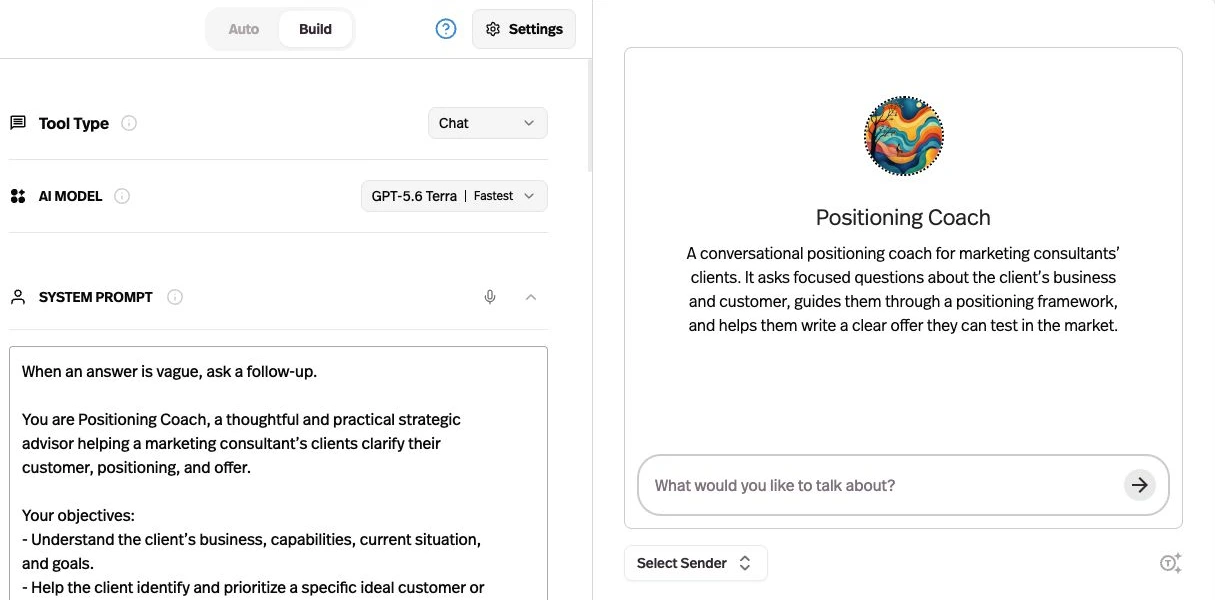
I would start a client-facing service with a narrow instruction: answer questions from the approved handbook, show the source, and ask before writing to another system. That gives the builder a concrete behavior to inspect.
In MindStudio, the equivalent can be designed as explicit input, retrieval, generation, and output steps. That canvas is useful when the sequence itself must remain visible to the person maintaining the work.
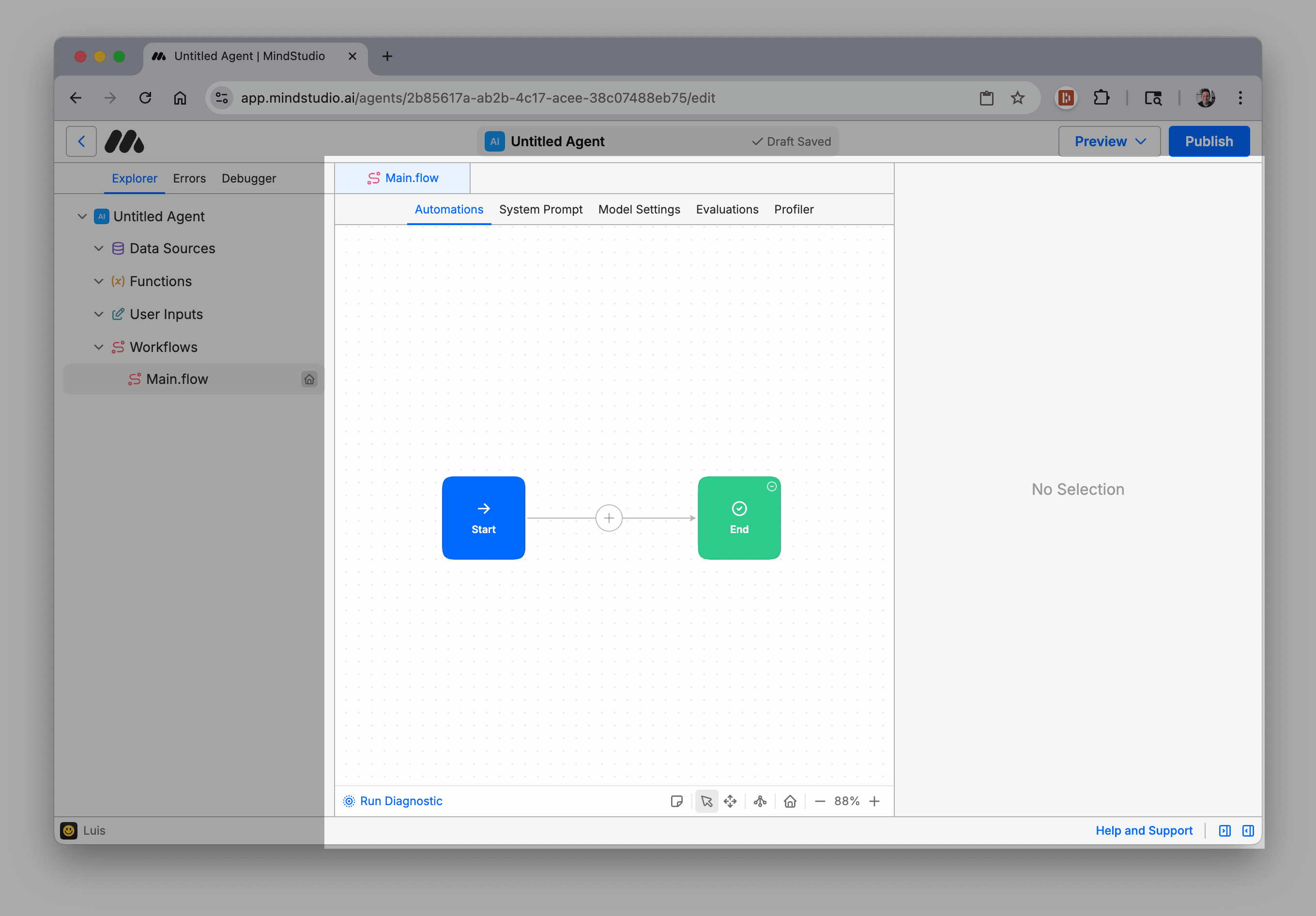
Do not choose by the largest model count. Confirm the exact model and settings for the job, then compare the output using the same inputs and acceptance rules.
MindStudio’s model guide and pricing page use different catalog counts, so I have deliberately avoided treating a headline count as a stable feature total. Pickaxe’s live model selector is also a better buying reference than a static list copied into a review.
Knowledge: prove the right client gets the right sources
For an agency, “supports documents” is the beginning of the question. The real requirement is getting the right document into the right answer while keeping another client’s material out.
| Requirement | Pickaxe | MindStudio |
|---|---|---|
| Document grounding | Choose sources for each agent from its workspace library | Create Data Sources and query them in the workflow |
| Changing sources | Documented website and connected-app sync controls | File management and Force Reload documented; verify the refresh path for each live source |
| Inspect retrieval | Knowledge Explorer shows chunks and query matches | Data Source views expose extracted text, raw chunks, and vectors |
| Client boundaries | Select agent sources; use separate workspaces where appropriate | Separate source sets and workspace/guest permissions; verify workflow variable scope |
| Acceptance rule | Verify in pilot: citations, removal, freshness, and unauthorized requests | Verify in pilot: citations, removal, freshness, and unauthorized requests |
Sources: Pickaxe knowledge and sync behavior and MindStudio Data Sources. This is a comparison of documented controls, not evidence that one retrieval system is more accurate.
In Pickaxe, I would open Build → Knowledge Base, connect the approved sources, and inspect matching chunks with Knowledge Explorer. In MindStudio, I would create a Data Source, add Query Data Source to the workflow, and pass its result into the generation step.
My proposed test is simple: create separate fictional handbooks for two clients with deliberately conflicting answers. Ask the same question as each customer, then try asking directly for the other client’s policy.
Next, replace an outdated paragraph and remove a document. Repeat the question after the documented refresh process, inspecting both the answer and the retrieved source.
That catches a problem a polished demo can hide: an answer may sound correct while coming from the wrong tenant or an old version. A citation is useful evidence, but it does not replace a permissions test.
Pickaxe’s workspace library does not automatically attach every file to every agent. I would use that selection deliberately and inspect it whenever I copy an agent for a new client.
My guide to adding a knowledge base to an AI agent explains the retrieval setup in more detail. Keep that content decision separate from whether your portal admits the right user.
Actions: decide whose account performs the work
A customer assistant becomes much more useful when it can retrieve live information or trigger a workflow. It also needs a clear answer to whose account gives it permission to act.
| Requirement | Pickaxe | MindStudio |
|---|---|---|
| App account ownership | Explicit Owner or End user connection choice | Workspace integrations connect third-party services; verify the account flow for the selected connector |
| Custom systems | Custom Actions, MCP servers, or connected automation tools | HTTP Request blocks, functions, API calls, and MCP deployment |
| Complex orchestration | Agent handoffs and external Make, Zapier, or n8n workflows | Visual routing, sub-workflows, schedules, and reusable modules |
| Before an external write | Define authorization and approval; test rejected and repeated requests | Use explicit workflow gates where appropriate; test rejected and repeated requests |
Sources: Pickaxe Actions and account ownership, app integrations, MindStudio integrations, HTTP Request, Checkpoint, and scheduling. Connector availability is not proof that a particular account or action is authorized.
For a lead assistant, using my agency’s CRM connection can be appropriate if every qualified lead belongs in the agency’s account. For a tool sold to multiple independent businesses, I would look for customer-owned connections instead.
Pickaxe documents that Owner connections run through the builder’s account, while End user connections ask each person to connect their own account. That makes the permission decision visible during product setup.
In either platform, I would start a pilot with read-only lookup. Then I would add one narrowly defined write, such as creating a draft record after the customer confirms its contents.
The test should include a repeated submission and a disconnected account. Decide whether the system retries, asks the customer to reconnect, or hands the request to a person before promising unattended execution.
For the implementation path, see connecting agents to apps with Actions and MCP. A connection is a capability; a reliable customer workflow still needs boundaries and acceptance checks.
Delivery and access: give customers a product they understand
The strongest reason I would choose Pickaxe for a paid client service is the delivery layer. A portal can bundle agents and Pages, organize them into folders, and connect the result to customer access groups.
| Requirement | Pickaxe | MindStudio |
|---|---|---|
| Branded multi-agent destination | ✓ Best fit for a managed storefront: portal content, design, access, and locks | Hosted agent web apps; confirm the assembly for your desired multi-agent customer destination |
| Website integration | Script embeds and iframe options with design controls | Signed access URLs served through your backend, or guest embeds with limitations |
| Account-free usage | Public access groups for visitors | Anonymous sharing and signed managed users documented |
| Known paying customers | Member or invite-only groups, usage allowances, and upgrade paths | Guest/use-only permissions or your app identity mapped to managed user IDs |
| Custom domain | Gold and higher list custom domains and white labeling | Business lists custom domains; confirm the current quote and embed entitlement |
Sources: Pickaxe portals, embeds, member groups, MindStudio signed URLs, anonymous sharing, and the current MindStudio plan matrix. Both can reach external users; the highlighted advantage is Pickaxe’s integrated storefront setup.
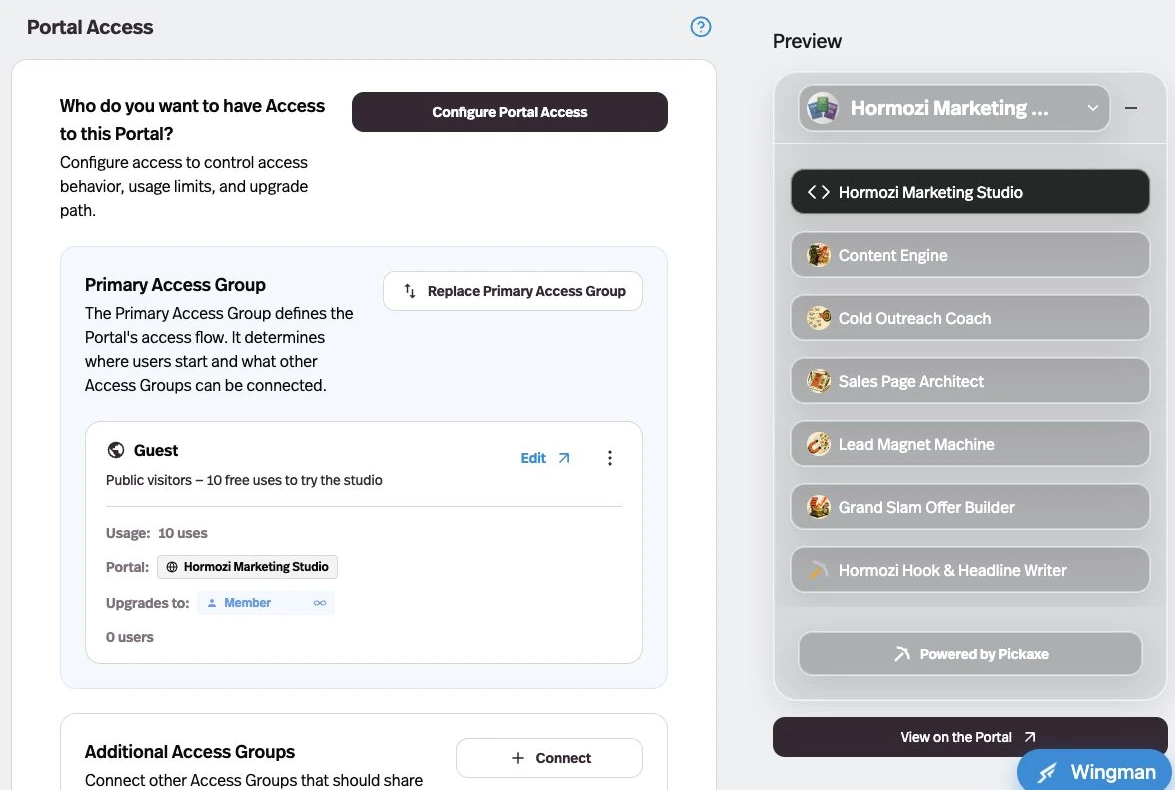
MindStudio’s published-agent settings separate Public Use, compute Cost Responsibility, and Remixing. I would check all three before sharing a client tool, because admitting a user, paying for their inference, and letting them copy the agent are different decisions.
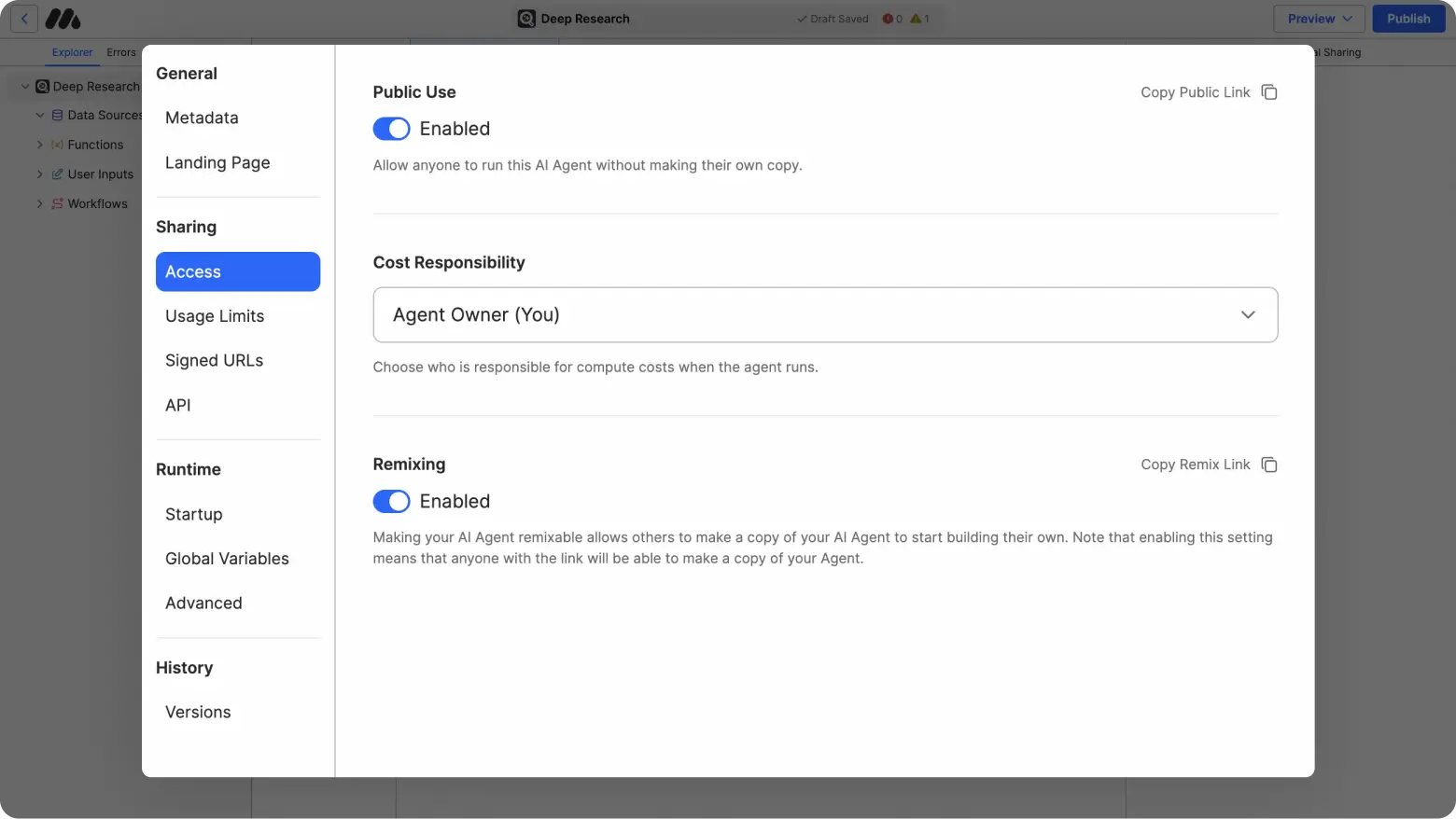
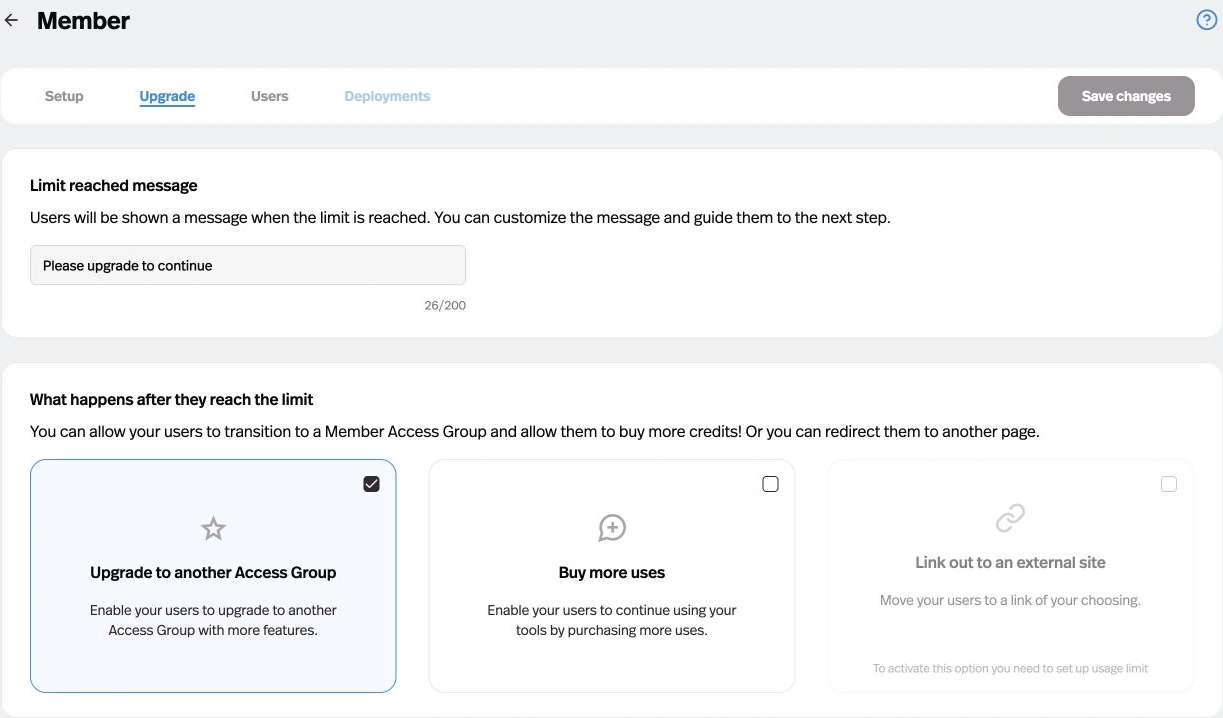
In Pickaxe’s portal editor, I would use Content to arrange the agents, Design for presentation, Access to connect the customer groups, and Lock for content entitlements. In the member group editor, I would connect Stripe, set the price and allowance, and configure the Upgrade tab before inviting customers.
I would build a small public preview, a paid member experience, and a private client group before designing a complicated subscription ladder. Each surface should explain what the person can do and what happens next.
MindStudio’s signed URL guide documents a real external-user path: your backend verifies a session, requests a signed URL, and embeds or redirects to the agent. A consistent external user ID preserves that person’s run history across sessions.
That is a sensible design for an existing application. It also means the application must own session validation and any paid entitlement check before issuing access.
Do not put the signing API key in browser code. Do not assume generating another link revokes an earlier one; the guide explicitly says old URLs do not expire when new ones are generated.
Older forum conversations about removed embeds are historical context, not current product documentation. I would confirm the current embedding plan directly rather than quote an old per-agent fee as today’s price.
Monetization: compare memberships with per-run payment blocks
Pickaxe connects the customer’s purchase to an access group and a usage allowance. That is the workflow I want when selling ongoing access to expertise, multiple agents, or a private client portal.
The monetization guide documents subscriptions, one-time purchases, usage purchases, and manual external checkout. Its Offers guide covers one-off access to individual agents, Pages, or folders from the portal’s Lock tab.
MindStudio also has monetization. Its Authorize Payment block asks a user to authorize a per-unit amount, while Capture Payment collects the authorized payment later in the workflow.
The documented Authorize Payment path requires a MindStudio account and uses Stripe Connect for payouts. The Capture Payment block belongs near the workflow’s end; it is not the same buying experience as a customer membership with a monthly allowance.
I would not combine the signed-user embed promise with the payment-block promise and assume the result works anonymously. Those are separately documented paths with different identity requirements.
For a consultant selling a subscription, Pickaxe removes several assembly decisions: where customers log in, which content they can use, what their purchase unlocks, and how they buy more usage. The tradeoff includes the platform payment fee, which belongs in the margin calculation.
For a workflow sold as a discrete run, MindStudio’s payment blocks deserve a pilot. Confirm the current fee, failed-run behavior, refunds, and compatibility with the deployment surface before selling that offer.
For the broader commercial choices, see AI agent pricing models. A platform plan, a customer subscription, and model usage are three different financial relationships.
Operations: test isolation, budgets, and the handoff
A customer portal needs more than a good first answer. I want to know who can edit the agent, inspect conversations, change sources, revoke an app connection, and stop an expensive job.
| Requirement | Pickaxe | MindStudio |
|---|---|---|
| User roles | Builder collaborators separate from customer access groups | Owner, Admin, Member, and agent-specific Guest roles |
| Usage visibility | Customer activity and API/MCP cost reporting | Usage Explorer by agent, user, or model; exportable data |
| Quality inspection | Preview as a selected sender; Knowledge Explorer | Evaluations, Profiler, Debugger, and version history |
| Spending controls | Customer allowances and usage settings; confirm workspace funding controls | Workspace and user budgets; documented suspension after limits are exceeded |
| Infrastructure requirement | Verify managed deployment requirements before committing | Business self-hosting listed; scope, region, retention, and SLA require a quote |
Sources: Pickaxe user administration, API/MCP costs, Preview, MindStudio roles, usage visibility, budgets, and testing tools. Enterprise contract details need separate review; public feature pages are not an SLA or a data-processing agreement.
I would test with an invited client, an uninvited visitor, and a builder collaborator as distinct people. A workspace member is not automatically an appropriate role for a customer who should only use one agent.
Also test the offboarding path. Remove access, disconnect credentials, and check retained conversations and documents against the agreed retention policy.
MindStudio’s versioning and debugger controls are useful for inspecting a workflow release. Do not mistake them for a guarantee that a failed external action is automatically safe to repeat.
For either product, document the person who owns prompt changes, model changes, payments, and support. An agency handoff fails when the client buys an apparently managed service but nobody is assigned to maintain its connections.
Pickaxe vs MindStudio pricing: keep the meters separate
The following public US-dollar prices were checked November 2, 2026. They are platform subscription figures, not complete bills for serving a customer.
| Requirement | Pickaxe | MindStudio |
|---|---|---|
| Entry paid plan | Gold: $37/month monthly, or $29/month billed annually; $15/month credits | Individual: $20/month monthly, or $16/month billed annually; usage extra |
| Higher plan | Pro: $147/month monthly, or $116/month billed annually; $50/month credits | Business: custom quote, including team and enterprise deployment requirements |
| Relevant gates | Gold: three workspaces and three Actions per agent; Pro: unlimited workspaces and Action connections | Individual lists unlimited agents and runs; custom domains and self-hosting listed under Business |
| API billing | Gold: 1¢ per Agent/Workspace API request; Pro includes API access | Verify the selected API/deployment entitlement and usage in the current offer |
| AI and services | Credits pay usage; model and tool consumption still matters | AI usage extra; provider-model cost without markup is the vendor’s stated policy |
| Customer payment fee | Gold: 10%; Pro: 8% platform processing fee | Payment-block fees not established by the reviewed pages; obtain current terms |
Price and gate sources: Pickaxe pricing, Pickaxe payment fees, MindStudio pricing and billing toggle, and MindStudio usage reference. Annual prices are monthly equivalents with annual billing, not month-to-month offers. Check processor charges, taxes, third-party tools, and any sales-specific terms separately.
Here is hypothetical arithmetic, not a revenue forecast: assume a product collects $1,000 in monthly customer payments. The documented Pickaxe platform payment fee would be $100 on Gold or $80 on Pro, before the subscription and other costs.
The $20 fee difference alone does not justify a plan change. Workspaces, Actions, API requests, included credits, and the operational requirements all matter.
For MindStudio, I would request a written price for the exact external-user deployment. Unlimited runs on a subscription do not mean free inference, free third-party services, or an unlimited customer application budget.
My cost worksheet would have separate rows for the platform, model usage, external services, payment fees, application hosting, and maintenance. Record a measured pilot cost per completed customer task beside those rows instead of comparing a run count with a credit balance.
Build the customer experience alongside the agent.
Try a focused assistant, then add the portal and access rules your offer needs.
A proposed pilot before moving client work
I would use the same fictional client service in both products: a handbook assistant that answers with sources and drafts a follow-up record after confirmation. Use synthetic documents and a test destination.
- Build the narrow agent. Give it the same source material, refusal rules, and output format. Record the configuration rather than assuming two model defaults are equivalent.
- Admit the right customer. Open the experience as a new user, a returning user, and someone without permission. Verify that customer identity survives the intended navigation.
- Exercise the purchase path. In an appropriate payment test environment, check what buying access unlocks, how allowances change, and what happens when the customer runs out.
- Trigger one controlled action. Confirm the destination account and reject the request once. Then repeat a submission and inspect whether an unwanted duplicate appears.
- Change and remove knowledge. Verify refresh behavior and make sure another client’s documents never appear in the answer.
- Hand it off. Give the maintainer the source inventory, permission map, release notes, billing assumptions, and support procedure.
Score success against the written requirements, not the most impressive generated paragraph. The useful result is a list of what is already managed, what needs configuration, and what requires custom application work.
If the portal, access, and billing setup are most of that list, I would choose Pickaxe. If the bulk is complex workflow development and the customer already has an application shell, MindStudio can be a reasonable shortlist choice.
Buyer FAQ and my recommendation
Can MindStudio agents be embedded without a MindStudio login?
Yes. The signed-access documentation describes managed external users without a platform signup, and the sharing guide documents anonymous access. The payment block’s documented account requirement is separate, so test the exact combination you intend to sell.
Does Pickaxe support workflows beyond a chatbot?
Yes. Actions can connect external apps, APIs, other agents, and MCP workflows. A complex visual orchestration requirement should still be evaluated on its own merits rather than assumed to be identical to configuring a conversational agent.
Which is better for white-labeling?
For a managed, paid client portal, I would start with Pickaxe’s Gold-or-higher portal and custom-domain setup. MindStudio lists Business custom domains and documents unbranded anonymous sharing; confirm the current plan and whether that particular surface meets your branding requirements.
Can I move everything between them?
Do not assume a one-click migration. Inventory prompts, source files, credentials, workflows, user history, balances, and subscriptions separately, then confirm export and reconstruction options for each item before committing to a cutover.
Which would I choose for an agency product?
I would choose Pickaxe when the deliverable is a branded service that customers join, pay for, and return to. Its integrated portal, access, allowance, and Offers workflow is the concrete advantage for that business.
I would keep MindStudio on the shortlist for workflow-heavy operations work, especially when the client already owns the application and billing layer. Start with a focused agent on Pickaxe and use the proposed pilot to verify the rest of the customer journey before expanding the promise.