
For Pickaxe vs Elvex, I would choose Pickaxe to sell a branded AI service to clients, and shortlist Elvex when the main job is giving employees a shared AI workspace with company context and administrative controls. Both can build agents, connect information, and call tools; the buying decision starts with who uses the result and who pays for it.
I compared the current documentation, pricing surfaces, API references, and commercial terms. This is a documented implementation comparison, not a benchmark or a claim that I ran either product through a customer deployment.
The product screenshots come from each vendor’s official help documentation, with captions naming the source and scope. They show the documented interface, rather than the result of a live workflow test or entitlement on every plan.
| Requirement | Pickaxe | Elvex |
|---|---|---|
| Agent building | Chat or form agents, prompts, Preview, models, knowledge, Actions | Agents with rules, context, datasources, integrations, and shared Spaces |
| Knowledge and grounding | Documents, websites, connected apps, citations, Knowledge Explorer | Uploaded or synced datasources, websites, databases, source references |
| External tools | Owner or end-user app connections; custom Actions and MCP | Personal and company connections; custom APIs and MCP |
| Paid client access | ✓ Best fit for paid client access: Stripe-backed memberships, usage purchases, and Offers | Team sharing and API delivery documented; native customer checkout not verified |
| Branded delivery | ✓ Best fit for an owned AI storefront: portals, custom domains, embeds, access groups | Company branding, Spaces, Slack/Teams and API; confirm any external storefront scope |
| Team administration | Collaborators and customer access groups; advanced SSO on Business | Company settings, roles, groups, model catalog, logs; SAML requires Enterprise |
| Operating visibility | User Activity, conversation insights, usage and cost exports | Agent analytics, event logs, company/user spend controls |
| Commercial model | Published plan prices, usage credits, payment processing share | Quote-dependent agreement; model billing and external-user rights need confirmation |
Sources, checked October 28, 2026: Pickaxe builder, portals, payments, plan gates, Elvex builder, company settings, commercial scope.
Pickaxe vs Elvex: start with the buyer and the job
| Buyer | My starting choice | Deciding requirement |
|---|---|---|
| Creator or agency selling an AI membership | ✓ Best fit: Pickaxe | Built-in branded portals, paid access and customer allowances |
| Department standardizing internal AI work | Shortlist: Elvex | Shared Spaces with company context and centralized administration |
| Private assistant with no checkout requirement | Both: verify in pilot | Knowledge boundary, identity, chosen integrations and full cost |
The overlapping features can hide a difference in what you are operating. A consultant selling an assistant needs a customer journey: landing in the right portal, signing in, paying, receiving an allowance, and getting useful work done.
An internal AI rollout needs a different journey: joining the organization, finding approved agents, inheriting relevant company context, connecting permitted tools, and staying within policy. Those journeys overlap, but they create different maintenance work.
Pickaxe’s portal documentation describes agents and pages packaged into a product with access groups and locked content. Elvex’s Spaces documentation describes persistent team or project context with pinned agents, datasources, and threads; each member opens their own conversations.
Sources, checked October 28, 2026: portal structure, Spaces.
I would favor Pickaxe for a coaching membership, a consultant’s paid knowledge assistant, or an agency’s branded client hub. I would consider Elvex for a department that wants multiple employees to reuse company context and approved tools inside their daily work.
That is a workflow recommendation, not a claim that Pickaxe cannot serve employees or Elvex cannot power an external application. For the broader delivery decision, the custom client portal guide explains why onboarding and recurring access deserve as much attention as the prompt.
Building and models: both go beyond a prompt box
| Requirement | Pickaxe | Elvex |
|---|---|---|
| Instructions and input | System prompt; chat or form tool type; supported model options | Rules, agent context, tool permissions and selected provider/model |
| Iteration | Preview alongside configuration; Select Sender for a particular user | Agent configuration and conversations; saved rule history with diff and restore |
| Model funding | Platform credits; check the current model and account configuration | Provider setup docs describe funded organization keys; confirm managed-provider terms in the quote |
| Capabilities | Model picker filters such as Actions, image upload and reasoning | Provider/model choice and enabled tools determine behavior; catalog controls restrict access |
Sources, checked October 28, 2026: builder controls, model options, agent configuration, rule history, provider setup, model catalog.
Both are credible starting points for a focused assistant. A form can be useful when clients must supply a consistent brief; a chat can work better when the question needs clarification before the answer.
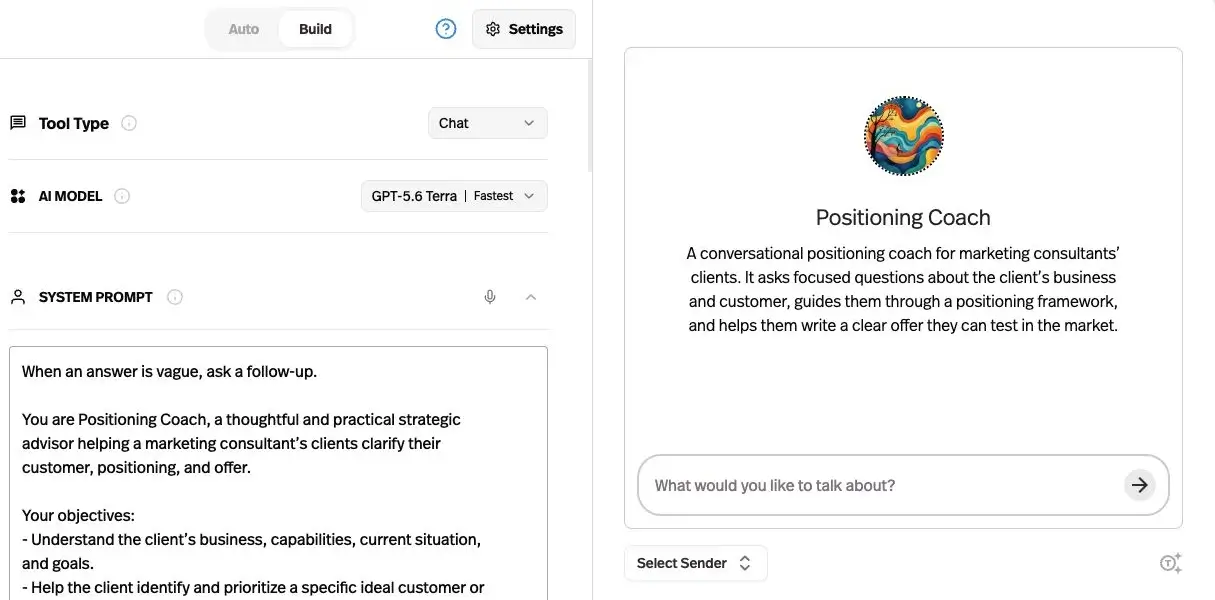
I would write the same compact specification first: audience, permitted sources, expected output, one allowed action, and an escalation condition. Then I would use the builder to implement it, rather than asking a broad agent to discover the business rules.
Elvex documents restoring earlier agent rules. That is useful change control, but restoring a prompt does not reverse a message already sent or a CRM record already changed; keep external recovery in the workflow design.
Model choice also needs task-level validation. A provider name appearing in a menu does not prove that every model supports the same tool behavior, file inputs, or context size; use the agent evaluation guide to compare the outputs you actually need.
Knowledge: inspect the source boundary before the answer
| Requirement | Pickaxe | Elvex |
|---|---|---|
| Sources | Files, websites, app connections, audio/video and data formats | Uploaded/synced files, websites, and external database connections |
| Freshness | Documented source-specific sync; daily auto sync for supported collections | Dynamic file sync aims for about five minutes; connected folders sync direct child files |
| Debugging and citations | Citation controls and Knowledge Explorer retrieval inspection | Datasource processing status, source references, query/search behavior |
| Isolation | Choose which sources each agent sees; test separate client access | Private/public resources and explicit sharing; shared datasource access can exceed a user’s source-system access |
Sources, checked October 28, 2026: Pickaxe source and retrieval controls, Elvex datasource sync and permissions, database permission boundary.
I would not rank these platforms by the size of their file-type list. The practical questions are whether the correct source reaches the correct user, whether updates arrive when required, and whether someone can inspect a wrong answer.
Pickaxe documents choosing an agent’s connected files, enabling citations, and running a question through Knowledge Explorer. Its collection auto-sync rules differ from individual connected-file updates, so I would test the exact source type instead of promising a universal refresh interval.
Elvex distinguishes ingested file content from live database queries. Its security guide warns that a connected database’s service account defines the available data; users of that agent do not automatically receive their original database permissions.
There is a related sharing caveat: Elvex documents that a public agent can use a private datasource. That can be intentional, but it makes the agent’s audience part of the data boundary; “private datasource” alone is not proof of private answers.
My proposed test is simple: create synthetic Client A and Client B documents with different canary phrases. Ask each client’s account about the other document, then change one approved fact and check which version the answer cites before accepting the setup.
This builds on the knowledge base setup walkthrough. It is a proposed acceptance test, not evidence that either product passed or failed it.
Actions and automation: choose whose account does the work
| Requirement | Pickaxe | Elvex |
|---|---|---|
| Account ownership | Owner or End user connections, selected during Action setup | Personal integrations plus company-wide setup where supported |
| Extensions | Action Library, custom Actions, MCP, connected automation platforms | Integration actions, custom OpenAPI integrations, MCP servers |
| Approvals | Design and verify the required approval behavior for the chosen Action | HITL on designated actions; admin-unlocked, personal auto-approval settings |
| Scheduled work | Verify the chosen runtime or an external scheduler/API arrangement | Schedules can attach agents, Spaces or datasources with a chosen cadence |
Sources, checked October 28, 2026: Pickaxe Actions and account choice, agent integration grants, company-wide setup, approval controls, scheduling.
Both products can move beyond answering questions. Pickaxe explicitly lets an Action use the owner’s account or require each end user to connect their own account; Elvex documents scoping integrations to agents and distinguishes personal from company connections.
I would test the credential path before connecting a write tool. A shared account can be correct for recording incoming leads in the agency CRM, while a personal account is usually the clearer choice for an employee’s own email.
Elvex’s company-wide setup guide says an admin connection can remove individual linking, while its general permissions guide also contains a per-user setup requirement. I would confirm the selected connector’s actual behavior with Elvex and in a pilot, rather than assuming one rule covers every integration.
Sources, checked October 28, 2026: company-wide connection guidance, general permissions guidance.
For either platform, start with a read operation or draft creation, then test an expired connection and a rejected write. The assistant should report the failure accurately and preserve a stable request identifier so a retry does not create duplicate work.
Neither a tool call nor a scheduling menu establishes guaranteed recovery for arbitrary external actions. If that matters, define idempotency and the maintenance owner in the connected service; the human approval guide covers where a person should remain involved.
Delivery and paid access: where Pickaxe is the clearer fit
| Requirement | Pickaxe | Elvex |
|---|---|---|
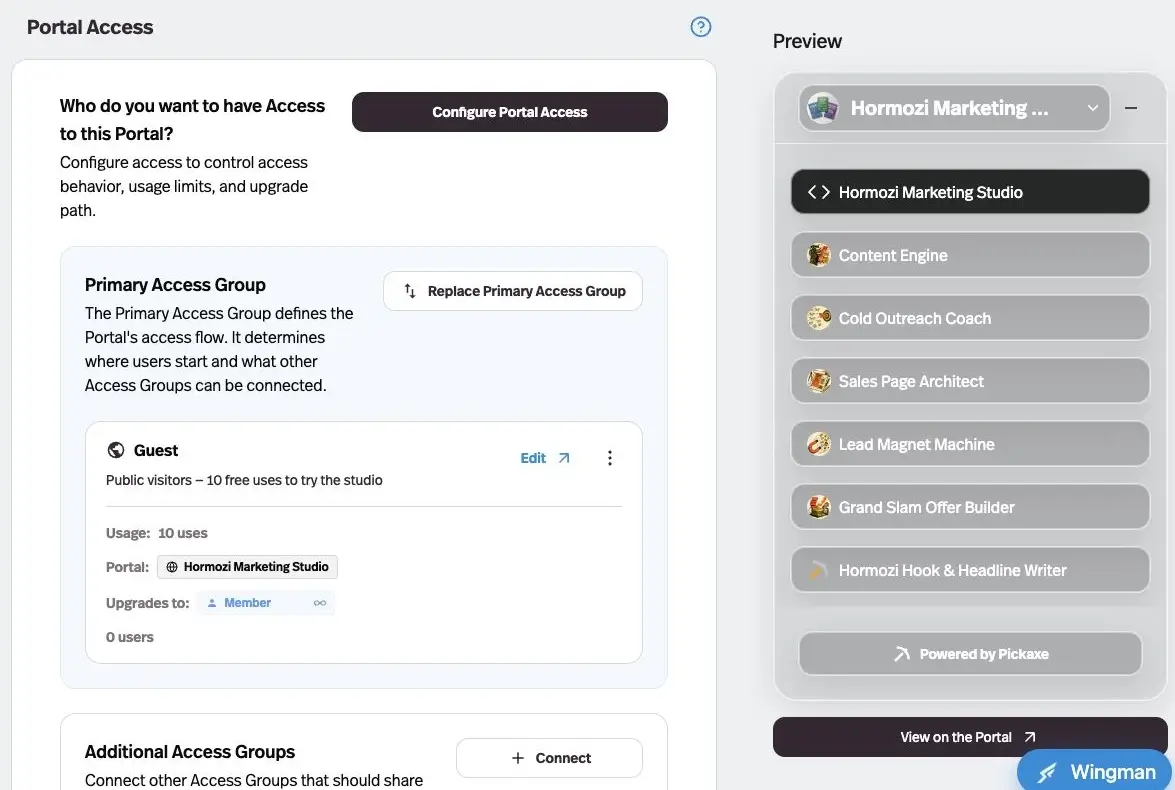
| Customer surface | ✓ Best fit for a paid portal: branded multi-agent hubs and custom domains on supported plans | Spaces and company branding; API access supports custom applications |
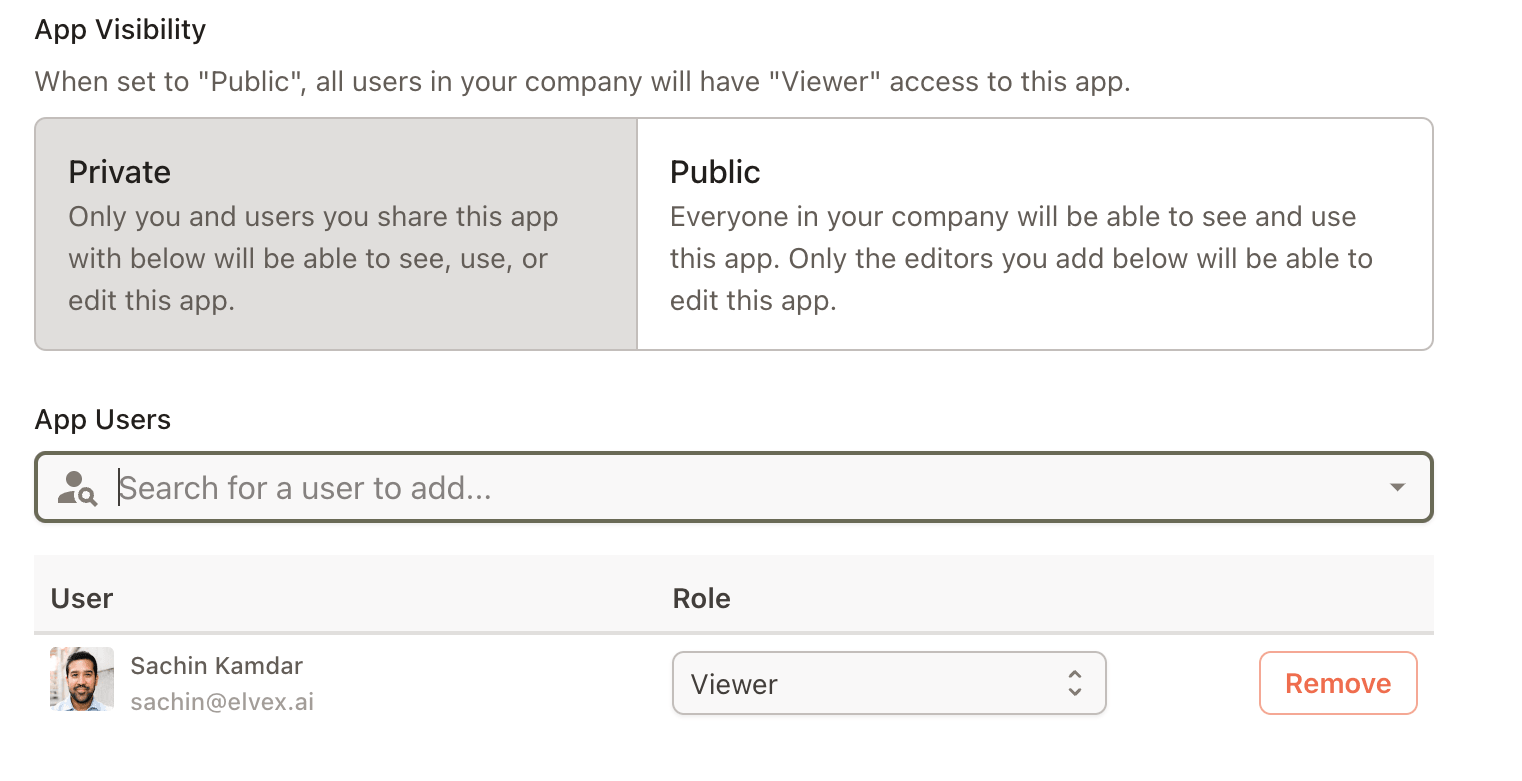
| Audience entry | Public, member and invite-only access groups | Private/public company resources, individual sharing and groups |
| Checkout and allowances | ✓ Best fit for built-in checkout: Stripe payments, group allowances and usage top-ups | A native external-customer checkout was not verified in the reviewed public documentation |
| One-off products | Offers lock an agent, page or folder for purchase | Confirm a custom delivery and commercial arrangement if needed |
Sources, checked October 28, 2026: portal surfaces, access groups, checkout, Offers, Elvex sharing, API delivery.
Pickaxe’s advantage here is specific: its documented product path joins the customer interface to paid entitlement and usage allowances. That is less infrastructure for an agency to assemble when the deliverable is an ongoing AI service.
Elvex’s “Public” agent visibility means available within the company, not automatically a public internet storefront. Its Slack and Teams options can extend approved access beyond people already signed into the web app, but that still needs the relevant sharing configuration.
Its API makes custom delivery possible technically. However, the standard Terms of Sale frame use around internal business operations and restrict making the service available beyond the agreement; confirm external-user and resale rights in the executed agreement before building a customer-facing wrapper.
Sources, checked October 28, 2026: public versus private sharing, chat-platform permissions, standard commercial terms.
I would use separate client workspaces where the ownership and data boundary require it. A different logo or access group is a presentation and access choice, not a substitute for testing which knowledge, memories, and credentials the agent can reach.
Governance and operations: compare actual controls and plan gates
| Requirement | Pickaxe | Elvex |
|---|---|---|
| Authentication | Customer login methods; Embed SSO on Pro; advanced SSO on Business | SAML is documented for Enterprise; company roles and groups |
| Visibility | Conversation and Action summaries, insights, filtered activity/user exports | Event logs, agent usage analytics, company and per-user spending views |
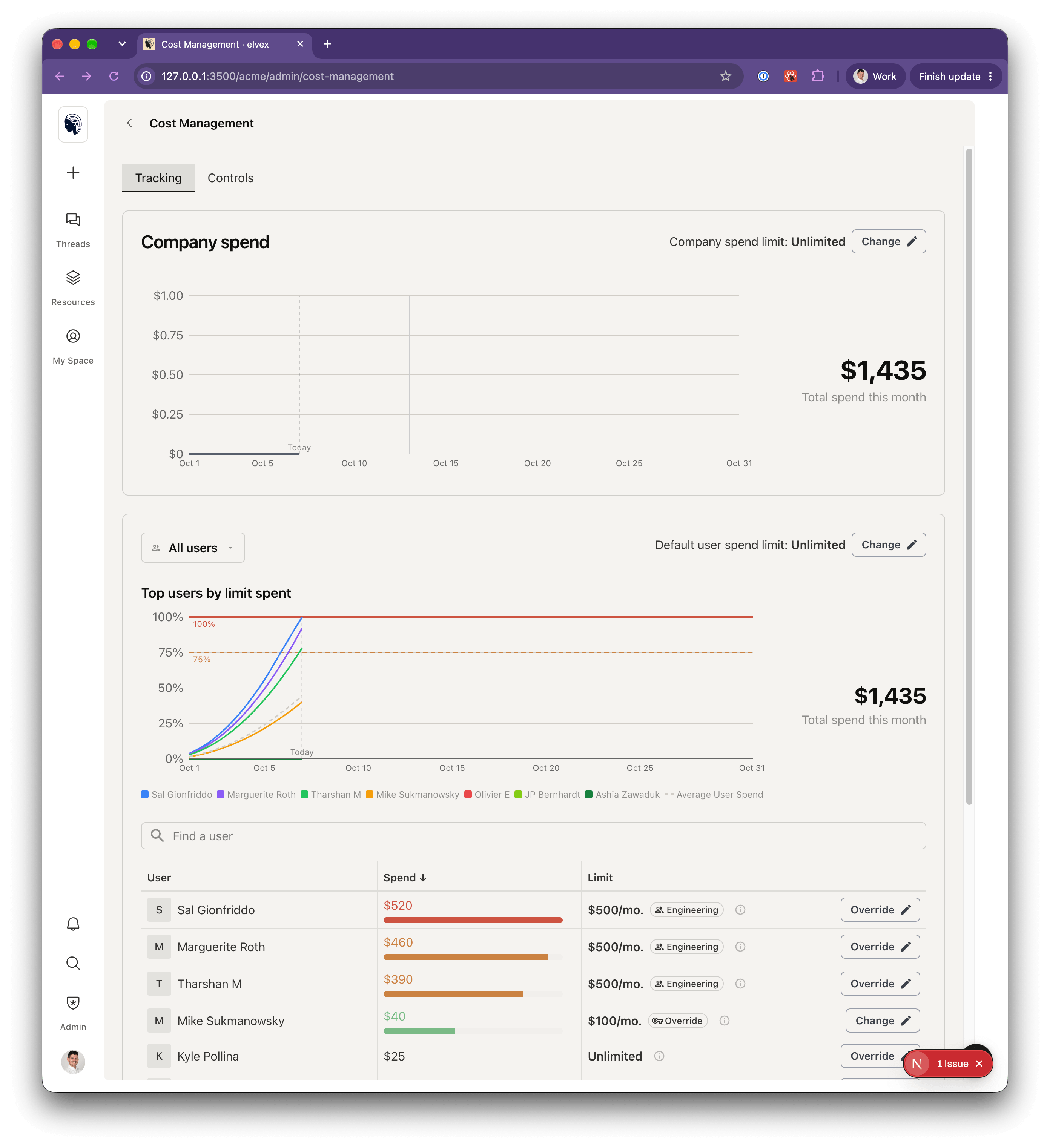
| Budget stops | Access-group uses or credits and upgrade/top-up behavior | Company and user spend limits; company limit can stop everyone |
| Security evidence | Public Trust Center describes SOC 2 Type II scope; request the full report | Security documentation and Trust Center provide vendor statements and report requests |
Sources, checked October 28, 2026: Pickaxe plan gates, Activity and exports, security examination scope, Elvex Enterprise SAML, spend controls, security documentation.
I would evaluate Elvex’s shared context, model catalog, groups, and company spend controls together for an internal rollout. Their value is a repeatable administrative process, rather than a claim that the competing product lacks permissions.
Pickaxe also has operational controls: its Users documentation describes conversation insights, resource use, feedback and downloadable activity. Its API deployment documentation adds a critical qualification: a caller-supplied user ID attributes usage, while the application remains responsible for authenticating that end user.
Sources, checked October 28, 2026: deployment API identity boundary, conversation insights and exports.
For sensitive work, I would request the applicable DPA, provider list, retention and deletion terms, hosting region, and report scope from both vendors. A security badge is not evidence that a particular connector, model route, or buyer configuration meets every contractual requirement.
Pickaxe’s public privacy policy distinguishes Enterprise content governed by individual agreements. Elvex also separates customer processing terms from its general privacy policy, so I would resolve the actual agreement and provider route before making a no-training or retention promise to a client.
Sources, checked October 28, 2026: Pickaxe privacy policy, Elvex privacy policy.
Pickaxe vs Elvex pricing: keep the meters separate
The figures below are the public USD prices checked October 28, 2026. They are platform plan prices, with tax and payment-provider costs excluded from the illustrative arithmetic; regional checkout and any negotiated agreement can change the final bill.
| Product or cost layer | Price or buying process | Meter and qualification |
|---|---|---|
| Pickaxe Gold | $37/month monthly; $29/month equivalent billed annually | $15/month included credits; 3 workspaces; 3 Actions/agent; 50 knowledge documents/workspace; 90% revenue retention |
| Pickaxe Pro | $147/month monthly; $116/month equivalent billed annually | $50/month included credits; unlimited workspaces/documents/Actions; 92% revenue retention; API included |
| Pickaxe Business | From $597/month; minimum six-month commitment | Custom credit package and terms; advanced SSO; up to 98% revenue retention |
| Elvex platform | Quote required: public pricing URL redirects to the demo page | Confirm seats, request allowances, external access, onboarding, support and overages |
| Elvex model spend | Provider route and agreement determine the bill | A request is a model interaction, including returning tool results; spending controls are estimates, including BYOK activity |
Sources, checked October 28, 2026: Pickaxe prices, limits and revenue retention, Elvex buying process, request definition, spend estimates.
Pickaxe defines $1 of platform credit as $1 of AI usage cost. Its simpler uses system counts one user input as one use; that does not mean every input has the same underlying model cost.
Sources, checked October 28, 2026: credit definition, uses versus credits.
For Elvex, one message that produces a tool call and then returns that result to the model can be two requests. I would ask for a quote against a workload trace, not compare a request allowance directly with customer messages or Pickaxe uses.
Elvex’s spending dashboard is an estimated model-cost control, not a substitute for its invoice or the provider’s invoice. A company cap stops new requests across users; an in-progress step may complete above the cap, and the documented API response at a reached limit is HTTP 429.
Three hypothetical workloads to price before signing
These scenarios are planning inputs, not observed customer volumes or measured model usage. For all three, assume synthetic text-only knowledge, no images, a chosen model common to both products, and average uncached payloads of 2,000 input and 500 output tokens per model call.
| Scenario | Audience and knowledge assumptions | Action and retry assumptions |
|---|---|---|
| Small service | 1 client; 1 builder; 500 messages/month; 20 MB knowledge | 100 Action attempts plus 5 retry attempts |
| Growing service | 5 clients; 2 builders; 5,000 messages/month; 200 MB knowledge | 1,000 Action attempts plus 50 retry attempts |
| Agency portfolio | 20 clients; 4 builders; 20,000 messages/month; 1 GB knowledge | 4,000 Action attempts plus 200 retry attempts |
An Action attempt is not automatically one extra model call. Record the real number of provider calls, context replay, tool-result tokens, cache writes or reads, failed attempts, and automation charges during the pilot, then replace these assumptions with the trace.
For Pickaxe, the small case might fit Gold’s workspace count if its document count and features also fit. Separate workspaces for the growing and portfolio cases point toward Pro’s unlimited-workspace allowance; collaborator limits still apply per workspace, so verify who needs edit access.
For hypothetical $1,000 monthly customer receipts, the published 90% and 92% retention figures imply $100 and $80 platform shares respectively, before payment-provider charges. These are arithmetic examples using the pricing table, not profit forecasts; subtract the plan, AI usage, external tools, support and taxes as applicable.
Sources, checked October 28, 2026: workspace, collaborator and retention limits.
For Elvex, send the same audience and workload inputs to sales, specify internal employees versus paying external clients, and request a written platform-plus-model breakdown. There is no defensible dollar winner until the quote, provider funding and permitted delivery model are comparable.
Walkthrough A: a branded assistant for a paying client
This is a proposed implementation using synthetic material. The deliverable is an agency methodology assistant that answers from an approved handbook and creates a draft follow-up task, with an agency owner responsible for ongoing operation.
- Prepare: create a small handbook, a source register and a separate confidential canary document. Define who can see each before connecting anything.
- Build: configure one agent, attach only approved knowledge, request source references, and test an unanswerable question. Keep the draft task Action narrowly scoped.
- Connect: choose owner credentials for the agency’s task inbox or end-user credentials for each client’s account. Avoid an unrestricted shared write connection.
- Deliver: in Pickaxe, connect a portal and suitable access group, set an allowance, then configure Stripe monetization or a one-off Offer if relevant. Confirm the intended primary/additional group combination.
- Break the happy path: change one handbook answer, exhaust an allowance, remove access, and expire the Action connection. Check the visible outcome and task system for duplicates.
The expected output is a grounded answer and a draft task tied to a known user, not an unattended change to the client’s business. Keep the pilot private until those boundaries work.
The Elvex equivalent begins with an agent, approved datasources and a scoped integration. If customers need a branded application and checkout, define the wrapper, identity enforcement, entitlement service and commercial permissions explicitly; the API alone supplies none of those business decisions.
Sources, checked October 28, 2026: membership setup, portal group combinations, Stripe and allowances, Elvex API access, external delivery scope.
Walkthrough B: a governed employee briefing workspace
The second proposed pilot serves an internal operations team. Give it synthetic policy files and a read-only project feed, and ask for a daily briefing with source references and draft escalation notes; IT owns permissions, while operations owns the content.
In Elvex, an admin configures the permitted provider route and integrations. A creator sets up a focused Shared Space, writes its context, pins the necessary agent and datasources, then grants the team both Space membership and resource access through the appropriate group.
If the briefing should run automatically, create a schedule with the specific resource, prompt, timezone and delivery expectation. Leave designated write actions on manual approval during the pilot and verify how a scheduled run handles a pending approval or missing connection.
Sources, checked October 28, 2026: Space setup and resource access, resource schedules, personal approval settings.
Pickaxe can serve the employee audience through an invite-only portal with focused agents, connected knowledge and Actions. Compare that implementation against the team’s actual context-sharing requirement, and verify the chosen runtime or external scheduler instead of assuming a portal itself schedules the work.
Test a removed employee, a changed policy, an unavailable feed, and a company budget stop. The expected outcome is a useful briefing or a truthful blocked state, with a named person who can repair the source or integration; an empty or stale report should not look like success.
Combining the products can be reasonable when Elvex is the company’s internal work surface and Pickaxe is its external paid service. Keep identity, data and billing boundaries explicit rather than copying all internal context into the client-facing agent.
Migration: preserve the business configuration, not just the prompt
I would inventory instructions, source files and permissions, model settings, credentials, customer records, payment relationships, and deployment URLs before moving either direction. Exporting text is only one part of preserving the service.
Pickaxe documents user and activity exports, including filtered downloads. Elvex documents rule history and generated-file exports, but I did not verify a complete one-click export of every agent, Space, credential and billing object; ask for the required exit artifacts and formats before committing.
Sources, checked October 28, 2026: user and activity exports, rule history, generated-file export.
Keep credentials in their original secret store and reconnect them deliberately. Do not assume subscriptions, customer allowances, OAuth grants or source permissions transfer with a copied agent; retain the old service until the replacement is verified and the commercial change is agreed.
A staged migration can preserve the existing customer URL while a small invited group tests the replacement. Define who can roll back, what triggers rollback, and whether any external actions need manual reconciliation; prompt rollback cannot undo a completed external change.
A proposed pilot that makes the comparison concrete
I would use twelve synthetic cases: ordinary grounded answers, ambiguous requests, changed facts, missing evidence, cross-client access attempts, a revoked user, an expired connection, a duplicate retry, a budget limit and the chosen delivery channels. Write each expected result before running it.
For every case, save the output, referenced source, effective identity, model calls, Action attempts and visible failure state. Track setup work and recurring maintenance separately so an easier first demo does not conceal a custom billing or permissions project.
Require the critical identity and duplicate-action cases to pass before accepting the workflow. For answer quality, agree a rubric with the buyer and inspect the individual failures; this proposed test set is too small to support a universal accuracy claim.
The build versus buy framework helps frame the extra engineering, and the agent cost guide explains why a message count alone is a weak budget.
Which platform I would choose
I would choose Pickaxe when the thing being sold is access to a client-ready AI product. The documented portal, branding, access-group and payment path directly serves that job, and its published pricing makes the initial plan decision inspectable.
I would shortlist Elvex when the product is an internal working environment: reusable company context, Shared Spaces, permitted models and integrations, with administrators governing a team’s use. I would still ask it to demonstrate the exact permissions and quote against the workload.
For an internal-only department with no checkout requirement, native customer payments should carry little weight. For a paid client service, a good internal chat interface should carry less weight than reliable customer onboarding, entitlement enforcement and a clear commercial right to deliver it.
Try the paid-service workflow with one focused agent
Start with approved knowledge, a clear audience, and a small private pilot.
Buyer FAQ
Can both products answer from company documents?
Yes. Both document knowledge or datasource connections, with different source types, permissions and update behavior. Compare grounding and access on the same synthetic questions; do not infer better answer quality from the presence of a citation control.
Does Elvex require every user to buy a separate AI subscription?
Its provider setup documentation describes organization-managed provider credentials, rather than each employee buying a consumer chat subscription. The commercial terms also contemplate Elvex-enabled providers, so confirm the actual funding route and charges in the quote.
Sources, checked October 28, 2026: provider setup, provider and order-form scope.
Is Elvex Public sharing the same as a public Pickaxe portal?
No. Elvex’s sharing guide uses Public for company-wide visibility, while Pickaxe documents public access groups for visitors with a link. The deployment and authentication rules still need to be tested on the surface you choose.
Is Pickaxe only for external customers?
No. Invite-only groups also support internal teams and private client work. I recommend it here for paid delivery because that path is directly documented, not because every portal has to charge money.
Sources, checked October 28, 2026: private and internal access.
Which is cheaper?
Pickaxe publishes plan prices; Elvex requires a quote for a comparable contract. Compare the platform, model route, usage, payment share and integration maintenance together after defining the same buyer outcome.
The next step: test the destination your users will actually use
My recommendation is to build one representative workflow before committing to a wider rollout. Have a real buyer walk through the intended login, ask a grounded question, encounter a controlled failure, and see what happens when their access or allowance changes.
If the outcome is a branded AI service you can sell, start a focused Pickaxe pilot and use the portal and access controls as part of the test. If the outcome is internal team adoption, ask Elvex to demonstrate that team’s context, permissions and cost controls in its proposed agreement.