

For an agency selling access to a branded AI service, I would choose Pickaxe in a Pickaxe vs Coze decision. Its documented subscriptions and usage purchases connect to customer access, so the deliverable can include the agent, its storefront, and the rules for using it.
Coze deserves a look when the central requirement is a visual bot workflow or an API inside software you operate. Before quoting client work, though, separate its international hosted service, China offerings, and open-source project: their capabilities, billing, and terms are different.
I compared current public documentation and inspected the accessible product entry points. The screenshots below are official help images, not captures of completed deployments; the pilots are proposals, with no claimed speed, accuracy, or revenue results.
Pickaxe vs Coze: functionality at a glance
| Functionality | Pickaxe | Coze international hosted documentation |
|---|---|---|
| Build an agent | Chatbot or Pro Personal Agent; model, instructions, knowledge, Actions. Builder controls | Agents plus reusable visual workflows combining plugins, models and code. Workflow guide |
| Knowledge grounding | Source connections, citation controls and retrieval settings. Knowledge guide | Text, tables and images; retrieval policies and source display. Knowledge settings |
| Tools and automation | App connections, MCP and agent chaining. Actions guide | Plugins and workflow nodes; authorization depends on the integration. OAuth plugins |
| Branded paid destination | ✓ Best fit for paid client access. Portals, member access, usage allowances and payments in one delivery path. Member controls | API/Chat SDK support external delivery; a matching creator subscription storefront was not verified. API publishing |
| Customer upgrades | ✓ Best fit for paid client access. Tier upgrades, top-ups and individual content offers. Offers | User Message Billing allocates consumption costs; it does not document a creator payout. Payer settings |
| Publishing | Portals, pages, direct links, embeds and API; new messaging deployments are paused. Current deployment notice | API, SDK and documented channel publishing; confirm availability in the intended account. Publish API |
| Usage accounting | Builder usage cost and customer allowances are separate. Credits and uses | Message credits and API/SDK Coze tokens are separate resources. Token billing |
| Commercial rollout | Selling agent access is an explicit documented use. Commercial setup | Hosted terms contain a personal/noncommercial license grant; obtain applicable commercial permission. Terms |
| Buyer job | My starting choice | What must be verified |
|---|---|---|
| Sell branded access to a client service | Pickaxe: the paid destination is part of the documented product. | Sources, access boundaries, customer allowance and failure behavior. |
| Maintain a visual workflow inside an existing app | Coze is a candidate when a maintained node graph is a specific requirement. | Applicable commercial terms, caller authorization and surrounding application ownership. |
| Operate the platform infrastructure | Assess Coze Studio separately. | License obligations, model integrations, hosting, backups and upgrade ownership. |
First, identify which Coze product you mean
I would put the product domain, contracting entity and deployment region in the proposal before comparing features. A screenshot from one edition cannot establish the model inventory, commercial permission, or price of another.
This article uses coze.com documentation for the hosted builder comparison. Its published terms identify SPRING (SG) PTE. LTD. and say features can vary by jurisdiction; China pricing is not a substitute for an international account quote.
There is also a material China procurement issue. The official China enterprise discontinuation notice specifies these dates:
- November 30, 2026: Enterprise Standard and Enterprise Flagship stop accepting new customers.
- December 31, 2026: listed legacy plans purchased through Volcengine retire.
- December 31, 2027: the newer enterprise plans retire; their service terms cannot extend beyond that date.
That notice covers specified plans. It does not establish a shutdown date for every international Coze account, and I would not use it to frighten a personal-plan user into migrating.
Coze Studio is a separate, Apache-2.0-licensed codebase. Self-hosting changes the ownership and operating-cost discussion, but it does not mean hosted subscriptions, model access, integrations, or support transfer with the code.
Building: configure the client’s job
Pickaxe starts from the service you want a user to operate. In the current builder, the Build panel puts agent type, interface and model together; standing instructions, knowledge and Actions define the job.
| Requirement | Pickaxe | Coze |
|---|---|---|
| Instructions and interface | Chatbot or Personal Agent, with chat/form configuration. | Agent prompt and skills; apps and workflows are separate construction surfaces. |
| Multi-step work | Actions can connect other agents or external workflows; Personal Agents add runtime workflows. | Reusable visual workflows combine model, plugin and code steps. |
| Model decision | Browse providers and supported capabilities in the picker. | Choose the model available to the actual edition/account; do not infer current access from an old screenshot. |
Sources for these rows: Pickaxe Agent Builder, model controls and Coze workflows. Both support work beyond a fixed prompt; I have not established equivalent graph editors or identical runtime behavior.
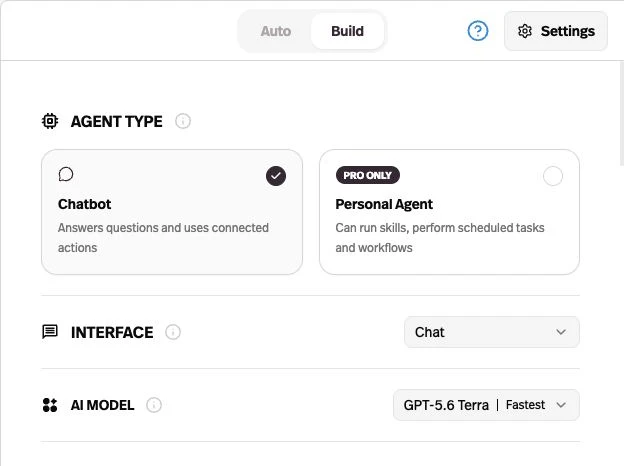
I would begin with a bounded chatbot for policy Q&A and one controlled lookup. A runtime that can execute broader tasks is useful when the service needs it, but it adds more behavior to supervise.
Pick a model by the cases it must pass: missing evidence, ambiguous requests, multilingual phrasing and tool failures. A provider name in both menus does not establish the same model version, context settings, tool permissions, or bill.
Knowledge: test the changed policy, not just the upload
Both products document knowledge-backed answers. Pickaxe connects sources to particular agents and exposes citation controls; Coze documents auto-call/on-demand retrieval, search strategies, recall thresholds and source display. These are shared capabilities, not an automatic win for either side.
| Task | Pickaxe | Coze |
|---|---|---|
| Choose evidence | Connect selected workspace sources to an agent. | Bind knowledge resources and configure when they are called. |
| Explain an answer | Enable citations for connected documents. | Show source can expose retrieved chunks and files. |
| Handle changed material | Documented source sync varies by source; inspect its refresh state. | Check the selected source’s update behavior and inspect recalled chunks in the pilot. |
Evidence: Pickaxe sources, citations and sync and Coze retrieval controls. Neither citation display nor a successful upload proves every answer uses the right revision.
My proposed test uses two synthetic policy documents with different effective dates. Replace the first policy, remove its obsolete exception, and ask the same question in a fresh conversation and an existing one.
The acceptance record should identify the document revision, retrieved evidence and final answer. If the source changed but the answer did not, stop release and investigate refresh, retrieval, memory and conversation context separately.
For a reusable test-set structure, the AI agent evals guide explains how to preserve expected behavior across changes. Keep client-specific evidence isolated in the architecture; a prompt telling users to stay in their own account is not an authorization boundary.
Actions: decide whose credentials do the work
Pickaxe has a useful product-delivery control: an app Action can run through the owner’s connection or ask each end user to connect their own account. Coze supports OAuth plugins too, so this is a permissions-design decision rather than a claim that only one product authenticates tools.
| Concern | Pickaxe | Coze |
|---|---|---|
| Credential ownership | Choose Owner or End user for supported app connections. | Configure plugin authentication and the intended user authorization flow. |
| Orchestration | Actions, agent chaining and external MCP workflows; Personal Agent runtime where appropriate. | Visual workflows connect plugins, models and code blocks. |
| Failed side effect | Require a verifiable receipt and a duplicate-prevention rule in the integration. | Apply the same requirement; workflow history alone does not reverse an external write. |
Sources: Pickaxe Action connections and Coze OAuth plugin setup; orchestration follows the builder sources above. Retries and duplicate prevention in this table are my implementation requirements, not guaranteed platform behavior.
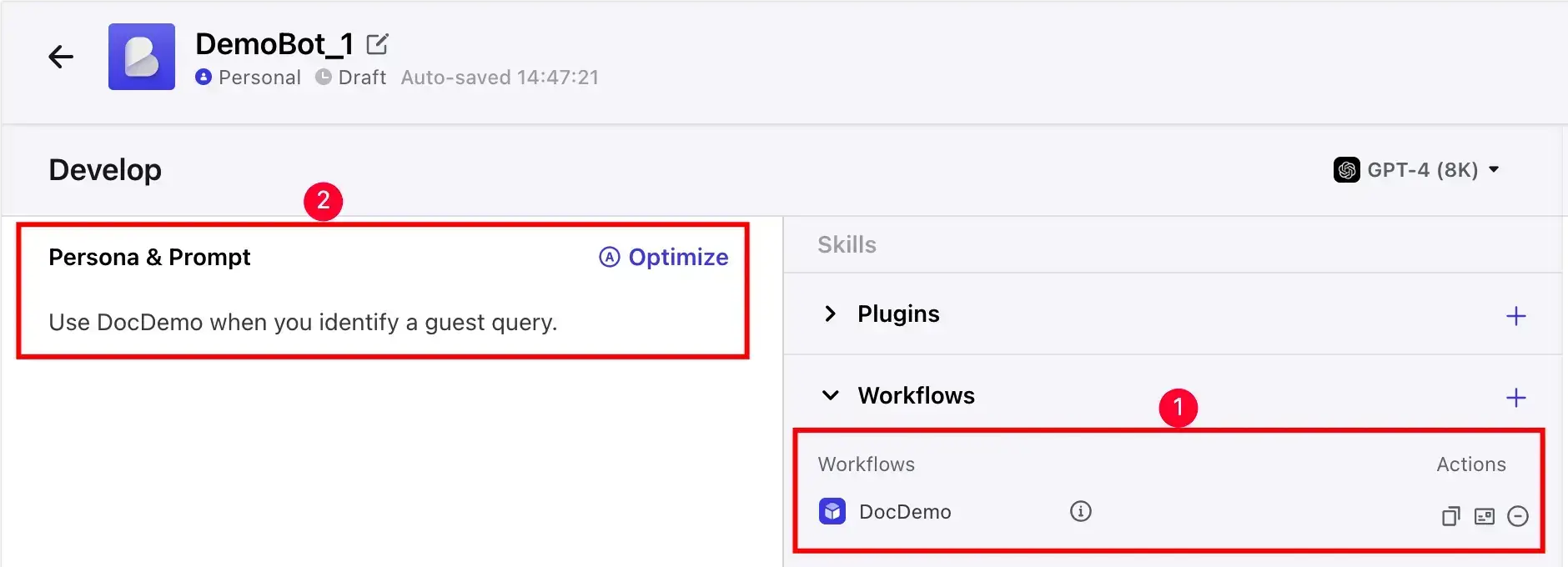
For a support agent, I would allow a narrow ticket-creation operation after the user confirms a summary. The integration should derive the client identity from an authenticated session, constrain the destination and return an external ticket ID.
If a timeout occurs after creation, inspect the external record before repeating the write. “The request failed” and “nothing happened” are different states, and the client needs an honest answer about which one is known.
A proposed paid-client pilot
Here is the first workflow I would take to acceptance: a small consultancy sells an assistant that answers from its approved onboarding material and creates a request for human follow-up. Everything below uses synthetic data and describes a proposed pilot, not a deployed customer.
- Prerequisites: approved source documents, an owner for corrections, a test ticket destination and a connected payment account for the paid version.
- Input: a signed-in client asks a policy question, then requests follow-up with a short summary.
- Expected output: a grounded answer, confirmation before the bounded write, and the resulting request ID or an explicit failure state.
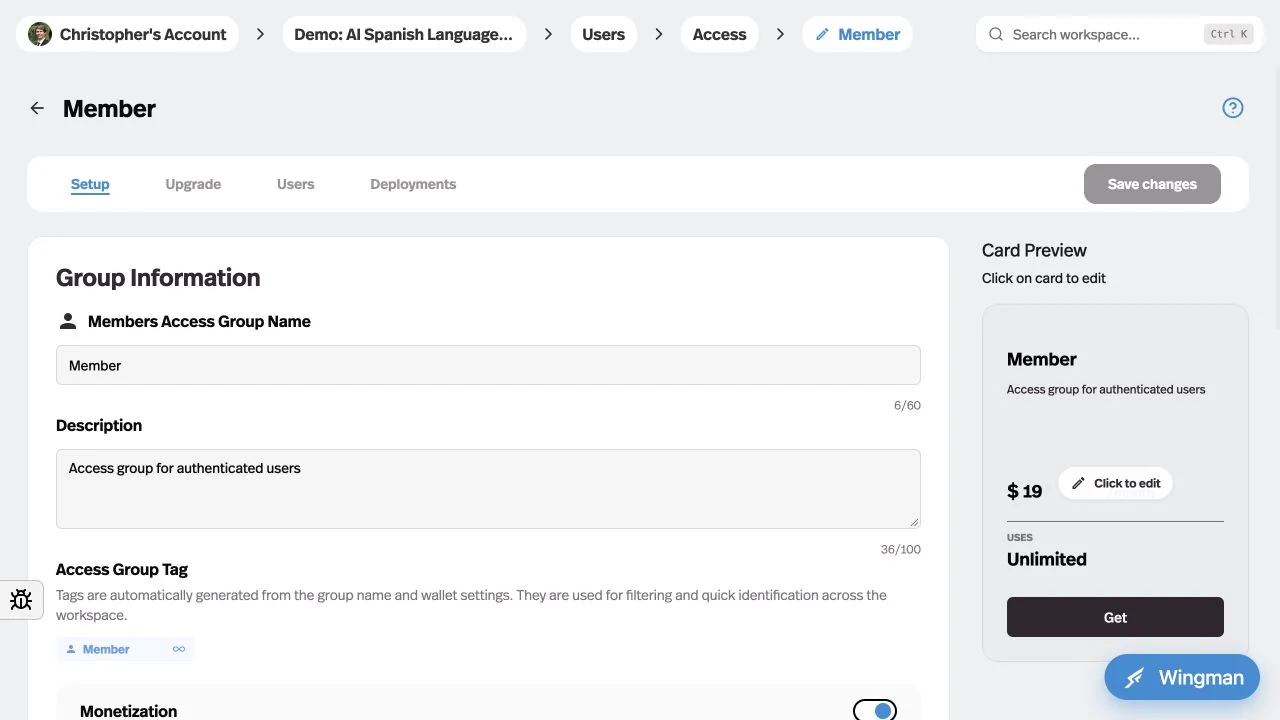
- Delivery: a branded Pickaxe portal connected to the appropriate member group, with a clear usage allowance and upgrade path.
- Maintenance owner: the agency maintains prompts and integration behavior; the consultancy approves policy revisions and who receives access.
The documented Pickaxe path combines portal delivery with member controls. In Coze, an API or SDK application could serve the same user goal, subject to commercial authorization, but the application’s developer must specify and verify its customer checkout and entitlement layer.
I would include twelve acceptance cases: four ordinary questions, two unanswerable questions, two changed-policy questions, two access-boundary attempts and two tool failures. Those counts are my suggested sample, not evidence that twelve cases are enough for every deployment.
The paid pilot fails if a signed-out visitor reaches private material, an unauthorized account reads another client’s content, or a failed action is reported as completed. A polished answer cannot compensate for those failures.
Delivery: access and payment belong together
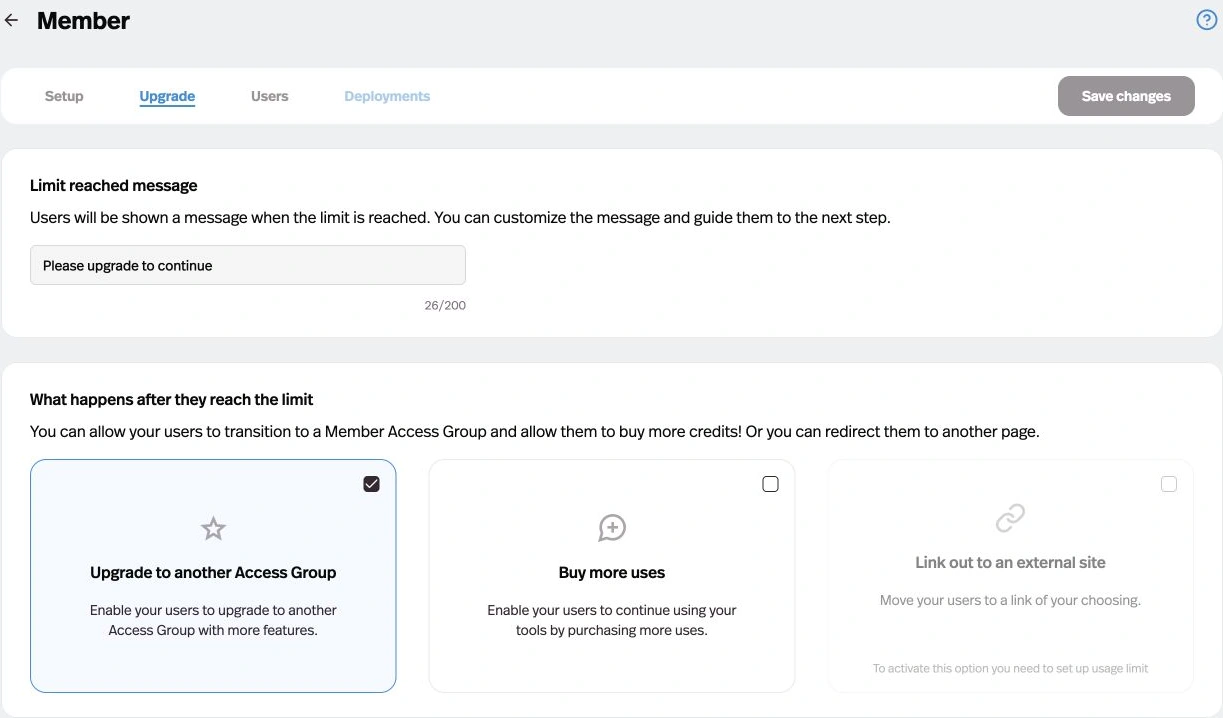
This is where I would give Pickaxe the most weight. A customer can receive a branded destination, an allowance and a path to continue when that allowance runs out, without you designing each of those surfaces as a separate application.
| Buyer requirement | Pickaxe | Coze |
|---|---|---|
| A paid client portal | ✓ Best fit for paid client access. Member groups connect subscriptions, allowances and portal access. | API/SDK can deliver an agent externally; creator checkout and entitlements need a verified implementation. |
| Private client work | ✓ Best fit for paid client access. Invite-only groups support controlled entry and optional billing. | Workspace roles and API caller identity require deliberate mapping to external customer permissions. |
| Messaging launch | New messaging-bot deployments are paused; plan around a supported web surface. | Channel guides exist; verify the target channel, payer and regional account in a pilot. |
Evidence: member groups, invite-only groups, the deployment pause notice and Coze API user identity. Builder workspace membership and customer membership are different roles.
For Coze, publishing outside its store is a documented possibility. The API guide requires a personal access token and a published agent; the calling application maintains user identity. An external user does not inherently need access to the builder, but the host application must enforce authentication and authorization.

Operations: trace versions, access and failures
I want the receiving team to know what changed and how to stop a problem. Both products document version controls, but the effect of a restore depends on the surface and publishing step.
| Operational question | Pickaxe | Coze |
|---|---|---|
| Restore a change | Builder Version history restores a draft; publish with Update and close. Dashboard Edit History can apply directly to live. | Resource-library workflow history can load a version to draft, then republish. |
| Track dependencies | Record agent, source and Action changes in the delivery record. | Agents follow the latest linked workflow; apps reference a specific library-workflow version until upgraded. |
| Monitor the service | Customer activity and usage controls are documented; confirm retention and export needs. | API log IDs and platform records aid investigation; confirm the required retention/export scope. |
| Govern the account | Confirm plan-specific SSO, collaborators and contractual requirements. | Confirm edition, contracting region, DPA and permissions; do not import China enterprise promises into a .com account. |
Sources: Pickaxe restore behavior, Coze workflow version scope, Coze API error/log identifiers and Pickaxe plan gates. Coze’s version guide specifically excludes app-internal workflows from that historical-version feature.
A rollback can restore configuration while leaving a created ticket, sent email or changed customer record intact. My handoff would therefore list the external systems to reconcile, the person who can pause writes and the evidence needed before restarting.
For the complete receiving-team record, use the AI agent client handoff checklist. Do not treat a collaborator invitation as proof that the client can operate or recover the service.
Pricing: keep the meters separate
These Pickaxe figures were checked on November 17, 2026: public USD web pricing, with taxes and payment-processor treatment to confirm at checkout. Monthly and annual commitments must not be mixed in one headline comparison.
| Offer | Documented cost or meter | Qualification |
|---|---|---|
| Pickaxe Gold | $37 monthly, or $29/month billed annually; $15/month usage credits. | Three workspaces, three Actions per agent, one collaborator per workspace; API at $0.01/request. |
| Pickaxe Pro | $147 monthly, or $116/month billed annually; $50/month usage credits. | Unlimited workspaces/Action connections, four collaborators per workspace; API included and Personal Agents available. |
| Coze hosted store/channels | Message credits; premium allowances and plugin deductions depend on the surface. | Paid USD subscription price not independently verified here. Request current account checkout terms. |
| Coze API/SDK | Coze tokens for model input/output and applicable plugin charges. | Separate from channel message credits. Obtain the actual model conversion, token purchase rate and paid-service terms. |
Sources for the plan rows: current Pickaxe pricing. Sources for Coze’s distinct meters: credits and Coze tokens. An undefined Coze token is not interchangeable with a provider token, a Pickaxe credit or one customer message.
Pickaxe’s monetization guide lists platform processing fees of 10% on Gold and 8% on Pro. Illustratively, $1,000 of platform-processed payments produces $100 or $80 in those fees alone; that is not a profit calculation, and any additional processor charges, taxes, usage and labor still need accounting.
I would not publish a “Coze costs $9, therefore it is cheaper” verdict from an old roundup. That number does not establish the current commercial terms or the API workload bill for the service being proposed.
Budget a small product, a growing product and a portfolio
Use explicit workload assumptions before requesting a quote. These illustrative monthly scenarios assume a text-only knowledge assistant, one builder per small product, shared agency operators, and separate client datasets; they are planning inputs, not observed demand.
| Scenario | People and knowledge | Messages, Actions and retries |
|---|---|---|
| Small | One client, one builder, 20 end users, 20 documents totaling 10 MB. | 1,000 messages; 100 initial Action calls; budget 10 additional attempts. |
| Growing | One client, two builders, 200 end users, 100 documents totaling 50 MB. | 10,000 messages; 1,000 initial Action calls; budget 100 additional attempts. |
| Agency portfolio | Ten separate clients/workspaces, three shared builders, 500 end users, 1,000 documents totaling 500 MB. | 30,000 messages; 3,000 initial Action calls; budget 300 additional attempts. |
For a first estimation pass, assume 2,000 input tokens and 300 output tokens per model invocation on a named model offered in the chosen account. Then replace those assumptions with logs: one message can trigger multiple model calls, retrieved context, paid plugins and retries.
Check entitlements before calculating usage. The growing example needs more collaborators and documents than the Gold row above allows, while the portfolio requires a plan or account structure that supports its workspaces and operators; ten end users do not imply ten builder seats.
The cost worksheet should separate platform subscription, metered AI and plugins, integration subscriptions, hosting for custom components, payment-related charges, and human operations. Coze’s API/SDK token documentation and Pickaxe’s credits/uses explanation define different accounting systems, so leave a total unquantified until the conversions are known.
Ask the owner to estimate implementation and monthly maintenance hours separately, using an agreed hourly rate. Track corrections, failed tool calls and entitlement support, since a cheaper model does not automatically make the delivered service cheaper to maintain.
The AI agent cost and token economics guide expands on the overhead behind a customer message. Use it to structure the worksheet, then replace every estimate with the selected deployment’s actual records.
Commercial permission is a release gate
The international Coze Terms of Service grant access for “personal and non-commercial use.” They also distinguish ownership of content/output from the service license. I would obtain written terms authorizing the intended paid or business deployment before recommending that hosted service for a client contract.
That is a reading of the published wording, not a claim that Coze can never offer commercial arrangements. Nor does the separate open-source license settle the hosted account’s rights, model-provider permissions, trademark use or plugin terms.
Pickaxe explicitly documents selling subscriptions and one-off access, which makes it a clearer fit for this buying requirement. For sensitive client work, I would still review the applicable Pickaxe terms, privacy policy and the actual account agreement rather than treating a sales feature as a universal security guarantee.
For either platform, document where client files, prompts, outputs and credentials go, who can inspect them, how long they persist and how deletion is verified. Coze publishes a Data Processing Addendum; ask for the relevant contractual evidence and subprocessor details instead of inferring residency or training exclusions from a logo.
Coze’s User Message Billing guide is also easy to misread: sponsored usage can be paid by the creator, with subsequent consumption paid from the user’s account. That allocation does not establish your subscription price, creator revenue, or ownership of the paying relationship.
Move the useful parts, then rehearse the failures
The second proposed workflow gives Coze a fair task: a user submits a synthetic supplier brief, a workflow extracts requested fields, a plugin performs a permitted lookup and the result returns through an API to the application. Commercial authorization is a prerequisite for a business deployment.
The input, expected JSON schema, permitted lookup source and missing-value behavior should be written before configuring nodes. The application owner maintains user sessions and access; the workflow owner maintains node logic and resource versions.
- Inventory prompts, source originals, workflow dependencies, credentials and caller IDs. Keep copies outside the builder where permitted.
- Rebuild one bounded path in the destination instead of assuming a workflow export imports directly. Preserve client access rules explicitly.
- Change a source and a sub-workflow independently. Verify which published agent/app version is actually executing.
- Disable the test lookup credential. Require an explicit incomplete result, with no invented supplier fact or false success message.
- Restore the credential, retry with a request ID, and inspect the downstream system for duplicates.
- Let the receiving operator run the same cases without help, then record access, cost and recovery acceptance.
Pickaxe can cover that user goal through a configured agent and Actions, with a Personal Agent where the runtime is needed. The deciding question is whether the buyer needs a visual workflow as the maintained artifact or a ready-to-use paid client service.
Combining them is an architecture to evaluate, not a verified native connector: a server-side integration could expose an authorized Coze workflow to a Pickaxe Action. Keep credentials server-side, map the caller to the correct client and measure both usage bills; do not add a second platform without a specific benefit.
Package one useful client service
Start with approved knowledge, bounded actions and a clear access allowance.
Buyer FAQ
Can I put Coze on my own website?
Its documentation supports API and Chat SDK publication. A custom site can therefore be a documented delivery direction, but you still need to verify the account’s commercial rights, authentication, usage funding and customer entitlement implementation.
Is Coze shutting down?
The China notice retires specified enterprise and legacy plans on the dates listed above. It does not announce a blanket closure of all Coze products or establish an international hosted-account deadline.
Is Coze free enough for a paid client service?
A free allowance does not establish commercial permission, an adequate usage budget, or customer billing. Get the intended account’s terms and meter, then test the actual deployment surface; do not budget an API application using a channel-credit allowance.
Does Pickaxe replace every workflow tool?
No. Pickaxe has Actions, connected workflows and a Personal Agent runtime, but an existing integration engine may remain valuable. I would keep it when a specific workflow benefit exceeds the added cost and maintenance burden.
Can I migrate prompts and documents without rebuilding anything?
Preserving source originals and instructions helps, but tool schemas, credentials, user identities, retrieval settings and publishing semantics still need reconstruction and testing. The white-label tools guide helps assess the commercial packaging separately from the migration work.
My Pickaxe vs Coze recommendation
I would choose Pickaxe for a branded AI service that clients pay to use. Its portal, access-group, allowance and monetization controls support the full commercial deliverable, and the screenshots show the relevant configuration surfaces.
I would evaluate Coze for a visual workflow/API requirement only after confirming the exact edition and the permissions needed for that work. If self-hosting is essential, assess Coze Studio as a separate infrastructure project with its own operating responsibilities.
Start with one client task, one approved dataset and a written failure policy. Compare the wider build-and-sell options if the business model is still undecided, or start a Pickaxe prototype and rehearse the customer’s full path before charging for it.