
Every week, I talk to founders and consultants who are stuck on the same question: should we build our own AI agent, buy an off-the-shelf solution, or just wait until the dust settles?
It's not a bad question. It's actually the most expensive question in enterprise tech right now.
Global AI spending hit $301 billion in 2026. The AI agent market alone is valued at $10.9 billion this year, projected to reach $50 billion by 2030. Companies are pouring money into agent strategies. And a staggering number of them are getting it wrong.
According to Gartner, over 40% of agentic AI projects will be canceled by end of 2027. Not paused. Not pivoted. Canceled. The top reasons? Escalating costs, unclear business value, and governance gaps.
The problem isn't that these companies picked the wrong AI model or hired the wrong engineers. The problem is they never had a real framework for making the build-vs-buy decision in the first place.
This article is that framework. I'll walk through the three main paths (build, buy, and wait), introduce a fourth option most people overlook, and give you a decision scorecard you can actually use. Whether you're a consultant advising clients, a founder launching an AI product, or a business leader evaluating your options, this will save you months of expensive trial and error.
Why the Build vs Buy Decision Changed in 2026
If you made a build-vs-buy decision about software five years ago, the calculus was straightforward. Building was slow and expensive. Buying was fast and limiting. You picked based on budget and timeline.
AI agents broke that model.
Three things shifted the equation:
Building got dramatically faster. Foundation models like GPT-4.5, Claude Opus, and Gemini 3.1 Pro eliminated years of ML training work. What used to require a dedicated data science team can now be prototyped in days. Frameworks like LangGraph, CrewAI, and others made agent orchestration accessible to any backend developer.
But the "last 20%" is still 80% of the effort. Prototyping an AI agent is easy. Making it reliable, safe, and production-ready? That's where the real cost lives. Evaluation pipelines, guardrails, monitoring, error handling, edge cases, hallucination detection — this is the unglamorous work that separates demos from deployments.
The vendor landscape exploded. There are now hundreds of AI agent platforms, each claiming to solve everything. That abundance created its own problem: evaluation paralysis. Teams spend months testing vendors instead of shipping solutions.
And here's what's really different in 2026: the hybrid approach is winning. KPMG reported that 57% of organizations now favor a blended approach to building and buying AI agents, up from 51% just a quarter earlier. The question isn't really "build or buy" anymore. It's "what do we build, what do we buy, and where do we draw the line?"
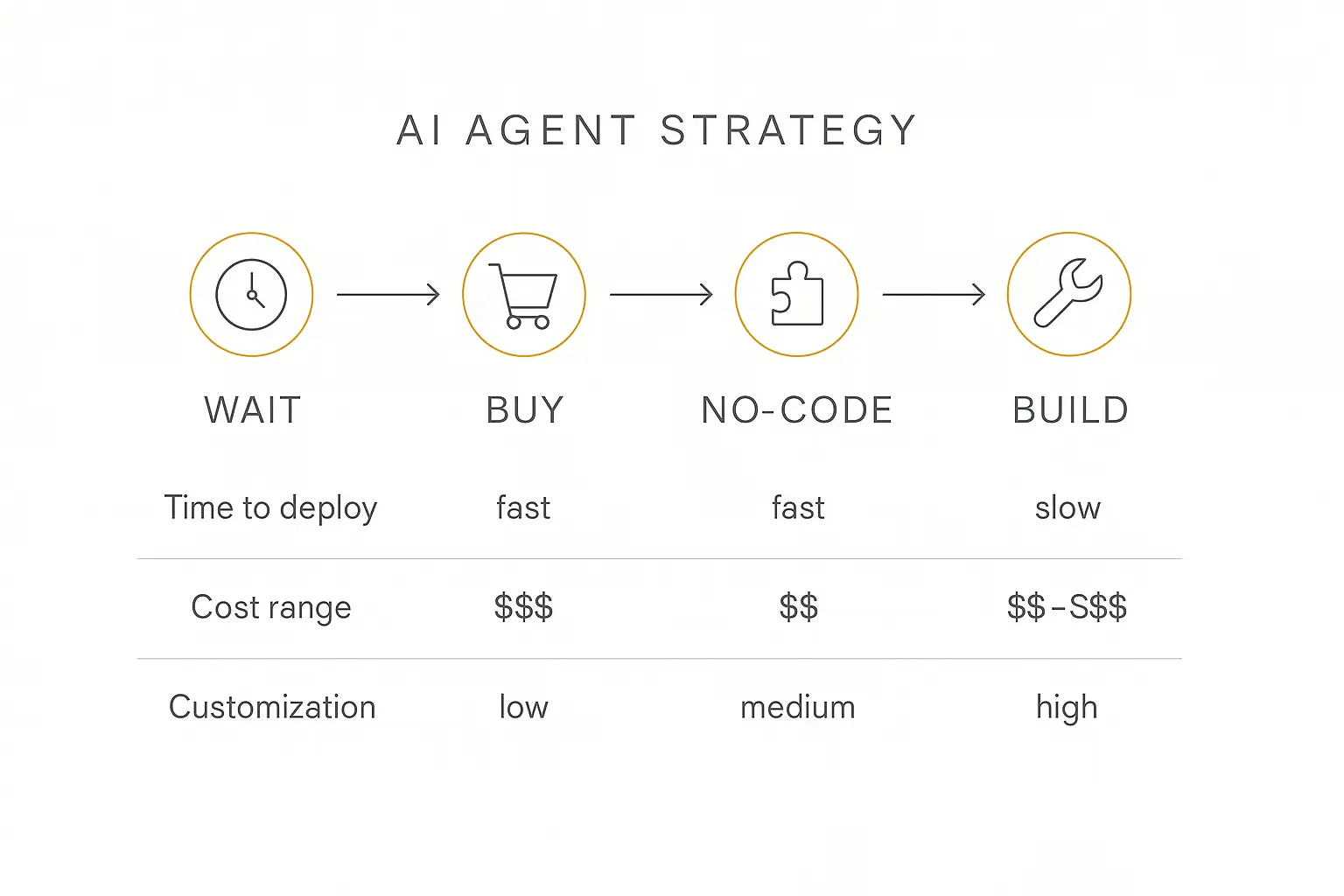
Path 1: Build Your Own AI Agent
"Build" means your team writes the orchestration logic, manages the infrastructure, and owns the entire stack from prompt to deployment. You're buying API access to foundation models, but everything above that layer is yours.
When Building Makes Sense
Your agent is a core product differentiator. If the AI agent itself is what you're selling — or if it's so central to your product that a vendor switch would gut your competitive advantage — building is the right call. You need that level of control.
You have proprietary data workflows. When your agent needs to integrate deeply with internal systems, proprietary databases, or domain-specific logic that no vendor anticipates, custom development gives you the flexibility to wire things up exactly how you need them.
You're handling over a million interactions annually. At high volumes, per-token economics start to matter. Building custom gives you the ability to optimize costs at scale — model routing, caching, batching — in ways that vendor platforms can't easily accommodate. Worth noting that the first of those is no longer build-only: model routing is something no-code platforms expose too.
Data sovereignty is non-negotiable. If your industry or clients require that data never leaves specific infrastructure, custom builds let you control every byte.
The Minimum Viable Team for a Custom Agent
Before you commit to building, be realistic about what it takes. A production-grade AI agent isn't a side project for your existing dev team.
At minimum, you need:
- 1 ML/AI engineer who understands prompt engineering, model selection, fine-tuning, and evaluation. This person designs the agent's cognitive architecture.
- 1 backend developer who handles the API integrations, data pipelines, vector databases, and application logic. They build the scaffolding the agent runs on.
- 1 product manager who defines success criteria, prioritizes features, and translates business requirements into technical specs. Without this person, your agent will be technically impressive and practically useless.
For anything beyond a simple chatbot, you'll also need:
- A DevOps engineer for deployment, scaling, and infrastructure management.
- An evaluation specialist who designs test suites, monitors quality, and catches regressions before your users do.
That's 3–5 people, minimum. At market rates for AI talent in 2026, you're looking at $500K–$1.2M in annual salary costs before you ship a single feature.
What Building Actually Costs
Let's be honest about the numbers. Custom AI agent development costs between $75,000 and $500,000 for a production-ready system, depending on complexity.
And that's just the build. The ongoing costs are what surprise people:
- Infrastructure: GPU compute, vector databases, monitoring tools — $3,000–$15,000/month for a production agent
- Team: At minimum, you need 1 ML/AI engineer, 1 backend developer, and 1 product manager. Add a DevOps engineer and an evaluation specialist for anything serious. That's $500K–$1M+ in annual salary.
- Iteration: Models change every quarter. Prompts drift. User expectations evolve. You're never "done" building.
The ROI math only works if the agent generates enough value to justify a dedicated team maintaining it indefinitely.
The Build Trap
Here's the mistake I see most often: teams build because they can, not because they should.
Engineering teams are naturally biased toward building. It's what they do. A developer who says "we should just buy this" is essentially arguing to make their own role smaller. So the default answer is always "we can build it."
The question isn't whether you can build it. The question is whether building it creates more value than the alternatives, after accounting for the total cost of ownership over 2–3 years.
Skip the six-figure build. Ship your AI agent this week.
Pickaxe gives you the full stack — agent builder, deployment, billing — without writing a line of code.
Path 2: Buy an Off-the-Shelf Solution
"Buy" means using a vendor's pre-built AI agent platform or SaaS tool. You configure it, connect your data, and deploy. The vendor handles the infrastructure, model management, and updates.
When Buying Makes Sense
Speed is your priority. If you need an AI agent live in weeks, not months, buying wins every time. Most vendor platforms can get you from zero to deployed in days.
Your use case is common. Customer support chatbots, lead qualification agents, FAQ bots, internal knowledge assistants — these are well-solved problems. Dozens of vendors have optimized for them. Building from scratch would be reinventing the wheel. If you are still deciding which category your problem falls into, these 16 agent examples show what is already well trodden.
You don't have (or want) an AI team. Buying lets you get AI capabilities without hiring ML engineers. For companies where AI is a tool, not a core competency, this is the right tradeoff.
You need proven reliability. Established vendors have battle-tested their systems across thousands of deployments. You inherit their learnings about edge cases, failure modes, and best practices.
The Real Cost of Buying
Vendor platforms typically run $50–$500/month for SMBs and $1,000–$10,000+/month for enterprise tiers. That looks cheap next to the build path. And for many companies, it is.
But watch for the hidden costs:
- Integration expenses: Getting the vendor's system to talk to your CRM, database, or internal tools often requires custom work. Budget 50–100% on top of subscription fees for realistic implementation.
- Vendor lock-in: Your prompts, conversation data, and workflow logic live inside someone else's platform. Switching vendors means starting over.
- Customization limits: Most off-the-shelf tools hit a wall. When your use case diverges from the vendor's assumptions, you're stuck filing feature requests instead of shipping solutions.
- Scaling economics: Usage-based pricing is great at low volumes. At high volumes, you're subsidizing the vendor's margin on every interaction.
How to Evaluate Vendors (Without Wasting Months)
If you're going the buy route, here's how to evaluate vendors without falling into analysis paralysis:
Run a 2-week paid pilot, not a 3-month evaluation. Pick your top 2 vendors, run a real use case through each for two weeks, and compare results. Most evaluations drag on because teams try to test every feature instead of validating the core use case.
Test with your worst data, not your best. Vendor demos always use clean, well-structured data. Your reality is messy PDFs, inconsistent databases, and edge cases. Feed the vendor your most problematic data and see how it handles it.
Ask about data portability on day one. Can you export your conversation history, prompt templates, and knowledge base? If the answer is vague, that's a red flag. You need an exit strategy before you need to exit.
Talk to customers who left, not just current references. Every vendor will give you their happiest customers. The real insights come from companies that switched away. What broke? What didn't scale?
The Buy Trap
The most common buying mistake is choosing a tool that's 80% right.
That last 20% haunts you. You spend months trying to configure around limitations. You build workarounds. You duct-tape integrations. Eventually, you've spent more time fighting the tool than you would have spent building something custom — and you still don't have what you need.
Before buying, be ruthless about whether the vendor's roadmap aligns with where your needs are heading, not just where they are today.
Path 3: Wait (The Strategy Nobody Wants to Hear)
Here's the path that doesn't get enough airtime: doing nothing. Strategically.
Not "doing nothing" as in ignoring AI. I mean choosing not to commit to a major build or buy decision right now, while actively learning and experimenting.
When Waiting Makes Sense
The technology is moving faster than your use case requires. If you're looking at AI agents for a process that works fine today, and the agent landscape is going to be dramatically better (and cheaper) in 12 months, the math might favor waiting. Foundation model costs have been dropping 50–70% year over year. The platform you'd build on today might be obsolete by Q1 2027.
Your organization isn't ready. An AI agent is only as good as the data, processes, and team supporting it. If your knowledge base is a mess, your processes aren't documented, or your team doesn't have basic AI literacy, deploying an agent now will just automate your problems at machine speed.
Governance and compliance aren't sorted. Gartner's prediction that 40% of agentic AI projects will be canceled by 2027 cites governance friction as a top blocker. If you're in a regulated industry without an AI governance framework, getting that foundation right first will save you from expensive rework later.
You're evaluating but haven't found the right fit. Better to keep experimenting with proofs of concept than to commit $200K to the wrong architecture.
What Smart Waiting Looks Like
Strategic waiting isn't passive. It looks like:
- Running small experiments. Build a proof-of-concept agent for one internal workflow. Learn what works and what breaks.
- Documenting your processes. The companies that deploy agents successfully are the ones that understood their workflows deeply before trying to automate them.
- Training your team. Get your people comfortable with prompting, basic agent design, and AI evaluation. This investment pays off regardless of which path you choose later.
- Tracking the market. Set up a quarterly review of the vendor landscape. What's new? What's cheaper? What problems have been solved since your last evaluation?
The "Build-to-Learn" Alternative
There's a smart middle ground between committing to a full build and passively waiting: build a prototype specifically to learn, not to ship.
Spend 2–4 weeks building a throwaway proof of concept. Use a no-code platform or a basic API wrapper. The goal isn't to create production software — it's to answer three critical questions:
- Does the use case actually work? Some problems sound perfect for AI agents but fall apart when you test them with real data and real users. Better to discover this in a 2-week experiment than a 6-month build.
- What's the real integration complexity? You won't know how hard it is to connect to your internal systems until you try. A prototype surfaces these challenges early.
- How do users actually interact with it? People use AI agents in ways you don't expect. Give them a prototype and watch. Their behavior will reshape your requirements.
The prototype costs almost nothing compared to a full build, and the learnings are invaluable. If the prototype validates the concept, you have data to justify a real investment. If it doesn't, you just saved yourself six figures.
This is the approach KPMG calls "borrow" — co-creating with partners or using existing platforms to share risk and accelerate learning before making a permanent commitment.
The Wait Trap
The danger of waiting is that it becomes permanent.
There will always be a better model around the corner. There will always be a reason to wait another quarter. Meanwhile, your competitors are shipping agents, learning from production data, and building moats around their AI capabilities.
The data is clear on this. Only 31% of enterprises have an AI agent in production today, but Gartner expects 40% of enterprise apps to embed AI agents by end of this year. That means the companies moving now are gaining a lead that will be increasingly hard to close. The window for competitive advantage is narrowing fast.
And consider this: 88% of agent pilots that do launch never make it to production. The organizations that succeed are the ones who have been iterating, failing, and learning in real deployments — not the ones who watched from the sidelines and tried to leapfrog everyone with a perfect first attempt.
Strategic patience is wise. Indefinite waiting is a losing strategy.
Path 4: The No-Code Middle Ground (What Most People Actually Need)
Here's what I've realized after watching hundreds of companies wrestle with this decision: most of them don't need to build or buy in the traditional sense.
There's a fourth path that sits between the full-custom build and the rigid off-the-shelf purchase. It's the no-code agent builder — platforms that give you the flexibility of building with the speed and cost structure of buying.
How No-Code Agent Builders Change the Math
A traditional build costs $75K–$500K and takes months. A traditional buy locks you into someone else's vision of what your agent should do.
No-code agent platforms let you design the agent yourself — your prompts, your knowledge base, your integrations, your deployment channels — without writing code. You get 80% of the customization of a build at a fraction of the cost and timeline.
The numbers back this up. Companies using no-code AI platforms report 40% faster time-to-market compared to custom development, and the typical organization saves over $180,000 annually versus building from scratch.
When the No-Code Path Wins
You need customization, but not from-scratch custom. If your agent needs specific prompts, a curated knowledge base, custom integrations, and branded deployment — but doesn't need novel ML architecture — no-code is the sweet spot.
You're a consultant or agency building agents for clients. If you're starting an AI agent agency, the ability to spin up client-specific agents quickly is everything. You can't afford to custom-build each one, and generic chatbots won't justify your fees.
You want to validate before you invest. No-code platforms are the best way to test whether an AI agent actually solves your problem before committing to a six-figure build. Ship a v1 in days, gather real user data, then decide if you need to go custom.
You want to monetize your AI agents. If monetizing your agents is part of the plan, you need deployment, billing, and access control built in. Most custom builds ignore the business layer entirely, focusing only on the AI and leaving the revenue infrastructure as an afterthought.
This is exactly the gap that platforms like Pickaxe are designed to fill. Pickaxe positions itself as the "Shopify for agent-powered businesses" — you build the agent, deploy it through branded portals, and charge for it with built-in billing. It's a full-stack solution for people who want to own the experience without managing the infrastructure.
When No-Code Isn't Enough
Be honest about the limitations:
- Highly complex orchestration: If your agent needs to manage dozens of tool calls in a single turn, run multi-step autonomous workflows, or coordinate multiple specialized sub-agents in real time, you'll likely outgrow a no-code platform.
- Custom model training: If you need fine-tuned models on proprietary data, no-code platforms (which use foundation model APIs) won't cut it.
- Extreme scale: At millions of daily interactions, the economics of a managed platform might not work. But you'd want to validate demand at lower scale first anyway.
The Decision Framework: A Scorecard You Can Actually Use
Enough theory. Here's a practical framework for making this decision.
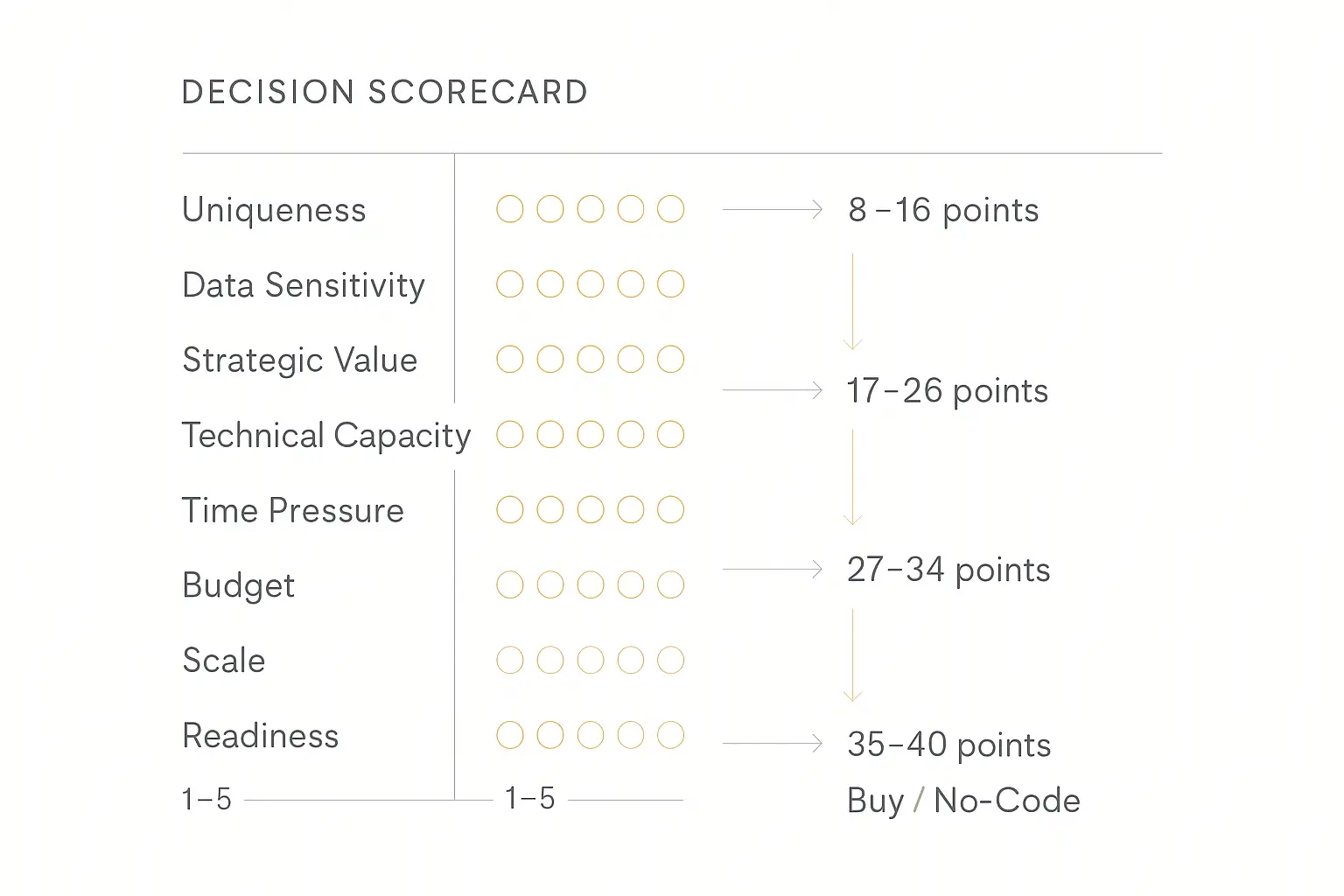
Score each dimension from 1–5, then use the totals to guide your path.
| Dimension | 1 (Low) | 5 (High) | Your Score |
|---|---|---|---|
| Uniqueness | Common use case (FAQ bot, lead gen) | Highly proprietary workflow | — |
| Data Sensitivity | Public or non-sensitive data | Regulated, must stay on-prem | — |
| Strategic Value | Nice-to-have efficiency gain | Core product differentiator | — |
| Technical Capacity | No AI/ML team | Dedicated AI engineering team | — |
| Time Pressure | No deadline, exploring | Need it deployed this quarter | — |
| Budget Available | Under $5K | $250K+ available | — |
| Scale Expected | Under 1,000 interactions/month | 1M+ interactions/month | — |
| Organizational Readiness | No AI governance, messy data | AI-mature, documented processes | — |
How to Read Your Score
8–16 points: Start with Buy or No-Code. Your use case is common enough that existing platforms handle it well. Don't over-engineer. Ship fast, learn from real users, and upgrade later if needed. A no-code builder gives you more control than a pure SaaS buy.
17–26 points: No-Code or Hybrid Build. You need some customization, but probably not a full custom stack. Start with a no-code platform for the 80% case, then build custom components for the specific areas where you need differentiation. This is the hybrid approach that 57% of organizations are converging on.
27–34 points: Build (with a No-Code Prototype First). Your use case is unique and strategic enough to justify custom development. But even here, I'd recommend prototyping on a no-code platform first. Ship a v1 in weeks, validate the concept with real users, then rebuild with custom architecture once you've proven the value.
35–40 points: Build from Day One. You have the team, the budget, the data, and the strategic imperative. This is rare — maybe 10–15% of companies. If this is you, invest in the full custom stack, but build evaluation and monitoring from day one.
Under 12 with low time pressure? Consider Waiting. If your scores are low across the board and there's no urgency, invest in organizational readiness instead. Train your team, document your workflows, and revisit in 6 months.
Real Cost Comparison: Build vs Buy vs No-Code
Let's make this concrete. Here's what each path actually costs for a typical business AI agent (customer-facing, connected to 2–3 data sources, deployed on web + one messaging channel).
| Cost Factor | Custom Build | Buy (SaaS) | No-Code Platform |
|---|---|---|---|
| Initial Development | $75K–$500K | $0–$5K (setup) | $0–$2K (setup) |
| Time to Deploy | 3–9 months | 1–4 weeks | 1–7 days |
| Monthly Operating Cost | $8K–$25K (infra + team) | $200–$2,000 | $50–$500 |
| Year 1 Total | $175K–$800K | $5K–$30K | $1K–$8K |
| Customization Level | Unlimited | Low–Medium | Medium–High |
| Maintenance Burden | High (dedicated team) | Low (vendor handles) | Low–Medium |
| Vendor Lock-in Risk | None | High | Medium |
| Monetization Built-in | Must build separately | Rarely | Often (e.g., Pickaxe) |
The difference is stark. For the vast majority of businesses, a no-code platform delivers the best value per dollar in the first 12–18 months. If you outgrow it, you'll have validated your concept with real data — which makes the custom build case much easier to justify.
Seven Mistakes That Burn Budgets (and How to Avoid Them)
1. Building Before Validating
Don't spend $200K building an agent before you know if anyone will use it. Ship a no-code prototype, get 100 real users on it, and then decide if custom development is worth it.
2. Buying Based on Demos
Every vendor demo looks incredible. The real test is whether the product handles your data, your edge cases, and your users. Always run a paid pilot with real data before committing to a vendor.
3. Ignoring Total Cost of Ownership
The initial build cost is the smallest part of the equation. Model API costs, monitoring, evaluation, iteration, and team salaries dwarf the upfront investment. Understand the full pricing model before you commit.
4. Letting Engineers Make Business Decisions
Your engineering team will almost always recommend building. That's not because they're wrong — it's because they're optimizing for a different objective (technical control) than the business needs (speed, cost, risk). Make sure the decision involves business stakeholders, not just the technical team.
5. Waiting for Perfect
The perfect model, the perfect platform, the perfect architecture — none of it exists. The companies winning with AI agents are the ones who shipped something imperfect six months ago and have been iterating since. Perfection is the enemy of production.
6. Ignoring the "Boring" Work
88% of AI agent pilots fail to reach production. The top blockers aren't technical — they're organizational. Evaluation gaps, governance friction, and model reliability are the real killers. Invest in the unglamorous infrastructure: evaluation suites, monitoring dashboards, and clear escalation policies.
7. Choosing a Path Without an Exit Strategy
Whatever you choose, plan for the possibility that you'll need to switch. Ask your vendor about data portability. Design your custom build with clean interfaces so you can swap components. Build on platforms that don't hold your data hostage.
Not sure which path fits?
Pickaxe lets you prototype in days, deploy across channels, and scale when you're ready — no engineering team required.
A Real-World Decision Tree
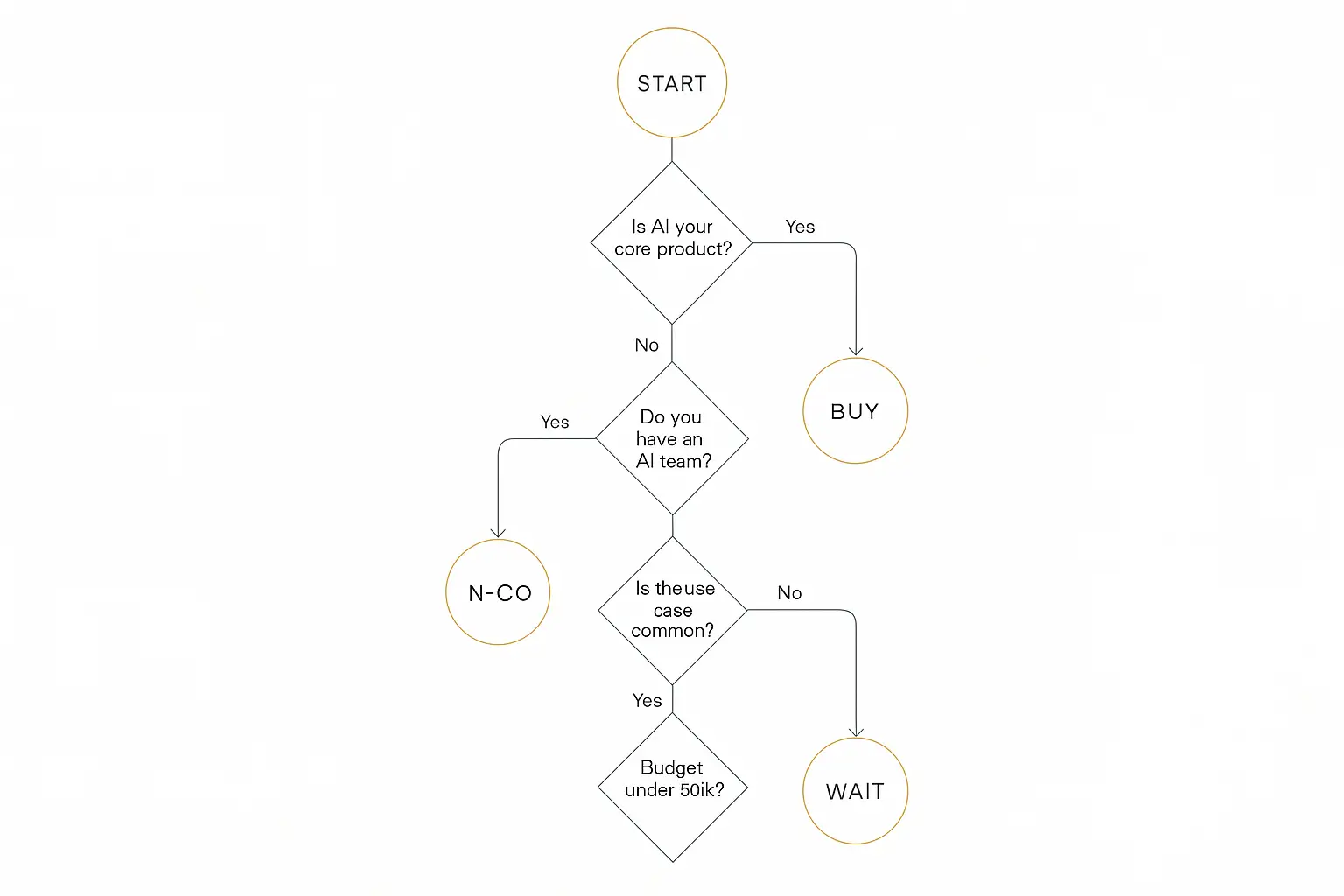
Still not sure? Walk through these questions in order:
1. Is the AI agent your core product?
Yes → Build (or build on top of a no-code platform if monetization matters).
No → Continue.
2. Do you have a dedicated AI engineering team?
Yes → Consider building, but prototype first.
No → Continue.
3. Is your use case common (support, lead gen, FAQ, onboarding)?
Yes → Buy or use a no-code builder. Don't reinvent the wheel.
No → Continue.
4. Do you need it deployed in less than a month?
Yes → No-code platform. Period.
No → Continue.
5. Is your budget under $50K?
Yes → No-code platform or buy a SaaS solution.
No → Continue.
6. Is AI governance and evaluation established at your organization?
Yes → You're ready to build. Start with a prototype, then invest.
No → Wait. Get your foundation right first, then revisit.
How the Hybrid Model Actually Works in Practice
I keep saying "hybrid" is winning, so let me show you what that actually looks like in practice. It's not just a buzzword — it's a specific architecture pattern.
The Layer Cake Approach
Most successful AI agent deployments in 2026 follow a layered model:
Layer 1: Buy the foundation model access. Almost nobody trains their own LLMs anymore. You buy API access to OpenAI, Anthropic, or Google and treat it as infrastructure. This is the "buy" portion, and it's a settled question for 95% of companies.
Layer 2: Build or buy the orchestration layer. This is where agents actually "think" — the prompt chains, tool calls, memory management, and routing logic. If your orchestration is proprietary, build it with open-source frameworks. If it's standard, buy it from a platform.
Layer 3: Build your integrations. No vendor knows your internal systems like you do. The connections to your CRM, your databases, your internal APIs — these almost always need custom work, even if you buy everything else.
Layer 4: Buy or configure the deployment layer. Embeds, APIs, multi-channel delivery, analytics — these are undifferentiated heavy lifting. Use a platform that handles them rather than building deployment infrastructure from scratch.
A Concrete Example
Let me make this tangible. Say you're a consulting firm building an AI-powered client intake agent.
You'd buy: Foundation model access (Claude or GPT-4.5), a deployment platform with branded portals and billing (like Pickaxe), and standard integrations for email and calendar.
You'd build: The custom prompting that reflects your firm's methodology, the connection to your proprietary client database, and the logic that determines when to escalate from the agent to a human consultant.
You'd wait on: Voice capabilities (still maturing rapidly), autonomous multi-step research workflows (reliability isn't there yet for client-facing use), and any features where the underlying models are improving so fast that today's custom code will be tomorrow's native API feature.
This layered approach lets you ship in weeks, maintain control where it matters, and avoid investing in areas that are changing too fast to lock in.
What the Experts Are Saying
The shift toward hybrid strategies isn't just data — it's the consensus among AI practitioners and industry analysts.
As one prominent AI architect noted on X, the biggest job in the next few years will be "AI Agent Architect" — someone who knows how to leverage AI for specific use cases. That's not a build-everything role. It's an orchestration role. Knowing what to build, what to buy, and how to connect the pieces.
Meanwhile, the no-code AI agent movement is producing real results. Consultants and agencies are building and selling AI agents that generate $2,000–$5,000/month per client — agents they can spin up in hours, not months. That kind of speed-to-revenue simply isn't possible with a custom build.
KPMG's agentic AI framework adds a useful taxonomy, breaking agents into four categories: Taskers (simple, single-purpose), Automators (multi-step workflows), Collaborators (work alongside humans), and Orchestrators (manage other agents). The build-vs-buy decision often depends on which category your agent falls into. Taskers and Automators are almost always better bought or configured with no-code tools. Collaborators and Orchestrators are where custom development starts to earn its cost.
The broader lesson from practitioners: start with the outcome, not the technology. Define what success looks like, pick the fastest path to validating that outcome, and invest more only after you've proven the value.
Frequently Asked Questions
How long does it take to build a custom AI agent?
A basic proof-of-concept can take 2–4 weeks. A production-ready agent with proper evaluation, monitoring, and integrations typically takes 3–9 months. The biggest variable is integration complexity — connecting to proprietary systems and handling edge cases is where most of the time goes.
Can I switch from buy to build later?
Yes, and many companies do. The key is to choose a "buy" platform with good data portability. Export your conversation logs, prompt templates, and user data so you can feed them into a custom build. The learning from your initial deployment is worth more than the subscription cost.
Is a no-code platform just a cheaper version of building?
Not exactly. No-code platforms like Pickaxe offer capabilities that custom builds often lack: built-in monetization, client onboarding flows, multi-channel deployment, and usage analytics. They're not a stripped-down build — they're a different approach optimized for speed and business outcomes. Where they trade off is in deep customization and complex orchestration.
What's the minimum budget for each path?
Build: $75K+ for a production-ready agent (more realistically $150K+ with team costs). Buy: $200–$2,000/month depending on the platform. No-code: $50–$500/month. Wait: $0 for the platform, but invest in team training and process documentation.
Should consultants and agencies build or buy?
For most consultants, the answer is no-code. You need to ship client-facing agents quickly, customize them per client, and charge for them. Building from scratch for each client doesn't scale, and generic SaaS tools don't justify consulting fees. The no-code middle ground lets you deliver custom-feeling agents at a pace and price that works for both you and your clients.
How do I calculate the ROI of an AI agent?
We wrote an entire guide on this: How to Measure AI Agent ROI. The short version: measure time saved, revenue generated, error reduction, and customer satisfaction improvement. Then compare against the total cost of your chosen path (not just the platform fee).
What about open-source AI agent frameworks?
Open-source frameworks like LangGraph, CrewAI, and AutoGen sit between the "build" and "buy" paths. They give you pre-built components for agent orchestration, but you still need engineering talent to assemble, deploy, and maintain them. Think of them as "build with a head start." For our full breakdown, see our comparison of AI agent frameworks.
How do I convince my boss to invest in AI agents?
Start with a single, well-scoped use case that has a clear cost or time savings. Build or configure a prototype on a no-code platform, run it for 30 days, and present the data. Real numbers from your own business are infinitely more persuasive than industry projections. Frame it as an experiment, not a commitment — that lowers the perceived risk and makes approval easier.
Is it too late to start with AI agents in 2026?
Absolutely not. While early movers have a head start, we're still in the early innings. Only 31% of enterprises have a production agent, and the tools available today are dramatically better and cheaper than what was available even six months ago. The best time to start was last year. The second-best time is now. The worst time is six months from now when you're even further behind.
The Bottom Line
The build-vs-buy decision for AI agents in 2026 isn't binary. It's a spectrum with four viable positions: build, buy, wait, and the no-code middle ground.
Build when the agent is a core differentiator, you have the team and budget, and you need unlimited control.
Buy when speed matters more than customization, and your use case is well-served by existing vendors.
Wait when your organization isn't ready, governance isn't in place, or the technology hasn't caught up to your specific needs yet. But wait actively, not passively.
Go no-code when you want the customization of building with the speed and cost of buying. For most consultants, agencies, and businesses shipping their first AI agents, this is the highest-leverage path.
Whatever you choose, remember the most important thing: the companies winning with AI agents right now are the ones that shipped something imperfect six months ago. They're learning from production data while their competitors are still debating architecture diagrams.
Stop debating. Pick a path. Ship something. Iterate.