
At 2:14am a tenant texts the office line: "water coming from under the dishwasher."
Nobody reads it until 8:30. By then the subfloor is soaked, the downstairs unit has a stained ceiling, and a $400 supply-line swap has turned into a five-figure remediation claim.
That gap — between when a tenant says something and when a human gets to it — is the single most expensive thing in this business. It's also the thing AI agents for property management are genuinely good at closing.
I've spent a while looking into how property managers are actually using AI in 2026, and the honest summary is this: the technology is ready for a narrow slice of the job, dangerous in another slice, and oversold across the board. This post is about telling those apart.
We'll go through the three workflows worth automating first — tenant screening, maintenance requests, and lease renewals — plus what the fair housing rules actually require, what it costs, how to connect an agent to AppFolio or Yardi without a developer, and where these things fall over.
Why property management is unusually good AI territory
Most industries adopt AI because a vendor told them to. Property management has a more specific problem: the work is 24/7 but the staff isn't.
The numbers back this up. AI adoption among property management companies jumped from 20% to 58% in a single year according to the 2026 Buildium/NARPM industry report — but only 8% of firms have fully automated any single workflow. Everyone's dabbling. Almost nobody has finished anything.
Meanwhile the load keeps climbing. 39% of property managers spend more than 20 hours a month just handling maintenance requests. Portfolios that used to sit at 50 doors per manager have crept to 150, 180, sometimes 200+ — and at that volume, as one industry analysis puts it, proactive management stops being possible and managers spend the day firefighting.
Three things make this a good fit for agents specifically:
- The questions repeat. "When is rent due?" "How do I submit a work order?" "Is the pool open?" A knowledge base of your lease, your policies, and your property rules answers most inbound volume without a human.
- The urgent stuff has a clear rule. Water, gas, no heat in winter, no lock on the door — those escalate. Everything else waits until morning. That's a decision tree, not a judgment call.
- The consequences of silence are worse than the consequences of a mediocre answer. A tenant who gets an imperfect reply at 2am is a lot happier than one who gets nothing until Monday.
That last point is the real argument. You're not comparing an AI agent to your best leasing agent. You're comparing it to voicemail.
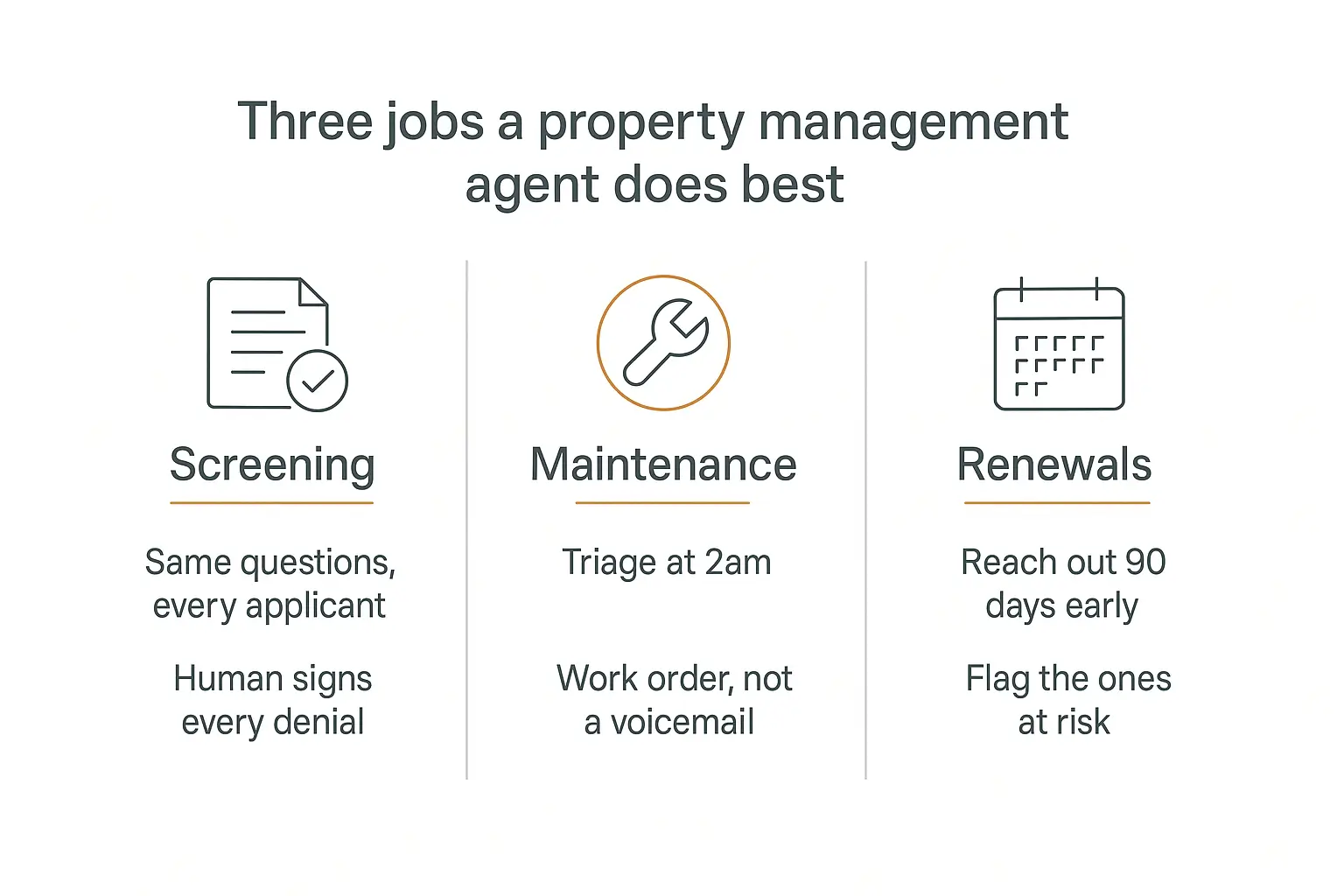
The three jobs worth automating first
If you automate one thing, automate maintenance intake. If you automate three, add screening intake and renewal outreach.
Here's how they compare on effort, risk, and payback:
| Workflow | Setup effort | Compliance risk | Payback | Automate it? |
|---|---|---|---|---|
| Maintenance intake & triage | Low | Low | Weeks | Yes — start here |
| Tenant FAQ / resident portal | Very low | Very low | Immediate | Yes |
| Leasing inquiry response | Medium | Medium (fair housing) | Weeks | Yes, with guardrails |
| Renewal outreach | Low | Low | One renewal cycle | Yes |
| Application intake & document chasing | Medium | Medium | Months | Yes — intake only |
| Screening decisions | High | Severe | Never worth it | No |
| Eviction / legal notices | High | Severe | — | No |
| Rent pricing recommendations | High | High (antitrust) | — | Not without counsel |
Notice the pattern. Everything an agent should do is intake, classification, and communication. Everything it shouldn't do is a decision about a person.
That's not a technical limitation. It's a legal one, and it's the most important thing in this article.
Job 1: Tenant screening — where the agent stops
Let's do the dangerous one first, because most content on this topic gets it wrong.
You will read a lot of marketing about "AI tenant screening." Almost all of it is describing something you should not build, or should build only up to a very specific line.
What HUD actually said
In May 2024, HUD issued explicit guidance that the Fair Housing Act applies to algorithmic and AI-driven tenant screening. The core principles:
- Relevance. You can only screen on factors actually tied to tenancy obligations. Not proxies. Not "vibes."
- Accuracy. The underlying report data has to be correct, and you're responsible for it.
- Policy scope. The algorithm has to match your written screening criteria — not exceed them.
- Transparency. Publish your screening criteria before people apply.
- Dispute rights. Applicants get their report and a way to challenge errors.
- Model testing. If it's a machine learning model, it must be designed and tested for FHA compliance.
And the line that matters most: you cannot outsource fair housing compliance to a vendor. If an automated tool produces a discriminatory outcome, that's your liability, not the software company's.
There's more coming. Colorado's SB 24-205 — the Colorado AI Act — takes effect June 30, 2026 and imposes obligations on "deployers" of high-risk AI systems, with tenant screening named explicitly. If you operate in Colorado, you're a deployer.
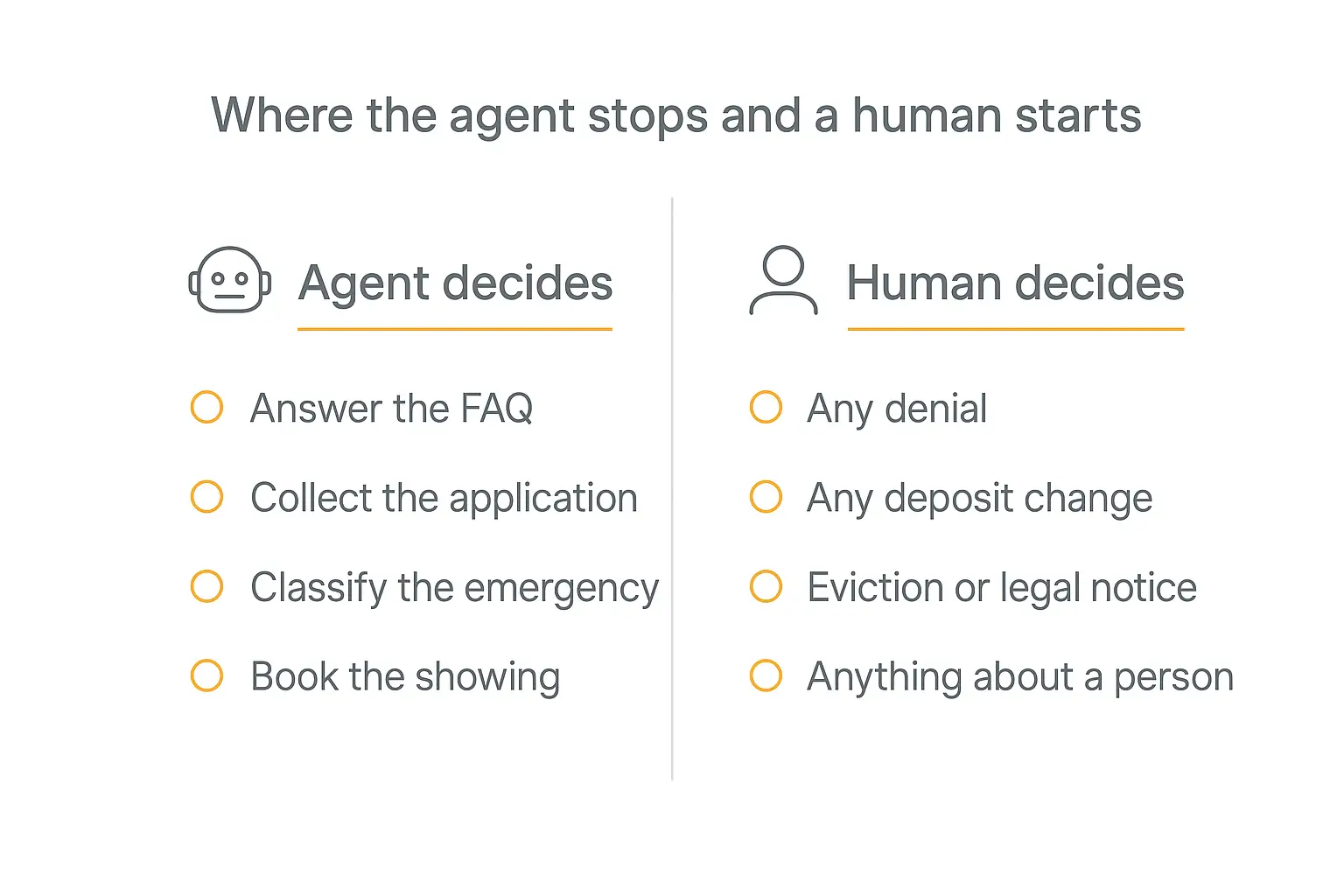
The safe version: intake, not judgment
So here's the split I'd actually build.
The agent handles intake. It explains your published criteria in plain language. It answers "do you accept housing vouchers?" and "what's the income requirement?" the exact same way for every single person who asks — which, incidentally, is better fair housing hygiene than a tired human doing it differently at 5pm on a Friday.
It collects the application. It chases missing documents. It tells someone their pay stub upload failed. It confirms receipt and sets expectations on timing.
A human makes every decision. Approval, denial, conditional approval, a higher deposit, a co-signer requirement — all of it. And note the trap here: an adverse-action notice is required whenever a screening report contributes to a denial, a co-signer demand, a higher deposit, or higher rent. Not just when it's the sole reason.
Consistency is the actual win. Most fair housing exposure in small and mid-size shops doesn't come from a rogue algorithm — it comes from a human answering the same question five different ways to five different people. An agent working from one published criteria document is more consistent than any staff member, by construction.
The fraud problem the agent can't solve
One honest caveat, because it's getting worse fast.
Roughly 93% of rental housing owners report experiencing rental fraud, and around 1 in 8 applications contains fraudulent income documentation. AI-generated document fraud reportedly jumped 500% in 2025 — anyone can produce a convincing fake pay stub in under a minute now.
Your intake agent will happily collect a beautifully forged pay stub and file it. It is not a fraud detector. If fraud is your pain point, that's a document verification vendor or income-verification API — a different tool solving a different problem. Don't let "we have AI screening" convince you you've addressed it.
Build the intake agent before the clever one
Upload your lease and screening criteria, and you have a resident FAQ agent in an afternoon.
Job 2: Maintenance requests — the one that pays for itself
This is the workflow I'd build first, every time.
Maintenance intake is high-volume, mostly routine, time-sensitive on a small minority of cases, and carries almost no compliance risk. That combination is rare.
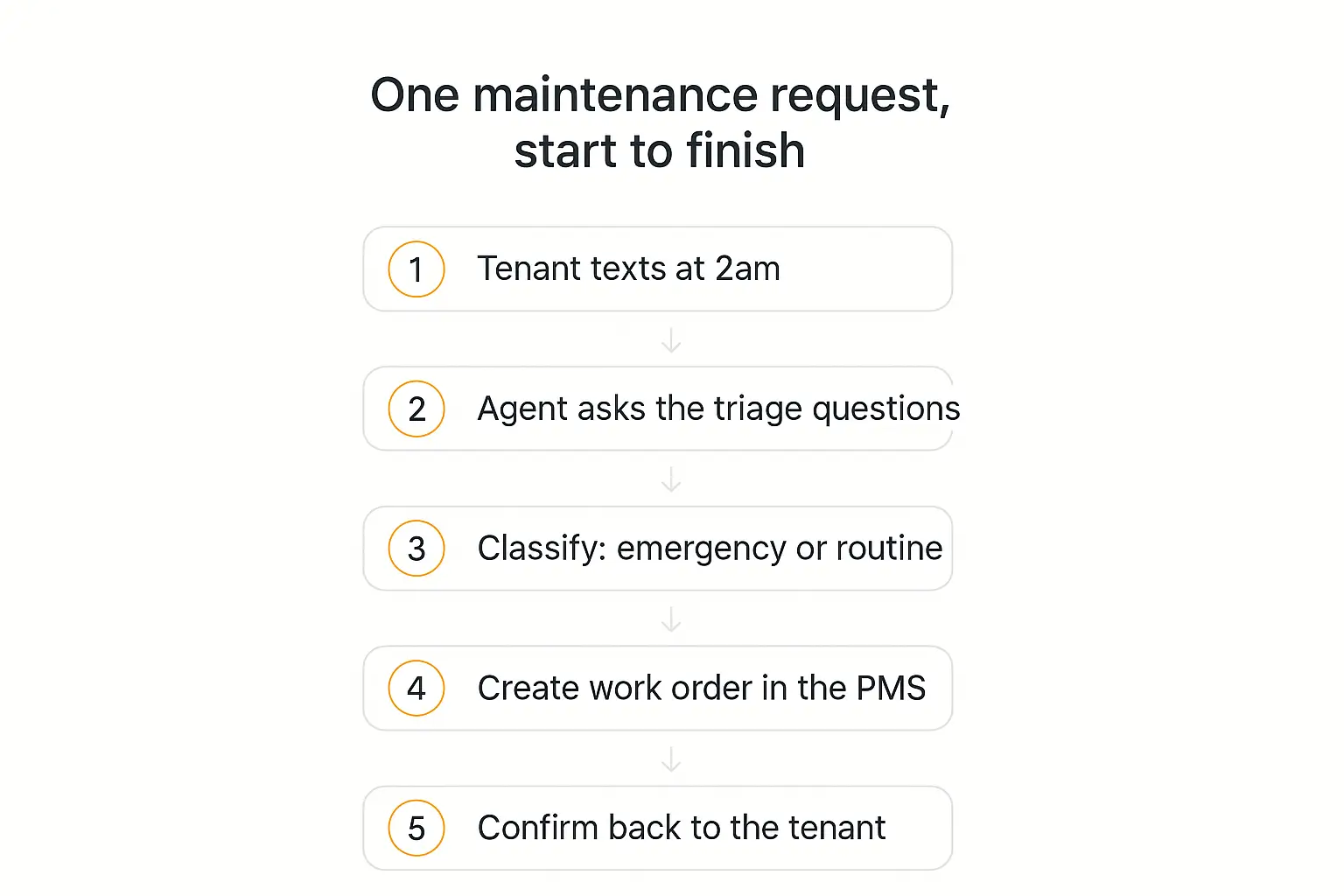
What good triage actually looks like
The agent's job is not to fix anything. It's to ask the questions a good coordinator would ask, then classify.
A solid triage script collects, in order:
- Name, property, unit number, and a callback number
- What's happening, in the tenant's own words
- The disambiguating question — "is water actively running right now, or is it a stain?" That one question is the difference between a 2am dispatch and a Tuesday work order.
- Whether the unit is safe to occupy tonight
- Entry permission and pets on site
- Photos, if the channel supports it
Then it classifies against your emergency definition — not a generic one. Most operators land on something like:
| Class | Examples | Action |
|---|---|---|
| Emergency | Active water, gas smell, no heat below freezing, sewage backup, no working lock, fire/electrical hazard | Transfer to on-call human immediately. Do not queue. |
| Urgent | No hot water, fridge out, AC out in extreme heat, single-toilet unit clogged | Ticket flagged for first dispatch next morning |
| Routine | Dripping faucet, blinds, cosmetic, minor appliance annoyance | Standard work order, SMS confirmation with expected window |
The non-negotiable design rule: emergencies escalate to a human, they never resolve inside the agent. The agent's contribution to an emergency is speed and a clean summary — it should hand off within seconds, having already collected the address and the callback number.
Why it's worth money
The ROI here isn't really labor savings, though those are real. It's avoided severity.
A leak caught in 20 minutes is a plumber. The same leak caught in eight hours is a restoration company, a displaced tenant, and an insurance claim. Industry write-ups put that swing at roughly $500 versus $15,000, which sounds like marketing math until it happens to you once.
The secondary win is retention. Turnover runs somewhere between $1,750 and $5,000 per unit depending on whose numbers you use, and the U.S. multifamily renewal rate sits around 55%. Maintenance responsiveness is consistently one of the top reasons tenants cite for leaving. Answering at 2am is a retention feature disguised as an operations feature.
The comparison to make is against an answering service, which typically runs $0.75–$2.00 per minute, or an internal on-call stipend at $500–$1,500 per employee per month. An agent handling the same intake usually lands well under that — and unlike a call center, it can write the work order directly into your system.
Voice or text?
Text first. Always.
Text is cheaper, easier to get right, produces a written record automatically, and handles photos — which are genuinely useful for triage. Voice matters when your resident population actually calls, which in a lot of portfolios it does. If that's you, look at the AI voice agent landscape before assuming you need voice on day one. Most operators find that a text agent plus a human on-call line covers 90% of the value at 20% of the complexity.
Job 3: Lease renewals — the quiet money
Renewals are the least glamorous item on this list and probably the highest ROI per hour of setup.
The logic is simple: a renewal is worth one to two months of rent in avoided turnover cost, and the intervention is a series of well-timed messages that nobody has time to send.
A renewal agent runs on a schedule rather than on inbound messages — this is the scheduled agent pattern rather than the chat pattern. A reasonable cadence:
- 120 days out: quiet check-in. "Anything we should fix before you decide?" This one is a maintenance-lead generator as much as a renewal touch — and fixing something at day 120 is what actually drives the renewal at day 60.
- 90 days out: the renewal offer, terms clearly stated, with an easy yes.
- 60 days out: follow up with anyone who hasn't responded.
- 45 days out: flag non-responders to a human. That's the list your manager should actually be calling.
The flagging step is the whole point. Your manager doesn't have time to chase 180 renewals. They absolutely have time to call the 14 people who went quiet.
One rule: the agent proposes, a human prices. Renewal rate increases touch rent-control rules in some jurisdictions, and there's active antitrust litigation in the algorithmic rent-pricing space. Let the agent handle the outreach and the logistics. Keep the number a human decision.
Job 4: Leasing inquiries (the crowded one)
Worth mentioning because it's where most vendor money is, and where you're least likely to build something better than what you can buy.
Leasing response is a real problem — leads go cold in minutes, and after-hours inquiries are where most of them arrive. But it's also the most competitive category in proptech. EliseAI is the established name in multifamily leasing conversations, and the big PMS platforms have all shipped their own: AppFolio's Realm-X, Yardi's Virtuoso, and Entrata's ELI.
If you're running multifamily at scale on one of those platforms, turn on what you already pay for before you build anything.
Building your own leasing agent makes sense in narrower cases: single-family and small multifamily portfolios that the enterprise tools price out, mixed portfolios spanning systems those tools don't cover, or third-party managers who need a differently branded experience per owner. That last one is a real business — more on it below.
Wherever it runs, the fair housing rules apply identically. The agent answers "is this neighborhood good for families?" with information about the property, never about the people in the area. That's a guardrail you write into the instructions explicitly, and then you test it adversarially before launch.
Job 5: The owner-facing agent almost nobody builds
Every article about AI for property management talks about tenants. Almost none talk about owners — which is strange, because if you're a third-party manager, owners are your actual customers.
Think about the questions you field from owners. They're remarkably repetitive:
- "Why was there a $340 charge in March?"
- "When does the lease at the Oak Street unit expire?"
- "Is the unit still vacant? What are we doing about it?"
- "Can you resend the September statement?"
- "How much have we spent on maintenance at this property this year?"
Every one of those has a definitive answer sitting in your system. And every one of them currently costs a manager fifteen minutes of context-switching, usually at a bad moment.
An owner agent with read access to statements, work order history, and lease dates answers all of them instantly — and it does it at 9pm on a Sunday when the owner is actually looking at their finances.
Three reasons this is the sleeper win:
- The compliance risk is near zero. No fair housing exposure, no tenant data sensitivity, no adverse actions. You're answering an owner's questions about their own property.
- It's a retention feature for the relationship that pays you. Owners churn over feeling uninformed far more than over fees. An owner who can ask a question at any hour and get a real answer doesn't feel uninformed.
- It's differentiating in a pitch. "You get your own portal where you can ask anything about your properties" is a concrete thing your competitor down the street does not have.
The setup is genuinely simpler than the tenant side, too. Owners are a small, known, authenticated group — so you can give each one a login and scope what they see to their own properties, rather than building for anonymous public traffic. That's what client portals are for, and pairing one with usage analytics tells you which owners are actually engaged.
One boundary to write in explicitly: the owner agent does not discuss tenants as people. It reports payment status, lease dates, and work order history. It does not characterize a resident, speculate about them, or share anything from a screening file. Owners will ask. The agent declines and routes to you.
A worked example: does the math survive contact?
Let's put numbers on a realistic mid-size shop, because "up to 80% automation" is not a business case.
Say you manage 400 doors across single-family and small multifamily.
Volume. Industry-typical maintenance request rates land around one request per unit per quarter, so call it roughly 130 requests a month. Around 35% arrive outside business hours — about 45 of them. Add a few hundred routine FAQ questions a month on top.
What the agent absorbs. Realistically it fully handles the FAQ volume and roughly 60% of maintenance intake end to end. Emergencies — a handful a month — get escalated in seconds instead of sitting in a queue.
Cost side. Platform plan plus usage for that volume lands in the low hundreds of dollars a month, all in. Compare that to an answering service at $0.75–$2.00 a minute handling the same 45 after-hours contacts, or a $500–$1,500 monthly on-call stipend.
Where the money actually comes from. Not the answering service line item. Three places:
- One avoided escalation. If catching a single active leak early in a year turns a $15,000 restoration into a $500 repair, that one event dwarfs the annual cost of the whole system. You need this to happen roughly once every several years for the project to break even — and in a 400-door portfolio it happens more often than that.
- Manager hours. If 39% of managers spend 20+ hours a month on maintenance handling, absorbing 60% of intake gives you back something like 10–12 hours a month per manager. That's not a headcount reduction; it's the difference between firefighting and doing the proactive work that keeps owners.
- A point or two of renewal rate. At $1,750–$5,000 per turnover, a 400-door portfolio at a 55% baseline renewal rate turns over roughly 180 units a year. Moving that rate by two points is four or five avoided turnovers — call it $10,000 to $20,000 a year, from nothing but responsiveness and well-timed outreach.
The honest read: the labor savings alone probably justify it, and the avoided-severity and retention effects are where it actually gets interesting. But those two are also the hardest to attribute, which is exactly why you should baseline your current numbers before you launch. Nobody can prove a renewal lift against a number they never wrote down.
The hard part nobody warns you about: your PMS
Here's where most property management AI projects actually die.
Building an agent that chats well takes an afternoon. Building one that writes a work order into AppFolio at 2am is the entire project.
An agent that can't write to your system is a very expensive note-taker. If the output is an email to your team that someone re-types into the PMS, you haven't automated anything — you've added a step.
Your options, roughly in order of how much they'll annoy you:
| Path | How it works | Reality check |
|---|---|---|
| Native PMS AI | Turn on Realm-X, Virtuoso, ELI | Best integration by far. Least flexible. Only covers their workflows. |
| Official API | Agent calls the PMS API directly | Cleanest custom path — if your plan includes API access. Many don't. |
| Automation middleware | Agent → Zapier/Make/n8n → PMS | The realistic answer for most mid-size shops. |
| Email/webhook bridge | Agent emails a structured request into the PMS intake address | Ugly, works surprisingly often, no API needed. |
| Spreadsheet + human sweep | Agent writes to Sheets, someone batches it in | Fine for month one. Not a destination. |
Be honest about which one you're on before you promise anyone a 2am work order.
On our end this is what Actions are for — the agent calls out to an API or an automation platform mid-conversation, gets a real response, and tells the tenant their ticket number instead of "someone will be in touch." We've written up the general pattern in connecting agents to Google Sheets, Slack, and other apps, and the Zapier/Make/n8n route covers most PMS platforms that don't hand out API keys freely.
Build vs. buy: an honest split
I run a platform for building agents, so treat my opinion with appropriate suspicion. Here's the version I'd actually give a friend:
Buy the vertical tool if: you're multifamily at scale, you're already deep in one PMS, the workflow you want is one they've built, and their pricing works at your door count. Nothing you build will integrate as tightly as the thing living inside your system of record.
Build your own if: your portfolio is single-family or scattered-site, you run multiple systems, your workflows are idiosyncratic, you want it branded per owner or per property, or the vertical tools quoted you a number that assumes you have 5,000 units and you have 300.
The build case that comes up most often is the third-party manager who wants each owner to see their own branded portal. That's not really a feature the enterprise tools offer — and it's a service you can charge for, which changes the math entirely. If that's the direction you're headed, selling agents to local businesses and the white-label playbook cover the commercial side.
The middle path most people land on: buy for leasing, build for resident-facing FAQ and maintenance intake. The leasing tools are genuinely good and the category is crowded. Resident FAQ is trivially easy to build and nobody sells it well.
How to actually build one
Concretely — this is the version I'd set up for a mid-size shop, and it's a couple of days of work, not a quarter.
Step 1: Feed it what it needs to know
Upload your standard lease, your house rules, your published screening criteria, your emergency definitions, the vendor list with hours, and a plain FAQ covering rent due dates, late fees, pet policy, parking, and how to submit a request.
Property-specific stuff — pool hours, trash day, gate codes that are not secret — goes in as separate documents so answers stay correct per building. Getting the knowledge base structure right matters more than the model you pick.
Two things that do not belong in a knowledge base: anything about a specific tenant, and anything you wouldn't want quoted back to you in a deposition.
Step 2: Write instructions that are mostly boundaries
The instructions for a property management agent are unusual in that most of the text is about what not to do.
Mine would include, near-verbatim:
- Never state or imply an approval or denial decision. Applications go to a human.
- Never discuss the demographics, character, or makeup of a neighborhood or its residents. Answer questions about the property.
- Never quote a rent change, a deposit amount, or a fee that isn't in the documents.
- Never give legal advice about evictions, notices, or tenant rights.
- If a message mentions water, gas, smoke, no heat, no lock, or someone being unsafe — escalate immediately and stop trying to help.
- If a tenant is angry or distressed, hand to a human rather than de-escalating on your own.
- When you don't know, say so and route to a person. Never guess about a lease term.
That last one is worth dwelling on. A model guessing about a lease clause is worse than a model saying "I'll have someone confirm." Our prompt engineering guide goes deeper, but for this use case the whole game is refusal behavior.
Step 3: Wire up the escalation path first
Build the handoff before you build anything clever.
An emergency keyword should fire an Action that pages the on-call phone — and the agent should tell the tenant plainly that a human is being contacted right now. Silent escalation is worse than no escalation, because the tenant keeps typing at a bot while the clock runs.
Test this one adversarially. Type "there's water everywhere" at 3am on a Sunday and confirm a phone actually rings. This is the human-in-the-loop boundary that everything else depends on.
Step 4: Deploy where tenants already are
Tenants will not download an app or learn a portal for this. Meet them where they are: an embedded widget on the resident page, a WhatsApp or SMS number, and an email address that routes to the same agent. A per-property or per-owner portal gives you the branded version when you need it.
Step 5: Run it in shadow mode for two weeks
The step everyone skips.
Before it talks to a single tenant, run it against your last 200 real maintenance requests and read every response. You are looking for two failure modes: something it classified as routine that was an emergency, and something it answered confidently that was wrong.
The first one is a lawsuit. The second is a refund. Both are cheaper to find in a spreadsheet than in production. Our agent testing guide covers building a proper regression set, which is worth doing once you're live.
One agent per owner, branded their way
Portals let third-party managers give every owner their own front door — and charge for it.
What to measure
Vanity metrics will lie to you here. "Conversations handled" tells you nothing — a bot that confidently misroutes 400 requests has a great conversation count.
Track these instead:
| Metric | What it tells you | Rough target |
|---|---|---|
| Escalation precision | Of what it called an emergency, how many were | Over-escalating is fine. Under-escalating is not. |
| Missed emergencies | Emergencies it classified as routine | Zero. Any non-zero number stops the rollout. |
| Time to work order | Tenant message → ticket in the PMS | Minutes, vs. hours before |
| True containment | Resolved without a human and not re-contacted in 48h | 50–70% of routine volume |
| After-hours share | % of volume outside business hours | Usually 30–40%. This is the whole ROI case. |
| Renewal lift | Renewal rate vs. last year, same season | A few points is worth real money |
That containment definition matters. Counting a conversation as "resolved" when the tenant just gave up and called the office is how these projects report success while everyone internally knows it isn't working. Proper ROI formulas are worth setting up before launch, not after.
Where this goes wrong
Five failure modes I'd watch for, in rough order of how expensive they are.
1. The confident wrong answer about a lease. The agent tells a tenant they can break their lease with 30 days' notice. They don't read the actual clause. Now you have an argument with a paper trail on the wrong side. Fix: refuse-and-route on anything lease-term specific, and never let it paraphrase a legal document.
2. The under-escalated emergency. A tenant writes "toilet won't stop running" and the agent hears "dripping faucet." Fix: bias the classifier hard toward escalation, and use the disambiguating question — is water actively running right now?
3. The fair housing slip. A prospect asks something about the neighborhood and the agent, being helpful, answers. Fix: explicit refusal instructions, plus adversarial testing before launch. Ask it the bad questions yourself, in every phrasing you can think of.
4. Language. If a meaningful share of your residents don't speak English as a first language, this is an accessibility issue with fair housing implications, not a nice-to-have. Test in the languages your residents actually use.
5. The integration that quietly breaks. Your PMS credential expires, Actions start failing, and the agent keeps cheerfully telling tenants their request was submitted. Fix: alert on Action failure, and have the agent say "I couldn't file that — I'm alerting the team" rather than assuming success. This is a boring thing that will bite you at the worst possible moment.
Underneath all five is one principle: decide how much autonomy this thing gets, deliberately. The levels of agent autonomy framework is a useful way to think about it — for property management, most workflows should sit at "acts, but a human reviews" rather than "acts independently," and screening should sit at "drafts only."
Frequently asked questions
Can AI agents legally screen tenants?
They can collect applications and explain published criteria. They should not make approval or denial decisions. HUD's 2024 guidance makes clear the Fair Housing Act applies to algorithmic screening, and you can't shift that liability to a vendor. Adverse-action notices are required whenever a screening report contributes to a denial, a higher deposit, or a co-signer requirement — so keep a human on every one of those.
What does it cost?
For a small to mid-size portfolio, a maintenance-intake and FAQ agent typically lands in the tens of dollars per month in usage plus the platform plan — meaningfully less than an answering service at $0.75–$2.00 per minute or an on-call stipend at $500–$1,500 per employee. Enterprise leasing AI is priced per unit and generally assumes real scale. The token economics breakdown covers how usage-based pricing actually behaves.
Will it integrate with AppFolio, Yardi, or Buildium?
Directly, only if your plan includes API access. In practice most mid-size operators route through Zapier, Make, or n8n, or use an email/webhook bridge into the PMS intake address. Confirm this before you scope anything — it's the constraint that determines what's actually buildable.
Should tenants know they're talking to an AI?
Yes. Disclose it in the first message. Several states now require it in some contexts, it's the correct default regardless, and — practically — tenants who know they're talking to a bot escalate faster when they need a human, which is exactly what you want.
Does this replace property managers?
No, and the industry data doesn't support that framing. The 2026 Buildium/NARPM report describes AI making staff faster rather than redundant, and Forbes framed it as the job changing, not disappearing. What actually happens is that the routine 80% stops eating the day, and managers spend their time on the exceptions — which is the part that was being neglected at 180 doors per person.
Is a chatbot the same as an agent?
No, and the difference matters here. A chatbot answers. An agent takes actions — files the work order, pages the on-call tech, schedules the showing. For property management the actions are the value; a chatbot that can only talk is a nicer FAQ page. We've written up the distinction in detail.
Where I'd start on Monday
If you manage doors and you want one thing to do this week: build the maintenance intake agent.
Not the leasing bot, not the screening system. The thing that answers the 2am text, asks whether water is actively running, and either wakes someone up or files a ticket with a confirmation number.
It's the lowest-risk workflow, the fastest to stand up, and the one where the gap between "AI answered" and "voicemail" is measured in thousands of dollars of avoided damage. Get that working, watch it for a month, then add the resident FAQ and the renewal sequence.
Screening intake comes after that, and screening decisions never come at all.
If you want to try it, you can build an agent on Pickaxe by uploading your lease and house rules, writing the boundaries above into the instructions, and connecting an Action to whatever your PMS will actually accept. The first version takes an afternoon. The version you trust at 2am takes two weeks of testing — and that's the version worth having.