Ask any event planner what actually eats their week, and it's almost never the creative part. It's the follow-up.
It's chasing 40 people who never replied to the invite. It's sending the same venue spec to a dozen spaces and copy-pasting their quotes into a spreadsheet. It's re-counting the headcount every time someone cancels, changes their meal, or brings a plus-one they forgot to mention.
This is exactly the kind of work AI for event planners is built to absorb. Not the vision, not the taste, not the relationships — the repetitive, deadline-driven admin that quietly swallows your evenings.
I looked into how planners are actually using AI agents in 2026 — for RSVPs, venue sourcing, and attendee management — and what stood out is how much of it you can now set up yourself, without a developer. Here's the honest version of what works, what doesn't, and how to build your own.
Why event planners are drowning in admin
Event planning has always been a coordination job disguised as a creative one. The larger the event, the more the balance tips toward logistics.
The numbers back this up. 45% of event teams run with just 1–3 people, according to industry data compiled by Cvent — which means a handful of humans are manually managing hundreds or thousands of moving pieces per event.
No surprise, then, that adoption is exploding. 95% of event professionals expect their organization's use of AI to increase in 2026, per Bizzabo's State of Events report, with 35% anticipating a significant jump.
And it's already paying off. 73% of event professionals say AI helps them save time on administrative tasks, and 66% say it lets them spend more time on strategic, high-value work instead of grunt work.
That last stat is the whole point. AI isn't replacing the planner — it's clearing the desk so the planner can do the part clients actually pay for.
If you're new to the concept, our guide on what AI agents are is a good primer. In short: an agent is an AI that doesn't just answer questions — it takes actions on your behalf, like sending an email, updating a sheet, or pulling data from a form.
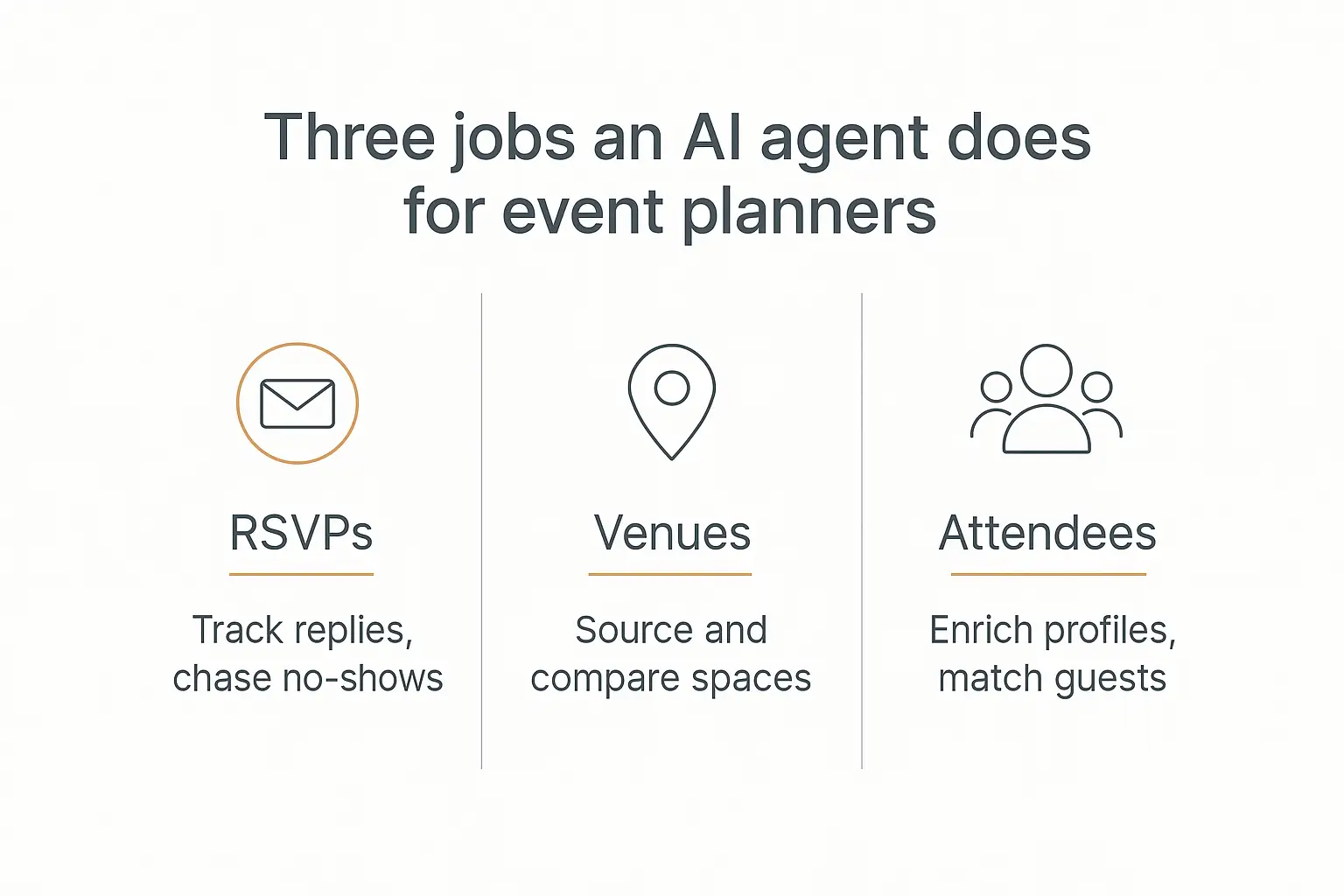
The three jobs where AI agents earn their keep
You can technically point an AI agent at almost any part of the event workflow. But three areas give you the fastest, most obvious return: RSVPs, venue search, and attendee management.
These are the tasks that are high-volume, rules-based, and repetitive — the exact profile of work that agents handle well. Let's go through each one.
1. Automating RSVPs and guest communication
RSVP management is death by a thousand small tasks. Send the invite, log the reply, note the dietary restriction, chase the non-responders, update the count, repeat.
An AI agent can own almost all of it. Connect it to your RSVP form or inbox, and it can read each response, log the answer, capture the meal choice and plus-one, and quietly update your master headcount in real time.
The most valuable part is the chasing. Roughly a third of your invitees will simply never reply the first time. An agent can automatically send a warm, personalized nudge to anyone who's gone silent after a few days — the follow-up you always mean to send but never do.
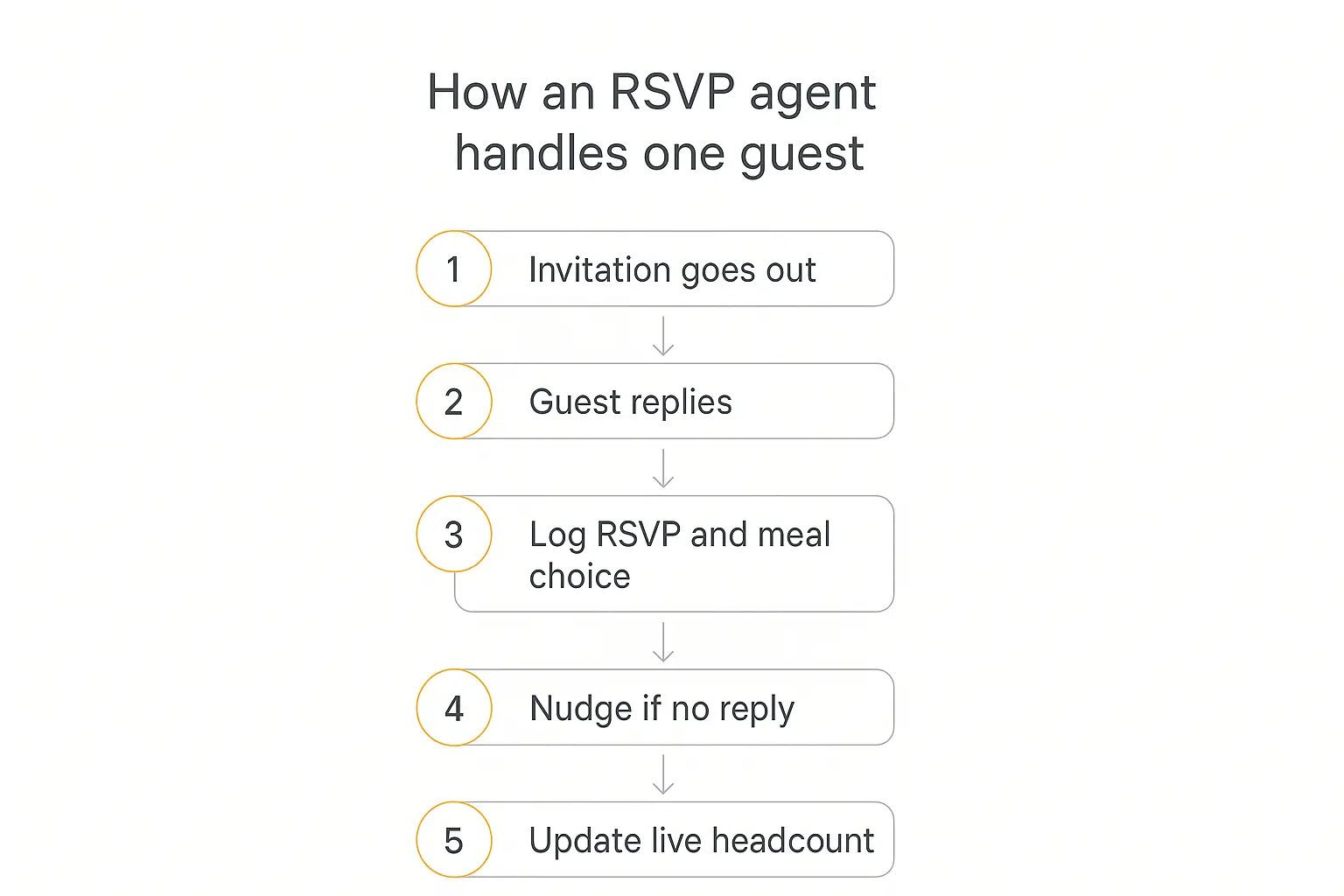
Here's what that loop looks like end to end for a single guest:
- The invitation goes out — via email, a form link, or a WhatsApp message.
- The guest replies — "Yes, two of us, one vegetarian."
- The agent logs it — parses the reply, records the RSVP, headcount, and meal choice into your sheet or CRM.
- It nudges the silent ones — anyone who hasn't answered after, say, four days gets a friendly reminder.
- It updates the live count — so your caterer number is always current, without you touching a spreadsheet.
Platforms like RSVPify and Jotform now bake versions of this directly into their forms. But if you want the agent to handle nuance — replying to odd questions, handling reschedules, speaking in your brand voice — a custom agent gives you far more control.
This is the same pattern we walk through in our guide on building a client-onboarding agent: a form on the front, an agent doing the logging and follow-up behind it. RSVPs are just onboarding with a guest list.
2. Venue search and sourcing
Venue sourcing is where planners lose entire days. You define the specs — capacity, location, budget, dates, A/V needs — then send that same brief to a dozen venues and wait for quotes to trickle back in wildly different formats.
This is one of the areas where AI has advanced fastest. 75% of planners already use AI for venue searches, according to Cvent's venue sourcing research drawn from 1,650 event planners.
Purpose-built tools like Nowadays.ai automate venue matching against your event specs, distribute RFPs to multiple venues at once, and even assist with rate negotiation. For a planner sending 10–15 RFPs per event, that compresses a multi-day sourcing cycle into hours.
Cvent's own 2026 sourcing report found that three-quarters of planners now use AI somewhere in sourcing — 43% for finding and selecting venues, 41% for analyzing which fits best, and 40% for comparing bids.
A custom agent slots in neatly here too. You can build one that takes your event brief, formats a clean RFP, sends it to your shortlist, then collects the responses into a single tidy comparison table — capacity, price, availability, side by side — so you're deciding instead of collating.
The winning move isn't replacing your judgment on which venue feels right. It's deleting the hours of copy-paste that stand between you and that decision.
3. Attendee management and personalization
Once people say yes, a new pile of work begins: enriching profiles, matching attendees, sending logistics, answering the same 20 questions over and over.
AI is genuinely good at the scale part of this. Grip, for example, generates over 70 million personalized networking recommendations a year by analyzing attendee profiles, interests, and goals to suggest who should meet whom.
For most planners, though, the everyday win is simpler. An attendee-facing agent can act as a 24/7 event concierge that answers "where do I park?", "what's the dress code?", and "when's the keynote?" without a single email hitting your inbox.
That's essentially an FAQ agent trained on your event details. Attendees get instant answers; you get your evenings back.
Behind the scenes, the same agent can enrich attendee records, flag VIPs for special handling, segment guests for tailored comms, and generate personalized pre-event briefings — the kind of white-glove touches that used to be reserved for events with a big enough budget to hire more hands.
Build an event concierge agent in an afternoon
Pickaxe lets you spin up a no-code agent that answers guest questions and logs RSVPs — no developer required.
Beyond the big three: where else AI helps
RSVPs, venues, and attendees are the headline use cases, but the same agent approach extends across the rest of the event workflow.
Marketing and promotion. Draft invite copy, social posts, and email sequences in your brand voice — then personalize them per segment. Roughly 79% of event pros say AI has already improved their planning efficiency, with marketing automation cited as a top gain.
Budgeting and vendor coordination. An agent can track quotes against your budget, flag when a line item drifts over, and draft the follow-up emails to caterers, A/V teams, and rentals.
Post-event work. The dreaded wrap-up — survey analysis, attendance reconciliation, the ROI report — is exactly where AI shines. Notably, the share of organizers who struggle to prove event ROI dropped from 70% to 40% year over year, largely thanks to better AI-assisted measurement and CRM integration.
On-site support. A chatbot embedded in your event app or website handles the flood of day-of questions so your team can focus on the room, not their phones.
Vendors like Momentus and Planning Pod have good rundowns of where AI fits across the broader event lifecycle if you want to go deeper.
A quick map of the AI event tool landscape
There's no single "best" tool — there's the right tool for each job. Here's how the main options stack up so you can decide where a custom agent fits versus an off-the-shelf platform.
| Tool | Best for | Where it fits |
|---|---|---|
| Cvent | Enterprise venue sourcing & RFPs | Large events with big venue databases and multi-region sourcing |
| Bizzabo | Registration & attendee experience | Conferences and hybrid events focused on the attendee journey |
| Nowadays.ai | AI-first venue sourcing | Planners sending lots of RFPs who want sourcing cut from days to hours |
| RSVPify / Jotform | Forms & RSVP collection | Simpler events that mostly need clean registration and reminders |
| Pickaxe | Custom no-code agents | Any planner who wants an agent for their specific RSVP, FAQ, or coordination workflow |
The big platforms are excellent at their lane but pricey and rigid outside it. The reason to build a custom agent is fit: you get exactly the workflow your events need, in your voice, connected to the sheets and forms you already use — without paying enterprise pricing for features you'll never open.
Many planners run both: an enterprise platform for the heavy sourcing, plus a lightweight custom agent for the everyday RSVP-and-FAQ grind.
How to actually build your own event agent (no code)
Here's the part that surprises people: you don't need to buy a dozen point solutions or hire an engineer. You can build one agent that does the specific jobs your events need, using a no-code platform.
This is what we do at Pickaxe. You describe what the agent should do in plain language, connect it to the tools you already use, and deploy it — as a chat widget, a form, or an assistant behind the scenes.
The three pieces that make an event agent useful:
- Instructions — the plain-English brief telling the agent its job: "You manage RSVPs for a corporate gala. Log every reply, capture meal choices, and follow up with anyone who hasn't responded in four days."
- Knowledge — your event details, FAQ, venue shortlist, or run-of-show, uploaded so the agent answers from your real information instead of guessing.
- Actions — the connections that let the agent do things: write to a Google Sheet, send an email, post to Slack, or pull from your registration form.
Those Actions are what turn a chatbot into an actual agent. Without them, you have a nice conversationalist; with them, you have something that updates your headcount while you sleep. Our piece on building a lead-qualification agent shows the same instructions-plus-actions pattern applied to a different job.
You can pick which model powers the agent based on the task — a fast, cheaper model for simple RSVP logging, a stronger one for nuanced guest replies. (See the available models for the current lineup.)
A starter recipe: your first RSVP agent
If you want the smallest useful thing to build first, start here. Don't try to automate the whole event — automate one annoying loop and prove it works.
- Point it at your RSVP form. Connect the agent to your registration form or the inbox where replies land, so it can read each response as it arrives.
- Give it one clear job. "Log every RSVP into this Google Sheet with name, headcount, and meal choice. If someone asks a question, answer it from the event FAQ."
- Add the follow-up rule. "Every morning, message anyone who was invited more than four days ago and hasn't replied."
That's a complete, genuinely useful agent — and it's the kind of thing you can stand up in an afternoon. Once it's earning its keep, add venue collation or attendee FAQs on top.
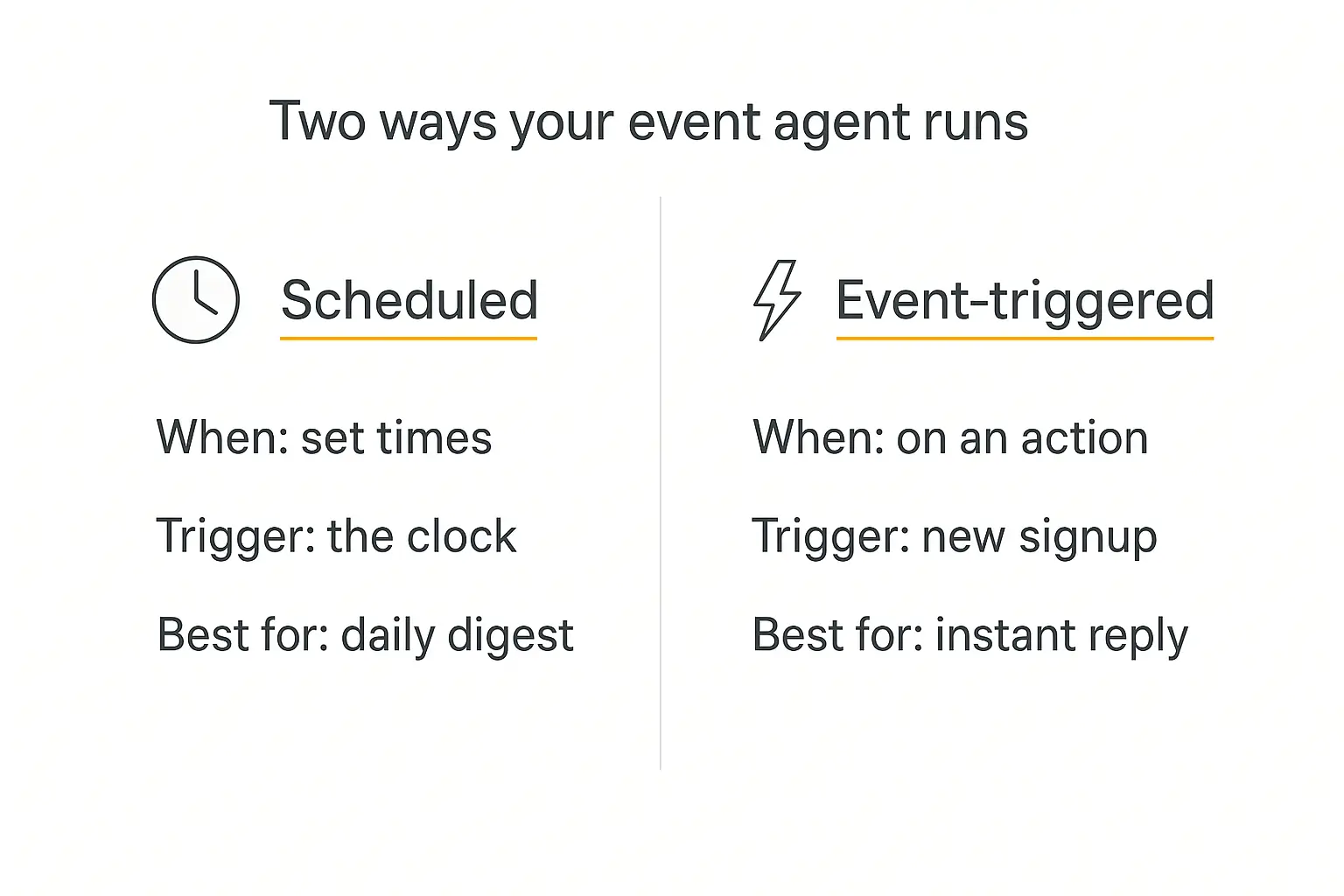
Scheduled vs. event-triggered agents
There are two ways your event agent can wake up and work, and good setups use both.
Scheduled agents run on a clock. A daily 8 a.m. run that emails you the current RSVP count, flags new cancellations, and lists who still hasn't replied is a perfect scheduled job. Our guide on building an agent that runs on a schedule covers this pattern in detail.
Event-triggered agents fire the instant something happens — a new registration comes in, a guest cancels, a form is submitted. That's the one you want for instant confirmation emails and real-time updates.
Most event workflows blend the two: instant confirmations when someone signs up, plus a calm morning digest that keeps you oriented without you refreshing a spreadsheet ten times a day.
A realistic day in the life
Let's make this concrete. Say you're planning a 300-person conference. Here's how the admin might run with a small stack of agents doing the heavy lifting.
Morning. You open an email your scheduled agent sent at 8 a.m.: 214 confirmed, 6 new cancellations overnight, 41 still silent. It's already drafted reminder emails to the 41 — you skim and hit send.
Midday. A sponsor asks about A/V options at the venue. Your knowledge-trained agent answers them directly from your run-of-show doc. You never see the question.
Afternoon. Three new registrations come in. The event-triggered agent confirms each one, logs their meal choice, and adds them to the seating tracker automatically.
Evening. Instead of reconciling spreadsheets, you're actually thinking about the event — the flow of the day, the speaker intros, the little touches. Which is the job.
None of this is science fiction. Every piece here is buildable today with tools a non-technical planner can operate. If you want the agent to live on your registration site, our guide on embedding an AI agent on your website walks through it.
What AI can't (and shouldn't) do
I'd be doing you a disservice if I pretended agents handle everything. They don't, and the honest boundaries matter.
Judgment calls stay human. Whether a venue feels right, whether a seating arrangement will spark the right conversations, how to handle a difficult VIP — that's you. AI hands you clean options; you make the call.
Relationships stay human. The trust between you and a client, or you and a favorite caterer, isn't something to automate. Use AI to free up time for those relationships, not to replace them.
High-stakes comms need a check. Let the agent draft the apology email after a scheduling mixup — but read it before it sends. Keep a human in the loop wherever the cost of a wrong message is high.
Data privacy is on you. Guest lists contain personal data. Make sure whatever platform you use handles it responsibly, and don't feed sensitive attendee information into tools you don't trust.
The planners who win with AI treat it as leverage, not autopilot. The agent does the volume; you keep the judgment.
Turn your event admin into an agent
Describe the job in plain English, connect your forms and sheets, and let it run. No engineers, no code.
Frequently asked questions
What is the best AI tool for event planning?
It depends on the job. For all-in-one enterprise platforms, Cvent and Bizzabo lead; for AI venue sourcing specifically, Nowadays.ai stands out. But if you want a custom agent that handles your specific RSVP, FAQ, or coordination workflow, a no-code builder like Pickaxe lets you create exactly that without paying for features you'll never use.
Can AI really handle RSVPs on its own?
For the mechanical parts, yes — logging replies, capturing meal choices, updating headcounts, and sending reminders to non-responders. Keep a human eye on unusual replies and anything sensitive, but the day-to-day volume is very automatable.
Do I need to know how to code to build an event agent?
No. Modern no-code platforms let you build an agent by describing its job in plain language and connecting it to your existing tools. If you can write a clear brief for a new assistant, you can build an agent.
How much time does AI actually save event planners?
Most reports put it in the significant range — 73% of event professionals say AI saves them time on administrative work, and two-thirds say it frees them for higher-value tasks. The exact savings depend on how much of your admin you hand over.
Is my attendee data safe with AI tools?
It's your responsibility to choose platforms that handle personal data properly. Review each tool's data policies, avoid feeding sensitive guest information into services you don't trust, and keep guest lists on reputable, secure platforms.
The bottom line
Event planning will always be a human craft. Clients hire you for taste, calm under pressure, and the relationships you've built — none of which an AI can replicate.
But the admin around that craft? The RSVP chasing, the venue collation, the endless headcount math? That's exactly the work AI agents were made to absorb.
The planners pulling ahead in 2026 aren't the ones with the fanciest tools. They're the ones who quietly handed the busywork to an agent and kept their energy for the parts that matter.
If you want to try it yourself, you can build your first event agent on Pickaxe without writing a line of code — start with one job, like RSVP follow-ups, and grow from there. Curious what it costs to run? Our breakdown on measuring AI agent ROI will help you make the case.