
A few years ago, "AI" at most companies meant a little chat bubble in the corner of a website. You typed a question, it matched you to a canned answer, and if it didn't understand, it handed you off to a human or quietly gave up.
That was a chatbot. Today the word everyone uses is AI agent — and the gap between the two is the single most important shift in software right now.
But here's the honest problem: half the products being rebranded as "AI agents" in 2026 are still just chatbots wearing a costume. So if you want to understand the difference between a chatbot and an AI agent — and figure out which one you actually need — you have to look past the marketing.
I've spent a lot of time looking into how these systems are built, where the line really sits, and why it matters for anyone deploying AI in a business. Here's the version I wish someone had given me.
If you're brand new to this, it's worth reading what an AI agent actually is first — this guide assumes you know the basics and want to understand what changed and why.
What a chatbot actually is
A chatbot is, at its core, a conversation machine. You say something, it says something back. That's the whole loop.
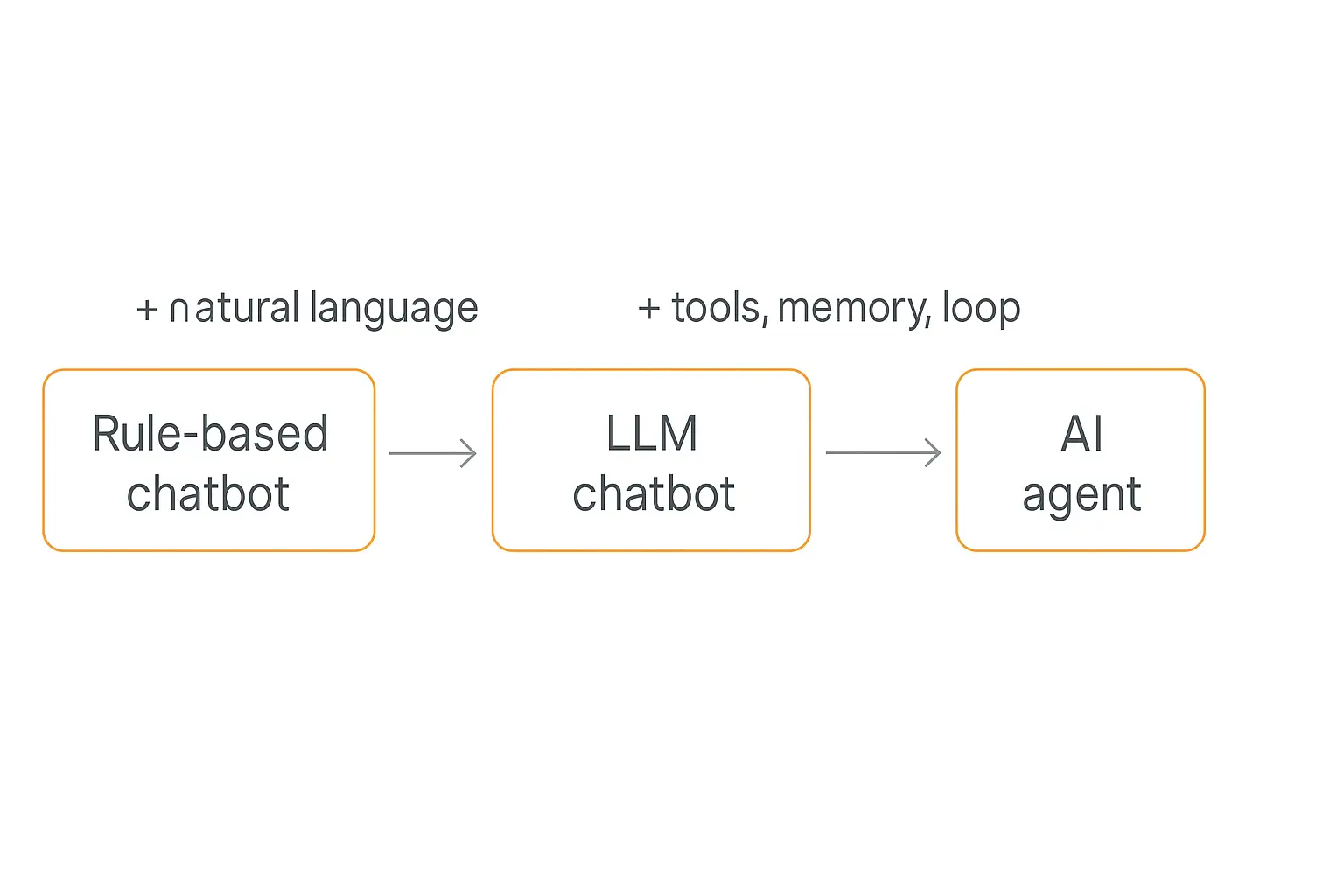
The earliest ones were rule-based: a decision tree of "if the user says X, reply with Y." Think of the menu bots that asked you to "Press 1 for billing." They didn't understand language — they matched patterns.
Then large language models arrived, and chatbots got dramatically better at the language part. A modern LLM chatbot can understand a messy, typo-ridden question and write a fluent, helpful answer. ChatGPT in its simplest form is exactly this.
But notice what a chatbot — even a smart, LLM-powered one — still doesn't do:
- It doesn't take actions in other systems. It can tell you how to reset your password, but it can't reset it for you.
- It usually doesn't remember you between sessions in any meaningful way.
- It handles one turn at a time. Ask it to do a five-step task and it'll describe the five steps rather than carry them out.
As one widely-cited framing puts it: a chatbot resolves the conversation; it doesn't resolve the problem. It answers. That's its job, and for a lot of use cases, answering is genuinely enough.
What an AI agent actually is
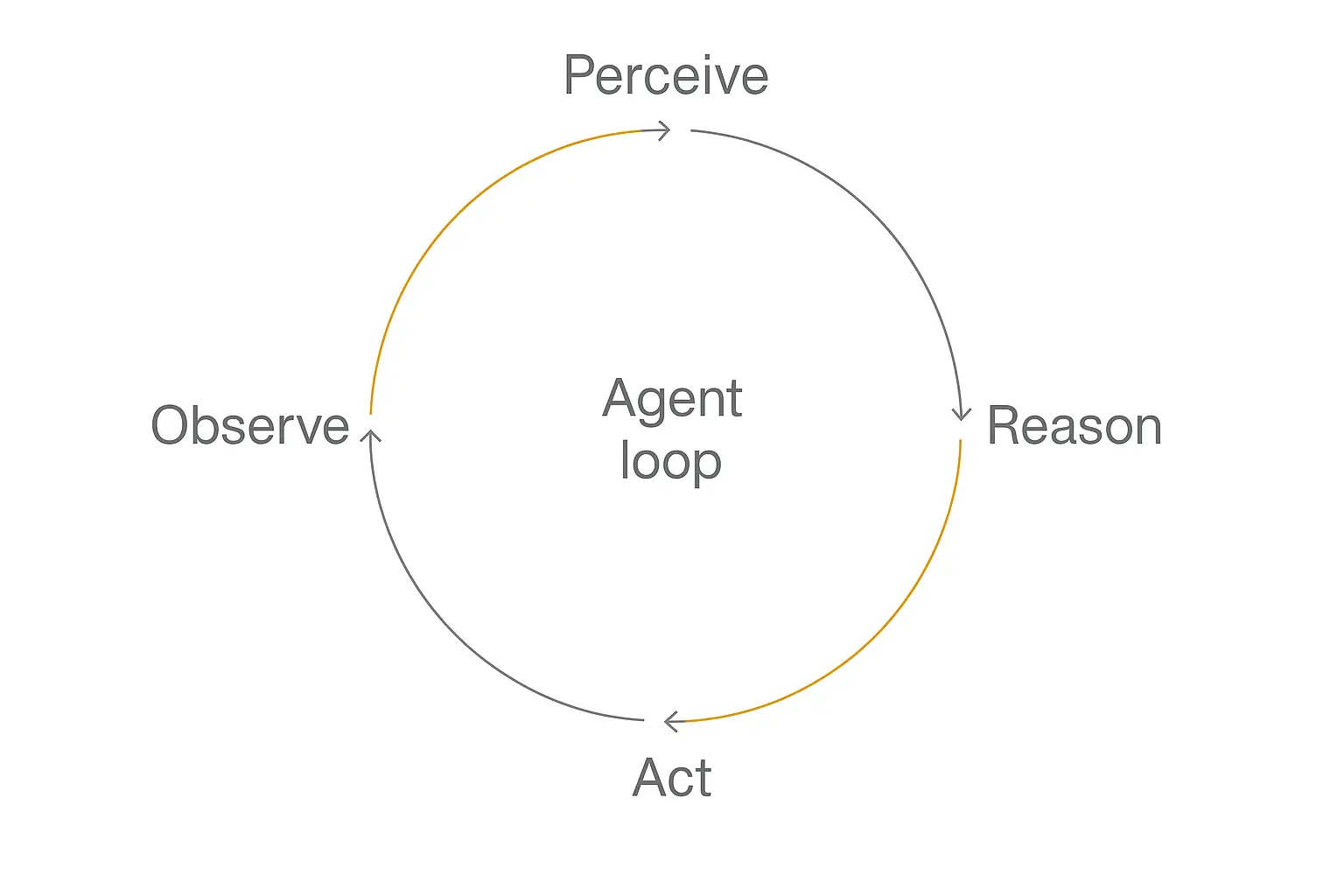
An AI agent uses a language model as a reasoning engine, not just a text generator. The model sits inside a loop: it observes the situation, reasons about what to do, takes an action using a tool, observes the result, and decides what to do next.
That loop — sometimes written as perceive → reason → act → observe — is the thing that separates an agent from a chatbot. Anthropic, in its guide on building effective agents, draws exactly this line: workflows follow fixed paths, while agents "dynamically direct their own processes and tool usage."
In plain English, an agent can do things, not just say things.
Ask a chatbot "Can you refund my last order?" and the best it can do is explain the refund policy. Ask an AI agent the same thing and it can look up your order, check the policy, decide if you qualify, issue the refund through your payment system, and email you the confirmation — then tell you it's done.
Three capabilities make that possible, and they're the heart of why this is a real shift and not just hype:
- Tools. The agent can call external systems — a database, an API, a calendar, a CRM — to look things up and make changes.
- Memory. It can hold context across steps and, often, across sessions, so it doesn't start from zero every time.
- Autonomy. Given a goal, it can plan and execute multiple steps without a human approving each one.
From chatbot to AI agent: the five shifts that actually matter
It's tempting to think of "agent" as just "a better chatbot." It's not. The change is a difference in kind, not degree. Here are the five shifts that actually moved the needle.
1. From answering to acting
This is the big one. A chatbot's output is words. An agent's output is outcomes — a booked meeting, an updated record, a sent invoice, a closed ticket.
The moment a system can change the state of the world on your behalf, you're no longer talking to a chatbot. You're delegating to an agent.
2. From scripts to reasoning loops
Old chatbots ran on scripts — rigid branches a human wrote in advance. If the user went off-script, the bot broke.
Agents run on a reasoning loop. Instead of following a pre-built path, the model decides at each step what to do next based on what just happened. That's why an agent can handle a request nobody scripted for — it reasons its way through.
3. From stateless to memory
A classic chatbot is stateless. Close the window, and it forgets you ever existed.
Agents carry memory. Short-term memory holds the current task; long-term memory persists facts about you across sessions. That's how an agent can remember that you're a returning customer, what you bought last month, and the preference you mentioned three conversations ago.
4. From one tool to many
A chatbot lives inside one box: the chat window. An agent reaches out.
Through tools and integrations — and increasingly through open standards like the Model Context Protocol — an agent can touch your email, your spreadsheets, your CRM, your scheduling software, and dozens of other systems. The chat is just the interface; the real work happens across your whole stack.
5. From resolving the conversation to resolving the problem
Put the first four together and you get the shift that businesses actually care about. A chatbot ends the conversation. An agent ends the problem.
That's the difference between deflecting a support ticket and actually solving it. Between answering "how do I reschedule?" and just rescheduling the appointment.
Chatbot vs AI agent: side by side
Here's the cleanest way I've found to hold the distinction in your head:
| Dimension | Chatbot | AI Agent |
|---|---|---|
| Core job | Answer questions | Complete tasks |
| Output | Text replies | Real-world actions + replies |
| Logic | Scripts or single-turn responses | Multi-step reasoning loop |
| Tools | Few or none | Calls APIs, databases, apps |
| Memory | Little to none | Short- and long-term memory |
| Autonomy | Waits for each prompt | Plans and executes toward a goal |
| Best for | FAQs, info lookup, simple support | Workflows, transactions, operations |
| Fails when | Task needs an action | Task is so simple an answer would do |
Notice the last row. An agent isn't automatically "better." A full agent pointed at a job a chatbot could handle is overkill — more cost, more failure modes, more to maintain. The right question is never "which is more advanced?" It's "which fits the job?"
Where chatbots still win
It's worth dwelling on this, because the agent hype makes it easy to forget: for a huge slice of real-world use cases, a plain chatbot is the better engineering choice, not the lazy one.
When the job is purely informational. If 90% of your inbound questions are "what are your hours?", "where's my order?", or "how do I reset my password?", you don't need an autonomous system reasoning across tools. You need fast, accurate answers — and a well-built chatbot with a solid knowledge base delivers them at a fraction of the cost.
When reliability matters more than capability. A chatbot's narrow surface area is a feature. It can only say things, so the worst case is a wrong answer. An agent can act, which means the worst case is a wrong action — a refund issued in error, the wrong record updated. The more power you hand a system, the more guardrails and testing it demands.
When you're just getting started. The smartest path is usually to ship a chatbot first, learn what your users actually ask, and only graduate to an agent for the specific workflows where "just answering" leaves value on the table. You rarely need to make the jump everywhere at once.
None of this is an argument against agents. It's an argument for matching the tool to the task — which, conveniently, is exactly what the data says most failed agent projects got wrong.
Why this shift matters right now
The reason this isn't just terminology is that the money and adoption have moved decisively toward agents.
Gartner forecasts that worldwide AI spending will grow 47% in 2026, with agentic AI the fastest-growing category. The firm projects that by the end of 2026, roughly 40% of enterprise applications will embed task-specific AI agents — up from less than 5% a year earlier.
The standalone agentic AI market is expected to grow from about $7.6 billion in 2025 to roughly $10.8 billion in 2026. And Gartner expects agentic AI to overtake chatbots and assistants as the largest AI software category by 2027. The category that defined the last wave is about to be eclipsed by the one defining this one.
It's showing up in narrow verticals too: Gartner separately projects supply-chain software with agentic AI will reach $53 billion in spend by 2030. And on the engineering side, Databricks reported that multi-agent workflows on its platform grew 327% in five months.
Translation: if your competitors are moving from "a bot that answers" to "an agent that does," the gap compounds quietly until it doesn't.
Want to build something that acts, not just answers?
Pickaxe lets you build AI agents with tools, memory, and integrations — no code required.
The honest part: most "AI agents" are still chatbots
Now for the caveat the vendors won't put on their landing pages.
The hype around agents has hit a point where nearly every startup calls itself "agentic." A take that's been making the rounds in the developer community sums it up bluntly: most things sold as "AI agents" in 2026 are still chatbots with a couple of extra API calls.
There's data behind the skepticism. By one reading of Gartner's research, of the thousands of vendors marketing an "AI agent," only on the order of a few hundred are verifiably agentic by any meaningful architectural standard. The rest are LLM chatbots with good marketing.
Gartner has also warned that over 40% of agentic AI projects will be canceled by the end of 2027 — driven in part by "agent washing," where existing products are rebranded without real agentic capability.
So how do you tell a real agent from a repainted chatbot? Ask three questions:
- Can it take an action that changes something outside the chat window — or does it only produce text?
- Can it handle a multi-step task on its own, or does it need you to prompt every single step?
- Does it decide what to do next based on results, or does it just follow a fixed script?
If the answer to all three is "no," you're looking at a chatbot — no matter what the pricing page says. That's not a knock; a chatbot might be exactly what the job needs. It's just not an agent.
What AI agents look like in the real world
The clearest way to feel the difference is to look at what agents are actually doing in businesses today. We rounded up sixteen of them in our list of top AI agent examples.
Customer service
This is where the shift is most visible. Klarna's AI assistant famously handled two-thirds of its customer service chats within its first month — doing the work of hundreds of agents, not by answering FAQs but by resolving refunds, cancellations, and disputes end to end.
The pattern repeats across the industry: companies report automation rates of 50–70% on support interactions once they move from a deflection-focused chatbot to an agent that can actually act on the customer's account. The middle ground between a script and a full agent has a name worth knowing — see agentic workflows.
Lead qualification and sales
A chatbot can ask a website visitor a few questions. An agent can qualify the lead against your criteria, log it to your CRM, book the demo on the right rep's calendar, and send the follow-up — all before a human touches it.
Client onboarding
Onboarding is full of repetitive, multi-step work, which makes it a perfect agent job. An onboarding agent can collect intake details, create the project in your task tool, generate a welcome doc, and schedule the kickoff. We walked through exactly this in our guide on building an AI agent for client onboarding.
Internal operations
Plenty of the best agents never face a customer at all. They reconcile data between systems, generate reports on a schedule, monitor for anomalies, and route work — the quiet back-office tasks that used to eat hours of someone's week. Reconciliation is the clearest case of that, and we walk through how finance teams run it end to end.
Whether one agent should handle all of this or several specialized agents should split it is its own design question — we cover that in multi-agent systems explained.
Do you actually need an agent?
Here's the part most "chatbot vs AI agent" articles skip: you often don't need the agent.
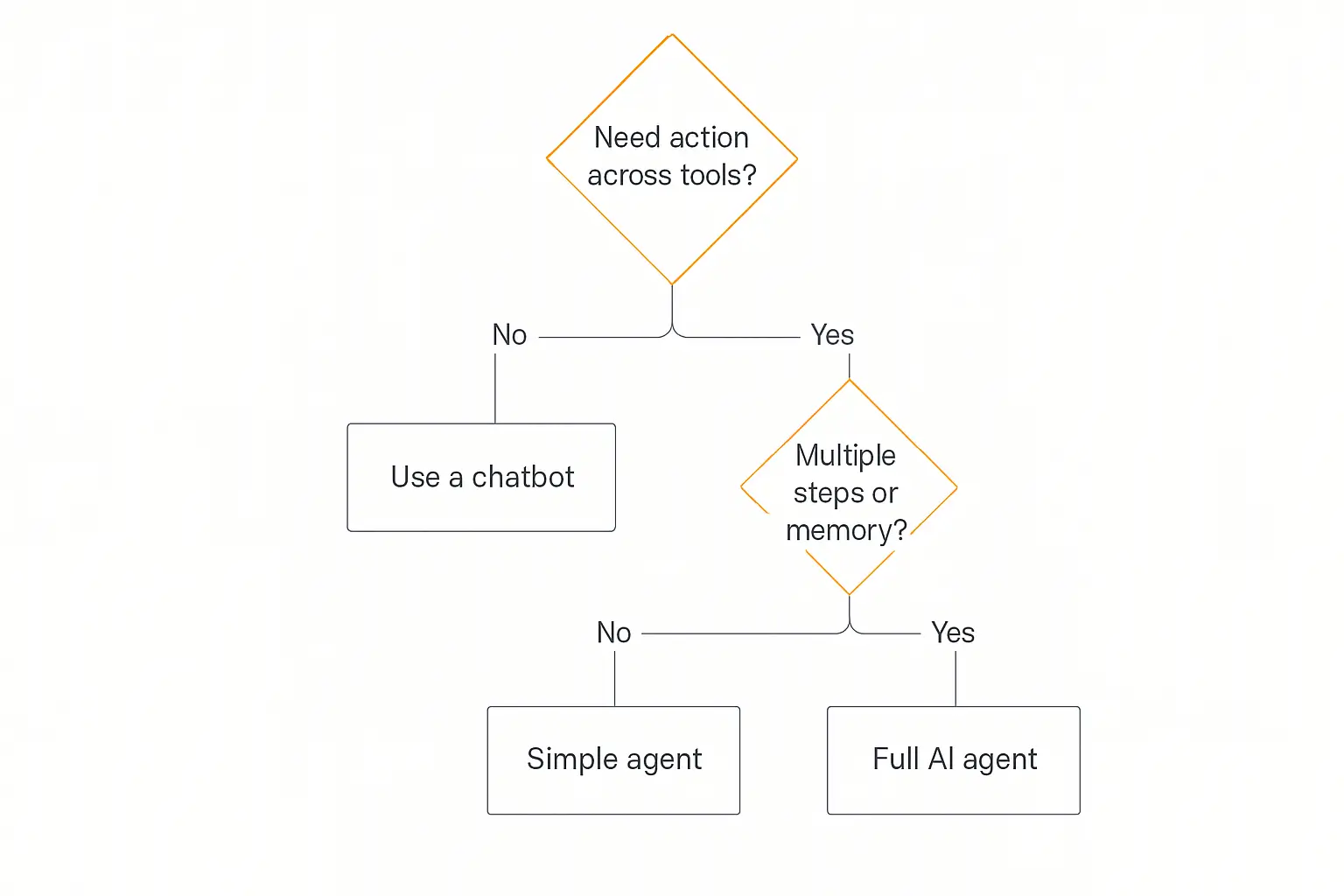
The hype pushes everyone toward the most powerful option, but the smartest deployments match the tool to the task. Walk it through these questions:
- Does the task require an action across your tools? If no — it's pure Q&A, lookups, FAQs — a chatbot is cheaper, simpler, and more reliable. Stop here.
- If yes, does it involve multiple steps or need memory? If it's a single, simple action, a lightweight agent will do. If it's a real workflow with branching and state, you want a full agent.
The expensive mistake isn't picking the wrong label. It's building a complex autonomous agent for a job a simple FAQ bot would have nailed — and then maintaining all that machinery forever.
A good rule of thumb: start with the simplest thing that resolves the problem, and only add autonomy when the task genuinely needs it. If you do go the agent route, plan to test and debug it properly before deploying — agents fail in more interesting ways than chatbots, precisely because they can act.
Not sure where to start? Start small.
Build a simple agent in Pickaxe, connect one Action, and grow from there — all without writing code.
How to build your first AI agent
The good news: you no longer need a team of engineers to cross the line from chatbot to agent. The "act" part — tools, memory, integrations — used to be the hard, code-heavy bit. No-code platforms have absorbed most of that complexity.
On Pickaxe, the move from a chatbot to an agent is mostly a matter of adding capabilities to something you've already built:
- Start with the instructions. Write a clear role prompt — what the agent does, its tone, and its boundaries. This is the same foundation a good chatbot needs.
- Give it a Knowledge Base. Upload your docs, URLs, and files so the agent answers from your actual content instead of guessing.
- Add Actions. This is the chatbot-to-agent moment. Actions connect your agent to external tools and APIs — look up an order, send an email, write to a CRM, trigger a workflow. The moment your agent can do something, it stops being a chatbot.
- Pick the right model. Agents that use tools benefit from stronger reasoning models. Pickaxe is model-agnostic, so you can compare models and switch anytime.
- Test in Preview, then deploy. Try it as a real user would, then ship it to a website embed, Slack, WhatsApp, email, or a branded portal.
For complex jobs, the recommended pattern is a "waterfall" setup — a primary agent that routes to specialized sub-agents — rather than cramming a dozen tools into one. If you'd rather survey the landscape first, we compared the leading options in the best no-code AI agent builders.
Frequently asked questions
Is an AI agent just a smarter chatbot?
No. The difference isn't intelligence — it's capability. A chatbot generates text replies. An AI agent uses a model as a reasoning engine to take actions across tools, hold memory, and complete multi-step tasks. A chatbot answers; an agent acts.
Are all chatbots being replaced by agents?
No, and they shouldn't be. For pure Q&A, FAQs, and information lookups, a chatbot is cheaper and more reliable. Agents make sense when the task requires taking action, multiple steps, or persistent memory.
What makes something a "real" AI agent?
Three things: it can take actions that change something outside the chat, it can handle multi-step tasks autonomously, and it decides what to do next based on results rather than following a fixed script. If a tool can't do all three, it's a chatbot regardless of how it's marketed. Getting that reliable in practice means splitting the job into discrete steps, which we break down in how to build a multi-step AI workflow.
Do I need to code to build an AI agent?
Not anymore. No-code platforms like Pickaxe handle the tools, memory, and integrations for you, so you can build a working agent by writing instructions and connecting Actions — no engineering required.
How do I measure whether an agent is worth it?
Track outcomes, not conversations — tasks completed, time saved, tickets resolved end to end. We break down the formulas in our guide to measuring AI agent ROI.
Are AI agents more expensive than chatbots to run?
Usually, yes — per interaction. Agents make multiple model calls per task (reason, call a tool, reason again) and often use stronger reasoning models, so each task costs more than a single chatbot reply. But the comparison that matters is cost per resolved problem. If an agent closes a ticket that would otherwise need a human, the higher per-task cost is often a bargain.
Can I turn my existing chatbot into an AI agent?
In most cases, yes — and that's the natural upgrade path. If your chatbot is already built on a modern platform, you "graduate" it by connecting tools (Actions), enabling memory, and pointing it at a multi-step goal. You keep the instructions and knowledge base you already wrote and add the ability to act.
The bottom line
The jump from chatbot to AI agent is the difference between a system that talks and a system that works. Chatbots answer questions. Agents resolve problems by reasoning, remembering, and acting across your tools.
That's a genuine shift — and the market data shows it's where the spending and adoption are heading. But it comes with a catch: a lot of what's labeled "agent" today is still a chatbot in disguise, and plenty of jobs are better served by a simple bot than an over-engineered agent.
So don't chase the buzzword. Get clear on whether your task needs an answer or an outcome, then build the simplest thing that delivers it.
And when you're ready to cross the line — when you want a system that doesn't just reply but actually gets things done — you can build your first agent on Pickaxe and connect it to the tools you already use, without writing a line of code.