
Everyone's deploying AI agents in 2026. Customer support bots. Sales qualification flows. Onboarding automations. Internal knowledge assistants. Gartner forecasts worldwide AI spending will hit $2.5 trillion in 2026, and they predict 40% of enterprise applications will feature AI agents by year-end. The hype machine is fully operational.
But here's the awkward truth most teams don't want to confront: they can't prove whether any of it is actually making money.
According to Deloitte's 2025 State of Generative AI survey, only 29% of executives can confidently measure AI ROI. That means more than 7 out of 10 leadership teams are flying blind — spending real money on AI agents without knowing whether they're getting it back.
This guide fixes that. I'm going to walk through the exact formulas, metrics, and real-world examples you need to measure AI agent ROI properly — and build a business case that survives scrutiny from your CFO, your board, or your own gut check.
Why Most AI Agent ROI Calculations Fail
Before we get to the formulas, let's talk about why most AI ROI calculations are basically fiction.
I've seen dozens of ROI projections from teams deploying AI agents. The pattern is almost always the same: wildly optimistic benefits, suspiciously low costs, and a time horizon that conveniently ends before reality sets in.
Here are the four traps I see most often.
Phantom Productivity
This is the big one. A team deploys an AI agent that "saves 10 hours per week" for their support staff. Sounds great on a slide.
But what actually happens to those 10 hours? In most organizations, saved time gets absorbed into meetings, Slack conversations, and low-value busywork. Nobody tracks whether the freed-up hours went toward revenue-generating activity.
If you can't show where the saved hours went, you haven't saved anything. You've just reshuffled.
Measuring Task Completion Instead of Business Outcomes
"Our AI agent completed 5,000 tasks last month." Cool. Did those completions actually resolve the customer's problem? Did they generate revenue? Did they reduce churn?
Completion rate and outcome rate are very different things. I'll get into this more when we cover metrics, but this distinction is the difference between an ROI case that holds up and one that falls apart under basic questioning.
Salesforce has started using "Agentic Work Units" (AWUs) specifically because they recognized that measuring tokens processed or tasks completed tells you nothing about whether the agent is actually delivering value.
Forgetting Total Cost of Ownership
Most ROI projections I've reviewed include compute costs and maybe implementation costs. That's maybe half the picture.
They forget the human-in-the-loop costs. The monitoring overhead. The model drift that requires retraining. The evaluation pipeline that runs on every response. The "trust tax" — the ongoing cost of making sure your AI agent isn't confidently wrong — is often the biggest hidden expense.
Gartner found that companies trying to capture AI ROI purely through headcount reduction rarely succeed. The layoffs don't deliver returns because the hidden operational costs of running AI systems eat into the savings.
Using the Wrong Time Horizon
A 90-day ROI window for an AI agent deployment is basically meaningless. The first three months are dominated by implementation costs, integration debugging, and the learning curve.
Meaningful AI agent ROI typically requires a 6-12 month measurement window — and for strategic deployments, you should be modeling out to 24 months to capture the compounding effects.
If your ROI case only works with a 3-month window, it probably doesn't work at all.
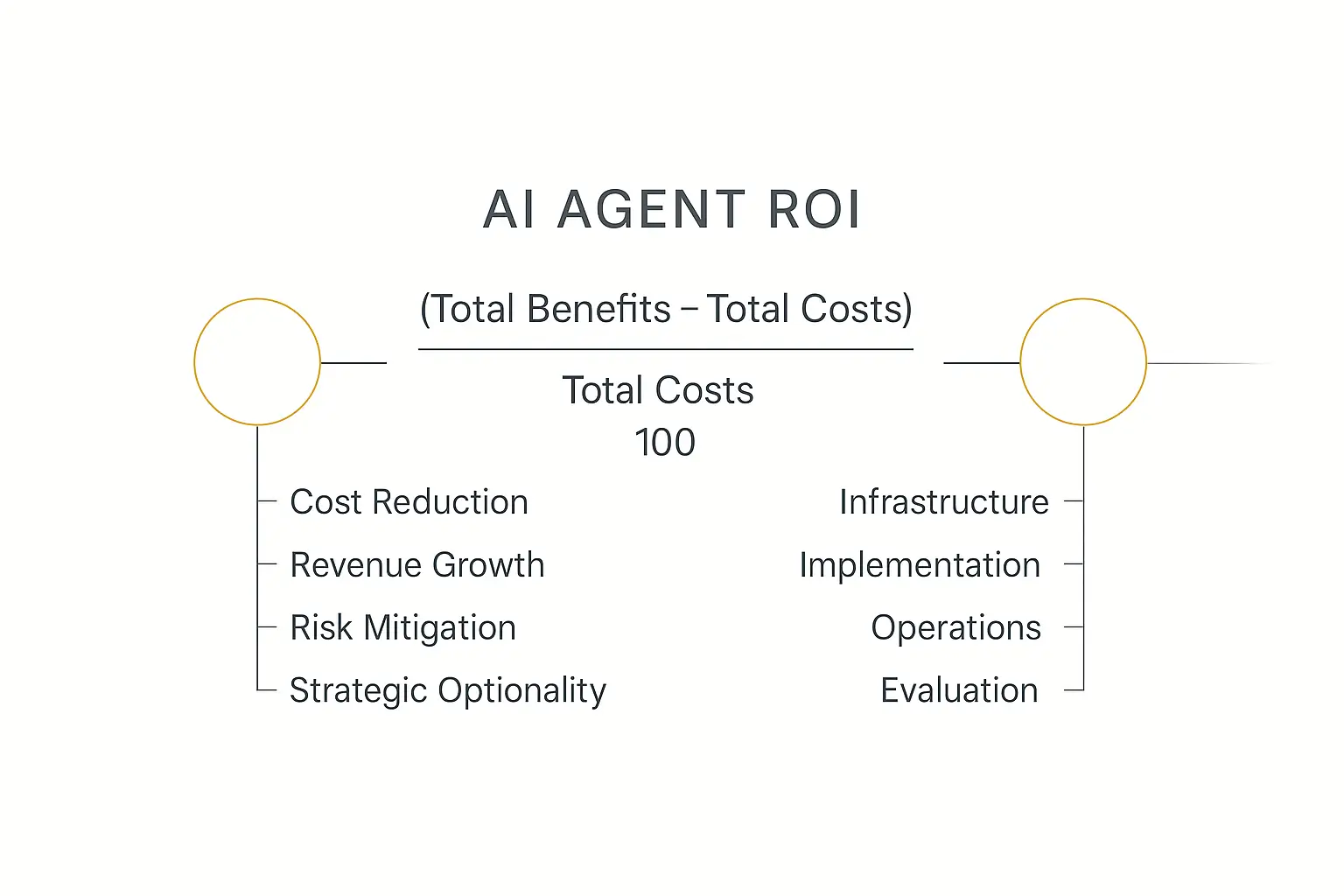
The AI Agent ROI Formula — Actually Explained
The core formula is simple. Applying it honestly is the hard part.
ROI (%) = [(Total Benefits − Total Costs) / Total Costs] × 100
A 100% ROI means you doubled your money. A 200% ROI means you tripled it. Anything above 0% means the investment is returning more than it cost.
Simple, right? The complexity is in what goes into "Total Benefits" and "Total Costs." Let me break both down.
Calculating Total Benefits
Benefits from AI agents generally fall into four categories. Most teams only count the first one and wonder why their projections don't match reality.
1. Cost Reduction
This is the most straightforward category and usually the easiest to measure.
Labor savings: How many hours of human work does the agent replace or reduce? Multiply by the fully loaded hourly rate (salary + benefits + overhead, typically 1.3-1.5x the base salary).
Rework reduction: How many errors does the agent prevent that would have required human correction? Each prevented rework cycle has a measurable cost.
Infrastructure consolidation: Does the agent replace other software tools or manual processes that had their own costs?
The key here is using fully loaded costs, not just salary. A $60K/year employee costs the business $78-90K when you factor in benefits, office space, equipment, and management overhead.
2. Revenue Growth
This is harder to measure but often more valuable than cost reduction.
Conversion acceleration: If your AI agent handles lead qualification 24/7, you're responding to prospects faster. Speed-to-lead studies consistently show that responding within 5 minutes versus 30 minutes can increase conversion rates by 100x.
Deal improvement: Are agents helping sales teams close larger deals or more deals? Track the average deal size and close rate before and after deployment.
Capacity creation: If your agents handle routine work, your human team can take on more clients without hiring. That's revenue you couldn't have captured before. If you're thinking about how to monetize AI agents, this is where the real leverage sits.
3. Risk Mitigation
This category is often overlooked because it measures things that didn't happen.
Compliance: In regulated industries, an AI agent that consistently applies the correct protocol can prevent fines, legal actions, or license revocations. The expected value of prevented compliance violations is a real benefit.
Error prevention: What's the cost of a human error in your process? Multiply the error rate reduction by the average cost per error. In healthcare, financial services, and legal, these numbers can be enormous.
Business continuity: AI agents don't call in sick, don't quit, and don't need two weeks' notice. The risk reduction from operational continuity has a calculable value.
4. Strategic Optionality
This is the category that separates basic ROI analysis from genuinely strategic thinking.
Future deployment velocity: Your first AI agent is the hardest and most expensive. Every subsequent agent is faster and cheaper to deploy because you've built the infrastructure, trained the team, and established the workflows. That acceleration has compounding value.
Compound learning: AI agents generate data about your processes that you didn't have before. That data makes future optimizations possible. This is hard to quantify precisely, but it's real — and companies that account for it make better long-term investment decisions.
Market positioning: Being an early, effective adopter of AI agents can be a competitive advantage. It's hard to put a dollar value on "we can serve clients 3x faster than competitors," but your sales team certainly can.
Calculating Total Costs
Here's where most ROI calculations go sideways. Teams dramatically undercount costs, which inflates ROI projections and leads to ugly surprises six months later.
1. Infrastructure and Compute
This is the line item everyone remembers. It includes:
- LLM API costs — per-token charges for the models your agents call
- Hosting and cloud compute — servers, containers, or serverless functions running your agent logic
- Database and storage — conversation logs, knowledge bases, vector databases
- Third-party tool subscriptions — any SaaS tools your agent integrates with
Pro tip: model costs are dropping fast (roughly 10x cheaper per year), so project forward costs, not just current ones. Your year-two compute bill will likely be a fraction of year one for the same workload.
2. Implementation and Integration
The upfront cost of getting the agent built, tested, and connected to your systems.
- Development time — whether internal engineering hours or an external agency (if you're starting an AI agent agency, these are the costs your clients need to understand)
- Integration work — connecting to CRMs, ERPs, ticketing systems, knowledge bases
- Prompt engineering and testing — the iterative work of getting the agent to actually do its job well
- Training and change management — getting your human team ready to work alongside the agent
Using a no-code platform like Pickaxe can cut implementation costs dramatically — often by 60-80% compared to custom development — because you skip most of the infrastructure and integration work.
3. Operational Costs
These are the ongoing costs that tend to surprise people.
- Human-in-the-loop (HITL): Someone needs to handle escalations, edge cases, and situations the agent can't resolve. Budget for this.
- Monitoring and observability: Dashboards, alerts, log analysis — someone needs to watch the agent's performance.
- Ongoing prompt maintenance: The world changes. Your products change. Your agent's instructions need updates.
- Escalation handling: When the agent fails, a human picks up — often mid-conversation, which takes longer than starting fresh.
I typically see operational costs running 15-25% of total first-year costs for well-designed agents. For poorly designed ones, it can be 40%+.
4. The Evaluation and Trust Tax
This is the cost category that almost nobody includes — and it can be significant.
Per-query evaluation: Many production AI agents run a secondary model to evaluate whether the primary model's response was accurate and appropriate. That means you're paying for two model calls per interaction, not one.
Quality assurance sampling: Human reviewers spot-checking agent outputs. Even at a 5% sample rate, this adds up at scale.
Regression testing: Every time you update your agent's prompts or the underlying model changes, you need to verify nothing broke. As Fiddler AI points out, the evaluation pipeline is an ongoing cost that scales with your agent's usage.
Red-teaming and safety: Especially for customer-facing agents, periodic adversarial testing to make sure the agent isn't exploitable.
The trust tax typically adds 10-20% on top of your base compute costs. Ignore it at your own peril.
Ready to measure your own AI agent ROI?
Pickaxe makes it easy to build, deploy, and track AI agents — so you can see exactly what they're worth.
The AI Agent ROI Metrics That Actually Matter in 2026
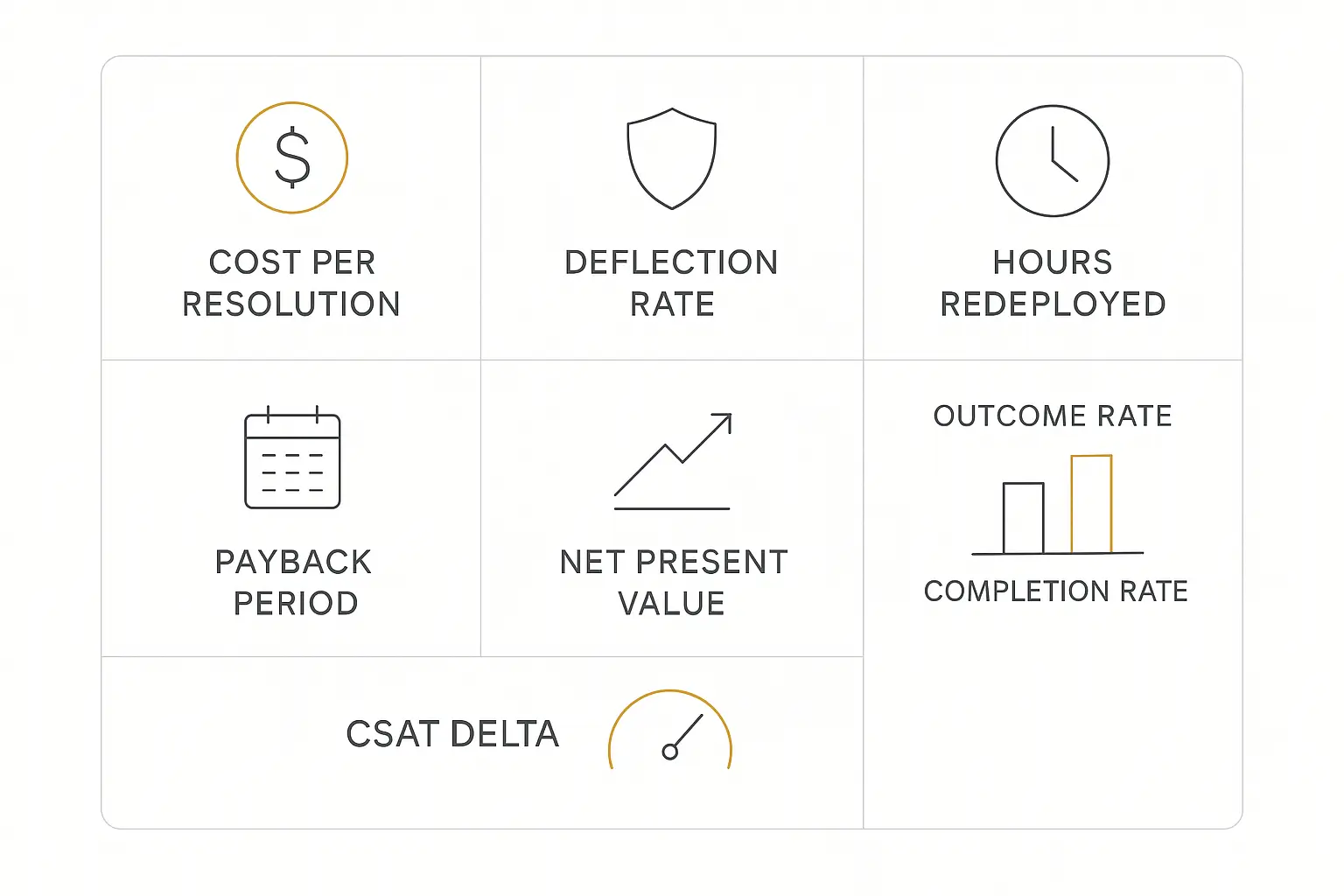
Once you understand the formula, you need the right metrics to feed into it. Here are the ones I'd focus on — with the actual formulas.
Cost Per Resolution (CPR)
This is the single most important metric for customer-facing AI agents.
CPR = Total Channel Cost / Number of Resolutions
Note: that's resolutions, not conversations. A conversation where the customer has to call back isn't resolved — it's deferred. If you're evaluating AI customer service tools, CPR should be your primary comparison metric.
For context, human-handled support resolutions typically cost $5-$12 each (depending on complexity and labor market). Well-tuned AI agents can bring that down to $0.15-$0.50 per resolution.
That's where the massive cost savings come from.
Deflection Rate
What percentage of incoming requests does the AI agent fully resolve without human involvement?
Deflection Rate = (AI-Resolved Interactions / Total Interactions) × 100
Benchmarks for 2026:
- Below 30%: Poor — your agent needs significant improvement or your use case is too complex for full automation
- 30-40%: Below average — there's meaningful room to improve
- 40-60%: Good — this is where most well-tuned agents land
- 60-70%: Excellent — you're in the top quartile
- Above 70%: Exceptional — make sure your CSAT hasn't dropped (high deflection with low satisfaction means the agent is just refusing to escalate)
Hours Saved (Redeployed)
Here's where you have to be honest. The formula is:
Value of Hours Saved = Hours Saved × Blended Hourly Rate × 52 weeks
But — and this is critical — only count hours that were actually redeployed to productive work. "We saved 20 hours/week" means nothing if those 20 hours dissolved into meetings and admin tasks.
The honest version is:
Value = Redeployed Hours × Rate × 52
Where "Redeployed Hours" means hours that went toward measurable revenue activity, additional client capacity, or documented productivity improvements. Be ruthless about this distinction. It's the difference between an ROI case that holds up at the 12-month review and one that gets your initiative defunded.
Payback Period
How long until the cumulative benefits exceed the cumulative costs?
Payback Period = Total Investment / Monthly Net Benefit
CFOs love this metric because it answers the simplest possible question: "When do we get our money back?"
For AI agent deployments in 2026, typical payback periods range from 4-18 months depending on the use case and scale. If your payback period is longer than 18 months, you probably need to rethink the deployment approach, not abandon the idea.
Net Present Value (NPV)
For multi-year AI agent investments, NPV accounts for the time value of money.
NPV = Σ [Net Cash Flow in Year t / (1 + Discount Rate)^t] − Initial Investment
This is especially important when comparing an AI agent investment against other capital allocation options. A positive NPV means the investment generates more value than it costs when you account for what that money could earn elsewhere.
Use your company's standard discount rate (typically 8-15% for technology investments). A positive NPV is a green light. A negative NPV at a reasonable discount rate is a red flag — even if the simple ROI percentage looks attractive.
Outcome Rate vs. Completion Rate
This is the metric distinction that separates sophisticated AI teams from everyone else.
Completion Rate: Did the agent finish the task? (It generated a response, processed the form, executed the workflow.)
Outcome Rate: Did the task achieve the desired business outcome? (The customer's problem was actually solved. The lead was actually qualified correctly. The document was actually compliant.)
An agent can have a 99% completion rate and a 60% outcome rate. That gap is where money evaporates.
Always measure outcome rate. Completion rate is a vanity metric for agents.
Customer Satisfaction Delta (CSAT)
For customer-facing agents, you need to compare satisfaction before and after deployment.
CSAT Delta = Post-Deployment CSAT − Pre-Deployment CSAT
A CSAT drop of more than 5% is a warning sign, even if your cost metrics look great. You're saving money by delivering a worse experience — and that has downstream revenue consequences (churn, reduced expansion, negative word of mouth) that will eventually show up in your P&L.
The best AI agent deployments I've seen maintain or improve CSAT while reducing costs. That's the sweet spot — and it's absolutely achievable when the agent is well-designed and handles the right use cases.
Real-World AI Agent ROI Examples With Actual Numbers
Theory is nice. Let's run actual numbers. Here are five worked examples based on patterns I've seen across different industries and use cases.
Example 1: Customer Support Agent
Scenario: A mid-size SaaS company with 30 support reps automates tier-1 customer support with an AI agent.
Baseline metrics:
- 1,000 support conversations per month
- Average human resolution cost: $5.00
- Current CSAT: 82%
After AI agent deployment:
- AI resolves 60% of conversations (deflection rate: 60%)
- AI resolution cost: $0.25 per interaction
- Remaining 40% still handled by humans at $5.00 each
- Post-deployment CSAT: 84% (slight improvement due to faster response times)
Monthly cost calculation:
- Before: 1,000 × $5.00 = $5,000/month
- After: (600 × $0.25) + (400 × $5.00) = $150 + $2,000 = $2,150/month
- Monthly savings: $2,850/month
Total costs:
- Implementation: $30,000 (one-time)
- Compute and monitoring: $2,000/month
- First-year total cost: $30,000 + ($2,000 × 12) = $54,000
First-year benefits:
- $2,850/month × 12 = $34,200 in direct cost savings
- Freed-up rep hours redeployed to proactive outreach: estimated $50,400 in retention revenue
- Total first-year benefits: $84,600
ROI: [(84,600 − 54,000) / 54,000] × 100 = 56.7%
Payback period: ~7.6 months
That's a conservative estimate. By year two, the implementation cost is already sunk, so the ROI jumps dramatically — typically north of 200%.
Example 2: Client Onboarding Agent
Scenario: A professional services firm automates their client onboarding — intake forms, document collection, scheduling, and welcome sequences.
Baseline:
- Onboarding coordinator spends 15 hours/week on intake tasks
- Fully loaded hourly rate: $75/hour
- Average onboarding time: 2 weeks
- 30% of new clients experience delays due to missing documents or scheduling conflicts
After deploying an onboarding agent (built on Pickaxe, with automated form collection and scheduling integrations):
- Coordinator time reduced to 4 hours/week (agent handles 73% of tasks)
- Onboarding time reduced to 5 days
- Document-related delays drop to 8%
Annual benefits:
- Hours saved: 11 hours/week × $75 × 52 = $42,900 in labor savings
- Faster onboarding → faster time-to-revenue: estimated $15,600 (clients start generating revenue 5 days sooner)
- Total annual benefits: $58,500
Total costs:
- Implementation: $15,000 (significantly lower using a no-code platform vs. custom build)
- Annual operational costs: $5,400 ($450/month for compute, monitoring, and platform subscription)
- Total first-year cost: $20,400
ROI: [(58,500 − 20,400) / 20,400] × 100 = 186.8%
Payback period: ~4.2 months
If you want to walk through the step-by-step build, I wrote a full guide on building AI agents for client onboarding.
Example 3: Sales Qualification Agent
Scenario: A B2B company deploys an AI agent to pre-qualify inbound leads 24/7, scoring them and routing qualified prospects to the sales team.
Baseline:
- Sales team closes $2M/year in revenue
- SDRs spend 60% of time on initial qualification (most leads are unqualified)
- Average response time to new leads: 4 hours (during business hours only)
- Current close rate: 12%
After AI agent deployment:
- Response time drops to under 2 minutes, 24/7
- 25% more qualified leads reaching human reps (agent filters out tire-kickers)
- Close rate improves to 15% (because reps are only talking to warmer leads)
- SDRs redeploy 40% of their time to outbound prospecting
Annual benefits:
- Revenue from improved close rate: $2M × (15/12 − 1) = $500,000 in additional revenue capacity
- SDR time savings redeployed to outbound: estimated $120,000 in pipeline value
- Conservative estimate (discounting by 50% for attribution uncertainty): $310,000
Total costs:
- Implementation and CRM integration: $45,000
- Annual compute and monitoring: $18,000
- Total first-year cost: $63,000
ROI: [(310,000 − 63,000) / 63,000] × 100 = 392%
Payback period: ~2.4 months
Sales qualification agents tend to have the highest ROI because they directly impact the revenue line. If you're selling AI agents to local businesses, lead qualification is one of the easiest value props to communicate.
Example 4: Healthcare Prior Authorization Agent
Scenario: A healthcare network automates prior authorization requests, which are notoriously manual, time-consuming, and error-prone.
Baseline:
- Staff processes 500 prior auth requests per month
- Average handling time: 45 minutes per request
- Denial rate due to errors or missing info: 22%
- Each denial costs ~$25 to rework and resubmit, plus revenue delay
- Staff cost: 375 hours/month × $45/hour = $16,875/month
After AI agent deployment:
- Agent handles 70% of prior auth submissions (standard cases)
- Handling time for AI-processed requests: 5 minutes (human review + approval)
- Denial rate drops to 7% (agent ensures complete, accurate submissions)
Annual benefits:
- Labor savings: 297 hours/month saved × $45/hour × 12 = $160,380
- Reduced denial rework: (110 fewer denials/month × $25 × 12) = $33,000
- Revenue acceleration from faster approvals: estimated $75,000
- Total annual benefits: $268,380
Total costs:
- Implementation (complex EHR integration): $55,000
- Annual operational costs (compute, compliance monitoring, HITL review): $36,000
- Total first-year cost: $91,000
ROI: [(268,380 − 91,000) / 91,000] × 100 = 194.9%
Payback period: ~4.1 months
Healthcare prior auth is a standout use case because the baseline process is so inefficient that even conservative automation delivers massive returns. Some implementations report north of 500% ROI when factoring in reduced claim delays.
Example 5: Legal Research Agent
Scenario: A law firm deploys an AI agent to handle initial legal research — case law searches, precedent summaries, regulatory lookups.
Baseline:
- Associates spend ~10 hours/week on research tasks
- Billable rate: $250/hour
- Only 60% of research time is billable (the rest is considered overhead)
- 5 associates affected
After AI agent deployment:
- Research time reduced by 80% (from 10 hours to 2 hours per associate per week)
- Reclaimed 8 hours/week per associate redeployed to billable client work
- Research quality improved (agent checks more sources, more consistently)
Annual benefits:
- Reclaimed billable hours: 8 hours × 5 associates × $250 × 52 = $520,000 in billable capacity
- Realistically billable (at 70% utilization): $364,000
Total costs:
- Implementation: $40,000
- Annual compute and legal database subscriptions: $24,000
- Total first-year cost: $64,000
ROI: [(364,000 − 64,000) / 64,000] × 100 = 468.8%
Payback period: ~2.1 months
Legal research has among the highest ROI potential because the hourly rates are so high. Even modest time savings translate to enormous dollar values. The key is making sure the reclaimed hours actually get billed — which requires capacity planning, not just tool deployment.
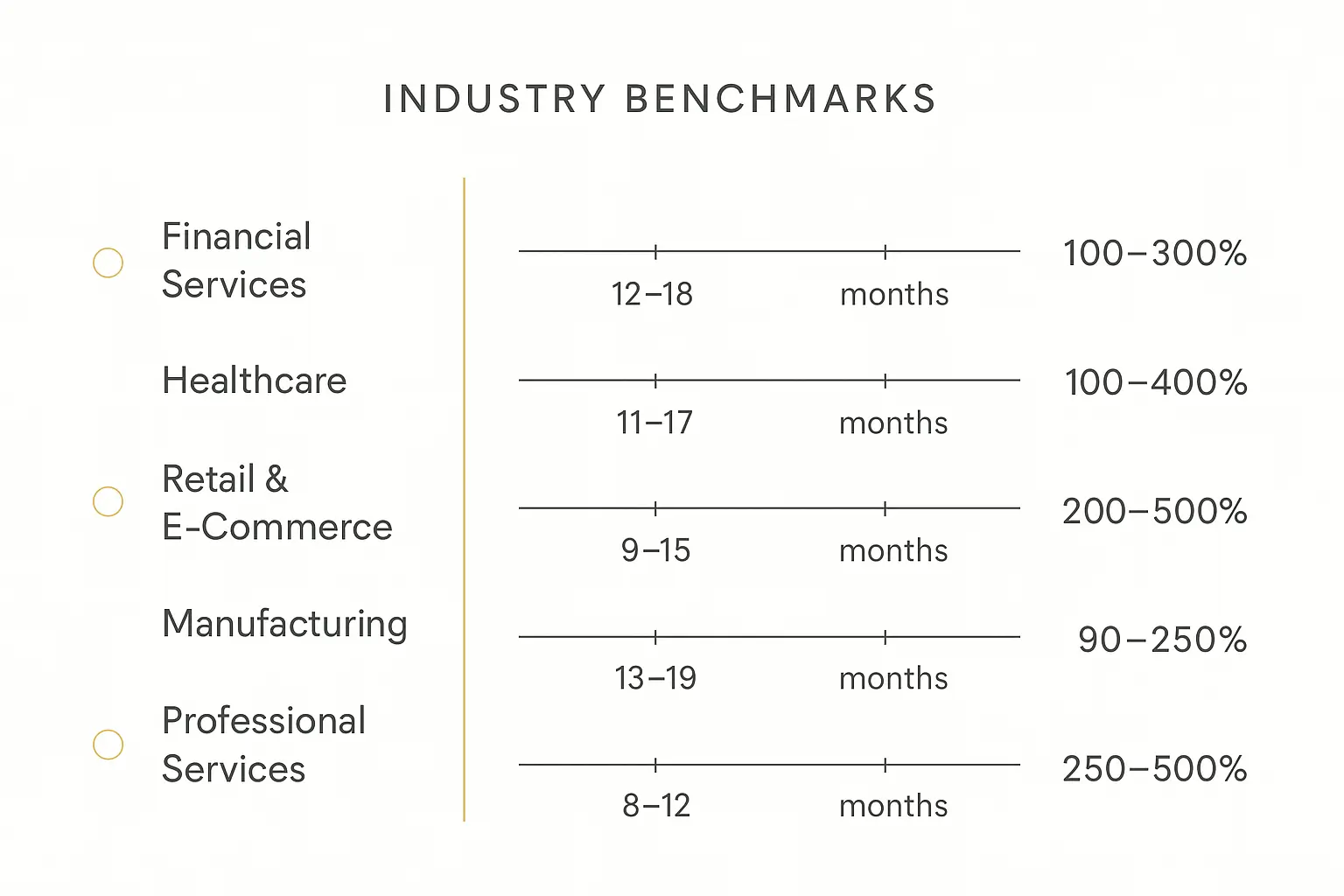
Industry Benchmarks: What Good AI Agent ROI Looks Like
Individual examples are useful. But you also need to know what "normal" looks like across industries so you can calibrate your expectations. Our roundup of real AI agent examples is a good place to see the kinds of deployments those numbers come from.
Here's what the data shows for 2026 AI agent deployments:
| Sector | Typical Payback Period | 24-Month ROI | Key Use Case |
|---|---|---|---|
| Financial Services | 8–14 months | 150–280% | Loan processing, compliance |
| Healthcare | 10–18 months | 120–220% | Clinical documentation, prior auth |
| Retail / E-Commerce | 6–12 months | 180–320% | Customer service, personalization |
| Manufacturing | 12–20 months | 110–200% | Quality inspection, supply chain |
| Professional Services | 4–8 months | 200–350% | Client intake, research, onboarding |
A few broader benchmarks worth noting:
- According to CTLabs' compilation of industry data, the average return across AI agent deployments is 171%.
- OneReach reports that US enterprises average 192% ROI on AI deployments.
- Across all industries, companies report an average of $1.49 returned for every $1 invested in AI agents.
- McKinsey's State of AI report confirms that organizations deploying AI at scale consistently outperform peers on revenue growth and cost efficiency.
What stands out to me: professional services firms consistently see the fastest payback periods. The reason is straightforward — they're converting saved hours directly into billable revenue. The path from "time saved" to "money earned" is shorter and cleaner than in other industries.
Retail and e-commerce follow close behind because customer service is a high-volume, well-defined use case where AI agents can handle a large percentage of interactions with minimal human oversight.
Manufacturing and healthcare tend to have longer payback periods — not because the ROI is worse, but because implementation is more complex (EHR integrations, SCADA systems, compliance requirements) and the upfront costs are higher.
If you're thinking about AI agent pricing models, these benchmarks help you understand what your clients can afford to pay based on their expected returns.
The 5-Step AI Agent ROI Measurement Process
Knowing the formulas is one thing. Here's the step-by-step process for actually measuring ROI in practice.
Step 1: Establish Your Baseline (Before You Deploy)
This is the step everyone skips and then regrets.
Measure your current state for 30-60 days BEFORE deploying the AI agent. You need hard numbers on:
- Current cost per resolution / per task
- Current processing time
- Current error / rework rates
- Current customer satisfaction scores
- Current throughput and capacity
- Current headcount dedicated to the process
Without a baseline, you're guessing. And guessing is how you end up in the "we think the AI agent is helping but we can't prove it" trap that 71% of executives find themselves in.
Document everything. Take screenshots of dashboards. Pull reports. Write down the numbers. Future-you will thank present-you when the CFO asks "compared to what?"
Step 2: Define Your Measurement Period
Pick a time horizon before you deploy, not after.
Minimum: 6 months. Recommended: 12 months. For strategic initiatives: 24 months.
Why so long? Several reasons:
- Months 1-3 are dominated by implementation and ramp-up costs
- Agent performance typically improves 20-40% between month 3 and month 6 as you tune prompts and handle edge cases
- Seasonal variations can distort shorter windows
- Strategic benefits (deployment velocity, compound learning) only materialize over longer periods
Set milestones: evaluate at 3 months (is it working at all?), 6 months (is it on track?), and 12 months (full ROI assessment).
Step 3: Categorize Your Benefits
Not all benefits are created equal in terms of measurability and credibility. Sort them into three tiers:
Tier 1 — Direct Cost Savings (high confidence): These are costs you can directly measure being eliminated or reduced. Labor hours, tool subscriptions replaced, rework costs avoided. These are the numbers your CFO will trust.
Tier 2 — Indirect Value (medium confidence): Revenue improvements, capacity creation, faster cycle times. These are real but require some assumptions about attribution. Present them with clear methodology and conservative estimates.
Tier 3 — Strategic Value (lower confidence but real): Competitive positioning, deployment velocity, data insights, employee satisfaction. These matter for long-term decision-making but shouldn't be the backbone of your ROI case.
Lead with Tier 1 in your business case. Include Tier 2 with clear assumptions stated. Mention Tier 3 as upside but don't build your numbers on it.
Step 4: Tally Total Costs Honestly
Go back to the four cost categories I outlined earlier and be thorough:
- Infrastructure/Compute: Get actual quotes or usage-based projections from your providers
- Implementation/Integration: Include internal labor at fully loaded rates, not just vendor costs
- Operational: Budget for HITL, monitoring, maintenance, and escalation handling
- Evaluation/Trust Tax: Include evaluation model costs, QA sampling, regression testing
A common rule of thumb: whatever your initial cost estimate is, add 25-30%. This isn't pessimism — it's realism based on how these deployments actually play out.
Pickaxe's built-in analytics make this step easier by tracking per-agent costs, usage patterns, and performance metrics in one place — so you're not cobbling together spreadsheets from five different tools.
Step 5: Apply the Formula and Contextualize
Now you plug in the numbers:
ROI (%) = [(Total Benefits − Total Costs) / Total Costs] × 100
But don't stop at the percentage. Contextualize it:
- What's the payback period? (CFOs care about this more than ROI percentage)
- How does this compare to your company's hurdle rate? (Most companies use 15-25% as their minimum acceptable ROI for technology investments)
- What's the NPV over 24 months? (Accounts for time value of money)
- What's the sensitivity? (What happens to ROI if benefits are 20% lower than projected? What if costs are 30% higher?)
A robust AI agent ROI case includes the formula result, the payback period, and a sensitivity analysis. Anything less is a back-of-napkin estimate.
Start building AI agents that pay for themselves
Create custom AI agents with built-in analytics to track the metrics that matter.
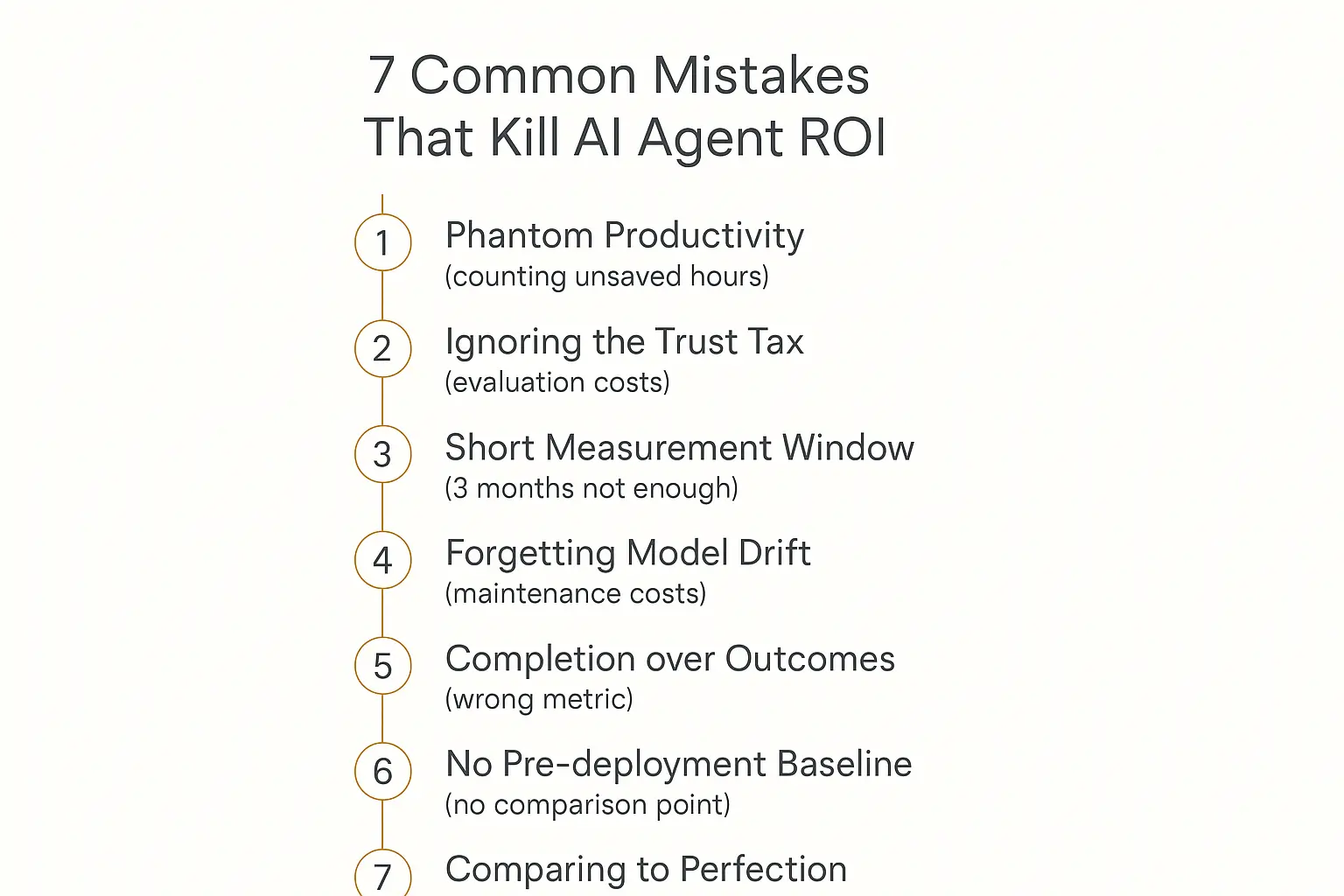
Seven Mistakes That Kill Your AI Agent ROI Case
I've seen each of these mistakes torpedo otherwise solid AI agent deployments. Avoid them.
1. Counting Time Saved Without Proving It Was Redeployed
"We saved 200 hours per month" is meaningless unless you can show where those hours went.
The fix: Track what employees do with freed-up time. Set explicit goals for redeployment before the agent goes live. If the plan is "support reps will handle 30% more complex cases," measure whether that actually happened.
2. Ignoring the Trust Tax
Your evaluation pipeline — the monitoring, quality assurance, and safety checks — can add 10-20% to your total costs. Most business cases pretend it doesn't exist.
The fix: Include a line item for evaluation and monitoring costs. If you don't know the exact number yet, estimate 15% of compute costs as a starting point and refine as you gather data.
3. Using a 3-Month Window Instead of 12+ Months
Three months captures all the costs and almost none of the mature-state benefits. It's a recipe for a negative ROI that kills the project prematurely.
The fix: Commit to a 12-month measurement window upfront. Set 3-month and 6-month checkpoints for course correction, but don't make go/no-go decisions on partial data.
4. Forgetting Model Drift and Maintenance Costs
AI agents degrade over time. Your products change. Your customers' questions evolve. The underlying models get updated. Without ongoing maintenance, performance drifts downward.
The fix: Budget 10-15% of implementation costs annually for maintenance, prompt updates, and model migration. This is not optional — it's the cost of keeping the agent effective.
5. Measuring Completion Rate Instead of Outcome Rate
"The agent processed 10,000 requests" sounds impressive. But if 30% of those "completions" resulted in customer callbacks or escalations, your effective resolution rate is 70% — and your cost savings are dramatically lower than projected.
The fix: Define "success" as the business outcome, not the task completion. For support agents, that means the customer's issue is actually resolved. For sales agents, that means the lead was correctly qualified. For onboarding agents, that means the client is fully set up and active.
6. Not Establishing a Pre-Deployment Baseline
I said this before, but it bears repeating because it's the most common mistake I see.
Without a baseline, you have no way to attribute improvements to the AI agent versus other changes happening simultaneously (seasonal effects, process improvements, team changes).
The fix: Spend 30-60 days measuring your current state before deployment. Yes, this delays your launch by a month or two. It's worth it. The alternative is spending $50K+ on an AI agent and never being able to prove it worked.
7. Comparing to Perfection Instead of the Status Quo
"But the AI agent made three mistakes last week!" Sure. How many mistakes did your human team make? The comparison isn't AI-versus-perfect — it's AI-versus-what-you-had-before.
The fix: Always frame ROI as improvement over baseline, not improvement over an ideal state. If your human error rate was 8% and the AI error rate is 3%, that's a 62.5% reduction — even though it's not zero.
This mindset shift is critical for getting organizational buy-in. Stakeholders who expect perfection will always be disappointed. Stakeholders who understand comparative improvement will see the value clearly.
How to Build an AI Agent ROI Case Your CFO Will Approve
Knowing the math is necessary but not sufficient. You also need to present it in a way that resonates with the people who control the budget.
After watching dozens of these business cases succeed or fail, here's what I've learned about what works.
Lead With the Payback Period
CFOs care about payback period more than any other metric. It answers the most fundamental question: "When do we get our money back?"
Start your pitch with: "We'll recoup the full investment in X months." Everything else is supporting detail.
For AI agents, a payback period under 6 months is exceptional. Under 12 months is strong. Under 18 months is acceptable for complex deployments. Anything over 18 months needs a compelling strategic rationale.
Use Conservative Estimates
Nothing destroys credibility faster than aggressive projections. If you think you'll save $100K, present $70K. If you think the payback period is 4 months, present 6 months.
When you beat your conservative estimates (and you probably will), you look like a genius. When you miss aggressive estimates (even by a small margin), you lose trust.
Present your estimates as a range, not a point: "We project $50K-$80K in first-year savings, with a payback period of 5-8 months."
Show a Sensitivity Analysis
A sensitivity analysis shows what happens to the ROI under different scenarios. This is the single most effective thing you can do to build credibility with a finance audience.
Show three scenarios:
- Conservative: Benefits are 30% lower than projected, costs are 20% higher. ("Even in the worst case, we break even in X months.")
- Moderate: Your best estimate. ("Our base case shows Y% ROI.")
- Aggressive: Benefits are 20% higher than projected, costs come in on budget. ("If things go well, we could see Z% ROI.")
If the conservative scenario still shows positive ROI, your case is almost impossible to reject.
Tie to Business KPIs They Already Track
Don't invent new metrics. Map your AI agent ROI to metrics the CFO is already watching:
- Cost per acquisition (CPA) — if the agent reduces it
- Customer lifetime value (CLV) — if the agent improves retention or upsell
- Revenue per employee — if the agent increases capacity without headcount
- Operating margin — if the agent reduces cost of goods sold
- Net promoter score (NPS) — if the agent improves customer experience
When you say "this AI agent will reduce our CPA by 15%," the CFO doesn't need to understand AI to understand the value. They already know what CPA means to the business.
Include a Pilot Proposal
If the full deployment is a big investment, propose a limited pilot first.
"Let's deploy to one team / one use case / one geography for 90 days. Here's what we'll measure, here's what success looks like, and here's the decision framework for scaling."
Pilots reduce risk for decision-makers. A $15K pilot that proves the concept is much easier to approve than a $150K full deployment — even if the math works out the same.
Address the Failure Modes
Proactively address what could go wrong and what your mitigation plan is. This isn't weakness — it's sophistication.
- "If the deflection rate is below 30% after 90 days, we'll pause and retune before scaling."
- "If CSAT drops more than 5%, we'll reduce the agent's scope to lower-risk interactions."
- "We've budgeted a 25% cost contingency for implementation overruns."
CFOs have been burned by technology projects that ignored risks. Showing that you've thought about them — and have a plan — dramatically increases approval odds.
Frequently Asked Questions About AI Agent ROI
What is a good ROI for an AI agent?
Based on 2026 benchmarks, a "good" first-year ROI for an AI agent is 100-200%. Anything above 200% is excellent. Anything above 50% is generally considered a worthwhile investment, especially given the strategic value and compounding benefits in year two and beyond.
For context, the average across enterprise AI deployments is about 171%, according to industry analyses. But this varies enormously by use case — simple customer service automation might deliver 80-150% while sales qualification agents can hit 300%+.
The more important question isn't "is the ROI good?" but "is it better than the alternative use of that capital?" Compare against your company's hurdle rate and other investment options.
How long does it take to see ROI from AI agents?
Most well-implemented AI agents hit breakeven in 4-12 months. The variation depends primarily on three factors:
- Implementation complexity: A no-code agent on a platform like Pickaxe can be deployed in days. A custom enterprise integration might take 3-6 months.
- Use case volume: High-volume use cases (customer support, lead qualification) generate returns faster because the per-interaction savings multiply quickly.
- Baseline inefficiency: The worse your current process is, the faster the agent shows ROI. A manual process that costs $10 per interaction has more room for improvement than one that already costs $2.
Don't expect meaningful ROI in the first 90 days. That's still the implementation and tuning phase. The 6-month mark is where most deployments cross from red to black.
How do you calculate AI agent cost savings?
The core calculation is:
Annual Cost Savings = (Current Cost Per Task × Annual Volume) − (AI Cost Per Task × AI-Handled Volume + Human Cost Per Task × Human-Handled Volume + Annual AI Operating Costs)
For example, if you currently handle 12,000 support requests per year at $5 each ($60,000), and an AI agent handles 60% of them at $0.25 each while humans handle the remaining 40% at $5 each, plus the AI costs $24,000/year to run:
Savings = $60,000 − ($1,800 + $24,000 + $24,000) = $60,000 − $49,800 = $10,200/year
But remember — cost savings are only one component of total benefits. Revenue improvements, risk reduction, and strategic value often exceed direct cost savings.
What metrics should I track for AI agent performance?
Track these metrics at minimum:
- Cost Per Resolution (CPR) — your primary efficiency metric
- Deflection Rate — percentage of interactions fully resolved by the agent
- Outcome Rate — percentage of interactions that achieved the desired business outcome (not just task completion)
- CSAT Delta — customer satisfaction change since deployment
- Payback Period — months until cumulative benefits exceed cumulative costs
- Escalation Rate — how often the agent needs to hand off to a human
- First Contact Resolution Rate — percentage of issues resolved without a callback
If you're only tracking one metric, make it Outcome Rate. It's the single best indicator of whether the agent is actually delivering business value.
Is AI agent ROI different from traditional software ROI?
Yes, in several important ways:
Costs are more variable. Traditional software has relatively fixed licensing costs. AI agents have usage-based costs (per-token, per-query) that scale with volume. This makes cost prediction harder but also means you're not paying for unused capacity.
Benefits compound faster. Traditional software delivers roughly the same value in month 12 as month 1. AI agents improve over time through prompt optimization, additional training data, and expanded use cases. Year-two ROI is almost always dramatically higher than year one.
The trust tax is unique to AI. Traditional software either works or it doesn't. AI agents operate in a probabilistic space where you need ongoing evaluation, monitoring, and quality assurance. This cost category simply doesn't exist for deterministic software.
Model costs are deflationary. Unlike traditional software licenses that tend to increase over time, LLM costs are dropping roughly 10x per year. This means your cost projections should account for decreasing compute costs — a dynamic that works strongly in favor of AI agent ROI over multi-year horizons.
How do I account for AI agent failures in my ROI model?
Build in a failure rate assumption. Even the best AI agents don't resolve every interaction successfully.
The cost of a failed AI interaction is typically higher than the cost of a successful one because it requires human intervention mid-stream, which takes longer than starting from scratch. A reasonable model is:
True Cost Per Interaction = (Success Rate × AI Cost) + (Failure Rate × (AI Cost + Human Escalation Cost))
For example, if your agent succeeds 70% of the time at $0.25 per interaction and fails 30% of the time with a $7.50 escalation cost:
True Cost = (0.70 × $0.25) + (0.30 × ($0.25 + $7.50)) = $0.175 + $2.325 = $2.50 per interaction
That's still well below the $5-$12 human cost per resolution, but it's a much more honest number than the $0.25 figure that gets thrown around in marketing materials.
The Bottom Line on Measuring AI Agent ROI
The companies winning with AI agents in 2026 aren't the ones spending the most. They're the ones measuring the right things.
The formula itself is simple. The discipline of applying it honestly — with real baselines, complete cost accounting, and outcome-focused metrics — is what separates the 29% of executives who can prove their AI ROI from the 71% who can't.
Here's what I'd do if I were starting from zero today:
- Pick one high-volume, well-defined process where you can measure before and after.
- Spend 30 days measuring the baseline — current costs, times, error rates, satisfaction scores.
- Deploy a focused AI agent with clear success criteria and a 12-month measurement window.
- Track outcome rate, CPR, and CSAT delta monthly.
- Run the ROI formula at 6 and 12 months with honest cost accounting.
The math works for most use cases. The question is whether you have the measurement discipline to prove it.
If you're looking to build and deploy AI agents without spending months on custom development, Pickaxe lets you go from idea to deployed agent fast — with the built-in analytics you need to track the metrics that matter. Check out Pickaxe pricing to see what fits your budget. Whether you're building agents for your own business or white-labeling AI for clients, start with one agent, measure the ROI, and scale from there.
The data is clear: AI agents deliver real, measurable returns. But only if you measure them right.