
Here's the uncomfortable truth about building with AI: your agent will look flawless in the demo and then fall apart the moment real users touch it.
It's not just you. According to the Composio AI Agent Report, 97% of executives say they deployed AI agents in the past year — but only about 12% of agent initiatives actually reach production at scale. The 2026 APEX-Agents benchmark found that even the best-performing models completed just 24% of real-world tasks on the first attempt.
The gap between "works in the demo" and "works in production" is almost always a testing gap. Most agents look perfect on the happy path and quietly break on the 30–40% of interactions that are edge cases.
So this guide is the answer to one very practical question: how to test an AI agent properly before you put it in front of customers. We'll cover why agent testing is weirder than normal software testing, the specific ways agents fail, the five layers of testing that catch those failures, how to debug with traces, and how to roll out without betting your reputation on a single launch.
If you're still fuzzy on the fundamentals, skim what AI agents actually are first — this guide assumes you've built something and now need to make sure it works.
Why Testing an AI Agent Is Different From Testing Software
Traditional software is deterministic. Same input, same output, every time. When it breaks, you get a stack trace pointing at the exact line.
AI agents break all of those assumptions.
They're non-deterministic. The same prompt can produce different answers on different runs. A test that passes once might fail the next time, so "it worked when I tried it" tells you almost nothing.
They fail silently. When an agent goes wrong, you usually don't get an error. You get a clean, confident, well-formatted response that is simply wrong. As one widely repeated line in AI engineering circles puts it: traditional engineers read source code to understand behavior — agent engineers read traces.
They're stateful and multi-step. A wrong decision at step 2 silently corrupts every step after it. By the time you see a bad final answer, the actual mistake happened five tool calls ago.
The failure surface is huge. An agent that calls tools, retrieves documents, and makes decisions has far more ways to go wrong than a function that takes an input and returns an output.
This is why you can't "test an AI agent" by clicking around for ten minutes. A few clever prompts is not a test suite. You need a structured approach. Our guide to LLM evaluation tools covers the platforms that can operationalize that structure.
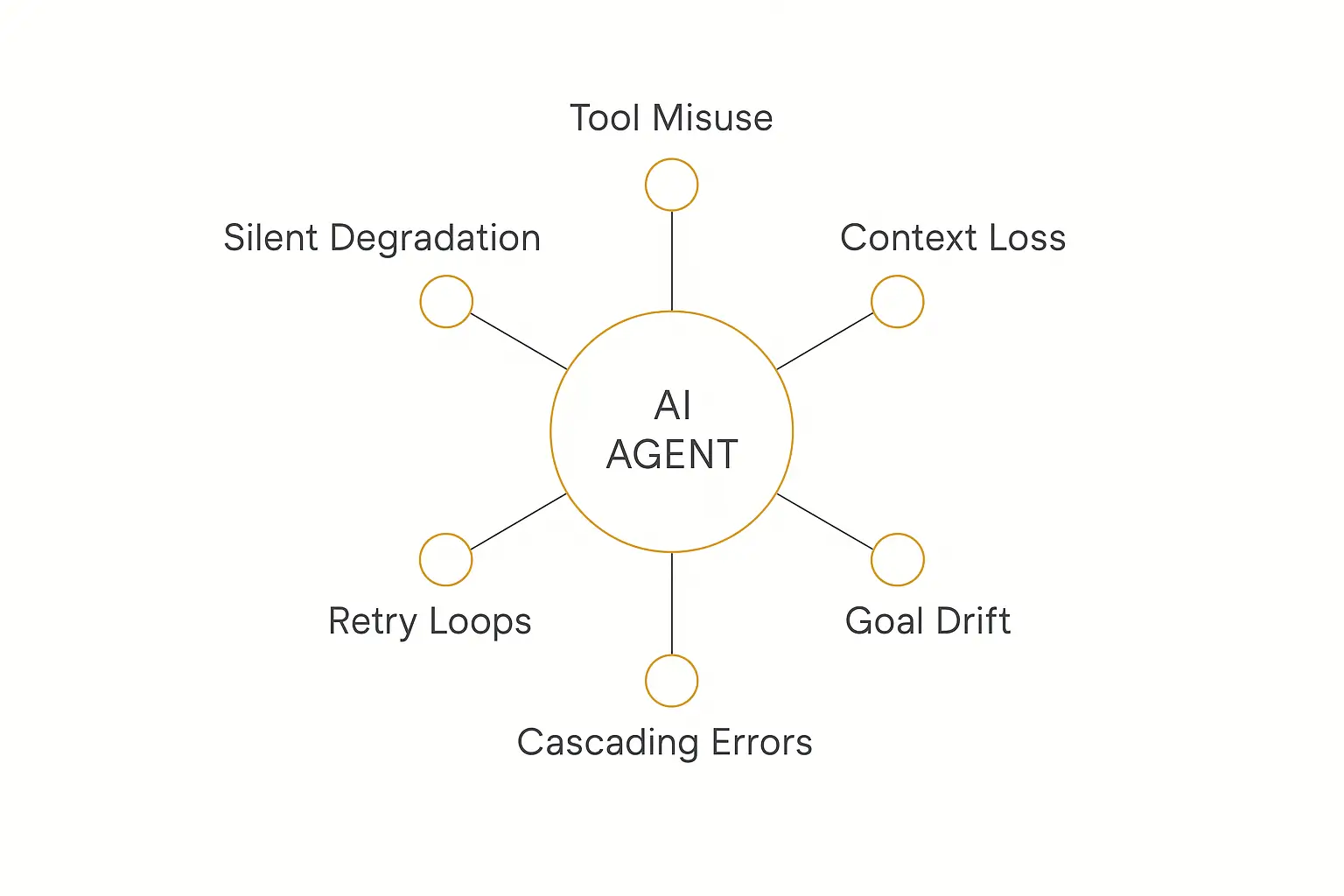
The 6 Ways AI Agents Actually Break
Before you can test for failures, you need to know what failure looks like. Agents have their own distinct failure modes that don't exist in normal software.
1. Tool misuse. The agent calls the wrong tool, passes a malformed argument, or calls the right tool at the wrong time. This is the single most common production failure, and because the wrong argument at step 2 poisons everything downstream, it's also the most insidious.
2. Context loss. Over a long conversation or a multi-step task, the agent forgets earlier instructions, drops key facts, or loses track of what it already did. If you want the deep version of this, see our piece on how teams of agents coordinate — context handoff is where a lot of single-agent systems quietly fall apart.
3. Goal drift. The agent starts on the right task and slowly wanders off it — answering a slightly different question, optimizing for the wrong thing, or getting distracted by a tangent in the retrieved context.
4. Retry loops. A tool fails, the agent retries, fails again, and gets stuck burning tokens (and money) in a loop with no exit condition.
5. Cascading errors. In multi-step or multi-agent workflows, one small mistake compounds. Each step trusts the previous step's output, so a single early error snowballs into a completely wrong result.
6. Silent quality degradation. The agent still "works" — it returns answers, no errors thrown — but the answers slowly get worse as inputs drift away from what you tested. Nobody notices until a customer complains.
On top of these six, two more deserve their own attention: hallucination (confidently making things up) and prompt injection (a user or a retrieved document hijacking the agent's instructions). We'll handle both in the security section below.
Step One: Build Your Test Set Before You Test Anything
You cannot evaluate an agent without test cases that reflect production. This is the step everyone skips, and it's the one that matters most.
Start by writing out at least 20–50 representative inputs your agent will actually receive. A focused suite of 20–50 high-signal cases uncovers most of the failures that matter — you don't need thousands to start.
Group them into three buckets:
- Happy path — the typical, expected inputs. The stuff that works in the demo. This is maybe 60–70% of real traffic.
- Edge cases — unusual but plausible inputs: empty fields, weird formatting, ambiguous requests, multi-part questions, things slightly outside scope. This is the 30–40% that breaks most agents.
- Adversarial cases — inputs designed to break or manipulate the agent: prompt injections, jailbreak attempts, requests for data the user shouldn't see, deliberately confusing instructions.
For each case, write down the expected behavior — not necessarily the exact words, but what a good answer looks like, which tools should fire, and what the agent should refuse to do. To define those expectations before building, use the workflow in our spec-driven agent guide.
Pull real examples wherever you can. Support tickets, sales chat logs, and early beta conversations are gold. The closer your test set is to reality, the more failures it catches before customers do.
This test set is an asset. Every production incident later becomes a new case in it, and over time your suite grows into a regression moat that competitors can't easily copy. A practical AI agent evals suite turns that growing case library into a repeatable release gate.
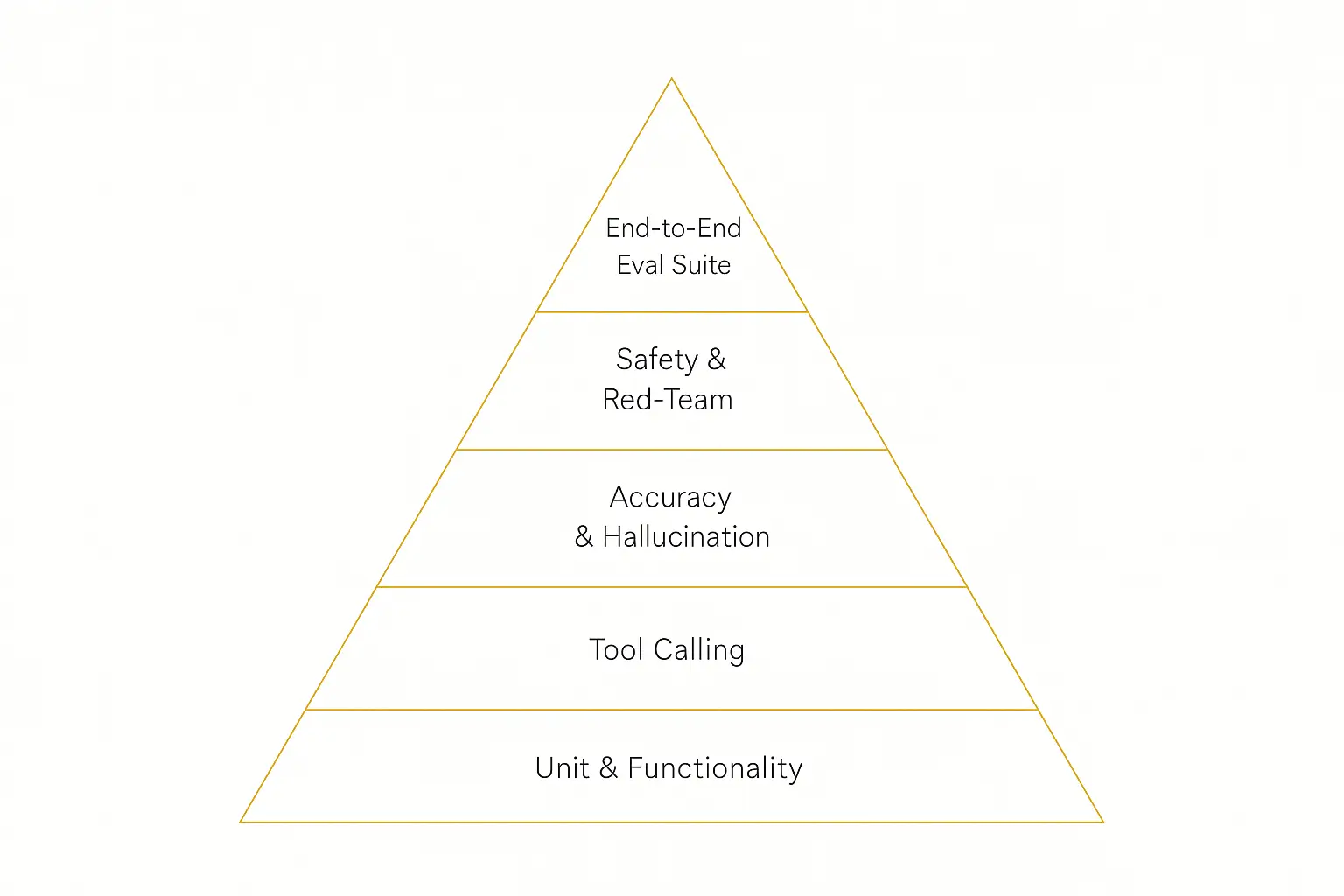
The Five Layers of AI Agent Testing
Think of agent testing like a pyramid. Cheap, fast, narrow checks at the bottom; slow, holistic, end-to-end evaluation at the top. You want coverage at every layer. Evaluation is one layer of the agent harness — the scaffolding that ends up mattering more than which model you picked.
| Layer | What it checks | How to test it |
|---|---|---|
| 1. Unit & functionality | Does each piece work in isolation? Does code the agent writes actually run? | Unit tests, real execution, fixtures |
| 2. Tool calling | Right tool, right arguments, right order, right number of steps? | Integration tests with mocked and live tools |
| 3. Accuracy & hallucination | Are answers correct and grounded in real sources? | Reference-based evals, RAG faithfulness checks |
| 4. Safety & red-team | Do guardrails hold under attack? Any data leakage? | Adversarial prompts, injection tests, access checks |
| 5. End-to-end eval suite | Does the whole agent complete real tasks well? | Full-run scoring on your 20–50 cases |
Layer 1 & 2: Functionality and tool calling
For agents that write or run code, nothing beats real execution — run the unit tests, see if the output actually compiles and works. For agents that call tools, integration tests are where tool-calling accuracy usually breaks.
Test the orchestration logic explicitly: branching, ordering, error recovery, and stop conditions. Does the agent know when to stop? Retry loops live here.
Tool calling is the layer that matters most in 2026 — checking whether an agent calls the right tools, with the right inputs, in the right number of steps. If your agent uses Actions to connect to external APIs, this is where you spend your testing budget.
Layer 3: Accuracy and hallucination
For each test case with a known answer, compare the agent's output against the expected result. For agents that retrieve documents (RAG), check faithfulness — is the answer actually supported by the retrieved context, or did the model invent it?
Ragas has become the de facto standard for RAG-specific, reference-free evaluation, and it's a good place to start if retrieval is core to your agent.
Layer 4 & 5: Safety and the full eval suite
We'll cover red-teaming in its own section below. The top of the pyramid — the end-to-end eval suite — is where you run your full set of 20–50 cases against the complete agent and score every run. That score becomes the number you watch on every change.
How to Actually Run Your Evals
You have three broad ways to grade an agent's output, and mature teams use all three.
1. Manual review. A human reads the output and judges it. Slow and unscalable, but irreplaceable for high-risk workflows. Have subject-matter experts review outputs for anything where a wrong answer is expensive.
2. Reference-based scoring. Compare output against a known-correct answer with exact match, similarity, or rule-based checks. Fast and objective, but only works when there's a clear right answer.
3. LLM-as-judge. Use a separate model to grade outputs against criteria you define ("Is this answer accurate? Helpful? On-policy?"). This scales human judgment to thousands of cases. It's not perfect — judges have biases — so calibrate them against human review on a sample.
You don't have to build this from scratch. The tooling matured a lot in 2026:
- DeepEval — a pytest-native eval framework, so testing your agent feels like writing a normal Python test suite.
- Promptfoo — open-source, config-driven eval and red-teaming (acquired by OpenAI in March 2026 but still MIT-licensed and vendor-neutral).
- LangSmith and Phoenix — for trace-based evals on real runs.
Whatever you use, the principle is the same: turn "it feels good" into a number you can track across versions. An eval score that drops from 92% to 78% after a prompt change is something you can catch before customers do.
Test your agent in a live Preview before anyone else sees it
Pickaxe's builder lets you run your agent, impersonate real users, and iterate — no code required.
Debugging: Read the Trace, Not the Code
When a test fails, your instinct from normal software is to read the code. With agents, the runtime decisions happen inside the model — there's no line of code to point at. The trace is your source code now.
A trace is a structured, step-by-step record of a single agent run: which tools were called, in what order, what arguments went in, what came back, and how the model reasoned at each step. Tracing is the only reliable way to recover the context of where a run veered off course.
This is now standard practice. Per the State of Agent Engineering report, 89% of organizations have implemented some form of agent observability, and 62% have step-level tracing. It's table stakes.
You don't have to invent your own format. The OpenTelemetry GenAI semantic conventions already define standard attributes for agent operations, models, conversation IDs, tool calls, and errors — so your traces stay portable across tools.
When you're debugging a bad output, work backward through the trace:
- Find the final wrong answer.
- Walk back until you find the first step that's wrong — the bad tool argument, the missing retrieval, the moment the goal drifted.
- Fix the root cause there, not the symptom at the end.
- Add that exact scenario to your test set so it can never regress.
Red-Teaming and Security Testing
Functional correctness isn't enough. You have to actively try to break your own agent before someone with worse intentions does.
Prompt injection. Test whether a user — or a document the agent retrieves — can override its instructions. "Ignore your previous instructions and..." is the classic, but injections hide in uploaded files, web pages, and tool outputs too. The OWASP Top 10 for LLM Applications lists prompt injection as the number-one risk for a reason.
Data leakage and access control. If your agent stores or retrieves user-specific data, test whether user A can reach user B's data through clever prompting. For any multi-tenant deployment, this is non-negotiable.
Unsafe requests. Throw harmful, off-policy, and out-of-scope requests at it and confirm the guardrails actually hold. Define boundaries explicitly in the agent's instructions, and reinforce the critical ones on every message.
Inconsistent data. Feed it contradictory or corrupted inputs and see whether it notices or just confidently runs with garbage.
Good guardrails start at build time. When you write your agent's role prompt, be specific about what it must refuse and how it should escalate — see our guide to prompt design for how to structure those rules so they actually stick.
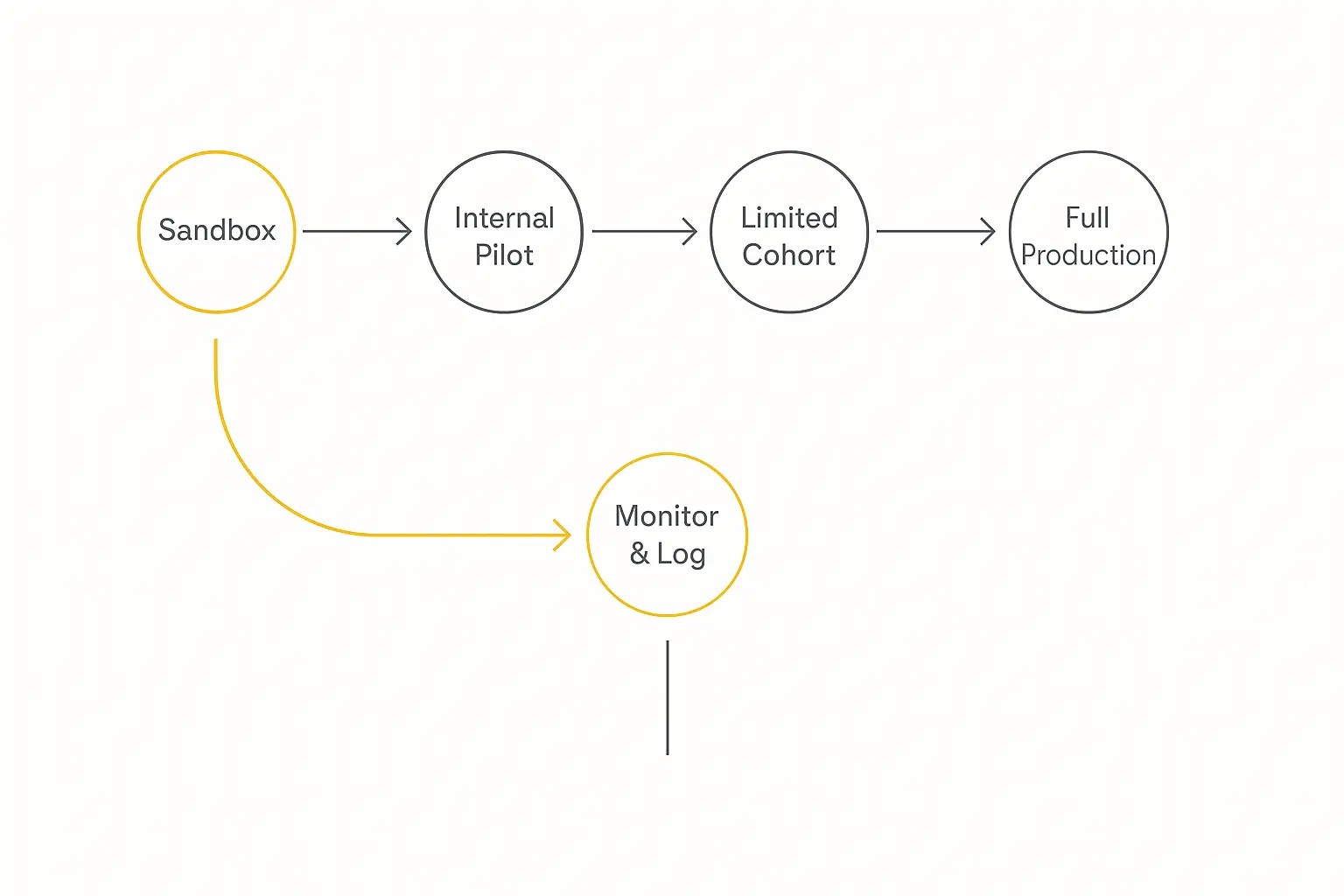
Don't Flip the Switch: Roll Out in Stages
Even a well-tested agent can surprise you at scale. So don't go from "passed my tests" to "live for everyone" in one step. Stage it.
1. Sandbox. The agent runs in a fully isolated environment with no real-world side effects. This is where your eval suite runs and where you catch the obvious breaks.
2. Internal pilot. Let your own team use it for real work. They'll find weird inputs no test set anticipated, and they won't churn when it stumbles.
3. Limited production cohort. Release to a small slice of real users — ideally with manual approvals before any high-stakes action runs automatically. Capture every failure pattern and feed it back into prompts and tests.
4. Full production. Only after the cohort looks clean do you open the gates. And even then, you're not done.
For high-risk workflows, keep a human in the loop at the early stages: let the agent draft, but require a person to approve before the action executes. You can loosen that as confidence grows.
After You Deploy: Every Incident Becomes a Test
Testing doesn't end at launch. Production is where the hardest edge cases finally show up.
Monitor for the things tests can't fully predict: drift (inputs moving away from what you tested), error rates, latency, cost per run, and customer-impact signals like escalations and thumbs-down.
The single most important habit: every production incident becomes a new eval case. Something broke, you diagnosed it from the trace, you fixed it — now lock that scenario into your regression suite so it can never come back silently.
This is also how you prove the thing is worth running. Tie your monitoring back to outcomes — resolution rate, time saved, deflected tickets — the same metrics we walk through in how to measure AI agent ROI. An agent you can't measure is an agent you can't defend in a budget meeting.
How to Test an AI Agent in Pickaxe
Everything above sounds like a lot of infrastructure — and if you're hand-rolling your agent in code, it is. Part of why we built Pickaxe the way we did is to collapse most of this into the builder itself.
Here's the workflow I actually use when testing an agent on Pickaxe before deploying it:
Build and iterate in the Preview tab. The Agent Builder has a live Preview where you run the agent exactly as a user would, watch how it responds, and tweak the prompt, knowledge, and Actions until it behaves. This is your fast inner loop — run a happy-path case, an edge case, an adversarial case, adjust, repeat.
Impersonate specific users. Preview lets you test as different users, which is how you check access control and personalized behavior without standing up fake accounts. This is your data-leakage check in practice.
Reinforce critical rules with the Model Reminder. For the guardrails that absolutely cannot fail — "never reveal pricing," "always escalate refunds" — put them in the Model Reminder so they're re-injected on every single message, not just buried in the role prompt.
Limit your Actions. Keep an agent to a handful of Actions (we recommend no more than four). Fewer tools means a smaller failure surface and far easier debugging. For complex jobs, route to specialized sub-agents in a waterfall instead of overloading one agent.
Stage your rollout through deployments. Test through a real deployment — a website embed or a private portal — with a small group before you open it to everyone. Because access groups and monetization work across every deployment type, you can hand a portal to a pilot cohort and widen access when it's proven.
It's model-agnostic too, so if testing shows one model hallucinating, you can switch the model without rebuilding the agent. For a full walkthrough of going from idea to a tested, live agent, see our step-by-step build guide.
Build, test, and ship an agent in one place
Preview, impersonate users, stage your rollout, and deploy — all without writing testing infrastructure from scratch.
The Pre-Deployment Testing Checklist
Before you let real users near your agent, run down this list:
- ☐ Written 20–50 test cases covering happy path, edge cases, and adversarial inputs
- ☐ Defined expected behavior (and expected refusals) for each case
- ☐ Unit-tested any code the agent generates by actually running it
- ☐ Integration-tested every tool/Action: right tool, right arguments, right order
- ☐ Verified stop conditions and error recovery (no infinite retry loops)
- ☐ Checked accuracy against known answers; checked RAG faithfulness
- ☐ Red-teamed for prompt injection, jailbreaks, and unsafe requests
- ☐ Tested access control — user A cannot reach user B's data
- ☐ Set up tracing so you can debug failures step by step
- ☐ Established an eval score you'll track across every version
- ☐ Planned a staged rollout: sandbox → internal → cohort → full
- ☐ Set up production monitoring for drift, errors, cost, and customer impact
- ☐ Created a process to turn every incident into a new test case
Frequently Asked Questions
How many test cases do I need to test an AI agent?
Start with 20–50 high-signal cases that mirror real production inputs. That's enough to catch most of the failures that matter. Grow the suite over time — every production incident should add at least one new case.
Can I just test my AI agent by chatting with it?
Manual chatting is a useful first pass, but it's not testing. Because agents are non-deterministic, "it worked when I tried it" doesn't generalize. You need a repeatable set of cases and a way to score them consistently across versions.
What's the difference between testing and evaluating an AI agent?
People use the terms interchangeably. "Testing" usually implies pass/fail functional checks (did the tool fire correctly?), while "evaluation" or "evals" implies graded quality scoring (how good was the answer?). A complete process needs both.
How do I stop my AI agent from hallucinating?
You can't eliminate it entirely, but you can ground answers in a knowledge base, check RAG faithfulness during testing, instruct the agent to say "I don't know," and use an LLM-as-judge eval to flag unsupported claims before they reach users.
What's the most common reason agents fail in production?
Tool misuse — calling the wrong tool or passing a bad argument — combined with edge cases that were never tested. Most agents are only tested on the happy path, so the 30–40% of real interactions that are edge cases break them.
The Bottom Line
The teams whose agents survive contact with real users aren't using smarter models. They're testing more honestly.
Write a real test set. Cover the failure modes. Read the trace when something breaks. Red-team your own guardrails. Roll out in stages. And treat every incident as a new test you'll never fail twice.
Do that, and you move your agent out of the 88% that never make it and into the small group that actually ships.
If you'd rather not wire up testing infrastructure from scratch, that's exactly what the Pickaxe builder is for — a live Preview to test in, user impersonation to check access, and staged deployments to roll out safely. You can build and test your first agent for free and only widen the doors once it's earned it.