
Look, I'm going to be straight with you.
If you're reading this in 2026 and you're NOT white-labeling AI for your clients yet, you are leaving an absurd amount of money on the table. Not "oh that's a nice opportunity" money. I'm talking about "this is the biggest land grab in the history of services businesses" money.
The AI-as-a-Service market hit $28.81 billion in 2026 and is projected to reach $313 billion by 2035. The overall AI market is approaching $540 billion. And the best part? Most businesses still have no idea how to implement AI themselves. They NEED someone to do it for them. That someone should be you.
Here's what I'd do if I were starting from zero today.
What Is White-Labeling AI (And Why Should You Care)?
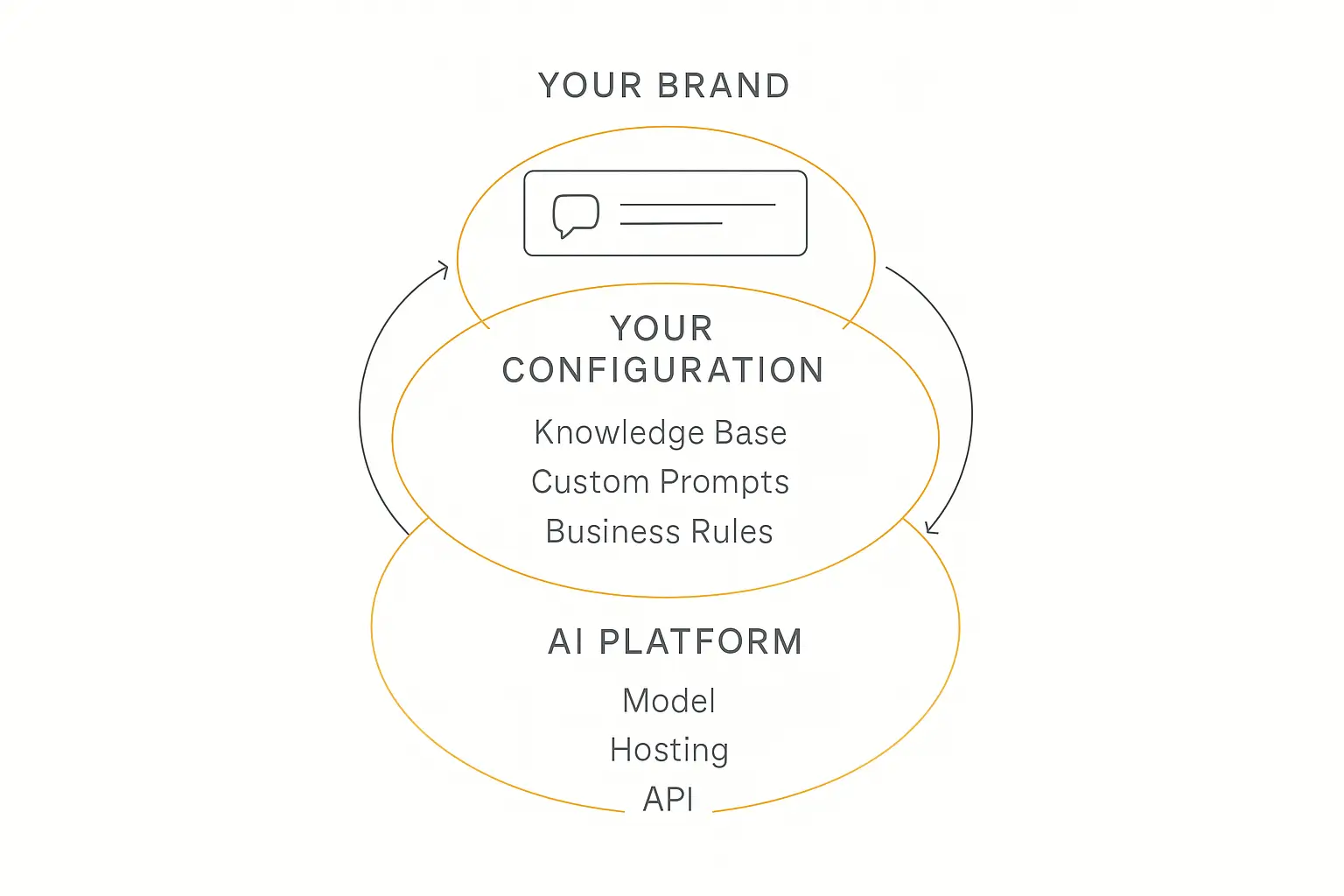
White-labeling AI means you take an AI platform, remove their branding, slap YOUR branding on it, and sell it to your clients as if you built the whole thing. Your client sees YOUR logo. YOUR colors. YOUR domain. They have no idea there's a platform behind it.
It's the same business model that made Shopify sellers billions. You don't manufacture the product. You don't build the warehouse. You build the brand, the relationship, and the distribution channel.
Here's why this matters RIGHT NOW:
- Businesses want AI but don't know how to build it. They're reading the headlines. They know they need it. They just don't know where to start.
- The technology is commoditized. You don't need a machine learning team. You don't need to train models. The infrastructure exists.
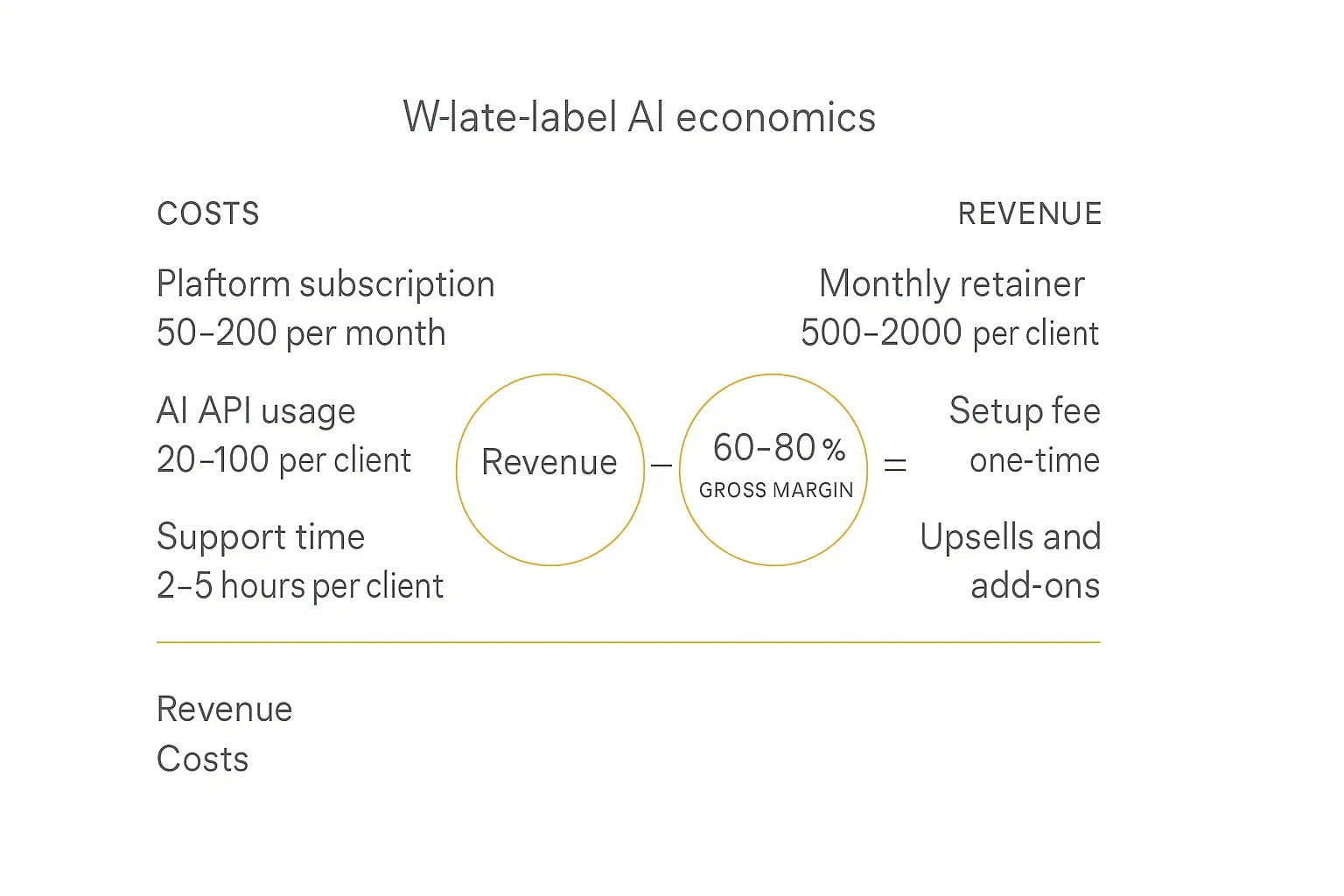
- The margins are insane. Platform costs are $30-$100/month. You're charging clients $500-$2,000/month. Do the math.
- Recurring revenue. This isn't project work. Once a client has an AI agent running their customer support or lead qualification, they're not turning it off. Ever.
According to Insighto's agency data, agencies are charging $300-$500+ MRR per client for white-labeled AI agents. And according to BotPenguin's partner program, some agencies are charging $1,000+ per month per agent.
That's 10 clients at $1K/month = $120K/year from ONE service offering.
The White-Label AI Landscape: Who's Doing What
Before I tell you what I'd do, let me show you what's out there. I've personally looked at every major platform in this space, and here's what the landscape looks like.
The Chatbot-First Platforms
These platforms started as chatbot builders and added white-labeling later:
- Stammer AI — Focuses on agencies building chat and voice AI agents. No revenue sharing, full pricing control. Their pitch is "keep 100% of your revenue." Solid for pure chatbot plays.
- BotPenguin — Starts at $4/month. Multi-channel support (WhatsApp, Messenger, website). Good entry point but limited customization depth. They have a comprehensive comparison of white-label builders.
- Botsify — White-label chatbot platform supporting WhatsApp, Messenger, Slack deployment. Good for agencies wanting complete brand invisibility.
- Botpress — Open-source roots give you more technical control. Their 2026 white-label guide is worth reading if you're technical.
- Thinkstack — Fully customizable white-label chatbot builder designed specifically for agencies.
The Enterprise/Custom Solutions
These are for bigger operations with bigger budgets:
- CustomGPT — Enterprise-focused with deep customization. Their comparison guide for resellers is one of the most thorough in the space.
- Vendasta — Full agency management platform that includes white-label AI. More of an all-in-one play.
- White Label IQ — Done-for-you white-label AI fulfillment service. They handle the technical work, you manage the client.
- 10Clouds — Enterprise-focused development service for startups wanting to launch AI products quickly.
The Voice AI Specialists
This is a rapidly growing niche:
- echowin — Enterprise-grade platform for AI phone and chatbot agents. Unlimited clients, full margin retention.
- Lety.ai — Unlimited agents with WhatsApp, voice, and chat capabilities for agencies.
- The voice AI market was $2.4B in 2024 and is projected to reach $47.5B by 2034 (~35% CAGR). White-labeling is a major growth driver.
The Build-And-Monetize Platform (What I'd Actually Use)
And then there's Pickaxe.

Pickaxe positions itself as the "Shopify for Agent-Powered Businesses" — and that positioning is dead accurate.
Here's what makes Pickaxe different from everything else I just listed: it's the only platform that gives you the full stack — build, deploy, AND monetize — all in one place.
Every other platform I mentioned? They handle the building and maybe the white-labeling. Then you're on your own for billing. You're on your own for access control. You're on your own for usage tracking. You're duct-taping Stripe, a separate auth system, and usage analytics together yourself.
Pickaxe? It's all built in. Billing. Access control. Usage tracking. White-labeling. Custom domains. Multiple deployment channels. All of it.
That's why they call themselves the "Shopify for Agent-Powered Businesses." And honestly? That's exactly what it is.
The Exact Playbook: How I'd Build a White-Label AI Agency
Alright. Enough context. Here's exactly what I would do, step by step, if I were building a white-label AI agency from scratch in 2026.
Step 1: Pick Your Niche (Stop Trying to Serve Everyone)
This is where most people screw up. They say "I'll build AI agents for anyone who wants one!" and then they wonder why nobody's buying.
Here's the truth: the riches are in the niches.
Pick ONE industry. ONE type of business. Get really, really good at solving THEIR specific problems with AI.
Here are niches I'd look at:
| Niche | AI Agent Use Case | Monthly Value |
|---|---|---|
| Real Estate Agencies | Lead qualification, property matching, 24/7 inquiry response | $500-$1,500/mo |
| Law Firms | Client intake, document Q&A, appointment scheduling | $1,000-$3,000/mo |
| E-commerce Stores | Customer support, product recommendations, order status | $500-$2,000/mo |
| Coaching/Consulting | Client onboarding, session prep, knowledge delivery | $500-$1,500/mo |
| Healthcare Practices | Appointment scheduling, FAQ handling, patient intake | $1,000-$2,500/mo |
| SaaS Companies | Customer support, onboarding assistance, feature guidance | $1,000-$3,000/mo |
Why does niche matter? Because when you walk into a room of real estate agents and say "I built an AI that qualifies leads, answers property questions 24/7, and books showings automatically" — they get it IMMEDIATELY. No explaining needed. No "well, AI can do a lot of things..." Just a clear problem and a clear solution.
Step 2: Build Your First Agent on Pickaxe
Here's where Pickaxe makes this stupid simple. You don't need to code. You don't need a technical co-founder. You don't need a development team.
Go to pickaxe.co and sign up. Here's what you're going to do:
A. Create your agent using the Agent Builder.
Pickaxe's Agent Builder has three tabs:
- AI Helper — A conversational assistant that walks you through setup. Perfect if you're starting from scratch.
- Editor — Direct control with four sub-tabs: Prompt, Configure, Knowledge, Actions.
- Preview — Live testing so you can see exactly what your clients will see.
Start with the Prompt tab. This is where you define:
- The agent's role (e.g., "You are a real estate lead qualification specialist for {Client Name}")
- Its behavior rules (what it can and can't discuss)
- Its tone (professional, casual, authoritative — match your client's brand)
- Its response format (short answers, detailed explanations, bullet points)
B. Load it with knowledge.
This is the superpower. Upload your client's:
- Website content (just paste their URL)
- Product catalogs (PDF, DOCX, CSV)
- FAQ documents
- Training materials
- Pricing sheets
- Any proprietary content that makes them unique
Pickaxe supports PDF, DOCX, TXT, XML, PPTX, MD, MP3, MP4, PNG, JPG, JSON, CSV, and more. You can also connect directly to Notion, Google Drive, OneNote, and OneDrive/SharePoint.
C. Add Actions.
Actions are what make your agent actually DO things instead of just chatting. Connect it to:
- CRMs (HubSpot, Attio) to log leads
- Google Sheets for data capture
- Email systems for notifications
- Calendars for booking
- Any external API through Make, Zapier, or n8n
Pickaxe recommends no more than 4 actions per agent. If you need more complex workflows, use a "waterfall setup" where a primary agent routes to specialized sub-agents. Smart architecture.
D. Choose your model.

Pickaxe gives you access to 40+ AI models from OpenAI, Google, Anthropic, xAI, Mistral, and Perplexity — all in one platform.
This is massive. Pickaxe is model-agnostic. You get access to 40+ AI models from 6 providers — OpenAI, Google, Anthropic, xAI, Mistral, and Perplexity. You're never locked in. If a better model comes out tomorrow, you switch with one click.
Compare that to platforms that lock you into GPT-4 or one specific model. That's a liability, not a feature.
Step 3: White-Label Everything
This is where the magic happens. Here's how to make it look like YOU built the whole thing.
On Pickaxe specifically, white-labeling is available on the Gold plan ($26.10/month billed annually) and above. Here's what you get:

White-labeling is available starting at just $26.10/month on the Gold plan. That's the cost of two coffees for a capability that lets you charge clients $500+/month.
What you can white-label:
- Custom domains — Your client accesses the agent at
ai.yourclientsbrand.com, not some third-party URL. - Custom logos — Your logo or your client's logo. No Pickaxe branding visible.
- Custom colors and design — Match the client's brand identity through the Portal editor's Design tab.
- Embeds — Drop a chat widget on their website (Wix, Squarespace, Webflow, WordPress, etc.) that looks completely native.
- Portal branding — The entire multi-agent hub carries your branding.
Pickaxe has a detailed community guide on how to white-label everything, and they also published a blog post on how to white-label your GPTs that walks through the full process.
Step 4: Set Up Monetization (This Is Where Pickaxe Destroys the Competition)
Here's the part that every other platform misses. Building the agent is 20% of the work. Getting PAID reliably and scalably is 80%.
Pickaxe has built-in monetization. Let me say that again for the people in the back: BUILT. IN. MONETIZATION.
Here's what that means:
Pricing Models Available:
- Subscription billing — Daily, weekly, monthly, or yearly recurring. This is what I'd use for most clients.
- Pay-per-usage — Sell credits or "uses." Users buy more when they run out. Great for high-volume use cases.
- One-time payment — Single upfront fee, often paired with pay-per-usage for ongoing costs.
- External payments — Link to a third-party payment provider if you have an existing setup.
The setup is dead simple:
- Enable access control
- Create a member access group
- Connect your Stripe account
- Set your prices
That's it. Your clients can now pay you directly through the platform. No custom billing integrations. No invoice management nightmares. No chasing payments.
Processing fees by plan:
| Plan | Processing Fee |
|---|---|
| Free | 25% |
| Gold | 10% |
| Pro | 8% |
At the Pro level ($104.40/month billed annually), you're only paying 8% processing on client payments. If you have 10 clients paying $1,000/month, that's $10,000/month revenue, $800 to Pickaxe, and you keep $9,200. Minus your $104/month platform cost, you're netting $9,096/month.
The pay-per-usage system is genius:
You have two options (workspace-wide):
- Uses: One user input = one use. Dead simple for clients to understand.
- Credits: Maps to actual AI cost. You set the markup. Sell $1 in credits, spend $0.30 in AI cost, pocket $0.70. This is how you build margin on high-volume agents.
Step 5: Deploy Across Every Channel
Don't just give your client a chatbot on their website. Give them an ECOSYSTEM.
Pickaxe lets you deploy the same agent across multiple channels simultaneously:
| Channel | Best For |
|---|---|
| Portals | Primary deployment. Branded multi-agent hubs with custom domains. |
| Embeds | Website chat widgets and inline embeds. Works with Wix, Squarespace, Webflow, WordPress, Kajabi, Notion. |
| Direct Link | Quick sharing. Send a URL, client uses the agent immediately. |
| WhatsApp Bot | Clients whose customers prefer messaging apps. |
| Slack Bot | Internal team agents. IT help desks, HR assistants, sales enablement. |
| Email Bot | Clients who want AI-powered email responses. |
| API | Custom integrations for technical clients. |
The Portal is the centerpiece. Think of it as a branded AI hub where your client can access multiple agents in one place. You can organize agents into folders, customize the entire design, and control access with groups. What you put inside it matters more than the branding on it — see how to build a client portal that gets used.
Here's the key insight: when you deploy across multiple channels, the perceived value skyrockets. You're not selling "a chatbot." You're selling "an AI-powered customer engagement system that works on your website, WhatsApp, email, and Slack." That's a $2,000/month pitch, not a $200/month pitch.
Step 6: Leverage OpenClaw for Advanced Capabilities
Pickaxe's OpenClaw engine is their next-gen AI engine, and it's a game-changer for white-label agencies. When enabled, every agent runs as an independent, sandboxed instance with advanced capabilities:
- Isolated execution per user session — Each client's data stays completely separate. This is huge for compliance.
- Multi-model functionality — Use different AI models within a single interaction.
- Web browsing — Your agent can look up real-time information.
- PDF creation — Generate documents on the fly.
- Code execution — Run code from a sandboxed environment.
- Deeper memory — Better context retention across conversations.
This is the kind of capability that lets you charge enterprise prices. When a law firm asks "can the agent pull up relevant case law in real-time and generate a brief?" — with OpenClaw, the answer is yes.
Step 7: Scale With Systems
Here's where you go from "freelancer with a cool tool" to "agency owner printing money."
The scaling formula:
- Template your agents. Build one killer agent for your niche. Then duplicate it for every new client, just swapping out the knowledge base and branding. On Pickaxe, you can do this in minutes.
- Productize your pricing. Don't do custom quotes. Have 3 tiers:
- Starter: 1 agent, website embed, basic knowledge base. $497/month.
- Growth: 3 agents, multi-channel deployment, CRM integration. $997/month.
- Enterprise: Unlimited agents, custom domain portal, OpenClaw, priority support. $2,497/month.
- Automate onboarding. Build a Pickaxe agent that handles your OWN client onboarding. Meta? Yes. Effective? Absolutely.
- Monitor and optimize. Pickaxe gives you activity monitoring and usage tracking. Use it. Look at which agents are getting used, which aren't, and optimize accordingly.
- Upsell with Actions. Start clients with a basic chatbot. Once they see value, add Actions — CRM integrations, email notifications, appointment booking. Each action is an upsell opportunity.
The Math: Why This Business Model Is Insane
Let me break down the actual numbers.
Your costs (Pickaxe Pro plan):
- Platform: $104.40/month
- AI credits: $50/month included free, additional credits at cost
- Your time: ~2 hours per client setup, ~1 hour/month maintenance
Your revenue (10 clients at $997/month average):
- Monthly revenue: $9,970
- Pickaxe processing (8%): -$798
- Platform cost: -$104
- Additional AI credits: -$200 (estimate)
- Net monthly profit: $8,868
- Annual profit: $106,416
At 25 clients:
- Monthly revenue: $24,925
- Net monthly profit: ~$21,000
- Annual profit: ~$252,000
And here's the kicker: this scales without scaling your time linearly. Client #25 takes the same 2 hours to set up as client #1 because you've templatized everything.
The Compliance Advantage (Don't Skip This)
If you're selling AI to businesses, they're going to ask about security and compliance. This is where a lot of white-label solutions fall apart.
Pickaxe is:
- SOC2 compliant — Enterprise-grade security controls
- GDPR compliant — European data protection covered
- CCPA compliant — California consumer privacy covered
That's three compliance certifications that would cost you $50,000+ and 6 months to get on your own. With Pickaxe, you inherit them. When a client asks "is this secure?" you can point to real certifications, not hand-waving.
Start white-labeling AI agents today
Pickaxe is purpose-built for agencies and consultants who want to create branded AI agents for clients.
Common Mistakes (And How to Avoid Them)
I've seen people screw this up in predictable ways. Here's what NOT to do:
Mistake #1: Trying to Build It Yourself
"I'll just use the OpenAI API and build my own platform!" No. Stop. You'll spend 6 months and $50K building something worse than what Pickaxe gives you for $26/month. Your time is better spent selling and serving clients, not debugging authentication flows.
Mistake #2: Choosing a Platform Without Built-In Monetization
If your white-label platform doesn't handle billing, you're going to be duct-taping Stripe, building customer portals, tracking usage manually, and chasing invoices. That's not a business, that's a part-time job as a collections agent.
Mistake #3: Not White-Labeling Aggressively Enough
Half-measures kill you here. If the client can see ANY branding that isn't yours (or theirs), the illusion breaks. Custom domain. Custom logo. Custom colors. Every touchpoint should be branded. Pickaxe's Gold plan gives you all of this for $26/month.
Mistake #4: Overcomplicating the Agent
Start simple. A well-prompted agent with a solid knowledge base beats a complicated agent with 10 actions and 3 sub-agents every time. Get the basics right first, then add complexity as the client's needs grow.
Mistake #5: Not Choosing a Niche
"We do AI for everyone" means you do AI for no one. Pick a niche. Dominate it. Expand later.
Mistake #6: Ignoring the Model Selection
Different models are better for different tasks. A customer support agent might work great on a fast, cheap model. A legal document analyzer needs a more capable model. Pickaxe lets you compare 40+ models and switch at any time. Use this to optimize both performance AND cost.
Platform Comparison: Pickaxe vs. The Competition
Let me be transparent about how Pickaxe stacks up against the alternatives.
| Feature | Pickaxe | Stammer AI | BotPenguin | CustomGPT | Botpress |
|---|---|---|---|---|---|
| White-labeling | Gold plan+ | Yes | Yes | Enterprise | Yes |
| Built-in billing | Yes (Stripe) | No | No | No | No |
| Access control | Yes | Limited | Limited | Limited | Limited |
| Multi-model | 40+ models | Limited | Limited | GPT-focused | Limited |
| Custom domains | Yes | Yes | Yes | Yes | Yes |
| Multi-channel deploy | 8 channels | 2-3 | 4-5 | 2-3 | 3-4 |
| Knowledge base | Advanced | Basic | Basic | Advanced | Advanced |
| Compliance | SOC2, GDPR, CCPA | Varies | Varies | SOC2 | Varies |
| Starting price | $0 (Free tier) | ~$49/mo | $4/mo | Custom | Free tier |
| OpenClaw/Advanced AI | Yes | No | No | No | No |
The honest assessment: If you ONLY need a chatbot and nothing else, cheaper platforms exist. But if you want to build a real business with billing, access control, multi-channel deployment, and scalable monetization — Pickaxe is the clear winner. It's the only platform that handles the ENTIRE workflow. If you are still mapping out which revenue model to chase, the top ways to make money with AI compares white-labeling against the alternatives.
What I'd Do in the First 30 Days
Here's the exact timeline I'd follow:
Week 1: Foundation
- Sign up for Pickaxe Gold ($26.10/month)
- Pick your niche
- Build your first template agent
- Set up your Portal with your agency branding
- Connect Stripe for billing
Week 2: Product
- Create 3 pricing tiers (Starter, Growth, Enterprise)
- Build demo agents for your niche (3-5 different use cases)
- Set up a demo Portal that prospects can explore
- Create a 2-minute Loom video walking through the demo
Week 3: Outreach
- Identify 100 businesses in your niche
- Send personalized outreach with your demo link
- Offer a free 7-day trial (Pickaxe's access control makes this easy)
- Book 10-15 demo calls
Week 4: Close and Deliver
- Close your first 3-5 clients
- Set up their agents (2 hours each with your template)
- White-label their Portals with custom domains
- Set up their billing through Pickaxe
- Deliver, collect feedback, iterate
Month 2 onwards:
- Refine your template based on client feedback
- Add upsell services (more agents, more actions, more channels)
- Get referrals from happy clients
- Scale to 10, then 25, then 50 clients
The Bottom Line
White-labeling AI is the single biggest opportunity in the services industry right now. The market is exploding. Businesses are desperate for help. And the tools to do it — particularly Pickaxe — have never been more accessible or more powerful.
You don't need to be technical. You don't need a big team. You don't need a lot of capital. You need a Pickaxe account, a niche, and the willingness to do outreach.
The agencies that move fast on this will own their niches for the next decade. The ones that wait will be competing with hundreds of copycats who read this article and actually executed.
So which one are you going to be?
Get started with Pickaxe for free and build your first white-labeled AI agent today.
Further Reading & Resources
Pickaxe Resources
- Pickaxe Homepage — Build & Sell AI Agents
- Pickaxe Pricing Plans
- Pickaxe AI Models Comparison
- How to White-Label Your GPTs (Pickaxe Blog)
- How to White-Label Everything (Community Guide)
- Pickaxe Community Forum
Market Research & Data
- AI Market Size Report — Grand View Research
- AI as a Service Market Report — Econ Market Research
- Voice AI Market 2026 — Famulor
- 150+ AI Agent Statistics — Master of Code
- Agentic AI Market Forecast — Fortune Business Insights
White-Label AI Platform Guides
- Best AI White Label Services to Resell — Insighto
- Top 10 White-Label AI Platforms Compared — Parallel Labs
- White Label AI Platforms Comparison Guide — CustomGPT
- 8 Best White-Label Chatbot Platforms Guide — Botpress
- 11 Best White Label AI Software Platforms — BotPenguin
- White-Label Chatbot Platforms — Voiceflow