
Most AI agents wait for you. You open a chat, type a question, and the agent answers. Useful — but it means you are still the trigger. Nothing happens until you show up.
The best agents I've built lately don't work like that. They wake up on their own at 7:00 a.m., pull yesterday's numbers, write a tidy summary, and drop it in my inbox before I've had coffee. I didn't ask. I never have to.
That's a scheduled AI agent — an agent that runs on a clock instead of a prompt. It's the quiet difference between a tool you operate and a teammate who just handles things.
This guide is the honest, plain-English walkthrough of scheduled AI agent automation: what it is, the three jobs it's genuinely great at, how one run actually works under the hood, the cron basics you need, and how to build one yourself without writing code.
If you're still getting your bearings on what an AI agent even is, start there first — this assumes you know the basics and want to make one run on autopilot.
What Is a Scheduled AI Agent?
A scheduled AI agent is an agent that executes automatically on a defined time schedule — every morning, every hour, every Monday — with no human in the loop to kick it off.
Think of it as cron for reasoning. Traditional cron jobs run a fixed script at a fixed time. A scheduled AI agent runs a thinking task at a fixed time: it gathers fresh data, reasons over it with a language model, and takes an action — send, post, alert, log.
The pattern matters because so much valuable work is recurring but not automatic. Someone still has to compile the weekly report, chase the overdue invoices, or check whether a competitor dropped their price. That work is predictable enough to schedule, but fuzzy enough that a plain script can't do it. That gap is exactly where scheduled agents live.
And the demand is real. Roughly 62% of the average knowledge worker's day goes to repetitive "work about work," and nearly 60% of workers say they'd save six or more hours a week if the repetitive parts of their job were automated, according to workflow automation research compiled by Kissflow. A separate roundup found 94% of small-business employees spend time on repetitive tasks, per 2026 workplace automation data. A scheduled agent is one of the cleanest ways to claw some of those hours back.
Scheduled vs. Event-Triggered: Two Ways an Agent Wakes Up
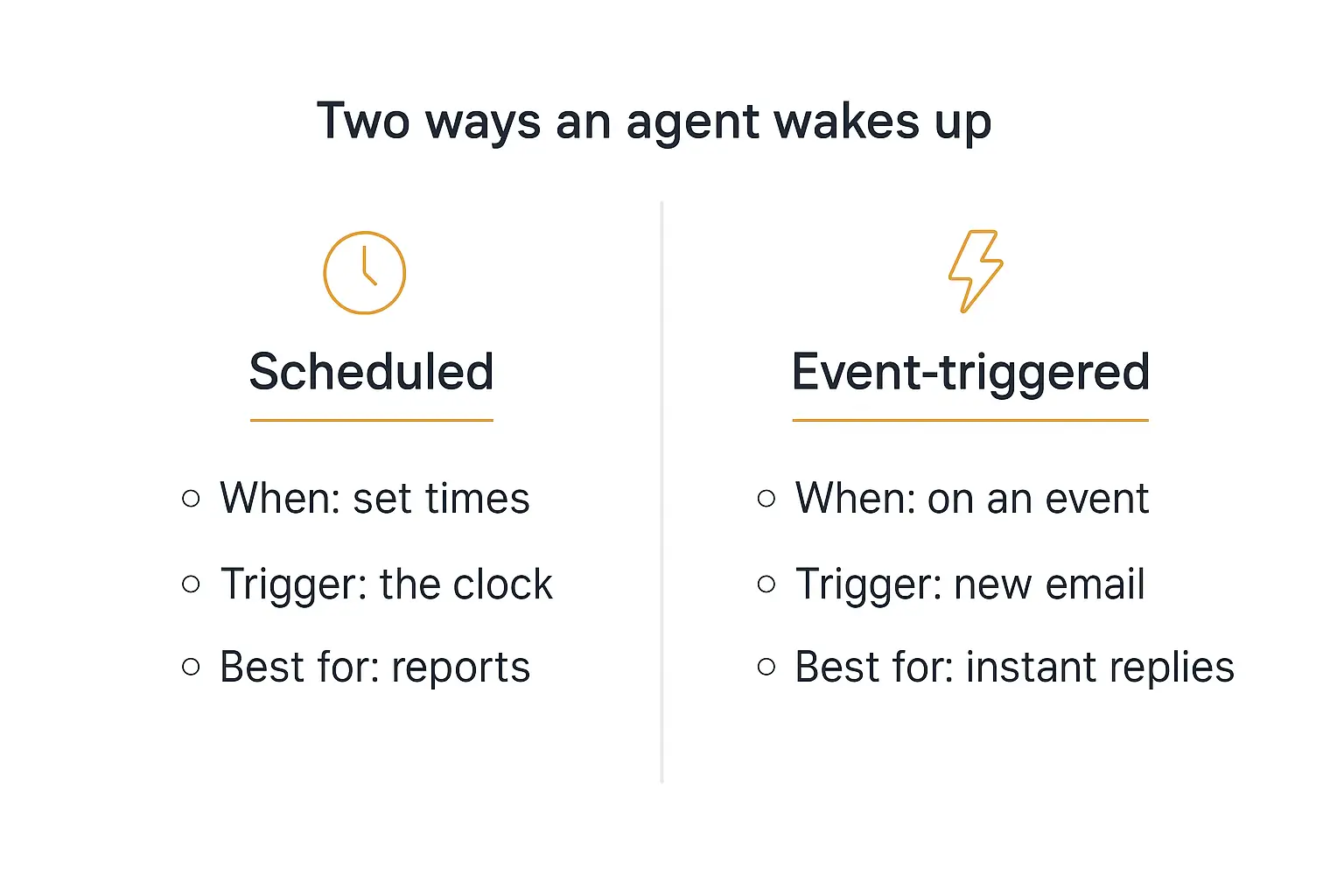
Before you build anything, it helps to know there are two fundamentally different ways an agent starts a task. Picking the wrong one is the most common early mistake.
Event-triggered agents run in response to something happening — a new email lands, a form is submitted, a webhook fires. They're reactive and near-instant. Great for customer replies, lead routing, and anything that needs to happen the moment a thing occurs.
Scheduled agents run on the clock — at 9:00 a.m. daily, on the hour, every Friday at 5. They're proactive. They don't wait for an event; they are the event. Great for reports, digests, reminders, and periodic checks.
Here's the simple test: if the question is "whenever X happens, do Y," you want an event trigger. If the question is "every so often, go check on Z," you want a schedule.
Plenty of real systems use both — an event-triggered agent handles incoming support tickets while a scheduled agent emails you a summary of the day's tickets each evening. This guide is about the second kind.
The Three Jobs Scheduled Agents Do Best
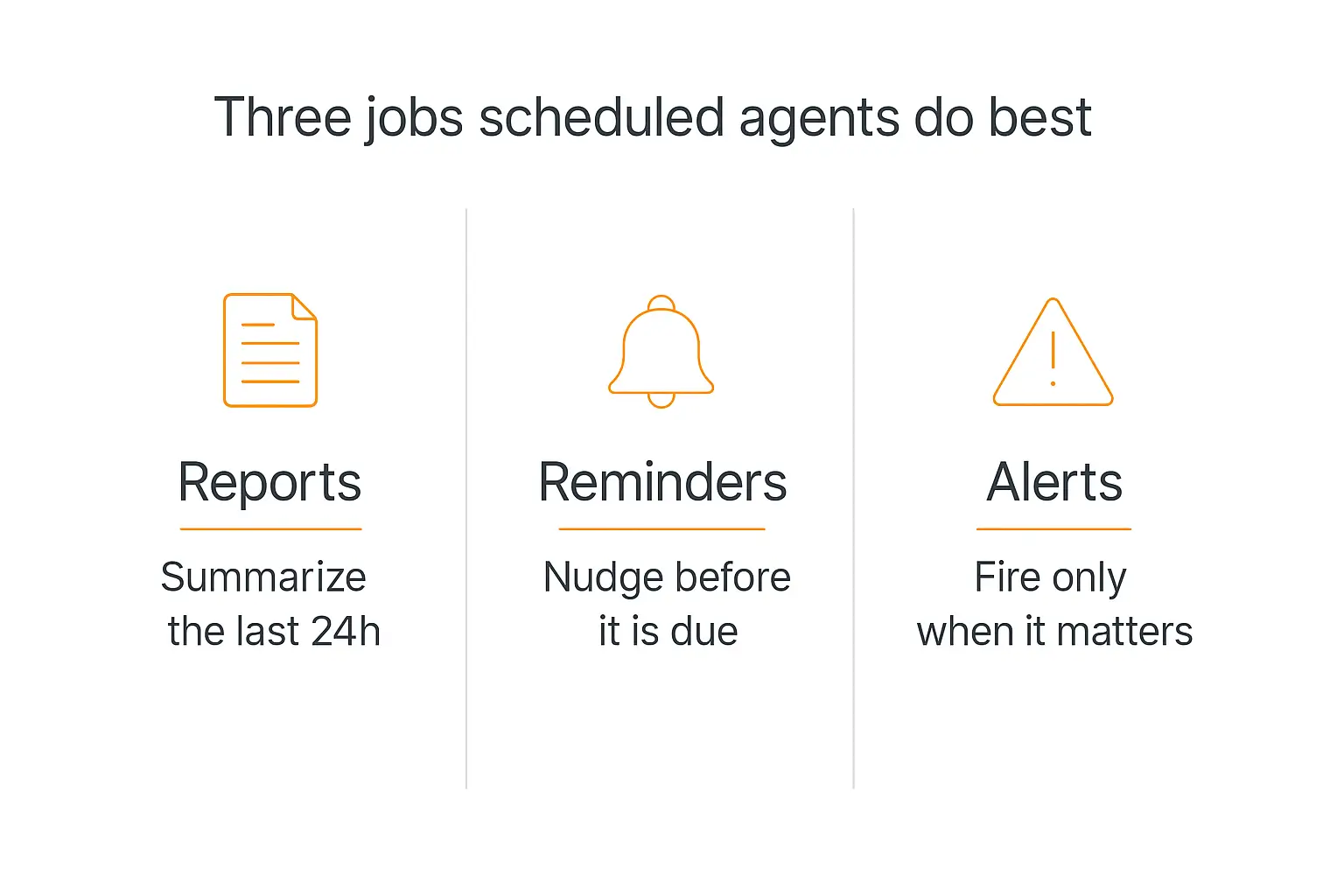
You can schedule an agent to do almost anything, but three jobs come up again and again because they map perfectly onto "recurring but not automatic." Nail these and you've covered 80% of the real-world use cases.
1. Reports and digests
This is the flagship use case. An agent aggregates data from the last day or week, analyzes it, writes a structured summary, and delivers it — replacing a chore that eats hours and gets done inconsistently.
Morning briefings are the classic: search the web for the last 24 hours of news on a topic, pull five relevant articles, and summarize each in a couple of sentences with links. Sales digests, support-ticket recaps, and "here's what happened in your analytics yesterday" all follow the same shape.
The magic is that the agent doesn't just fetch data — it reads it. It can tell you the number went down and take a guess at why, which no dashboard does on its own.
2. Reminders and nudges
A scheduled agent makes a wonderful memory. It checks a source on a cadence and reminds the right person before something slips.
Overdue invoices, contracts up for renewal, tasks past their due date, follow-ups that were promised and forgotten — an agent can scan for these every morning and send a gentle, specific nudge. Not "you have overdue items," but "Invoice #4021 for Acme is 6 days late; want me to draft the follow-up?"
3. Alerts and monitoring
This is the "check often, speak rarely" pattern. The agent runs frequently — every 15 minutes, every hour — checks a metric or data source, and stays silent unless something crosses a threshold worth flagging.
Competitor price changes, a spike in error rates, a mention of your brand on social, a KPI falling off a cliff — the agent watches so you don't have to, and only interrupts you when it matters. The restraint is the whole point: an alert that fires constantly gets ignored.
How a Scheduled Agent Actually Works (The Anatomy of One Run)
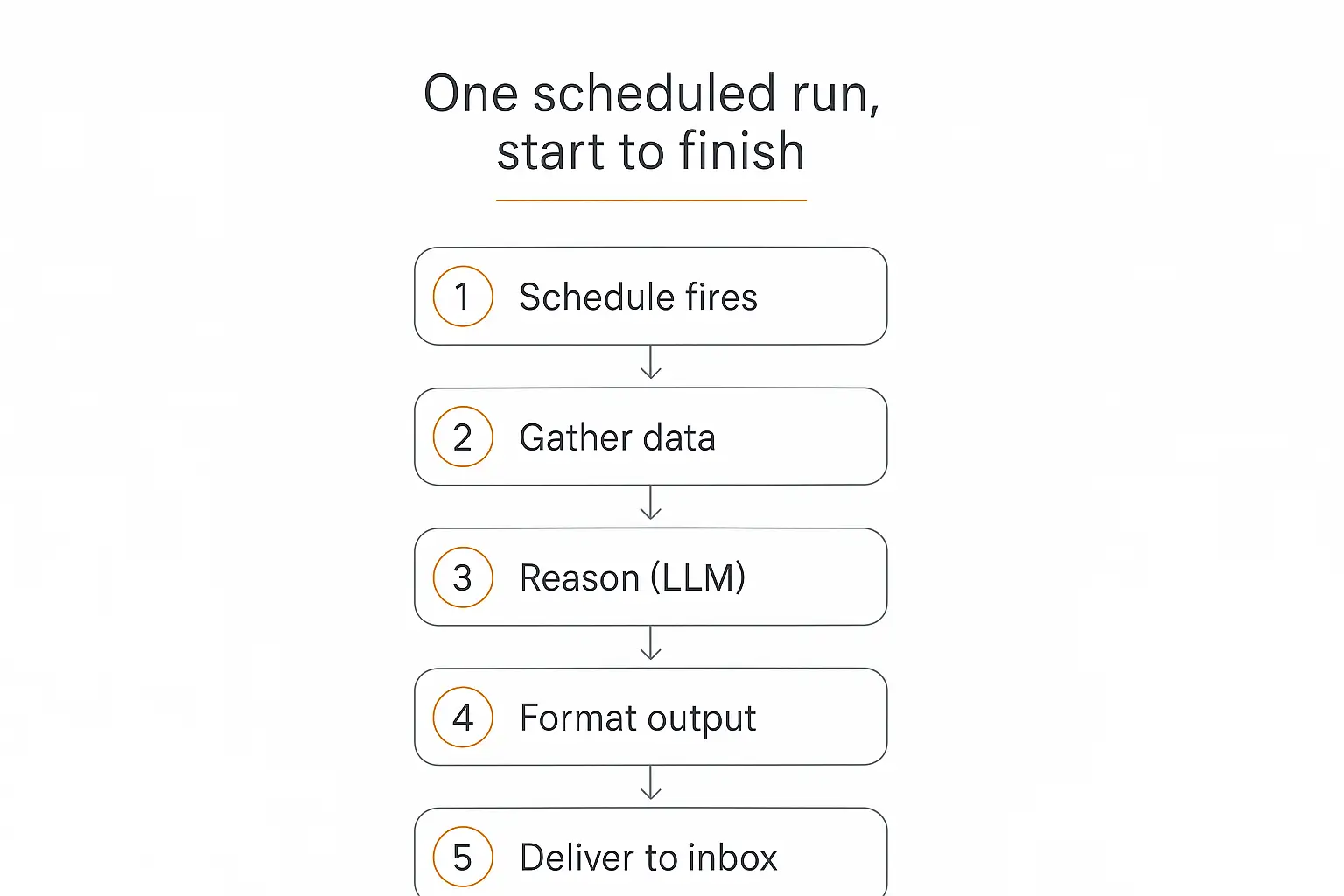
Under the hood, every scheduled agent run — no matter how fancy — walks through the same five steps. Understanding this loop makes the whole thing far less mysterious.
- The schedule fires. A scheduler (cron, a workflow platform, or a built-in timer) hits the go button at the appointed time. This is the only part a human doesn't touch.
- Gather data. The agent pulls whatever it needs to reason about — yesterday's rows from a database, the latest emails, a web search, a metrics endpoint. In agent terms, these are tool calls or actions.
- Reason with the model. The language model does the actual thinking: summarize, compare against last week, decide whether anything is worth flagging, draft the message.
- Format the output. Turn the model's reasoning into the shape you want — a clean email, a Slack block, a row appended to a sheet, a short SMS.
- Deliver. Send it where it needs to go. Email, Slack, WhatsApp, a webhook, a database. Then the agent goes back to sleep until the next tick.
That's it. A scheduled agent is a small, repeatable pipeline: trigger → gather → reason → format → deliver. Everything else is variations on those five moves.
One subtle but important detail: steps 2 and 3 are where a scheduled agent beats a plain automation. A Zapier zap can move data on a schedule, but it can't judge the data. The model in the middle is what lets the agent write "revenue dipped 8%, likely because the weekend promo ended" instead of just pasting a number.
Cron 101: How to Read and Write a Schedule
Sooner or later you'll bump into cron expressions — the tiny five-field syntax that has defined "run this at this time" on Unix systems for decades. Even most no-code schedulers use them under the hood, so it's worth five minutes to demystify.
A cron expression is five fields separated by spaces: minute hour day-of-month month day-of-week. An asterisk means "every." Here are the ones you'll actually use:
| Expression | Means | Good for |
|---|---|---|
0 9 * * * | Every day at 9:00 a.m. | Daily morning report |
0 * * * * | Every hour, on the hour | Hourly monitoring check |
*/15 * * * * | Every 15 minutes | Near-real-time alerts |
0 17 * * 5 | Every Friday at 5:00 p.m. | Weekly wrap-up |
0 8 1 * * | 8:00 a.m. on the 1st of each month | Monthly billing summary |
If you'd rather not hand-write these, crontab.guru is the canonical scratchpad — type an expression and it tells you in plain English when it will run. Most modern schedulers also let you pick a cadence from a menu and generate the cron string for you.
The one rule that saves the most headaches: set your schedule in UTC and be explicit about timezone. Daylight saving time makes local-time schedules run twice or skip entirely when the clocks change. As the reliability folks at UptimeRobot's cron guide put it, UTC never has DST transitions — so your 9:00 a.m. job actually runs once, at 9:00, every day.
Build the agent once, let it run forever
Pickaxe gives you the reasoning brain and the actions to send it anywhere. Wire it to a schedule and walk away.
How to Build a Scheduled AI Agent Without Code
You don't need to stand up a server or write a cron daemon to do this. The cleanest no-code approach splits the job into two halves: the brain (the agent that gathers, reasons, and drafts) and the trigger (the scheduler that wakes it up).
Here's the setup I use, built around Pickaxe for the brain and a scheduler for the trigger.
Step 1: Build the agent's brain
In Pickaxe, create a new agent and write its instructions like a job description: what it does each run, what data to look at, what the output should look like, and the tone. Be specific — "summarize yesterday's support tickets into five bullets, flag anything mentioning 'refund' or 'cancel,' keep it under 150 words."
This is the same prompt-craft that makes any agent good. Clear role, clear boundaries, an example of the output format.
Step 2: Give it hands with Actions
An agent that can only talk is useless on a schedule — it needs to reach data and deliver results. In Pickaxe, Actions are the connections that let an agent look up data, call APIs, and send messages. Wire up the sources it reads from and the channel it delivers to (email, Slack, a Google Sheet).
Keep it lean — four actions or fewer per agent is the sweet spot. If a workflow needs more, split it into a primary agent that routes to specialized sub-agents rather than one overloaded do-everything agent.
Step 3: Add a knowledge base if it needs context
If your agent needs to reason against your own material — brand guidelines, a product catalog, last quarter's goals — upload it to the agent's knowledge base. A daily content agent that knows your voice writes far better drafts than one working from a blank slate. Pickaxe's knowledge base auto-refreshes daily, so connected sources stay current.
Step 4: Connect the trigger
This is the piece that makes it "scheduled." Pickaxe agents can be reached via the API and through automation platforms like Zapier, Make, and n8n over MCP. In your scheduler of choice, create a time-based trigger — "every day at 9:00 a.m." — and have it call your agent.
The scheduler pulls the trigger; the agent does the thinking. That separation is a feature: you can change the cadence without touching the agent, and reuse the same agent across multiple schedules.
Step 5: Test it like it's already broken
Before you trust a scheduled agent, run it manually a dozen times with different data. Scheduled agents fail silently — if the 9:00 a.m. run breaks, nobody's watching. I wrote a whole guide on how to test and debug your AI agent, and every bit of it applies double when no human is in the loop.
Once it's solid, let it fly. The first morning the report shows up on its own is a genuinely great feeling.
Reliability: The Difference Between "It Fired" and "It Worked"
Here's the lesson that separates a toy from something you actually depend on: a scheduler firing is not the same as your job succeeding. The cron tick can go off perfectly while the agent quietly fails behind it. Production scheduling is mostly about closing that gap.
Four habits, borrowed from decades of running cron in the wild, keep scheduled agents trustworthy:
- Make each run idempotent. Running the job twice should produce the same result as running it once. Schedulers retry, and you'll rerun things by hand to test a fix. If a double-run sends two invoices or posts two reports, that's a bug waiting to happen. Idempotency is the single most important property of a production cron job.
- Decide what happens on overlap. A 15-minute job that occasionally takes 20 will collide with its next run. Choose explicitly: skip the new run, or let the latest one replace the old. Don't let two copies stomp on each other.
- Alert on failure, not just success. The whole value of a scheduled agent is that you stop thinking about it — which means a silent failure can go unnoticed for weeks. Send yourself a ping when a run fails, so absence of the morning report isn't the only signal.
- Watch it over time. Track success rate, run duration, and output quality. This is exactly the kind of monitoring I cover in AI agent analytics — a scheduled agent that slowly degrades is worse than one that fails loudly.
Google's own site-reliability engineers wrote a whole chapter on this in the SRE Book's distributed cron — the throughline is that the interesting failures happen between "the schedule fired" and "the work is done." Design for that gap and your agent earns its trust.
7 Scheduled AI Agent Ideas You Can Steal
If you want to build one this week, here are seven that deliver value fast. Each is just the trigger → gather → reason → deliver loop pointed at a different job.
- Morning news briefing. Every weekday at 7:00, search the last 24 hours for news in your niche, summarize the top five stories with links, and email it. Pairs beautifully with a proper research agent that cites its sources.
- Daily sales digest. At 8:00, pull yesterday's orders and revenue, compare to the prior day and same day last week, and drop a Slack summary with a one-line "why" on any big swing.
- Overdue-invoice chaser. Each morning, scan for invoices past due and draft a specific, polite follow-up for each — ready for you to approve and send.
- Competitor price watch. Every few hours, check competitor pricing pages, compare to yours, and alert only when something changes.
- Weekly content planner. Every Monday, review last week's top-performing posts and propose five new ideas in your brand voice.
- Support-ticket recap. At end of day, summarize the day's tickets, surface recurring themes, and flag anything unresolved and aging.
- Metric guardian. Hourly, watch a KPI you care about and stay silent unless it crosses a threshold — then explain what moved.
Notice how many of these could run more than one model — a cheap model for the routine summarizing, a stronger one for the judgment calls. That's the multi-model approach, and scheduled agents are a natural place to use it because you control the cost of every run.
Turn one of these into a real agent today
Build the brain in Pickaxe, connect your data and delivery channel, and put it on a schedule.
Common Mistakes With Scheduled Agents
Most scheduled-agent pain comes from a short list of avoidable errors. I've made most of these myself.
- No failure alerting. The number one mistake. If your only signal that the agent works is the report showing up, you won't notice when it stops.
- Scheduling in local time. DST will run your job twice or skip it. Use UTC and be explicit.
- Running too often. An alert agent that fires every five minutes trains everyone to ignore it. Match the cadence to how fast the underlying thing actually changes.
- Feeding it too much data. Dumping an entire database into the prompt is slow, expensive, and worse quality. Send only what the task needs — it also keeps you tidy on the rest of your agent stack.
- No memory of the last run. A digest that doesn't remember yesterday can't say "up from yesterday." Give it lightweight memory when comparisons matter.
- Set-and-forget forever. Data sources change, prompts drift, models update. Revisit your scheduled agents quarterly.
Frequently Asked Questions
Do I need to know how to code to build a scheduled AI agent?
No. You can build the agent's logic on a no-code platform like Pickaxe and trigger it on a schedule using a no-code automation tool (Zapier, Make, or n8n) with a time-based trigger. The whole thing can be assembled without writing a line of code.
What's the difference between a scheduled agent and a Zapier zap?
A scheduled zap moves and transforms data on a timetable, but it follows fixed rules. A scheduled agent adds a reasoning model in the middle, so it can summarize, judge, and write in natural language — deciding what to say, not just where to move data.
How often should a scheduled agent run?
Match the cadence to how fast the underlying data changes. Reports and digests are usually daily or weekly. Reminders are daily. Monitoring and alerts run more often — hourly or every 15 minutes — but should stay quiet unless something crosses a threshold.
How much does it cost to run an agent on a schedule?
Less than you'd think. Each run is one agent invocation, so cost scales with frequency and model choice. A daily digest on an efficient model is pennies; using a cheaper model for routine runs and a stronger one only for hard judgment calls keeps it low. You control the cost of every tick.
Indie builders have turned this into a bit of a sport on X — swapping "set it and forget it" recipes, like the developer who wired up cron jobs that feed a morning brief to their phone for under five dollars a year in total spend. That's the economics that makes scheduled agents worth it for solo operators, not just big teams.
Will a scheduled agent run if my computer is off?
Yes, as long as the scheduler and the agent both live in the cloud rather than on your laptop. A cloud-hosted platform and a cloud scheduler mean your 7:00 a.m. report shows up whether or not your machine is on.
The Bottom Line
A scheduled AI agent is the moment your automation stops waiting for you. It wakes up on its own, does a genuinely useful thinking task, and delivers the result — day after day, without a nudge.
The recipe is simple: pick a job that's recurring but not automatic — a report, a reminder, or an alert — build the brain, give it actions to gather and deliver, and put it on a clock. Then make it reliable: idempotent runs, UTC schedules, and an alert when something breaks.
Start with one. A single morning digest that shows up on its own will teach you more than any amount of planning — and it's the kind of small win that quietly compounds.
If you want to build one on a platform that gives you the reasoning brain, the actions, and the deployment channels in one place, Pickaxe is where I'd start. Spin up your first agent, point it at a job you're tired of doing by hand, and let the clock take it from there.