If you built something on OpenAI's Agent Builder, you have until November 30, 2026. After that, it's gone.
That's not a rumor or a read-between-the-lines interpretation. It's written on OpenAI's own docs, in an orange box, at the top of the Agent Builder guide.
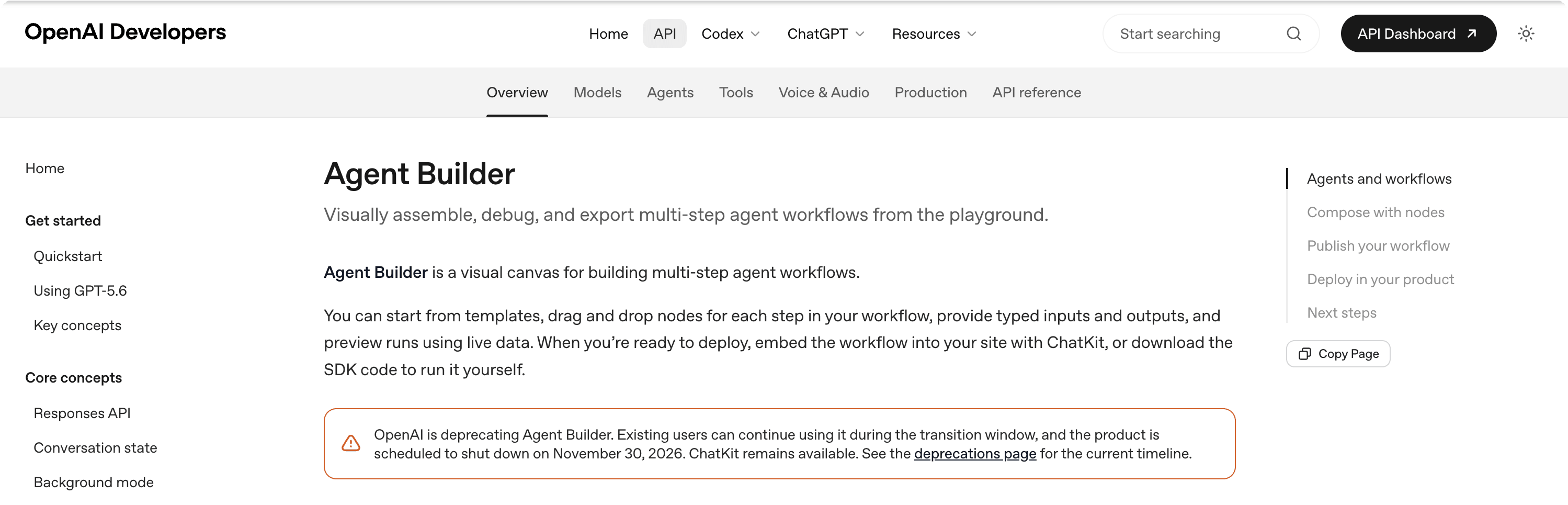
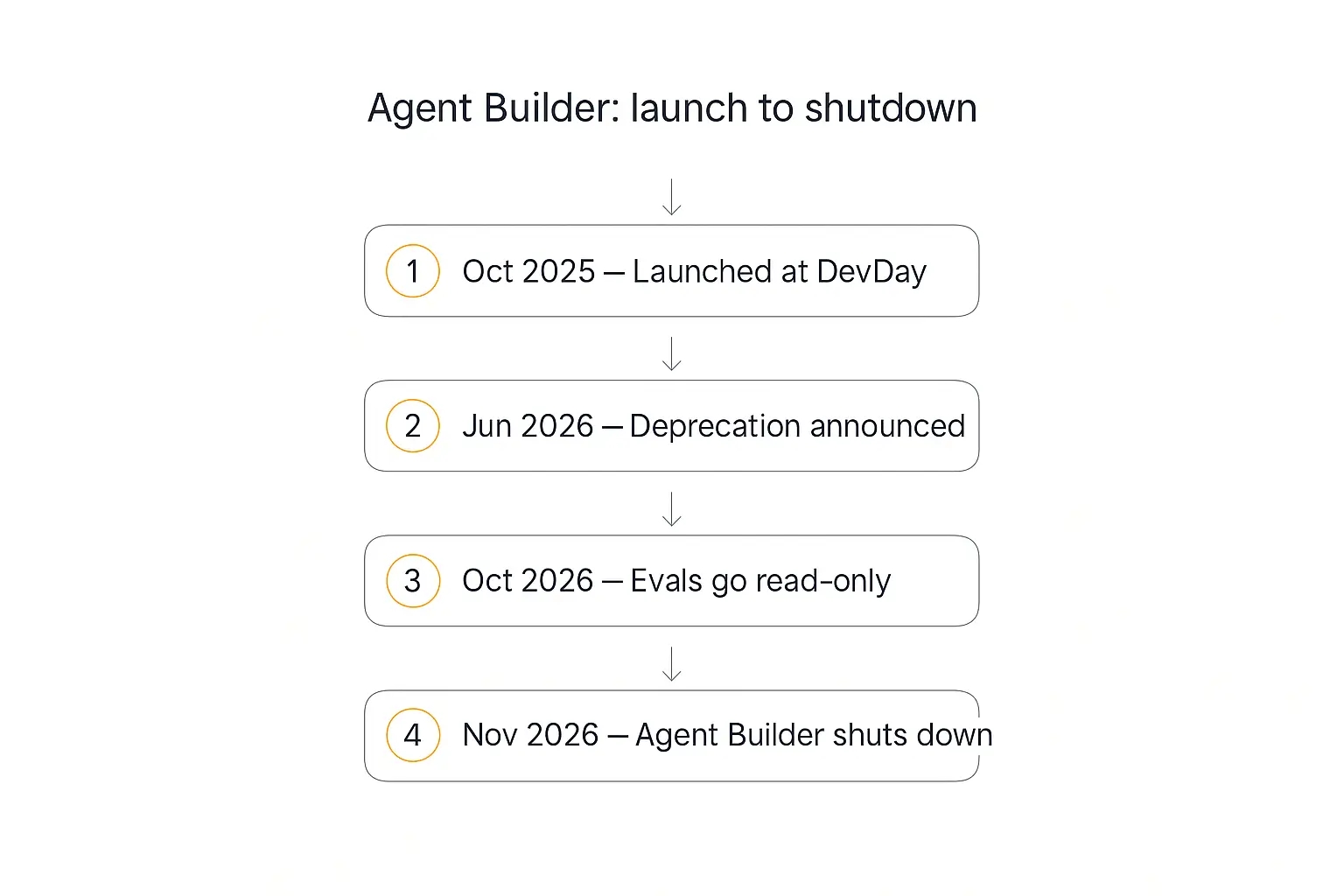
The product launched at DevDay in October 2025. The deprecation notice went up on June 3, 2026. That's roughly eight months from launch to death notice — for a tool OpenAI positioned as the way to build agent workflows without writing code.
I want to be straight with you about what this guide is. I work on Pickaxe, which is one of the places you could move to. So I have an interest here.
What I'm going to do is lay out exactly what was announced, what you actually lose, and every realistic option — including the ones that aren't us and the cases where they're the better call. Then I'll make the case for why Pickaxe fits most Agent Builder refugees, and give you a migration playbook you can run this week.
The OpenAI Agent Builder deprecation is annoying. It's also a decent moment to ask a question worth asking anyway: should the thing your business runs on live inside someone else's product roadmap?
What OpenAI actually announced
On June 3, 2026, OpenAI posted three deprecations at once. Agent Builder was one of them.
Here's the entry straight from OpenAI's deprecations page:
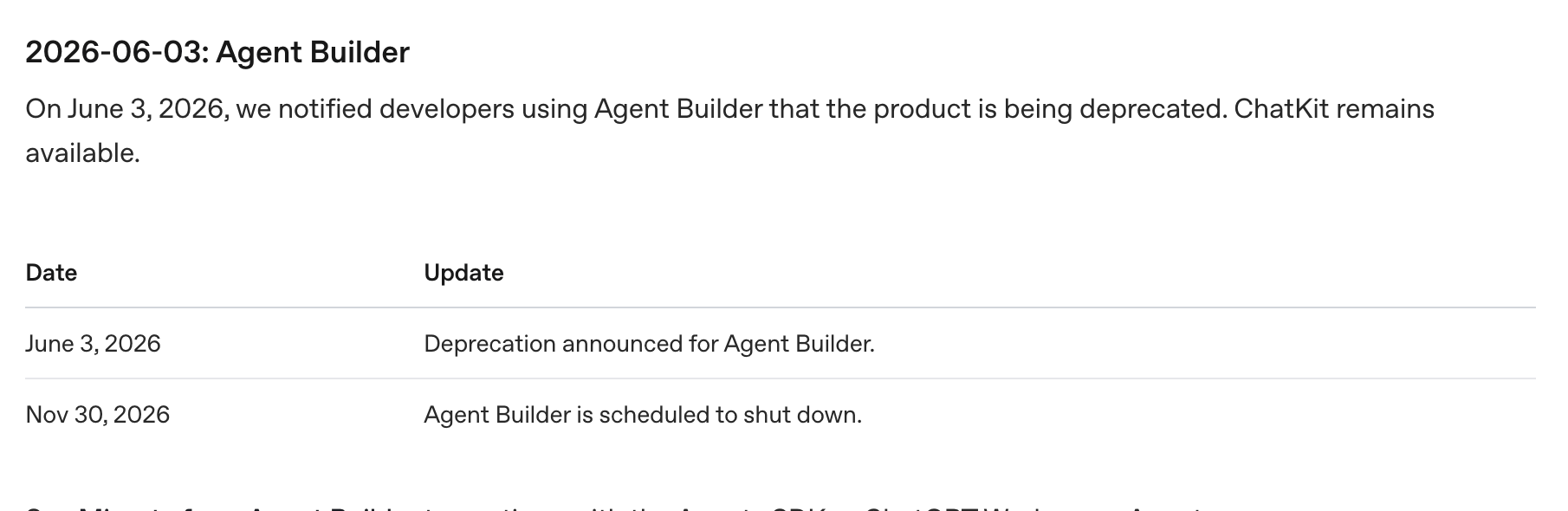
The full set of dates, for all three deprecated products:
| Date | What happens |
|---|---|
| June 3, 2026 | Deprecation announced for Agent Builder, the Evals platform, and reusable prompts (v1/prompts) |
| October 31, 2026 | Existing evals become read-only |
| November 30, 2026 | Agent Builder shuts down. The Evals dashboard and API shut down. Reusable prompt objects shut down. |
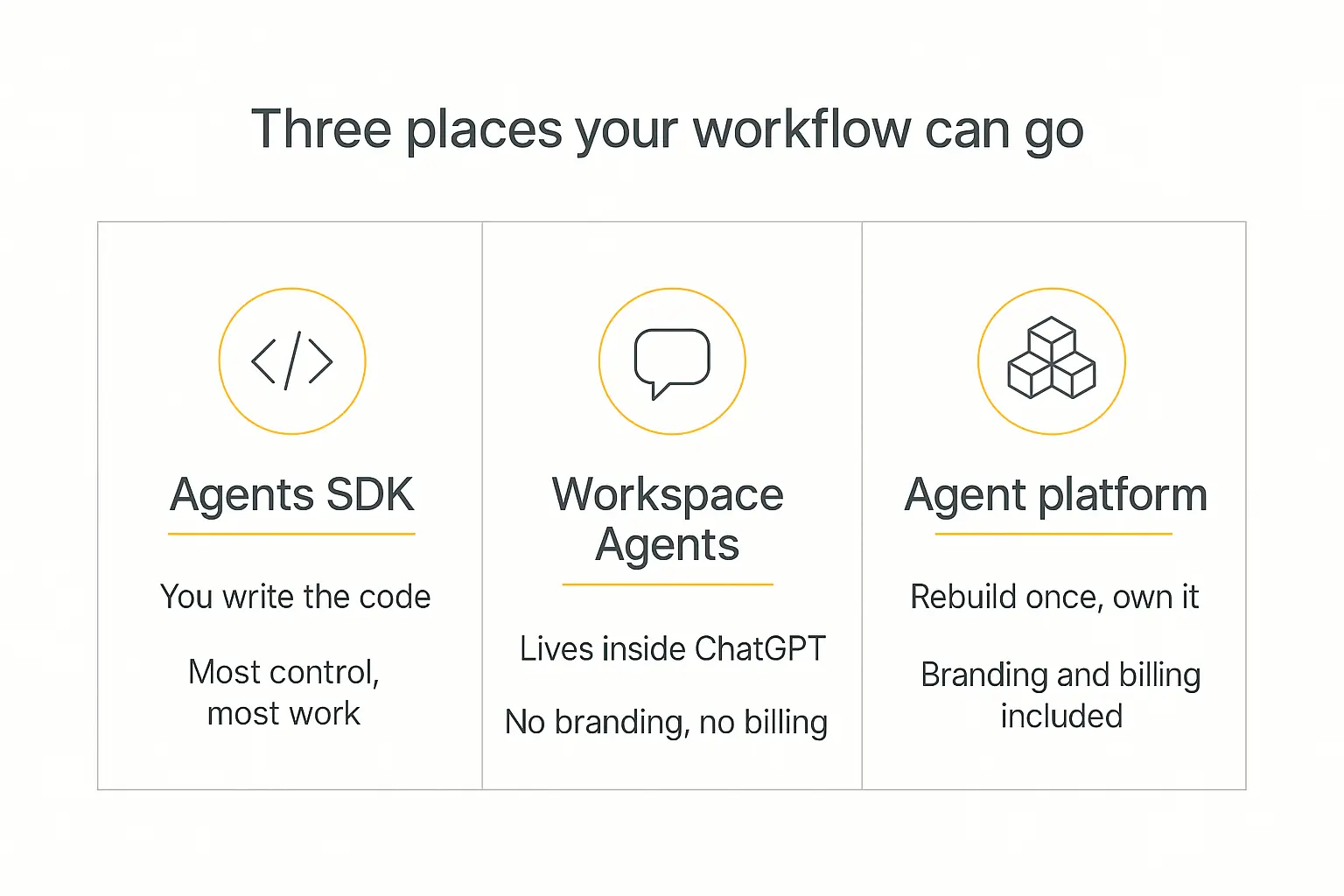
OpenAI's stated migration path is short: the Agents SDK, or Workspace Agents in ChatGPT. That's it. There is no "we're replacing it with a better visual builder" in the announcement.
Security researcher Johann Rehberger summed the whole thing up on X with a wave emoji and the two migration options — the post is about as long as the sympathy OpenAI extended.
What is NOT going away
This part matters, and a lot of the panicky coverage got it wrong.
- The Responses API is fine. Not deprecated. The underlying way you call models is unaffected.
- ChatKit is fine. The embeddable chat UI toolkit survives. What dies is the convenient setup where ChatKit talked to an OpenAI-hosted backend that was your Agent Builder workflow.
- The Agents SDK is fine. It's the thing OpenAI is pushing you toward.
- Fine-tuning timelines are unchanged. Those live in a separate section and weren't touched.
So this isn't OpenAI exiting agents. It's OpenAI exiting the no-code visual layer for agents and telling everyone to write code instead.
Which, if you picked Agent Builder because you didn't want to write code, is precisely the problem.
What Agent Builder actually did (and why people liked it)
Worth spending a paragraph on, because understanding what you're replacing makes the choice easier — and because a lot of teams adopted it without ever articulating what job it was doing.
Agent Builder was a visual canvas for multi-step agent workflows. OpenAI's own description: visually assemble, debug, and export multi-step agent workflows from the playground.
In practice that meant four things.
Nodes on a canvas. You dragged in steps — an agent node with its own instructions and model, a file-search node hitting a vector store, tool and MCP nodes for external calls, guardrail nodes, and control-flow nodes for branching and looping. Edges carried typed inputs and outputs between them.
Preview with live data. You could run the graph and watch real values move through it, which is genuinely the best part of visual builders and the thing people will miss most.
Publishing and versioning. Workflows auto-saved while you worked, and publishing created a major version — a snapshot you could pin to in API calls. Real version discipline, which most no-code tools skip.
Two deployment routes. The recommended one: embed ChatKit in your site and let OpenAI host the workflow behind it. The advanced one: export SDK code and run it yourself.
That first route is why so many people picked it. You got a working chat interface on your website backed by a multi-step agent, without deploying a single server.
It's also exactly the combination that stops working on November 30 — ChatKit survives, the hosted backend doesn't.
What you actually lose on November 30
Let's be concrete, because "the product shuts down" hides a few different losses.
The canvas. The drag-and-drop workflow builder — nodes, typed inputs and outputs, live preview runs — disappears. Whatever logic you assembled visually stops being editable in that form.
The hosted backend. This is the big one and the one people underestimate. OpenAI's recommended integration was: embed ChatKit on your site, let OpenAI host the workflow behind it. That hosted half goes away. ChatKit still exists, but now you have to run the backend it talks to.
Your published versions. Workflows were objects with IDs and versioning. Those objects go with the product.
Your export window. You can export a workflow to Agents SDK code — but only while the dashboard is up. Miss the window and you're rebuilding from memory and screenshots.
That last point is why the first action item in this guide isn't "choose a platform." It's "go export everything today."
Step zero: export your workflows this week
Do this before you read the rest of this article. Seriously.
- Open each workflow in Agent Builder.
- Click Code in the top navigation.
- Choose Agents SDK, then pick TypeScript or Python.
- Copy the generated code into a repo, or at minimum a folder in your Drive.
- Screenshot the canvas itself. The generated code captures the logic; the picture captures your intent, which is what you'll actually want when rebuilding.
- Write down every credential and connector the workflow relied on. Those don't come along in an export.
Even if you have no intention of ever running Agents SDK code, the export is your spec. It's a written record of the branching, the prompts, and the tool calls you spent weeks tuning.
You cannot get it back on December 1.
Rebuild it somewhere that won't sunset in eight months
Pickaxe gives you the agent, the branded portal, and the billing — all in one place.
Why OpenAI did this (and why it'll happen again)
The official reasoning is consolidation. OpenAI would rather maintain one code-first path (Agents SDK) and one consumer-facing path (Workspace Agents in ChatGPT) than a third hosted visual product sitting between them.
From a platform-strategy view, that's defensible. Maintaining a visual builder is expensive, and it competed with their own SDK.
But look at the pattern rather than this one decision.
ChatGPT plugins came and went. Custom GPTs launched with a revenue-share promise and a store, and we wrote about their sunset earlier this year. Now Agent Builder, eight months after a keynote launch.
The lesson isn't "OpenAI is bad." Their models are excellent and most agent platforms — including ours — call them.
The lesson is narrower and more useful: a model company's application-layer products are marketing for the model, not durable infrastructure. They exist to show what's possible and get developers onto the API. When they stop serving that purpose, they get cut.
The developer thread under the deprecation notice is worth reading if you want the mood. One commenter noted that shipping a tool and killing it within six months isn't a sound business strategy — several asked OpenAI to open-source it so existing projects could survive. You can read the whole thing on the OpenAI developer forum.
If your client's lead-qualification agent runs on a model company's demo product, you inherited that risk. The fix isn't avoiding OpenAI. It's putting the durable part of your stack somewhere whose business model is the platform itself.
Your options, honestly compared
There are five realistic destinations. Here's the summary, then the detail.
| Option | Best for | You give up | Effort |
|---|---|---|---|
| OpenAI Agents SDK | Teams with engineers who want total control | The no-code layer; you now own hosting, auth, UI, billing | High |
| ChatGPT Workspace Agents | Internal team automations for ChatGPT users | Your branding, your domain, external users, monetization | Low |
| Pickaxe | Client-facing agents you want to brand, control, and charge for | Node-level visual canvas; you configure instead of drawing | Low–medium |
| n8n / Zapier / Make | Workflows that are mostly integrations with some AI | Purpose-built agent UX; end-user-facing polish | Medium |
| LangGraph / code frameworks | Complex, stateful, engineer-owned systems | Everything no-code; maximum maintenance | Highest |
Option 1 — The OpenAI Agents SDK
OpenAI's primary recommendation, and the natural home for your exported code.
Good: total control, no vendor visual layer to be deprecated out from under you, and the SDK docs are solid. If you have engineers, this is a legitimate answer.
Bad: it hands you a pile of responsibilities Agent Builder was absorbing. You now host the backend, build the UI (or self-host ChatKit via its Python SDK), handle auth, handle user management, handle billing, and keep it all running.
Developers in that forum thread are already deploying FastAPI servers to Lambda and Cloudflare Workers and comparing cold-start times. That's the actual cost of this path — it's infrastructure work.
Choose it if: you have engineering capacity and the workflow is genuinely bespoke. Skip it if: you chose a visual builder because you don't write code. Nothing about that changed.
Option 2 — ChatGPT Workspace Agents
OpenAI's other recommendation: build agents in natural language that live inside ChatGPT for your workspace.
Good: genuinely easy, no infrastructure, and fine for internal automation if your team already lives in ChatGPT.
Bad: it's the wrong shape for anything client-facing. Your users need ChatGPT accounts in your workspace. There's no branding, no custom domain, no access tiers, no charging anyone. You cannot hand this to a client as a product.
Choose it if: the workflow was always an internal tool. Skip it if: external people use it, or you want to sell it.
Option 3 — Pickaxe
The case for us, in one line: Agent Builder gave you the workflow but never gave you the product around it. Pickaxe gives you both.
I'll spend a full section on this below, because it's where most Agent Builder users land and it deserves more than a bullet.
Option 4 — n8n, Zapier, or Make
If your workflow was 80% "move data between six apps" and 20% "ask a model something," an automation platform is the honest recommendation.
n8n in particular is a good visual-canvas replacement — it's the closest thing to Agent Builder's node-graph feel, self-hostable, and its branching primitives are mature. We've written about n8n alternatives if you want that landscape.
Bad: these are automation tools with AI bolted on, not agent platforms. There's no good story for end users who need accounts, no branded interface to hand a client, and no billing.
Choose it if: the AI is a step in a pipeline. Skip it if: the agent is the product.
Option 5 — LangGraph and code frameworks
LangGraph and friends give you explicit state machines, durable execution, and total flexibility.
Same trade as the Agents SDK, more so. Great for engineering teams building complex stateful systems. Wrong for anyone who wanted a builder. Our AI agent tech stack guide covers where these fit.
The others worth knowing
For completeness, since a fair comparison means naming names: Voiceflow and Botpress are strong if your agent is conversational-first and you want fine-grained dialogue design. Gumloop leans into visual automation with early MCP support. Lindy and Relevance AI target internal ops assistants.
All are reasonable tools. None of them are built primarily around selling the agent to end users, which is the gap that matters most for agencies and consultants. Our roundup of no-code AI agent builders goes deeper on each.
Why Pickaxe fits most Agent Builder refugees
Here's the honest framing. Agent Builder was a workflow tool. Pickaxe is a product platform that happens to include the workflow tool.
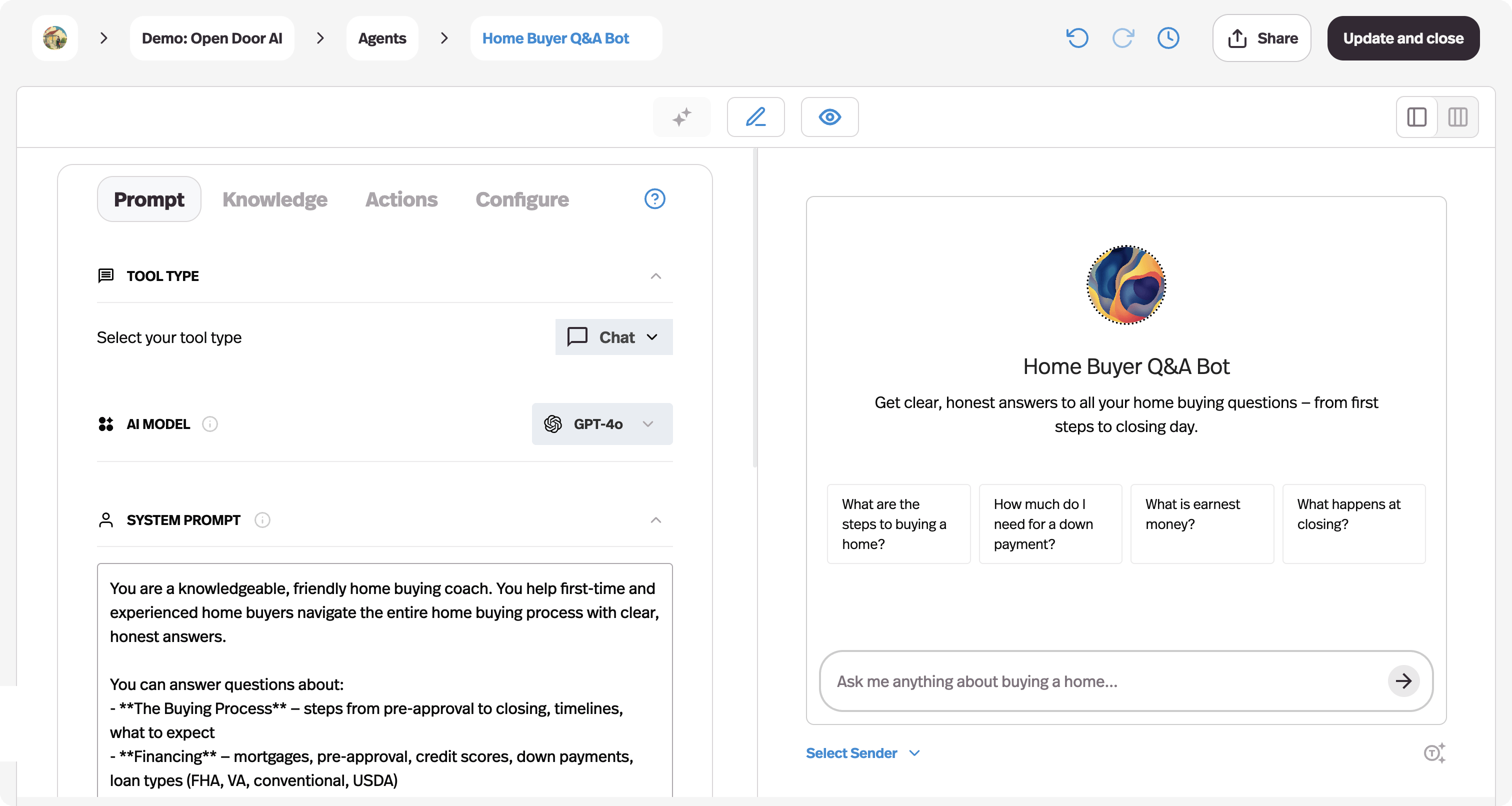
If you were using Agent Builder to prototype something internal, the Agents SDK is a fine landing spot. If you were using it to build something people other than you would touch — clients, customers, students, members — you were always missing four things Agent Builder never had.
1. A place for your users to actually go
Agent Builder gave you a workflow ID and an embed. Everything else — the page, the login, the navigation, the branding — was your problem.
Pickaxe's primary deployment is a Portal: a branded hub holding one or many agents, with folders, search, and a custom domain. Your client sees their brand, not ours and not OpenAI's.
2. Access control that isn't "everyone with the link"
Access groups let you gate agents to members, run free public tiers, or mix both. Pair that with Offers to sell one-off access to a specific agent or folder.
Agent Builder had no concept of your end users at all.
3. Billing that already works
Connect Stripe and charge subscriptions (daily through yearly), pay-per-usage via credits or uses, one-time payments, or a mix. This is the part teams underestimate — it's typically weeks of work on the Agents SDK path, and it's a toggle here.
If pricing is the open question, how to price AI services and monetizing AI agents are the two guides I'd read.
4. Deployment beyond a web embed
The same agent can go out as a portal, a standalone page, a direct link, a website embed, an email bot, a WhatsApp bot, a Slack bot, or through the API — with monetization and access rules applying across all of them. Our guide on deploying an agent to web, WhatsApp, and Slack covers the mechanics.
What maps to what
If you're holding an exported workflow and wondering where each piece goes:
| In Agent Builder | In Pickaxe |
|---|---|
| Agent node / instructions | Role Prompt in the Editor's Prompt tab |
| File search / vector store | Knowledge Base — docs, URLs, Notion, Drive, with daily auto-refresh |
| Tool and MCP nodes | Actions — API calls, app integrations, or chaining to another agent |
| If/else and routing nodes | A waterfall setup: a router agent that hands off to specialised sub-agents |
| Guardrail nodes | Prompt-level boundaries plus Model Reminder |
| Model selection per node | Per-agent model choice, switchable anytime (see pickaxe.co/models) |
| ChatKit embed | Portal, page, direct link, or embed widget |
| (nothing) | Access groups, Stripe billing, usage tracking, custom domain |
Where Pickaxe is genuinely worse
I said I'd be straight, so: you don't get a node-graph canvas. If what you loved about Agent Builder was drawing the graph and watching data flow through typed edges, Pickaxe will feel different. You configure an agent and chain agents together rather than wiring a diagram.
For most workflows that's a wash or an improvement — fewer boxes, less to maintain. For a genuinely intricate 20-node graph with fan-out and merge steps, a code framework or n8n will represent it more faithfully.
Also worth saying: the recommendation is to keep an agent to about four actions. Beyond that you split into sub-agents. That's a real constraint, and it's there because agents get unreliable at picking between many tools — but it is a constraint.
Move one workflow first and see how it feels
Most Agent Builder workflows rebuild in an afternoon, not a sprint.
The migration playbook
Eight steps. You can do a single workflow in an afternoon once you've done one.
Step 1 — Inventory what you have
List every workflow, who uses it, whether it's client-facing, and what breaks if it stops on December 1. Sort by that last column.
Most people discover two or three matter and the rest were experiments.
Step 2 — Export everything (see step zero)
Code export plus canvas screenshots plus a credential list. Done for every workflow, not just the important ones — it costs ten minutes each and the window closes permanently.
Step 3 — Separate logic from plumbing
Go through the export and mark each node: is this reasoning (a prompt, a judgment, a classification) or plumbing (a lookup, a format conversion, an API call)?
Reasoning becomes agent instructions. Plumbing becomes Actions. This split does most of the migration work for you. The same translation is mapped screen by screen in our guide to rebuilding a Custom GPT on Pickaxe.
Step 4 — Rebuild the main agent
Create the agent, paste your role prompt in, choose a model. Start with the same model you were on so you're changing one variable at a time.
Our guide to prompt engineering for agents is useful here — exported prompts often carry Agent Builder-specific scaffolding you can delete.
Step 5 — Reattach knowledge
Whatever was in a vector store goes into the Knowledge Base. Upload the documents, add the URLs, connect Notion or Drive if that's where the source of truth lives.
Do this before testing. A knowledge-less agent will look broken and you'll waste an hour debugging the prompt. Adding a knowledge base walks through the details.
Step 6 — Rebuild the branches as a waterfall
This is the step people overthink. Your if/else nodes become a router: one agent whose job is to classify the request and hand off to the right specialist agent.
Keep the classifier's output to a fixed short list. Give it a default path for anything unmatched. If you had nested conditions, flatten them — most nesting in visual builders is an artifact of the canvas, not the logic.
Step 7 — Wire the Actions
Reconnect the integrations. Credentials do not transfer; you'll re-authenticate each one. Connecting an agent to Sheets, Slack, and other apps covers the common ones, and MCP servers connect too if you were using those — see our MCP explainer.
Step 8 — Test against real inputs, then deploy
Run your twenty gnarliest real inputs through it and compare against what the old workflow did. Testing and debugging an agent has a proper method.
Then build the portal, set access rules, connect Stripe if you're charging, and point your domain at it.
A worked migration: the support triage workflow
Abstract steps are easy to agree with and hard to act on. Here's a concrete one — the single most common shape I've seen built on Agent Builder.
The original graph had seven nodes: a start node taking the customer's message; a file-search node pulling from a help-docs vector store; a classifier agent node labelling the message as billing, technical, or general; an if/else node branching on that label; three agent nodes, one per category, each with its own instructions; and a guardrail node checking the draft before it went out.
Here's how that lands on the other side.
The vector store becomes a Knowledge Base
Upload the same help docs, or point at the docs site URL and let it refresh daily. This is usually less work than the original setup, because you're not managing chunking yourself.
One gotcha: if your vector store was populated from files you no longer have locally, retrieve them before you delete anything on the OpenAI side.
The classifier node becomes a router agent
Create one agent whose entire job is classification. Its instructions say: read the message, return exactly one of billing, technical, general, or unsure.
Give it a cheap fast model. This step doesn't need frontier reasoning, and routing every ticket through an expensive model is where budgets quietly disappear — see AI model routing for the full argument.
The if/else node becomes Actions that chain to sub-agents
This is the conceptual jump. Instead of an if/else box with three edges, the router agent has actions that hand off to three specialist agents.
The routing logic lives in the router's instructions and its action trigger prompts rather than in a diagram. Be explicit — spell out when each handoff fires, and what to do when none of them match.
The three category agents become three agents
Straight port. Paste each set of instructions into its own agent, attach the relevant knowledge, pick a model per agent. Only the billing agent needs the billing docs; scoping knowledge per agent usually improves answers versus the single shared store you had before.
The guardrail node becomes prompt boundaries plus a review step
Explicit rules in the role prompt ("never quote pricing, never promise a timeline, escalate anything mentioning a refund over $500"), reinforced by a Model Reminder so they're re-asserted on every message rather than fading as the conversation grows.
For anything customer-visible and irreversible, add a human approval step instead of trusting the guardrail alone — human-in-the-loop agents covers where to put those gates.
What you add that didn't exist before
Now the part Agent Builder had no answer for. Put the four agents in a portal on support.yourcompany.com. Gate it to logged-in customers with an access group. Turn on usage tracking so you can see which category actually dominates.
Total time for a graph this size, once you know the tool: an afternoon. The classifier retuning takes longer than everything else combined, because it's the step most sensitive to its surroundings.
What the migration actually costs
Nobody puts numbers on this, so here's an honest estimate rather than a comfortable one.
If you go to the Agents SDK: the logic port is nearly free — your export is already SDK code. The cost is everything around it. Hosting the backend, building or self-hosting a UI, user accounts, and billing if you charge. For a team with engineers, plan a couple of weeks for a production-quality deployment of a workflow that previously needed zero infrastructure. For a team without engineers, this is not a two-week project; it's a hiring decision.
If you go to a platform: a day for your first workflow, a few hours each after that. The recurring cost is a subscription instead of infrastructure. The thing you're really buying is not having to maintain any of the above.
Either way, budget for retuning. Prompts written against one system's scaffolding rarely behave identically on another. Assume a round of testing per workflow, and assume the classification steps need the most attention.
The cost of waiting is the one to watch. In November, every agency and every team that built on Agent Builder will be doing this at once, and your own deadline will collide with client work you can't move. Nothing about migrating gets easier closer to the date.
If you're an agency with client workflows on this
Special case, because the stakes are different and there's a communication problem attached.
Tell your clients before they read about it. This is one of those rare moments where a vendor's bad news is your opportunity to look like the professional in the room. A short note — "OpenAI is retiring the tool underneath your assistant, here's my migration plan, no action needed from you" — is worth a great deal of trust.
Migrate the revenue-generating ones first. Obvious, frequently ignored.
Rebuild under your own brand this time. If the client was looking at an OpenAI-hosted interface, that was free advertising for OpenAI. A white-labeled portal on your domain is strictly better positioning — white-label AI tools for agencies covers the setup.
Consider repricing. You're doing real work here. Migration is a legitimate billable project, and it's also the natural moment to move a one-off build onto a retainer. The agency playbook and selling agents to local businesses both cover that conversation.
What about Evals and reusable prompts?
Two smaller deprecations landed the same day, and if you used them the deadlines are just as real.
Evals go read-only on October 31, 2026, then the dashboard and API shut down November 30. OpenAI points to Promptfoo as the migration path. Export your eval datasets before October 31 — read-only means you can still read them, but don't leave it to the last week.
Reusable prompts (v1/prompts and prompt objects) shut down November 30. The guidance is to move prompt content into your application code. If you're moving to a platform, prompts live with the agent anyway, so this resolves itself.
How to not get burned by the next one
Whatever you pick, pick it with these questions answered. This is the actual takeaway, and it applies to us too — hold Pickaxe to it.
Can you export your work? Prompts, knowledge sources, and configuration should be retrievable in a usable form. If the only export is a screenshot, that's a warning.
Is this the company's product or their marketing? A platform whose revenue is the platform has a reason to keep it alive. A free tool from a company that sells something else is a demo with a lifespan.
Do you own the user relationship? If your users have accounts with the vendor rather than with you, you're renting your customer list.
Whose domain is it on? Custom domains aren't vanity. They're the difference between moving a DNS record and asking every user to learn a new URL.
Is the model swappable? If your agent is welded to one provider's model, you inherit every one of that provider's decisions. Being able to switch models — and mix providers — is real insurance.
How old is the product? Agent Builder was eight months old. That's not a reason never to adopt new things, but it is a reason not to bet a client deliverable on one without an exit plan.
If you're weighing this properly, build vs buy vs wait is the framework I'd use.
Frequently asked questions
When exactly does OpenAI's Agent Builder shut down?
November 30, 2026. The deprecation was announced June 3, 2026, and existing users can keep using it during the transition window until the shutdown date.
Is all of AgentKit being deprecated?
No. Agent Builder is. ChatKit remains available, the Responses API is unaffected, and the Agents SDK is OpenAI's recommended path forward. The Evals platform and reusable prompts were deprecated separately on the same day.
Can I export my Agent Builder workflows?
Yes — open the workflow, click Code in the top navigation, choose Agents SDK, and pick TypeScript or Python. Do it while the dashboard is still up; exports aren't available after shutdown.
What's the closest replacement to the visual canvas?
For pure node-graph feel, n8n. For agents that need users, branding, and billing around them, an agent platform like Pickaxe is a better fit even though it isn't a canvas. For maximum control, the Agents SDK.
Will my prompts still work?
Mostly. Role prompts transfer with light editing — delete Agent Builder-specific scaffolding and any references to node names. Expect to retune classification steps, since those are the most sensitive to surrounding context.
Do I have to move to something no-code?
No. If you have engineers and the workflow is genuinely bespoke, the Agents SDK is a legitimate destination and your export is already in that format. The question is whether you want to own hosting, auth, UI, and billing.
How long does migrating one workflow take?
Plan a day for your first one — most of that is learning a new tool, not rebuilding. Subsequent workflows tend to take a couple of hours. Reconnecting credentials and testing usually takes longer than rebuilding the logic.
What to do this week
You have about sixteen weeks. That's comfortable if you start now and unpleasant if you start in November.
This week: export every workflow and screenshot every canvas. Non-negotiable, and it takes an hour.
Next week: pick your destination using the comparison above. Be honest about whether the thing is internal or client-facing — that single question decides most of it.
The week after: migrate one workflow end to end. Not the most important one — the second most important one. Learn the tool on something that matters but won't ruin your month.
Then: batch the rest, and tell your clients before OpenAI's shutdown notice does.
The uncomfortable truth in all this is that Agent Builder was never really yours. You were building in someone's showroom, and they redecorated.
Wherever you land, land somewhere you can export from, brand as your own, and charge on. If that's Pickaxe, we'd be glad to have you — and if it's the Agents SDK because you've got engineers and a bespoke problem, that's a good answer too.
Just don't let November 30 arrive with the export button still unclicked.