
n8n has been on a tear. A $180 million Series C in late 2025 valued the company at $2.5 billion. Over 183,000 GitHub stars. Roughly 230,000 active users building workflows across startups and enterprises alike. For a self-hostable, open-source automation platform, those are staggering numbers.
But here's the thing — n8n isn't perfect for everyone. And as someone who's spent a lot of time in this space, I've watched the landscape around it shift dramatically.
n8n recently discontinued its permanent free cloud plan, which pushed a lot of casual users to reconsider. Self-hosting is technically free, but the real cost — servers, maintenance, updates, debugging at 2 a.m. — runs $200 to $500 per month once you factor in time and infrastructure. n8n Cloud starts at $24/month for the Starter tier, which is reasonable, but the integration library (400+ connectors) is still a fraction of what some competitors offer. And the learning curve? Not trivial if you're coming from a no-code background.
The workflow automation market is worth roughly $26 to $30 billion in 2026, growing at 10-16% annually. n8n holds about 7.19% market share — meaningful, but far from dominant. Meanwhile, Gartner predicts 75% of enterprise software engineers will use AI assistants by 2028, and low-code/no-code adoption is accelerating across the board. That leaves a lot of room for alternatives that do things differently. Some are simpler. Some are cheaper. Some are better suited for AI-native workflows. And a few aren't really about automation at all — they're about building and selling AI agents, which is a different game entirely.
I looked into 15 platforms that people commonly compare to n8n. Here's what I found.
Quick Comparison: Top n8n Alternatives at a Glance
Before we dive into each one, here's the summary table for skimmers.
| Platform | Best For | Starting Price | Open Source? | AI Features |
|---|---|---|---|---|
| Zapier | No-code teams, largest app ecosystem | Free / $29.99/mo | No | AI Copilot, AI Agents, MCP |
| Make | Visual workflow building | Free / $10.59/mo | No | AI modules, AI agents |
| Activepieces | Open-source alternative | Free / $25/mo | Yes | MCP support, AI pieces |
| Pipedream | Developer-first workflows | Free / $29/mo | Partial | Code-level AI, serverless |
| Pabbly Connect | Budget-friendly automation | $14/mo | No | Limited |
| Power Automate | Microsoft ecosystem | Free / $15/mo | No | AI Builder, Copilot, RPA |
| Workato | Enterprise iPaaS | Custom (enterprise) | No | Agentic orchestration |
| Tray.ai | Enterprise data transforms | Custom pricing | No | Merlin AI, API management |
| IFTTT | Simple personal automation | Free / $3.99/mo | No | AI filtering |
| Relay.app | Human-in-the-loop workflows | Free / $27/mo | No | AI steps, approval flows |
| Gumloop | AI-native automation | Free / $37/mo | No | Agent building, AI-first |
| Lindy | Non-technical AI agent users | Free / $49.99/mo | No | Full AI agent platform |
| Node-RED | IoT and edge computing | Free (self-hosted) | Yes | Community AI nodes |
| Apache Airflow | Data pipeline orchestration | Free (self-hosted) | Yes | ML pipeline integration |
| Pickaxe | Building & monetizing AI agents | Free / $19/mo | No | Full agent builder, OpenClaw |
Now let's break each one down.
1. Zapier — Most Popular No-Code Automation
Zapier is the gorilla in the room. If you've ever connected two apps without writing code, there's a good chance Zapier was involved. With over 8,000 integrations, nothing else comes close in sheer breadth of app connections.
What stood out to me is how aggressively they've leaned into AI in 2026. Zapier now has an AI Copilot that builds Zaps from plain English, plus standalone AI Agents and chatbots that can hold multi-turn conversations while triggering automations in the background. They've also added MCP support, which means your AI tools can tap into Zapier's entire app ecosystem programmatically.
The biggest drawback is price. At scale, Zapier is 4 to 15 times more expensive than Make for equivalent workloads. The task-based pricing model adds up fast when you're running high-volume workflows. And the AI Agents come with separate pricing on top of your regular Zap subscription, which can feel like you're paying twice.
What stood out: The unmatched integration library and the fact that you can go from idea to working automation in under 15 minutes. The AI Copilot is genuinely useful for building simple Zaps.
Watch out for: Pricing that compounds quickly. A workflow running 10,000 tasks per month will cost dramatically more on Zapier than on nearly any other platform on this list. Complex multi-step logic also feels clunky compared to visual builders.
Pricing: Free (100 tasks/month), Professional ($29.99/mo for 750 tasks), Team ($103.50/mo), Enterprise (custom).
Best for: Non-technical teams that need the broadest app coverage and are willing to pay for convenience. If time-to-first-automation matters more than cost-per-automation, Zapier wins.
2. Make (formerly Integromat) — Best Visual Workflow Builder
Make is the platform I keep coming back to when I need to build something with branching logic, error handling, and conditional paths. The visual canvas builder is genuinely a pleasure to use — you can see your entire workflow as a connected graph, which makes debugging dramatically easier than linear workflow editors.
Make was formerly known as Integromat, and the rebrand came with a serious upgrade in AI capabilities. You can now build AI agents directly inside Make that act as autonomous collaborators within your workflows. The native AI modules let you plug LLMs into any scenario without custom code.
The pricing model is operation-based rather than task-based, and the difference matters. A single Zapier "task" might equal multiple Make "operations," but even accounting for that, Make almost always comes out cheaper at scale. The free tier gives you 1,000 operations per month, which is enough to actually test meaningful workflows.
What stood out: The visual builder is best-in-class for complex workflows. Conditional branching, error routes, and iterators are intuitive. The price-to-power ratio is excellent — this is where most n8n users land when they want a cloud-hosted alternative. The harder question is where the branches belong in the first place — we cover that in chains, branching, and conditional logic.
Watch out for: The operation-based pricing can be confusing at first. Some integrations consume more operations than you'd expect. The AI agent features, while growing, aren't as mature as Zapier's yet.
Pricing: Free (1,000 ops/month), Core ($10.59/mo for 10,000 ops), Pro ($18.82/mo), Teams ($34.12/mo), Enterprise (custom).
Best for: Teams that need visual, complex workflows at a reasonable price. If you're coming from n8n because you liked the visual node editor but want managed hosting, Make is the most natural transition.
3. Activepieces — Best Open-Source Alternative
Activepieces is the closest thing to a direct n8n replacement if you value open source. It's MIT-licensed (not n8n's more restrictive "sustainable use" license), which means you can self-host it, modify it, and even build commercial products on top of it without worrying about license complications.

What really caught my attention is the MCP (Model Context Protocol) support. Activepieces was one of the first automation platforms to integrate MCP, which means your AI models can use Activepieces as a tool provider — they can trigger automations, query data, and execute actions through a standardized protocol. If you're interested in how MCP is reshaping integrations, I wrote a deeper comparison in MCP vs A2A Protocol.
The integration library has grown to 400+ pieces, which is comparable to n8n. The visual builder is clean and intuitive — less intimidating than n8n's for newcomers. And the cloud offering starts at $25/month, which undercuts n8n Cloud slightly while requiring zero DevOps on your end.
What stood out: True MIT open-source license with no usage restrictions. MCP support is a differentiator for AI-native workflows. The community is active and the piece library is growing fast.
Watch out for: Smaller community than n8n (though growing). Some enterprise connectors are still missing. Self-hosted documentation could be more comprehensive.
Pricing: Free (self-hosted, unlimited), Cloud Platform ($25/mo), Cloud Pro ($115/mo), Enterprise (custom).
Best for: Teams that want a truly open-source automation platform with modern AI features. If n8n's license model concerns you, Activepieces is the answer.
4. Pipedream — Developer-First With Code Steps
Pipedream is what happens when you build an automation platform for people who actually want to write code. Every workflow step can include custom Node.js, Python, Go, or Bash, and it all runs on a serverless runtime so you never think about infrastructure.

This is the n8n alternative I'd recommend to developers who find n8n's UI frustrating but still want a visual framework for orchestration. Pipedream gives you the best of both worlds — a visual workflow builder for the high-level flow, with full code access in every step for the granular logic.
The free tier is genuinely generous. You get 10,000 invocations per month with no time limit on execution. That's enough to build and run production-grade workflows for small projects. And the platform's event-driven architecture means you can react to webhooks, cron schedules, or API events without polling.
What stood out: The ability to write arbitrary code inside visual workflows is unmatched. The serverless runtime means no infrastructure management. The free tier is generous enough for real work.
Watch out for: Less useful if you don't code. The no-code pieces are more limited than Zapier or Make. Documentation can be spotty for edge cases.
Pricing: Free (10,000 invocations/month), Basic ($29/mo), Advanced ($79/mo), Business ($199/mo), Enterprise (custom).
Best for: Developers who want code-level control within a workflow framework. If you're using n8n's Function nodes constantly, Pipedream is built for you.
5. Pabbly Connect — Most Budget-Friendly
Pabbly Connect is the anti-Zapier. While most automation platforms nickel-and-dime you with per-task pricing, Pabbly offers flat-rate plans with unlimited workflows. You pay for the number of tasks, but the workflows themselves are unlimited — no extra charge for multi-step automations, internal tasks, or premium app connections.
I'll be honest — Pabbly doesn't have the polish of Zapier or Make. The interface feels a generation behind, and the integration library is smaller. But for straightforward automations where you need to keep costs predictable, the pricing model is hard to argue with.
The lifetime deal option is particularly interesting if you're running a small business or agency and want to lock in automation costs permanently. Pabbly also bundles other tools (email marketing, forms, billing) into a single suite, which can save even more if you're using multiple services.
What stood out: Flat-rate pricing eliminates the anxiety of "will this workflow cost me a fortune this month?" No hidden fees for premium connectors or multi-step workflows.
Watch out for: The UI is dated. Fewer integrations than the big names. AI features are limited compared to Zapier, Make, or n8n. Not ideal for complex conditional logic.
Pricing: Standard ($14/mo for 12,000 tasks), Pro ($29/mo for 24,000 tasks), Ultimate ($59/mo for 50,000 tasks). Lifetime deals sometimes available.
Best for: Small businesses and freelancers who need reliable, predictable automation costs without surprises. If budget matters more than bells and whistles, Pabbly delivers.
6. Microsoft Power Automate — Best for the Microsoft Ecosystem
Power Automate is Microsoft's answer to workflow automation, and it has one massive advantage: deep integration with the entire Microsoft 365 stack. If your company lives in Teams, SharePoint, Outlook, Excel, and Dynamics 365, Power Automate connects to all of it with native, first-party connectors that just work.

What sets Power Automate apart from pure cloud automation tools is its RPA (Robotic Process Automation) capabilities. You can automate desktop applications — think legacy systems with no API, old ERP interfaces, or any software that only has a GUI. n8n can't do that. Most tools on this list can't, either.
The AI layer has gotten seriously good in 2026. AI Builder lets you add document processing, text classification, and object detection to flows without machine learning expertise. And the Copilot integration means you can describe what you want in plain English and get a working flow.
What stood out: The RPA capability is genuinely unique. If you need to automate desktop applications alongside cloud services, Power Automate is one of the only platforms that handles both. The Microsoft 365 integration depth is unmatched.
Watch out for: The licensing model is notoriously confusing. Some connectors are "premium" and require more expensive plans. Performance outside the Microsoft ecosystem is mediocre — third-party connectors feel like second-class citizens. And the learning curve is steeper than it looks.
Pricing: Free (with Microsoft 365 subscription, limited), Power Automate Premium ($15/user/mo), Process Mining ($150/user/mo).
Best for: Organizations already deep in the Microsoft stack, especially those needing RPA for legacy desktop applications. If your team already uses Microsoft 365, the barrier to entry is lower than any other tool here.
7. Workato — Best Enterprise iPaaS
Workato is not a tool you casually sign up for. It's an enterprise integration platform (iPaaS) built for companies that need governance, compliance, audit trails, and centralized recipe management across hundreds or thousands of automations.
I'm including it here because enterprises evaluating n8n often end up comparing it to Workato — especially when IT leadership gets nervous about self-hosting open-source software in production. Workato offers the kind of enterprise governance that n8n Cloud is still building: role-based access control, environment management (dev/staging/prod), SOC 2 compliance, and detailed activity logging.
The Agentic Orchestration feature is Workato's answer to the AI wave. It lets you build AI agents that can reason about which integrations to use, handle multi-step processes autonomously, and escalate to humans when needed. It's enterprise AI automation done properly — if you can afford it.
What stood out: The governance and compliance features are leagues ahead of any other tool on this list. The recipe-based automation model is powerful once you learn it. Enterprise support is responsive and knowledgeable.
Watch out for: The price. Workato typically starts around $25,000 per year, and that's the entry point. Complex deployments can easily hit six figures. It's also overkill for small teams — the feature set assumes you have a dedicated ops team managing integrations.
Pricing: Custom enterprise pricing. Expect $25K+ annually as a starting point.
Best for: Mid-to-large enterprises that need enterprise-grade governance, compliance, and scalability. If your IT team is nervous about n8n's self-hosted security posture, Workato is the corporate-approved alternative.
8. Tray.ai — Enterprise Data Transforms and API Management
Tray.ai is another enterprise player, but with a specific edge: complex data transformations and API management. Where most automation platforms treat data as something that flows between apps, Tray treats it as something you can reshape, enrich, validate, and transform at every step.
The Merlin AI engine is Tray's standout feature for 2026. It lets you build AI agents within the Tray platform that can orchestrate complex workflows, make decisions based on data context, and manage API interactions intelligently. The data transformation capabilities mean these agents can work with messy, unstructured data in ways that simpler platforms can't.
Tray positions itself as the "general automation platform" for technical ops teams. If your workflows involve heavy data manipulation — parsing XML, transforming JSON schemas, aggregating data from multiple APIs — Tray handles it more gracefully than most.
What stood out: Data transformation capabilities are excellent. The API connector builder lets you integrate with any REST API without custom code. Merlin AI adds genuine intelligence to enterprise workflows.
Watch out for: The pricing is opaque — you have to talk to sales, and the final number is usually steep. The learning curve is significant. And unless you have complex data transformation needs, you're paying for capabilities you won't use.
Pricing: Custom pricing. Enterprise-tier only — expect to negotiate.
Best for: Enterprise ops teams that deal with complex data transformations, API orchestration, and need an AI layer on top. If your workflows are data-heavy rather than app-to-app triggers, Tray is worth evaluating.
9. IFTTT — Simplest Personal Automation
IFTTT (If This Then That) is the OG of consumer automation. It predates Zapier, n8n, and most of the tools on this list. And while the automation world has moved toward complex, multi-step workflows, IFTTT has stayed focused on simplicity.
That's both its strength and its limitation. An IFTTT "applet" is essentially one trigger and one action — or a small chain of actions with their multi-step feature. You're not going to build a complex sales pipeline automation here. But if you want your smart lights to turn on when you get home, or your Spotify likes to save to a Google Sheet, IFTTT does that in about 30 seconds.
The IoT and smart home integrations are where IFTTT truly shines. It supports more smart home devices, wearables, and connected hardware than any other platform on this list. If your automation needs involve physical devices, IFTTT is often the only option.
What stood out: Unbeatable for simple, personal automation. The smart home and IoT integration library is massive. At $3.99/month for the Pro plan, it's the cheapest paid option on this list by a wide margin.
Watch out for: Not suitable for business-grade automation. Limited conditional logic. No real data transformation capabilities. The free tier is restricted to two applets, which feels stingy.
Pricing: Free (2 applets), Pro ($3.99/mo, 20 applets), Pro+ ($14.99/mo, unlimited).
Best for: Personal automation, smart home setups, and simple app-to-app connections. If your needs are basic and you don't want to learn a complex platform, IFTTT gets the job done.
10. Relay.app — Human-in-the-Loop Automation
Relay.app does something that most automation platforms treat as an afterthought: it puts humans in the loop intentionally. Every workflow can include approval steps, review gates, and manual decision points where a team member gets notified and has to take action before the automation continues.
This is a bigger deal than it sounds. If you've ever set up an automation and then worried about it doing something wrong at 3 a.m., Relay solves that anxiety by design. The human-in-the-loop model means you get the speed of automation with the judgment of a real person at critical decision points.
Relay also has native AI steps that can draft content, summarize data, or make recommendations — but always with the option to route through a human for review before the AI output goes anywhere. For teams that want AI assistance without fully autonomous AI agents, this is a smart middle ground.
What stood out: The human-in-the-loop concept is executed thoughtfully. The approval workflows integrate with Slack, email, and SMS. The AI steps paired with human review create a "trust but verify" model that risk-averse teams appreciate.
Watch out for: The human dependency means workflows aren't fully autonomous — someone has to be available to approve. Fewer integrations than Zapier or Make. The pricing jumps significantly from the free tier to paid.
Pricing: Free (100 runs/month), Team ($27/mo for 1,000 runs), Business ($67/mo for 5,000 runs).
Best for: Teams that need automation with built-in oversight — compliance-heavy industries, agencies managing client workflows, or anyone who's been burned by a fully autonomous workflow doing something unexpected.
11. Gumloop — AI-Native Automation With Agent Building
Gumloop is one of the newer platforms on this list, and it's built around a fundamentally different assumption: automation should be AI-first, not integration-first. Instead of starting with "connect App A to App B," Gumloop starts with "what does the AI agent need to accomplish?"
The visual builder lets you chain AI models, data sources, and actions into workflows where the AI is making decisions at every step — not just sitting in one node as a "process this text" function. You can build agents that browse the web, extract structured data, make decisions based on context, and take actions across connected tools.
For people exploring the no-code AI agent builder space, Gumloop sits in an interesting middle ground between traditional automation platforms and dedicated agent builders. It's more AI-capable than Zapier or Make, but more automation-oriented than pure agent platforms.
What stood out: AI is genuinely central to the platform, not bolted on. The visual agent builder is intuitive. Web scraping and data extraction capabilities are built in. For heavier extraction jobs, our roundup of the best web scraping tools covers the purpose-built options.
Watch out for: Newer platform means smaller community and fewer battle-tested workflows. The integration library is growing but limited compared to established players. Pricing at $37/month for the base plan is on the higher side for what you get.
Pricing: Free (limited), Pro ($37/mo), Team ($97/mo), Enterprise (custom).
Best for: Teams building AI-powered workflows where the intelligence is the main event, not just the glue between apps. If you find yourself adding AI nodes to every n8n workflow, Gumloop makes that the default.
12. Lindy — AI Agent Builder for Non-Technical Users
Lindy markets itself as a way to create AI employees — agents that handle specific roles like email triage, meeting scheduling, lead qualification, and customer support. The pitch is compelling: describe what you want the agent to do, and Lindy builds it.
What makes Lindy different from n8n is the abstraction level. You're not building workflows step by step — you're describing outcomes, and the AI figures out the steps. This is great for non-technical users who know what they want but don't want to map out trigger-action chains.
Lindy also supports "Lindy societies" — multiple agents that can collaborate, hand off tasks, and coordinate with each other. It's an interesting approach to multi-agent workflows, though it can get unpredictable when agents start making decisions you didn't anticipate.
One thing to note: if you're looking to build AI agents and sell them to clients, Lindy is designed more for internal use. For monetization use cases — white-labeling agents, charging per use, deploying across branded portals — a platform like Pickaxe is built specifically for that.
What stood out: The natural language agent creation is impressive. Template library covers common use cases well. The multi-agent coordination is unique and powerful when it works.
Watch out for: Agents can be unpredictable. The "black box" nature means debugging is harder than traditional workflow builders. At $49.99/month for the base paid plan, it's the priciest non-enterprise option on this list. Limited monetization or client deployment options.
Pricing: Free (400 credits/month), Pro ($49.99/mo), Business ($99.99/mo).
Best for: Non-technical business users who want AI agents handling routine tasks without learning workflow automation. Good for internal productivity, less suited for building products.
13. Node-RED — Open-Source IoT and Edge Computing Champion
Node-RED is the grandfather of flow-based visual programming. Originally built by IBM for IoT applications, it's evolved into a general-purpose automation tool with a massive community. And it's completely free and open-source under the Apache 2.0 license.

Where Node-RED really shines is at the edge. You can run it on a Raspberry Pi, a local server, or any device with Node.js. This makes it ideal for IoT workflows, industrial automation, and edge computing — use cases where cloud-dependent platforms like n8n Cloud or Zapier simply don't work.
The community node library is enormous. There are nodes for MQTT, serial protocols, GPIO pins, industrial PLCs, and hundreds of other hardware-adjacent integrations that you won't find on any cloud automation platform. For software integrations, the library is thinner — you'll often need to use HTTP request nodes and handle the API logic yourself.
What stood out: Runs anywhere, including edge devices. The IoT integration depth is unmatched. Completely free with no licensing restrictions. The visual flow editor was literally the inspiration for n8n's interface.
Watch out for: The UI feels dated compared to modern platforms. Software-as-a-service integrations require manual API configuration. No built-in AI features — you'll need community nodes. Scaling requires manual infrastructure management.
Pricing: Free (self-hosted). Some managed hosting options exist from third parties.
Best for: IoT developers, hardware engineers, and edge computing use cases. If your automations involve physical devices, sensors, or industrial systems, Node-RED is likely the right tool. For pure SaaS automation, look elsewhere.
Automations run workflows. Agents run businesses.
If you're building AI-powered tools for clients, Pickaxe handles the agent logic, billing, and deployment so you don't have to.
14. Apache Airflow — Data Pipeline Orchestration
Apache Airflow is technically a workflow orchestration tool, but it's in a different category than everything else on this list. It's designed for data engineering pipelines — ETL jobs, batch processing, ML model training schedules, and data warehouse management.
I'm including it because I've seen data teams evaluate n8n as an alternative to Airflow (and vice versa), and the comparison comes up frequently in forums. The reality is they serve different purposes. n8n is event-driven, Airflow is schedule-driven. n8n connects SaaS apps, Airflow orchestrates data pipelines. They occasionally overlap, but they're not substitutes.
Airflow's strength is its Python-native DAG (Directed Acyclic Graph) definition. If your team writes Python, defining workflows as code feels natural. The ecosystem of operators and providers is massive, covering every major cloud service, database, and data tool.
What stood out: The gold standard for data pipeline orchestration. Python-native workflow definition is powerful. Massive ecosystem with operators for every major data service. Battle-tested at companies like Airbnb, Spotify, and Slack.
Watch out for: Not designed for app-to-app integration or event-driven automation. The learning curve is steep — you need Python and data engineering knowledge. Self-hosting is complex (consider managed Airflow services like Astronomer or MWAA). Overkill for anything that isn't data pipeline orchestration.
Pricing: Free (self-hosted). Managed services (Astronomer, AWS MWAA, Google Cloud Composer) start around $300-500/month.
Best for: Data engineering teams orchestrating ETL pipelines, ML training jobs, and batch processing. If you're building data infrastructure, Airflow is the standard. If you're connecting SaaS apps, it's the wrong tool.
15. Pickaxe — Best for Building and Monetizing AI Agents
I'm including Pickaxe here because it represents a completely different answer to the "what do I use instead of n8n?" question. Instead of automating workflows between existing apps, Pickaxe lets you build custom AI agents and sell them as products.
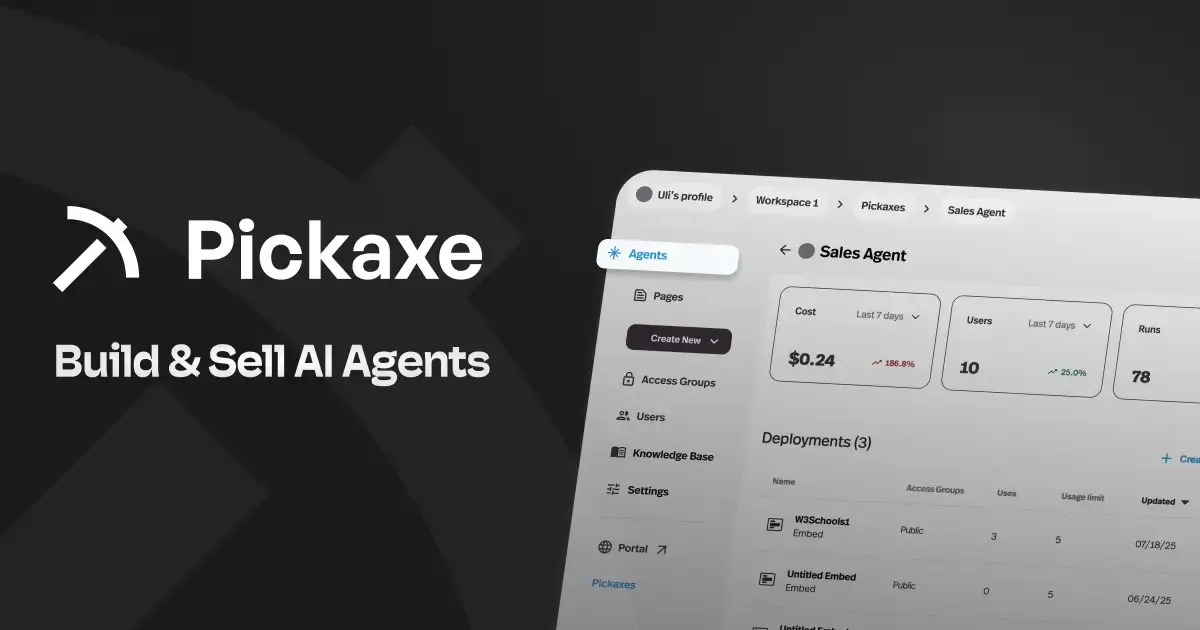
Think of it as the "Shopify for agent-powered businesses." You build agents with no code using a visual builder, equip them with knowledge bases and external tool connections (called Actions), and then deploy them through branded portals, embeds, Slack bots, WhatsApp, email, or API. The part that makes Pickaxe unique is the monetization layer — built-in billing, access control, and usage tracking so you can actually charge clients for the agents you build.
The platform supports a wide range of LLM models (you choose the model per agent, and can switch anytime), and their OpenClaw engine gives agents advanced capabilities like web browsing, code execution, and PDF generation — all in isolated, sandboxed environments. If you're interested in the broader landscape here, check out our guide on how to start an AI agent agency.
Actions let your agents connect to external tools — Google Sheets, Gmail, Notion, CRMs, or any custom API. You can even chain agents together, where one agent delegates to specialized sub-agents. This is different from n8n's workflow-connects-apps model — here, the AI agent is the product, and the integrations serve the agent's intelligence.
Pickaxe also integrates with automation platforms like n8n, Make, and Zapier via MCP, so you can use it alongside traditional automation tools rather than replacing them entirely.
What stood out: The only platform on this list with built-in monetization for AI agents. SOC 2, GDPR, and CCPA compliant. The portal system lets you create branded, multi-agent hubs for clients. White-labeling is available on the Gold plan.
Watch out for: Not a workflow automation tool — if you need Zapier-style "when X happens, do Y" automations, that's not what Pickaxe does. The Action library is growing but smaller than dedicated automation platforms. Best suited for the "build and sell AI agents" use case.
Pricing: Free tier available, Gold ($19/mo), Pro ($49/mo), Enterprise (custom). Built-in monetization means you can charge end users for access and recoup costs from day one.
Best for: Consultants, agencies, and entrepreneurs who want to build AI agents and sell them to clients. If your goal is to monetize AI rather than automate internal processes, Pickaxe is purpose-built for that. Check out the pricing page for full plan details.
How I Picked These 15 n8n Alternatives
I want to be transparent about how I narrowed this list down, because there are easily 50+ tools that could claim "n8n alternative" status.
I focused on platforms that people are actually comparing to n8n — based on forum discussions, Reddit threads, G2 comparisons, and what comes up when people search for n8n alternatives. I didn't include every iPaaS or automation tool that exists.
I tried to cover the full spectrum of use cases. Some people leave n8n because they want something simpler. Some want something cheaper. Some need enterprise governance. Some are looking for more AI-native capabilities. And some realize they don't need workflow automation at all — they need to build AI products. I wanted at least one option for each of those scenarios.
A few things I specifically looked at for each platform:
- Pricing transparency — does the platform clearly explain what you'll pay, or do you need to "talk to sales" for everything?
- AI capabilities — in 2026, automation without AI feels like buying a flip phone. How well does each platform integrate AI?
- Self-hosting vs. cloud — since n8n's self-hosting model is a major draw, I noted which alternatives also offer that option.
- Integration depth — how many apps can you connect to, and how well do those connections work?
- Learning curve — can a non-developer actually use this, or does it require a software engineering background?
I did not conduct exhaustive benchmarking or performance testing. This is a landscape overview based on research, documentation review, and hands-on exploration where possible — not a scientific comparison. For a deeper look at how these tools fit into the broader AI tooling ecosystem, see our guide on Top 15 AI Integration Platforms.
Frequently Asked Questions
What is n8n and why are people looking for alternatives?
n8n is an open-source workflow automation platform that lets you connect apps and build automated workflows using a visual node editor. People look for alternatives for several reasons: the self-hosting requirement adds real infrastructure costs ($200-500/month), the cloud pricing starts at $24/month with limited features, the integration library (400+ connectors) is smaller than competitors like Zapier (8,000+), and the learning curve is steeper than no-code tools. Some users also have concerns about n8n's "sustainable use" license, which is more restrictive than traditional open-source licenses.
Is n8n really free?
Self-hosted n8n is free to download and run. But "free" is misleading when you factor in server costs, maintenance, updates, SSL certificates, backups, and the time spent managing it all. Realistic self-hosting costs run $200 to $500 per month for a production-quality setup. n8n Cloud eliminates the DevOps burden but starts at $24/month for the Starter plan and scales up from there. n8n also discontinued its permanent free cloud plan, so there's no truly free hosted option anymore.
What's the best n8n alternative for non-technical users?
Zapier or Make are the most accessible options for people without a technical background. Zapier has the gentlest learning curve and most integrations. Make offers more visual power while staying approachable. If you specifically want to build AI agents without code, Pickaxe and Lindy are both designed for non-technical users. For the simplest possible automation, IFTTT can't be beat — it's practically effortless.
Which n8n alternative is cheapest for high-volume automation?
Pabbly Connect wins on pure cost for high-volume workflows, with flat-rate pricing starting at $14/month. Make is the best value among the major platforms — significantly cheaper than Zapier at equivalent volumes. For self-hosting, Activepieces is completely free with an MIT license. If you're comparing cloud-hosted options head-to-head, Make's operation-based pricing typically comes out 4 to 15 times cheaper than Zapier for the same workload.
Can I migrate my n8n workflows to another platform?
There's no universal one-click migration between automation platforms. Most migrations require rebuilding workflows from scratch in the new platform, though the logic translates. Some tools (like Make) have community-created migration guides from n8n. If your workflows use n8n's custom JavaScript function nodes heavily, Pipedream is the easiest transition since it also supports code-native steps. For simpler workflows, Zapier or Make recreations usually take 15-30 minutes each.
Should I use a workflow automation platform or an AI agent builder?
It depends on your goal. Workflow automation platforms (Zapier, Make, n8n, Activepieces) are best for connecting apps and automating repetitive processes — "when this happens, do that." AI agent builders (Pickaxe, Gumloop, Lindy) are best when you need intelligent, conversational tools that can reason, make decisions, and interact with users. Some people need both — and many agent platforms now integrate with automation tools via MCP, so you can pair an AI agent with traditional automations. For more on this distinction, see our comparison of Top 14 AI App Builders.
The Bottom Line: Which n8n Alternative Should You Choose?
After looking at all 15 of these platforms, here's how I'd break it down by use case.
If you just want n8n but easier: Go with Make. It's the closest experience to n8n's visual builder, but fully cloud-hosted with better pricing.
If you need the most integrations: Zapier still wins with 8,000+ apps, though you'll pay for the privilege.
If you want open-source without n8n's license restrictions: Activepieces is the MIT-licensed alternative with modern AI features.
If you're a developer: Pipedream gives you code-level control within a workflow framework.
If budget is king: Pabbly Connect — flat-rate pricing, no surprises.
If you live in Microsoft 365: Power Automate, especially if you need RPA for desktop apps.
If you're an enterprise: Workato for governance, Tray.ai for data-heavy workflows.
If you want to build and sell AI agents: That's a different question entirely — and the reason Pickaxe exists. If you're thinking about packaging AI into products, monetizing agent access, or starting an AI agent agency, it's the platform built for exactly that use case.
The automation landscape in 2026 is bigger and more fragmented than ever. The good news? You have more options than ever to find the right fit. The key is knowing whether you need traditional workflow automation, AI-powered workflows, or a platform to build AI products — and picking accordingly. For more context on how these tools fit into the broader ecosystem, check out our guides on Top AI Platforms and Top AI Tools for Building a Business.