
The first time I looked closely at an AI agent's usage logs, the thing that stood out wasn't how much it was spending. It was what it was spending the money on.
Roughly two-thirds of the calls were doing something genuinely trivial. Deciding whether a message was a support question or a sales question. Pulling a date out of a sentence. Turning a three-paragraph answer into a one-line summary. Checking whether a form field looked like a real company name.
Every one of those calls was going to the same frontier model as the hard work — the multi-step reasoning, the long document analysis, the code generation. Same model, same price, for "is this a refund request?" as for "rewrite this 40-page contract summary."
That gap is the entire premise of AI model routing: stop sending every request to your most expensive model, and start sending each task to the cheapest model that can still do it properly. Inside the Anthropic lineup, that decision comes down to Opus vs Sonnet vs Haiku.
It's one of the highest-leverage things you can do to an AI agent that's already working. You're not changing what the agent does. You're changing which engine handles each job. Done carefully, it takes a serious bite out of your bill and — this surprises people — often makes the agent faster.
This guide covers what AI model routing actually is, the three routing strategies that work in production, what the research says the savings really look like, which tasks are safe to route down (and which absolutely aren't), and a step-by-step way to add routing to an agent you've already shipped.
What AI model routing actually is
AI model routing is the practice of choosing which model handles each request at runtime, instead of hard-coding one model for your entire application.
That's it. There's no exotic machinery required. A router sits between your agent and the model providers, looks at the incoming request, and decides: this one goes to the cheap fast model, that one goes to the expensive smart model.
The mental model that helped me most: you already do this with people. You don't put your principal engineer on password resets. You don't hand a database migration to the intern. You match the difficulty of the work to the capability of whoever's doing it, and you'd think it was insane to do otherwise.
Most AI agents do exactly the insane thing. They pick one model on day one — usually the best one, because that's the safe choice when you're still figuring out whether the thing works at all — and then never revisit it.
Which is reasonable! Picking the strongest model is the right call early on. You're trying to find out if the idea is viable, and you don't want model quality to be the thing that kills it. The mistake is leaving it there once you have real traffic and real bills.
Why one model for everything is the expensive default
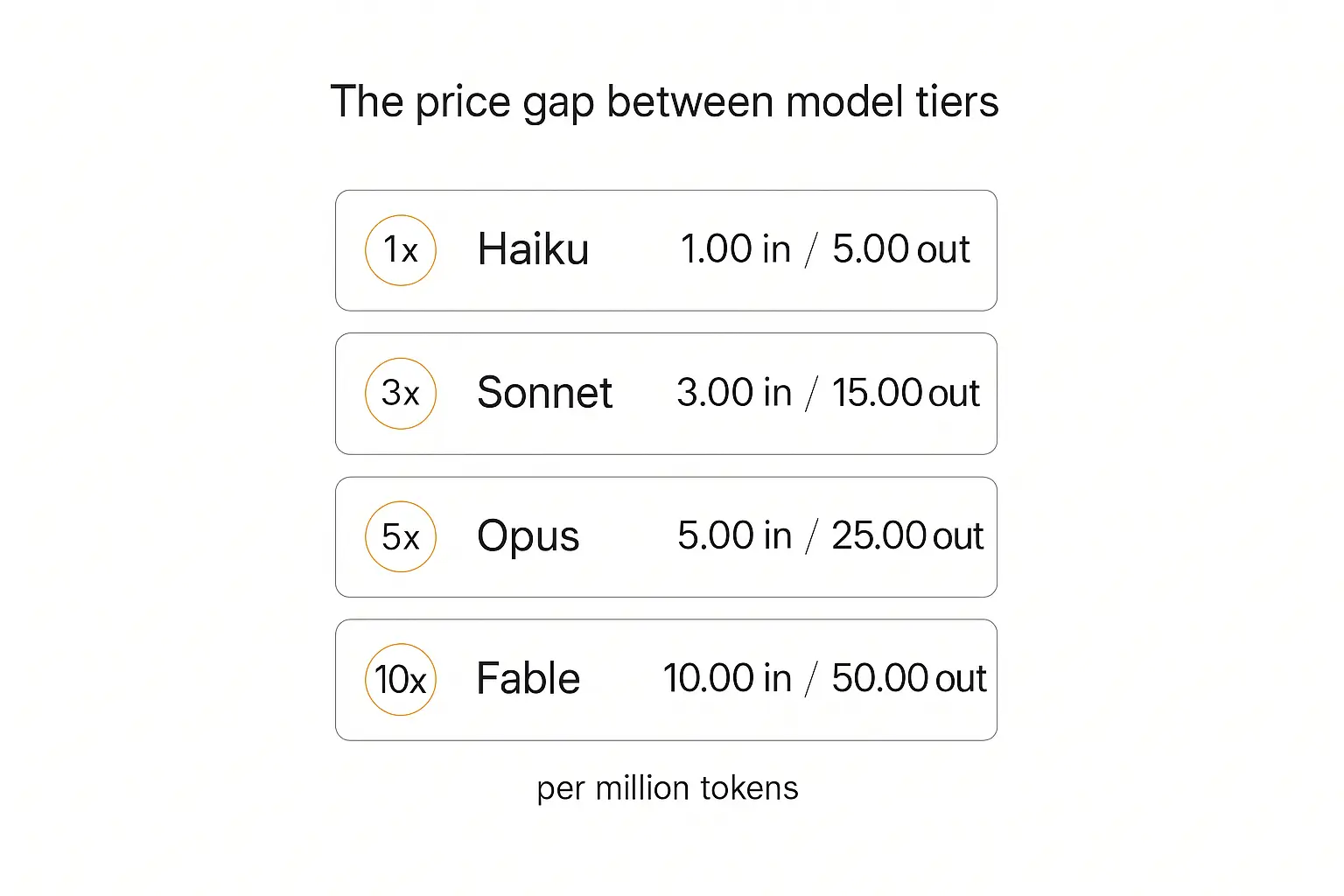
The reason routing works at all is that the price gap between model tiers is enormous — much bigger than most people carry around in their heads.
Here's the current Anthropic lineup, straight from the Claude model documentation, priced per million tokens:
| Model | Input / 1M | Output / 1M | Relative input cost |
|---|---|---|---|
| Claude Haiku 4.5 | $1.00 | $5.00 | 1× |
| Claude Sonnet 5 | $3.00 | $15.00 | 3× |
| Claude Opus 5 | $5.00 | $25.00 | 5× |
| Claude Fable 5 | $10.00 | $50.00 | 10× |
Ten times. That's the spread between the cheapest and most capable tier in a single provider's catalogue — and the same shape holds at OpenAI and Google.
Now do the arithmetic on a realistic workload. Say you handle 10 million tokens a month and everything runs on the top tier: that's $100 in input costs. Move the 70% of requests that are genuinely simple down to the cheapest tier, and the same volume costs about $37. Same work. Same outputs, if you routed carefully.
The savings scale with your volume, which means they're small when you don't need them and large when you do. That's an unusually friendly shape for an optimization. Nobody should be routing on day one with 200 requests a month — the engineering time costs more than the tokens. At a million requests a month, it's negligent not to.
There's a second benefit that gets less attention: smaller models are faster. Considerably. If a chunk of your traffic is classification and extraction, routing that traffic to a small model doesn't just cut the bill, it cuts the latency your users actually feel. I've seen this flip the perception of an agent from "a bit sluggish" to "snappy" without a single change to the prompts. For the models you might put on each route, our GPT-6.1 Sol, Claude Opus 5.5, and Gemini 3.8 Flash comparison lays out the agent workloads to test. Before adding another candidate to a route, use our Gemini 4 Argon adoption checklist to define the evidence a model switch needs.
The three ways to route a request
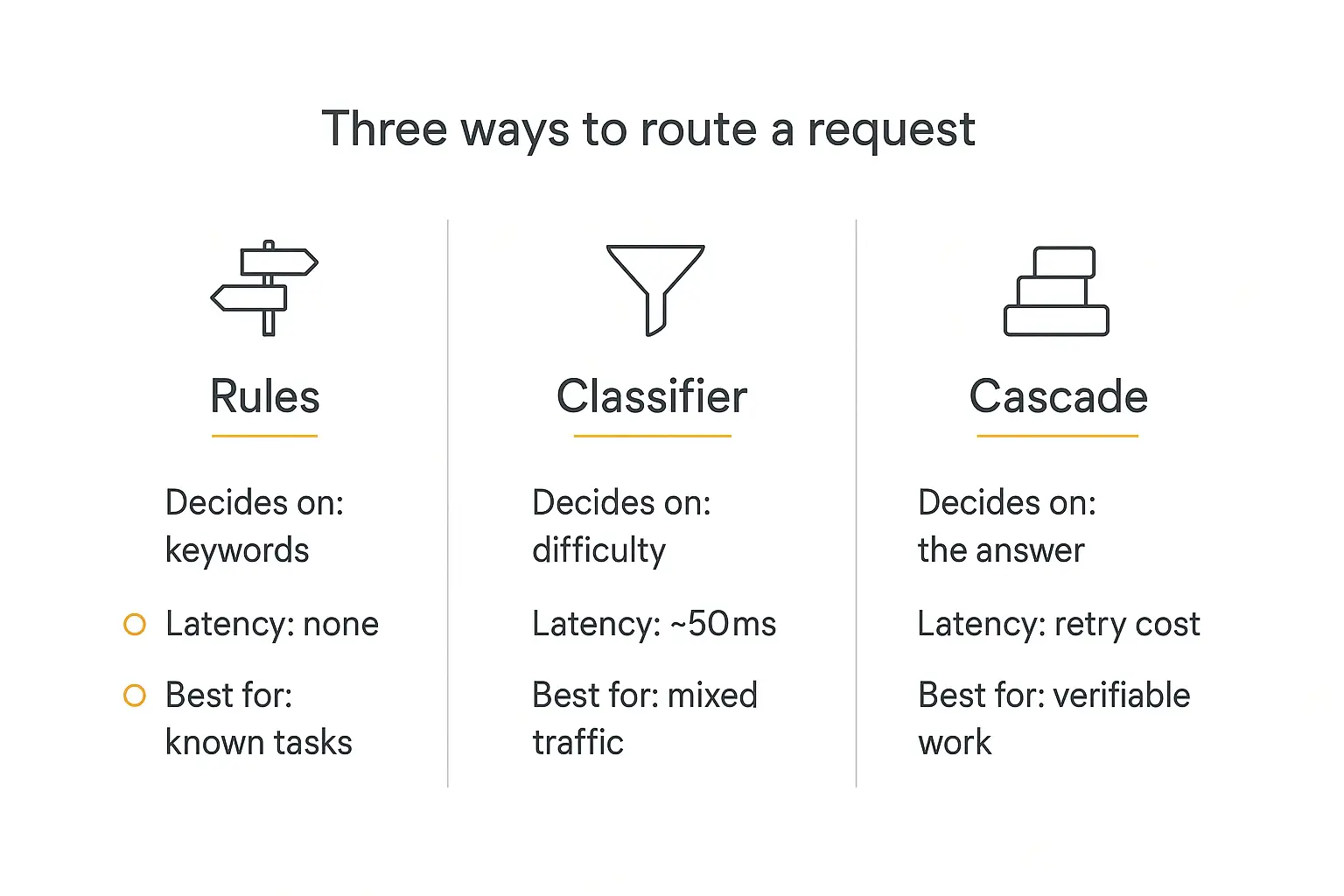
There are three routing strategies that show up over and over in production systems. They're not competitors — plenty of mature setups use all three in different places — but they have genuinely different tradeoffs.
1. Rules-based routing
You decide up front which task goes to which model, and hard-code it.
If the request is a classification call, use the cheap model. If it's the final customer-facing answer, use the good one. If the input is over 50,000 tokens, use the model with the biggest context window.
This is the least clever approach and it's the one I'd start with almost every time. It has no routing latency, no extra API call, nothing to train, and — critically — it's completely predictable. When something goes wrong you can look at the rule and know exactly why the request went where it did.
The limitation is that it only works when you already know what the task is. In an agent with a fixed pipeline — extract, then reason, then summarize — you know. In a general-purpose chat interface where users can ask anything, you don't.
Use it when: your agent has distinct, named steps. Which is most agents, honestly.
2. Classifier routing
A small, fast model (or a trained classifier) looks at the incoming request and predicts how hard it is, then picks a tier.
This is what you need when requests arrive unlabeled. A user types something into a chat box; you don't know in advance whether it's "what are your hours?" or "compare these three contracts and flag the liability differences."
The classifier can be a genuinely tiny model, an embedding-similarity lookup against known-easy and known-hard examples, or a purpose-built router. The best-known research here is RouteLLM from the LMSYS team at UC Berkeley, which trains routers on human preference data — which of two model responses did people actually prefer — and learns to predict which queries genuinely need the stronger model.
The cost is latency and a small amount of complexity. An embedding lookup adds a handful of milliseconds; a classifier model adds more like 50-100ms. That's usually fine, but it's not free, and on a request that was going to take 300ms anyway it's a real percentage.
Use it when: traffic is mixed and unpredictable, and volume is high enough that the savings dwarf the routing overhead.
3. Cascade routing
Try the cheap model first. Check the answer. If it isn't good enough, escalate to the expensive one.
This inverts the question. Instead of predicting difficulty before you have an answer, you get an answer cheaply and then judge whether it holds up.
The idea goes back to FrugalGPT, a 2023 Stanford paper that pushed cascading hard and reported dramatic cost reductions on their benchmarks by having cheap models handle most queries and reserving expensive ones for the queries that actually needed them.
Cascades are beautiful when you have a cheap, reliable way to check the answer. Did the model return valid JSON matching the schema? Did the generated code compile? Did the extracted value appear in the source document? Those checks cost nothing and are completely trustworthy.
They get much less attractive when the only way to judge the answer is another LLM call, because now you're paying for the cheap attempt, the judge, and possibly the expensive attempt too. A cascade that escalates 60% of the time is more expensive than just using the good model. That's the failure mode to watch for.
Use it when: correctness is machine-checkable. Structured output, code, math, anything with a schema.
A note on semantic routing
You'll also see semantic routing discussed as a fourth category — routing based on what the request is about rather than how hard it is, usually by embedding the query and matching it against category exemplars. Medical questions go to one model, coding questions to another.
Mechanically it's a variant of classifier routing (you're still running a cheap model to make a decision), but it's worth knowing as its own pattern because it's the right shape when your models differ in specialization rather than raw capability. There's active research here too — the vLLM semantic router work applies it to deciding when a model should reason at all versus answer directly.
What the savings actually look like
You'll see some very large numbers thrown around in vendor marketing — 85%, 90%, "cut your LLM bill by 80% with one line of code." Some of that is real and some of it is benchmark-shaped.
Here's what I'd actually anchor on.
The research numbers are real but measured on benchmarks. RouteLLM reported over 85% cost reduction on MT-Bench while retaining around 95% of GPT-4's performance, sending only a small fraction of queries to the strong model. FrugalGPT reported reductions up to 98% on its evaluation set. These are genuine, peer-reviewed results — but benchmark query distributions are not your query distribution, and a benchmark has no angry customer on the other end of a bad answer. The same caveat applies to launch-day scores, which is why reading the fine print on the GPT-6 Astra benchmark is worth more than the headline number.
Your realistic number depends almost entirely on your traffic mix. The lever isn't the router's cleverness, it's what fraction of your requests are genuinely easy. Two agents with identical routing infrastructure can see wildly different savings because one handles 80% simple lookups and the other handles 80% multi-step research.
A rough way to estimate before you build anything: pull a few hundred real requests from your logs, hand-label each as "a small model could obviously do this," "definitely needs the big model," or "not sure." The first bucket, as a percentage, multiplied by the price gap, is roughly your ceiling. If that number is 15%, don't build a router — go optimize something else. If it's 60%, get started.
Don't count on the maximum. You'll leave savings on the table deliberately, because the tasks where you're unsure are tasks you should route up until you have evidence. That's the correct trade.
Want to compare models before you route anything?
Pickaxe lets you swap the model behind an agent and see the cost and speed difference on your own prompts.
The tasks you should route down first
If you take one practical thing from this guide, make it this list. These are the jobs where a small model is genuinely, boringly sufficient — and where I'd move first because the risk is close to zero.
| Task | Why a small model is fine | How you'd verify |
|---|---|---|
| Intent classification | Picking one label from a short list is pattern matching, not reasoning | Label 200 real requests by hand, compare accuracy |
| Structured extraction | Pulling dates, emails, amounts, names out of text | Schema validation plus spot-checks against source |
| Routing and triage | "Which department handles this?" is a classification problem | Compare against the big model's answers on a sample |
| Short summarization | Condensing a known-good answer loses little at smaller sizes | Human read of 50 outputs side by side |
| Format conversion | Prose to JSON, JSON to prose — mechanical transformation | Schema validation, automated |
| Content moderation flags | Binary "does this look problematic?" pre-filters | Precision/recall on a labeled set |
| Query rewriting for search | Turning a question into keywords before a retrieval step | Retrieval quality downstream |
Notice what these have in common: the output is small, constrained, and checkable. That's the tell. When the correct answer belongs to a short list or has to match a schema, the model has far fewer ways to go wrong, and the capability gap between tiers matters much less.
What you should not route down
Equally important, and the part most cost-cutting guides skip.
- The final user-facing answer. This is what your users judge the whole product on. Save money somewhere they can't see.
- Anything with multi-step reasoning. Chains of inference are exactly where small models fall down, and they fail confidently — you get a fluent, plausible, wrong answer rather than an obvious error.
- Tool and function calling in agentic loops. A model that picks the wrong tool doesn't just produce one bad output; it sends the whole loop down a bad path and burns tokens doing it. Any savings evaporate.
- Long-context work. Small models often have smaller context windows, and comprehension across a long document degrades faster than headline benchmarks suggest.
- Anything regulated or high-stakes. Medical, legal, financial. The expected cost of one bad answer swamps a year of token savings.
- Whatever you haven't measured. The default should be "route up until proven otherwise," not the reverse.
That last one is the real rule. Everything else is a special case of it.
How to add AI model routing to your agent
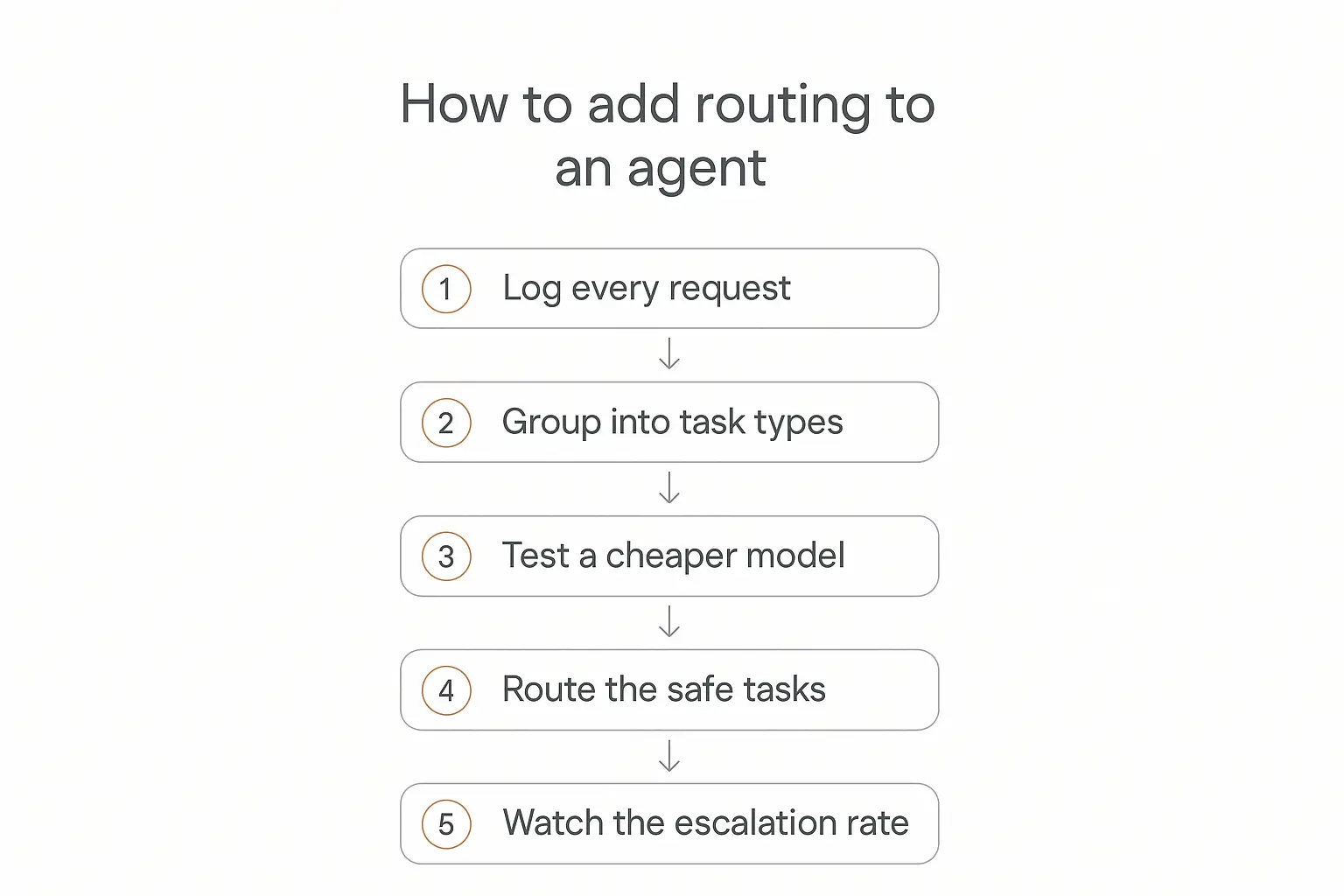
Here's the sequence I'd follow on an agent that's already in production. It's deliberately incremental — every step is reversible and you learn something before you commit to anything.
Step 1: Log every request with its task type
Before you route anything, you need to know what you're routing. Tag every model call with what it was for — classify_intent, extract_fields, final_answer — plus its token counts and latency.
If you skip this step you'll be guessing, and routing decisions made on guesses are how people end up quietly degrading their product. Give it a week of real traffic. Our guide to AI agent analytics goes deeper on what's worth instrumenting.
Step 2: Group requests into task types and find the volume
Sort your tagged calls by total token spend. You're looking for the task types that are high volume and low difficulty — that's where the money is.
This almost always surprises people. The expensive thing is rarely the impressive thing. It's usually some unglamorous preprocessing step running on every single request.
Step 3: Test a cheaper model on one task type — offline
Pick your biggest easy-looking task type. Take 200-500 real logged inputs. Run them through both the current model and a cheaper one, and compare the outputs.
For classification and extraction you can score this automatically against the expensive model's output as a reference. For anything fuzzier, read a sample yourself. Do this offline, on logged data, before any user sees it.
What you're looking for is not "identical." It's "close enough that no user would notice or care." If the cheap model gets 97% agreement on intent classification and the 3% disagreements are all genuinely ambiguous cases, you're fine.
Step 4: Route the safe tasks, one at a time
Change one task type. Ship it. Watch it for a few days. Then do the next one.
The temptation is to flip everything at once because you've already done the analysis. Resist it — if quality drops you want to know exactly which change did it, and a single-variable change makes that trivial.
Step 5: Watch escalation rate and quality signals
Once routing is live, two numbers matter. Escalation rate: for cascades, what fraction of requests fall through to the expensive model? If it climbs past roughly 30-40%, your cascade has stopped saving money. Quality signals: thumbs-down rates, support tickets, retry rates, conversation abandonment.
Set an alert on both. Routing is not a set-and-forget change — model behavior shifts when providers update models, and your traffic mix shifts as your product grows.
The hidden costs nobody mentions
Routing is genuinely good, but the pitch usually skips the parts that cost you something. Four worth knowing about.
Routing latency is real. A classifier that adds 80ms to every request has added 80ms to every request — including the ones that were always going to the expensive model anyway. On a high-volume, latency-sensitive product that can be a worse trade than it looks on the cost dashboard. A faster generation model is another candidate to test; my Mercury diffusion model guide outlines the workflow evidence I would require.
Prompt caching interacts badly with switching models. This one bites people. Caches are model-scoped — switch models mid-conversation and you lose the cached prefix and pay full price to rebuild it on the new model. A router that flips models turn-by-turn inside one conversation can easily cost more than never routing. Route at conversation boundaries, or route distinct sub-tasks that have their own context, not individual turns of a shared thread.
Prompts are not portable. A prompt tuned against one model does not automatically perform the same on another, and smaller models generally need more explicit, more structured instructions. Budget real time for re-tuning — this is usually the largest hidden cost, and it's engineering time rather than tokens.
You now have more surface area. Two models means two sets of rate limits, two failure modes, two things to monitor, two things that change when a provider ships an update. That's a genuine operational cost, and it's the main reason I'd tell a small team with modest volume to skip routing entirely for now.
Routing tools and gateways
You can absolutely write rules-based routing yourself — it's an if statement — and for many teams that's the right answer. But once you're managing keys and fallbacks across several providers, a gateway starts earning its keep.
| Tool | What it is | Best for |
|---|---|---|
| LiteLLM | Open-source proxy that normalizes many providers behind one OpenAI-format endpoint | Teams who want to self-host and keep full control |
| OpenRouter | Hosted aggregator — one key, hundreds of models, provider fallbacks | Fast prototyping and reaching new models quickly |
| Portkey | Gateway leading with observability, guardrails, and audit trails | Teams where governance matters as much as cost |
| RouteLLM | Research framework for training preference-based routers | Building a real classifier router, not a full gateway |
| Not Diamond | Managed automatic model selection per prompt | Wanting routing decisions handled for you |
One thing to be clear-eyed about: a gateway is not a router. LiteLLM and OpenRouter make it easy to reach many models and handle failover; deciding which model each task deserves is still your call. The gateway removes the plumbing, not the thinking.
If you're weighing up the wider stack around this, our breakdown of the AI agent tech stack covers where a gateway sits relative to everything else.
Build the agent first, optimize the model second
Pickaxe handles the hosting, knowledge base, and billing so you can focus on whether the agent is actually good.
How we think about this at Pickaxe
Building on a platform changes the shape of this problem, and it's worth being straight about how.
On Pickaxe you choose the model behind each agent from a catalogue that spans the major providers, so the routing decision at the agent level is a dropdown rather than an integration project. If you have one agent doing lead qualification and another doing long-form research, you can put them on different tiers in about ten seconds — and that agent-level split captures a good chunk of the available savings for most people, without any router at all.
Token usage runs through Pickaxe credits rather than your own provider keys, which means the cost comparison you care about is the credit consumption per agent, not a stack of separate provider invoices. Our model cost comparison lays out how the tiers compare, and the cost estimator is useful for sanity-checking a workload before you commit to it.
The honest limitation: this gives you clean per-agent routing, not per-request routing inside a single agent. If you genuinely need a classifier deciding tier on every individual message, you want a gateway and your own code. For the large majority of agents I've seen, per-agent selection plus splitting a workflow into a cheap step and an expensive step gets you most of the way there for a fraction of the effort.
If you're weighing up which model to put behind an agent in the first place, our guide to the best LLM models and our piece on multi-model AI agents both go deeper on the tradeoffs.
Frequently asked questions
Does AI model routing hurt quality?
It can, if you route badly. It doesn't have to. The whole discipline is picking the cheapest model that is genuinely sufficient for a task — and for classification, extraction, and formatting, the small models are sufficient. Quality damage comes from routing down tasks you never actually tested, which is why step 3 above is the one you can't skip.
How much can I realistically save?
Somewhere between nothing and a lot, driven almost entirely by what fraction of your traffic is easy. Benchmark research reports 85%+ in ideal conditions; a mixed real-world workload where you're being appropriately careful lands more often in the 30-60% range. Label a few hundred of your own logged requests and you'll have a much better estimate than any industry average.
Should I build routing from scratch or use a tool?
Start with hard-coded rules in your own code — it's a handful of lines and it's the version you'll actually understand when it misbehaves. Reach for a gateway when you're juggling multiple providers, need failover, or want centralized spend controls. Reach for a trained classifier only when you have genuinely unpredictable traffic and enough volume to justify it.
What's the difference between model routing and a multi-model agent?
Routing is one technique inside the broader multi-model idea. A multi-model agent uses several models — possibly for specialization, possibly for redundancy, possibly for cost. Routing specifically means choosing between them per request. All routing is multi-model; not all multi-model setups route.
Does routing work with prompt caching?
Carefully. Caches are scoped to a single model, so switching models discards the cached prefix and you pay to rebuild it. Route at task or conversation boundaries where each path has its own stable prefix — don't flip models turn-by-turn inside one long cached conversation, or the cache misses will cost you more than the routing saves.
Is routing worth it for a small agent?
Usually not. If you're spending $40 a month on tokens, the engineering time to build and maintain routing costs far more than the maximum possible saving. Pick a good model, ship, and revisit when your bill is large enough that a 40% cut is a number you'd notice.
The takeaway
AI model routing isn't a clever trick. It's the fairly obvious observation that a 10× price gap exists between model tiers, that most agent traffic is easier than the model handling it, and that you can do something about that.
The order matters more than the technique. Measure what your agent actually spends money on. Find the high-volume, low-difficulty work. Test a cheaper model offline on real logged inputs. Move one task type at a time. Watch the quality signals. That sequence works whether you're writing three lines of routing logic yourself or deploying a full gateway.
And keep the sequencing straight at the product level too: get the agent good first, then make it cheap. An expensive agent people love is a business. A cheap agent nobody uses is a rounding error.
If you want the wider picture on what agents actually cost to run, our guide to the real cost of AI agents and token economics is the natural next read. And if you'd rather skip the infrastructure entirely and just pick a model from a dropdown, Pickaxe is built for exactly that.