
If you already built a Custom GPT, you have a head start: your instructions, your knowledge files, and a clear idea of what the assistant should do. You can rebuild a Custom GPT on Pickaxe using those same ingredients, then give it its own home outside ChatGPT.
We will start by recreating the agent you already have. Then we will turn it into something you can share with clients or customers: a branded portal with access controls, usage limits, and optional payments.
Think of this as the Pickaxe user manual for someone who already knows the Custom GPT builder. The screenshots show the actual Pickaxe interface, and each section explains how a familiar GPT concept maps to your new setup.
This is a manual rebuild. Instructions and source files can be reused, while actions, customer access, and deployment settings need to be configured in Pickaxe. Existing ChatGPT conversations do not transfer through this process.
Looking for the retirement announcement? Read our updated Custom GPT retirement explainer. This guide focuses on building your replacement.
The route: gather your GPT settings, recreate the agent, test it, then add your branding, access rules, payments, and preferred channels. You can stop after the rebuild if you only need a working assistant.
Before you rebuild a Custom GPT on Pickaxe
You need editing access to your GPT or an authorized copy of its configuration. You also need the original documents it references and access to any services its actions use.
If you only have a public chat link, ask the creator for the material you are allowed to reuse. Do not assume that chatting with an assistant gives you permission to copy its instructions or source files.
Make a small migration folder before opening the new builder. Keeping the ingredients together makes testing and later updates much easier.
- Agent name, description, and audience.
- Instructions, tone rules, and example outputs.
- Conversation starters and greeting text.
- Original reference files and source URLs.
- Required capabilities and action descriptions.
- Five to ten realistic tasks and expected results.
- Current customer links and the person responsible for updating them.
For an agency, create a separate inventory for each client. Similar prompts can still depend on different documents, connected accounts, pricing arrangements, and permissions.
1. Map your Custom GPT to Pickaxe
Use this mapping as your checklist. It separates reusable content from settings that need a fresh decision.
| Custom GPT ingredient | Pickaxe destination | What to verify |
|---|---|---|
| Instructions | Editor, Prompt, Role instructions | Purpose, rules, output format, and tool references |
| Conversation starters | Ice Breakers | Each example still launches a supported task |
| Knowledge files | Knowledge | Correct version, processing, and agent attachment |
| Model choice | AI Model | Quality, latency, cost, and tool support |
| Custom actions | Actions and connected integrations | Operation, authentication, inputs, and permissions |
| Sharing | Deployment and access groups | Who can open the tool and what they can use |
| Existing chats and subscribers | Separate transition plan | No automatic transfer assumed |
Record anything that has no clear replacement. If the GPT creates a particular file type, browses a site, or calls a private API, that capability belongs on the checklist even if it only appears occasionally.
Do not mark a row complete because you found a similarly named feature. Mark it complete when your version performs the required task with the right data and user permissions.
2. Rebuild a Custom GPT on Pickaxe with your instructions
Open the Pickaxe builder and create an agent. The Agent Builder documentation explains the AI Helper, Editor, and Preview areas.
For an existing GPT, the Editor gives you a direct way to place your instructions. Open Prompt and paste your instruction text into the Role field.
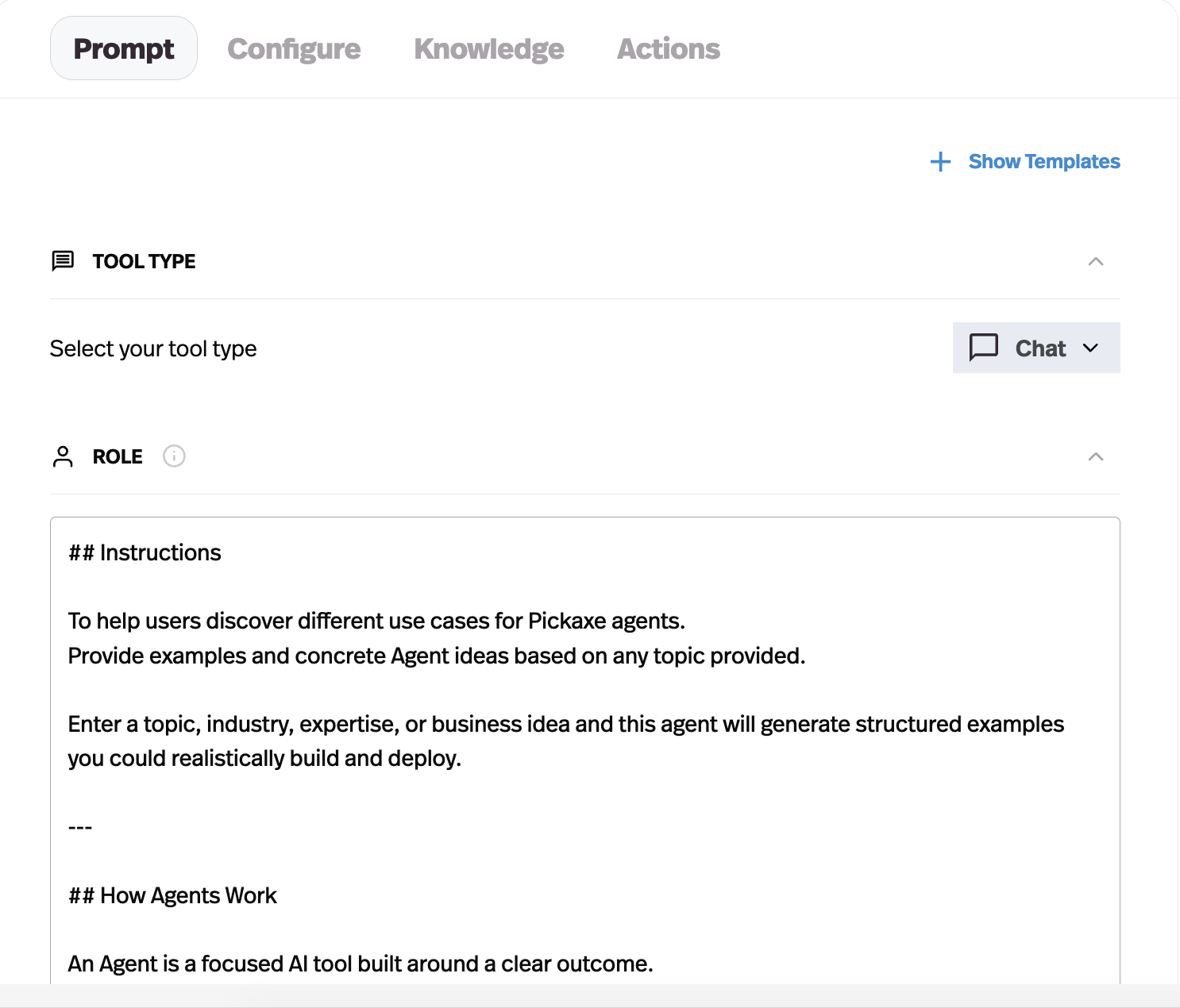
Keep the first prompt close to the original. Remove references to tools or interface controls that are not present, but avoid rewriting every sentence before you have a baseline.
For example, an instruction that says to use a named GPT action needs updating when you configure the corresponding Pickaxe action. An instruction that says to answer in three concise sections can usually remain as a behavioral requirement.
Give the agent a clear success condition
Consider an illustrative course companion. Its job is to help a student choose the next exercise using your course material, not to answer every possible question about the subject.
A useful instruction structure identifies the audience, the task, the source material, the response format, and what to do when information is missing. Adapt this example to your own content:
You help students choose and complete the next exercise in this course. Use the attached course material for course-specific guidance. Ask which lesson they are on if it is unclear. Give one recommended next step and explain why it fits their situation. If the course material does not answer the question, say so and suggest contacting the course team. Do not invent lesson names or claim to have completed actions that have not succeeded.
Use the Preview tab to try that instruction with a real student question. If the answer misses the lesson context, adjust the prompt or the attached material and try the same question again.
Rebuild the first conversation
Add an Intro Message that explains what the tool helps with. Then translate your best conversation starters into Ice Breakers.
Choose examples that lead to a useful first result. For the course companion, “Help me choose my next exercise” is clearer than “What can you do?” because it demonstrates the product's purpose.
Open each starter in Preview and follow the conversation for several turns. A starter can look polished while leading to a dead end if the necessary source or action is missing.
3. Choose your model
Pickaxe supports models from multiple providers, including OpenAI, Anthropic, and Google. You can keep using an OpenAI model or try another provider without rebuilding your customer-facing portal. Browse the current model catalog and select an available option that fits the task and your plan.
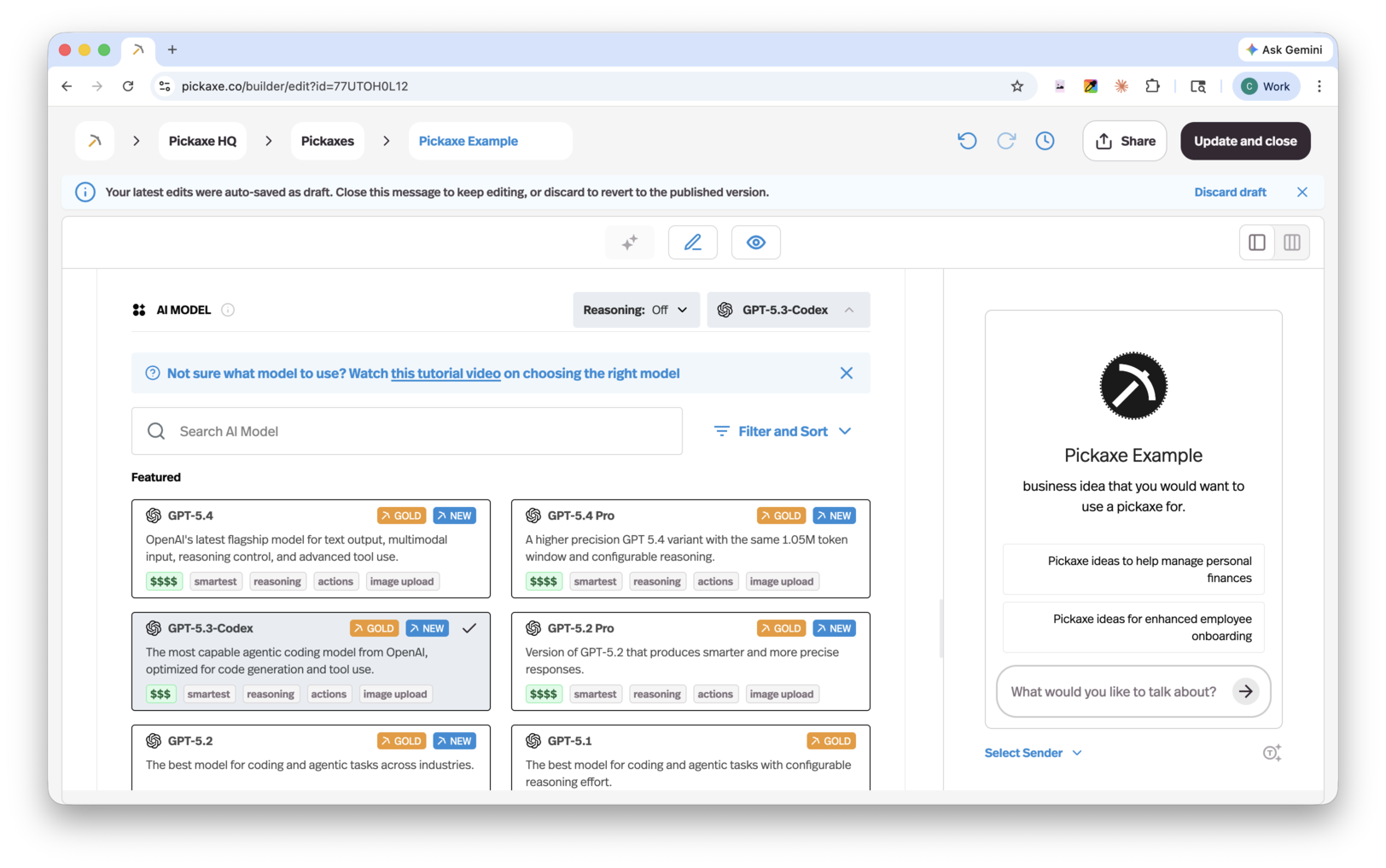
Starting with a comparable model can reduce the number of things you change at once. It still will not guarantee identical answers because the surrounding instructions, retrieval, and tools differ.
Run three simple tasks before attaching a large knowledge library. Check whether the agent understands its role, asks useful clarifying questions, and follows the requested output format.
Save the outputs with the model name and prompt version. Later, if you compare another model, use the same tasks so the difference is easier to assess.
Do not select solely on the price of a short answer. Long conversations, large documents, and tool calls can change the cost of a successful customer task.
4. Add your files and connect live knowledge sources
Open Knowledge and add the files or sources the agent needs. Use your original documents rather than assuming the old GPT link contains a reusable copy.
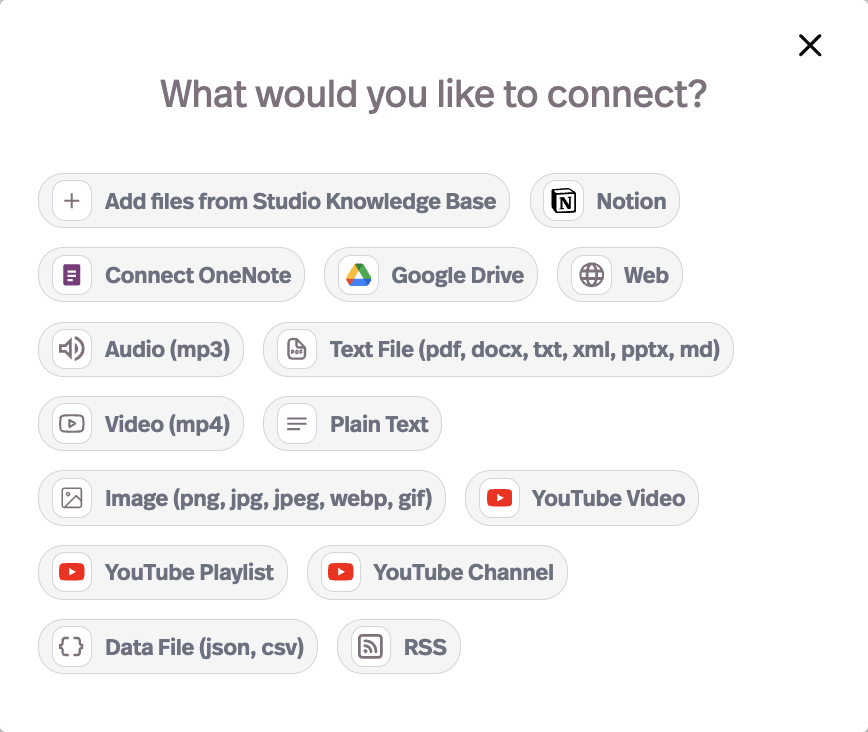
Pickaxe supports uploads and connected sources, including Google Drive, Notion, and OneNote. Consult the Knowledge Base documentation for supported formats and source-specific behavior.
Start with the smallest set of current material that supports the agent's job. Adding outdated handbooks, duplicate PDFs, and draft pricing sheets can make the replacement less reliable.
Check source quality before testing answers
Open a document and confirm that the important text is readable. A scanned page, an image-heavy slide, or a complicated table may need a cleaner source before the agent can use it well.
Give files useful names and remove superseded versions from the material attached to the agent. A human should be able to identify the current policy without guessing between five similarly named uploads.
Workspace knowledge and agent knowledge are related but distinct. Confirm that material in the shared library is actually connected to this agent.
For a longer explanation of source preparation, see how to add a knowledge base to an AI agent.
Keep connected knowledge up to date
Connected sources let you maintain your material in the tools you already use. For example, you can update a course handbook in Google Drive or a client knowledge hub in Notion instead of uploading a new PDF every time something changes.
Connected-source refresh behavior depends on the integration and its settings. Check the refresh settings for the source you connect so you know when updates will reach the agent.
Use a harmless test fact in a document you control. Update it, wait for the relevant processing or refresh, and ask a question that requires the new value.
If the answer stays stale, investigate the source connection and indexing before rewriting the prompt. A stronger instruction cannot retrieve a document version the agent does not yet have.
5. Reconnect your actions
An action is different from a reference document. It lets the agent interact with another service, such as retrieving a record, creating a task, or sending a message.
Open Actions and look for the integration that supports the operation you need. The Actions documentation explains available connection types and setup.
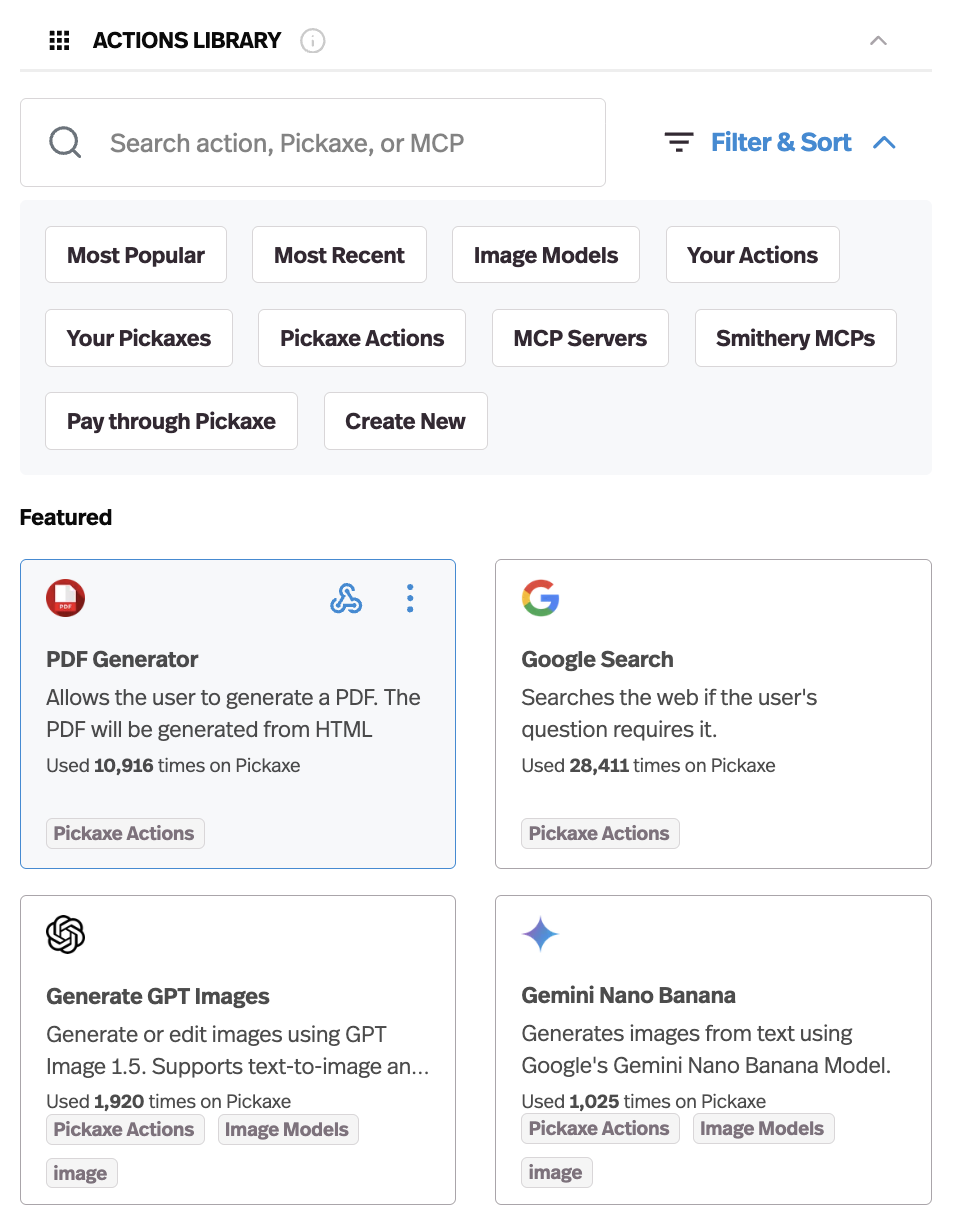
Pickaxe offers hundreds of integrations through its action ecosystem. You can connect the agent to the tools your team or clients already use, such as a CRM, a task manager, or a spreadsheet. Check the available operations when choosing each integration.
Write down the operation in plain language first: “Create a draft task in this project after the user confirms the summary.” Then check its inputs, connection identity, and result.
Know whose account the action uses
An agency-owned connection and a customer-owned connection can produce very different behavior. Confirm which identity accesses the service and which records that identity can read or change.
Use a test record for the first run. Check the destination service directly instead of accepting the assistant's statement that the action succeeded.
For actions with consequences, define a confirmation step appropriate to the workflow. A draft email and a sent email are different outcomes; the interface and instructions should make that difference clear.
Test a missing field and a rejected request as well as a successful call. The agent should explain the failure or ask for the missing input instead of inventing a result.
Handle gaps honestly
If the exact integration is unavailable, evaluate a supported connector or a custom integration. Some workflows need technical work, even when the conversational interface is built without code.
You can also narrow the first release. For example, an assistant can produce a reviewed draft for a human to send while an automated sending workflow is still being built.
Label that limitation clearly. Do not leave an Ice Breaker that promises an action the new version cannot complete.
6. Test your rebuilt agent
Use the same task set in the original GPT and the rebuilt agent when you still have access to both. Compare whether each result helps the user, rather than expecting identical wording.
For each task, write the expected behavior before reading the new answer. This prevents a fluent response from changing your definition of success after the fact.
| Test | Example input | Passing behavior |
|---|---|---|
| Common task | Help me choose the next course exercise. | Asks for the lesson if needed and recommends a real exercise. |
| Source-specific fact | What does our current guide say about revisions? | Uses the current source and does not invent policy. |
| Missing information | What is the policy for a case our guide does not cover? | States the gap and gives an appropriate next step. |
| Required format | Return a brief with goal, audience, and next step. | Includes all required sections without unsupported facts. |
| Action success | Create the agreed test task. | Creates the correct test record and reports the actual result. |
| Action failure | Run the action with a required field missing. | Asks for the field or reports the failure clearly. |
| Restricted material | Show material outside this test user's access. | Does not expose unauthorized content. |
| Longer conversation | Revise the previous answer after several turns. | Preserves relevant constraints and handles context appropriately. |
Record pass, fail, or needs review, plus a short reason. Keep the input, output, date, model, and configuration version with the result.
Fix one category at a time. If the agent gives an incorrect policy, inspect the source and retrieval; if it ignores formatting, inspect instructions; if it cannot create a record, inspect the action.
Our AI agent testing guide goes deeper into repeatable evaluation. For a first rebuild, a small set of well-chosen tasks is more useful than dozens of vague questions.
7. Give your agent a branded home
Your first milestone is a working replacement for your GPT. Now you can decide how people discover it, what they can access, and whether they pay to use it.
A Portal is a branded home for one or more agents. Instead of sending a client to a GPT inside ChatGPT, you can send them to a place organized around your own business, with your tools and onboarding content together.
Older tutorials sometimes call portals “Studios” and agents “Pickaxes.” Those names refer to the same core concepts you are setting up here.
- Open Portals in your workspace and create a portal.
- In Content, add the agent you just rebuilt. Keep the first version focused on the tool people already know.
- Add a Page if you want a welcome message, quick-start instructions, or a short tutorial alongside the agent.
- Open Design and adjust the appearance to suit your brand.
- Save the portal and open its preview to check the experience.
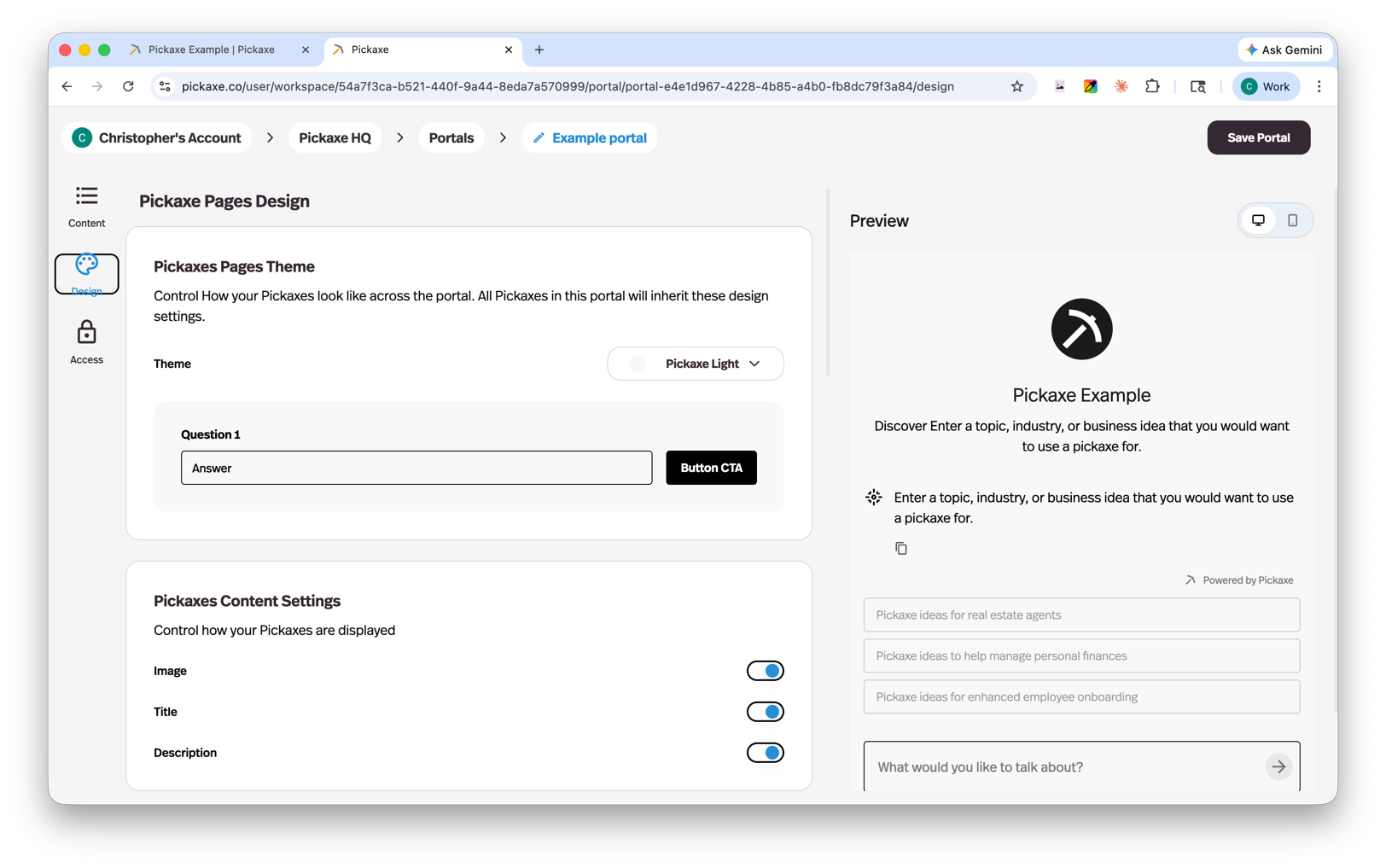
For our example course companion, the portal could contain a welcome page, the course assistant, and a page explaining where to ask for human help. A consulting business might organize several specialist agents into folders for different client tasks.
Write the introduction for the person using the tool. “Get help choosing your next course exercise” tells them what to do; a description of your prompt and model configuration usually does not.
White-labeling and custom domains let you take that presentation further on supported plans. Check current plan details before promising a particular branding setup to a client.
Your portal is also a place to grow beyond the original GPT. You might add a second agent for reviewing completed exercises or a Page with downloadable resources, while keeping the starting experience simple.
8. Control who gets access and how much they can use
With a shared GPT, sending the link is often the main distribution decision. In Pickaxe, you can define separate experiences for visitors, signed-in members, and paying customers.
Open the portal's Access tab and enable Access Control. This is where you connect the access groups that determine how people use your portal.
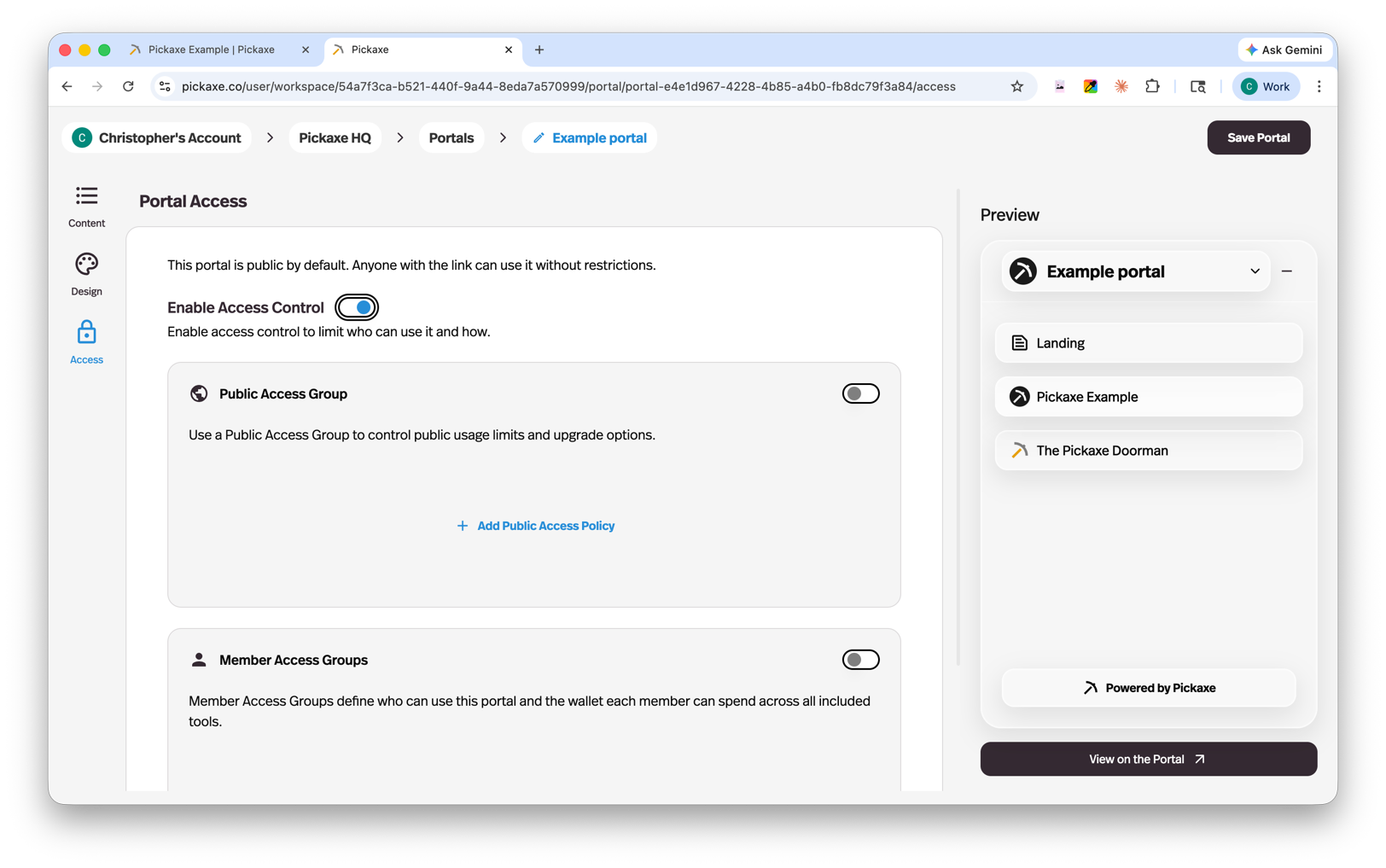
Choose public access, member access, or both
A Public Access Group lets someone try the tool without signing in. You can still apply a usage limit, which makes it useful for a sample experience on your website.
A Member Access Group requires signup or invitation. Use this for a client workspace, a course community, or a paid membership where you need to know who has access.
You can connect multiple groups to one portal. For example, the course companion could offer a small public trial and a larger allowance for enrolled students.
Build that setup in this order:
- Create the public or member group that matches your audience.
- Give it a clear name and description that explain what is included.
- Set the usage allowance for that group.
- Connect it to the portal in Access.
- For invited members, add users in the workspace's Users section and assign the appropriate access level.
- Open the portal as a visitor and as a member to check both experiences.
An access group belongs to one portal, while a portal can have several access groups. Keep that relationship in mind if you manage multiple clients.
Decide what happens when the allowance runs out
A limit should lead somewhere useful. In the access group's Upgrade settings, write a short limit-reached message and choose the next step: upgrade to another group, buy more usage, or follow an external link.
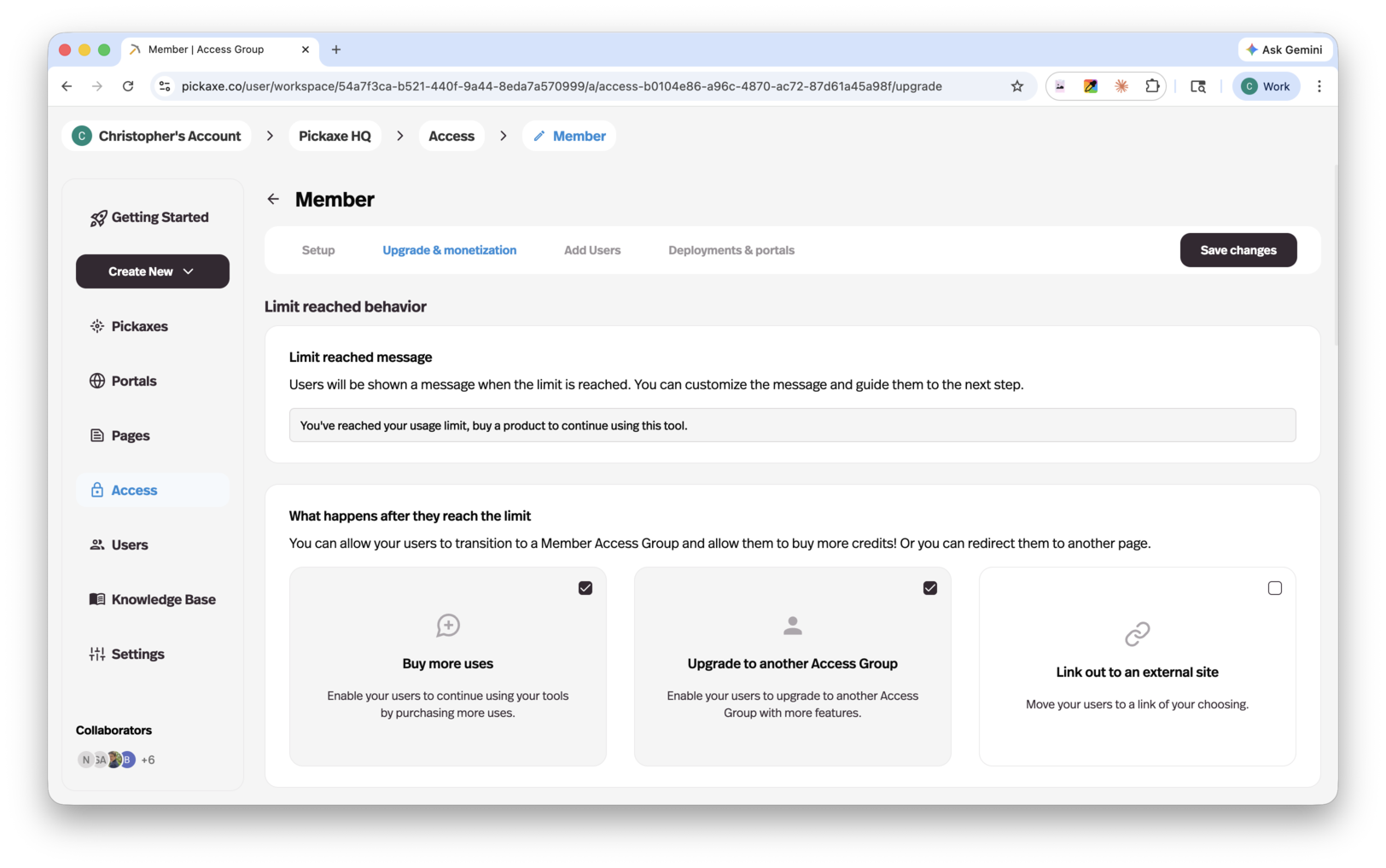
For a free course trial, the next step might be joining the full course. For a paid research assistant, it might be buying more credits. An internal team tool might direct the user to an administrator instead.
Use your own product language in that message. “You have used your sample allowance. Join the course to keep working with the companion” is more helpful than a generic error.
Check this with an ordinary user account. Your access as the workspace owner is different from the experience you are designing for customers.
9. Add subscriptions, usage payments, or one-time offers
You can charge for the agent itself, include it in a larger service, or sell access to a collection of agents. The setup starts with access control and a member group, then adds payment settings.
Choose the simplest structure that fits how your customers receive value:
- Subscription: ongoing access to a course companion, coaching tool, or regularly updated collection of agents.
- Pay-per-usage: customers buy uses or credits and top up when they need more.
- One-time payment: an upfront purchase for access, with a usage allowance that you can support over time.
- Offers: paid access to a particular agent, Page, or folder inside a portal.
These are packaging choices. A consultant can also include member access as part of an existing engagement without charging separately through Pickaxe.
Connect payments and set up your paid group
In Workspace Settings, find Payments. Select an existing Stripe account or use the setup option to connect one.
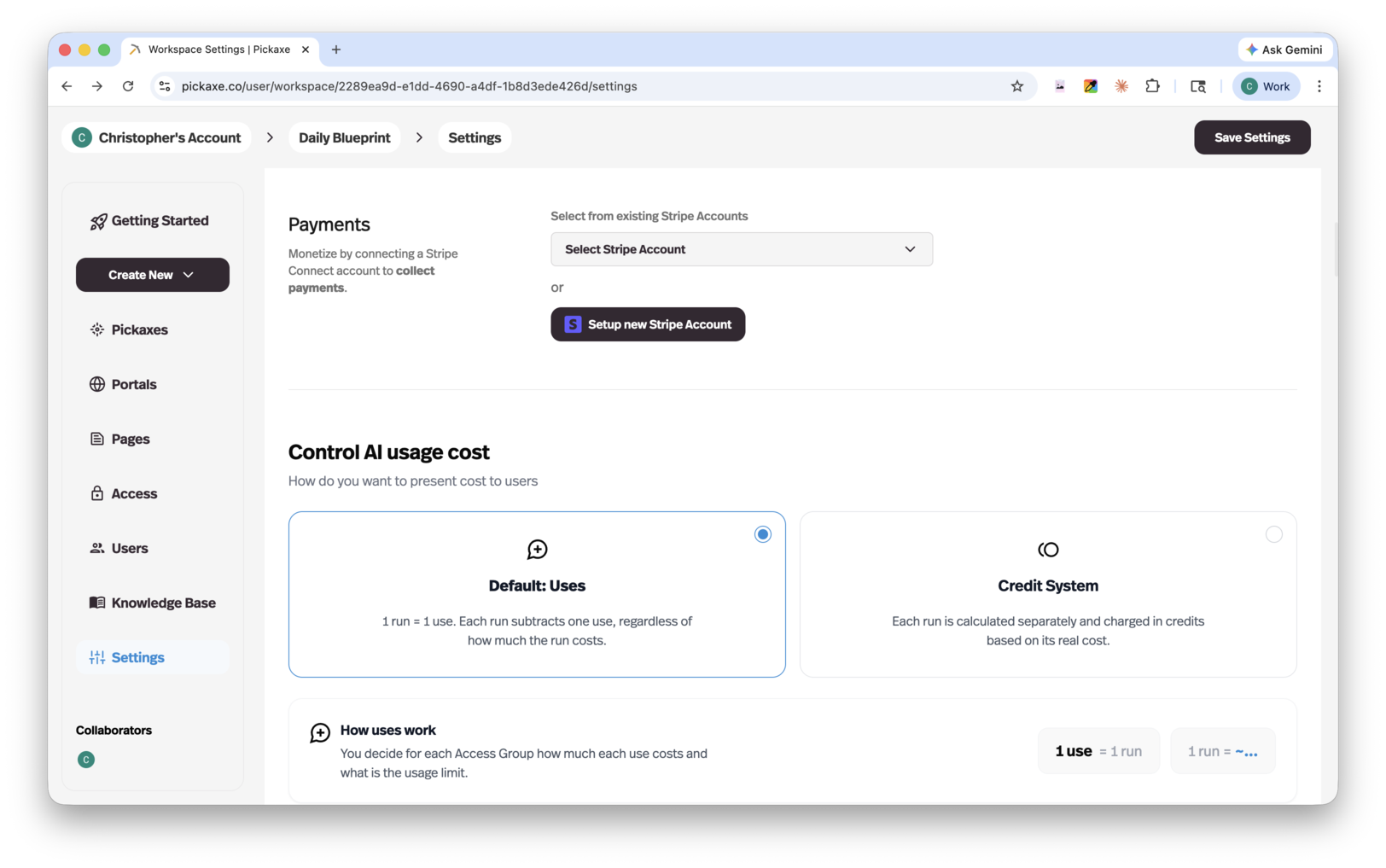
Then return to your member access group. Enable Monetization, select the pricing option, set the price, and save your changes.
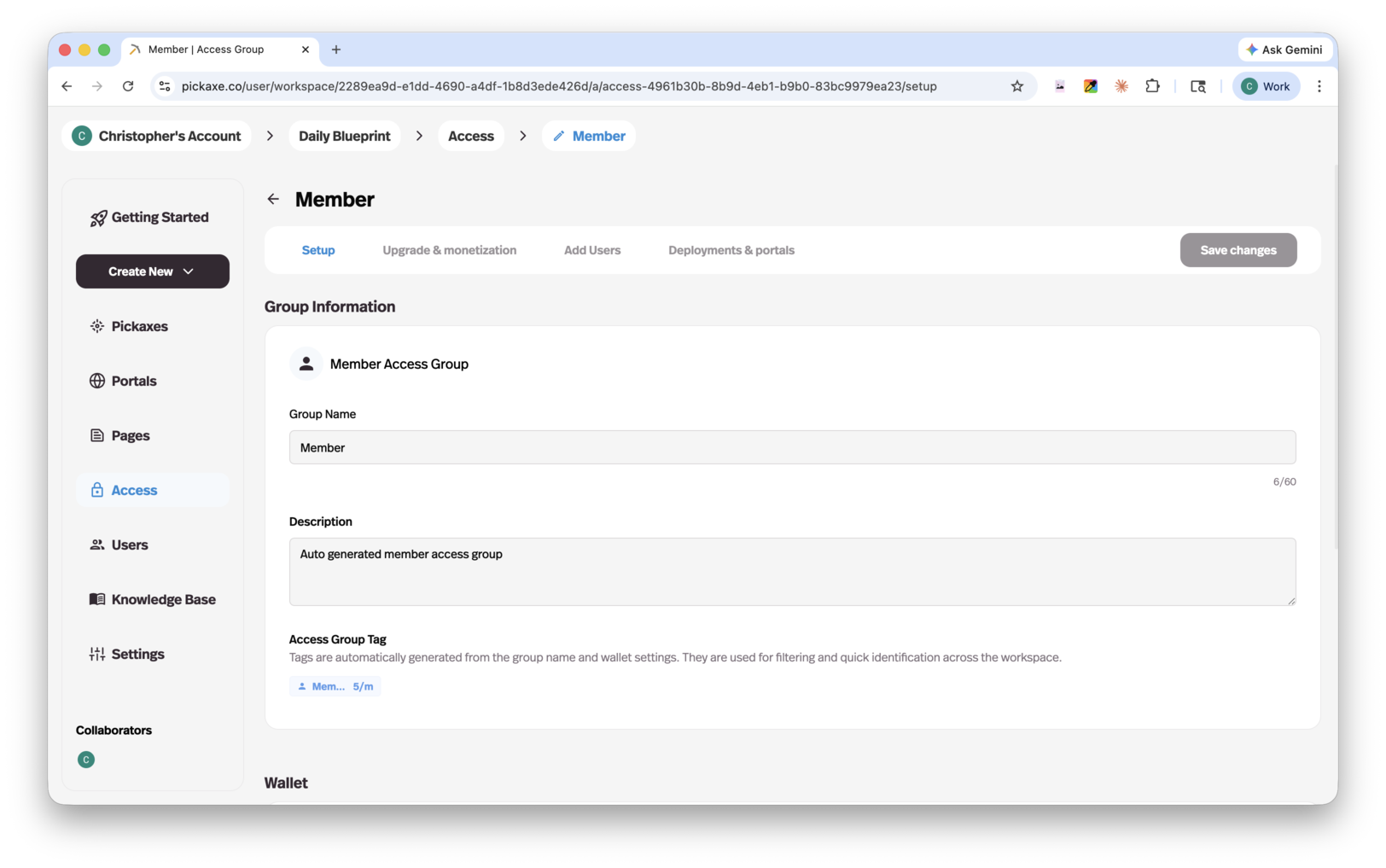
For a course companion, one paid member group with a clear allowance is enough to start. You can add more tiers later if customers need meaningfully different packages.
Pickaxe supports two ways to represent usage: uses, where a user input counts as a use, and credits, which track the underlying AI usage cost. Choose the system in your workspace settings, then configure the allowances your offer includes.
Uses are easy for a customer to understand. Credits can be helpful when one task is a short answer and another processes a long document, because those tasks may cost different amounts to run.
Before settling on an allowance, run representative conversations and look at their usage. Include AI costs and applicable platform and payment fees in your calculation; the pricing page has current plan details.
For a deeper walkthrough, see setting up Pickaxe monetization with Stripe.
Sell individual tools with Offers
If your portal contains several products, you do not have to make every purchase a whole membership tier. Use the portal editor's Lock tab to gate a specific agent, Page, or folder.
Choose an Offer for a one-off purchase, or an upgrade preview when the content should become available through a higher access group. A course creator could keep the companion in the main membership and sell a separate assessment tool as an Offer.
Check the entire customer journey: see the offer, follow the purchase flow, return to the portal, and use the content covered by the purchase. Also check what someone without that purchase can see.
If people already pay you elsewhere, plan how you will grant their new access. Rebuilding the agent does not automatically move their existing subscriptions or membership records.
10. Put the agent where your customers already are
A portal is one way to share your rebuilt GPT. You can also put an agent directly on your website or make it available through a messaging channel.
Open the agent's deployment options and choose the channel that fits the way your audience works. Start with the one you expect people to use most.
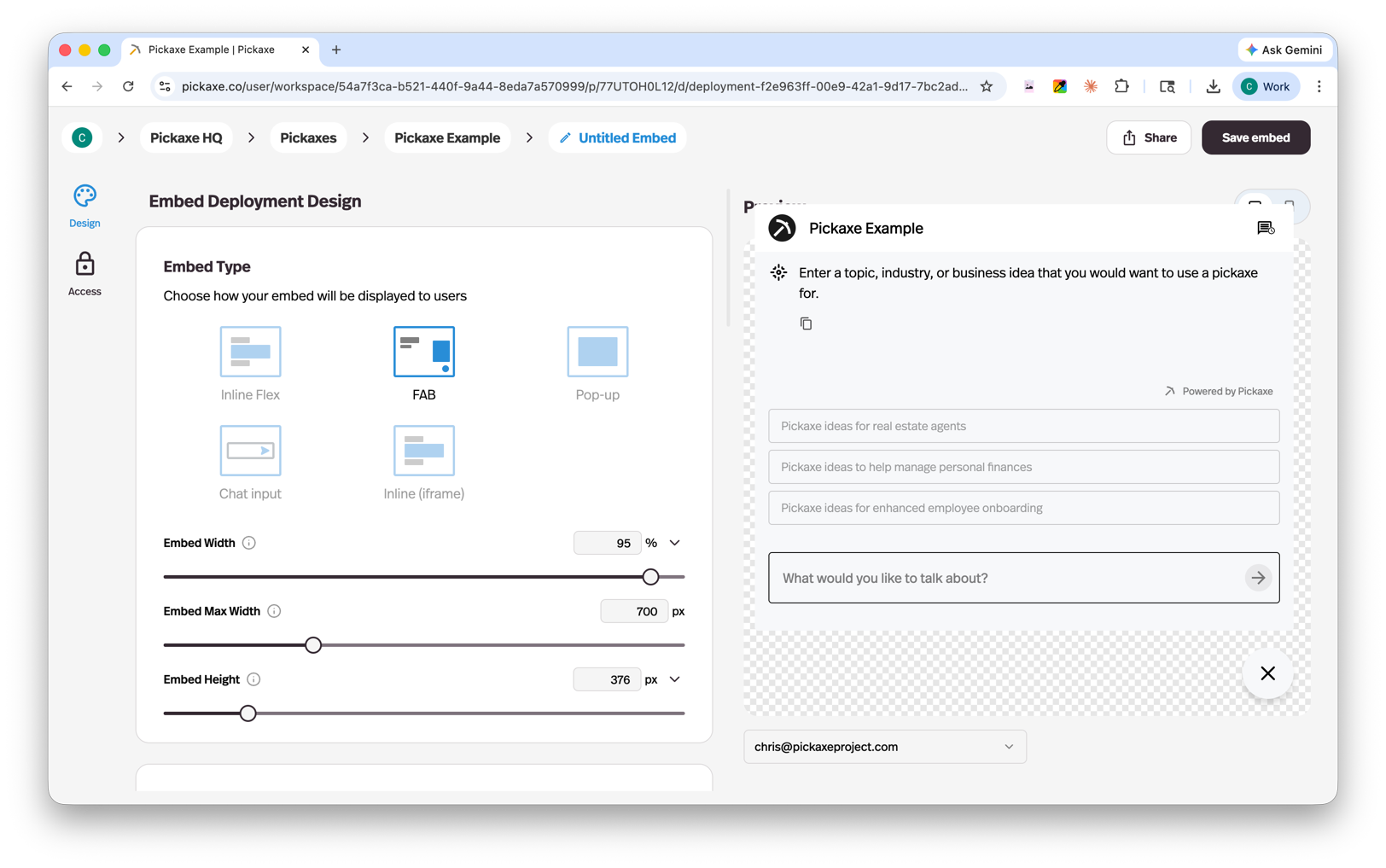
- Website embed: add the agent to an existing site as an inline experience or chat widget. This works well for a course page, client resource hub, or lead-generation page.
- Direct link: give someone a straightforward URL to the agent when they do not need a full portal.
- Email: let users interact with an agent through an email workflow.
- WhatsApp: make the agent available in a messaging experience your audience already uses.
- Slack: bring an internal assistant into a team's Slack workflow.
- API: connect the agent to a custom application when you need a developer-controlled interface.
Each channel has its own setup. Compare the deployment options, connect the required account, and test a complete interaction in the destination channel.
For a website, copy the embed code from the deployment setup into your site and check the actual published page. Use our website embedding guide for the detailed steps.
Test on a phone as well as a desktop. Check the opening message, login or access requirements, file uploads if you use them, and what happens when the user reaches a limit.
Your original GPT gave people one place to talk to your assistant. This stage lets you choose the place that makes sense for the customer, while continuing to improve the agent behind it.
11. Help your existing users make the move
List every place the old GPT link appears: onboarding emails, course lessons, client handoff documents, website buttons, and saved team resources.
Replace those links only after the new deployment passes your tests. Do not assume a link hosted by OpenAI will redirect to your Pickaxe deployment.
Give users a short explanation of where to go, whether they need a login, and one task to try. If some capabilities are still being rebuilt, state those limits in the handoff.
Your assistant is now available at [new link]. Use [login instructions] to access it. Start with [example task]. Your access includes [allowance or membership details]. For help or an unexpected answer, contact [support route].
Replace every bracketed field before sending that message. If an account needs an invitation or a purchase, make the next step explicit.
Review early conversations and failure reports after the switch. Keep the test set so that prompt updates, source changes, and model switches can be checked against the same expectations.
Rebuild a Custom GPT on Pickaxe: launch checklist
- The instructions and reference material are authorized, current, and saved outside the builder.
- The agent passes representative tasks and handles missing information.
- Knowledge sources are attached and their refresh behavior is understood.
- Actions work with the correct account and fail clearly.
- The chosen deployment works on desktop and mobile where applicable.
- Visitor and member access behave as intended.
- Usage limits, pricing, and purchase permissions match the offer.
- Existing customer access has been planned separately.
- Old links and onboarding material have an owner for the switch.
- Users have a clear support route.
Troubleshooting your first rebuild
The answer sounds right but uses the wrong facts
Choose one incorrect claim and trace it back to the material the agent should have used. Check whether that source is attached, readable, current, and relevant to the question.
If two sources disagree, resolve the conflict in the knowledge base. Adding a sentence that says “always be accurate” does not tell the agent which version of a policy is authoritative.
The agent ignores an important instruction
Reduce competing instructions and make the required behavior concrete. Instead of asking for a helpful answer, specify the sections, necessary questions, and conditions for escalating to a person.
Try the failing task again in a fresh conversation, then in a longer conversation. If only the longer version fails, review the accumulated context and the resource settings before assuming the rule itself is unclear.
An action reports success without the right result
Inspect the destination record, the connected account, and the submitted fields. Confirm that your test did not create a duplicate in another project or send a request to the wrong workspace.
Update the action instructions to report only what the tool result establishes. If a service accepted a request but has not completed the job, the answer should describe that pending state.
The owner can use the agent but customers cannot
Check the deployment's access group and the customer's membership or entitlement. Then reproduce the issue with an account that has the same permissions as the affected customer.
Keep access testing separate from answer testing. A perfect response in Preview does not establish that a new member can reach the tool, use the included allowance, or purchase the right offer.
For every fix, save the original failing input and add it to your test set. That turns the first migration into a useful foundation for future maintenance.
Common questions before you start
How long does a rebuild take?
The configuration work depends on the agent. A prompt with a few documents is simpler than a workflow with private APIs, customer permissions, and a paid portal.
Plan time for testing and access setup as well as copying instructions. A quick first answer does not mean the customer-facing product is ready.
Can I use any model?
You can choose from Pickaxe's supported model catalog and the models available to your plan. That provides choice across providers, but it is not a guarantee that every model exists on the platform.
Will my old chat history appear?
This manual process does not transfer previous conversations. Preserve any records you need through appropriate export or recordkeeping processes, and explain the fresh starting point to users.
What should I build first?
Choose the smallest agent that delivers a recognizable result for your audience. Rebuild it, test it, and use the feedback to decide which capabilities deserve the next investment.
See the Pickaxe Custom GPT comparison for the product differences, then start rebuilding your first agent.