
For the last couple of years, building an AI agent meant picking a model and marrying it. You chose GPT, or you chose Claude, or you chose Gemini, and then you wired your whole product around that one brain.
That era is quietly ending. The teams getting the best results in 2026 aren't loyal to a single lab — they're multi-model. They route the reasoning-heavy steps to one model, the cheap high-volume steps to another, and the long-context document work to a third, all inside the same agent.
Multi-model AI agents are exactly what they sound like: a single agent that calls more than one underlying large language model, choosing the right one for each task instead of forcing one model to be good at everything.
I've spent a lot of time looking into how people actually wire these up — the routing logic, the trade-offs, the places it backfires. This is the honest guide I wish I'd had: what "multi-model" really means, why mixing OpenAI, Anthropic, and Google beats betting on one, the patterns that work, and how to build it without juggling five API keys and five invoices.
If you're still getting your bearings on what an AI agent even is, start there first — this assumes you know the basics and want to level up.
What Is a Multi-Model AI Agent?
A multi-model AI agent is an agent whose underlying intelligence comes from two or more different language models rather than one. The agent decides — per request, per step, or per task type — which model to send the work to.
The key word is per task. A single-model agent uses the same brain for everything: classifying a support ticket, drafting a legal summary, extracting JSON from a messy email. A multi-model agent treats those as different jobs and hands each to whichever model does it best (or cheapest, or fastest).
It helps to separate two ideas people often blur together:
- Multi-model = one agent, several different models (e.g., GPT-5.5 for reasoning, Gemini for long documents, Haiku for cheap classification).
- Multi-agent = several agents that each may use one model, coordinating on a bigger task. That's a different pattern — we cover it in multi-agent systems explained.
You can absolutely combine the two: a multi-agent system where each specialist agent runs on the model best suited to its slice of the job. But you don't need a whole agent team to go multi-model. Even one agent can route across models.
Why does this matter now? Because the gap between "the best model" and "the best model for this specific task" has gotten wide enough to be worth exploiting. According to Menlo Ventures' State of AI in the Enterprise research, the typical enterprise now uses three or more foundation models in production rather than standardizing on one. Single-vendor loyalty is becoming the exception.
Why Mix Models at All?
The honest answer: no single model wins every category, and the rankings change every few months. Building your whole agent around one lab is a bet that they'll stay ahead forever. They won't.
Here are the real reasons teams go multi-model.
1. Different models are genuinely better at different things
This is the big one. One model writes more natural marketing copy. Another is sharper at multi-step logic and code. Another swallows a 1-million-token document without breaking a sweat. If you only use one, you're accepting that model's weaknesses on every task it's bad at.
2. Cost control
Frontier reasoning models are expensive. Most of what an agent does — routing, classification, simple extraction, "is this spam?" — doesn't need a frontier brain. Sending those steps to a small, cheap model and reserving the expensive one for hard reasoning can cut your token bill dramatically without anyone noticing a quality drop. That idea has a name and a full playbook behind it — see AI model routing. Document-heavy workflows also benefit from choosing among AI document extraction tools instead of treating every file as plain text.
3. Speed and latency
Smaller models respond faster. For anything user-facing — a chat widget, an autocomplete, a live classifier — a fast small model on the easy turns keeps the experience snappy, while the heavy model only gets pulled in when the question is actually hard.
4. Resilience and uptime
Every provider has outages. If your entire product runs on one API and it goes down, so do you. A multi-model setup can fail over to a backup provider so a single lab's bad afternoon doesn't become your bad afternoon.
5. Avoiding lock-in
If switching models means rewriting your app, you're hostage to your vendor's pricing and roadmap. An agent designed to route across models can adopt whatever's best next quarter without a rebuild.
There's a real counter-argument here, and I'll get to it: multi-model adds complexity, and for plenty of simple agents a single good model is the right call. But for anything doing varied work at volume, the case for mixing is strong.
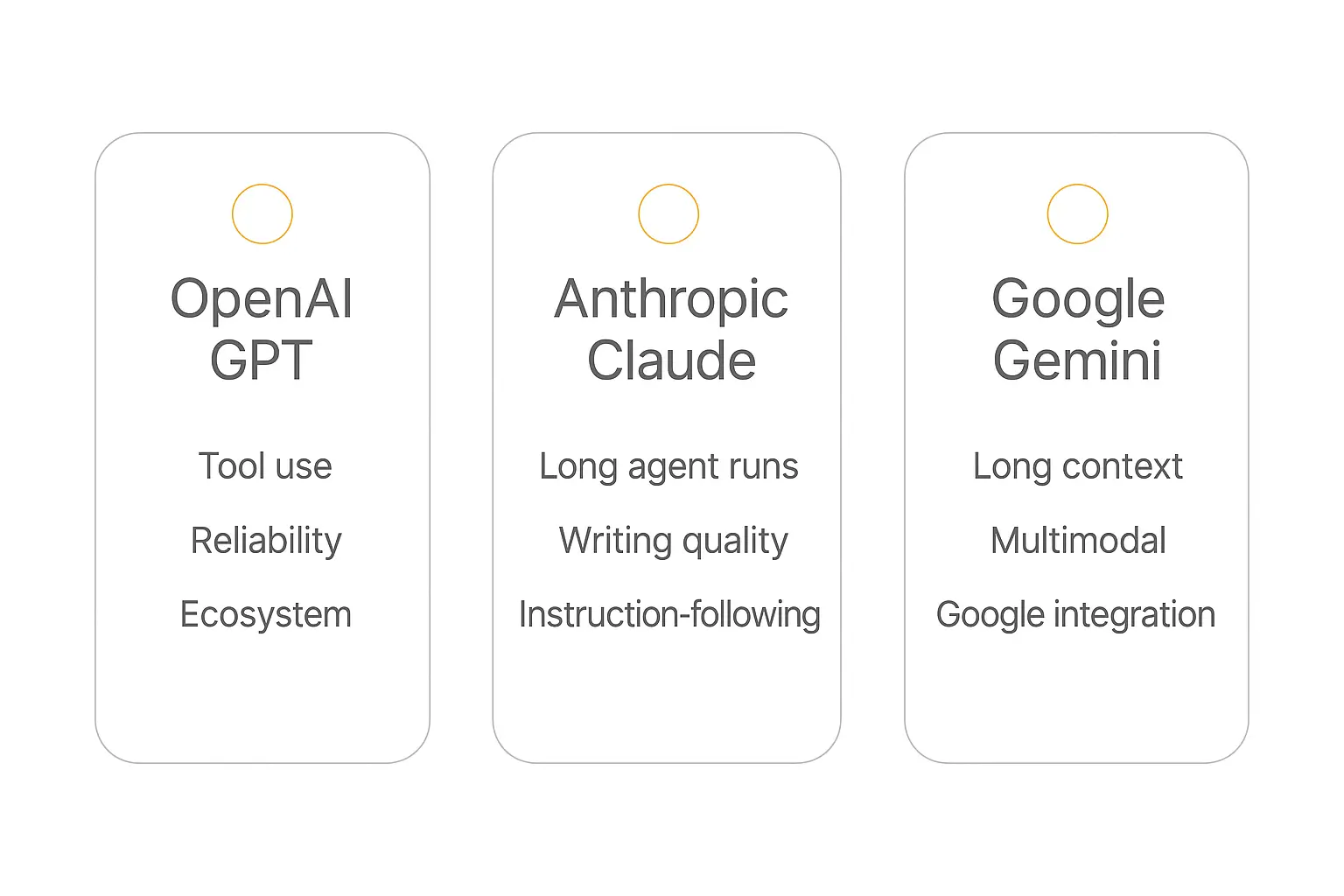
The Big Three: What OpenAI, Anthropic, and Google Are Each Best At
Let me be clear up front: these are generalizations, the models leapfrog each other constantly, and you should always check a current benchmark before committing. Independent leaderboards like Artificial Analysis and LMArena are the closest thing to a neutral scoreboard, and they update as new models drop. GPT-6 Astra is the most recent model to reshuffle those boards, and we went through what its benchmarks actually show.
That said, here's the rough lay of the land in 2026, and the kind of work each provider tends to win.
OpenAI (GPT-5.5 and the GPT family)
Where it shines: all-around reliability, function calling and tool use, a massive ecosystem, and strong structured-output behavior. GPT models are the safe default for agentic workflows because the tooling around them — the SDKs, the function-calling spec, the community — is the most mature.
Use it for: tool-heavy agents, structured data extraction, general reasoning, and anything where you want the largest pool of documentation and examples to lean on. See OpenAI's model docs for the current lineup.
Anthropic (Claude Opus 4.8, Sonnet 4.6, Haiku 4.5)
Where it shines: careful reasoning, writing quality, instruction-following, and long, agentic tasks that run for many steps without going off the rails. Claude has a reputation for being the model that "stays on task," which matters enormously for agents that take dozens of actions.
Anthropic's tiering is itself a built-in multi-model strategy: Opus for the hardest reasoning, Sonnet for the balanced everyday workhorse, and Haiku for fast, cheap, high-volume calls. Many teams run all three Claude tiers as their entire routing layer. Check Anthropic's model overview for specifics. For which job belongs on which tier, we went through them one at a time in Claude Opus vs Sonnet vs Haiku.
Use it for: writing-heavy work, long multi-step agent runs, nuanced reasoning, and tasks where carefully following instructions matters more than raw speed.
Google (Gemini 3.1 Pro and the Gemini family)
Where it shines: enormous context windows, native multimodality (text, images, audio, video in one model), and tight integration with Google's ecosystem. When you need to drop an entire codebase, a 300-page contract, or a long video transcript into a single prompt, Gemini's context length is hard to beat.
Use it for: long-document analysis, multimodal tasks, anything Google-Workspace-adjacent, and high-context retrieval. Google's Gemini model docs list the current context limits.
Quick comparison
| Strength | OpenAI (GPT) | Anthropic (Claude) | Google (Gemini) |
|---|---|---|---|
| Tool use / function calling | Excellent | Excellent | Strong |
| Long multi-step agent runs | Strong | Excellent | Strong |
| Writing quality | Strong | Excellent | Good |
| Long context | Strong | Strong | Excellent |
| Multimodal (image/audio/video) | Strong | Good | Excellent |
| Cheapest tier for volume | Good | Haiku — Excellent | Flash — Excellent |
| Ecosystem / docs maturity | Excellent | Strong | Strong |
Notice there's no single column that wins every row. That's the entire argument for going multi-model in one table.
How Model Routing Actually Works
"Multi-model" is a nice idea, but the mechanics come down to one question: how does the agent decide which model gets each request? That decision layer is called a router, and there are a few ways to build one.
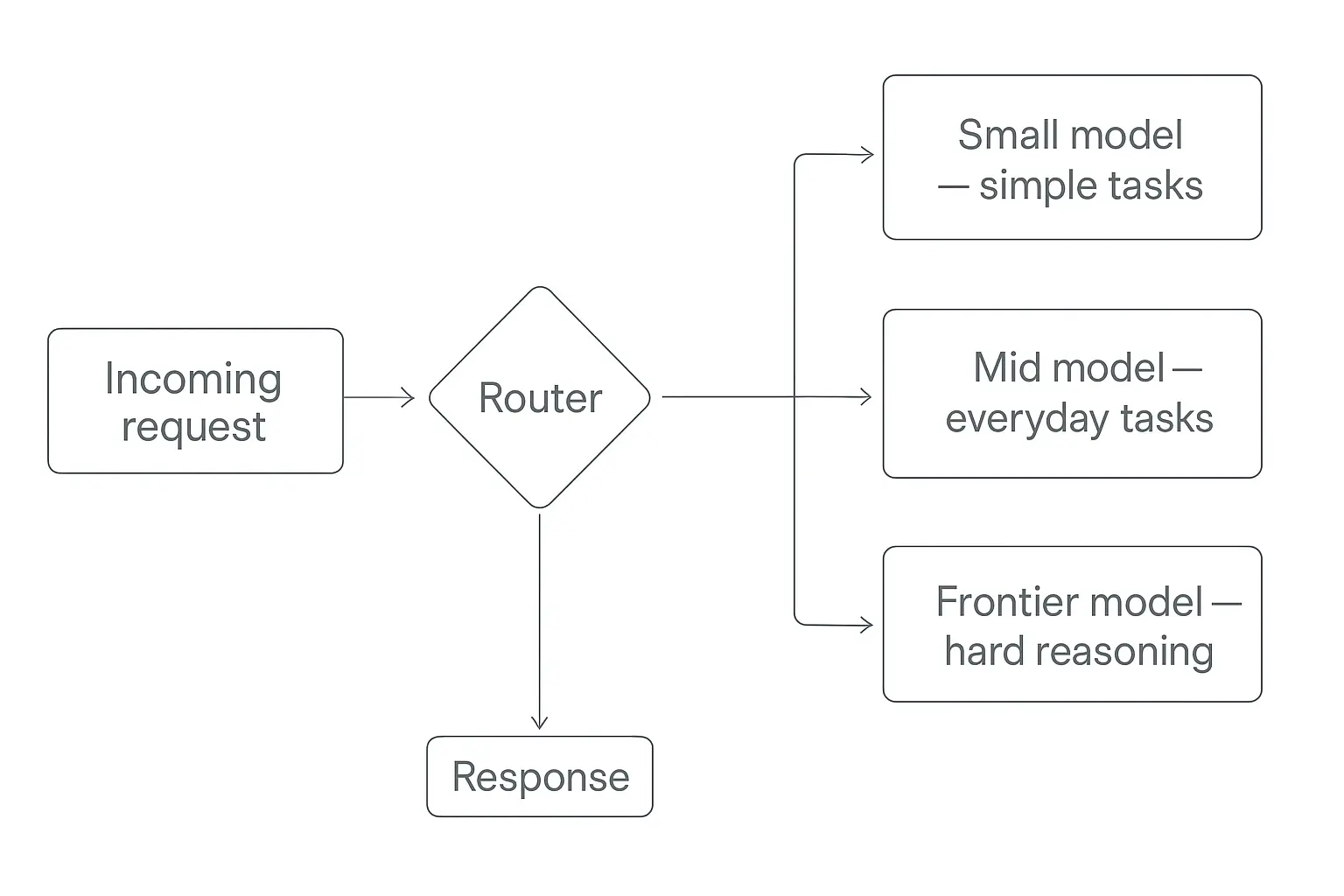
Rule-based routing
The simplest approach. You write explicit rules: "classification tasks go to the cheap model, anything tagged legal goes to Claude, document uploads over 100 pages go to Gemini." It's transparent, predictable, and free to run — there's no extra model deciding. The downside is you maintain the rules by hand.
Model-based routing
Here a small, fast model looks at each incoming request and classifies it: easy or hard, which domain, how long. Based on that, it picks the destination model. It's more flexible than hard rules and adapts to messy real-world inputs, but it adds a little latency and cost for the routing call itself. Projects like OpenRouter and routing research from Not Diamond have made this approach mainstream.
Cascade / fallback routing
Start cheap, escalate if needed. The request goes to a small model first; if its confidence is low or its answer fails a check, the agent retries with a bigger model. You only pay for the expensive model on the requests that actually need it. This is one of the most cost-effective patterns in production.
Capability routing
Route by what the task needs, not how hard it is: image in the input goes to a multimodal model, a 500K-token document goes to the big-context model, a tool-calling step goes to the model with the best function-calling support. You're matching the request to a capability, not a difficulty score.
The Multi-Model Patterns That Actually Work
Beyond routing one request to one model, there are composition patterns where multiple models work on the same request. These are where multi-model gets genuinely powerful.
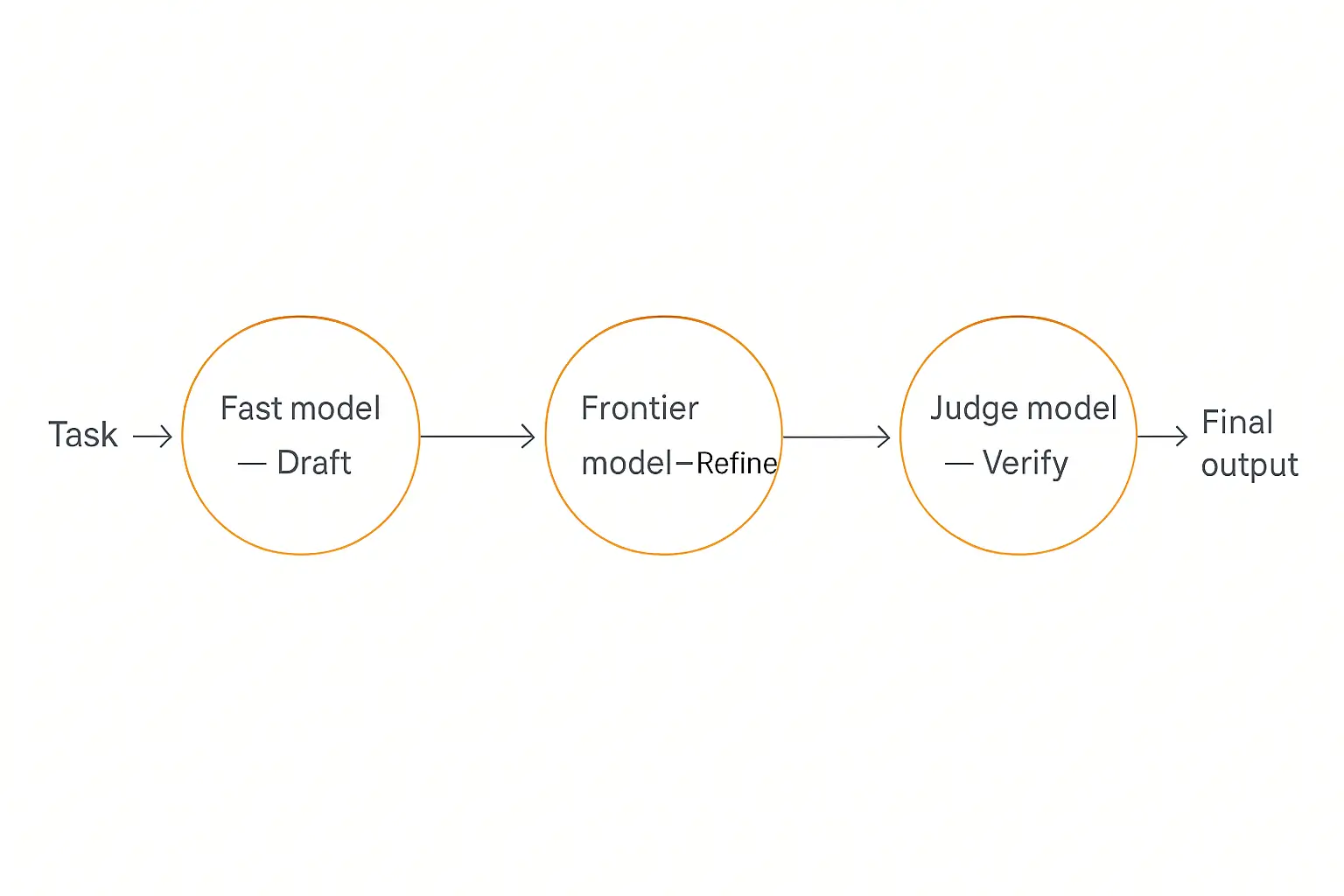
Draft-and-refine
A fast, cheap model produces a first draft; a stronger model refines it. You get most of the quality of the expensive model while spending fewer of its tokens, because it's editing rather than generating from scratch. Great for content generation and code.
Generator-and-judge
One model produces an answer; a different model evaluates it against your criteria and either approves it or sends it back. Using a different model as the judge matters — a model is a poor critic of its own blind spots, so a second opinion from another lab catches mistakes the first one is structurally prone to. This is one of the most reliable quality-control patterns for agents.
Ensemble / best-of-N
Ask two or three models the same question and either pick the best answer or have a judge synthesize them. Expensive, but for high-stakes outputs (medical, legal, financial) the redundancy can be worth it. Think of it as a second and third opinion.
Specialist mesh
In a multi-agent system, give each specialist agent the model that fits its job — a writer agent on Claude, a data-extraction agent on a cheap fast model, a research agent on a big-context model. The orchestration is multi-agent; the model assignment is multi-model. This is the most advanced setup and the one frontier teams are converging on.
Want to pick a model per agent without managing five API keys?
Pickaxe lets you choose the model for each agent and meters the tokens through one account — no separate billing to wrangle.
Real-World Multi-Model Workflows
Abstract patterns are easier to grasp with concrete examples. Here are a few multi-model setups that map to real jobs.
A customer support agent
A cheap, fast model handles intent classification and the 70% of tickets that are simple FAQs. When a ticket is flagged complex or angry, it escalates to a stronger reasoning model that drafts a careful, empathetic reply. A long product manual lives in context via a big-context model for retrieval. Three models, one agent, and the bill is a fraction of running everything on the frontier model.
A content production agent
A fast model generates outlines and first drafts in bulk; a writing-strong model (Claude is a common pick here) polishes the ones that pass a quality gate; a judge model fact-checks claims against source material before anything ships. This is draft-and-refine plus generator-and-judge stacked together.
A research agent
A big-context model ingests and summarizes long source documents, a reasoning model synthesizes findings across them, and a cheap model formats the final output and citations. If you want to see how a citation-disciplined research agent is structured, we broke one down in how to build an AI research agent.
A document-processing agent
Multimodal model reads scanned PDFs and images; extraction model pulls structured fields into JSON; a verification model checks the extracted data against the original before it hits your database. Each step uses the model that's actually good at it.
The Honest Downsides of Multi-Model
I'd be doing you a disservice if I only sold the upside. Multi-model is not free, and plenty of agents are better off single-model. Here's the real cost.
Complexity
Every model you add is another API, another set of quirks, another failure mode, another thing to monitor. The routing logic itself becomes code you have to maintain and debug. A single-model agent is just simpler, and simple ships.
Inconsistent behavior
Different models format differently, follow instructions differently, and have different ideas about what "JSON only" means. Stitching their outputs into one coherent experience takes work, especially when a routing decision sends similar requests to different models and users notice the tonal shift.
Prompt portability
A prompt tuned for GPT often underperforms on Claude or Gemini and vice versa. Truly multi-model agents need prompts that are either model-agnostic or maintained per model — which multiplies your prompt-engineering work.
Evaluation overhead
You can't improve what you don't measure, and now you're measuring across several models whose performance shifts every time a provider ships an update. Good testing and evaluation matters more in a multi-model setup, not less.
Billing and key management
Three providers means three API keys, three invoices, three rate limits, three sets of usage dashboards. This is the unglamorous tax of going multi-model the hard way — and it's exactly the part a good platform should absorb for you.
My honest take: if your agent does one narrow thing, pick one good model and move on. Go multi-model when you have real variety in your workload — a mix of cheap-and-frequent and hard-and-rare tasks — because that's where the cost and quality gains actually show up.
How to Build a Multi-Model Agent Without Juggling Five API Keys
Everything above assumes you're willing to wire up multiple provider SDKs, write a router, manage keys, and reconcile invoices. If you're a developer who enjoys that, great — frameworks like LangGraph, CrewAI, and AutoGen give you the building blocks, and OpenRouter gives you a single API across providers.
But most people building client-facing agents don't want to run a routing service. They want to choose a model per agent, get good results, and ship. That's the gap no-code platforms close.
This is the part where I'll be upfront that I build on Pickaxe, so take it as the recommendation of someone who uses the thing. When you build an agent in Pickaxe, you pick the underlying model from a menu of frontier options — different Claude tiers, GPT, Gemini, and others — per agent. The tokens are metered through your Pickaxe account, so there's no wrangling separate API keys or separate invoices for each provider.
That means a multi-model setup looks like building a few agents, each pointed at the model that suits its job, and connecting them — rather than standing up a routing microservice. For a support flow you might run a cheap, fast model on the front-line triage agent and a stronger model on the escalation agent. For content you might run a writing-strong model on the drafting agent and a different one on the fact-check agent.
You can connect those agents to your real tools with Actions and MCP, give each one its own knowledge base, and deploy the whole thing as a branded portal or an embed on your site. The model choice is one dropdown; the plumbing is handled.
The point isn't that one approach is universally right. If you're shipping a serious engineering product, code it. If you want a multi-model agent running this week without becoming a DevOps project, a platform that abstracts the providers is the faster path.
Build a multi-model agent and put it in front of clients
Pick the model per agent, connect your tools, and deploy a branded portal — no routing service required.
Multi-Model AI Agents FAQ
What is a multi-model AI agent?
It's an AI agent that uses two or more different language models, choosing the right one for each task instead of relying on a single model for everything. For example, a cheap model for classification, a reasoning model for hard logic, and a big-context model for long documents — all inside one agent.
Is multi-model the same as multi-agent?
No. Multi-model is about which underlying models one agent uses. Multi-agent is about several agents coordinating on a task. You can combine them — a multi-agent system where each agent runs on a different model — but they're distinct ideas. See multi-agent systems explained for the difference.
Does mixing models actually save money?
Usually, yes — if your workload has variety. The savings come from sending high-volume, simple tasks to cheap models and reserving expensive frontier models for the small share of requests that genuinely need them. Cascade routing (start cheap, escalate only when needed) is the most reliable way to capture that.
Which is the best model for AI agents?
There isn't one, and that's the point. As of 2026, OpenAI's GPT line is the safe all-rounder, Anthropic's Claude excels at long agent runs and writing, and Google's Gemini leads on context length and multimodality. Check a live benchmark like Artificial Analysis before committing, because the rankings move monthly.
Do I need to code to build a multi-model agent?
Not anymore. Frameworks like LangGraph and CrewAI are the code-first path, and OpenRouter gives developers one API across providers. No-code platforms like Pickaxe let you pick a model per agent from a dropdown and handle the keys and billing for you, so you can run a multi-model setup without writing a router.
What about bringing my own API keys?
It depends on the platform. Some let you plug in your own provider keys; others, including Pickaxe, meter model usage through the platform's own credits so you don't manage separate provider accounts and invoices. For most people the second approach is simpler — one bill, no key rotation, no per-provider rate-limit juggling.
The Bottom Line
The single-model era is ending because the premise behind it — that one lab will be best at everything — was never true and is getting less true every quarter.
Multi-model AI agents win by playing each model to its strengths: cheap and fast where speed matters, frontier reasoning where the problem is hard, huge context where the documents are long. Done well, you get better answers and a smaller bill.
It's not free — the complexity, the inconsistent outputs, and the key-and-billing tax are real. But you don't have to pay that tax yourself. Whether you code it with a framework or build it on a platform that abstracts the providers, the goal is the same: stop forcing one model to be good at everything, and start routing each job to the model that's actually built for it.
If you want to try the no-code path, you can build your first agent on Pickaxe, pick a model that fits the job, and add more as your workflow grows.