
The first time I heard "Model Context Protocol," I assumed it was another piece of AI jargon I could safely ignore. I was wrong. MCP turned out to be one of the most important shifts in how AI agents actually get things done, and if you're building or buying AI agents in 2026, it's worth understanding in plain English.
So here's my attempt at the explainer I wish I'd had. No PhD required.
The Model Context Protocol (MCP) is an open standard that lets AI models talk to your tools, data, and apps in a consistent way. Introduced by Anthropic in November 2024, it has since been adopted by basically everyone — OpenAI, Google, Microsoft — and quietly become the plumbing underneath the agent boom.
This is the model context protocol explained the way I'd explain it to a smart friend who doesn't write code: what it is, why it suddenly matters, how it works under the hood, where the risks are, and what it means for you whether you're a developer or a no-code builder.
What Is the Model Context Protocol (MCP)?
Let's start with the analogy everyone uses, because it's genuinely good.
MCP is like a USB-C port for AI applications. Before USB-C, every device had its own weird connector — one for your phone, another for your camera, a third for your laptop. USB-C replaced that mess with a single standard plug.
MCP does the same thing for AI. Instead of building a custom, one-off connection every time you want an AI model to reach a database, a calendar, or an API, you connect it once through a standard protocol.
More formally: MCP is an open-source standard for connecting AI applications to external systems. It gives large language models (LLMs) a secure, standardized "language" for discovering and using outside data, tools, and workflows at runtime.
The official spec lives at modelcontextprotocol.io, and Anthropic's original launch announcement is still a clean primer if you want the source.
Here's the key mental shift. An LLM on its own is brilliant but boxed in — it only knows what it was trained on, and it can't do anything in the real world. MCP is what lets it reach out: read your files, query your CRM, send an email, check live inventory. It turns a chatbot into an actual agent that takes actions.
The Problem MCP Solves: The "N×M" Mess
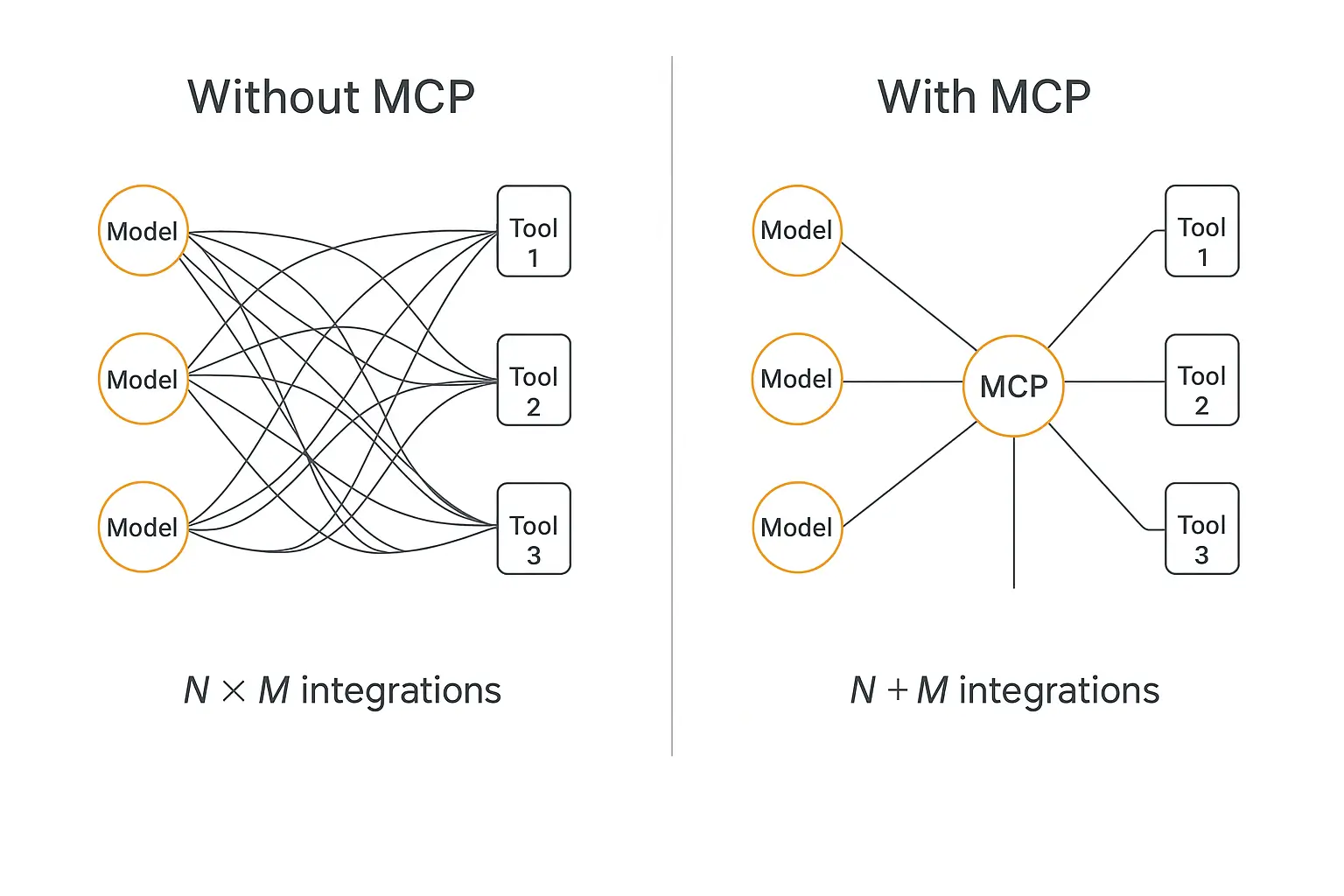
To appreciate why MCP caught on so fast, you have to understand the pain it removed.
Before MCP, every time you wanted to connect an AI model to an external tool, you wrote a custom integration. Specific to that model. Specific to that tool. Specific to that vendor's quirks.
Now do the math. If you have N different AI models and M different tools, you potentially need N × M custom integrations to wire everything together. Add one new tool and you're writing connectors for every model all over again.
This is famously called the "N×M problem," and it made AI integrations a tangled, brittle, expensive mess.
MCP collapses that. Build one MCP server for a tool, and any MCP-compatible model can use it. Add a model? It instantly works with every existing MCP server. You've gone from N×M to roughly N + M.
As Google Cloud puts it, this enables genuine "plug-and-play" tool usage instead of bespoke code for every single connection. That's the whole game.
Why MCP Matters Right Now (The Adoption Story)
Standards only matter if people actually use them. MCP's adoption curve is the real headline.
Here's the timeline that turned an Anthropic side project into an industry standard:
- November 2024: Anthropic open-sources MCP.
- March 2025: OpenAI adopts MCP across its Agents SDK, the Responses API, and the ChatGPT desktop app.
- April 2025: Google DeepMind confirms MCP support in upcoming Gemini models.
- December 2025: Anthropic donates MCP to the Agentic AI Foundation (AAIF) under the Linux Foundation — with OpenAI and Block as co-founders and AWS, Google, Microsoft, Cloudflare, and Bloomberg as supporting members.
That last move matters. When a protocol moves to a neutral foundation backed by every major lab and cloud, it stops being "Anthropic's thing" and becomes shared infrastructure.
The numbers back it up. As of late 2025, there were more than 10,000 active public MCP servers and over 97 million monthly SDK downloads across Python and TypeScript, according to figures shared during MCP's one-year mark.
By mid-2026, GitHub showed nearly 16,000 repositories tagged with the mcp-server topic. The flagship servers repo alone had crossed 86,000 stars.
The New Stack went as far as declaring "the Model Context Protocol won," noting it achieved faster cross-vendor adoption than specs like OpenAPI, OAuth 2.0, and even HTTP did in their early years.
Translation: this isn't a fad you can wait out. It's becoming the default way agents connect to the world.
Want the benefits of MCP without writing a server?
Pickaxe lets you connect agents to your tools through Actions and MCP — no code required.
How MCP Actually Works (Without the Jargon)
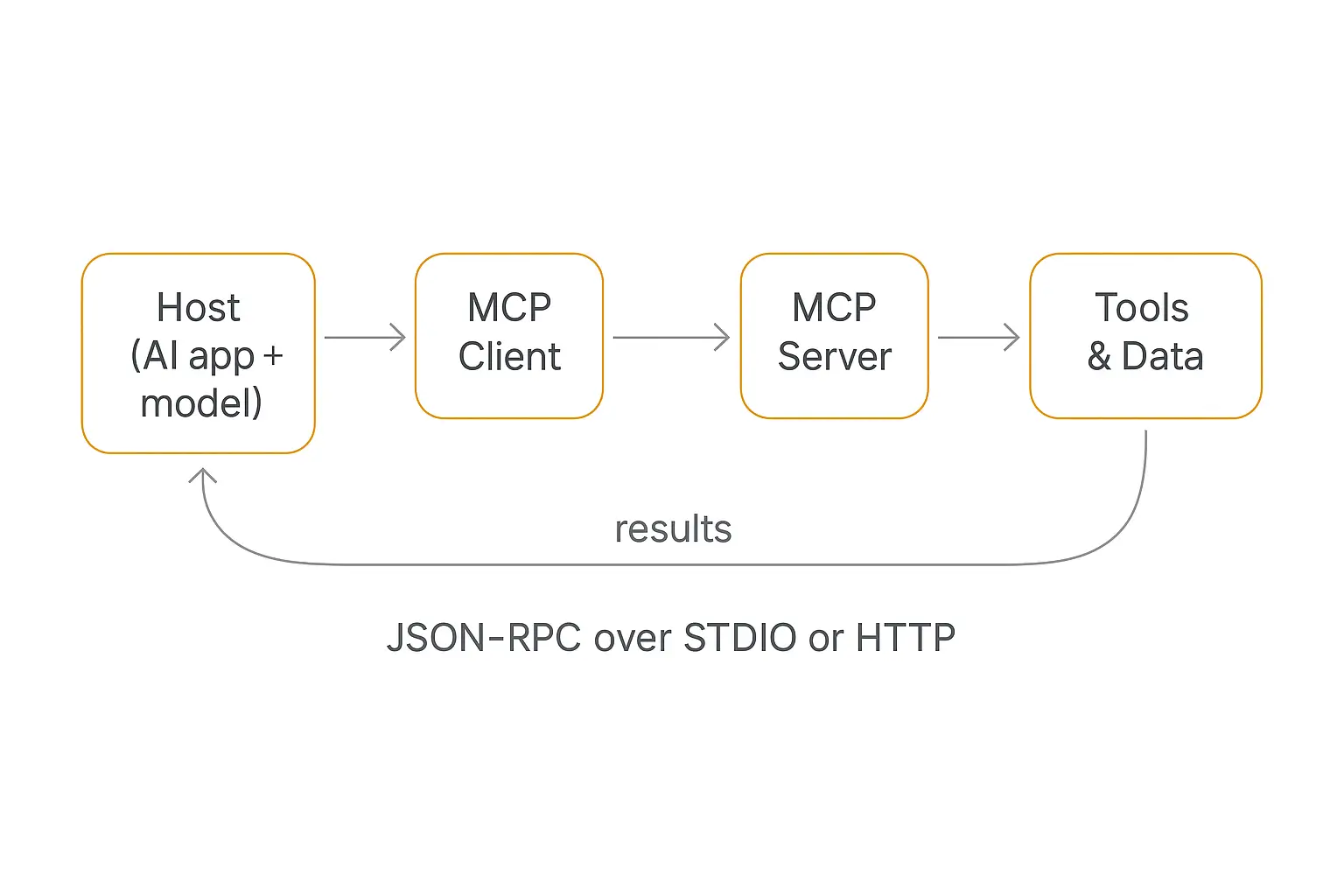
MCP uses a client–server architecture. That sounds technical, but it breaks into three simple roles.
1. The Host
The host is the AI application you actually use — Claude Desktop, an IDE like Cursor, ChatGPT, or a custom agent. It's the thing the human interacts with, and it contains the LLM.
2. The Client
Inside the host sits one or more clients. Each client maintains a dedicated, one-to-one connection to a single server. Think of the client as a translator that knows how to speak the MCP protocol on the model's behalf.
3. The Server
An MCP server is a lightweight program that exposes a specific capability — access to your Google Drive, your Postgres database, the GitHub API, a web search tool. Each server advertises what it can do, and the client can call it.
So the flow looks like this: Host (with the model) → Client → Server → the actual tool or data source, and back again. One host can connect to many servers at once, which is how a single agent ends up with dozens of capabilities.
What the model and server actually say to each other
Under the hood, MCP messages use JSON-RPC 2.0 — a simple, well-established format for "call this function, here are the arguments, send back the result." Communication is bidirectional: clients call methods, servers return results, stream partial outputs, and push notifications.
Those messages travel over a transport layer, and there are two common ones:
- STDIO — used when the client and server run on the same machine. The host launches the server as a subprocess and they talk over standard input/output pipes. Great for local tools.
- HTTP / SSE — used when the server runs remotely. It exposes an HTTP endpoint and uses Server-Sent Events to stream messages over a persistent connection. This is how hosted, multi-user MCP servers work.
If you want the deep technical reference, the official architecture docs are the canonical source.
The Three Primitives: Tools, Resources, and Prompts
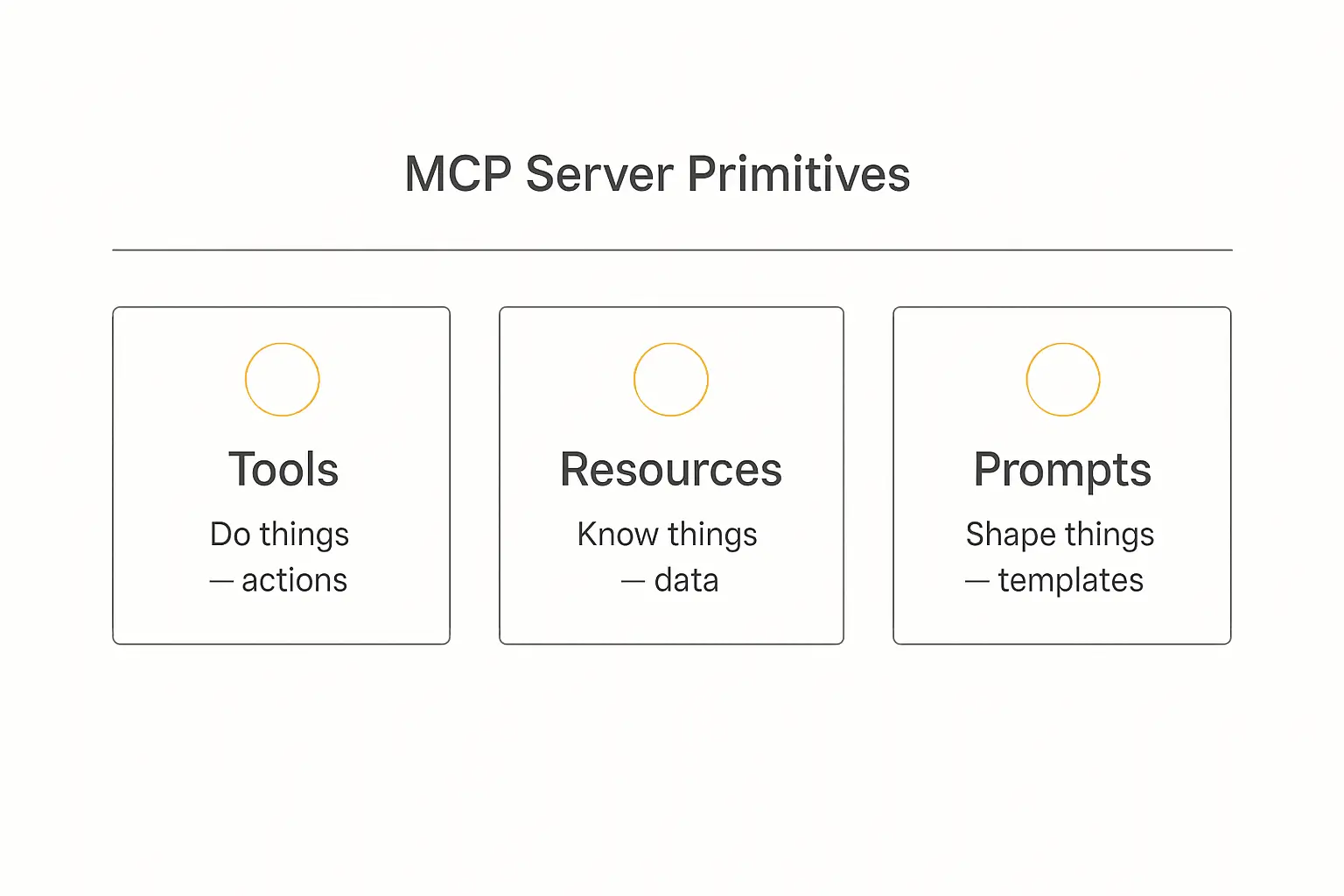
Every MCP server exposes its capabilities through three building blocks, called primitives. This is the part worth memorizing, because it tells you exactly what an MCP server can offer.
| Primitive | What it is | Example |
|---|---|---|
| Tools | Executable functions the AI can invoke to perform an action | "Create a calendar event," "run this SQL query," "send a Slack message" |
| Resources | Data sources that provide context the AI can read | A file, a database record, a webpage, a document |
| Prompts | Reusable templates that structure how the model approaches a task | A "summarize this ticket" or "draft a reply" workflow |
The easiest way to remember it: Tools do things. Resources know things. Prompts shape things.
When a host connects to a server, it negotiates capabilities and discovers which of these primitives are available. The model then decides — based on the user's request — which tool to call or which resource to read.
This discovery-at-runtime design is what makes MCP feel like magic compared to hardcoded integrations. The agent doesn't need to be pre-programmed for every tool; it asks the server what's available and adapts.
MCP vs. Traditional APIs and Function Calling
A fair question: didn't we already have APIs and "function calling"? What's new here?
Function calling (where you describe a function to the model and it decides when to call it) was a big step — but every vendor implemented it differently, and you still had to hand-write and host every function for every model. It solved the "how does the model decide" half, not the "how does everything connect" half.
Here's the distinction that finally made it click for me:
| Traditional API / function calling | MCP | |
|---|---|---|
| Standardization | Vendor-specific; reinvented per model | One open standard across all models |
| Discovery | Hardcoded; model must be told each function | Dynamic; servers advertise capabilities at runtime |
| Reusability | Rebuild per model/platform | Build once, any MCP client can use it |
| Scaling | N×M integrations | N+M integrations |
MCP doesn't replace APIs — your tools still have APIs underneath. MCP is the standard wrapper that makes those APIs uniformly consumable by any AI model. IBM's explainer frames it well: MCP sits between the model and the tools as a shared interface layer. MCP standardizes the tools; agent skills do the same for the instructions that tell a model when to reach for them.
If you're weighing how this stacks against agent-to-agent communication standards, I went deep on that in MCP vs A2A Protocol — they're complementary, not competing.
What People Are Actually Building with MCP
Theory is nice, but the reason MCP spread is that it unlocked genuinely useful workflows. Here are the patterns I keep seeing.
Developer tooling. Engineering teams wire agents into GitHub, Jira, Slack, Sentry, and Datadog through MCP. Instead of copy-pasting context between tabs, a developer asks their assistant to pull live sprint data, summarize error logs, or draft a pull request description — and the agent reaches each system through its MCP server.
Debugging with real context. One example that stuck with me: a developer chasing a production bug can have the agent trace the error, open the relevant module, scan recent commits, and cross-reference CI/CD logs to spot the dependency bump that broke things — all in one conversation, because each of those sources is an MCP connection.
Payments and operations. Stripe and similar platforms expose MCP servers so an agent can generate invoices, create customers, or process refunds from a natural-language request. That's the kind of capability that turns a support chatbot into something that actually resolves the ticket.
Knowledge and data. There are MCP servers for Google Drive, Notion, PostgreSQL, Salesforce, and most of the data tools you already use. The agent queries them live instead of relying on a stale export.
By early 2026, the MCP ecosystem included hundreds of notable server implementations covering most major SaaS platforms — on top of the 10,000+ public servers overall.
The developer chatter on X put it more bluntly than any spec page ever could. The recurring refrain through 2025 was that MCP had quietly become "the USB-C of AI" — and for once, the hype actually matched what shipped.
Where MCP Fits in the Agent Tech Stack
MCP isn't the whole agent — it's one layer of it. A working AI agent stacks roughly like this: a model for reasoning, memory for state, an orchestration layer to manage steps, and MCP as the connective tissue to tools and data.
If you want the full picture of how these pieces fit, I broke down each layer in the AI agent tech stack guide. And once you have multiple agents collaborating, MCP often becomes how each one reaches its tools — see multi-agent systems explained for that pattern.
The point: MCP is foundational, but it's a means to an end. The end is an agent that reliably does useful work.
The Security Side: What Can Go Wrong
I'd be doing you a disservice if I made MCP sound risk-free. Giving an AI model the ability to act on real systems raises real security questions, and the research community has been vocal about it.
Two risks come up again and again:
1. Prompt injection. Attackers hide malicious instructions inside data the model reads — a webpage, a document, an email — tricking it into doing something it shouldn't, like leaking data or calling a destructive tool. Security researcher Simon Willison has written extensively about how MCP amplifies prompt injection risk precisely because the model can now take actions.
2. Tool poisoning. A nastier variant where malicious instructions are buried in a tool's description — text the model sees but the user usually doesn't. A poisoned server can quietly steer an agent. A 2026 threat-modeling paper on MCP maps these attack surfaces using STRIDE/DREAD frameworks across the host, client, model, and server.
Practical defenses that the community converges on:
- Only connect to trusted, vetted MCP servers — treat an untrusted server like untrusted code.
- Keep a human in the loop for high-stakes actions (sending money, deleting records).
- Use least-privilege scoping so a server can only touch what it genuinely needs.
- Watch for unexpected tool behavior and audit tool descriptions.
None of this is a reason to avoid MCP. It's the same lesson every powerful technology teaches: capability and responsibility scale together. If you're deploying agents for clients, build security in from day one rather than bolting it on later.
Build an agent your clients can actually trust
Pickaxe handles access control, usage limits, and guardrails so your deployments stay safe.
What MCP Means If You're a No-Code Builder
Here's the part most MCP explainers skip: you don't have to write an MCP server to benefit from this shift.
The whole reason a standard like MCP is exciting is that it lets platforms do the hard plumbing for you. Tools you'd otherwise have to integrate by hand become available through a single, consistent interface — and no-code platforms expose that without making you touch JSON-RPC.
This is exactly how I think about building agents on Pickaxe. When I want an agent to do something — look up a record, send an email, post to a CRM — I use Actions, Pickaxe's connections to external tools and APIs. For automation platforms, Pickaxe connects through MCP to Make, Zapier, and n8n, which between them reach thousands of apps.
So the practical pattern is: the LLM reasons, and a tool layer (Actions + MCP) lets it act — the same architecture MCP standardizes, just without the code. You pick your model, give the agent a knowledge base, wire up a few actions, and deploy.
One tip from experience: keep it to a handful of actions per agent. If a workflow needs more, use a "waterfall" setup where a primary agent routes to specialized sub-agents. Fewer, well-chosen tools beat a sprawling toolbox every time — for both reliability and security.
How to Start Using MCP Today
Depending on who you are, "getting started" looks different:
If you're a developer: Spin up a local MCP server using the official SDKs (Python or TypeScript), connect it to an MCP-compatible host like Claude Desktop or Cursor, and watch your agent gain a new capability. The getting-started docs walk through it in under an hour.
If you're using AI tools day to day: Check whether your favorite app already has an MCP server — with 10,000+ public servers, odds are good. ChatGPT, Cursor, VS Code, Microsoft Copilot, and Gemini all support MCP connections now.
If you're building products for clients: Use a no-code platform that abstracts MCP and Actions for you, so you ship value instead of maintaining connectors. That's the lane I'd recommend for agencies and consultants — your time is better spent on the agent's logic and your client relationship than on integration plumbing.
Frequently Asked Questions
Is MCP only for Anthropic's Claude?
No. MCP started at Anthropic but is now an open standard under the Linux Foundation's Agentic AI Foundation. OpenAI, Google, and Microsoft all support it. It's vendor-neutral by design.
Is MCP free?
The protocol itself is open-source and free. Individual MCP servers may connect to paid services (the underlying API still costs what it costs), but MCP as a standard carries no license fee.
Do I need to know how to code to use MCP?
To build a server from scratch, yes. But to benefit from MCP, no — no-code platforms like Pickaxe expose tool connections and MCP-based integrations through a visual interface.
Is MCP the same as an API?
Not quite. APIs are how individual tools expose functionality. MCP is a standard layer that sits above APIs so any AI model can use any tool in a uniform way. MCP usually calls APIs under the hood.
What's the difference between MCP and A2A?
MCP connects a model to tools and data. A2A (Agent-to-Agent) connects agents to each other. They solve different problems and are often used together — more in our MCP vs A2A breakdown.
The Bottom Line
The Model Context Protocol is, at its heart, a boring-but-brilliant idea: give AI models one standard way to plug into the world.
That boring idea is why agents in 2026 can suddenly do so much more than the chatbots of a couple years ago. It killed the N×M integration nightmare, earned buy-in from every major AI lab, and became the connective tissue of the agent era — faster than almost any standard before it.
You don't need to memorize JSON-RPC to ride this wave. You just need to understand what MCP makes possible: agents that act, not just talk.
And the best way to feel it is to build one. If you want to create an AI agent that connects to your tools and data — and actually deploy it to clients — Pickaxe handles the plumbing so you can focus on the work that matters. Spin one up and see how far "agents that act" can take you.