
For most of the last two years, "building an AI agent" meant writing one good prompt, handing it a couple of tools, and hoping for the best. That gets you a demo. It does not get you something a client will pay for month after month.
The gap between those two things is the AI agent tech stack — the layers of infrastructure that sit between a raw language model and an agent that reliably does real work in production.
And that stack changed a lot recently. Three shifts redrew the map between 2024 and 2026: the Model Context Protocol standardized how agents connect to tools, reasoning models changed what an agent can decide on its own, and memory finally became a first-class part of the architecture instead of a hack you bolted on.
This guide walks the whole AI agent tech stack layer by layer — what each one does, the tools that live there in 2026, and how to tell the difference between what you actually need and what you're being sold. If you're still fuzzy on the basics, start with what an AI agent even is and come back. Everything below assumes you know an agent is a model that can plan, use tools, and act in a loop — not just answer a question.
I'll be honest about one thing up front: most people overbuild this. By the end you'll know which layers are non-negotiable and which you can skip until you actually need them.
What the "AI agent tech stack" actually means
An AI agent tech stack is the layered set of tools, models, and infrastructure you assemble to build, run, and govern an AI agent. Think of it the way a web developer thinks about a "stack" — database, backend, frontend, hosting — except the pieces are models, memory, tools, orchestration, and guardrails.
The reason it's worth thinking in layers is simple: you swap pieces independently. A new model drops every few months. A better vector database comes out. A client needs a different deployment channel. If your architecture is one tangled script, every change is a rewrite. If it's layered, you replace one box and leave the rest alone.
Different people slice the stack differently. AIMultiple counts seven layers. O'Reilly's 2026 edition groups them differently. Microsoft's framing at Build 2026 used five. The exact count doesn't matter — the functions do, and they're remarkably consistent across every version.
Here's the framing I find clearest: six horizontal layers that stack from the model up to the user, plus two vertical rails — observability and governance — that run through all six because they touch everything.
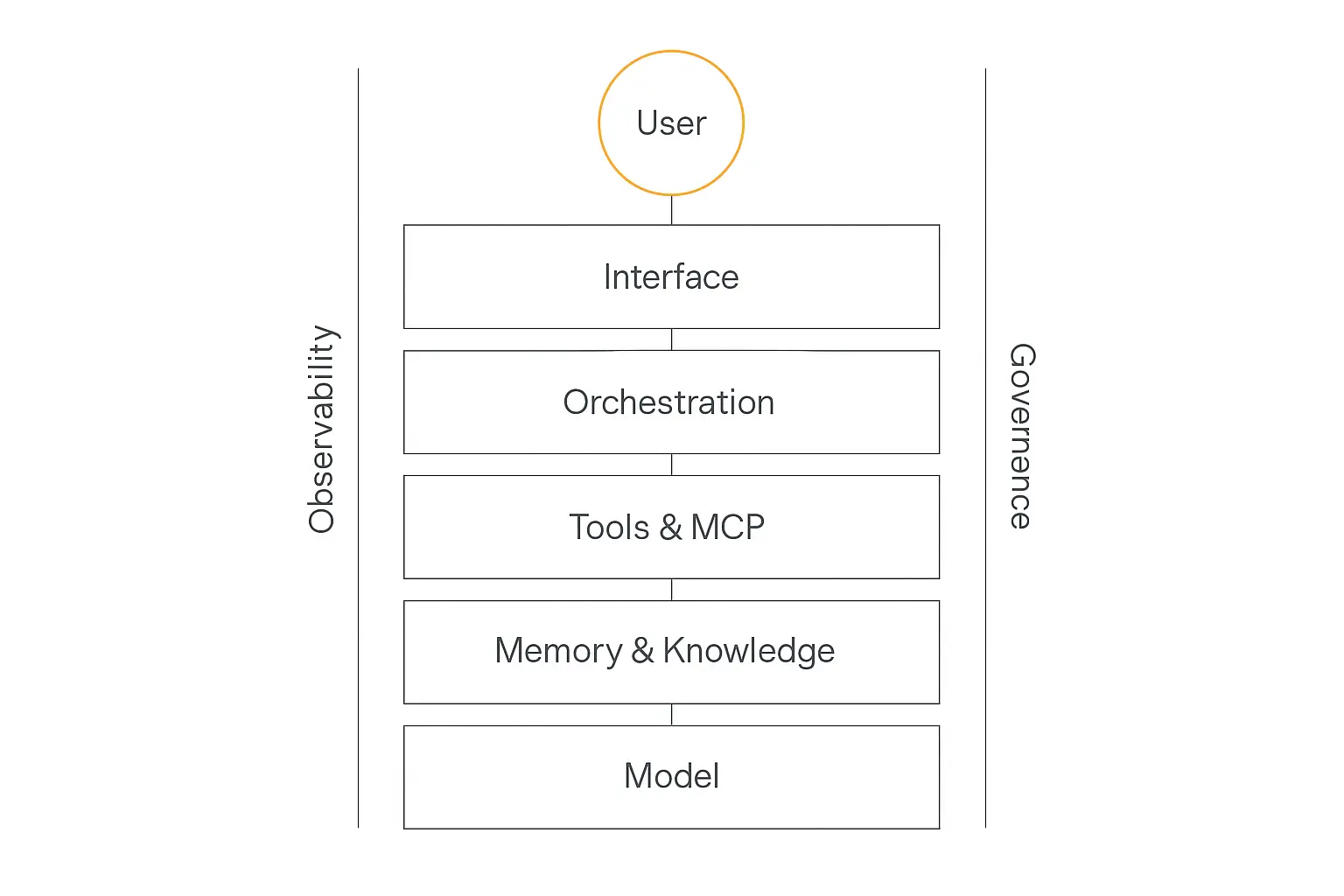
Let's walk them from the bottom up.
Layer 1: The model — the reasoning engine
At the bottom of the AI agent tech stack sits the model. It's the part everyone obsesses over and, paradoxically, the part you'll spend the least time configuring once you've chosen well.
The model is the reasoning engine. It decides what to do next, interprets tool results, and writes the final output. Everything above it in the stack exists to feed it the right context and act on its decisions.
In 2026 you're choosing along a few axes:
- Reasoning depth. Frontier models like Claude Opus and GPT-class flagships handle multi-step planning and ambiguous tasks. Smaller models are faster and cheaper but need tighter guardrails.
- Cost and latency. A model that's twice as smart but five times the price isn't automatically the right call. Match the model to the job.
- Tool-calling reliability. Some models are markedly better at producing well-formed tool calls. For agents, this matters more than raw benchmark scores.
- Context window. Bigger windows let you stuff in more memory and documents, but they're not a substitute for good retrieval — more on that in Layer 2.
The biggest mistake here is treating model choice as permanent. It isn't. The whole point of a layered stack is that you can route an easy task to a cheap model and escalate the hard ones to a frontier model — and switch entirely when a better option ships next quarter.
This is exactly why platforms decouple the agent from the model. On Pickaxe you pick the model per agent from a dropdown and tokens run through platform credits, so swapping from one model to another is a setting, not a migration. If you want to go deeper on the trade-offs, our model comparison breaks down speed, cost, and reasoning side by side.
Don't want to wire six layers together yourself?
Pickaxe bundles the model, memory, tools, and deployment into one no-code builder.
Layer 2: Memory and knowledge — what the agent knows
A raw model knows whatever was in its training data and nothing about your business, your client, or the conversation it had five minutes ago. The memory and knowledge layer fixes that.
This layer became a genuine architectural priority in 2026. As mem0's state-of-memory report put it bluntly, memory is still one of the weakest parts of large language models — the models themselves rely on a fixed context window and have no real long-term memory of their own. So you build it around them.
There are two distinct jobs here, and people constantly conflate them.
Knowledge: what the agent can look up
Knowledge is your reference material — documents, policies, product specs, past tickets. The pattern for serving it is retrieval-augmented generation (RAG): you chunk the documents, turn each chunk into a vector embedding, store those in a vector database, and at query time pull back the handful of chunks most relevant to what the user asked.
The tools that live here in 2026: vector databases like Pinecone, Weaviate, and pgvector for the Postgres crowd. If you're building from scratch, this is a real chunk of engineering — embeddings, indexing, re-ranking, keeping the index fresh.
If you're not, it's a file upload. Pickaxe's Knowledge Base handles chunking, embedding, and retrieval behind the scenes — you drop in PDFs or connect a source and the agent can cite it. We wrote a whole guide on adding a knowledge base without the jargon if you want the long version.
Memory: what the agent remembers
Memory is different. It's the agent's recollection of this user and this ongoing relationship — short-term (the current conversation) and long-term (preferences and facts that should persist across sessions).
The key design question, and one the O'Reilly piece hammers on: how much state do you actually need to manage? A stateless tool-caller that answers one question and forgets is a completely different engineering problem from a multi-session agent that learns a user over weeks. Don't build the second when you need the first.
Layer 3: Tools, actions, and MCP — how the agent does things
A model that can only talk is a chatbot. A model that can act — send an email, update a CRM, query a database, book a meeting — is an agent. The tools layer is what makes the difference, and it's where the chatbot-to-agent jump actually happens.
The mechanic is "tool calling" (or "function calling"): you describe a set of tools to the model, and when it decides it needs one, it emits a structured call — name plus arguments — that your code executes and feeds back. The model reads the result and keeps going.
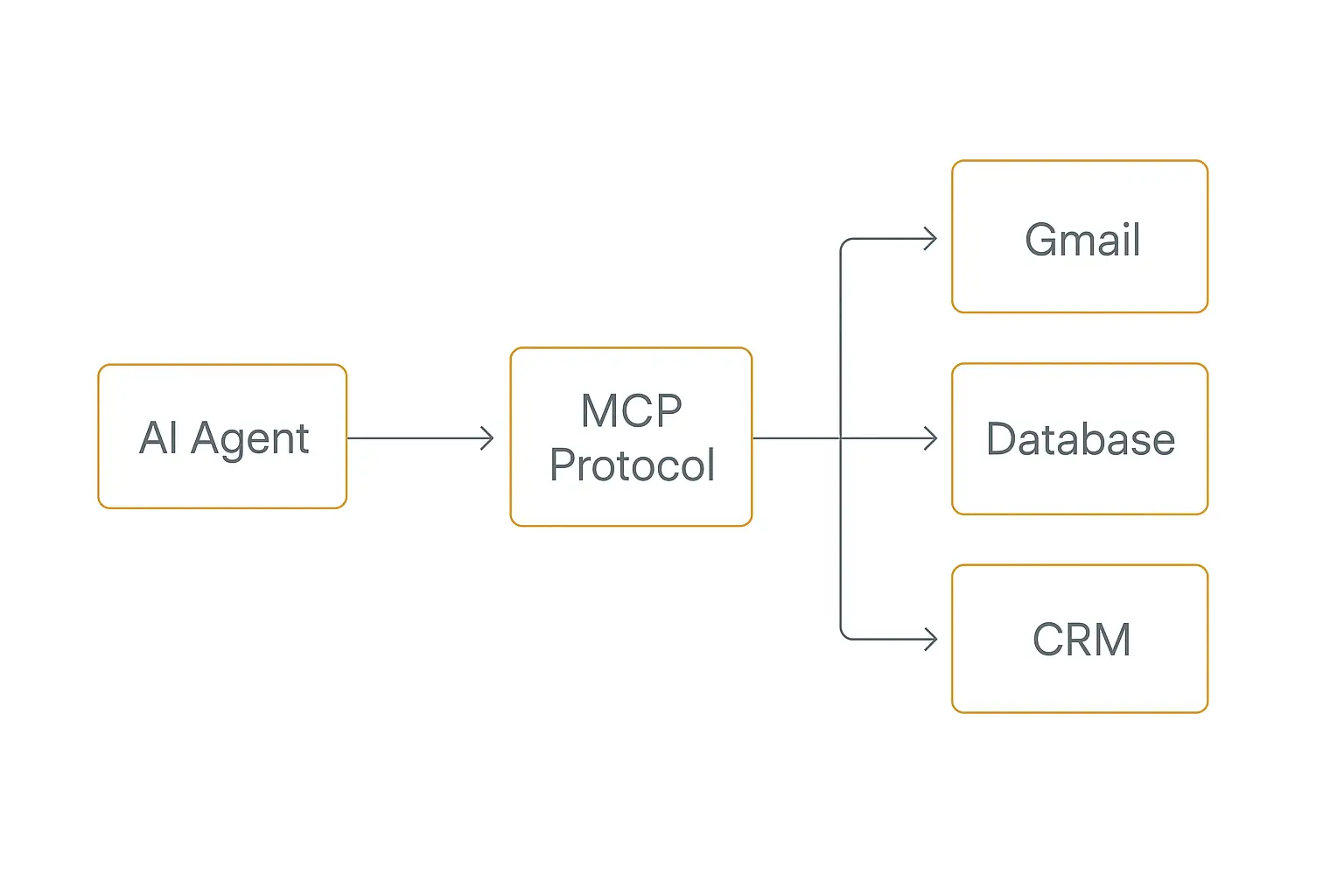
The big 2026 story in this layer is MCP — the Model Context Protocol. Before MCP, every tool integration was bespoke: you wrote custom glue for every API, for every framework, over and over. MCP standardized it. People call it the "USB-C for AI" — one protocol so any compliant agent can talk to any compliant tool server.
It caught on fast. Early adopters like Block, Apollo, and Zed reported much faster agent prototyping once they could reuse tool servers instead of rebuilding connectors. The trade-offs — lock-in concerns, security surface, auth — are real and worth reading up on, which is why we did a full MCP vs A2A protocol breakdown.
Two flavors of "tools" matter in practice:
- Actions — pre-built integrations to common apps (Gmail, Slack, Notion, Google Sheets, your CRM). These cover 80% of what real-world agents need.
- MCP servers — the standardized way to expose custom or third-party capabilities, increasingly the default for anything beyond the basics.
Pickaxe supports both: Actions for the common apps with credentials you connect once, and MCP for everything else. Note credentials run through the platform's Action connections — you authorize Gmail or Notion once and the agent reuses it.
Layer 4: Orchestration — the agent loop and how agents coordinate
Orchestration is the layer that turns "a model with tools" into "an agent that gets things done." It's the control logic: the loop that decides plan → act → observe → repeat until the task is complete, plus the logic for handing work between multiple agents.
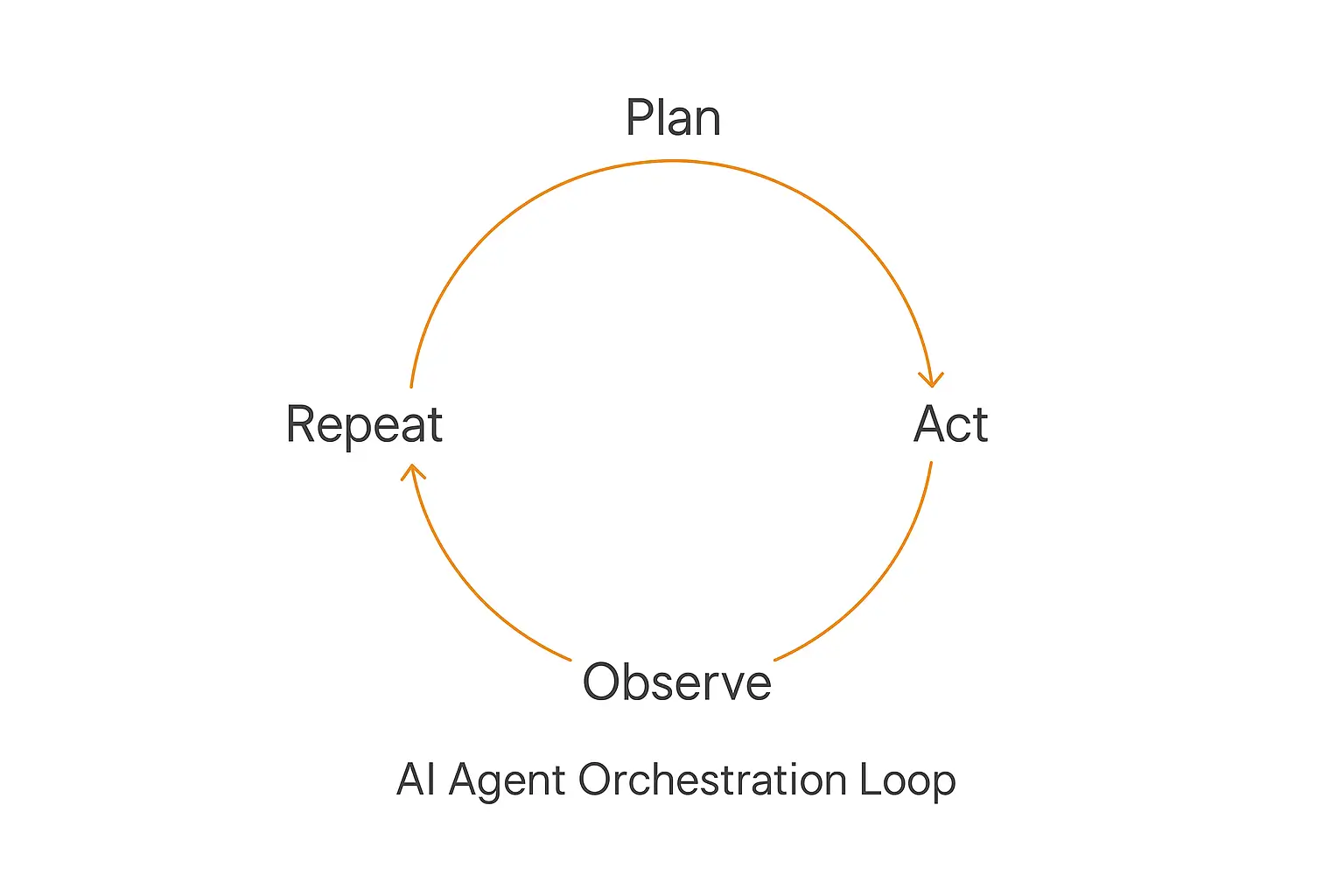
For a single agent, the loop is straightforward: the model decides what to do, calls a tool, reads the result, and decides again — until it's done or hits a stop condition. The orchestration layer manages that loop, handles errors, enforces step limits so the agent doesn't spin forever, and keeps the running state coherent.
Things get more interesting with multiple agents. Instead of one agent juggling everything, you split the work across specialists — a researcher, a writer, a reviewer — coordinated by a supervisor. We go deep on the patterns in our multi-agent systems guide, but the short version: this is now mainstream. Databricks reported that multi-agent workflows on its platform grew 327% in five months.
The framework landscape in 2026, if you're coding it yourself:
- LangGraph — the graph-based orchestration leader after its v1.0 release, running in production at Uber, JPMorgan, LinkedIn, and Klarna.
- CrewAI and AutoGen — role-based and conversation-based multi-agent frameworks, each with a different mental model. We compared all three in CrewAI vs LangGraph vs AutoGen.
Worth noting the honest counter-trend, surfaced in The New Stack's orchestration roundup: a lot of teams that fought heavy framework abstractions in 2024 are now writing thin wrappers over provider APIs plus MCP. The lesson is the same one that runs through this whole article — don't reach for the heaviest tool until the problem demands it.
If you're not coding it, this is the layer a no-code builder hides entirely. The agent loop, step limits, and multi-step logic are handled for you — you describe the behavior, the platform runs the loop.
The orchestration layer is where most builds stall.
Skip the framework wiring — build, test, and ship your agent loop in Pickaxe.
Layer 5: Interface and deployment — where users meet the agent
An agent that only runs in your terminal helps nobody. The interface and deployment layer is how the agent reaches real users — and it's the layer people underestimate most.
The same agent often needs to show up in several places:
- An embeddable widget on your website or your client's site.
- A hosted portal — a standalone page where users log in and interact, optionally gated behind access controls or payment.
- Messaging channels — Slack, WhatsApp, email.
- An API so the agent plugs into other software.
Each channel has its own auth, formatting, and session quirks. Building all of them yourself is a surprising amount of plumbing — which is exactly why deployment is a headline feature of agent platforms.
This is one of Pickaxe's strongest layers. The same agent can ship as an embeddable widget, a hosted portal with access groups, a Slack or WhatsApp bot, or an API — without rebuilding the agent for each one. For agencies, that portal layer is where the business model lives: you can white-label it, gate it, and charge for it.
The two rails: observability and governance
Those five layers get an agent working. The two vertical rails keep it working safely once real users are hitting it — and they touch every layer, which is why they run alongside the stack rather than sitting in it.
Observability: can you see what it's doing?
When an agent gives a wrong answer or burns through your budget, you need to know why. Observability is logging, tracing, evals, and analytics — every step the agent took, every tool it called, every token it spent. The current LLM observability tools differ most in how they capture and analyze those traces.
Community sentiment in 2026 is that this rail is still underbuilt relative to orchestration and memory — debugging tooling lags behind the rest of the stack. Tools like Langfuse fill the gap for code-first builds. Whatever you use, the principle holds: you cannot improve what you cannot see. Before you deploy anything, read our guide on testing and debugging an agent, and once it's live, track the numbers that actually matter using our AI agent ROI framework.
Governance: should it be doing that?
Governance is the guardrails — permissions, data handling, content filtering, audit logs, and compliance. Which tools can the agent touch? What data can it see? Who's accountable when it acts?
This rail is moving from nice-to-have to mandatory as agents touch regulated data and real money. The good news for no-code builders: a managed platform handles a lot of the governance baseline — auth, access groups, and audit trails — out of the box, instead of leaving you to assemble it.
Build-your-own vs. all-in-one: two ways to assemble the stack
Here's the decision that actually determines your week: do you assemble these six layers yourself from best-of-breed parts, or adopt a platform that ships them as one integrated stack?
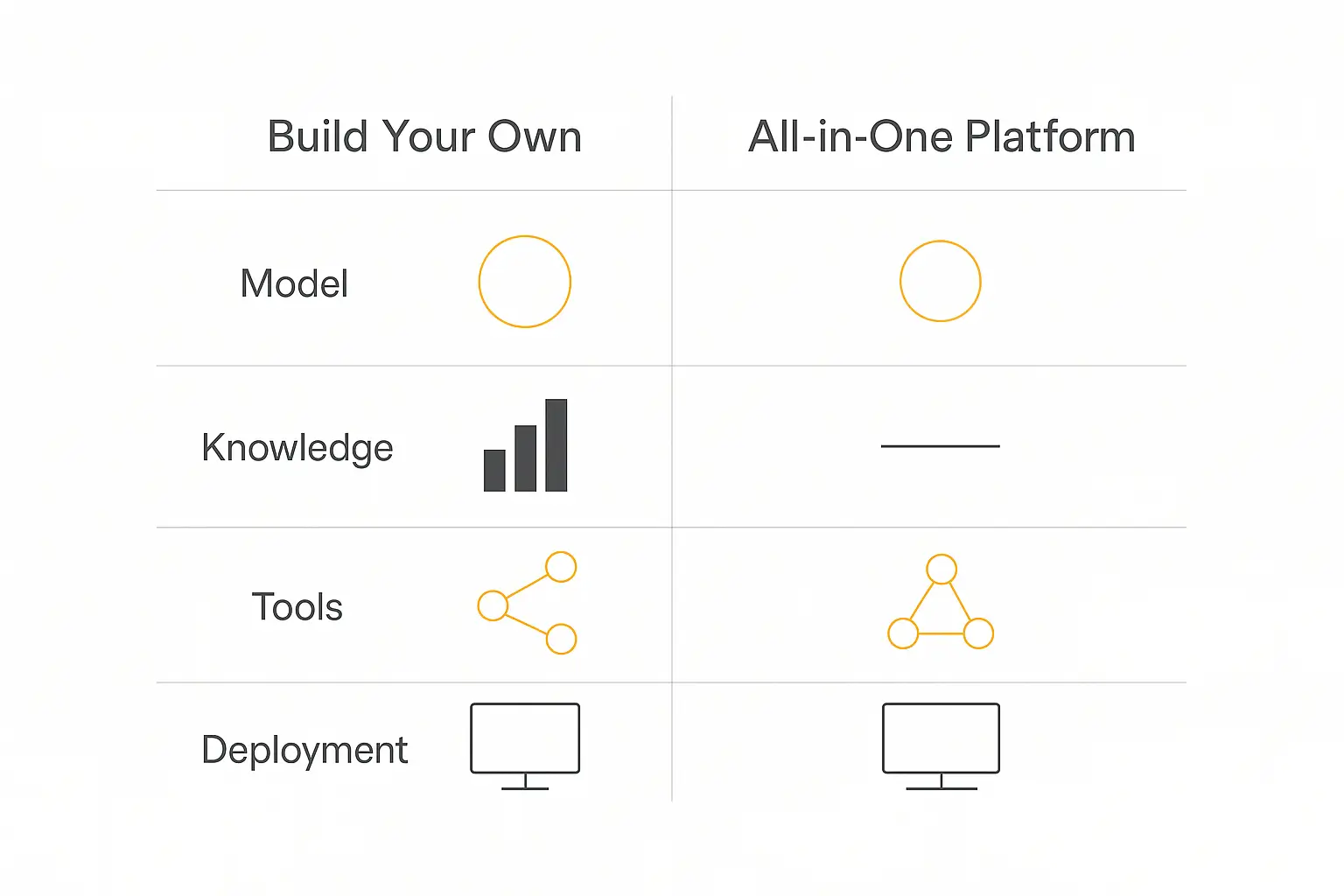
Both are legitimate. They suit different people.
| Layer | Build-your-own (code) | All-in-one platform |
|---|---|---|
| Model | Provider SDKs, your own routing | Dropdown, credits included |
| Memory / Knowledge | Pinecone / Weaviate + RAG pipeline | Built-in Knowledge Base |
| Tools | MCP servers, custom connectors | Pre-built Actions + MCP |
| Orchestration | LangGraph / CrewAI / AutoGen | Managed agent loop |
| Interface | Build each channel yourself | Embed, portal, API, Slack, WhatsApp |
| Observability / Governance | Langfuse, OPA, custom logging | Built-in analytics + access control |
| Best for | Engineering teams, deep customization | Consultants, agencies, fast shipping |
Build-your-own gives you maximum control and no platform ceiling. The cost is that you own all six layers forever — every upgrade, every breakage, every model swap is your problem. That's the right call if customization is your core differentiator and you have the engineering to back it.
All-in-one trades some ceiling for enormous speed. The layers are pre-integrated and maintained, so you go from idea to deployed agent in an afternoon. That's the right call if shipping value to clients — not building infrastructure — is the actual goal. We laid out the full decision in build vs. buy vs. wait.
For most consultants and agencies, the honest answer is the platform. You're not in the business of maintaining a vector database; you're in the business of solving a client's problem. Pickaxe exists for exactly that crowd — the whole stack, no glue code, priced for people who bill clients rather than raise venture rounds.
The minimum viable stack: what you actually need
Now the part nobody tells you: you almost certainly don't need all six layers on day one. Most agents that deliver real value run on a deliberately small slice of the stack.
Here's the minimum viable AI agent tech stack for a genuinely useful agent:
- A model — pick a solid mid-tier one and move on.
- A knowledge base — your documents, so it answers from your reality, not the open internet.
- A couple of tools — the two or three actions that cover the actual job.
- One deployment channel — wherever your users already are.
That's it. No multi-agent orchestration, no custom vector pipeline, no observability platform. Those layers earn their place later, when scale or complexity actually demands them.
The single most common failure I see isn't building too little — it's building too much. People wire up a five-framework, multi-agent, custom-RAG monster to answer customer questions that a single agent with a knowledge base would have nailed. The agentic AI market is huge — roughly $10.8 billion in 2026 and projected to grow many times over by the early 2030s — and a lot of that spend is on complexity that never ships. Start at the minimum. Add layers when reality forces you to, not before.
Where the stack is heading
A few shifts worth watching as you plan a stack you'll live with for a while:
Protocols are consolidating. MCP has clear momentum for tool connectivity, with agent-to-agent protocols forming above it. Betting on standardized connectivity is safer than betting on bespoke glue.
Memory is getting real. Composable, portable memory that moves between agents and sessions is one of the most active areas of 2026. The agents that feel genuinely smart a year from now will be the ones that remember well.
The adoption gap is the real story. Surveys keep finding that while most enterprises have adopted agents in some form, only a small fraction run them reliably in production. Gartner projects 40% of enterprise applications will embed task-specific agents by the end of 2026, up from under 5% in 2024. The winners won't be whoever has the fanciest stack — they'll be whoever actually ships and maintains a working one.
Frequently asked questions
What is an AI agent tech stack?
It's the layered set of tools and infrastructure between a raw language model and a production AI agent: the model, a memory/knowledge layer, a tools layer, orchestration, an interface/deployment layer, and observability plus governance rails running through all of it.
Do I need to know how to code to build an AI agent stack?
No. Building from scratch with frameworks like LangGraph requires real engineering. But no-code platforms like Pickaxe package every layer of the stack — model, knowledge base, actions, orchestration, deployment — so you can assemble a working agent without writing code.
What is MCP and why does it matter for the stack?
MCP (Model Context Protocol) is a 2026 standard for connecting agents to tools and data sources — often called the "USB-C for AI." It matters because it replaces bespoke, one-off integrations with a reusable protocol, which dramatically simplifies the tools layer. See our MCP vs A2A guide.
What's the minimum stack I need to launch an agent?
A model, a knowledge base of your own documents, two or three relevant tools/actions, and one deployment channel. Multi-agent orchestration, custom RAG pipelines, and dedicated observability platforms can wait until scale or complexity demands them.
Should I build my own stack or use a platform?
Build your own if deep customization is your core differentiator and you have engineering capacity to maintain six layers indefinitely. Use a platform if your goal is shipping value to clients fast. Most consultants and agencies are better served by an integrated platform.
The takeaway
The AI agent tech stack isn't a mystery once you see it as layers: a model to reason, memory and knowledge to ground it, tools to let it act, orchestration to run the loop, an interface to reach users, and observability plus governance to keep it safe.
Understanding all six makes you a better builder even if a platform handles most of them for you — you know what's happening under the hood and where to look when something breaks.
And understanding them also frees you to not build them all. The best agent is the one that ships and helps someone, not the one with the most impressive architecture diagram.
If you'd rather skip the wiring and get straight to shipping, Pickaxe gives you the whole stack in one no-code builder — model, knowledge base, actions, and deployment included. Build your first agent today, add the fancy layers if and when you actually need them.