Updated September 18, 2026. This article previously discussed an unconfirmed August shutdown rumor. We have replaced that framing with OpenAI's published Custom GPT retirement guidance. The original URL is retained so existing links continue to work.
OpenAI Custom GPT retirement is now a documented transition. If you built a useful GPT, the next decision is where that work should live: inside ChatGPT's replacement experience, or as a branded tool you can distribute to your own audience.
My recommendation is to start with the job your GPT does. An internal assistant and a paid coaching product can use similar instructions, but they need very different access, billing, and deployment setups.
OpenAI Custom GPT retirement: what is confirmed?
OpenAI says the transition affects all ChatGPT plans and points to plugins as replacements. Its detailed schedule applies to affected Enterprise workspaces; other accounts should follow their own notices.
| Enterprise milestone | Planned date |
|---|---|
| Admin notice | September 11, 2026 |
| Migration experience targeted to begin | September 17, 2026 |
| New Custom GPT creation ends | September 25, 2026 |
| Existing Custom GPTs retire | December 11, 2026 |
These dates are subject to change. September 17 is a rollout target, not a promise that every account has the migration option. Existing GPTs remain usable until retirement, subject to permissions.
OpenAI's planned migration turns instructions into a skill within a plugin and brings connected apps along. Custom actions require separate rebuilding. Review files, behavior, and sharing before switching users.
Check the official retirement and migration FAQ and your workspace notice for the schedule that applies to you.
What this means for the work you already did
The useful part of your GPT is often the work around the model: the instructions you refined, the reference material you selected, the examples you wrote, and the workflow your customers understand.
Start by preserving those ingredients. Keep a copy of instructions you are authorized to use, locate the original source documents, and write down a handful of real tasks the GPT handles well.
A shared GPT link is not a backup of its configuration. If a teammate or contractor created the GPT, ask the owner for the configuration and source material before planning a rebuild.
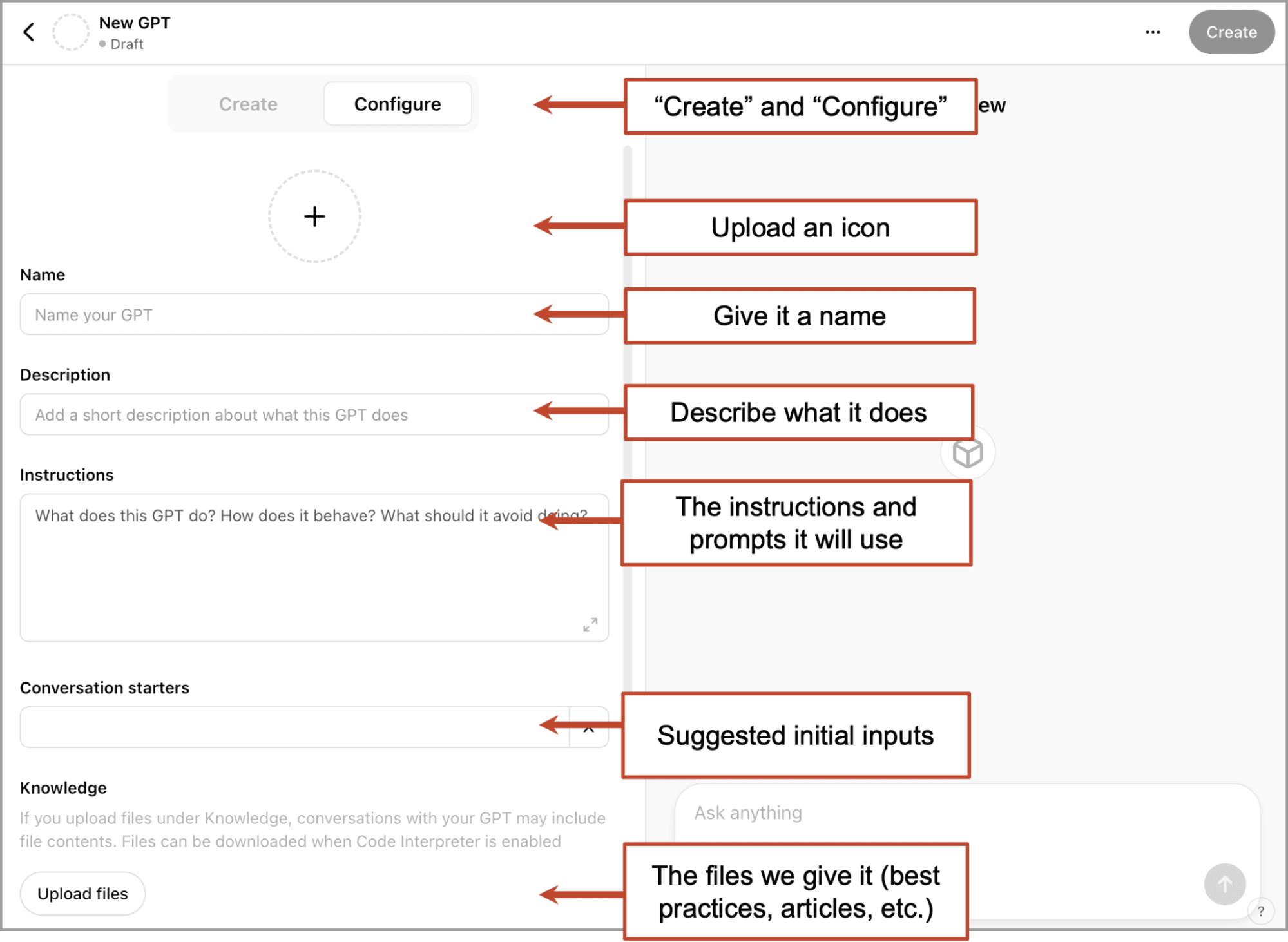
Reference screenshot of the Custom GPT builder. The controls visible in your account may differ as OpenAI rolls out the transition.
Choose the destination before you rebuild
There are two different goals here. You might want continuity for a workflow your team already runs in ChatGPT. Or you might want to turn that workflow into a product with its own customer experience.
For the first goal, evaluate OpenAI's plugin migration. For the second, evaluate the delivery features around the agent as carefully as its answers.
| Your priority | What to evaluate |
|---|---|
| Keep a workflow within ChatGPT | OpenAI's plugin migration, workspace permissions, and replacement behavior |
| Deliver a tool under your own brand | Pickaxe portals, custom domains, and branding options |
| Charge customers or limit usage | Access groups, subscriptions, one-time offers, and usage allowances |
| Reach users outside ChatGPT | Website embeds, email, WhatsApp, Slack, or a dedicated portal |
| Choose across model providers | Supported models, task quality, latency, and operating cost |
This is also a good moment to review our Custom GPT alternatives comparison. Different teams need different amounts of control, and the right choice should fit the audience you actually serve.
Where Pickaxe changes the customer experience
Put access and pricing around the agent
A useful assistant can be part of a course, a consulting engagement, a membership, or a standalone product. Those offers need rules about who can use the tool and how much usage is included.
Pickaxe supports access groups and monetization options including subscriptions, one-time payments, and usage-based purchasing. Configure the offer and limits together, then test the experience with a customer account.
For example, a coach might include an assistant in an existing membership, while an agency might sell a separate monthly package. Neither business should assume that an unlimited chat allowance produces sustainable costs.
The monetization documentation explains the setup. Our AI agent monetization guide covers how to think about packaging and pricing.
Make the tool recognizable as yours
With a branded portal, you can present the agent alongside instructions, supporting pages, and other tools. Your customer gets a destination designed around the service you provide.
White-labeling and custom-domain availability depend on your plan. Check current Pickaxe pricing before promising a particular setup to a client.
Pickaxe is still a hosted platform. The benefit is control over more of the customer experience, not independence from every provider or a promise that hosting, models, and integrations will never change.
Deploy where your audience works
A website embed can put the assistant beside the material it helps explain. A portal can organize several tools for a client. Email, WhatsApp, and Slack deployments support other ways of reaching users.
Start with the channel your audience already uses. Each channel needs its own setup and testing, and a good web experience does not automatically prove that a messaging deployment is ready.
Our website embed guide walks through the web option. The Pickaxe versus Custom GPT comparison gives a faster overview of the differences.
Choose a model for the task
Custom GPTs use models available within ChatGPT. Pickaxe offers supported models from multiple providers, including OpenAI, Anthropic, and Google.
That gives you room to compare quality, response time, and cost without rebuilding the entire customer-facing product. It does not mean every model is available or that changing models preserves identical behavior.
Use the current model catalog to shortlist options, then run the same representative tasks through each one. A model that writes polished copy may not be the best choice for a tool-heavy workflow.
Connect knowledge and actions deliberately
Reference files are only one way to supply knowledge. Pickaxe supports sources such as Google Drive, Notion, and OneNote; refresh behavior depends on the source and configuration.
Confirm that the specific source you connect has updated before promising automatic freshness. Also distinguish a source in your workspace library from material actually attached to the agent.
Actions let the assistant use integrations to do work, such as look up information or update another system. Pickaxe's action ecosystem includes hundreds of integrations, but you still need to confirm the exact operation and permission model your workflow needs.
See the Knowledge Base guide and Actions guide before selecting the connections for a rebuild.
OpenAI Custom GPT retirement: your preparation checklist
- Inventory the tools that matter. Record their owner, audience, business purpose, and where their links appear.
- Save your source material. Preserve authorized instructions, original documents, example outputs, and integration requirements.
- Choose one representative agent. Start with a useful workflow you can evaluate clearly.
- Build a small test set. Include common tasks, a missing-information case, and any actions the agent must perform.
- Rebuild and test privately. Compare behavior before changing the link customers use.
- Check access as a customer. Verify permissions, usage limits, and any purchase flow.
- Switch deliberately. Update links, explain the new entry point, and monitor early usage.
Keep the first rebuild focused. Changing the model, the prompt, the source documents, and the business offer simultaneously makes it harder to tell why an answer improved or broke.
If an action cannot be reproduced yet, document the gap and decide whether a narrower version is useful. A prompt that promises to send an email is not a replacement for a working email integration.
Frequently asked questions
Was August 2026 the confirmed shutdown date?
No. Our earlier article discussed a rumor, and that framing is no longer appropriate. Use the official guidance linked above and the notice for the account or workspace that owns your GPT.
Do I need to buy ChatGPT subscriptions for every Pickaxe user?
A Pickaxe deployment does not require your audience to use a ChatGPT account. Users may need a Pickaxe portal login or membership depending on how you configure access.
It would also be inaccurate to say that every Custom GPT user always needed a paid ChatGPT subscription. OpenAI's GPT access documentation describes availability and account requirements.
Does rebuilding transfer old chats or customers automatically?
This guide does not describe an automatic import of chat history, user accounts, payment subscriptions, or GPT Store discovery. Treat those as separate transition tasks and verify any specific transfer capability before relying on it.
Can I rebuild a GPT someone else shared with me?
Only use instructions and material you own or have permission to reuse. Access to a conversation does not establish access to the creator's configuration or permission to copy their product.
Start with one working agent
You do not need to redesign your entire business to make progress. Choose one GPT, preserve its ingredients, and prove that the replacement helps the same person complete the same useful task.
Follow our step-by-step guide to rebuilding a Custom GPT on Pickaxe, or explore the Custom GPT alternative landing page to compare the capabilities around the agent.