
Build
Pickaxes Overview
Understand what Pickaxes are, how the dashboard works, and how to manage your AI agents.
What are Pickaxes?
Pickaxes are the AI agents you build within the Pickaxe platform. Each Pickaxe is a standalone AI tool designed to serve a specific purpose — defined by the instructions you give it.
You can think of a Pickaxe as a custom AI assistant that knows exactly what you need it to do. Whether it's answering customer questions, generating content, qualifying leads, or walking users through a process, every Pickaxe is shaped by how you configure it.
The Pickaxes dashboard
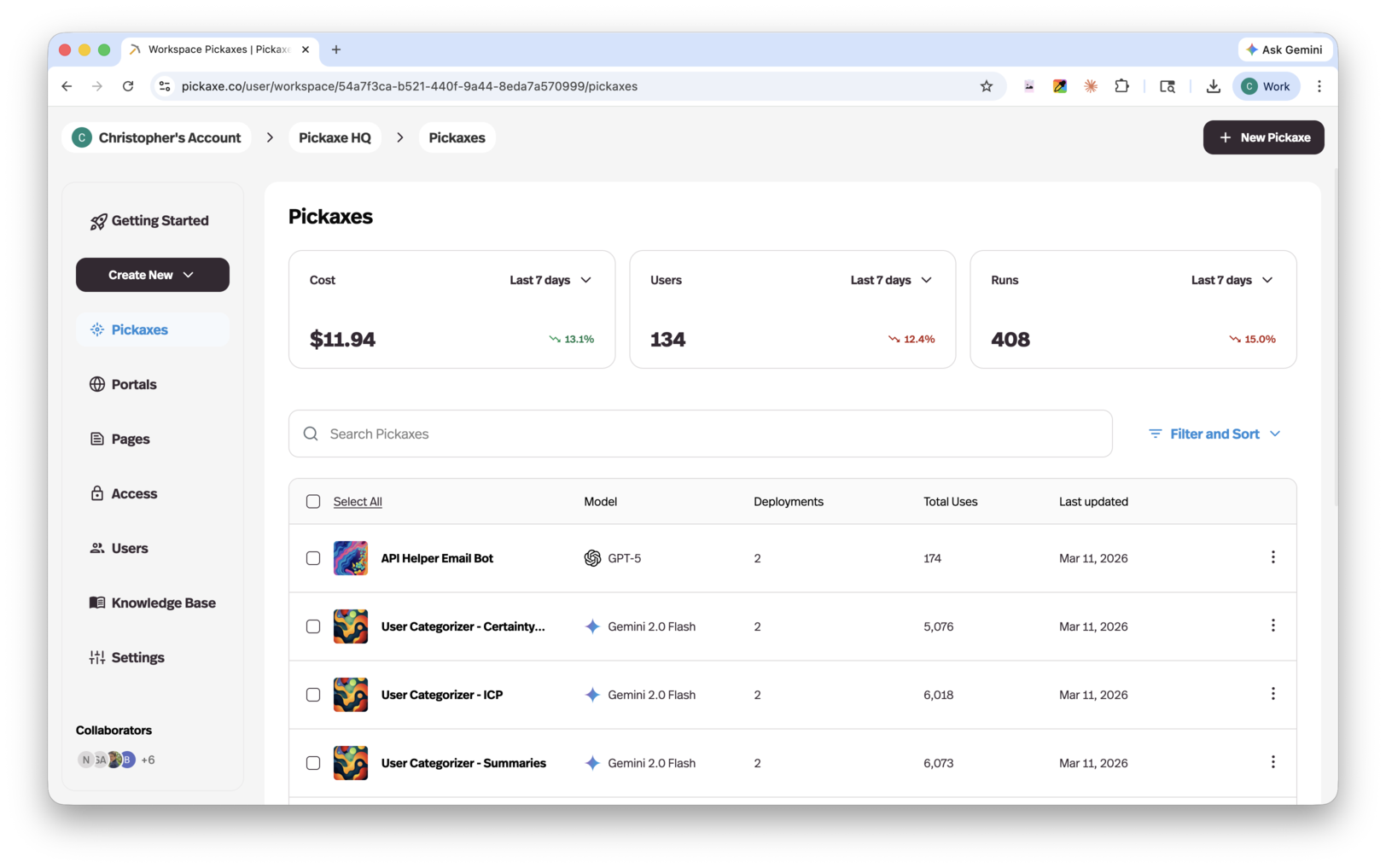
The Pickaxes dashboard is your home base for managing all of your agents. From here you can see every Pickaxe in your workspace at a glance, along with key details like the model it's using, how many deployments it has, its total usage, and when it was last updated.
At the top of the dashboard, summary cards show your workspace-level stats for a selected time period — including total cost, number of users, and total runs — so you can quickly monitor activity across all of your Pickaxes.
You can search, filter, and sort your Pickaxes to find what you need, and use bulk actions by selecting multiple Pickaxes at once.
What makes up a Pickaxe?
Every Pickaxe is built from a few core components that work together:
Instructions
Instructions are the foundation of your Pickaxe. They tell the agent what its purpose is, how it should behave, what tone to use, and any rules or boundaries it should follow. The more specific your instructions, the more focused and useful your Pickaxe will be.
Knowledge base
You can train a Pickaxe on your own data by adding content to its knowledge base. Upload documents, paste text, or point to URLs — your Pickaxe will use this information to give accurate, grounded responses based on what you've provided.
Actions
Actions let your Pickaxe do more than just chat. You can connect it to external tools and APIs, or even to other Pickaxes, so it can take real actions like looking up data, submitting forms, sending emails, or triggering workflows.
Model
Each Pickaxe is powered by an AI model. You can choose from a range of leading models and switch between them at any time to find the best balance of quality, speed, and cost for your use case.
Deployments
Once your Pickaxe is ready, you can deploy it in multiple ways — embed it on a website, share it via a direct link, add it to a portal, connect it as a Slack bot, WhatsApp bot, email bot, or access it through an API. A single Pickaxe can be deployed across as many channels as you need.
Creating a new Pickaxe
To create a new Pickaxe, click the + New Pickaxe button in the top right corner of the dashboard. This will open the Pickaxe Builder, where you can configure your agent's instructions, knowledge, actions, model, and more.
Managing your Pickaxes
From the dashboard, you can:
- Search for a specific Pickaxe by name
- Filter and sort to organize your list by model, usage, or last updated date
- Select multiple Pickaxes to perform bulk actions
- Click on any Pickaxe to open it in the builder and edit its configuration
- Access quick actions using the menu icon on the right side of each row