A client called me last quarter because their support agent kept telling customers the wrong refund window.
Their fix, already in motion, was to upgrade to a bigger model. More reasoning, more money, problem solved.
It didn't work. The refund policy had been updated in a PDF nobody re-uploaded. No model on earth can reason its way to a fact it was never shown.
That's the whole argument for caring about the AI agent harness. The model is the part everyone shops for. The harness is the part that decides whether the shopping mattered.
This guide covers what an agent harness actually is, which layers it's made of, how to tell whether your model or your harness is the thing failing you, and what the evidence really says about how much the harness is worth — including the widely-quoted number I couldn't trace to a primary source.
What is an AI agent harness?
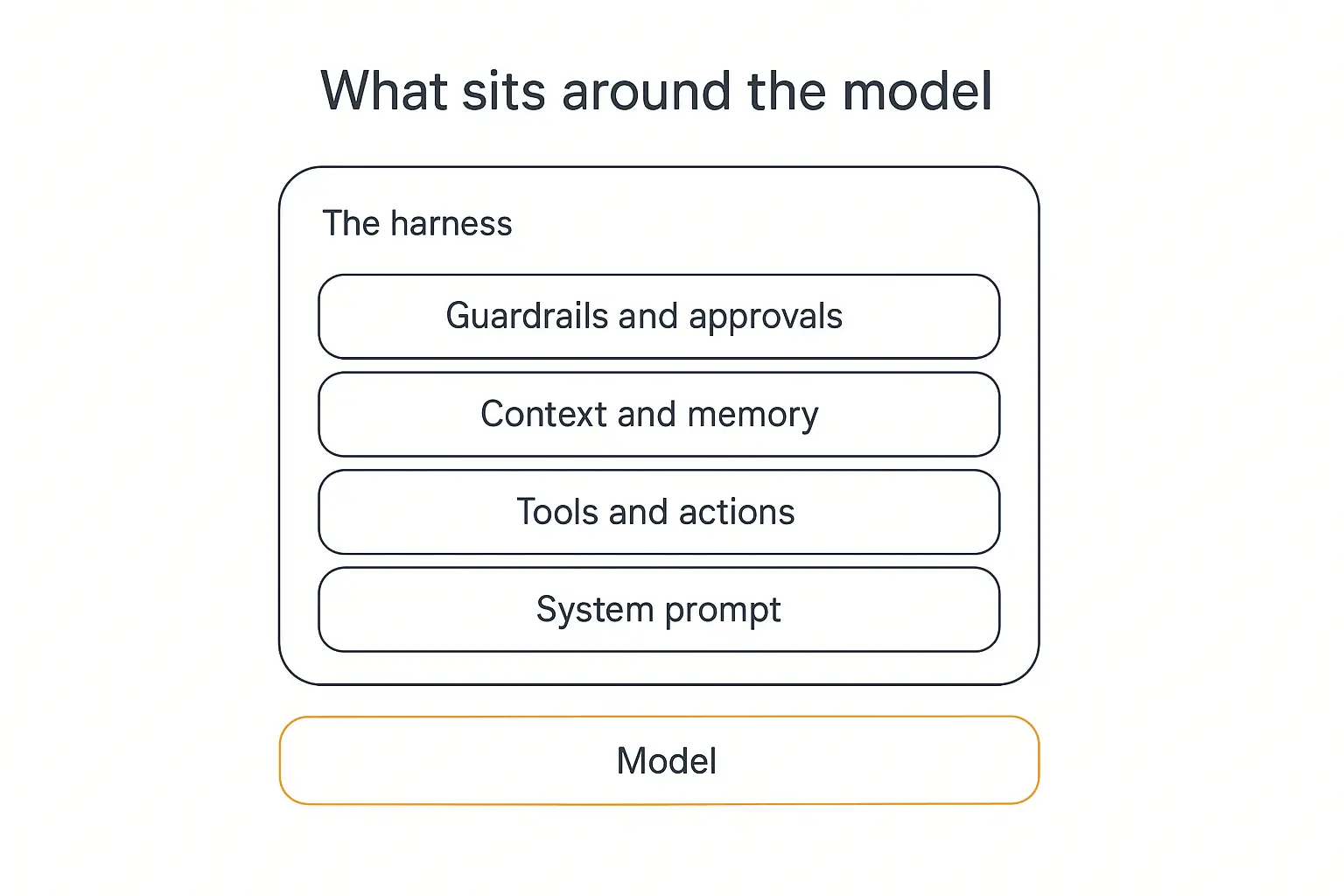
An agent harness is all the software wrapped around a language model that turns it into something that can do work.
The canonical shorthand, which has stuck because it's genuinely useful, is:
Agent = Model + Harness
LangChain's Vivek Trivedy put the sharpest version of it in The Anatomy of an Agent Harness: if you're not the model, you're the harness. Everything else — prompts, tools, memory, retries, logging, the loop itself — is harness.
Databricks frames it the same way in their explainer: "The model contains the intelligence. The harness turns that intelligence into reliable work."
Here's the part that trips people up.
A raw language model is stateless. It has no memory of your last message, no clock, no filesystem, no ability to call an API, no idea what happened five minutes ago.
Every one of those things you assume your agent "has" is something the harness handed it.
When your agent remembers a customer's name across sessions, that's not the model remembering. That's the harness storing something and re-injecting it. When your agent looks up an order status, the model didn't reach into your database — it emitted a structured request, and the harness executed it.
The model proposes. The harness disposes.
Harness vs prompt engineering vs context engineering
These three get blurred constantly, and the distinction is actually clean once you see it as a set of nested scopes.
| Discipline | Scope | The question it answers |
|---|---|---|
| Prompt engineering | One interaction | How do I phrase this so the model does the right thing? |
| Context engineering | What the model can see | Which information is in the window at this moment, and why? |
| Harness engineering | The whole operating environment | What can this agent do, remember, verify, and be stopped from doing? |
Harness engineering is the outermost ring. It contains the other two. Our profile of Pickaxe engineer Artsiom Maisiuk offers a look at one of the people doing this kind of systems work.
If you've already read our guide to prompt engineering for AI agents, think of the harness as everything that decides what your prompt is even competing with — the tools available, the junk in the context window, the retry that silently swallowed an error.
Where the term came from (a very short history)
The pattern is old. The vocabulary is new.
The reasoning-then-acting loop at the core of every harness was described in the ReAct paper back in 2022, and tool-calling was formalized in Toolformer shortly after. People were building harnesses for years without a word for it.
The word arrived in early 2026, and attribution is genuinely contested — Wikipedia's entry notes both claims:
- February 2026 — HashiCorp co-founder Mitchell Hashimoto describes a habit: every time an agent made a mistake, he engineered a permanent fix into the agent's environment, so that specific mistake became structurally impossible to repeat.
- March 10, 2026 — LangChain's Vivek Trivedy publishes The Anatomy of an Agent Harness, which is where Agent = Model + Harness gets its canonical framing and its component list.
- April 2, 2026 — Thoughtworks' Birgitta Böckeler publishes Harness engineering for coding agent users on martinfowler.com, adding the inner/outer distinction that I think is the single most useful idea in this whole space for non-engineers.
- July 2026 — Microsoft ships a literal Agent Harness as a first-class concept in Agent Framework, with todo tracking, compaction, and tool approval on by default.
When Microsoft turns your blog-post concept into a documented API surface within five months, the concept has stopped being a buzzword.
Hashimoto's version is the one I'd tattoo on a wall, though. Don't correct the agent. Change the environment so the mistake can't happen again. That's a harness mindset in one sentence, and it's the difference between endlessly patching a prompt and actually shipping something.
What the evidence actually says (and one number I'd stop repeating)
Let me get the honest part out of the way first.
There's a figure circulating in a lot of harness content right now: the same model scoring 46% under one harness and 80% under another, usually credited to research from Cursor. It's a great stat. It's in half the articles on this topic.
I went looking for the primary source and couldn't find it. Cursor's published benchmarking write-up, CursorBench, is about how they compare model quality — it doesn't contain that comparison. I'm not saying it's fabricated; I'm saying I couldn't verify it, and a 34-point swing is exactly the kind of claim that deserves a citation.
The real numbers are smaller. They're also more than enough to change how you spend your time.
The figures I can actually source
Epoch AI, running SWE-bench Verified, found that simply swapping the scaffold changes results by up to 11 points for GPT-5 and up to 15 points for Kimi K2 Thinking. Their conclusion is blunt: the choice of scaffold has the single biggest impact on overall performance.
Databricks reports GPT-5.5 moving from 36.10% to 52.63% on complex enterprise document tasks purely by changing the harness around it — a 16-point gain with no model change at all.
Future AGI compiled the same model across four harnesses on SWE-bench Pro. Claude Opus 4.5 scored roughly:
| Harness | Score | Delta vs baseline |
|---|---|---|
| Scale AI SEAL (standardized baseline) | ~45.9% | — |
| Claude Code | ~49.8% | +3.9 |
| Cursor | ~50.2% | +4.3 |
| Auggie | ~51.8% | +5.9 |
Figures as of July 2026; the standardized number is Scale AI's SEAL-lab run and the three vendor figures come from a single published table by Augment Code, so treat cross-vendor comparisons with the usual caution.
And the peer-reviewed version: "Don't Blame the Large Language Model: How Agent Harness Evolution Shapes Coding Agent Quality" (Ben Sghaier, Li, Adams, Hassan — July 2026) finds harness improvements contribute to coding agent quality at a level comparable to or exceeding the contribution of upgrading the underlying model.
So: not 34 points. But 4 to 16 points, repeatedly, across independent sources, from changing nothing but the scaffolding.
Why this matters more every month
Here's the trend that makes the harness argument compound.
Frontier models are converging. The gap between the top three or four models on most business tasks is narrower than it was a year ago, and for a support agent or an intake form, it's often indistinguishable.
As models converge in raw capability, the harness increasingly determines performance. That's Databricks' framing and I think it's right. When everyone can buy the same intelligence, the differentiator is what you wrap around it.
It also reframes a cost question. If you're weighing a jump to a pricier tier — the tradeoffs we walk through in Claude Opus vs Sonnet vs Haiku and AI model routing — a harness fix is usually cheaper, faster, and permanent, where a model upgrade is a recurring bill.
What practitioners are saying
The strongest claims aren't coming from vendors — they're coming from people who build these things daily.
Trivedy himself put it about as bluntly as it can be put on X: you can outperform any default harness-plus-model combination on essentially any task by engineering the harness around it — same model, curated prompts, tools, skills and hooks.
Y Combinator's Garry Tan has been pushing a "thin harness, fat skills" position: keep the orchestration code slim and push the domain knowledge into portable instruction files. That's the same instinct behind agent skills — the harness stays small and stable while the expertise it loads stays editable.
Google's Addy Osmani has been writing about harness engineering as a named discipline, and there's a long-running Hacker News thread arguing the other side — that this is an old idea in new packaging, which is a fair criticism of the vocabulary and a bad reason to ignore the practice.
My favourite is the one-liner from developer Justin Barnett: "I'm telling you. Harness engineer is coming." Job titles usually lag reality by about eighteen months.
The anatomy of an agent harness: nine layers
Different sources slice this differently. Databricks lists eight components, Trivedy's post derives about a dozen, Microsoft's framework exposes them as a capability matrix.
Here's the version I find most useful for people building client-facing agents rather than coding agents — which is most of you, and which almost none of the existing harness writing is aimed at.
1. The system prompt (identity and rules)
The foundation layer. Who the agent is, what it does, what it refuses, how it escalates.
The most common harness mistake I see lives here: the overloaded system prompt. Every time the agent got something wrong, someone appended another rule. Six months later it's 4,000 words of contradictory instructions and the model is quietly ignoring the middle third.
A system prompt is a harness component, not a junk drawer. When a rule must hold on every single turn, it belongs somewhere more reliable — in Pickaxe that's the Model Reminder, an instruction prepended to every user message that only the AI sees, so critical rules don't get buried under conversation history.
2. Tools and actions (the ability to do anything)
Without tools, an agent is a very confident conversationalist. Tools are how it reads a calendar, writes to a CRM, sends an email, checks stock.
Two things determine whether a tool layer works:
- Tool descriptions. The model picks tools by reading their descriptions. A vague description is a routing bug waiting to happen. "Gets data" tells the model nothing; "Looks up a customer's current subscription tier and renewal date by email address" tells it exactly when to fire.
- Tool count. More tools is not better. Past a certain number, selection accuracy degrades — the model has too many near-identical options and picks wrong.
Pickaxe caps this deliberately at around four Actions per agent, and the recommended pattern beyond that is a waterfall setup: one routing agent that hands off to specialised sub-agents, each with its own small tool set. That's harness design encoded as a product constraint, and it exists because unbounded tool lists reliably degrade.
If you're wiring tools through MCP, the same rule applies — a server exposing forty tools will hurt you.
3. Context management (what's in the window right now)
This is the layer that fails silently and gets blamed on the model most often.
Context windows are finite. A long conversation, a fat knowledge base retrieval, and a few verbose tool outputs will fill one fast — and when it fills, something gets dropped. Usually the thing you cared about.
The harness decides what survives. Good context management means compaction (summarising older turns), offloading (writing bulky tool output to storage and passing a reference instead), and prioritising.
Pickaxe handles this with waterfall allocation — memory fills first, then end-user documents, then the knowledge base gets whatever remains. Knowing that order matters, because it tells you what gets squeezed out when a conversation runs long.
Microsoft's harness enables compaction automatically once token limits are supplied. If your platform doesn't do this, long conversations degrade and it will look exactly like the model getting dumber.
4. Memory (what survives between sessions)
Context is what the model sees this turn. Memory is what comes back next Tuesday.
These are genuinely different problems, and conflating them is why so many agents feel amnesiac. We went deep on the approaches in AI agent memory explained, but the harness question is narrower: what gets written, when, and what gets retrieved?
A memory layer that writes everything is as useless as one that writes nothing — you've just moved the context-bloat problem downstream.
5. Retrieval and knowledge (grounding in your facts)
My refund-window client had a retrieval failure, not a reasoning failure.
The knowledge layer covers what documents exist, how they're chunked, how they're searched, and — the part people forget — how they stay current. A knowledge base that was accurate at upload and stale by Q3 is a liability, because the agent will state the outdated fact with total confidence.
This is why source refresh is a harness feature, not a nice-to-have. Pickaxe's Knowledge Base auto-refreshes connected sources daily and supports linked apps like Notion, Google Drive and SharePoint precisely so the answer tracks the source of truth instead of a snapshot.
6. Orchestration and routing (deciding who handles what)
Once you have more than one job, something has to route.
That might be a simple triage agent handing off to specialists, a multi-agent system, or model routing that sends cheap tasks to a cheap model and hard ones to an expensive one.
Orchestration is where the agent-versus-workflow distinction actually bites. A fixed sequence of steps is a workflow, and the harness runs it deterministically. An agent chooses its own path, and the harness has to bound how far it can wander.
7. Execution environment (where work actually happens)
For agents that run code, browse the web, or generate files, the harness has to provide somewhere for that to happen safely — a sandbox, isolated per user, that can't reach anything it shouldn't.
This layer is invisible until it isn't. Pickaxe's OpenClaw engine is essentially this layer productised: each user session gets its own isolated, sandboxed instance with real-time browsing, code execution and file generation, rather than everyone sharing one environment.
8. Error handling and verification (what happens when things break)
The most under-built layer in almost every agent I look at.
An API times out. What happens? If your honest answer is "I don't know," you have an undefined failure state — and undefined failure states are where agents produce confident nonsense, because the model received an empty or garbled tool result and reasoned onward as though it were data.
A harness with real error handling defines, for every tool: what a failure looks like, what the agent is told, and what it should do next. "The lookup failed, tell the user you can't confirm that right now and offer to escalate" is a vastly better outcome than a hallucinated order status.
Verification is the other half — the agent checking its own output before it ships. Böckeler calls these sensors, and we'll come back to them.
9. Guardrails, approvals and observability
The layer that decides what the agent may do unsupervised, and what it must ask about first.
Microsoft's harness ships tool approval and standing approval rules on by default, which is a good signal about where the industry landed. Our guides on human-in-the-loop agents and the five levels of agent autonomy go deeper on where to draw that line.
And observability. If you can't read a transcript of what the agent did — which tools it called, what came back, what it decided — you cannot debug your harness. You'll be guessing, and guessing usually terminates in "let's try a bigger model." That's what agent analytics is for.
Inner harness vs outer harness: which one you actually control
This is Böckeler's distinction and it's the most practically useful idea here, especially if you're not writing code.
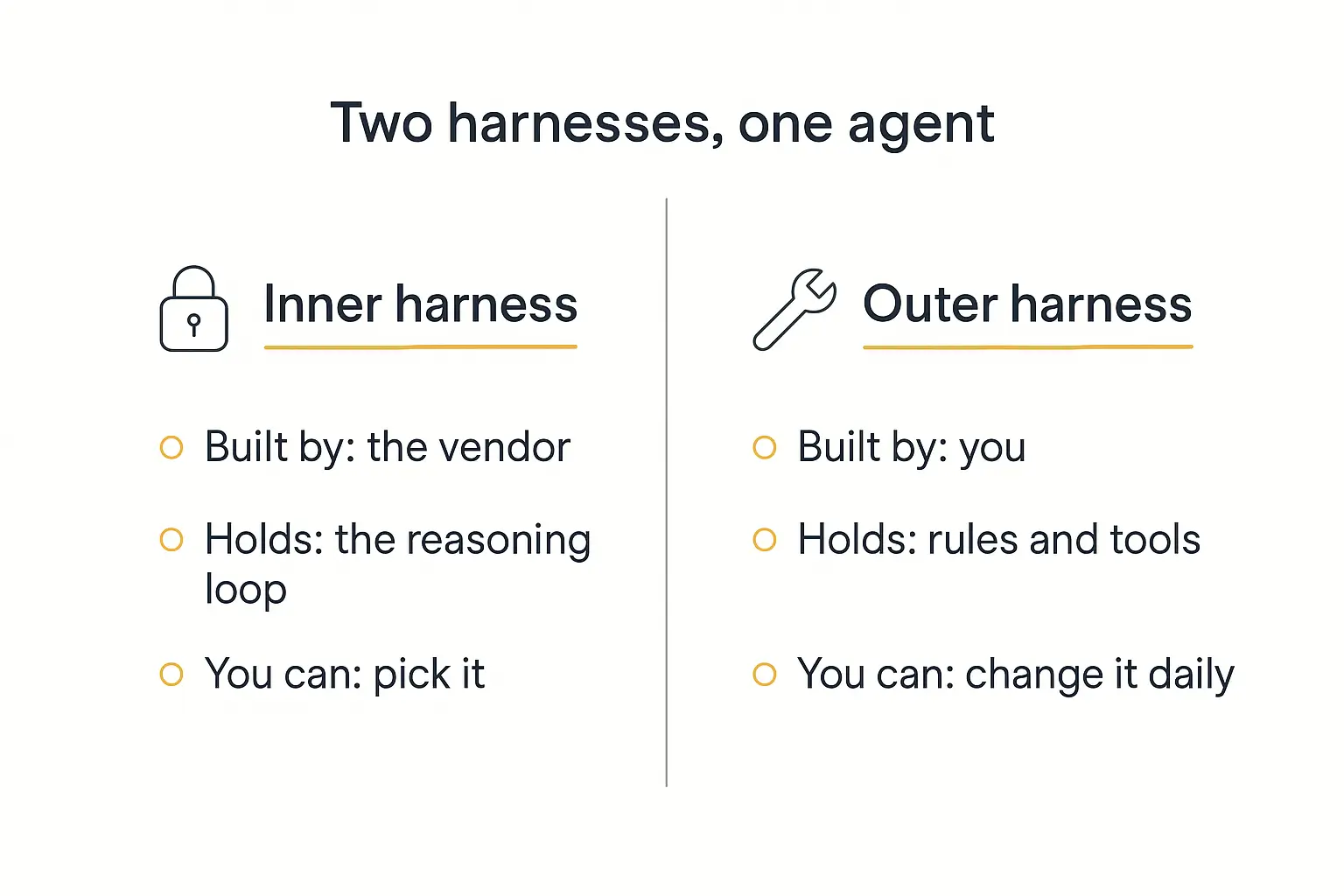
The inner harness is shipped by whoever built your agent tooling. The reasoning loop, how tool calls are parsed and dispatched, retry mechanics, how context gets compacted. You don't write it. You choose it, by choosing a platform.
The outer harness is everything you assemble on top: your instructions, your tool set, your knowledge sources, your approval rules, your escalation paths, your evaluation cases.
Two consequences fall out of this, and they're the ones I'd want a consultant to internalise:
First: you are already doing harness engineering. If you've configured an agent — written instructions, uploaded documents, connected an action — you built an outer harness. The only question is whether you built it deliberately.
Second: your leverage is almost entirely in the outer harness. You can rewrite it this afternoon. The inner harness you change only by migrating platforms, which is expensive and rare. So when something's broken, the outer harness is where to look first — it's both the likelier culprit and the cheaper fix.
Choosing your inner harness well is a real decision, though, and it's the one our AI agent tech stack guide and build vs buy framework are really about.
Guides and sensors: the two ways to control an agent
Böckeler's second contribution is a clean split in how harness controls work.
Guides steer the agent before it acts. Instructions, tool descriptions, examples, checklists, refusal rules. They raise the odds of getting it right first time.
Sensors observe after the agent acts and let it self-correct. Validation checks, test runs, a second agent reviewing the first one's output.
Each can be computational (deterministic — a regex, a schema check, a required-field validator) or inferential (an LLM making a judgement call).
| Computational | Inferential | |
|---|---|---|
| Guide (before) | Required fields, enum-constrained inputs, a schema the output must match | Instructions, few-shot examples, a planning step |
| Sensor (after) | Did it return valid JSON? Is the date real? Did the email send? | A reviewer agent asking "does this actually answer the question?" |
The practical rule from her work: computational checks are cheap enough to run on everything. Inferential checks cost a model call, so use them selectively — on high-value outputs, or where deterministic tools genuinely can't judge.
Most agents I look at are all guide and no sensor. They've got a beautifully written system prompt and absolutely no mechanism for noticing when the output is wrong. That's an unbalanced harness, and it's why the failures reach the client instead of the logs.
Is it your model or your harness? A five-step diagnostic
Here's the triage I'd run before anyone is allowed to say "let's try a bigger model."
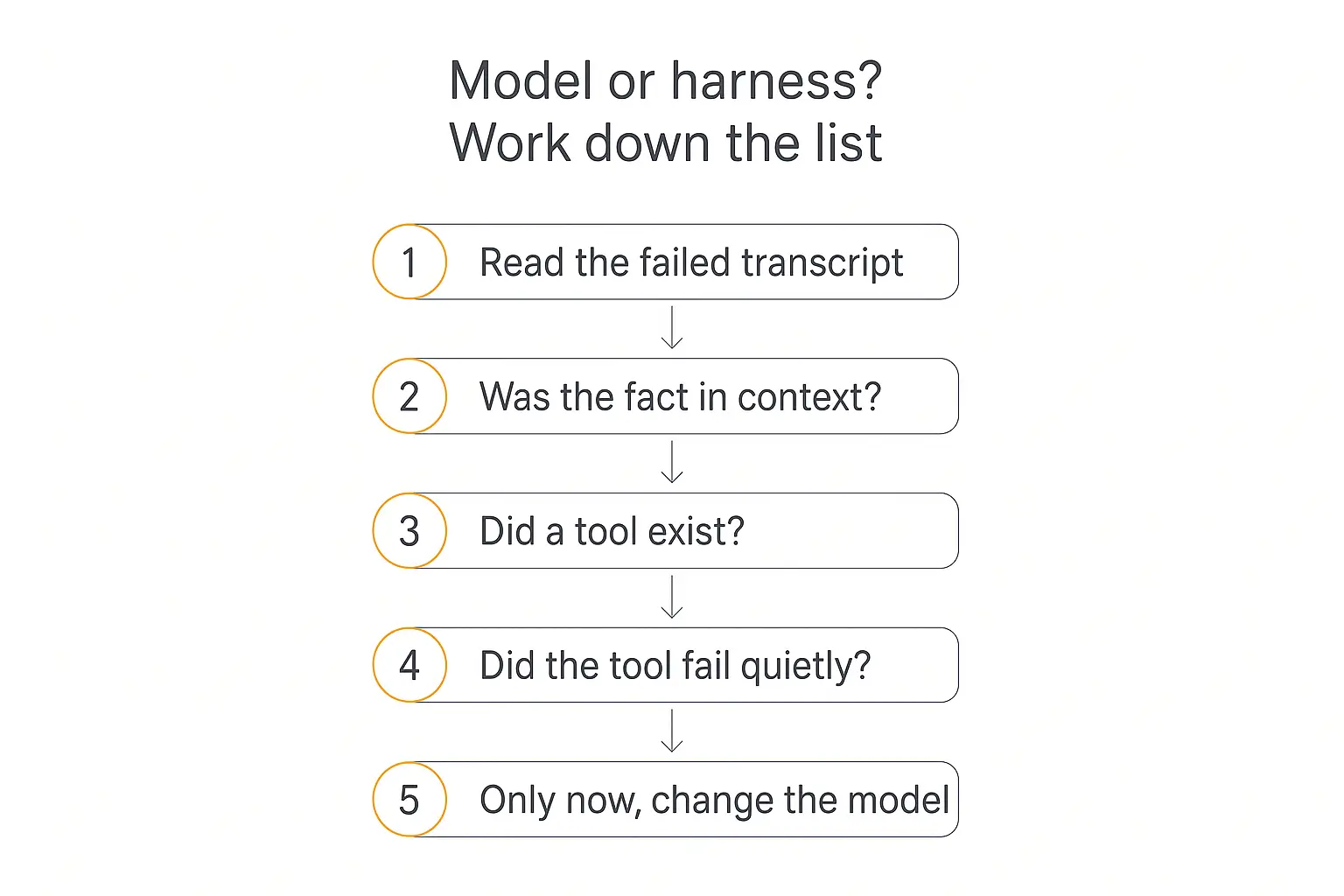
Step 1 — Read the actual transcript of the failure
Not the summary. The full trace: what the agent was sent, which tools it called, what came back, what it produced.
Most "the model is dumb" reports dissolve at this step. You'll frequently find the tool returned an error, or returned nothing, and the agent improvised.
Step 2 — Was the needed fact actually in context?
If the information wasn't in the window, this is a retrieval or context problem, full stop. A smarter model fails identically. Check whether the document exists, whether it's current, whether the chunk was retrieved, whether it got squeezed out by a long conversation.
This was my refund-window client. Zero model involvement.
Step 3 — Did a tool exist for what it needed to do?
If the agent needed live order data and had no order-lookup action, it will either refuse or invent. Both are tool-layer problems.
Related: did the tool exist but with a description so vague the model didn't realise it applied? That's still the harness — a documentation failure, not a reasoning failure.
Step 4 — Did something fail quietly?
The nastiest category. The tool ran, errored, returned an empty result, and nothing surfaced. The agent treated silence as data.
Any time an agent is confidently wrong about something it should have looked up, check this before anything else. It's the single most common root cause I encounter, and it is always the harness.
Step 5 — Only now, consider the model
You've earned the model conversation if, and only if: the right facts were in context, the right tool existed and returned good data, nothing failed silently — and the agent still reasoned badly.
That does happen. Genuinely hard multi-step reasoning, ambiguous judgement calls, long-horizon planning — these are real model-capability limits, and the fix is a better model.
But it's the fifth question, not the first. Our guide to testing and debugging agents covers how to build this into a repeatable process rather than an ad-hoc scramble.
The seven harness failures I see most
Patterns, with the fix that actually works.
1. The system prompt that ate everything
Symptom: instructions get followed inconsistently; adding a rule breaks an older one.
Fix: cut it hard. Move must-hold-every-turn rules to a per-message reminder. Move reference material to the knowledge base. Move procedures into a routed sub-agent. A system prompt should define identity and boundaries, not encode your entire operations manual.
2. Undefined tool failure states
Symptom: confident hallucinations about data the agent should have fetched.
Fix: for every tool, write down what happens on failure and put it in the instructions explicitly. "If the lookup returns nothing, say you couldn't verify it and offer to escalate — never guess."
3. Too many tools
Symptom: the agent calls the wrong action, or chains three when one would do.
Fix: split into a router plus specialists. Four tools per agent is a good ceiling. Sharpen every description so the trigger condition is unmistakable.
4. Stale knowledge
Symptom: confidently outdated answers — old pricing, old policies, departed staff.
Fix: connect live sources rather than uploading snapshots, and put a human owner on every knowledge source with a review date. Documents don't age gracefully.
5. No intermediate state
Symptom: long tasks lose the thread; the agent forgets step two by step six.
Fix: give it somewhere to write things down. This is why todo tracking is enabled by default in Microsoft's harness — an explicit plan the agent maintains outside the context window is dramatically more reliable than hoping it remembers. Our multi-step workflow guide covers structuring these.
6. Guardrails as an afterthought
Symptom: the agent did something nobody authorised — issued a refund, promised a discount, emailed the wrong list.
Fix: approval tiers. Decide per action whether it's auto-approved, requires confirmation, or is off-limits. The agent security risks post covers the blast-radius thinking here.
7. No sensors at all
Symptom: you find out it's broken when a client tells you.
Fix: add the cheapest possible checks first. Did it return the required fields? Is that a real date? Did it include the disclaimer? Deterministic checks catch a surprising share of failures for essentially nothing, and they run on every response instead of on the ones you happen to spot-check.
What harness work actually costs
The harness literature is enthusiastic and mostly silent on the bill. Let me not be.
A harness is a maintained asset, not a one-time build. Every tool you add is a thing that can break when the API on the other end changes. Every knowledge source needs an owner. Every guardrail needs revisiting when the business changes.
Rough shape of it, from client work:
| Harness investment | Effort | Typical payoff |
|---|---|---|
| Tighten instructions, sharpen tool descriptions | An afternoon | High — usually the biggest single win |
| Define failure states for every tool | A day | High — kills the confident-hallucination class |
| Connect live knowledge sources | A day, then ongoing ownership | High for anything policy- or price-related |
| Add deterministic output checks | 1–2 days | Medium-high, and it compounds |
| Build an eval set | 2–5 days | Low at first, very high once you're changing things regularly |
| Custom orchestration and routing | Weeks | Only worth it at real volume |
Note the shape: the cheapest interventions have the highest payoff. That's unusual and it's the actual practical takeaway of this entire article. Most teams skip the afternoon-long fixes and go straight to arguing about models.
The one genuine trade-off worth flagging: a more elaborate harness is a slower, more expensive agent. Verification steps cost model calls. Approval gates cost human time. Compaction costs latency. A sophisticated harness on a task that didn't need one is over-engineering, and it shows up in both your latency and your token bill.
Match harness weight to stakes. An internal FAQ bot does not need what a client-facing agent issuing refunds needs.
Build your harness or buy it?
The honest version of this question is: which layers do you want to be responsible for?
Building your own inner harness — the loop, dispatch, compaction, sandboxing, observability — is a real engineering project. It's the right call if your agent's core mechanics are genuinely novel, or if you need control that no platform exposes.
For most consultants, agencies and small teams shipping client-facing agents, it isn't. You'd be rebuilding solved infrastructure while your competitor ships.
The middle path — and where Pickaxe sits — is buying the inner harness and owning the outer one. The platform handles the loop, sandboxing, context allocation, deployment and access control; you own instructions, actions, knowledge, guardrails and evaluation, which is where your domain expertise actually lives.
A few Pickaxe specifics map directly onto harness layers, if you want to audit yours:
- Model Reminder — rules that must hold on every turn, immune to context bloat
- Actions, capped around four, with waterfall routing beyond that — the tool-count discipline, enforced
- Knowledge Base with daily source refresh and per-source context instructions — retrieval that doesn't rot
- Waterfall allocation — a defined, inspectable order for what survives a full context window
- Preview with user impersonation — testing the harness as a specific user sees it, not as an abstraction
- Access groups — scoping what an agent can reach, per audience
- OpenClaw — per-user isolated sandboxes for agents that browse, execute code or generate files
You can compare what different models cost inside that harness at pickaxe.co/models, though after reading this far you'll hopefully treat that as the last knob to turn rather than the first.
A harness audit you can run this week
Take one agent that's underperforming. Work through this in order. It takes about two hours.
- Pull ten real failed conversations. Not synthetic tests — actual transcripts where a user didn't get what they needed.
- Classify each one against the five-step diagnostic: missing context, missing tool, silent failure, bad instruction, or genuine reasoning limit. Tally them.
- Count your tools. More than four or five? Note which two are most confusable and rewrite both descriptions.
- Word-count your system prompt. Over ~800 words, find what belongs in knowledge or a sub-agent instead.
- Ask "what happens if this fails?" for every tool. Any you can't answer is a defect. Write the failure instruction now.
- Date every knowledge source. Anything not reviewed in 90 days is suspect. Anything about price, policy or people is guilty until proven innocent.
- List what the agent can do without asking. Anything on that list you'd be uncomfortable explaining to a client needs an approval gate.
- Add one deterministic sensor. Just one. The cheapest check that would have caught the most common failure in step 2.
The tally in step 2 is the payoff. In nearly every audit I've run, the "genuine reasoning limit" bucket is the smallest one — usually one or two out of ten.
The other eight were harness.
Frequently asked questions
What is an AI agent harness in simple terms?
It's everything wrapped around the language model that lets it actually do things — the instructions, the tools, the memory, the loop that keeps it going, the rules about what it's allowed to do. The model thinks; the harness gives it hands, a memory and a rulebook.
Is the harness the same as the agent framework?
Close, but not identical. A framework (LangGraph, CrewAI, Microsoft Agent Framework) is a toolkit for building a harness. The harness is the specific assembled thing your agent runs inside. Two teams using the same framework will have very different harnesses. Our framework comparison covers the toolkit layer.
Does the harness matter more than the model?
For most business agents, yes — and increasingly so as models converge. The sourced evidence puts scaffold-driven swings at roughly 4 to 16 points on identical models, and academic work finds harness evolution contributing comparably to model upgrades. But it's not either/or: a great harness on a model that's genuinely too weak for the task still fails. The point is sequencing — fix the harness first, because it's cheaper, faster and permanent.
Do I need to write code to work on my harness?
No. Instructions, tool descriptions, knowledge sources, approval rules and failure-state handling are all outer-harness work, and no-code platforms expose all of them. That's the majority of the available gain.
How is harness engineering different from context engineering?
Context engineering is a subset. It's specifically about what information is in the model's window at any moment. Harness engineering includes that plus tools, memory, error handling, orchestration, sandboxing, guardrails and observability.
What's the fastest harness improvement I can make today?
Define failure states for your tools. Go through each one, write down what the agent should say and do when it fails, and put that in the instructions. It's an hour of work and it eliminates the most damaging failure mode there is — confident wrongness about data the agent should have looked up.
The takeaway
The model is the part with a price tag and a launch event. The harness is the part that decides whether any of that reaches your client.
Every time you're tempted to upgrade the model, run the five questions first. Was the fact in context? Did the tool exist? Did it fail quietly? Was the instruction clear? Only then, is this genuinely too hard to reason about?
Four out of five times, the answer is sitting in the harness — and it's an afternoon of work rather than a permanent line item.
Mitchell Hashimoto's framing is the one to keep: when the agent gets something wrong, don't correct the agent. Change the environment so that mistake becomes impossible.
That's the job. That's harness engineering.
If you want to build on an inner harness that's already handling the loop, the sandboxing and the context allocation — so your work goes into the layers that actually carry your expertise — Pickaxe is built for exactly that shape of problem.