Most AI projects don't fail because the model wasn't smart enough. They fail because someone asked one prompt to do six jobs at once.
You've probably seen the shape of it. A single mega-prompt that's supposed to read an inbound email, work out what the sender wants, look up their account, decide whether it's urgent, draft a reply, and log the whole thing to a spreadsheet.
It works in the demo. Then it meets real inputs, and it starts skipping steps, hallucinating the lookup, or answering a billing question with a sales pitch.
The fix is almost never a better model. It's structure. You break the job into steps, you make each step do one thing, and you let the path through those steps change depending on what the data says.
That's a multi-step AI workflow: a sequence of model calls, tool calls, and decisions wired together so the output of one step becomes the input to the next — with branches that let different inputs take different routes.
This guide covers what a multi-step AI workflow actually is, the three layers every one of them has, how chains and branches differ, the five orchestration patterns worth knowing, a full worked example you can copy, and the failure modes that bite people in production.
What a multi-step AI workflow actually is
A single LLM call is a function: text in, text out. A multi-step AI workflow is a program that happens to call an LLM several times along the way.
The important word is program. There's control flow. There are intermediate values. There are places where things can go wrong and get retried.
Anthropic draws the line clearly in Building Effective Agents: workflows orchestrate LLM and tool calls through predefined code paths, while agents let the model decide its own next move at runtime.
With a workflow, you own the plumbing. With an agent, the model owns the plumbing and you own the goal and the guardrails.
That distinction matters more than it sounds. It determines who is responsible when the thing does something stupid at 2am — your flowchart, or the model's judgment.
Most production systems I've looked at are workflows that call an agent in one or two spots, not agents all the way down. The structure is deterministic; the reasoning is delegated.
If you're still fuzzy on where agents fit into all this, our explainer on what AI agents are is a good starting point, and chatbot vs AI agent covers the step before that.
Why "multi-step" beats "one big prompt"
Splitting a job into steps buys you four things that a mega-prompt can't give you.
Accuracy. Each call has one job and a short instruction. Short instructions are followed more reliably than long ones — this is the single most consistent thing I've seen across builds.
Inspectability. When the output is wrong, you can look at the intermediate values and see exactly which step produced garbage. A mega-prompt gives you one black box.
Cost control. Once steps are separate, they don't all need the same model. Classification can go to something cheap and fast; the final draft can go to something expensive. That's the whole premise of AI model routing.
Reuse. A step that extracts a company name from a message is useful in six workflows. A mega-prompt is useful in one.
The three layers of every multi-step workflow
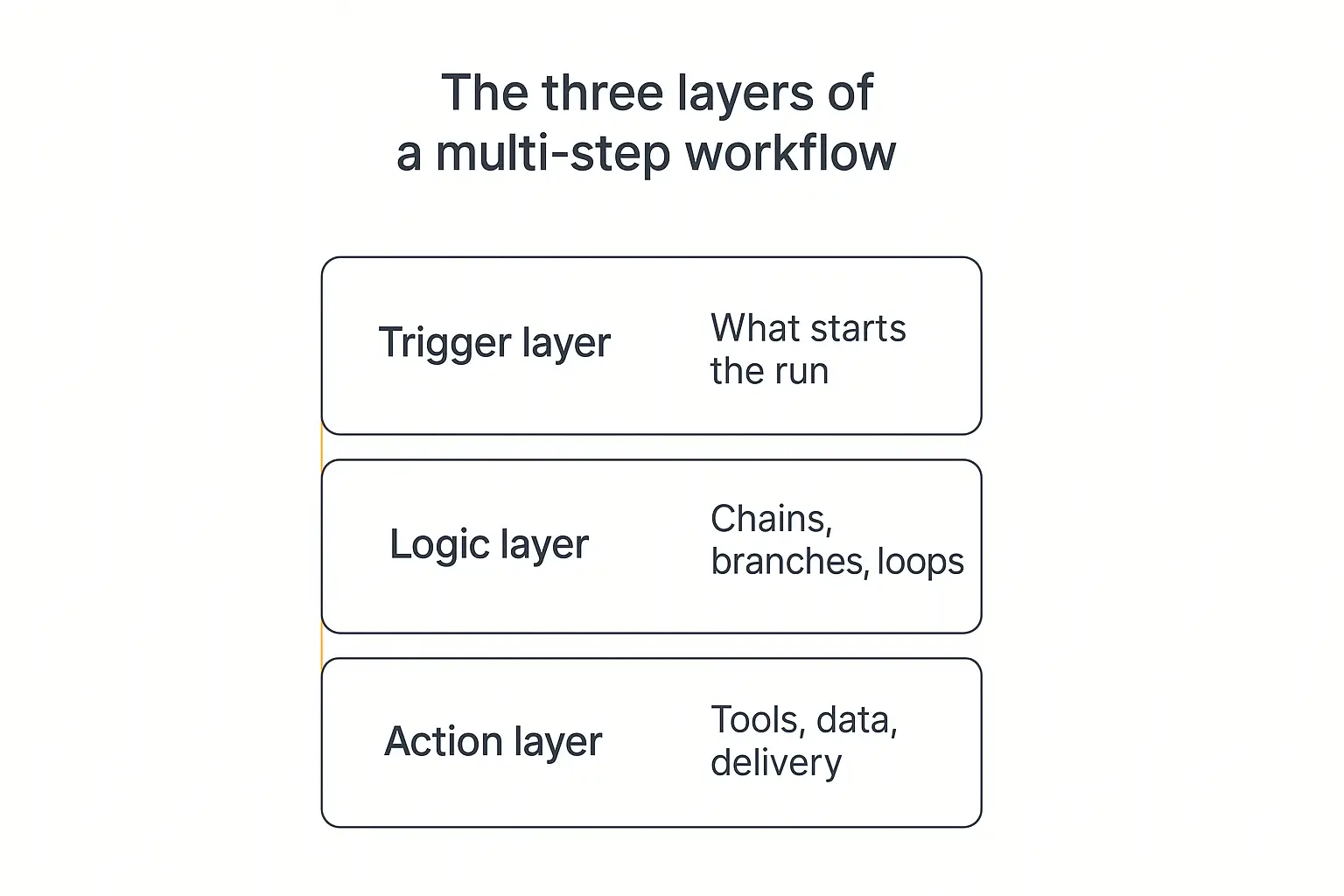
Every multi-step AI workflow I've taken apart has the same three layers, whether it was built in code or dragged together in a builder.
1. The trigger layer — what starts the run
Something has to kick the workflow off. There are only really four options.
- A person — someone types a message or submits a form.
- A clock — the run happens at 7am every weekday. We covered this pattern in depth in how to build an AI agent that runs on a schedule.
- An event — a new email lands, a deal moves stage, a webhook fires.
- Another workflow — one run finishes and hands off to the next.
The trigger sets the tone for everything downstream. Event triggers need idempotency (the same event can arrive twice). Scheduled triggers need to handle "nothing happened since last time" gracefully.
2. The logic layer — chains, branches, and loops
This is where the actual multi-step behaviour lives, and it's what the rest of this guide is about.
The logic layer decides what runs, in what order, and under what conditions. It's the difference between a workflow and a pile of prompts.
3. The action layer — tools, data, and delivery
Steps that touch the outside world: retrieving from a knowledge base, calling an API, writing a row, sending a message.
These are the steps that can actually cause damage, so they're the ones that need approval gates and retry logic. More on that later.
In Pickaxe these are Actions — connections to external tools and APIs that let an agent do more than talk. If you're wiring up that layer, connecting an agent to Google Sheets, Slack, and other apps walks through it.
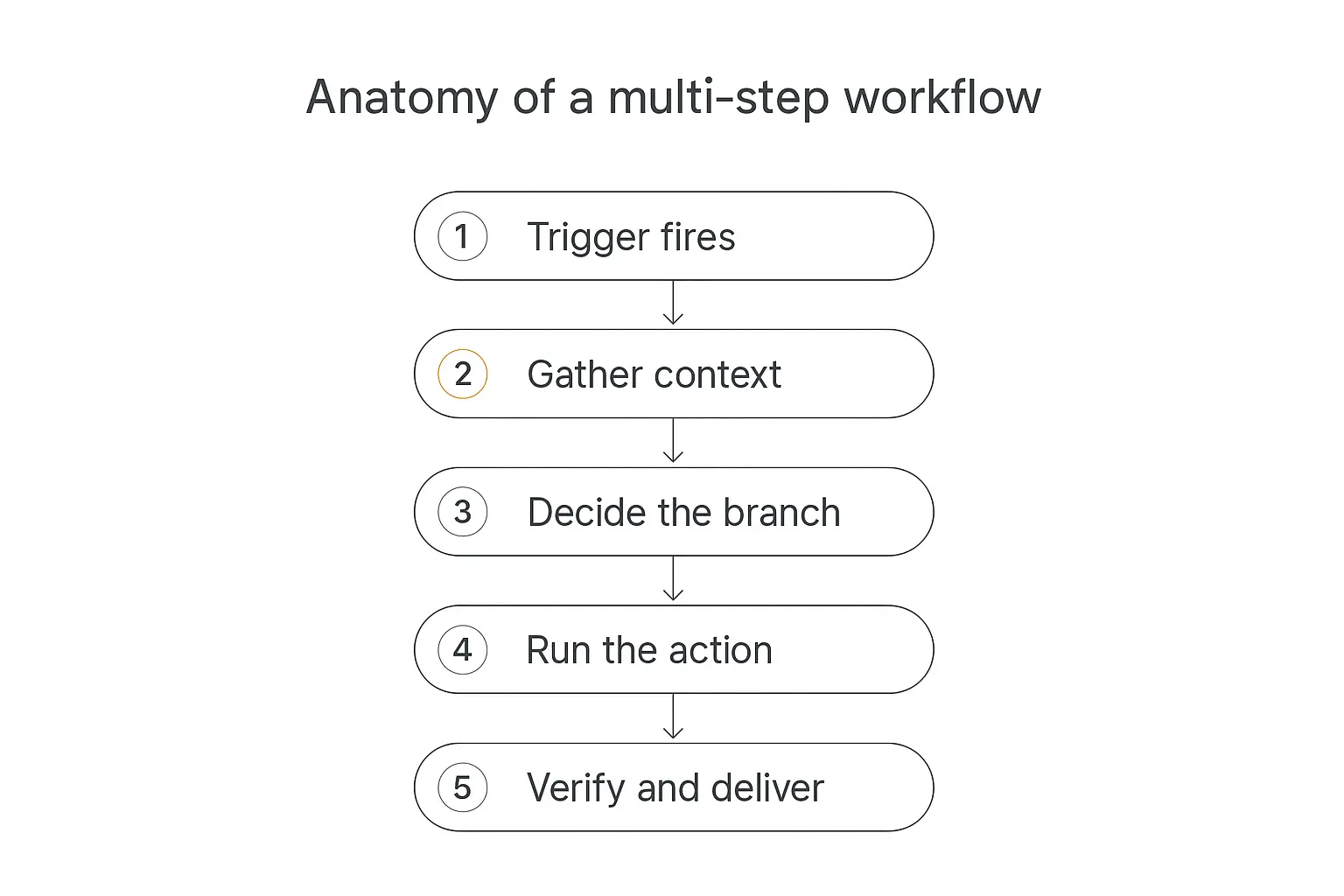
What one run actually looks like, stage by stage
Strip away the diagrams and a single run through a multi-step AI workflow goes through five stages. Almost every workflow you'll ever build is a variation on these.
Stage 1: Trigger fires
The run begins with a payload — an email, a form submission, a row, a timestamp. Capture it raw and keep it. You will want it later when you're debugging.
Stage 2: Gather context
Before the model reasons about anything, pull in what it needs: the customer record, the last three tickets, the relevant policy doc.
This is the step people skip, and it's why so many agents feel dumb. The model isn't dumb; it's uninformed. Our guide to adding a knowledge base to your agent covers the retrieval side of this properly.
Stage 3: Decide the branch
Now classify. What kind of request is this? Is it urgent? Does it need a human?
Keep this step brutally simple. It should return a label from a fixed list, not an essay. A cheap model with a tight prompt and five allowed outputs beats a frontier model asked to "figure out what to do."
Stage 4: Run the action
The chosen branch executes — draft the reply, create the ticket, update the record, generate the report.
Stage 5: Verify and deliver
Check the output before it leaves the building. Did the draft actually answer the question? Is the JSON valid? Are all required fields present?
A verification step costs one cheap model call and catches an embarrassing share of failures. It's the highest-return step in the whole workflow and the one most often left out.
Build the workflow without wiring the plumbing yourself
Pickaxe handles the triggers, the knowledge base, and the actions so you can focus on the logic.
Chains: the sequential backbone
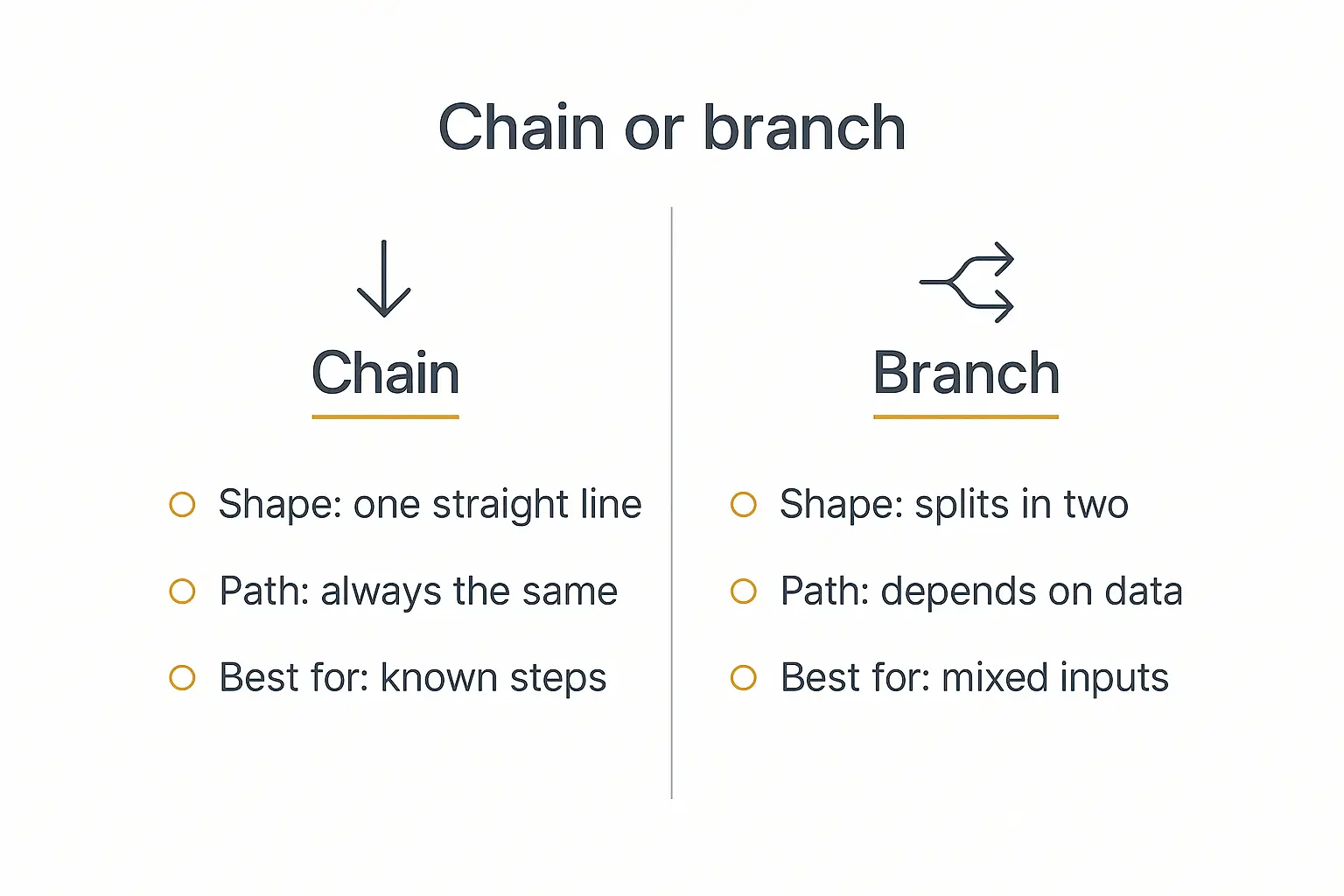
A chain is the simplest multi-step structure: step one runs, its output feeds step two, and so on in a straight line.
Anthropic calls this prompt chaining — decomposing a task into a sequence where each LLM call processes the output of the previous one.
The classic example is writing something long. Generate an outline, check the outline against criteria, then write the document from the approved outline. Three calls, each easy, versus one call that has to hold the whole job in its head.
The gate between links
The part people miss is that a good chain has gates — small checks between steps that decide whether it's safe to continue.
A gate is usually not an LLM call. It's a schema validation, a length check, a "did the lookup return anything at all" check.
Without gates, a bad step-two output flows into step three, gets elaborated on, and arrives at the user as a confident, detailed, completely wrong answer.
Where chains break down
Chains have one big limitation: the path is fixed. Every input walks the same road.
That's fine when your inputs are homogeneous. It falls apart the moment a refund request and a partnership enquiry arrive at the same door and get handed to the same five steps.
Chains also compound latency — five sequential calls means five round trips — and they compound error. If each step is 95% reliable, five steps in a row land you around 77%.
Branching: where workflows get interesting
Branching is what turns a script into a system. Instead of one road, the workflow evaluates a condition and picks a path.
Anthropic's version of this is routing: classify the input, then direct it to a specialised follow-up task. The value isn't cleverness — it's separation of concerns.
Once a refund request goes down its own branch, that branch's prompt can be written entirely for refunds. It can be blunt, specific, and full of edge-case rules that would be noise in a general prompt.
This is exactly why Slack added conditional branching to Workflow Builder and why Zapier's Paths exist. Linear automations hit a ceiling fast.
Two kinds of conditions
There are only two ways to decide a branch, and mixing them up causes most of the pain.
Deterministic conditions read a field and compare it. order_total > 500. customer_tier == "enterprise". attachments.length > 0.
These are free, instant, and always give the same answer. Use them wherever you possibly can.
Model-judged conditions ask an LLM to classify something fuzzy. "Is this message angry?" "Which of these five categories does it belong to?"
These cost money, add latency, and — critically — can return something different on two identical inputs.
The rule I'd give anyone: never use a model to evaluate a condition a field could answer. If the CRM already says the plan is Enterprise, don't ask a model to infer it from the email signature.
Making model-judged branches reliable
When you do need the model to decide, constrain it hard.
- Fixed label set. Give it an explicit list and forbid anything outside it.
- Structured output. Force JSON with an enum, not free prose you then have to parse.
- A default branch. There must be an
else. Unmatched inputs need somewhere to go that isn't "crash." - Low temperature. Classification is not a creative task.
- Confidence escape hatch. Let it return
unsureand route that to a human.
That last one matters more than it looks. A classifier that admits uncertainty 5% of the time and routes those to a person is far more useful than one that guesses confidently every time.
Nesting, and knowing when to stop
Branches can contain branches. They usually shouldn't go more than two deep.
Past that, nobody — including you in three months — can hold the flowchart in their head, and every new rule risks contradicting an existing one.
When you find yourself building a third level, that's the signal to either flatten into a routing table or hand that sub-problem to an agent with a goal instead of a flowchart. The five levels of AI agent autonomy is a useful frame for deciding how much rope to hand over.
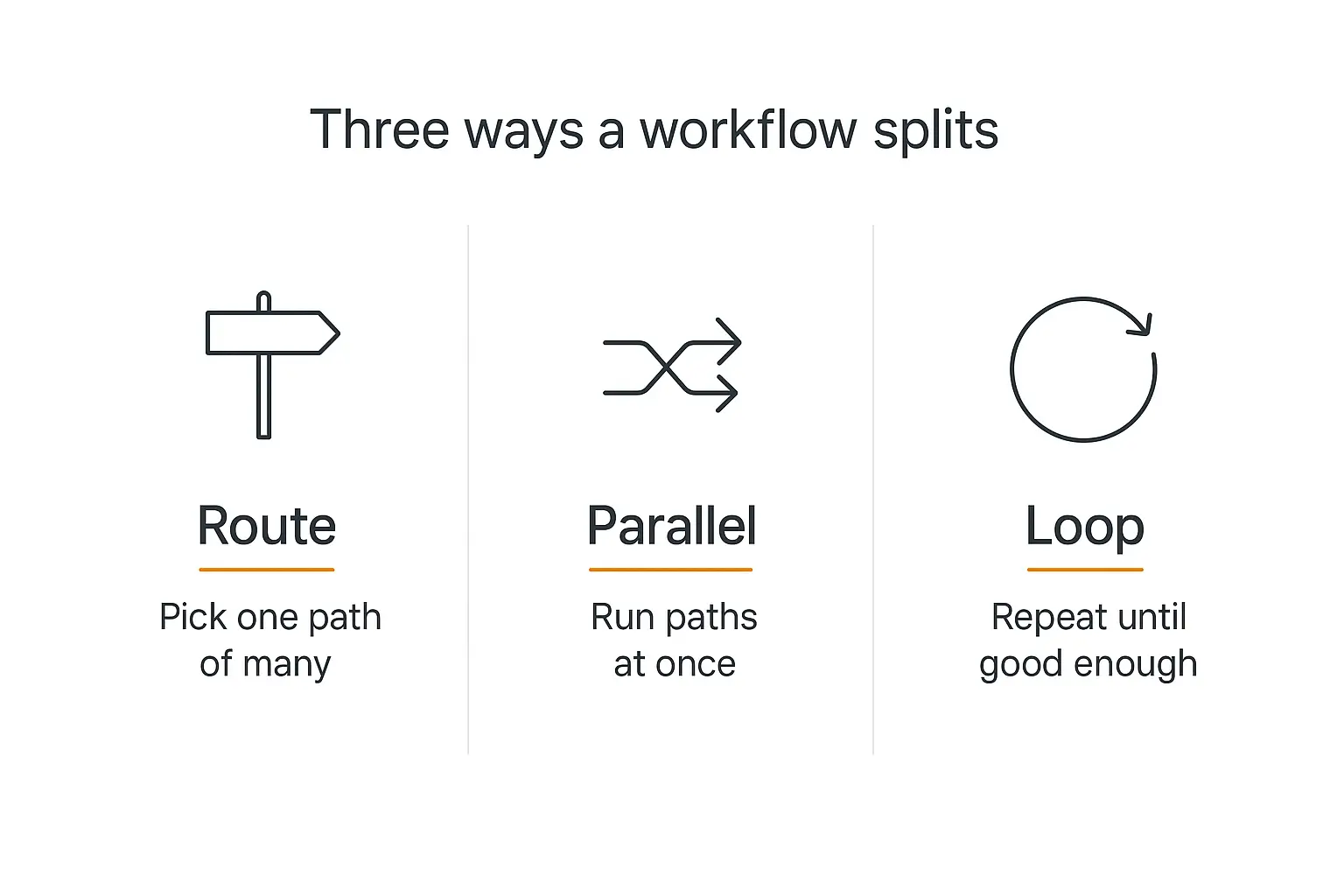
Three ways a workflow splits
"Branching" gets used loosely. It's worth separating the three genuinely different things it can mean, because they have different costs and different failure modes.
Route — pick one path of many
One condition, several possible destinations, exactly one taken. This is the standard conditional branch and the one you'll use most.
Cost is predictable: you pay for one path.
Parallel — run several paths at once
Parallelization splits work across simultaneous calls and combines the results. It comes in two flavours.
Sectioning splits a task into independent chunks — summarise these ten documents at the same time, then merge.
Voting runs the same task several times and aggregates. Three classifiers vote; majority wins. It's a genuinely effective reliability trick for high-stakes decisions.
Parallel paths cut wall-clock time and multiply token spend. Worth it for latency-sensitive work; wasteful if you're just being thorough for its own sake. Keep an eye on what those extra calls cost.
Loop — repeat until good enough
The evaluator-optimizer pattern: one call generates, a second critiques against explicit criteria, the first revises. Repeat until it passes.
This produces noticeably better output on writing, code, and anything with a quality bar you can articulate.
It also has the nastiest failure mode in the whole toolkit: the loop that never ends. Always set a hard maximum iteration count and a "ship the best attempt so far" fallback. Never let a loop's exit depend solely on a model saying "yes, this is good now."
The five patterns worth knowing
Nearly every multi-step AI workflow in production is one of these five patterns, or a composition of them. The OpenAI practical guide to building agents and Anthropic's write-up on common workflow patterns converge on roughly the same list.
| Pattern | What it does | Use it when | Watch out for |
|---|---|---|---|
| Prompt chaining | Sequential steps, each consuming the last output | You know all the steps up front | Compounding errors; no gates between links |
| Routing | Classify, then send down a specialised path | Inputs are varied and need different handling | Misclassification; no default branch |
| Parallelization | Run independent calls at once, then merge | Latency matters, or you want a vote | Token spend multiplies; merge step gets messy |
| Orchestrator-workers | A lead model splits the task at runtime and delegates | Subtasks can't be known in advance | Unpredictable cost; hard to test |
| Evaluator-optimizer | Generate, critique, revise, repeat | There's a clear quality bar to hit | Infinite loops without a hard cap |
These compose. A router at the front can dispatch into different chains; a chain can contain a parallel step; a worker inside an orchestrator can run its own evaluator loop.
The one to be careful with is orchestrator-workers, because it's the point where you stop owning the control flow. It's powerful and it's also where costs get unpredictable. Multi-agent systems explained goes deeper on that trade-off.
A worked example: the inbound lead workflow
Abstract patterns are easy to nod along to. Here's a complete workflow you could build this afternoon, with the actual decisions spelled out.
The job: every message that hits hello@ gets read, qualified, routed, and either answered or escalated — within two minutes, without a human triaging the inbox.
Step 1 — Trigger
New email arrives. Payload: sender, subject, body, timestamp, any attachments.
Dedupe on message ID immediately. Mail providers redeliver, and a workflow that replies twice looks broken in a way users remember.
Step 2 — Gather context (deterministic, no model)
Look the sender's domain up in the CRM. Pull: existing customer yes/no, plan tier, open tickets, account owner.
No LLM involved. This is a database call, and it should stay one.
Step 3 — Classify (cheap model, fixed labels)
One call, low temperature, JSON out:
intent: one ofsales,support,billing,partnership,spam,unsureurgency: one oflow,normal,highsentiment: one ofcalm,frustrated,angry
Three fields, all enums. No prose. If the model returns anything off-list, treat it as unsure.
Step 4 — Branch (deterministic rules on top of the labels)
Now the routing, and notice that none of these conditions involve another model call. The model already did its one job in step 3.
intent == spam→ archive, stop.sentiment == angryORurgency == high→ escalate to a human immediately, post to Slack, stop.intent == unsure→ human review queue, stop.intent == billingAND existing customer → billing branch.intent == supportAND existing customer → support branch.intent == sales→ qualification branch.- anything else → default branch: acknowledge and route to the shared queue.
The angry-customer rule sitting above everything else is deliberate. Escalation conditions should be evaluated before category conditions, always. An angry billing question is an escalation, not a billing ticket.
Step 5 — Run the branch
The support branch retrieves from the help docs and drafts an answer with citations. The billing branch pulls the last three invoices and drafts against them. The sales branch scores the lead and drafts a qualifying reply.
Each of these is its own small chain, with its own prompt written for exactly that job. That's the payoff for routing: our guide to building an AI lead qualification agent is essentially just the sales branch, built out in full.
Step 6 — Verify before sending
One cheap call against the draft: does it answer the question asked, does it avoid promising anything about pricing or timelines, is it under 200 words, does it include a citation if it made a factual claim?
Fail any check → send to human review instead of the customer.
Step 7 — Deliver and log
Send the reply. Write a row: input, classification, branch taken, model used, tokens, latency, verification result, final action.
That log is your improvement loop. Without it you're guessing, and AI agent analytics explains what to do with the data once you have it.
Ship this workflow to clients under your own brand
Package multi-step agents into a branded portal with access control and billing built in.
How to actually build one, without writing orchestration code
You have three broad options, and the right one depends on how much control you need versus how fast you want to move.
Code frameworks
LangGraph models workflows as graphs with explicit state. Microsoft's Agent Framework has first-class branching primitives. For long-running or failure-prone workflows, Temporal gives you durable execution, so a run can survive a crash and resume where it stopped.
Maximum control. Also maximum surface area to maintain.
Automation platforms
n8n's flow-logic nodes and Zapier Paths give you visual branching with hundreds of integrations already built.
Great when the workflow is mostly plumbing with a bit of AI. Less great when the AI part is the hard part.
Agent platforms
Platforms like Pickaxe come at it from the other end: the AI is the primary thing, and the plumbing is configuration.
You give an agent a role prompt, attach a Knowledge Base for retrieval, and add Actions to reach external tools. For multi-step logic, the recommended shape is a waterfall setup — a primary agent that classifies and routes, with specialised sub-agents behind it handling each branch.
That maps almost exactly onto the router-plus-chains pattern above, which is not a coincidence. It's the shape that survives contact with real inputs.
One practical guideline: keep it to around four actions per agent. Past that, agents get unreliable at picking the right one, and you're better off splitting into sub-agents. The same instinct that makes you split a mega-prompt applies to a mega-agent. Model choice per step matters too — you can compare options at pickaxe.co/models.
Where multi-step workflows break in production
Gartner has predicted that over 40% of agentic AI projects will be cancelled by the end of 2027, largely on cost, unclear value, and weak risk controls.
Very little of that is model quality. It's these five things.
1. Compounding error
Five steps at 95% each is roughly 77% end to end. Ten steps is 60%.
The fix: fewer steps, gates between them, and a verification step at the end. Measure per-step accuracy, not just end-to-end — otherwise you can't tell which link is dragging the chain down.
2. Silent branch drift
A classifier starts sending 30% of traffic down a branch that used to get 5%, and nobody notices for a month because the workflow never errors.
The fix: log branch distribution and alert on shifts. This is the single most useful metric a multi-step workflow can emit.
3. Runaway loops and cost
An evaluator loop that won't converge. An orchestrator that decides this particular task needs forty subtasks.
The fix: hard iteration caps, per-run token budgets, and a kill switch. Every loop needs an exit that doesn't depend on the model's opinion.
4. Missing default branches
Real inputs are weirder than your test set. Something will arrive that matches no condition.
The fix: every branch point gets an else, and the else goes to a human, not to a crash or a shrug.
5. No idempotency
Retries are good. Retries that send a second email, create a second ticket, and charge a second time are not.
The fix: make side-effecting steps idempotent with a run key, and separate "generate" steps (safe to retry) from "commit" steps (not safe).
Testing a workflow that has branches
Testing a chain is easy — one path, one set of expectations. Testing a branching workflow means testing paths, and the number of paths grows fast.
A few things that make it tractable.
Build a labelled set for the classifier. Fifty real inputs with the branch each one should take. This is the highest-value hour you'll spend on the whole project, and it turns "the routing feels off" into a number.
Test each branch in isolation. Feed the branch its expected input directly, without running the classifier. Otherwise a classifier bug looks like a branch bug.
Keep a set of deliberately awful inputs. Empty messages, wrong language, three questions at once, someone trying to prompt-inject their way to a discount. Every one of them should land somewhere sane.
Re-run the whole set after any prompt change. Changing the classifier prompt changes the branch distribution, which changes everything downstream. Our guide to testing and debugging an AI agent before deploying it covers the mechanics.
Prompt quality does most of the heavy lifting at each step — prompt engineering for AI agents is worth reading alongside this.
When to put a human in the loop
Not every branch should end in an automated action. The useful question isn't "can the model do this?" but "what does it cost if it's wrong?"
Three tiers work well in practice.
- Auto-execute — cheap to reverse, low blast radius. Tagging, drafting, internal summaries, logging.
- Draft and approve — customer-visible but reversible. Outbound replies, proposals, published content.
- Human decides — money, contracts, legal, anything you'd have to apologise for. The workflow gathers evidence and recommends; a person clicks.
Approval gates are cheap to add and very expensive to skip. Human-in-the-loop AI agents goes through how to place them without strangling throughput.
When you shouldn't build a multi-step workflow at all
The honest answer, and the one most guides skip.
Anthropic's own advice is to start with the simplest thing that works and add multi-step machinery only when simpler solutions fall short. That advice is routinely ignored, usually because multi-step architectures are more fun to build than they are to run.
Skip it if a single well-tooled prompt already passes. One call with good retrieval and a couple of examples beats five calls that each add a little latency and a little error.
Skip it if the steps never vary. If there's no condition and no judgment, that's not an AI workflow — it's a script, and a script is cheaper and more reliable.
Skip it if you can't articulate the decision rule. If you can't write down when branch A applies, the model can't apply it either. Vague rules produce vague routing.
Reconsider if the path genuinely can't be known ahead of time. That's the case where a workflow becomes the wrong tool and an agent with a clear goal, good tools, and hard guardrails becomes the right one.
The developer consensus that formed over the last year lands in roughly the same place: don't build an agent where a deterministic workflow will do, and don't build a workflow where one prompt will do.
Frequently asked questions
What's the difference between a multi-step AI workflow and an AI agent?
A multi-step AI workflow follows a path you defined at build time. An agent decides its own path at runtime. Workflows are predictable and testable; agents are flexible and harder to bound. Most real systems are workflows that call an agent for one or two genuinely open-ended steps.
How many steps should a workflow have?
As few as get the job done. Each additional step adds latency, cost, and a chance to fail. If you're past about seven or eight steps for a single run, look for steps that can be merged or replaced with deterministic code.
Should branching conditions use an LLM or plain logic?
Plain logic wherever the data can answer the question. Use a model only for genuinely fuzzy judgments like intent or tone — and even then, have it output a fixed label that plain logic branches on afterwards.
How do I stop a workflow from looping forever?
Set a hard maximum iteration count, a token budget per run, and a fallback that ships the best attempt so far. Never make the exit condition depend only on the model deciding the output is good enough.
Can I build a multi-step AI workflow without code?
Yes. Automation platforms give you visual branching, and agent platforms like Pickaxe let you build a routing agent with specialised sub-agents behind it. You'll still need to think like an engineer about conditions, defaults, and failure handling — the tool removes the syntax, not the design work.
What should I log?
Input, the classification, the branch taken, model and tokens per step, latency, verification result, and final action. Branch distribution over time is the metric that catches problems earliest.
Where to start
If you take one thing from this: the structure matters more than the model.
Pick a job that's currently done by a person following an if-this-then-that rule in their head. Write the rule down. That's your branch logic — you already have it.
Then build the smallest version: trigger, one classification step, two branches, one verification step, one log. Run it on real inputs for a week and read every log line.
You'll find the third branch you need. You'll find the input nobody predicted. You'll find the step that should have been deterministic. That's the work.
Add complexity only where the logs prove you need it — and only after the simple version has earned it.
If you'd rather skip the orchestration plumbing entirely, Pickaxe lets you build the routing agent, attach the knowledge base, wire the actions, and put the whole thing behind a branded portal — without standing up a framework first.