Three frameworks keep coming up every time someone asks about building multi-agent AI systems: CrewAI, LangGraph, and AutoGen.
Developers argue about these endlessly on Reddit, Twitter, and Discord. Some swear by CrewAI's simplicity. Others insist LangGraph is the only serious choice for production. And then there's the AutoGen crowd, who'll point out it has more GitHub stars than both of the others combined.
I dug into all three to sort out which one actually fits different use cases -- and whether any of them is the clear winner people claim. Spoiler: it depends on what you're building, how much control you need, and whether you care more about prototyping speed or production durability. If you're still getting your head around what AI agents actually are, start there first. This article assumes you already know the basics and want to pick a framework.
Quick Comparison: CrewAI vs LangGraph vs AutoGen at a Glance
Before we go deep on each one, here's the overview.
| Feature | CrewAI | LangGraph | AutoGen (AG2) |
|---|---|---|---|
| Architecture | Role-based (agents as employees) | Graph-based (nodes + edges) | Conversation-based (agent dialogue) |
| Primary Language | Python | Python, JavaScript/TypeScript | Python, .NET |
| License | MIT | MIT | Apache 2.0 |
| GitHub Stars | ~31K | ~12K | ~42K |
| Enterprise Adoption | Growing | Fastest (Klarna, Uber, Replit) | Research-heavy |
| Pricing | Free tier + paid cloud | Open-source (LangSmith costs extra) | Completely free |
| Best For | Fast prototyping, role-based workflows | Production systems, complex state management | Multi-party conversation, research |
| Learning Curve | Low | Medium-High | Medium |
Now let's break down what each of these actually looks like in practice.
CrewAI -- Role-Based Multi-Agent Collaboration
CrewAI takes the most intuitive approach of the three. You think of agents the way you'd think of a team of employees -- each one has a role, a goal, a backstory, and a set of tools they can use. You assign them tasks and let them collaborate.

That metaphor is what makes CrewAI so accessible. If you've ever managed a team, you already understand the mental model. A "researcher" agent gathers information, a "writer" agent drafts content, and a "reviewer" agent checks the output. Each agent knows their role and works within those boundaries.
Architecture and Core Concepts
CrewAI organizes everything around four concepts: Agents, Tasks, Tools, and Crews.
An Agent is defined by its role ("Senior Data Analyst"), its goal ("Analyze market trends and identify investment opportunities"), and an optional backstory that shapes its behavior. You assign tools to each agent -- which APIs they can call, which databases they can query, which files they can read.
A Task is a specific piece of work you want done. Each task gets assigned to an agent, and you can set dependencies so tasks run in a specific order. Tasks can also include expected output formats, so you get structured results.
A Crew is the container that brings agents and tasks together. You define the process -- sequential (tasks run one after another), hierarchical (a manager agent delegates to workers), or consensual (agents discuss and agree) -- and kick it off.
Key Features
CrewAI has invested heavily in developer experience. Their Visual Studio editor lets you design agent workflows graphically, which is great for teams that include non-developers. There are 100+ built-in tools covering web search, file operations, API calls, and more.
The memory system is one of the more interesting features. CrewAI supports short-term memory (within a task), long-term memory (across sessions), and entity memory (remembering facts about specific things). This means agents can learn and improve over time, not just execute blindly.
One important technical note: CrewAI removed its LangChain dependency in version 1.14 and is now fully standalone. If you tried CrewAI earlier and were frustrated by the LangChain overhead, it's worth another look. The framework is leaner and faster without that dependency.
With roughly 31,000 GitHub stars, CrewAI has built a strong community. The documentation is approachable, and the tutorials are genuinely helpful for getting started quickly.
Pricing
CrewAI's open-source framework is free. Their cloud platform has tiered pricing:
- Free: 50 executions/month
- Pro: $25/month (100 executions)
- AMP Cloud: ~$99/month (higher limits, more features)
- Enterprise: Custom pricing
You can run CrewAI entirely locally for free. The paid tiers are for their managed cloud platform, which handles deployment, monitoring, and scaling.
Where CrewAI Shines
Prototyping speed is CrewAI's biggest advantage. You can go from idea to working multi-agent system in an afternoon. The role-based metaphor means you spend less time thinking about technical architecture and more time thinking about what you actually want your agents to do.
It's also the best choice if your team includes people who aren't deep into graph theory or distributed systems. Product managers, domain experts, and junior developers can all understand and contribute to a CrewAI setup.
Where CrewAI Struggles
Here's the honest part. CrewAI's error handling is too coarse-grained for serious production use. When an agent fails mid-task, the retry logic isn't configurable enough to handle the kinds of partial failures you see in real-world systems.
I've seen multiple reports of prototypes that looked great in demos but fell apart in production. The gap between "works in development" and "works reliably at scale" is wider with CrewAI than with LangGraph.
The memory system, while impressive conceptually, can get expensive with large agent teams because each memory operation involves LLM calls. At scale, that adds up fast.
LangGraph -- Graph-Based Agent Orchestration
LangGraph takes a fundamentally different approach. Instead of thinking about agents as team members, you think about your workflow as a directed graph -- nodes that do work and edges that control flow between them.
It's more abstract than CrewAI's role metaphor, which is both its strength and its weakness. The graph model gives you precise control over every decision point, every conditional branch, and every state transition in your agent system. But it also means you need to think carefully about your workflow architecture before you start building.
Architecture and Core Concepts
LangGraph is built on three primitives: Nodes, Edges, and State.
A Node is a function that does work. It could be an LLM call, a tool invocation, a data transformation, or any custom logic. Nodes receive the current state and return updates to it.
Edges connect nodes and control the flow. They can be static (always go from A to B) or conditional (go to B if the condition is met, otherwise go to C). This is where LangGraph's power lives -- you can model complex decision trees, loops, parallel execution, and error recovery paths.
State is a typed object that flows through the graph. Every node can read and write to the state, and the state is automatically checkpointed so you can resume from any point if something fails. This is huge for production systems where reliability matters.
LangGraph reached v1.0 in October 2025, which signals maturity and a commitment to API stability. For teams evaluating frameworks for long-term production use, that matters.
Key Features
The feature that sets LangGraph apart is built-in checkpointing and durable execution. Every state transition is automatically saved, so if your agent system crashes mid-workflow, it picks up exactly where it left off. No lost work, no re-running expensive LLM calls.
Human-in-the-loop is a first-class feature, not an afterthought. You can insert approval gates at any point in the graph where a human needs to review or approve before the workflow continues. For enterprise use cases where AI decisions need oversight, this is essential.
The DeltaChannel system makes checkpoints efficient by only saving what changed since the last checkpoint, not the entire state. For workflows with large state objects, this dramatically reduces storage and improves performance.
Per-node timeouts and error recovery give you fine-grained control over failure handling. If one node in your graph times out or throws an error, you can define exactly what happens -- retry, skip, reroute to a fallback, or escalate to a human. This level of control is what production systems need.
LangGraph is used in production by Klarna, Uber, Replit, Elastic, and LinkedIn. With roughly 12,000 GitHub stars, it has fewer stars than the others, but its enterprise adoption rate is the fastest of the three. You can explore the source on GitHub.
Pricing
LangGraph itself is free and open-source under the MIT license. You don't pay anything to use the framework.
The cost comes from LangSmith, the observability and monitoring platform that most LangGraph teams use alongside it:
- Developer (free): 5,000 traces/month
- Plus: $39/seat/month, includes more traces
- Enterprise: Custom pricing
- Per-node execution: $0.001/node executed (on LangGraph Cloud)
You can run LangGraph without LangSmith, but you'd be missing out on the observability that makes debugging complex agent systems manageable. The documentation covers both the standalone and LangSmith-integrated setups.
Where LangGraph Shines
LangGraph is the most production-ready framework of the three. The combination of durable execution, typed state management, fine-grained error handling, and enterprise observability makes it the safest choice for systems that need to run reliably at scale.
If you're building something where failure recovery, auditability, and human oversight are non-negotiable, LangGraph is the clear winner. That's why enterprises are adopting it faster than the alternatives.
Where LangGraph Struggles
The learning curve is real. If you're not comfortable thinking in graphs -- nodes, edges, conditional routing, state machines -- LangGraph will feel overwhelming at first. The mental model is powerful but abstract.
The documentation is comprehensive but can be overwhelming. There's a lot of it, and it doesn't always make clear which path to follow for your specific use case. You might spend more time reading docs than writing code in the first week.
And because LangGraph comes from the LangChain ecosystem, there's sometimes confusion about where LangGraph ends and LangChain begins. They're separate projects now, but the history adds friction for newcomers.
AutoGen (AG2) -- Conversation-Driven Multi-Agent Systems
AutoGen takes yet another approach. Instead of roles (CrewAI) or graphs (LangGraph), AutoGen models agent collaboration as conversations. Agents talk to each other, debate, negotiate, and reach consensus through dialogue.
This makes AutoGen the most natural fit for use cases where multiple perspectives need to be weighed -- think brainstorming, code review, research synthesis, or any scenario where agents should challenge each other's conclusions.
The AutoGen-to-AG2 Story
Here's the important context. Microsoft created the original AutoGen and it became enormously popular -- the Microsoft repo has roughly 42,000 GitHub stars, making it the most-starred framework of the three.
But in 2024-2025, Microsoft shifted its focus to a new project (AutoGen Studio) and effectively put the original AutoGen into maintenance mode. The community responded by creating AG2, a community-led fork that continues active development under the AG2 organization on GitHub.
When I say "AutoGen" in this article, I'm primarily talking about AG2 -- the active fork. The Microsoft original still works but isn't getting significant new features.
Architecture and Core Concepts
AutoGen's mental model is a group chat. You create agents, put them in a conversation, and define how they interact. An agent might respond to every message, only when mentioned, or based on some condition you define.
The conversation patterns are flexible. You can set up round-robin (agents take turns), selector (a manager picks who speaks next), broadcast (everyone gets every message), or completely custom routing.
What makes this powerful is that agents genuinely interact with each other's outputs. One agent proposes a solution, another critiques it, a third refines it, and a fourth evaluates the final result. The dialogue pattern naturally produces higher-quality outputs for tasks that benefit from multiple perspectives.
Key Features (AG2 Beta)
The AG2 Beta redesign brings significant improvements over the original AutoGen:
- Streaming support -- see agent responses as they're generated, not just the final output
- Event-driven architecture -- react to things as they happen instead of polling for results
- Multi-provider LLM support -- easily swap between OpenAI, Anthropic, Google, and open-source models
- Dependency injection -- cleaner code structure, easier testing
- Typed tools -- better developer experience with type-safe tool definitions
- First-class testing -- built-in support for testing agent behavior
With roughly 42,000 GitHub stars (across the original and fork), AutoGen has the largest community of the three. That's a real advantage for finding examples, getting help, and building on existing patterns.
Pricing
AutoGen and AG2 are completely free and open-source. No paid tiers, no cloud platform costs, no per-execution fees. Zero.
This is a genuine differentiator. You only pay for the LLM API calls your agents make and whatever infrastructure you run them on. There's no vendor layer adding costs on top.
Where AutoGen Shines
Multi-party conversations are where AutoGen has no equal. If your use case involves agents debating, building consensus, reviewing each other's work, or synthesizing multiple perspectives, AutoGen's conversation model is purpose-built for that.
The zero cost is also significant. For research teams, students, startups watching every dollar, and open-source projects, not having any framework-level costs removes a barrier entirely.
AutoGen also offers the most diverse conversation patterns. The flexibility to design custom interaction protocols means you can model complex organizational workflows -- not just linear pipelines or tree structures.
Where AutoGen Struggles
The Microsoft-to-AG2 transition created real confusion. If you search for AutoGen tutorials, you'll find a mix of content for the old Microsoft version and the new AG2 fork. Library names, import paths, and APIs have changed. It's getting better, but the transition isn't fully settled yet.
AG2 is still working toward a stable v1.0 release. The beta is usable but APIs may still change. For production systems that need API stability, this is a real concern. LangGraph's v1.0 stability guarantee gives it an edge here.
And honestly, AutoGen is less production-proven than LangGraph. There are fewer case studies of large-scale production deployments. Most of the impressive AutoGen work has been in research and experimentation, not in serving millions of users.
Head-to-Head: Architecture Comparison
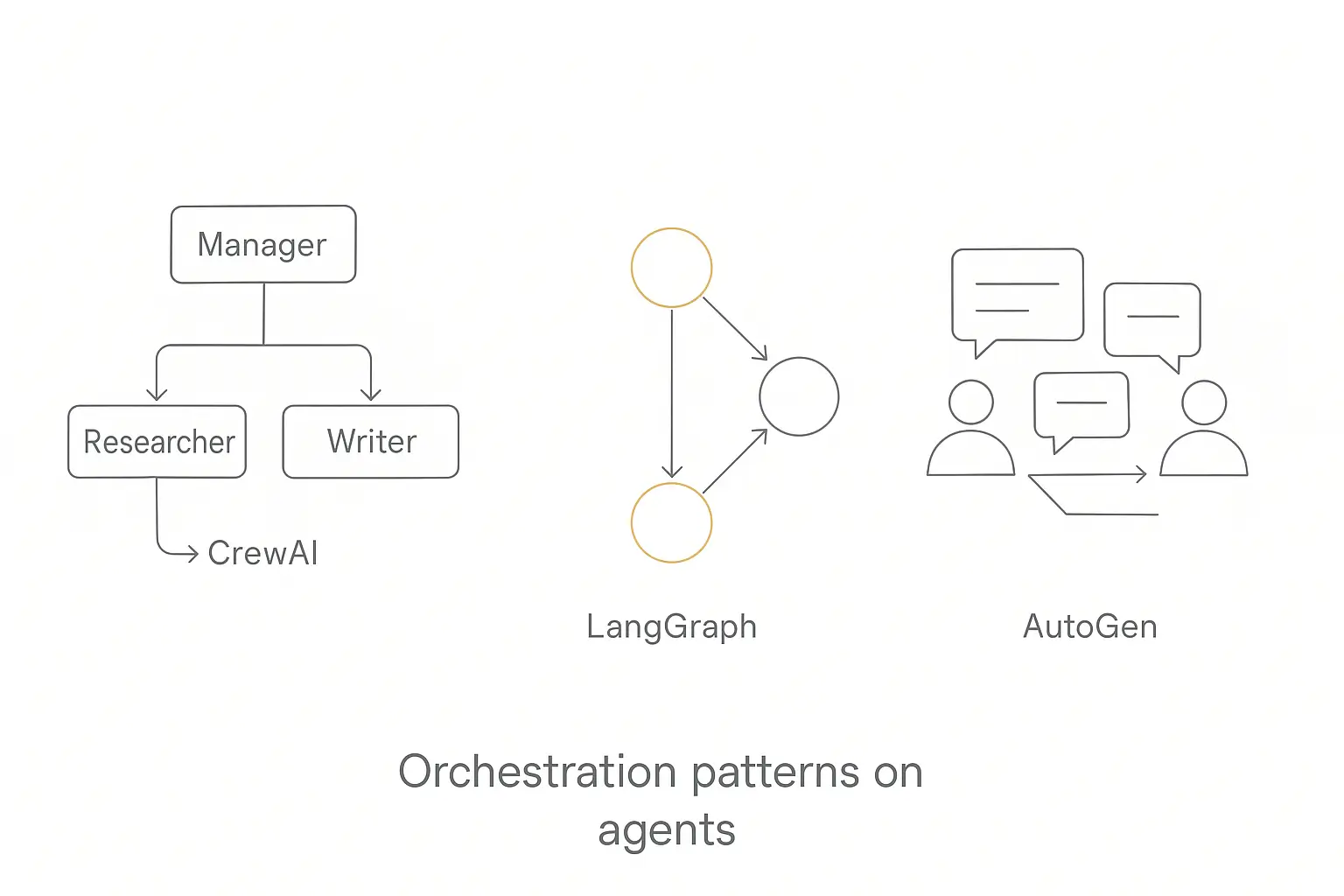
The biggest difference between these three frameworks isn't features or pricing -- it's how they want you to think about your problem.
CrewAI = Org Chart
CrewAI thinks in roles, tasks, and delegation. Your agents are employees with job titles and responsibilities. Work flows through an organizational hierarchy -- manager delegates to workers, specialists handle their domains, and results roll up.
This is the right mental model when your workflow maps naturally to how a team of humans would handle it. Content creation, research pipelines, data analysis workflows -- anywhere you'd naturally say "the researcher does X, then the writer does Y, then the editor does Z."
LangGraph = Flowchart
LangGraph thinks in nodes, edges, and conditions. Your workflow is a directed graph where each step can branch, loop, or run in parallel based on the current state. You define exactly what happens at every decision point.
This is the right mental model when you need precise control over complex logic. Approval workflows, multi-step processes with error handling, systems that need to pause and resume -- anywhere the flow of work involves branching conditions and state that needs to be tracked carefully. You can get most of that shape without adopting a framework at all, which is what building a multi-step AI workflow walks through.
AutoGen = Group Chat
AutoGen thinks in conversations, dialogue, and consensus. Your agents are participants in a discussion. They propose ideas, challenge each other, refine their thinking through debate, and converge on a result.
This is the right mental model when your problem benefits from multiple perspectives being weighed against each other. Code review, brainstorming, research synthesis, quality assurance -- anywhere the best answer comes from agents challenging and improving each other's work.
Which Mental Model Fits Your Project?
Ask yourself: does your workflow look more like an org chart, a flowchart, or a group discussion? That question will point you to the right framework faster than any feature comparison.
For a deeper look at how these and other frameworks compare across the full landscape, I put together a full breakdown of 15 AI agent frameworks.
Skip the framework rabbit hole entirely
Build and deploy AI agents in an afternoon with Pickaxe -- no code, no infrastructure.
Production Readiness Compared
This is where it gets real. Prototyping is fun. Production is where frameworks earn their keep.
| Capability | CrewAI | LangGraph | AutoGen (AG2) |
|---|---|---|---|
| Error Handling | Basic retry logic, coarse-grained | Per-node timeouts, custom fallbacks, granular recovery | Try/except patterns, improving in beta |
| State Persistence | Memory system (short/long/entity) | Built-in checkpointing, DeltaChannel for efficient saves | Conversation history, custom persistence |
| Observability | Basic logging, CrewAI Dashboard | LangSmith integration (traces, debugging, analytics) | Basic logging, community tools |
| Human-in-the-Loop | Supported but basic | First-class feature with approval gates | Supported via UserProxy agent |
| Deployment | CrewAI Cloud, self-hosted, Docker | LangGraph Cloud, self-hosted, any container platform | Self-hosted only |
| API Stability | Stable (post v1.14) | v1.0 stable | Beta (APIs may change) |
LangGraph wins on production readiness. It's not close. The combination of durable execution, built-in checkpointing, enterprise-grade observability through LangSmith, and first-class human-in-the-loop support puts it ahead of the other two for any system that needs to run reliably.
CrewAI is fine for simpler workflows where the cost of failure is low. If an agent task fails and you can just re-run it, CrewAI's error handling is adequate. But for workflows where partial failures need graceful recovery, it falls short.
AutoGen (AG2) needs more maturity. The beta redesign is heading in the right direction, but until AG2 reaches a stable v1.0 with proven production deployments, it's harder to recommend for mission-critical systems.
On benchmarks, the differences are measurable. In complex task completion scenarios, LangGraph achieves roughly 62% completion rates, AutoGen around 58%, and CrewAI about 54%. Those numbers come from DataCamp's comparison testing. The gap widens further on tasks requiring error recovery and state management.
Pricing Breakdown
Cost matters, especially if you're evaluating frameworks for a team or an organization. Here's the full picture.
| Tier | CrewAI | LangGraph + LangSmith | AutoGen (AG2) |
|---|---|---|---|
| Free | 50 exec/month (cloud) | 5,000 traces/month (LangSmith) | Unlimited (fully open-source) |
| Individual / Pro | $25/month (100 exec) | $39/seat/month (Plus) | $0 |
| Team / Cloud | ~$99/month (AMP Cloud) | $0.001/node exec (Cloud) | $0 |
| Enterprise | Custom | Custom | $0 |
| Self-Hosted Cost | $0 (framework only) | $0 (framework only) | $0 |
What This Actually Costs in Practice
AutoGen is the clear winner on price. It's completely free at every tier. Your only costs are LLM API calls and your own infrastructure. For a solo developer or small team, that could mean zero framework costs.
CrewAI gets expensive if you use their cloud. The free tier's 50 executions/month disappears fast during development. But if you self-host, the framework itself is free. The cloud is a convenience, not a requirement.
LangGraph's tricky cost is LangSmith. The framework is free, but most teams end up using LangSmith for observability because debugging complex graph workflows without it is painful. At $39/seat/month, a team of five is looking at $195/month just for observability. The per-node execution cost on LangGraph Cloud ($0.001/node) adds up too -- a workflow with 10 nodes running 10,000 times a month is $100 in node costs alone.
Real-World Cost Scenarios
Solo developer building a side project: AutoGen costs $0. CrewAI costs $0 (self-hosted) to $25/month (cloud). LangGraph costs $0 (self-hosted, no LangSmith) to $39/month (with LangSmith).
Small team of 5 in production: AutoGen costs $0 in framework fees. CrewAI costs $99-$500/month depending on usage. LangGraph costs $195/month for LangSmith seats alone, plus node execution costs.
Enterprise team of 20: AutoGen still costs $0 in framework fees. CrewAI is custom pricing. LangGraph is $780/month minimum for LangSmith seats, plus cloud costs.
Keep in mind: these are framework costs only. All three require LLM API calls, which are typically the largest expense in any agent system. And if you want to understand the full cost picture of running AI agents, I covered the formulas for measuring AI agent ROI in a separate article.
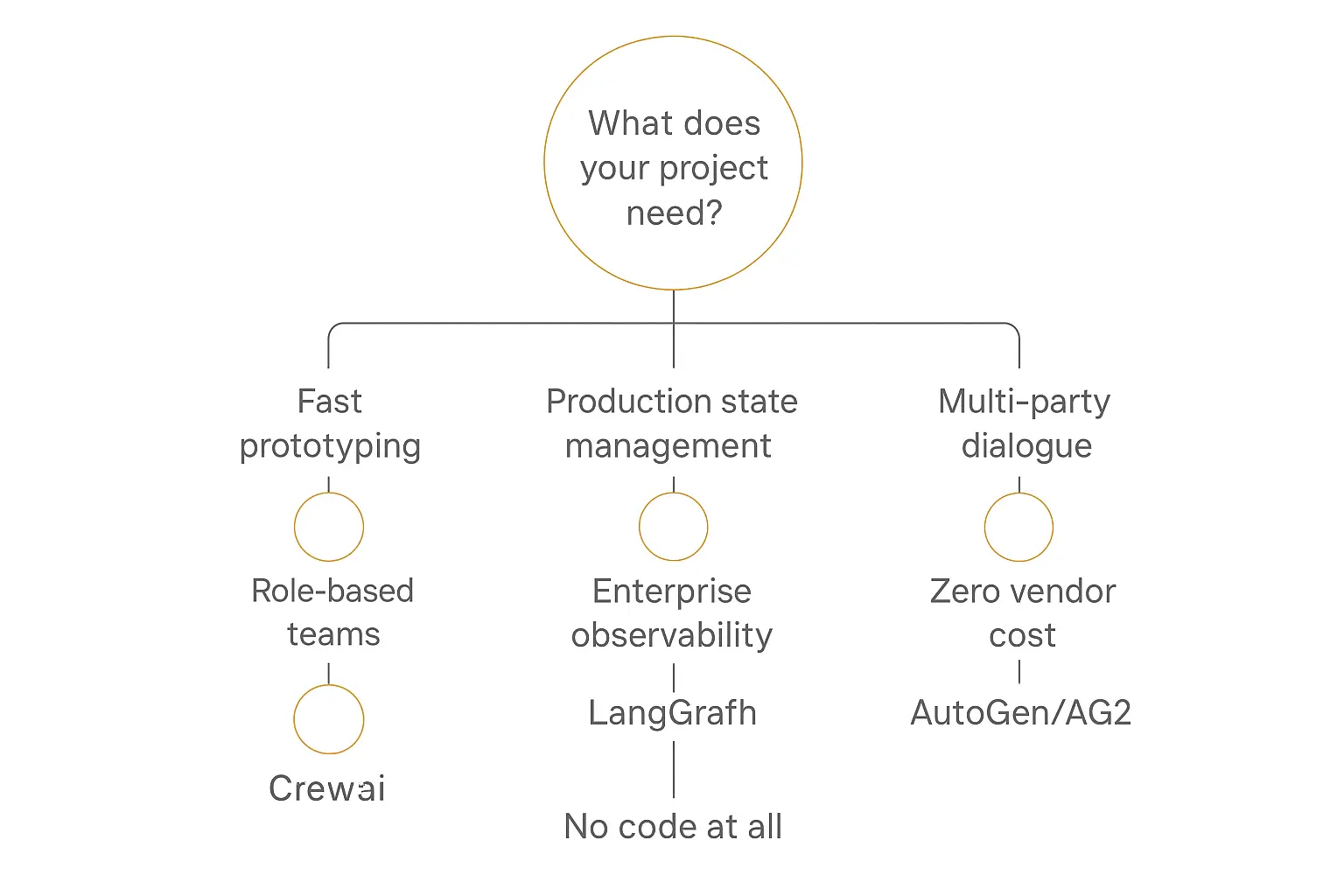
When to Use Each Framework
After digging into all three, here's my honest take on when each one is the right choice.
Choose CrewAI When...
- You want to prototype fast. CrewAI gets you from idea to working demo faster than the others. If you need to show something to stakeholders next week, start here.
- Your team thinks in roles and tasks. If your workflow naturally maps to "this person does X, then that person does Y," CrewAI's metaphor will feel intuitive.
- You need built-in tools. CrewAI's 100+ tools mean less time building integrations and more time building logic. Web scraping, file operations, API calls -- they're already there.
- Your production requirements are modest. For internal tools, content pipelines, data analysis workflows -- where occasional failures are annoying but not catastrophic -- CrewAI works fine.
Choose LangGraph When...
- You're building for production. If reliability, error recovery, and observability are requirements (not nice-to-haves), LangGraph is the safest bet.
- You need state management. Complex workflows with branching logic, loops, parallel execution, and state that persists across sessions -- this is LangGraph's sweet spot.
- You want enterprise-grade observability. LangSmith's tracing, debugging, and analytics tools make it possible to understand what's actually happening inside your agent system. For production debugging, this is invaluable.
- Human oversight is required. Regulated industries, high-stakes decisions, workflows where a human needs to approve before the AI proceeds -- LangGraph's human-in-the-loop is purpose-built for this.
Choose AutoGen (AG2) When...
- Your agents need to negotiate or debate. Code review panels, research synthesis, brainstorming -- any workflow where agents should challenge each other produces better results with AutoGen's conversation model.
- You want zero vendor lock-in. No paid tiers, no cloud platform, no usage-based pricing. AutoGen is the only framework here where you truly own the entire stack.
- You're doing research or experimental work. AutoGen's flexibility in conversation patterns makes it the best playground for exploring new multi-agent architectures.
- Budget is a hard constraint. If you literally cannot spend money on framework tooling, AutoGen is the answer.
Choose None of Them When...
Here's the thing nobody in the framework community wants to say: most people who are evaluating agent frameworks don't actually need one.
If you just want to deploy an AI agent that answers questions, handles customer intake, or automates a business process -- you don't need to write code at all. No-code AI agent builders like Pickaxe let you build and deploy agents in hours instead of weeks, without worrying about orchestration, state management, or deployment infrastructure.
The build vs buy decision is real. Frameworks make sense when you need custom multi-agent orchestration with complex logic. For everything else, a no-code platform is faster, cheaper, and easier to maintain.
What About the Vendor SDKs?
I should mention the elephant in the room. OpenAI, Anthropic, and Google have all released their own agent SDKs -- OpenAI Agents SDK, Claude Agent SDK, and Google ADK respectively.
These are simpler than any of the three frameworks we've been comparing. They're designed to work with a single provider's models and APIs, which means less configuration and faster setup.
The tradeoff is vendor lock-in. If you build on the OpenAI Agents SDK, you're committed to OpenAI models. If you build on Claude's Agent SDK, you're committed to Anthropic. The three frameworks in this article are all model-agnostic -- you can swap providers without rewriting your system.
For simpler single-agent use cases, the vendor SDKs are worth considering. For multi-agent systems or anything where provider flexibility matters, the independent frameworks are the better choice. I covered all of these in my full breakdown of 15 AI agent frameworks.
Also worth noting: there's growing interest in standardized protocols for agent-to-agent communication. The MCP vs A2A protocol comparison covers this emerging space if you're thinking about interoperability between different agent systems.
Frequently Asked Questions
Can I use multiple frameworks together?
Yes, and some teams do. LangGraph has adopted the Agent Protocol standard, which means a LangGraph agent can communicate with agents built on other frameworks. You could use CrewAI for rapid prototyping and then move your validated workflows to LangGraph for production. Or run AutoGen agents for consensus-building alongside LangGraph agents for stateful orchestration.
That said, mixing frameworks adds complexity. Unless you have a clear reason -- like different parts of your system genuinely benefiting from different architectures -- picking one framework and going deep is usually the better strategy.
Which framework has the best documentation?
LangGraph has the most comprehensive documentation, but it can be overwhelming. There's a lot of it, and navigating to the right guide for your specific use case takes patience.
CrewAI has the best tutorials and getting-started experience. You can follow their quickstart and have something working in 30 minutes. The docs are more approachable even if they're less exhaustive.
AutoGen's documentation is in transition because of the AG2 fork. Some docs point to the old Microsoft version, some to the new AG2 version. It's improving but currently the weakest of the three.
Do I need a framework at all?
Not necessarily. If you're building a single agent that does one job, you can probably just use the OpenAI API or Anthropic API directly. Frameworks add value when you need multiple agents coordinating, complex state management, or sophisticated error handling.
And if you don't want to write code at all, no-code platforms can get you to a deployed agent faster than any framework. The framework path makes sense when your requirements genuinely demand custom orchestration logic.
Is AutoGen dead?
No, but the situation is nuanced. Microsoft's original AutoGen repository is in maintenance mode -- it still works but isn't getting major new features. The AG2 fork is actively developed with regular releases, a redesigned architecture, and an engaged community.
The AG2 team is working toward a stable v1.0, and the beta already includes significant improvements over the original. It's not dead -- it's forked and evolving. But the transition has created some ecosystem fragmentation that the community is still working through.
As one tweet put it, we're still searching for the "Linux of AI agents" -- a single, dominant framework that everyone coalesces around. We're not there yet, and AutoGen's fork is one example of why the landscape is still shifting.
Which framework is best for beginners?
CrewAI, without question. The role-based metaphor is the most intuitive way to think about multi-agent systems. You'll be building working prototypes on day one. Start there to learn the concepts, and then evaluate whether you need LangGraph's production features or AutoGen's conversation patterns for your specific use case.
What about framework churn?
This is a legitimate concern. The AI agent framework space is moving fast, and as Priyanka Vergadia's cheatsheet shows, new frameworks and updates are constant. My advice: pick the one that fits your current needs, build something real with it, and don't chase every new release. LangGraph's v1.0 stability commitment is designed to address exactly this concern.
Some developers thinking about building agent-based businesses might also want to consider the starting an AI agent agency angle, where framework choice becomes a strategic business decision.
The Bottom Line
Here's my honest summary after digging into all three.
CrewAI is the best on-ramp. It's the framework I'd recommend if you're new to multi-agent systems and want to start building immediately. The role-based metaphor is intuitive, the tooling is good, and you can prototype fast. Just know that you may outgrow it when production requirements get serious.
LangGraph is the production choice. If you're building something that needs to run reliably, handle errors gracefully, and scale to real users, LangGraph has the most battle-tested infrastructure. The learning curve is steeper, but the investment pays off when things need to work at scale.
AutoGen (AG2) is the wildcard. It's the most flexible, the cheapest (free), and the best at conversation-based collaboration. If your use case fits the conversational model, nothing else comes close. But the platform is still maturing, and the Microsoft-to-AG2 transition adds uncertainty.
And if you've read this far and realized that you don't actually need a framework -- you just need an AI agent that works -- you might be better served by a no-code approach entirely. Pickaxe lets you build, deploy, and even monetize AI agents without writing a single line of code. No orchestration libraries to learn, no infrastructure to manage, no framework debates to settle.
Sometimes the best framework is no framework at all.
Build AI agents without the framework headache
Pickaxe lets you go from idea to deployed AI agent in an afternoon. No code, no infrastructure, no orchestration libraries.