Three teams. Three whiteboards. Same problem: "handle inbound support email automatically."
The first team drew a straight line of boxes. The second drew the same line, but three of the boxes had a little brain icon on them. The third drew a single circle with an arrow looping back into itself.
All three said they were "building an AI agent." Only one of them was.
This is the confusion I want to clear up, because it's costing people real money. "AI agents," "agentic workflows," and plain old "automation" get used as if they're synonyms in sales decks, and they are not. They're three different architectures with three different cost profiles, three different failure modes, and three very different answers to the question your CFO is going to ask.
I've spent a lot of time this year looking at how people actually wire these systems together — what ships, what stalls, and what quietly gets switched off two months after launch. The pattern is consistent enough to be useful.
So here's the honest breakdown of AI agents vs agentic workflows vs traditional automation: what each one really is, the single question that tells them apart, what each costs you, and how to pick the right one for the job in front of you.
The short answer: it comes down to who decides the next step
Forget the marketing for a second. Every one of these systems does the same basic thing — it takes an input, does some stuff, produces an output.
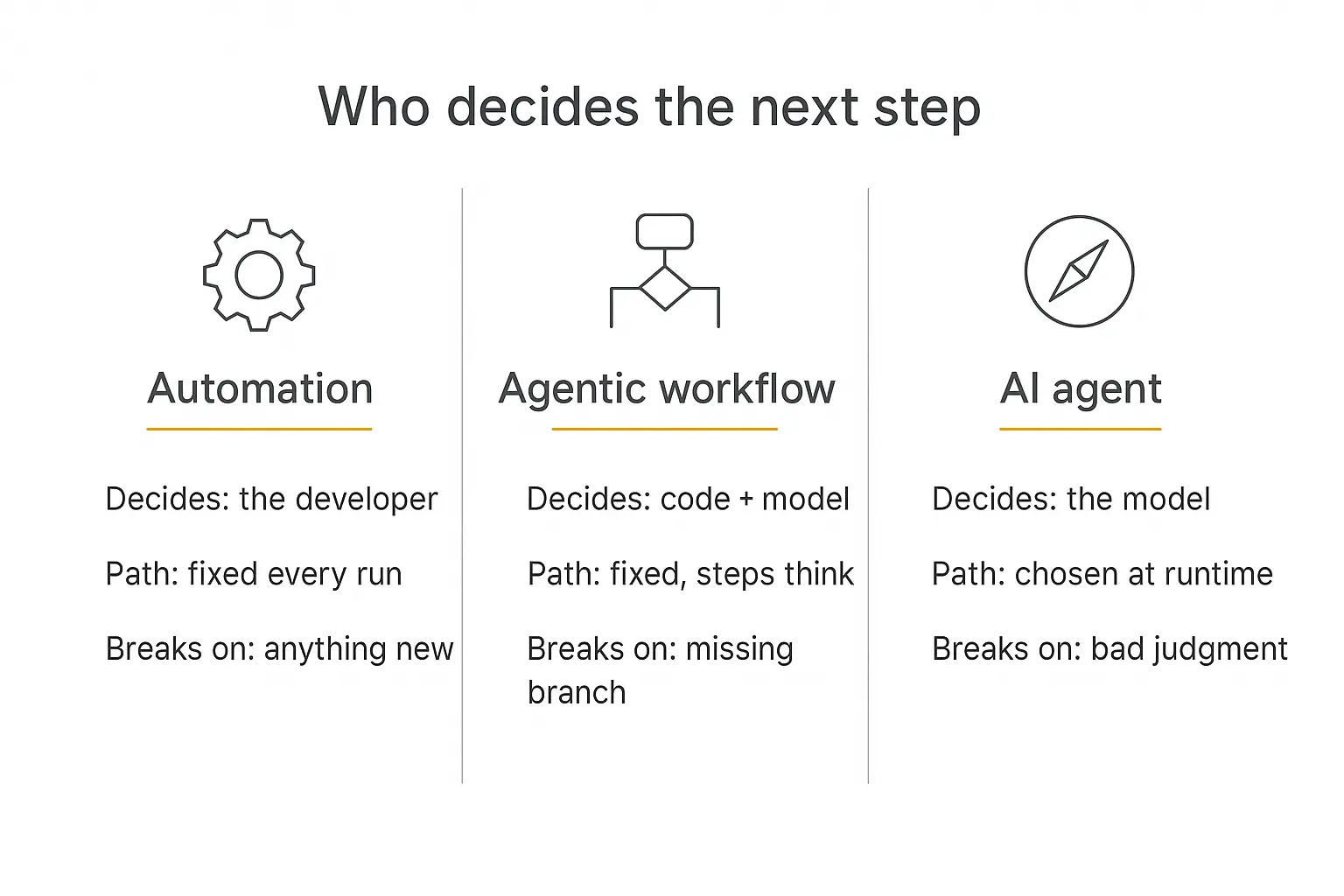
The only thing that meaningfully separates them is who chooses what happens next.
- Automation: you decided, in advance, at build time. The path is identical on run 1 and run 10,000.
- Agentic workflow: you still decided the path. But some of the steps along it use a model to handle work that can't be expressed as rules — reading, classifying, drafting, judging.
- AI agent: the model decides. You give it a goal and a set of tools, and it picks its own sequence of moves at runtime.
That's it. That's the whole distinction. Everything else — cost, latency, reliability, how hard it is to debug at 2am — falls out of that one design choice.
Anthropic draws the line the same way in its widely-cited engineering write-up Building effective agents, defining workflows as systems where models and tools "are orchestrated through predefined code paths," and agents as systems where models "dynamically direct their own processes and tool usage." Same fault line, more precise words.
Automation: the path is carved in stone
Traditional automation is a recipe. When this happens, do that, then that, then that.
Zapier, Make, classic n8n flows, cron jobs, and enterprise RPA bots all live here. A trigger fires, a fixed sequence executes, a result lands somewhere.
It's deterministic. Same input, same path, same output, every single time. That property is boring and it is also the single most underrated feature in this entire article.
What automation is genuinely great at
- Moving structured data around. Form submission to CRM. Stripe payment to spreadsheet row. New file to backup bucket.
- Anything with a hard compliance requirement. If an auditor needs to know exactly what happened, deterministic beats clever.
- High volume, low margin work. A Zap costs a fraction of a cent. An agent run can cost dollars.
- Speed. No model call means no inference latency. Milliseconds, not seconds.
Where it falls apart
Automation operates on structure, not meaning. It can move a field called customer_email anywhere you like. It cannot read the email and work out that the customer is furious.
The moment your process contains a step that starts with "well, it depends," you've hit the wall. And you'll usually hit it in one of three ways:
- Unstructured input. Free-text email, a PDF with a layout nobody standardised, a voice note.
- Branch explosion. You keep adding if conditions until the canvas looks like a subway map and nobody dares touch it.
- Silent breakage. A vendor renames a field and your bot cheerfully writes empty strings into your database for six weeks.
This is exactly why the RPA world has been repositioning rather than dying. As CIO reported, the emerging model isn't agents replacing bots — it's agents deciding when to call the bots. UiPath's own automation trends reporting now leads with agentic framing for the same reason.
Deterministic execution didn't stop being valuable. It just stopped being sufficient on its own.
A quick detour: why the vocabulary is such a mess
It's worth understanding how we got here, because the confusion isn't accidental.
Each wave of automation borrowed the previous wave's language and stretched it. RPA bots were "digital workers." Rule-based chatbots were "virtual assistants." Retrieval apps became "copilots." Now everything is an "agent."
The word keeps moving because it sells. "Agent" currently means whatever the vendor needs it to mean, which is why Gartner had to coin a term for the practice.
There's also a genuine reason for the fuzziness: this really is a spectrum, not three boxes. An evaluator-optimizer loop that runs until quality passes is more autonomous than a linear chain and less autonomous than an open-ended agent. Reasonable people put the boundary in slightly different places.
That's fine. What isn't fine is not knowing where your system sits, because that determines your cost model, your testing strategy, and your risk surface. If the chatbot-to-agent shift is the part you're still untangling, the difference between a chatbot and an agent covers that specific jump.
Agentic workflows: fixed rails, thinking steps
An agentic workflow is the middle path, and in my experience it's the one most people actually need while believing they need something fancier.
You still define the sequence. Step one, then step two, then step three. But one or more of those steps is an LLM call doing something a rule can't do: summarise, classify, extract, draft, score, decide between three named options.
The model brings judgment to individual steps. The code still owns the map.
This is the architecture behind most production AI that works. And it's the one Andrew Ng was pointing at when he argued on X that agentic workflows would drive more progress than the next generation of foundation models — noting that GPT-3.5 wrapped in an iterative loop beat GPT-4 answering in one shot on HumanEval, 95.1% against 67.0%.
The structure around the model mattered more than the model. That's still true.
The five patterns worth knowing
Anthropic's write-up names five workflow shapes, and I've yet to see a production system that isn't some combination of them:
| Pattern | What it does | Use it when |
|---|---|---|
| Prompt chaining | Output of one model call feeds the next | The task decomposes cleanly into ordered stages |
| Routing | Classify the input, send it to a specialised handler | Distinct categories need distinct prompts or tools |
| Parallelization | Run several calls at once, then section or vote | Independent subtasks, or you want consensus for confidence |
| Orchestrator-workers | A lead model splits work among worker calls | The subtasks depend on the input and can't be listed upfront |
| Evaluator-optimizer | Generate, critique, revise, repeat | You have clear quality criteria and iteration measurably helps |
Notice that the last two start to blur into agent territory. That's not a flaw in the taxonomy — it's a spectrum, and these sit near the middle of it. If you want the full mechanics of wiring these together, I went deep on it in how to build a multi-step AI workflow.
Why this is usually the right answer
Agentic workflows give you the thing that makes AI useful — semantic understanding — without giving up the thing that makes systems operable: you know what's going to happen.
You can unit test each step. You can log each step. You can put a human approval gate between step three and step four. When something goes wrong, the trace tells you which box broke.
Try doing any of that when the model invented the sequence at runtime.
Build the workflow version first, ship it this week
Pickaxe gives you prompts, knowledge, and Actions without writing orchestration code.
AI agents: handing over the map
An AI agent gets a goal, a set of tools, and permission to figure out the rest.
The loop is simple to describe: the model looks at the current state, picks a tool, calls it, reads the result, and decides whether it's done or needs another move. Repeat until the goal is met or a limit is hit.
Nobody wrote step four, because step four depends on what came back from step three.
OpenAI's practical guide to building agents frames the qualifying test well: agents earn their keep on workflows that "have previously resisted automation," and if a deterministic solution would do, a deterministic solution should win.
That's a much narrower door than the marketing implies.
What makes something actually an agent
Four things, and you need all four:
- A goal, not a script. "Resolve this ticket," not "do these six things."
- Tools it can choose between. Real side effects — search, database reads, API calls, sending things.
- A loop with memory of the loop. Each iteration sees what the previous ones did.
- Its own stopping condition. It decides when the job is finished, or when to hand back to a human.
Drop any one of those and you have a workflow wearing an agent costume. The Model Context Protocol has made point two dramatically easier over the past year — standard tool interfaces instead of bespoke glue for every integration.
Where agents genuinely win
- Research. You can't know in advance how many sources it takes to answer a question.
- Debugging and triage. The next diagnostic step depends entirely on the last result.
- Long-tail support. Thousands of possible intents, most of them rare, none worth a hand-built branch.
- Open-ended data work. "Find out which of our accounts look like they're about to churn and tell me why."
The common thread: you cannot draw the flowchart in advance. If you can draw it, draw it — and then you don't need an agent.
The hidden tax of autonomy
Here's the part the demos skip.
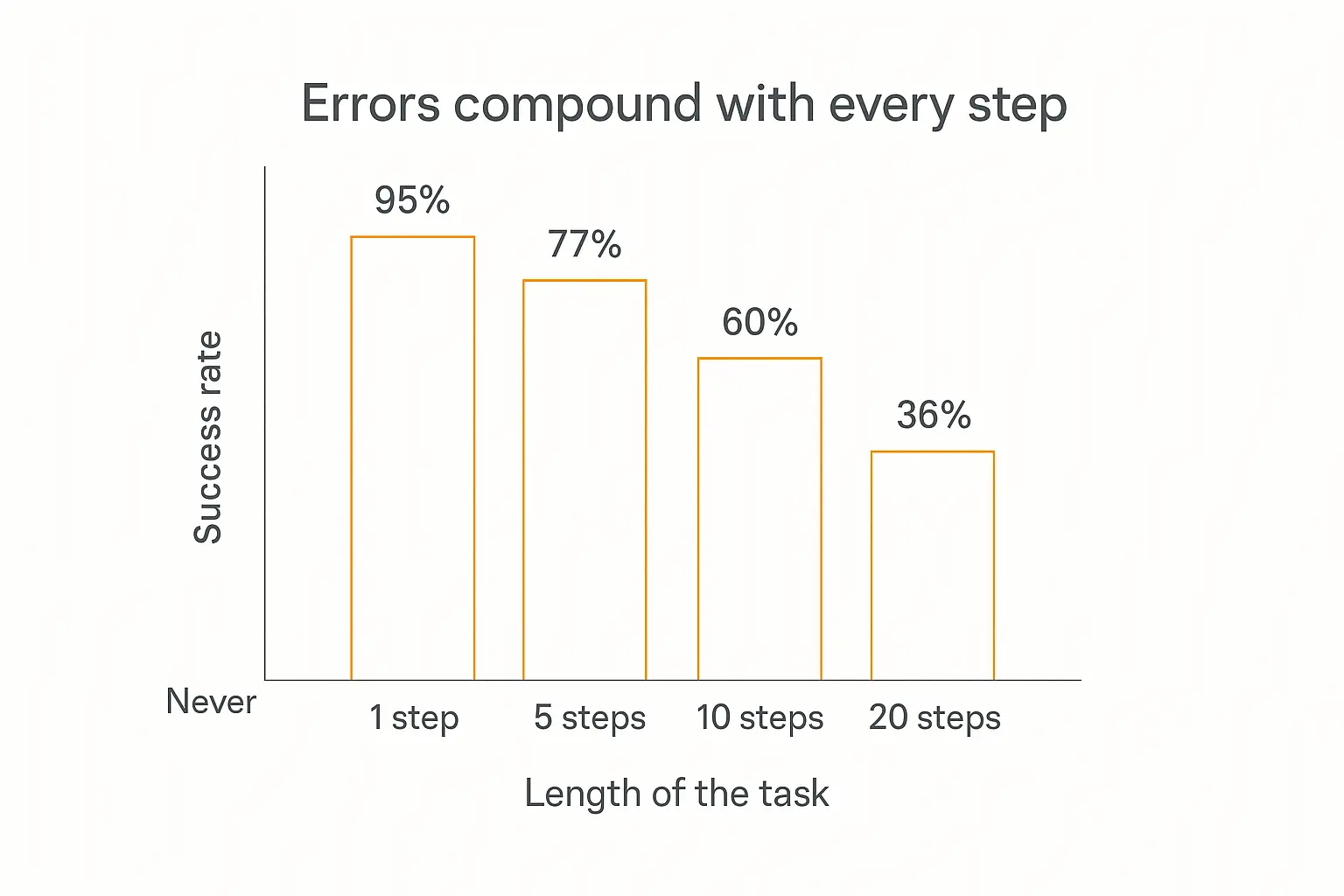
Every step an agent takes is a chance to be wrong, and those chances multiply. A step that's right 95% of the time sounds excellent. Chain twenty of them and your end-to-end success rate is 36%.
Push per-step reliability to 99% — genuinely hard — and twenty steps still only gets you to 82%. This is why agent demos are dazzling and agent deployments are exhausting.
The bill arrives in four forms:
1. Cost variance
A workflow with four model calls costs roughly the same every run. You can put it in a spreadsheet.
An agent might take three tool calls or thirty-three. Same input class, wildly different invoice. I broke down how this compounds in the real cost of AI agents, but the headline is that unbounded loops are unbounded budgets unless you cap them explicitly.
2. Latency
Deterministic automation answers in milliseconds. A workflow answers in a few seconds. An agent that decides to take twelve turns answers in a minute or two.
For a background job, fine. For someone waiting in a chat widget, that's a lost customer.
3. Debuggability
When a workflow breaks, you know which step. When an agent breaks, you get a transcript and a headache — and the same input may not reproduce it, because the model may not choose the same path twice.
This is where agent analytics stops being nice-to-have. If you can't replay a run, you can't fix it.
4. Blast radius
A workflow does exactly the six things you gave it. An agent with write access to your CRM can do anything the CRM API allows, in any order, if it reasons its way there.
Which is precisely why human-in-the-loop checkpoints exist on every serious deployment I've seen. For agents that send email, a DMARC management platform can help you monitor authentication failures and unexpected sending sources.
Side by side
| Automation | Agentic workflow | AI agent | |
|---|---|---|---|
| Who picks the next step | You, at build time | You, with model judgment inside steps | The model, at runtime |
| Handles messy input | No | Yes | Yes |
| Same path every run | Always | Usually | Rarely |
| Cost per run | Negligible | Predictable | Variable, sometimes 10× |
| Typical latency | Milliseconds | Seconds | Tens of seconds to minutes |
| Debugging | Trivial | Straightforward | Genuinely hard |
| Fails by | Breaking loudly | Missing a branch you didn't write | Confidently doing the wrong thing |
| Best for | Structured, repetitive, high volume | Known process, fuzzy inputs | Open-ended goals, unknown path |
Read the "fails by" row twice. It's the most useful line in the table.
Automation fails loudly — the Zap errors, you get an email. Agents fail quietly and plausibly, producing something that looks like a good answer and isn't. Quiet failure is far more expensive than loud failure, and it's the reason agent projects stall in review rather than in build.
Twelve real jobs, and what each one actually wants
Abstractions are easy to nod along to. Here's the same judgment applied to work people actually ask me about.
| The job | What it wants | Why |
|---|---|---|
| Form submission into your CRM | Automation | Structured in, structured out. No meaning required. |
| Invoice data into accounting | Automation | Unless the invoices are scanned PDFs with no fixed layout — then add a model step. |
| Daily metrics digest to Slack | Workflow | Fixed schedule, fixed sources, model writes the summary. See scheduled agents. |
| Lead qualification from a web form | Workflow | Score, enrich, route. Known steps, fuzzy judgment inside them. |
| First-line customer support | Workflow | Classify, retrieve, draft, gate on confidence. Agent only for the tail. |
| Contract review flags | Workflow | Extract clauses, compare to policy, list exceptions. Human signs off. |
| Onboarding a new client | Workflow | The steps genuinely are the same every time. Personalise the content, not the sequence. |
| Competitive research brief | Agent | You don't know how many sources it takes until you're looking. |
| Diagnosing a failing deployment | Agent | Each check determines the next check. Classic loop territory. |
| "Why did revenue dip last month?" | Agent | Open-ended, exploratory, path depends entirely on findings. |
| Bulk content generation from a brief | Workflow | Chain of generate → critique → revise. Bounded and repeatable. |
| Multi-system incident response | Agent + gates | Autonomous investigation, human approval before anything is changed. |
Count them: six workflows, three agents, two straight automations, and one hybrid. That ratio isn't a coincidence — it matches what I see in practice. The middle column is where most of the work lives.
Which one do you actually need?
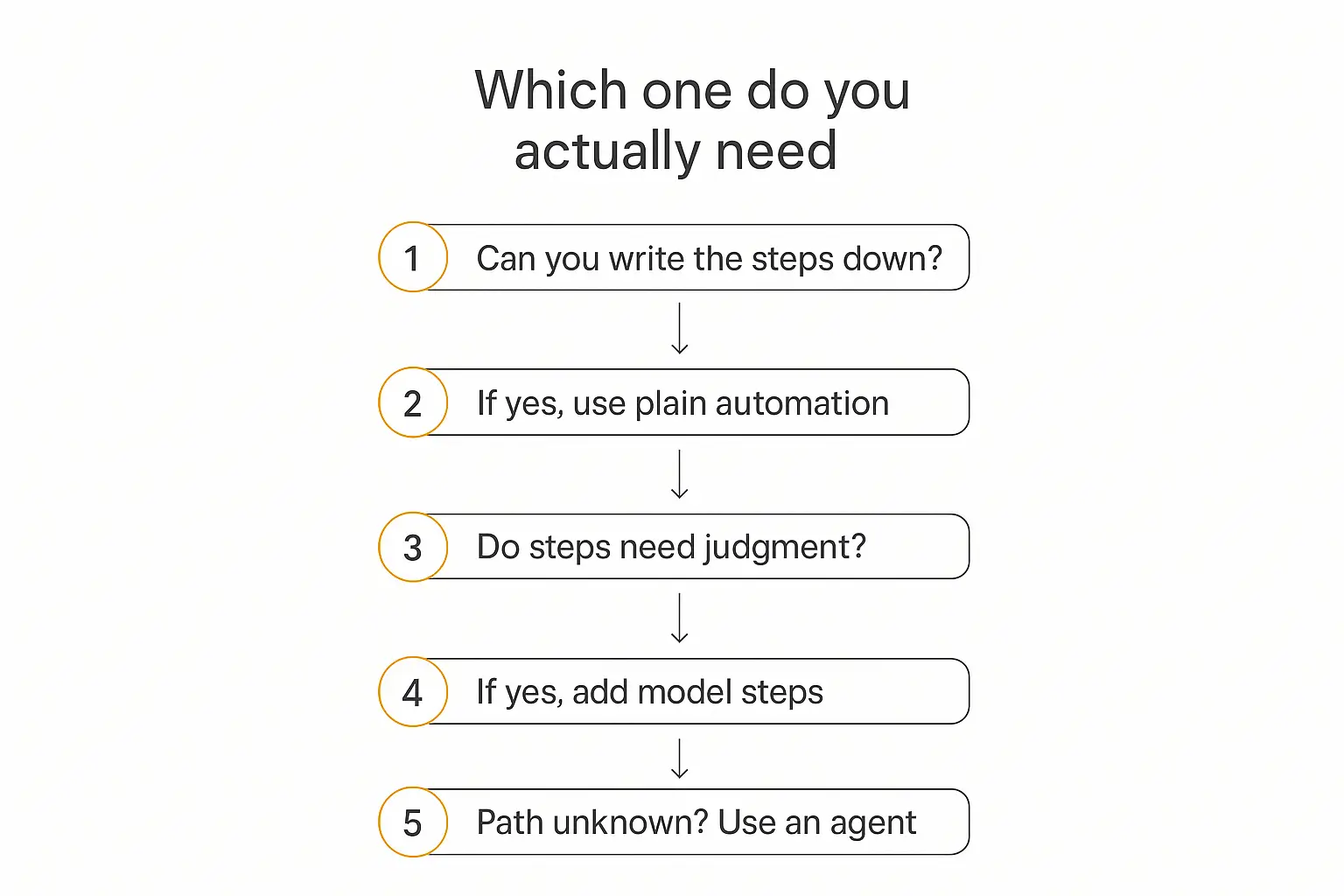
Run your task through these four questions in order. Stop at the first one that gives you an answer.
Question 1: Can you write down every step right now?
Not roughly. Actually. Open a doc and list them.
If you can, and none of them require reading something written by a human, build plain automation. You are done. Don't put a model in it because models are exciting.
Question 2: Can you write down the steps, but some of them need judgment?
The sequence is fixed, but step two is "work out whether this is a refund request or a bug report" and step four is "draft a reply in our tone."
Build an agentic workflow. Fixed rails, model steps where meaning is required. This covers the large majority of real business processes, and it's where I'd point most teams first.
Question 3: Do the steps change depending on what you find?
You know the goal and the tools, but the order genuinely depends on intermediate results. There's no flowchart because the flowchart would need a hundred branches.
Now you have a real agent case. Scope it tightly, cap the loop, log everything.
Question 4: Is a mistake here expensive?
This one overrides the others. Irreversible actions — sending money, emailing clients, deleting records, anything a regulator cares about — should sit behind an approval gate regardless of which architecture you chose.
Autonomy is a dial, not a switch. I laid the full range out in the five levels of AI agent autonomy, and almost nobody should be starting at the top of it.
The same job at all three levels
Concrete beats abstract. Take one task — handle an inbound support email — and build it three ways.
As automation
Email arrives → parse sender → create ticket in helpdesk → assign by round robin → send "we got it" autoresponse.
Fast, free, reliable. Understands nothing. Every ticket lands in the same queue whether it's a password reset or a legal threat.
As an agentic workflow
Email arrives → model classifies intent and urgency → route by category → model drafts a reply using your knowledge base → confidence high? send : queue for human → log outcome.
Five steps, two of them model calls. It reads the email, understands "furious," escalates. Costs a few cents. Runs in seconds. Every step is inspectable, and you can point at the box that misbehaved. For email workflows, inbox-placement tests can help you improve email deliverability before enabling automatic replies.
This is the version that quietly deflects half your tickets and nobody writes a press release about it.
As an agent
Email arrives → agent gets the goal "resolve this customer's issue" plus tools: search knowledge base, look up order, check shipment status, issue refund under $50, escalate to human.
It reads the email, decides it needs the order record, fetches it, notices the shipment is stuck, checks the carrier, decides a refund is warranted, issues it, writes the reply.
Nobody scripted that sequence. For a genuinely tangled case it's magic. For "how do I reset my password" it's an expensive way to answer a question you already have a canned response for.
And that's the real lesson. Most inboxes are 80% simple and 20% tangled. The winning design isn't one architecture — it's automation for the simple, a workflow for the standard, and an agent reserved for the messy tail.
The hybrid that actually ships
The systems I've seen work in production almost never pick one. They layer.
Deterministic shell, agentic core. Code owns the outer sequence — receive, validate, log, deliver, record. Inside one or two of those steps, a model does the thinking. If the thinking step needs to be open-ended, that specific step becomes a bounded agent loop with a hard cap on iterations.
You get semantic understanding where you need it and predictable structure everywhere else.
Three rules that consistently separate the ones that survive:
- Cap every loop. Max iterations, max tool calls, max spend per run. An agent without a budget ceiling is an incident waiting for a date.
- Make irreversible actions ask. Reads can be autonomous. Writes that touch money, customers, or records get a checkpoint.
- Log the reasoning, not just the result. You will need to answer "why did it do that," probably in a meeting, probably soon.
Route by difficulty too. Cheap model for classification, expensive model for the hard reasoning step — model routing alone often cuts costs more than any prompt optimisation.
Why so many of these projects die
The numbers here are sobering, and worth knowing before you pitch anything internally.
Gartner predicts over 40% of agentic AI projects will be cancelled by the end of 2027, citing escalating costs, unclear business value, and inadequate risk controls. In the same release, the firm called out "agent washing" — vendors rebranding assistants, chatbots and RPA as agents — estimating only about 130 of thousands of agentic vendors are the real thing.
MIT's Project NANDA found something similar on the buyer side: roughly 95% of generative AI pilots produced no measurable P&L impact, and the researchers attributed the gap to approach rather than model quality.
McKinsey's State of AI research points at the same culprit from a third angle: the strongest predictor of real impact is whether the organisation redesigned the workflow around the AI, and only about a fifth have done it end to end.
Read those three together and a pattern emerges. The failures aren't model failures. They're architecture failures — reaching for autonomy on a problem that needed a five-step workflow, then discovering the cost and control problems after the demo impressed everyone.
The four mistakes I see most
- Agent-washing your own project. Calling a three-step chain an agent to get budget approved. It works right up until someone asks why it can't handle novel cases.
- Starting at full autonomy. Ship the workflow version, watch where it fails, and let the failures tell you which single step deserves a loop.
- No stopping condition. The agent that runs 40 tool calls trying to answer an unanswerable question, twice a minute, all weekend.
- Skipping evals. If you can't measure whether a change made it better, you're not iterating, you're gambling. Testing and debugging is the unglamorous part that decides the outcome.
Start with the version that ships
Prompt, knowledge base, a few Actions — then add autonomy only where it earns it.
How this maps onto building with Pickaxe
All three architectures are buildable without writing orchestration code, and the pieces line up cleanly.
The workflow version is an agent with a tight role prompt, a knowledge base for grounding, and two or three Actions. The prompt owns the sequence — "first classify, then look up, then draft" — and the model handles the judgment inside each stage.
The more autonomous version is the same setup with looser instructions and more Actions available, letting the model choose which to call and in what order.
The multi-agent version uses a waterfall setup: a router agent reads the request and hands off to specialists. In practice, keeping each agent under about four Actions and chaining them beats one agent juggling twelve — the same lesson as multi-agent systems generally.
Deployment doesn't change with architecture. The same agent runs in a portal, an embed on your site, Slack, WhatsApp, email, or over the API — so you can start with the workflow version behind a chat widget and tighten it up without rebuilding the front end. If you're weighing whether to assemble this yourself, build vs buy vs wait covers that trade honestly.
How to tell whether you chose right
You don't have to guess. Four numbers will tell you within a fortnight of shipping.
Escalation rate
What share of runs end with a human taking over? If your workflow escalates on 60% of cases, your branches don't cover reality — that's the signal to add a model step or a loop.
If your agent escalates on 5%, congratulations, but check the next number before celebrating.
Cost per successful outcome
Not cost per run — cost per run that actually worked. An agent that costs 30 cents and succeeds 40% of the time costs 75 cents per success, and is losing to a 6-cent workflow that succeeds 70% of the time.
This single metric kills more agent projects than any architecture review, and it should.
Step variance
Log the number of tool calls per run and look at the spread. If your "agent" takes almost exactly the same number of steps every time, it isn't an agent — it's a workflow paying agent prices. Convert it and pocket the difference.
Conversely, a workflow that keeps needing new branches is telling you it wants to be a loop.
Time to diagnose
When something goes wrong, how long until you know why? If the answer is "we read transcripts for an hour," your observability is the bottleneck, not your model. The agent tech stack piece covers what to instrument.
Frequently asked questions
Is an agentic workflow the same as an AI agent?
No. An agentic workflow uses AI inside steps you defined; an AI agent chooses the steps itself. The tell is whether you could draw the flowchart before the run — if yes, it's a workflow.
Is agentic AI just automation with better marketing?
Partly, and that's the honest answer. Plenty of products labelled "agentic" are conditional workflows, which is what Gartner means by agent washing. But the underlying distinction is real: an agent that picks its own tool sequence is doing something no rules engine can do.
Do AI agents replace RPA and Zapier?
No, and the framing is wrong. Deterministic automation is cheaper, faster, and more reliable for structured work. The likely end state is agents deciding when to invoke those bots, not agents replacing them.
Which is cheaper to run?
Automation by a wide margin, then agentic workflows, then agents — and the gap widens with volume. A workflow's cost is roughly fixed per run; an agent's depends on how many turns it takes, which you don't control directly.
Can I start with a workflow and upgrade to an agent later?
Yes, and it's the sequence I'd recommend. Ship the workflow, watch which step keeps failing on cases you didn't anticipate, then give that one step a loop and its own tools. You'll usually find only one step needed it.
What about multi-agent systems — where do they fit?
Above all three. Multi-agent means several agents coordinating, usually via a router or orchestrator. Powerful for broad problems, but every handoff is another place to lose context, so earn it before you build it.
The takeaway
Three architectures, one question: who decides the next step?
If you decided in advance and no step needs to understand meaning, that's automation, and it's still the right call more often than the industry admits.
If you decided in advance but some steps need judgment, that's an agentic workflow — and if you take one thing from this article, it's that this is probably what you need. It's where the reliability and the value overlap.
If the sequence genuinely can't be known until the work is happening, that's an agent. Scope it, cap it, gate the irreversible bits, and let it earn its budget.
The teams shipping useful AI right now aren't the ones with the most autonomous systems. They're the ones who correctly diagnosed which of the three the problem needed — and then resisted the urge to build something more impressive than the job required.
If you want to try the workflow version of your own process, Pickaxe lets you stand one up with a prompt, a knowledge base, and a couple of Actions — then add autonomy step by step, only where it pays for itself. Start with the fundamentals of what AI agents are if you're still mapping the territory.