
The most consequential thing to happen to AI agents in the last year wasn't a new model. It was a text file.
AI agent skills are folders containing a SKILL.md file — plain markdown with a bit of metadata on top — that teach an agent how to do a specific job. Anthropic released the format as an open standard in December 2025, and by mid-2026 roughly 40 products listed on the official client showcase could load them, including Claude, OpenAI Codex, Cursor, Gemini CLI, GitHub Copilot, VS Code, JetBrains Junie, Goose, and Snowflake Cortex Code.
That's an unusually fast, unusually broad adoption curve for something that is, structurally, a markdown file in a folder.
I've been writing skills for months now — for our own internal work and for client agents — and the thing that surprised me most is how much of the value comes from what a skill doesn't do. It doesn't sit in your context window. It doesn't run a server. It doesn't need an SDK. It waits on disk until the agent decides it's relevant, and only then does it cost you anything.
This guide covers what AI agent skills actually are, the mechanism that makes them work, how they differ from MCP and prompts and RAG (the comparison almost everyone gets slightly wrong), how to write a good one, and the security problem the ecosystem hasn't solved yet.
What an AI agent skill actually is
Strip away the branding and a skill is a directory. The Agent Skills specification defines the layout like this:
my-skill/
├── SKILL.md          # Required: metadata + instructions
├── scripts/          # Optional: executable code
├── references/       # Optional: documentation
├── assets/           # Optional: templates, resources
└── ...               # Any additional files
Only SKILL.md is required. Everything else is optional bundling.
The file itself has two parts. YAML frontmatter at the top carrying a name and a description, then a markdown body with the actual instructions:
---
name: quarterly-client-report
description: Builds the monthly client performance report from
  the analytics export. Use when the user asks for a client
  report, monthly recap, or performance summary.
---

# Quarterly client report

## Steps
1. Read the CSV in `data/` — it is always the most recent export.
2. Exclude any account with `test_` in the name.
3. Use the section order in `assets/template.md`. Do not reorder.
4. Every number gets a period-over-period delta in parentheses.
That's a complete, working skill. No build step, no registration, no code. Drop that folder where your agent looks for skills and it works.
The name field maxes out at 64 characters and allows only lowercase letters, numbers, and hyphens. The description can run to 1,024 characters. Both are validated, and both matter far more than their size suggests — more on that shortly.
What makes this different from just... writing instructions
Fair question. You could paste those same four steps into a prompt.
Three things separate a skill from a pasted prompt.
It's portable. The same folder works across Claude Code, Codex, Cursor, and 40-odd other clients without modification. You write the procedure once.
It's versioned. A skill lives in git alongside your code. When the reporting format changes, you change one file and every agent that uses it gets the update.
It's conditional. This is the big one. A pasted prompt is in context whether or not it's relevant. A skill isn't — and the mechanism that makes that possible is the whole reason the format caught on.
How AI agent skills actually work: progressive disclosure
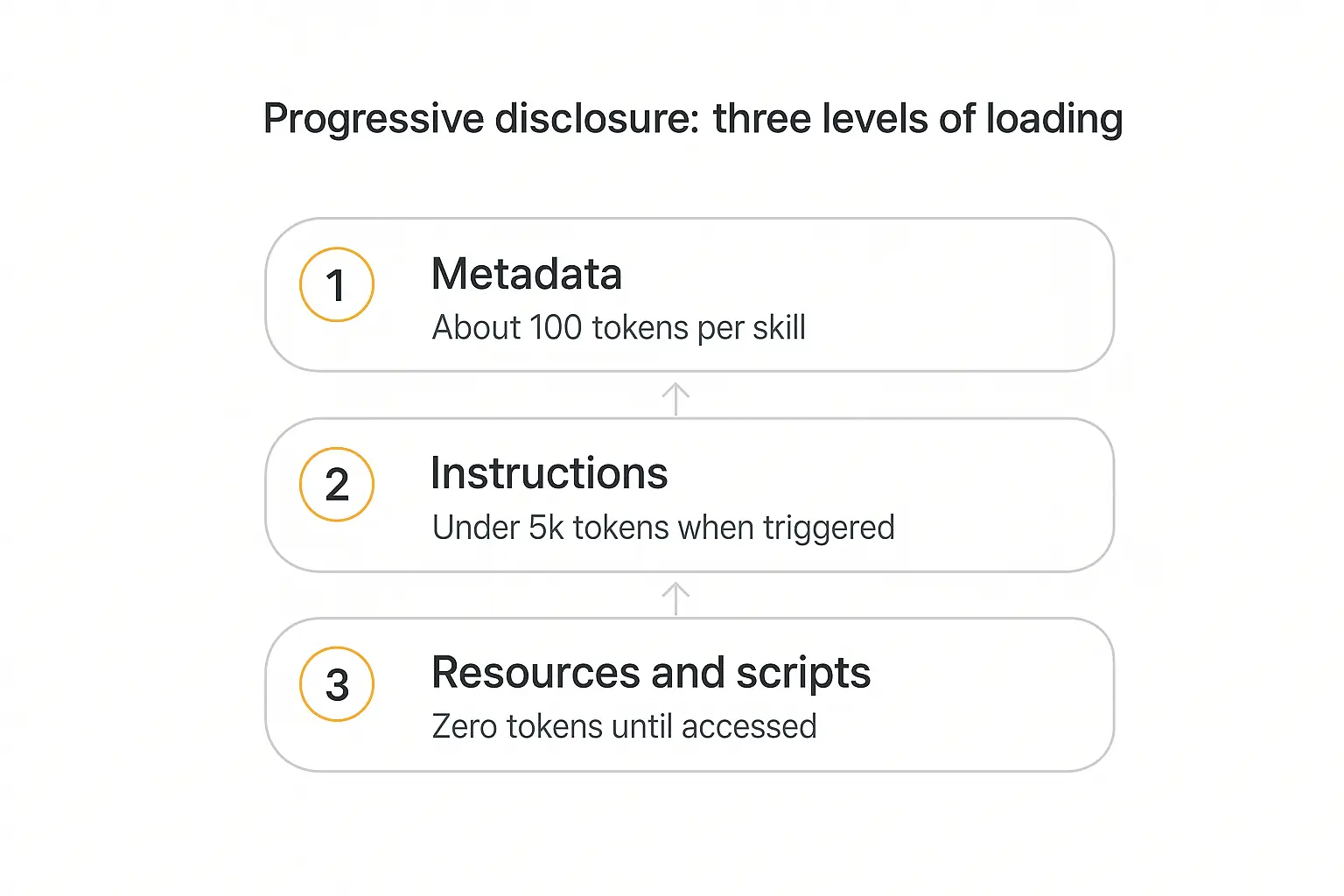
The design pattern underneath skills is called progressive disclosure, and it's the answer to a problem every agent builder eventually hits: you can't put everything the agent might need into its context window, but you don't know in advance what it will need.
Skills solve this by loading in three stages.
Level 1: Metadata — always loaded
At startup, the agent reads only the name and description from each skill's frontmatter and puts them in its system prompt. Per Anthropic's documentation, that costs roughly 100 tokens per skill.
This is why you can install a lot of skills without paying for them. Fifty skills sitting on disk cost about 5,000 tokens of awareness — the agent knows they exist and roughly what each one is for, and nothing more.
Level 2: Instructions — loaded when triggered
When your request matches a skill's description, the agent reads the full SKILL.md body into context. Anthropic's guidance is to keep this under 5,000 tokens, or about 500 lines.
Note the mechanism here: on filesystem-based clients the agent literally runs a bash command to cat the file. There's no special loader. Skills work because agents can already read files.
Level 3: Resources and scripts — loaded as needed
Bundled files cost nothing until they're opened. A skill can ship 200 pages of API documentation, a dozen reference schemas, and a folder of utility scripts, and none of it touches the context window until the agent has a reason to reach for it.
Scripts are better than that, actually. When the agent runs python scripts/validate.py, the script's code never enters context — only its output does. A 400-line validator costs you the eleven tokens it takes to say "Validation passed."
That asymmetry is the whole game. It's why skills scale in a way that stuffing your system prompt does not, and it's the same context-budgeting instinct behind good token economics for agents generally.
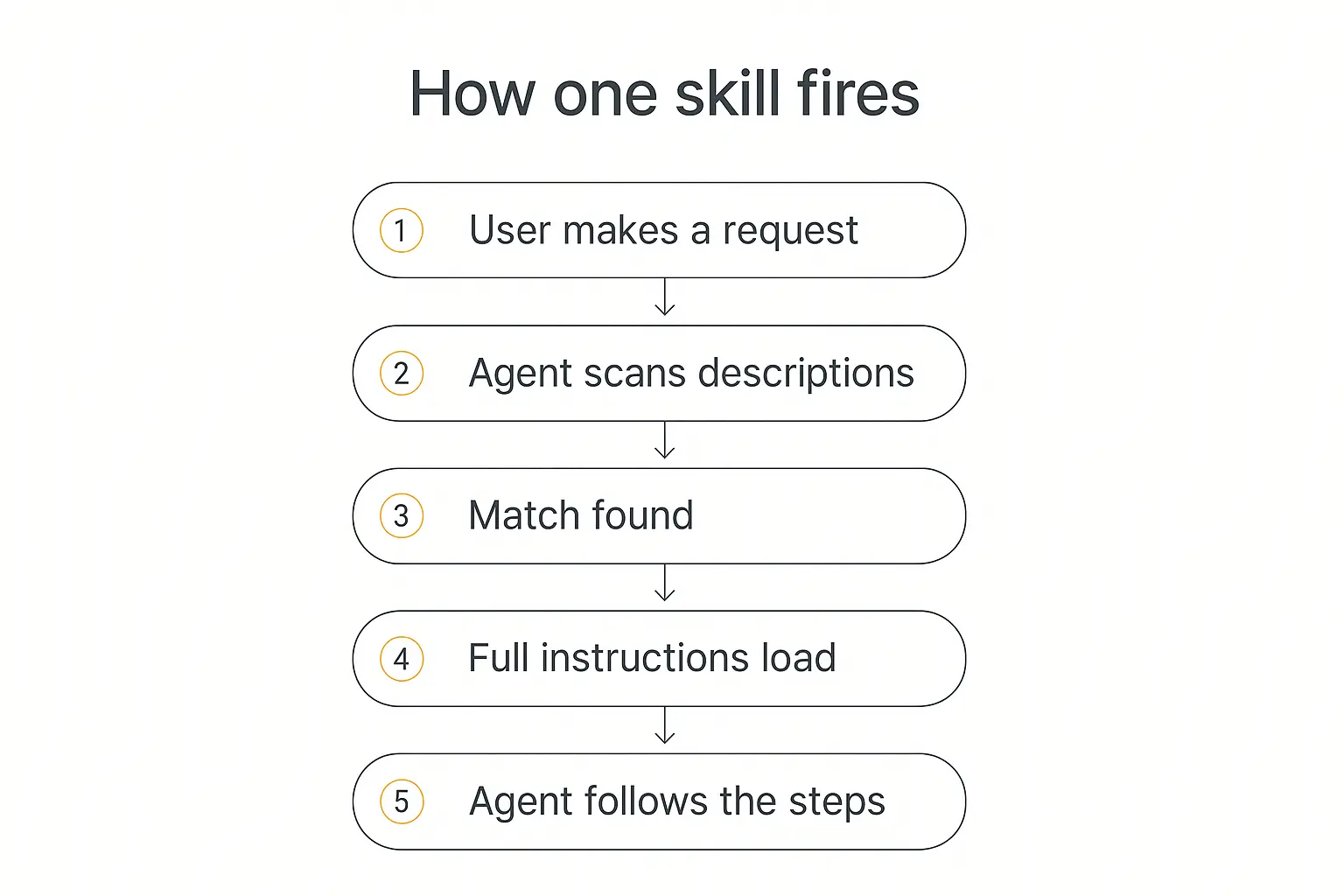
What a single activation looks like end to end
- Startup. The agent's system prompt includes one line per available skill: name plus description.
- Request. You ask for something — "put together the monthly report for Northwind."
- Match. The agent compares your request against the loaded descriptions.
- Activation. It reads the matching
SKILL.mdinto context. - Execution. It follows the steps, reading bundled files or running bundled scripts only where the instructions point it.
Step 3 is where skills succeed or fail, and it's worth sitting with that for a moment. The agent is matching against your description, not your instructions. A brilliantly written skill body with a vague description will never fire.
Want the same repeatability without writing files?
Pickaxe lets you encode a procedure once and hand it to clients as a working agent.
Why the format spread so fast
Standards in this space usually die quietly. This one didn't, and the reason is worth understanding because it tells you something about what to bet on.
Anthropic published the spec on 18 December 2025 and put it at agentskills.io rather than keeping it in-house. Within weeks, competitors had shipped support — OpenAI Codex, Cursor, GitHub Copilot, VS Code, and Gemini CLI. Google's Antigravity adopted it in January 2026. By mid-year the client list had grown to roughly 40 products, spanning JetBrains Junie, Block's Goose, Letta, Laravel Boost, Databricks Genie Code, Snowflake Cortex Code, Mistral's Vibe, and Nous Research's Hermes Agent.
Three things made that possible.
The barrier to implementing it is almost nothing. If your agent can read a file and put text in a system prompt, you already support skills. There's no runtime to embed, no protocol to negotiate, no wire format. Compare that to the engineering lift of shipping an MCP client.
It's plain markdown, so it's diffable. Skills drop into the workflow teams already have: pull requests, code review, version tags. Nobody had to build tooling for them because git was already the tooling.
Nobody had to lose. Adopting skills doesn't require abandoning a competing format or routing anything through a rival's infrastructure. A vendor gets instant compatibility with a growing library of skills for the cost of a file reader — which is about as favorable as an adoption trade gets.
The interesting consequence: a skill written for one agent runs unchanged in most others. That's rare enough in this industry to be worth building on. If your team's method for handling client intake lives in a SKILL.md, changing agent vendors is a migration you can do in an afternoon — a genuinely different position from having that method locked in a platform's proprietary config.
Skills vs MCP: the comparison everyone gets slightly wrong
This is the question I get most, and the framing is usually off. People treat skills and MCP as competitors. They aren't. They solve different halves of the same problem.
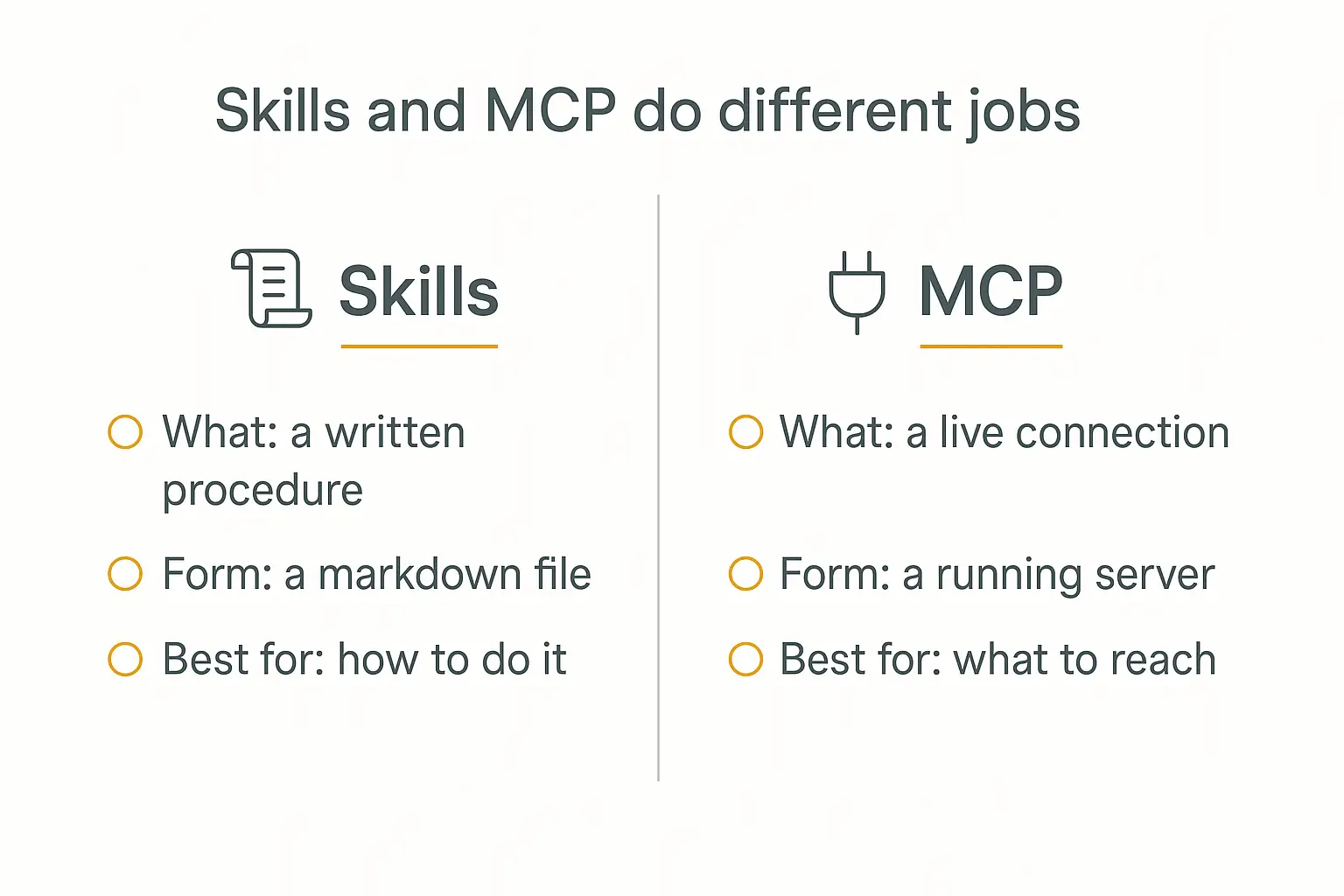
MCP is a connection. It's a client-server protocol that lets an agent reach a live system — your database, your CRM, the GitHub API. It runs as a process. It handles auth. It gives the agent a way to touch the world.
A skill is a procedure. It's a written description of how to do something. It doesn't connect to anything. It tells the agent what steps to take and in what order.
The cleanest heuristic I've found comes from LlamaIndex's write-up on the two: if the data changes between invocations, you need MCP. The agent needs live access. If what changes is the method — the house style, the sequence, the rules about which accounts to exclude — that's a skill.
| Agent skill | MCP server | |
|---|---|---|
| What it is | A markdown file with instructions | A running server speaking a protocol |
| Answers | "How do I do this?" | "What can I reach?" |
| Cost when idle | ~100 tokens | Tool definitions in context, plus a process |
| Setup | Write a file | Deploy and authenticate a server |
| Credentials | None of its own | Holds them, often as a security chokepoint |
| Good for | Brand guides, checklists, formats, workflows | Databases, SaaS APIs, live data, writes |
| Bad for | Anything needing fresh data | Encoding judgment and house style |
In practice the two compose. A well-built skill routinely says "fetch the current pipeline using the CRM:list_opportunities tool, then format it like this" — the skill supplies the procedure, MCP supplies the live data. Anthropic's own guidance even specifies that skills should reference MCP tools by fully qualified name (ServerName:tool_name) to avoid tool-not-found errors when several servers are connected.
If you want the protocol layer in more depth, we covered it in Model Context Protocol explained and the follow-up on MCP vs A2A.
What about prompts and knowledge bases?
Two more comparisons worth drawing, because the boundaries blur.
Skills vs prompts. A prompt is conversation-level and one-off. A skill is filesystem-level and reusable. If you find yourself pasting the same guidance into a third conversation, that's the signal to make it a skill. Everything we wrote about prompt engineering for agents still applies inside the skill body — you're writing a prompt, you're just storing it somewhere durable.
Skills vs knowledge bases. A knowledge base holds facts the agent retrieves from — documents, transcripts, policy PDFs. A skill holds procedure: the steps, the order, the rules. Facts go in the knowledge base; the method for using them goes in the skill. When people complain that RAG "doesn't work," what they've often built is a pile of facts with no procedure attached.
How to write an AI agent skill that actually fires
Here's the part most guides skip. Writing a skill is easy. Writing one that the agent reliably picks up is a different job.
1. The description is the whole ballgame
The description is the only part of your skill the agent sees before deciding whether to use it. It's competing against potentially a hundred other descriptions. Anthropic's authoring best practices give three rules that matter more than anything else in the file:
Say what it does AND when to use it. Both halves. The "when" is what enables matching.
Write in third person. The description is injected into the system prompt, and a point-of-view mismatch measurably hurts discovery. "Processes Excel files and generates reports" — not "I can help you with Excel."
Include the words a user would actually say. If people ask for a "recap," put "recap" in the description, not just "summary."
Compare:
| Weak | Strong |
|---|---|
description: Helps with documents | description: Extracts text and tables from PDF files, fills forms, merges documents. Use when working with PDF files or when the user mentions PDFs, forms, or document extraction. |
description: Processes data | description: Analyzes spreadsheets, creates pivot tables, generates charts. Use when analyzing Excel files, spreadsheets, tabular data, or .xlsx files. |
The strong versions are longer, and that's fine — you have 1,024 characters and the cost is trivial. Vague descriptions are the single most common reason a skill never fires.
2. Assume the model is already smart
The most common failure in skill bodies is over-explanation. Anthropic frames the context window as "a public good" and pushes a simple test on every paragraph: does the model actually not know this?
Bad — roughly 150 tokens explaining what a PDF is before getting to the point. Good — roughly 50 tokens:
## Extract PDF text

Use pdfplumber:

import pdfplumber
with pdfplumber.open("file.pdf") as pdf:
    text = pdf.pages[0].extract_text()
Only write down what's yours: your table names, your exclusion rules, your section order, your definition of "active client." The model brought the general knowledge; you bring the specifics.
3. Match freedom to fragility
This is the most useful mental model in the whole spec. Think of the agent as walking a path, and ask how much room it has.
Open field — high freedom. Many routes work; context decides. Give direction, not commands. A code review skill should say "check for edge cases, suggest readability improvements," not prescribe a rigid sequence.
Narrow bridge — low freedom. One wrong step is expensive. Be exact. A database migration skill should say "run exactly this script, do not add flags."
Most skills sit in the middle, but getting this wrong in either direction hurts: over-constrain an open task and the output is robotic; under-constrain a fragile one and you get creative destruction.
4. Split before 500 lines
Keep the SKILL.md body under 500 lines. Past that, move detail into bundled files and point at them from the main file:
# BigQuery analysis

**Finance**: Revenue, ARR, billing → See reference/finance.md
**Sales**: Opportunities, pipeline → See reference/sales.md
**Product**: API usage, adoption → See reference/product.md
One warning that cost me real time: keep references one level deep. If SKILL.md points at advanced.md which points at details.md, agents tend to preview nested files with something like head -100 rather than reading them fully — so you get partial information and don't know it. Every reference file should link directly from SKILL.md.
And for any reference file over ~100 lines, put a table of contents at the top. If the agent does partially read it, it still sees the full scope of what's in there.
5. Build the evaluation before the documentation
The advice I'd most want a first-time skill author to hear: write your test cases before you write the skill.
The recommended loop:
- Run the agent on the real task without a skill. Write down exactly where it fails.
- Turn those failures into three concrete evaluation scenarios.
- Write the minimum instructions that fix those failures.
- Run the evals. Compare against the no-skill baseline.
- Iterate on what's still broken — and nothing else.
This keeps you from writing 400 lines documenting problems the model never had. It's the same discipline we argued for in how to test AI agents, applied one layer down.
One genuinely clever wrinkle from the official guidance: use one instance of the model to author the skill and a separate fresh instance to use it. The authoring instance knows the format natively — you can just ask it to write a skill. The fresh instance reveals the gaps, because it only knows what the file told it. Then you take those observations back to the author.
6. Test across model tiers
A skill is an addition to a model, not a replacement for one. Something that reads as over-explaining to a frontier model may be exactly the scaffolding a smaller, cheaper one needs. If you're running different models for different jobs, test the skill on each tier you actually deploy.
7. Five anti-patterns that quietly kill a skill
These are the mistakes that don't announce themselves. The skill loads, the agent runs, the output is subtly worse than it should be.
Offering too many options. "You could use pypdf, or pdfplumber, or PyMuPDF, or pdf2image" gives the agent a decision it has no basis to make. Pick a default and provide one escape hatch: "Use pdfplumber. For scanned PDFs needing OCR, use pdf2image with pytesseract instead."
Baking in dates. "Before August, use the old endpoint" is a landmine. Write the current method as the only method, and if history matters, put it in a collapsed "old patterns" section at the bottom where it won't compete for attention.
Drifting terminology. If you call it a "field" in one section, a "box" in the next, and an "element" in the third, you've made the agent do resolution work for no reason. Pick one word per concept and never vary it — this is the opposite of good prose style, and it's correct here.
Windows-style paths. scripts\helper.py breaks on Unix. Forward slashes work everywhere. Small thing, real failures.
Magic numbers in bundled scripts. TIMEOUT = 47 tells nobody anything. If you can't justify the constant, the agent certainly can't when it needs to adjust it. Document the reasoning inline, or don't parameterize it.
One more that isn't in any spec but shows up constantly: writing a skill for a task you do twice a year. The maintenance cost is real and the recall is bad — by the time you need it again, it's stale. Skills earn their keep on things you do weekly.
A worked example: turning a repeated task into a skill
Abstract advice only goes so far. Here's the shape of a real one — a client onboarding brief, the kind of thing an agency does forty times a year and does slightly differently every time.
---
name: writing-onboarding-briefs
description: Writes the internal client onboarding brief from a
  discovery call transcript. Use when the user mentions an
  onboarding brief, kickoff doc, new client summary, or asks to
  turn a discovery call into a brief.
---

# Client onboarding brief

## Workflow
- [ ] 1. Read the transcript in `input/`
- [ ] 2. Extract the four required sections (below)
- [ ] 3. Check against `references/checklist.md`
- [ ] 4. Flag anything missing as an open question — never invent it

## Required sections
Use `assets/brief-template.md`. Section order is fixed.

1. **Scope** — what they asked for, in their words
2. **Success criteria** — must be measurable; if the client
   gave none, say so explicitly
3. **Constraints** — budget, timeline, systems, compliance
4. **Open questions** — anything unresolved on the call

## Rules
- Never soften a stated budget or deadline.
- If success criteria are vague, that IS the finding. Do not
  substitute plausible-sounding metrics.
- Quote the client directly for scope. Paraphrase elsewhere.
Note what's doing the work here. The description carries four different phrases a person might actually use. The checklist gives the agent a structure to track against. The template lives in a bundled file, costing nothing until needed.
And the rules encode the thing that's genuinely yours — the hard-won knowledge that an agent left alone will paper over a vague answer with a confident-sounding metric, and that on an onboarding brief, that's the exact failure you can't afford.
That's the test for whether something should be a skill: would a competent new hire get this wrong on their first try? If yes, write it down. If no, you're just burning tokens.
Six skills worth writing first
If you're staring at an empty folder, these are the categories that pay off fastest — in rough order of how quickly you'll feel the difference.
1. House style. Your formatting conventions, tone rules, banned phrases, the way you write dates and numbers. This is the highest-value first skill for almost everyone, because it's the guidance you're already retyping most often and it applies to nearly every output.
2. A recurring report. Any document you generate on a schedule — the weekly client recap, the monthly metrics summary. Encode the section order, the exclusion rules, and what counts as a meaningful change. This is where consistency is worth the most and where humans drift the fastest.
3. Intake and triage. How to read an inbound request and classify it: what makes something urgent, what needs a human, what the routing rules are. Pairs naturally with lead qualification work.
4. A review checklist. Whatever you check before something ships — a code review rubric, a pre-publish content check, a compliance pass. Checklists are the format skills handle best, because the agent can literally track progress through them.
5. A data dictionary. Your table names, field definitions, and the unwritten rules ("always exclude accounts with test_ in the name," "revenue means net, not gross"). This is pure institutional knowledge and the model has no way to guess it.
6. A multi-step workflow with validation. Once you're comfortable, the pattern that unlocks the most: plan, validate the plan with a script, then execute. Having the agent write out its intended changes to a file and check them before touching anything catches mistakes while they're still cheap. Same instinct as designing a multi-step AI workflow properly.
Notice what's not on this list: anything requiring live data, anything you do rarely, and anything the model already does well unaided. Those are the three ways a skill library turns into clutter.
The security problem nobody has solved
Now the part the enthusiastic posts leave out.
A skill is instructions that an agent treats as trustworthy and executes. That is, structurally, the exact shape of a prompt injection — which means the usual defense of "detect instructions hiding in data" doesn't apply, because a skill is nothing but instructions.
The numbers are not reassuring. Snyk's ToxicSkills study analyzed 3,984 skills from public registries in February 2026 and found:
- 13.4% (534 skills) contained at least one critical security issue
- 36.8% (1,467 skills) had at least one flaw at some severity level
- 76 confirmed malicious payloads, with 8 still publicly available at publication
- 10.9% exposed hardcoded secrets or API keys
- 17.7% fetched untrusted third-party content — an indirect injection vector even when the skill itself is clean
That last one deserves emphasis. A skill that pulls a live URL is only as trustworthy as whatever is at that URL today. A skill you audited in March can turn hostile in June without a single line of it changing.
Snyk's own framing is that the ecosystem resembles npm or PyPI before either took security seriously — except that skills arrive with higher-risk permissions by default. Anthropic's documentation is blunt in the same direction: use skills from sources you created or trust, and treat installing one like installing software.
A practical policy
What I'd actually do, in order of how much it buys you:
Read every file before installing. Not just SKILL.md — the scripts and the assets too. This is tedious and it is the single highest-value thing on this list.
Be suspicious of network calls. A brand-voice skill has no business fetching a URL. Ask what it's reaching for and why.
Watch for scope mismatch. The tell for a malicious skill is usually an instruction that doesn't match the stated purpose — a formatting skill that reads .env, a docs skill that wants to touch git credentials.
Pin what you install. Vendor the skill into your own repo rather than pulling latest from a registry. You want changes to arrive as reviewable diffs.
Scope the agent, not just the skill. A malicious skill can only do what the agent can do. Least privilege on the agent's own credentials limits the blast radius regardless of what any file says. That's the same argument we made in AI agent security risks, and skills make it more urgent, not less.
Good advice I've seen repeated in the developer community, and agree with: don't start by installing fifty public skills. Write two of your own for tasks you actually repeat. You'll learn more, and you'll ship nothing you haven't read.
Build the agent, skip the file plumbing
Instructions, knowledge, and actions in one place — deployable to clients in an afternoon.
What skills mean if you're not writing code
Most of the skills conversation happens among people running coding agents in a terminal. But the underlying idea — procedure as a portable, versioned artifact — matters just as much if you're building agents for clients without touching a filesystem.
The pattern translates directly. When we build agents on Pickaxe, the same separation shows up in the builder: Instructions carry the procedure (the part a skill body would hold), the Knowledge Base carries the facts, and Actions carry the live connections (the part MCP would handle). Different packaging, same three layers.
What you lose without files is portability across tools. What you gain is that non-technical people can actually maintain it, and that the agent ships with auth, billing, and a client-facing front end already attached — which is the part that takes longest when you build from scratch. We walked through that trade-off in more depth in the AI agent tech stack and build vs buy.
The practical takeaway for anyone selling agents: the procedure is the product. Skills made that legible by giving it a file format. Whatever platform you build on, the durable asset isn't the model or the integration — it's the written-down method that makes the output consistent enough to charge for.
Where skills fall short
Three honest limitations.
Discovery is probabilistic. Skills fire when the model decides a description matches. That's a judgment call, not a routing table. If you need a step to happen every single time without exception, a skill is the wrong tool — put it in the system prompt or enforce it in code.
They don't sync across surfaces. A skill uploaded to a chat product isn't automatically available via that vendor's API, and filesystem-based skills are separate from both. You manage each surface independently, which is exactly the kind of drift that bites six months later.
Runtime constraints vary by platform. Skills running through an API sandbox may have no network access and no ability to install packages at runtime, while the same skill on a local coding agent has whatever access you do. Write for the tightest environment you plan to run in.
Frequently asked questions
Are AI agent skills the same as Claude Skills?
Effectively yes, in origin. Anthropic developed the format and released it as an open standard in December 2025; it's now maintained openly at agentskills.io with adoption across OpenAI, Google, Microsoft, and JetBrains products. "Claude Skills" usually refers to the same SKILL.md format.
Do skills work with any model?
The format is model-agnostic — it's just markdown. Whether skills work depends on the client, which needs to load descriptions and read files on demand. Support now spans Claude Code, Codex, Cursor, Gemini CLI, Copilot, VS Code, Goose, OpenCode, and dozens more.
How many skills can I install?
At roughly 100 tokens each, a hundred skills costs about 10,000 tokens of always-on context. The practical ceiling isn't tokens — it's description collision. Past a few dozen overlapping skills, the model's ability to pick the right one degrades. Keep descriptions distinct.
Do I need MCP to use skills?
No. A skill that only formats, checks, or drafts needs nothing but the file. You add MCP when the procedure needs live data.
Can a skill run code?
Yes — bundle scripts in scripts/ and tell the agent to run them. The script's output enters context; its source doesn't. Be explicit about whether you want the agent to execute a script or read it as reference, since those are very different instructions.
Where do skills go?
Depends on the client. On Claude Code it's ~/.claude/skills/ for personal skills or .claude/skills/ for project ones. Other clients use their own conventions — check the vendor docs, since the standard defines the file format rather than the install location.
The takeaway
AI agent skills are the least glamorous important idea in agent building right now. There's no new architecture, no clever training trick — just a convention that procedural knowledge should live in a file the agent reads when it's relevant and ignores when it isn't.
What makes that powerful is the economics. Near-zero cost to have a skill available, real cost only when it's used, and no ceiling on what you bundle. That inverts the usual context tradeoff, where everything you might need competes with everything else you might need.
If you're starting: pick one task you've explained to an agent three times. Write the description first, and make it specific enough that you'd recognize your own request in it. Keep the body short. Test it on a real task, not a made-up one. Then write the second one.
And if you'd rather encode that method into something a client can actually log into and pay for, that's the problem Pickaxe exists to solve — same idea, with the portal, billing, and access control already wired up.