

Pickaxe vs Stammer AI comes down to who logs in and what they pay for. I'd choose Pickaxe to sell a branded member portal where people use a set of agents and resources.
I'd choose Stammer AI to sell an after-hours phone and web chat service where each client can manage its deployment and pay for usage through a sub-account.
A client might call both of those things an “AI portal.” Ask what they expect it to do on an ordinary Tuesday. The answer tells you more than a checklist of white-label features.
I compared the published controls, prices and billing rules for both platforms. The images are official help-documentation screenshots.
The two pilot plans below use a fictional equipment-service client and describe what I'd test.
Pickaxe vs Stammer AI functionality at a glance
| Functionality | Pickaxe | Stammer AI |
|---|---|---|
| Core delivery | ✓ Best fit for a paid member destination Package agents, pages and folders on a portal. Pickaxe portal documentation | Deploy chat and phone agents and show the client a branded management dashboard. Stammer voice overview Stammer white-label terms overview |
| Customer access | Member access groups, usage limits and portal content locks. Pickaxe member access groups Pickaxe Offers documentation | Client sub-accounts with allocated agent capacity and permissions. Stammer sub-account setup |
| Web chat | Both. Publish an agent on a portal or as an embed. Pickaxe portal documentation | Both. Configure web chat and optionally hand off to a person. Stammer human handoff setup Stammer public pricing |
| Phone workflow | Agent Builder supports spoken responses inside the agent interface. Pickaxe Agent Builder | ✓ Best fit for phone reception Assign a phone number to an inbound voice agent and configure transfers. Stammer phone number setup Stammer inbound voice setup |
| Commercial setup | Stripe-connected memberships, usage and specific one-off Offers. Pickaxe monetization documentation Pickaxe Offers documentation | Stripe-connected subscriptions and client wallet rebilling. Stammer Stripe setup Stammer wallet documentation |
| Branding | Paid plans list white labeling and custom domains. Pickaxe plan and usage pricing | Pro White Label and Enterprise cover branded agency setup. Stammer public pricing |
“White label” describes the branding on the surface someone sees. At the proposal stage I ask the client to name that surface out loud.
If the answer is “the place my members do their work,” I design the portal first.
If it's “the place my office manager sees which calls the bot answered,” I design the support deployment first.
Both can handle a branded web chat deployment. I would give the buyer two demo links.
One asks a customer to sign in and access a purchased workflow, and one lets a service manager see a conversation their own customers had with the business.
Which platform fits your offer?
| What the buyer needs | I would start with | Why |
|---|---|---|
| A membership with guided workflows and subscriber-only resources | Pickaxe | The buyer accesses a portal and the operator controls access to the agents and materials. Pickaxe portal documentation Pickaxe Offers documentation |
| After-hours answering across multiple independent businesses | Stammer AI | The agency manages phone and chat deployments under separate client sub-accounts. Stammer sub-account setup Stammer phone number setup |
| One branded web chat agent answering questions | Either | Demo the exact escalation and access path the customer needs. Pickaxe portal documentation Stammer human handoff setup |
| A receptionist and a paid operations toolkit | Pilot both surfaces | Check who owns CRM records, access and billing before promising synchronization. |
For a consultant selling the same maintenance-planning method to independent service operators, a Pickaxe portal can package a guided questionnaire, an agent, supporting pages and member access. For an agency reselling reception and lead capture to those same operators, Stammer gives the agency a dashboard with client sub-accounts and phone-agent setup. Pickaxe portal documentation Stammer sub-account setup Stammer voice overview
For the crossover case, choose a small test. If the client wants a phone service plus a members-only estimator, ask whether the same people need both surfaces and whether both surfaces must share purchases.
Running both can make sense if the CRM owns the lead record and each surface has its own clear support owner. The client portal design guide covers choosing what lives behind the member login.
How the builders handle models and knowledge
| Requirement | Pickaxe | Stammer AI |
|---|---|---|
| Configure the agent | Choose an agent type, interface, model, knowledge and Actions. Pickaxe Agent Builder | Set up chat and inbound voice agents for their target surfaces. Stammer chat knowledge documentation Stammer inbound voice setup |
| Update an approved source | Workspace and agent-level sources, including sync options for supported sources. Pickaxe knowledge documentation | Chat knowledge supports files, site data and Q&A. Verify the voice source update separately. Stammer chat knowledge documentation Stammer inbound voice setup |
| Model and credential choice | Model directory and workspace pricing calculator. Pickaxe plan and usage pricing | Pro lists multiple model providers and support for bringing LLM keys. Confirm metering for the channel. Stammer public pricing |
In Pickaxe, the Agent Builder separates agent type and model from knowledge, Actions, settings and preview. I'd set up the first test as a Chatbot with a narrow job and one approved source, then examine the answer before enabling tools.
The Pickaxe model directory is a better place to check current model availability than the model name captured in a help image. Pickaxe Agent Builder
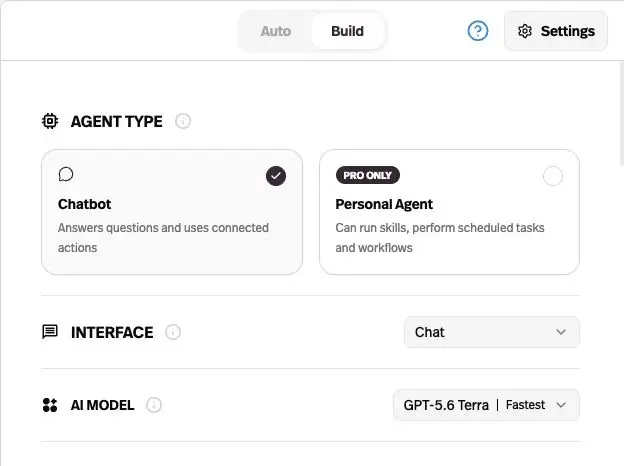
Stammer's chat knowledge documentation covers web scraping, files and Q&A data. Its phone setup has its own documented Voice Agent configuration and plan-specific voice knowledge capacity, so the same answer deserves a fresh run in both channels.
For example, a caller's “do you service my area?” can sound like a coverage question even when they are asking whether a technician is available that day. Stammer chat knowledge documentation Stammer inbound voice setup Stammer subscription plans
Give every answerable question an owner and a source. On this pilot I'd keep a public service-area document separate from a member-only operating procedure, then retire the old service area sheet and check what each agent retrieves.
For the retrieval side of that test, see the guide to connecting a knowledge base.
Actions, integrations and failed requests
| Requirement | Pickaxe | Stammer AI |
|---|---|---|
| Connect data or trigger work | Actions can look up data or call an external tool. Verify whose account is connected. Pickaxe Actions guide | Pro lists MCP, integrations and a branded API. Verify the connector on the channel used. Stammer public pricing |
| Call a deployed agent from software | Pickaxe API reference covers deployed agents. Pickaxe API documentation | White Label API docs cover agent and sub-account operations. Stammer White Label API |
| Duplicate or timed-out booking | Verify in pilot. The back end should track the outcome by request ID. | Verify in pilot. Check the calendar before repeating a timed-out write. |
I'd give the member agent a read-only quote-status lookup on the first day. The action's service should resolve the caller's permitted account on the server and return a deliberately small set of fields.
If the service times out, the agent can say the status is unavailable and offer the service desk's contact details.
For a receptionist that books appointments, the test uses a fake calendar and a real-looking scheduling conflict. Submit the same request twice in the pilot and check the appointment record as well as the transcript.
If a response times out after the calendar writes, ask the back end whether it created an appointment before trying again.
Pickaxe documents account choices for Actions and the API for deployed agents. Stammer's Pro page lists MCP and a White Label API, and its API docs cover agents, conversations and sub-accounts.
For either product, I would map which identity runs each call and pay particular attention to whether the client or the agency owns its credential. Pickaxe Actions guide Pickaxe API documentation Stammer public pricing Stammer White Label API
Where the client and customer see the agent
| Requirement | Pickaxe | Stammer AI |
|---|---|---|
| Multi-tool member site | ✓ Best fit for a branded toolkit Organize agents and pages in one navigable portal. Pickaxe portal documentation | Agency brand and client dashboards are documented for managing chat and voice deployments. Stammer white-label terms overview |
| Human takeover for web support | Use the product or support workflow you can demonstrate end to end with the chosen integration. Pickaxe Actions guide | ✓ Best fit for web chat takeover The help center shows selecting a human-handoff workflow. Stammer human handoff setup |
| Inbound phone and concurrent calls | Spoken responses are documented in Agent Builder. Scope any phone integration separately. Pickaxe Agent Builder | ✓ Best fit for inbound telephony Number assignment, call settings and concurrency are documented. Stammer phone number setup Stammer inbound voice setup Stammer call concurrency |
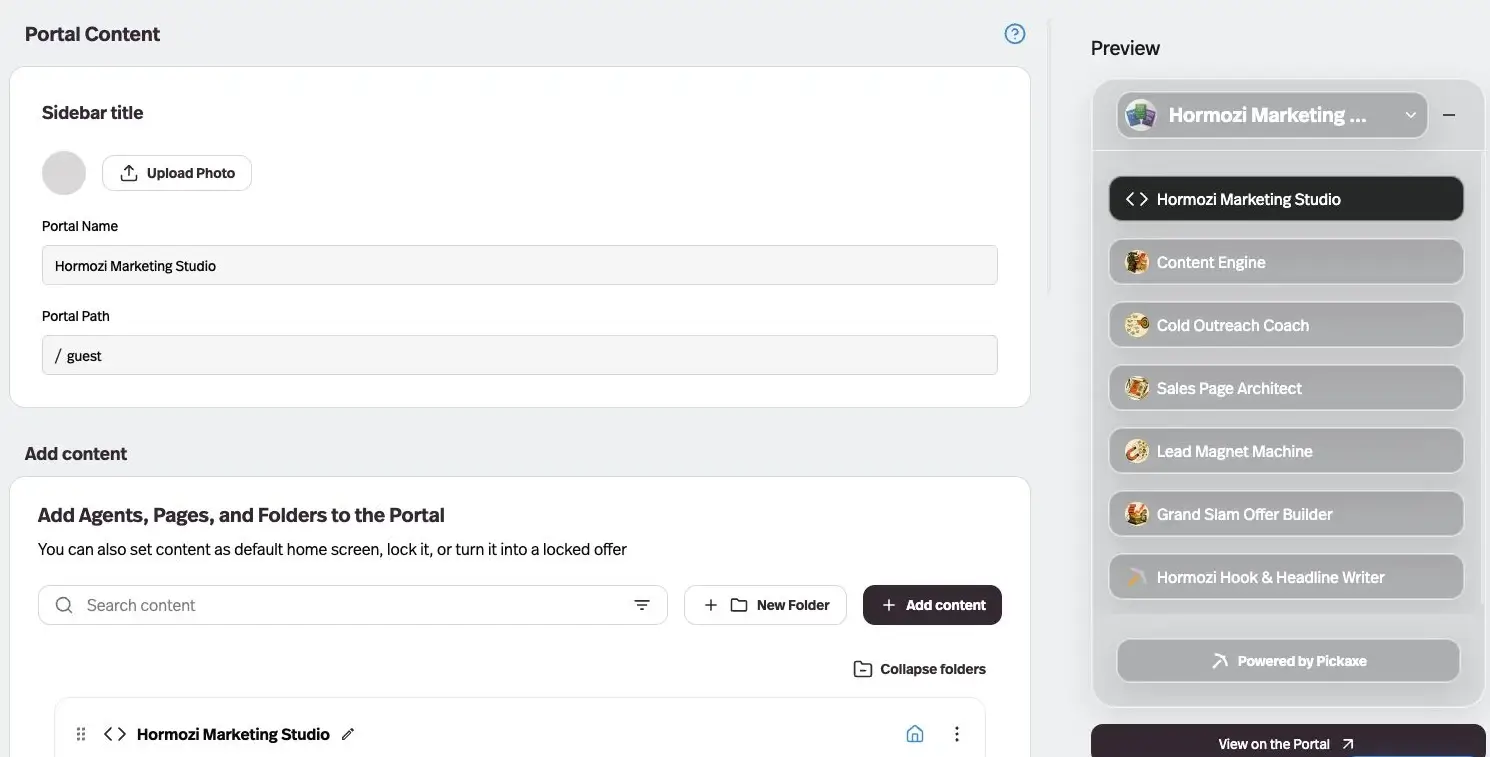
The Pickaxe Portal Editor's Content tab is where the build starts to look like a product. It organizes agents and pages in folders, with separate controls for access and design.
A client can buy a workflow and come back to the same branded site with the related material in reach. Pickaxe portal documentation
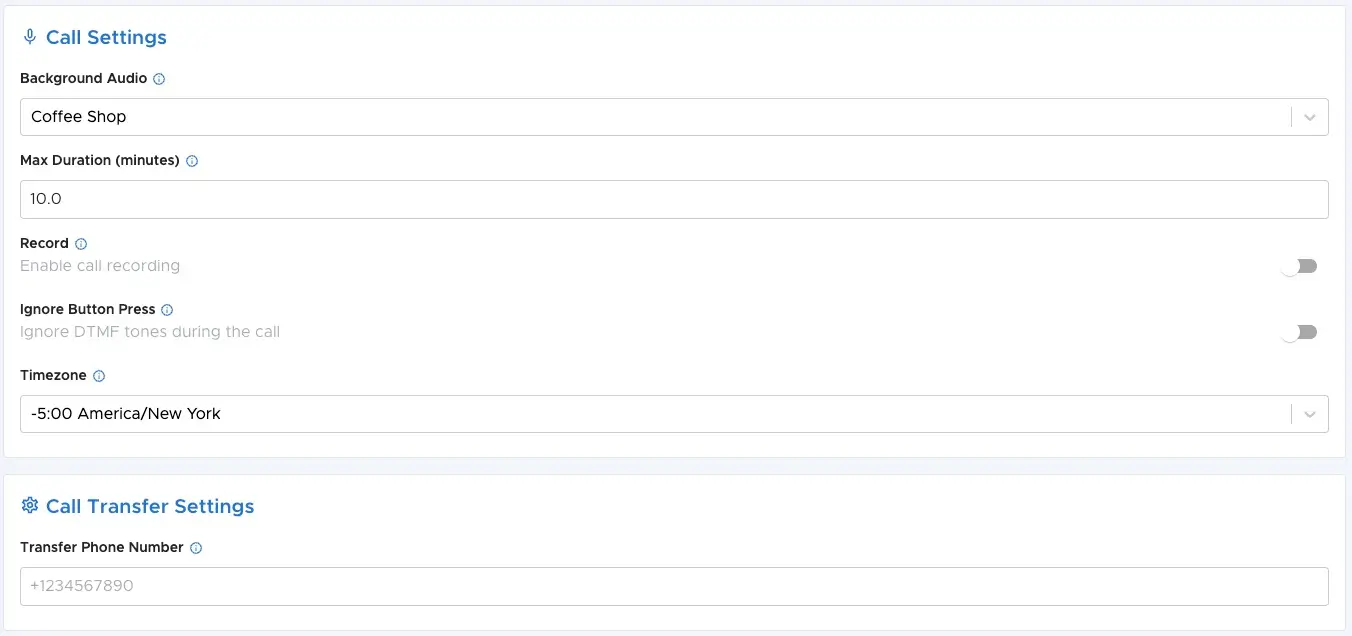
Stammer documents a Phone Numbers area for assigning numbers to voice agents, including an option to connect an existing Twilio account. Its call-concurrency guide describes what happens when another call arrives while the current capacity is occupied.
I'd choose a supported region and verify the queue and transfer destination with two people dialing at once. Stammer phone number setup Stammer Twilio setup Stammer call concurrency Stammer voice overview
Pickaxe's builder also documents spoken responses in its agent interface. I treat that as an interface capability and put phone number provisioning, inbound routing and call handling in the telephony requirements of the RFP.
A website customer and a person dialing an existing business line are different acceptance tests. Pickaxe Agent Builder Stammer phone number setup
Who can change the agent and what they can see
| Requirement | Pickaxe | Stammer AI |
|---|---|---|
| Sell one extra tool | ✓ Best fit for an individual agent or folder purchase Lock portal content as a standalone Offer. Pickaxe Offers documentation | SaaS packages allocate agents, storage and permissions to client sub-accounts. Stammer package settings |
| Client supervises deployed support | Separate portal member access from the plan’s workspace collaborator settings. Pickaxe member access groups Pickaxe plan and usage pricing | ✓ Best fit for a delegated support dashboard Set permissions to view conversations, access knowledge or edit chatbots. Stammer sub-account setup Stammer package settings |
| Review between-client boundaries | Test users in separate workspaces and group assignments. Pickaxe member access groups | Test logins for separate client sub-accounts and the permissions on each. Stammer sub-account setup |
Pickaxe member groups govern who can use the customer portal and which access or usage terms they get. If the agency wants to let a client change an agent, price that workflow separately with workspace collaborator permissions or a handoff.
Verify the Gold or Pro collaborator and ownership-transfer rules on the exact plan. Pickaxe member access groups Pickaxe plan and usage pricing
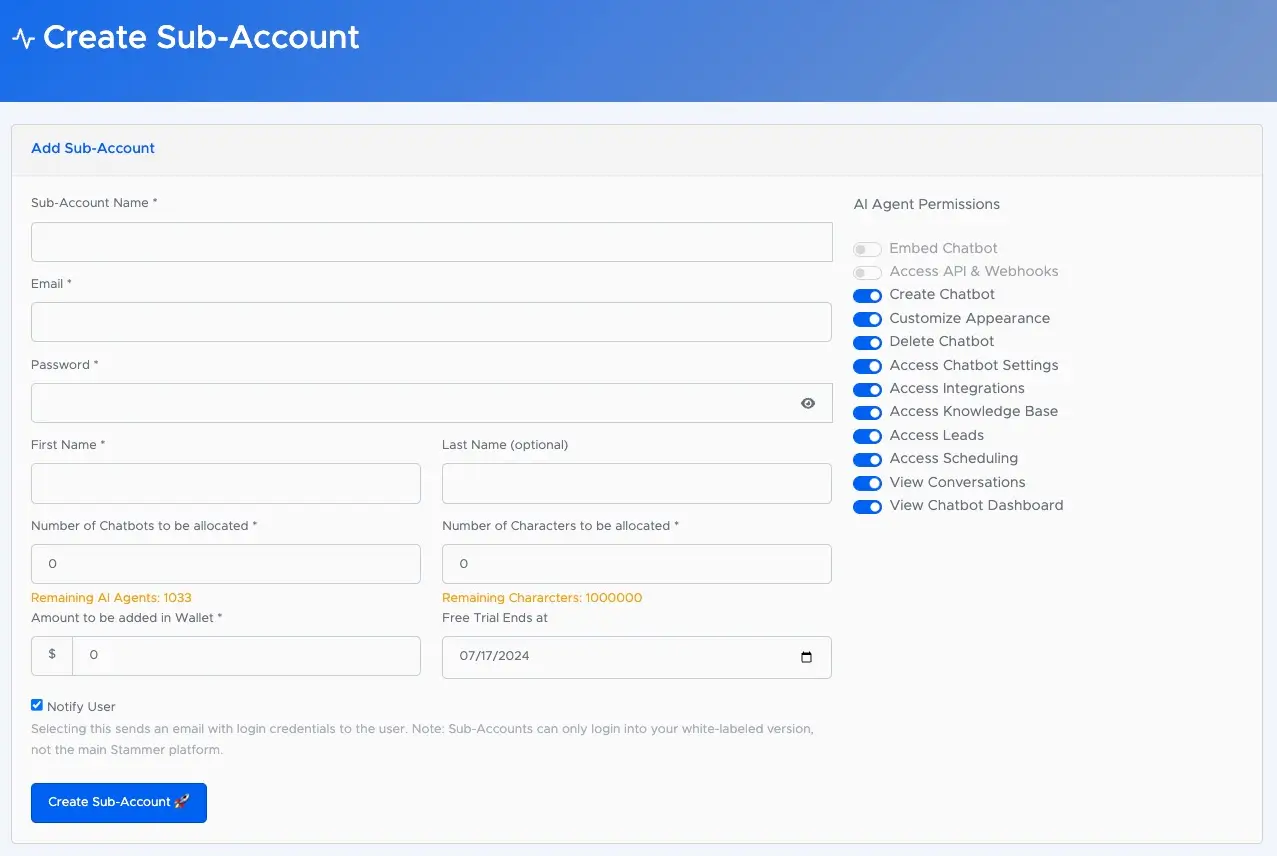
Stammer's documentation shows a client sub-account form where an agency can allocate agents, storage and wallet balance and set permissions. The operations manager could get conversation access while the agency retains template and integration control.
Run the role test with ordinary client accounts, including a second fictional business whose data should stay out of reach. Stammer sub-account setup Stammer package settings
Write the boundary into the delivery agreement. One person updates the client policy.
One person can switch off the booking agent. One person can approve changing the retail price.
A shared admin user blurs all three jobs and makes offboarding harder to rehearse.
Try a member-only workflow
Put one agent and one resource in a Pickaxe portal and check what a paying member can open.
Security, support and ownership at handoff
| Requirement | Pickaxe | Stammer AI |
|---|---|---|
| Identity integration | Embed SSO listed on Pro and Business. Pickaxe plan and usage pricing | Custom integrations and SSO are listed on Enterprise. Stammer public pricing |
| Ownership and exit | Workspace ownership transfer is listed on Pro and Business. Confirm the transfer scope. Pickaxe plan and usage pricing | Connect the agency Stripe account and agree on number ownership and portability in advance. Stammer Stripe setup Stammer Twilio setup |
| Documentation and support | Trust center and published support tiers. Pickaxe trust center Pickaxe plan and usage pricing | Security report process and Pro onboarding and office hours. Stammer privacy and security documentation Stammer public pricing |
Pickaxe publishes a trust center and lists embed SSO and workspace ownership transfer on Pro in its plan matrix. Stammer publishes privacy and security documentation and lists custom integrations and SSO under Enterprise.
I would verify the type of SSO and buy the exact surface that needs it, such as an embedded agent or a staff dashboard. Pickaxe trust center Pickaxe plan and usage pricing Stammer privacy and security documentation Stammer public pricing
Ask each vendor for the retention and deletion terms covering the data you will actually collect. A phone recording, lead form, support transcript and portal chat can have different destinations.
Include a test copy of each in the handoff checklist and confirm which exports and delete requests the operator can perform.
Get the domain and the billing account into the right name at the start. At renewal, the client should know what happens to their domain, phone number, recordings, source files and subscriptions if the agency relationship ends.
The client handoff checklist has a more complete inventory to work from.
Pilot A gives paid members a working portal
Imagine Juniper Equipment Service wants to sell a maintenance-planning membership to independent operators. A customer should sign in, open a guided prep agent, ask a question about their tier, and optionally buy access to a separate quote-prep tool.
- Build the smallest product. In a workspace, create a Chatbot with a fictional service policy and checklist. Add a read-only Action for quote status using synthetic records and an account-scoped back end. Test the ordinary question and the case where there is no quote. Pickaxe Agent Builder Pickaxe Actions guide
- Publish a member route. Add the agent and prep guide to a branded portal. Set up a member access group with a usage limit and connect Stripe if you're testing native checkout. Use a separate account to verify the first sign-in and the locked route. Pickaxe portal documentation Pickaxe monetization documentation
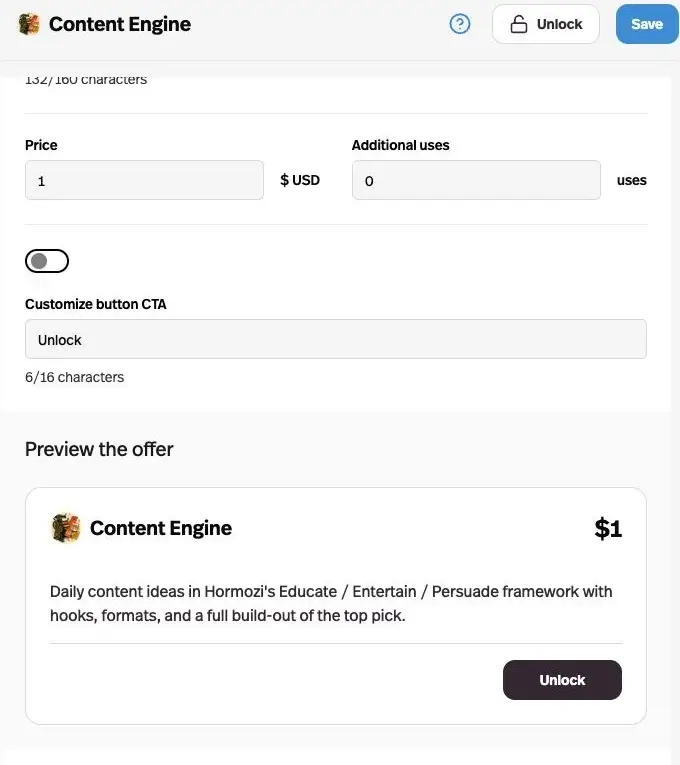
- Test a paid add-on. In the Lock tab, set a standalone Offer for the quote-prep agent or folder. Check visibility before purchase, access after purchase, and the operator's process for granting and removing access. Pickaxe Offers documentation
- Practice the failure path. Replace next-day inspection availability with two-day availability in the approved source. Ask for the retired policy, force a lookup timeout, and sign in as another client. The agent must fall back to the service desk and avoid returning another account's quote.
The useful deliverable is a working customer journey. Capture the public URL, the invite or signup flow, the restricted page and the limited account's fallback state.
If the workflow only works while the agency admin is signed in, hold the pilot.
Pilot B sells reception as a managed service
Now give Juniper the same customer questions, but assume the buyers are service companies paying an agency to handle missed calls. Callers should hear the right coverage policy, leave a callback request if needed, and reach a human when the request is outside the script.
- Provision the client. Configure the branded agency domain, connect Stripe for client subscriptions, and create Juniper's sub-account. Allocate a test agent and wallet balance and grant only the dashboard permissions the office manager needs. Stammer agency quick start Stammer sub-account setup Stammer Stripe setup
- Build for two channels. Create a chat agent and a voice agent around the approved coverage policy. Attach an appropriate test number, confirm the region and destination, and point both routes at a sandbox calendar or fake CRM. Stammer chat knowledge documentation Stammer inbound voice setup Stammer phone number setup
- Exercise handoff. Send a website chat with a request for a person. Place a call that needs transfer and repeat during a simulated busy period. Compare what the customer heard with the callback record the dispatcher actually received. Stammer human handoff setup Stammer voice overview Stammer call concurrency
- Reconcile the wallets. Set a retail package and run a small batch of billed test traffic. Reconcile the agency's wholesale deductions, the client's retail deductions and any top-ups against the actual invoice and conversation records. Stammer package settings Stammer wallet documentation Stammer public pricing
The agency owns the runbook and the client owns the coverage policy and escalation line. I would agree those roles before going near the main business number.
If a booked appointment never appears in the calendar, route the request to a person and explain the fallback in the customer's language.
How to make both pilots fail on purpose
Replay the same outdated-policy question after removing the old document. For the portal, confirm that the revised policy is visible to the member account and that its stored quotes are scoped correctly.
For the voice agent, have the caller state an ambiguous location and see whether it asks which branch they mean before promising a visit.
Record the source version, the user role, any external reference ID and the observed side effect. Confirm the test receiver can pause the affected action or channel.
The guide to building an agent evaluation set shows how to keep these cases for future regressions.
Judge the workflows against different pass conditions. The portal should grant exactly the purchased access and protect other clients' records.
The receptionist should answer or offer a reliable callback, transfer, or booking, then give the operator a record to reconcile.
Pickaxe vs Stammer AI pricing and usage
These are published USD list prices for new US buyers as of November 25, 2026. The monthly column is for monthly billing.
Annual figures are monthly equivalents. Confirm taxes, payment costs and account-specific rates at checkout.
| Meter | Pickaxe | Stammer AI |
|---|---|---|
| White-label entry, USD | Gold $37 per month billed monthly or $29 per month billed annually. Pickaxe plan and usage pricing | Pro White Label from $99 per month billed monthly or $79 per month billed annually. Standard from $49 monthly lacks white labeling. Stammer subscription plans Stammer public pricing |
| Typical agency step up, USD | Pro $147 monthly or $116 per month billed annually. Gold lists up to three workspaces. Pro lists unlimited workspaces. Pickaxe plan and usage pricing | The documented Pro bundles include 5 chat and 5 voice agents at $99 monthly or 10 and 10 at $149 monthly. Unlimited client sub-accounts are separate from included agents. Stammer subscription plans |
| Usage | Plan credits separate from cost of agent runs and tools. Gold lists $15 in credits per month and Pro lists $50. Pickaxe plan and usage pricing | Pro has a one-time $25 signup wallet credit. Model-based chat quotes are estimates. The rate card lists GPT-4.1-nano voice at $0.11 per minute. Stammer subscription plans Stammer public pricing |
| Customer payments | Listed platform fee is 10% on Gold and 8% on Pro for processed payments. Pickaxe monetization documentation | Agency retail prices and client wallet top-ups via connected Stripe. Agency pays its platform costs. Stammer wallet documentation Stammer Stripe setup |
| Telephony | Estimate any external phone service separately from the portal. | Price numbers, concurrent capacity and carrier charges as separate scope items before quoting. Stammer phone number setup Stammer call concurrency Stammer public pricing |
Stammer's current subscription guide identifies the old Agency and Full SaaS Mode offers as legacy. It also calls the Pro signup credit a one-time wallet credit.
I budget the Pro voice meter from the model-rate section and keep Standard's reply and minute overage rates separate. Ask for an invoice sample if a sales quote bundles carrier, number or model charges differently. Stammer subscription plans Stammer public pricing Stammer phone number setup
Pickaxe's percentage applies to payments processed on the platform. Stammer advertises no platform revenue share on agency resale, while the agency still pays for the plan, applicable usage and its payment processing.
Neither statement answers what a customer is allowed to use after a refund or a failed renewal. Test that separately. Pickaxe monetization documentation Stammer white-label terms overview Stammer Stripe setup
Model a small launch, a growing book and a portfolio
Here's my planning example. The Pickaxe pilot assumes one workspace and two agents per client, one shared agency owner, one supporting operator per workspace, and two source documents per client.
Model thirty read-only lookups and two manually reviewed retry cases per client each month. The Stammer pilot assumes one voice agent and one chat agent per client, a client operator, 300 chat replies and 120 billed call minutes per client per month.
Each buyer can change those inputs.
| Pilot size | Pickaxe monthly base | Stammer AI monthly base + voice |
|---|---|---|
| 2 separate clients | Gold $37. Pickaxe plan and usage pricing | 600 chat replies and 240 call minutes. $99 base + $26.40 voice = $125.40 partial subtotal. Stammer subscription plans Stammer public pricing |
| 8 separate clients | Pro $147. Pickaxe plan and usage pricing | 2,400 chat replies and 960 call minutes. $149 base + $105.60 voice = $254.60 partial subtotal. Stammer subscription plans Stammer public pricing |
| 20 separate clients | Pro $147. Pickaxe plan and usage pricing | 6,000 chat replies and 2,400 call minutes. $199 base + $264 voice = $463.00 partial subtotal. Stammer subscription plans Stammer public pricing |
For the Stammer column I multiplied total billed minutes by its listed GPT-4.1-nano voice rate of $0.11 per minute and added the corresponding Pro base. The sums exclude chat, phone numbers, additional concurrency, external tooling, payment costs, taxes and staff time.
They assume no credits and no included Pro voice minutes for the model. The live quote and invoice should settle the exact scope. Stammer public pricing Stammer subscription plans Stammer phone number setup
For the Pickaxe column I used the published base price for the first eligible workspace tier under the example. Plan credits, costs of runs and tools, the checkout fee and support remain distinct lines.
Pickaxe's pricing calculator estimates model and tool costs from observed usage. I would replace that estimate with a metered sample from the actual portal, including repeated requests and longer conversations. Pickaxe plan and usage pricing
Use the invoice to calculate the real margin
Start with customer revenue actually collected. Subtract refunds, processing costs, the share of the platform subscription you allocate to the client, variable model and channel usage, third-party tools and support labor.
Keep wallet top-ups and consumption in separate columns so you can explain the difference between cash in and service already delivered.
In a fictional Stammer retail package, variable call cost is $0.11 per minute and the client pays a hypothetical $0.25 per minute. On 120 billed minutes that is $13.20 of voice usage against $30 of customer usage charges, or $16.80 before the shared plan, chat, telephony, payments and labor.
A credit the agency grants to a sub-account can still cost the agency real money when the client uses it. Stammer public pricing Stammer wallet documentation
For a fictional Pickaxe Gold membership at $100 per month, the listed 10% platform fee makes the remainder $90 before the plan, any other payment costs, actual agent usage and support. Renewals and one-time Offers can make the sales look different month to month, so tie the margin check to the entitlement customers purchased. Pickaxe monetization documentation Pickaxe Offers documentation
The guide to agent pricing models is helpful when a client wants a predictable flat subscription. I usually keep internal usage detail even under a flat contract, because a busy week can change the cost of an apparently identical plan.
What I'd confirm before selling either workflow
- Buyer and operator. List the person paying and the people who need a login. Have a customer and a client admin try the relevant screens separately.
- First failure. Demonstrate an outdated source, a denied permission and a failed action or missed transfer. Record the fallback and the owner who can pause it.
- Billing event. Walk through joining, running out of usage, topping up or upgrading, and a failed renewal. Save the actual invoice and access state for the offer you plan to sell.
- Exit. Identify who retains the brand domain, phone number, source material and payment account. Ask whether the required exports or transfer are available on the selected plan.
If the exit plan is “we'll figure it out,” ask the vendor about portability before opening checkout. Keep the original knowledge files and written role rules somewhere the client can access independently of the agent.
Frequently asked buyer questions
Can both platforms be white-labeled?
Yes. Pickaxe's paid plan matrix includes white labeling and a custom domain.
Stammer lists white labeling on Pro White Label and Enterprise. Verify what your own end users see on the public page, login screen, email and payment flow before promising full brand consistency. Pickaxe plan and usage pricing Stammer public pricing
Can I sell a client dashboard on Stammer and paid access on Pickaxe?
Yes, the documented products support both sales patterns. Stammer's SaaS Configurator sells a package to a sub-account with specified agent capacity and permissions.
Pickaxe membership and Offers sell access to tools and content on a portal. Preserve separate billing and entitlement records if you combine them. Stammer package settings Pickaxe monetization documentation Pickaxe Offers documentation
Does Stammer Pro include unlimited phone agents?
The current plans document unlimited client sub-accounts with finite chat and voice agent capacity by Pro tier. Check the agent mix, simultaneous calls, voice knowledge allowance and number availability as distinct requirements. Stammer subscription plans Stammer phone number setup
Is a voice-enabled portal the same as a phone receptionist?
Spoken output inside an agent interface answers a different delivery requirement. A receptionist job also needs the number, routing, simultaneous calling behavior and a tested transfer or callback.
Stammer publishes those phone-specific controls. Pickaxe Agent Builder Stammer phone number setup Stammer call concurrency Stammer voice overview
Which would I choose?
For a paid membership with gated tools and reference material, I'd start with a single Pickaxe portal and prove that a customer can buy access, use it and get help. For a phone-and-chat service sold to several businesses, I'd start with a Stammer sub-account and prove the client can supervise a missed call and reconcile their usage.
Ask the buyer to choose the first customer journey they want to see. If it's a member opening a paid agent, you can start a Pickaxe prototype with one agent, one source and one access group.