
If you run or build software, you've probably noticed that the AI agent conversation stopped being theoretical sometime last year. It's now sitting in your support queue, your onboarding flow, and your renewal forecast — whether you put it there on purpose or not.
SaaS is the industry where AI agents landed first, and it's easy to see why. Software companies already have structured docs, APIs, ticket histories, and product data sitting in databases. That's exactly the raw material an agent needs to actually do a job instead of just talking about one.
The numbers back it up. Gartner projects that 40% of enterprise applications will feature task-specific AI agents by the end of 2026, up from less than 5% in 2025 — one of the fastest integration shifts in enterprise software history.
I've spent a lot of time looking at how software teams are actually deploying these things — not the demo-day version, the version that's answering real tickets at 2 a.m. This guide is the honest breakdown: where AI agents for SaaS companies genuinely move the needle, what the ROI really looks like, where they fall flat, and how to build one without lighting a quarter of your roadmap on fire.
What an "AI agent" actually means for a SaaS company
Let's get the terminology straight, because "AI agent" has been stretched to mean everything from a glorified FAQ widget to a fully autonomous ops system.
A chatbot answers. An agent acts. A chatbot pattern-matches a question to a canned response. An AI agent can read your knowledge base, call your product's API to actually check a customer's subscription status, change it, log the result to your CRM, and escalate to a human if it hits a wall.
The difference matters enormously for SaaS. A support bot that says "here's a help article about billing" deflects nothing — the customer still has to do the work. An agent that opens the billing record, applies the credit, and confirms it has actually closed the ticket. (If you want the full breakdown of that shift, we wrote about it in From Chatbot to AI Agent.)
For a software company, the useful mental model is this: an agent is a teammate you can point at a repetitive, rules-based, data-connected job. The best candidates are jobs that are high-volume, well-documented, and mostly deterministic — which describes a huge slice of what SaaS support, success, and ops teams do all day. Plenty of those jobs do not need an agent at all, though — we sort out which of the three you actually need.
Not every task qualifies. Agents struggle with genuinely novel judgment calls, anything requiring information that lives only in someone's head, and situations where being wrong is catastrophic. Knowing that boundary is what separates a deployment that works from one that ends up in the 40% of agentic AI projects Gartner expects to be canceled by 2027.
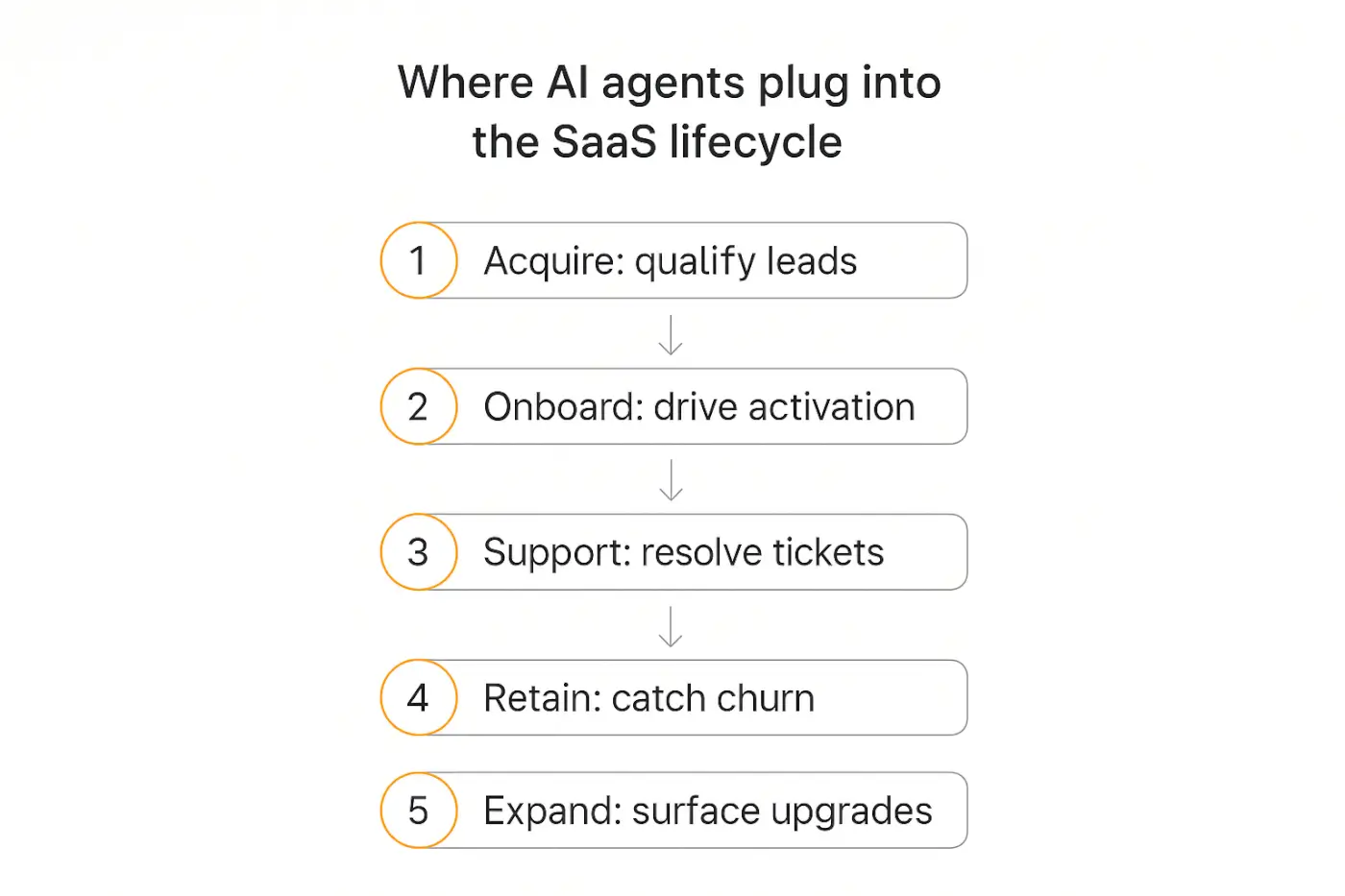
Where AI agents fit across the SaaS customer lifecycle
The mistake most teams make is treating "AI agent" as a support-only tool. In reality, agents show up at every stage of the SaaS customer lifecycle, and the highest-leverage ones aren't always in support.
Here's the map, from first touch to expansion:
- Acquire — pre-sale agents that qualify leads, answer product questions on the pricing page, and book demos.
- Onboard — in-app agents that guide activation, answer setup questions, and get users to their first "aha" moment faster.
- Support — the classic: Tier-1 ticket resolution across chat, email, and Slack.
- Retain — agents that watch usage signals, flag churn risk, and trigger save flows before a customer cancels.
- Expand — in-product agents that surface the right upgrade or feature at the right moment.
The compounding value is that one agent stack can touch all five. The same knowledge base and product connections that power support also power onboarding and expansion — you're not rebuilding from scratch each time.
This is why analysts have started calling the emerging pattern "agent-led growth" — a model where autonomous agents, not just human users, drive product value, retention, and expansion. Let's go stage by stage through the use cases that are actually working.
Use case 1: Support deflection and Tier-1 resolution
This is the flagship, and for good reason — it has the clearest, most measurable ROI of anything on this list.
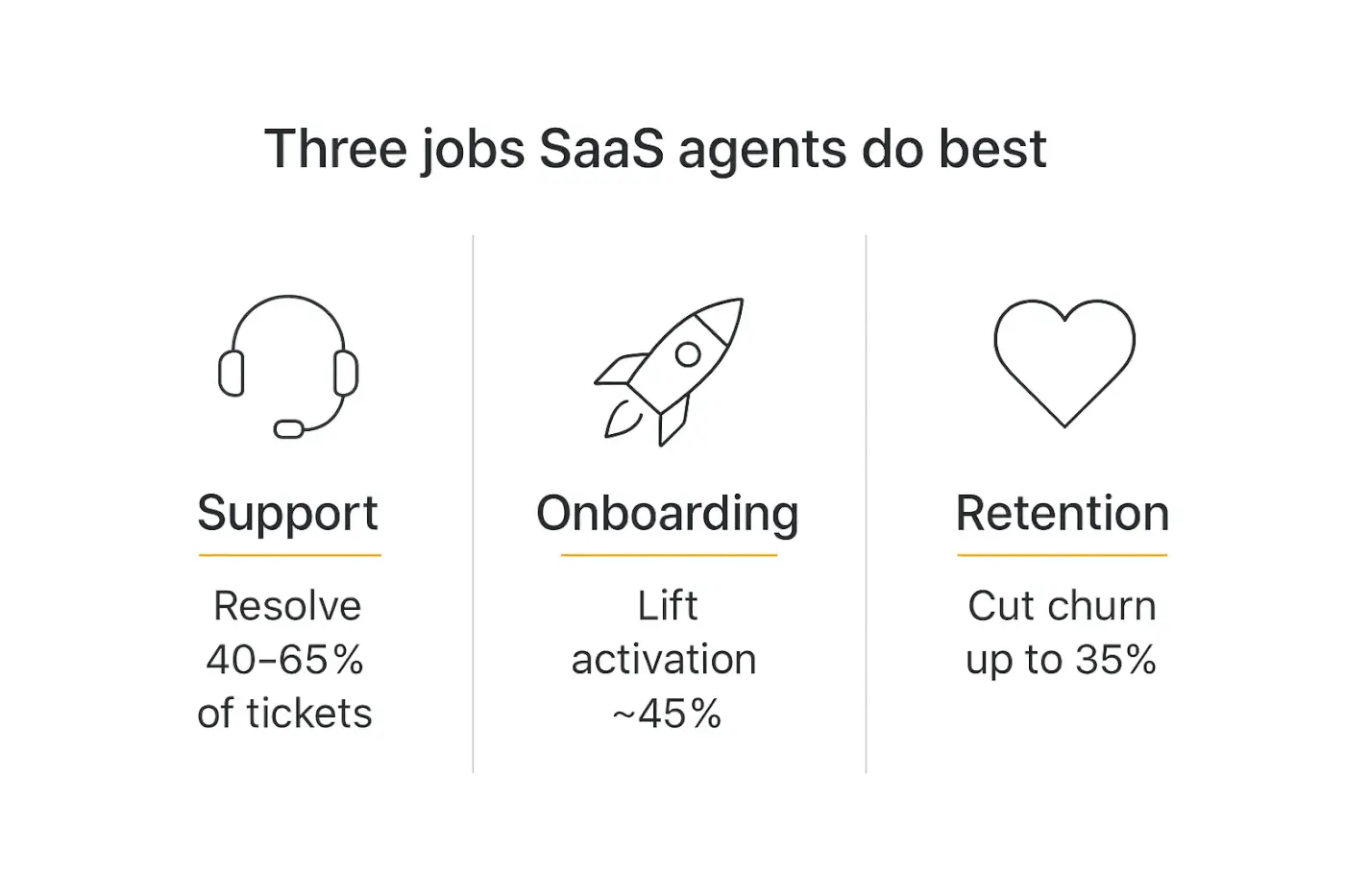
Strong SaaS teams are now running AI deflection between 40% and 65% of inbound volume with a properly configured agent, and the leaders push past that. The key phrase is "properly configured" — the agent needs your docs, your product API, and clear escalation rules, not just a model and a prompt.
What Tier-1 resolution looks like in practice: password and access issues, billing and subscription changes, plan upgrades and downgrades, integration setup questions, "how do I do X" walkthroughs, and status checks. These are high-volume, well-documented, and mostly deterministic — the sweet spot.
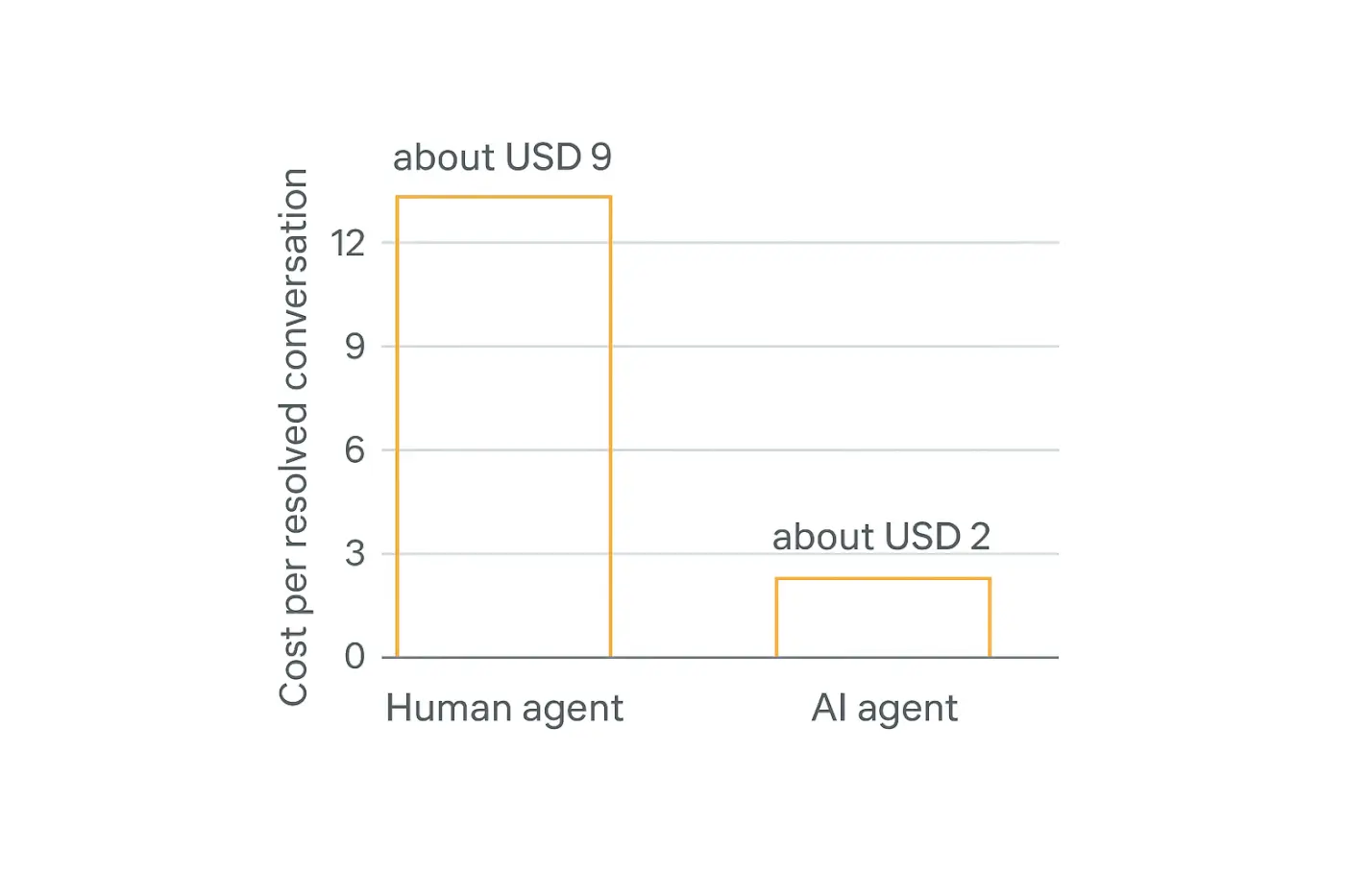
The economics are stark. Human support conversations run $6 to $12 each; AI resolutions run roughly $0.99 to $2.00. A company handling 50,000 monthly conversations that shifts 60% to AI can save on the order of $2.5 million a year.
But cost savings is the boring half of the story. The retention half matters more. Faster answers directly reduce churn — businesses deploying AI support report a 15% decrease in customer turnover simply because customers get resolved instead of waiting.
The trap to avoid: a deflection number that's really a deferral number. If your agent "resolves" a ticket by bouncing it back into the queue, you've made things worse, not better. Measure resolution, not just first response. Our guide to AI agent analytics covers exactly which metrics to track here.
Use case 2: Onboarding and activation
If support is where agents save money, onboarding is where they make it.
Poor onboarding is responsible for over 20% of churn in mid-market SaaS. A customer who never reaches activation was never really a customer — they were a trial with a credit card attached.
An onboarding agent lives inside the product and does what a great customer success manager would do at scale: it watches where a new user gets stuck, answers setup questions in context, nudges them toward the next step, and connects the integrations they'll need.
The results are hard to argue with. Teams that move onboarding onto AI agents report successful-onboarding rates lifting by roughly 45%, and AI-personalized onboarding has been shown to lift Day-30 retention by 30-40% compared to static product tours.
The reason it works: static onboarding assumes every user is the same. A tour designed for the median user is wrong for almost everyone. An agent adapts — it can tell the difference between an admin setting up a team and a solo user kicking the tires, and it guides each one differently.
This is the same playbook we walk through in how to build an AI agent for client onboarding — the mechanics are identical whether you're onboarding your own SaaS users or a consulting client's.
Use case 3: Churn detection and save flows
Here's where agents move from reactive to proactive, and where the smartest SaaS teams are focusing right now.
Churn is almost never a surprise in the data — it's a surprise only to the humans who weren't watching. Login frequency drops, a key feature goes unused, support tickets spike in frustration, a champion leaves the account. The signals are there weeks before the cancellation.
A churn agent watches those signals continuously across your product analytics, support history, and usage data — something no human CSM can do across a book of hundreds of accounts. Over 50% of SaaS companies now use AI in their core customer success workflows, primarily for churn prediction, health scoring, and onboarding automation.
When the agent detects risk, it can trigger the right save motion: a proactive check-in, a targeted tutorial for the feature they're struggling with, an alert to a human CSM for high-value accounts, or a well-timed offer. Vendors report churn reductions of up to 35% when AI detects risk early and engages before the customer leaves.
The honest caveat: this is the use case where you most want a human in the loop. A misfired save offer to a happy customer is annoying; a missed signal on your biggest account is expensive. Let the agent detect and recommend, and let a human make the call on your top accounts. We dig into where to draw that line in human-in-the-loop AI agents.
Use case 4: Expansion, upsell, and product-led growth
The best time to sell someone the next tier is the moment they hit the limit of their current one — and an agent living inside your product is the only "salesperson" present at that exact moment.
An expansion agent notices when a user bumps against a plan limit, adopts a feature that's gated on a higher tier, or shows a usage pattern that maps to an add-on. Then it surfaces the relevant upgrade in context, right when the value is obvious.
This is the engine behind what's now called agent-led growth. Companies that embed AI into activation and retention flows see 20-40% improvements in net revenue retention — and NRR is the single metric SaaS investors care about most.
Expansion revenue from self-serve is the holy grail: growth without a proportional increase in sales headcount. That's the whole promise of product-led growth, and agents are what make it work at scale.
One caution worth stating plainly: nobody likes being nagged inside a product they're paying for. The line between "helpful nudge" and "aggressive upsell bot" is thin. Tune the agent to surface value first and pitch second, or you'll train users to ignore it.
Use case 5: Developer and integration support
If your SaaS has an API, an SDK, or a marketplace, you know developer support is its own special kind of expensive. The questions are technical, the answers live across docs and code samples, and your best engineers are the ones getting pulled in to answer them.
A developer-support agent grounded in your API docs, changelog, and past support threads is one of the highest-ROI agents a technical SaaS can build. It can generate working code snippets, explain error codes, walk through auth flows, and troubleshoot webhook failures — the exact questions that otherwise interrupt an engineer's focus.
Because API docs are structured and precise, they make excellent grounding material. This is one of the cases where retrieval-augmented generation genuinely shines: the agent isn't inventing answers, it's citing your actual documentation. For accuracy-critical work like this, having the agent cite its sources isn't optional — it's the whole point.
Bonus: every developer question the agent answers is a signal about where your docs are weak. Feed those gaps back to your docs team and the agent gets better while your documentation does too.
Use case 6: Internal ops — engineering, sales, and CS enablement
Not every SaaS agent faces the customer. Some of the fastest payback comes from agents pointed inward.
Bug triage and routing. An agent that reads incoming bug reports, dedupes against known issues, tags severity, and routes to the right team saves your engineers hours of grooming every week.
Sales enablement. An agent trained on your battlecards, pricing, and past deals can answer a rep's "how do we compare to competitor X on SSO?" instantly, mid-call, instead of after.
CS enablement. An internal agent that pulls an account's full history — usage, tickets, contract terms — into a single brief before a renewal call means your CSMs walk in prepared instead of scrambling.
Internal agents are also a lower-risk place to start. The blast radius of a wrong answer is smaller when the "customer" is your own team, which makes internal ops a smart first deployment before you point an agent at paying users.
The ROI: what the numbers actually say
Let's put the business case together, because this is where the SaaS conversation gets real. The data across 2026 benchmarks is remarkably consistent.
Return on investment. Companies investing in AI customer service see average returns of $3.50 for every $1 spent, with leaders achieving up to 8x. First-year returns average 41%, climbing past 124% by year three.
Payback period. Typical payback lands at 3 to 6 months — fast enough that the CFO conversation is easy.
Cost per conversation. The drop from $6-$12 (human) to under $2 (AI) is the headline, but the compounding effect is throughput: agents handle volume spikes without a hiring cycle, and they're awake at 3 a.m.
Here's a clean summary of the benchmarks worth quoting to your team:
| Metric | Typical range (2026) | Best-in-class |
|---|---|---|
| Ticket deflection / resolution | 40-65% | 80%+ |
| Cost per resolved conversation | $0.99-$2.00 | Under $1 |
| Churn reduction | 15% | Up to 35% |
| Onboarding success lift | ~45% | — |
| Net revenue retention lift | 20-40% | — |
| ROI | $3.50 per $1 | 8x |
| Payback period | 3-6 months | Under 3 months |
Zoom out and the market signal is just as loud. Fortune Business Insights sizes the agentic AI market at $9.1 billion in 2026, heading to $139 billion by 2034 — and the SaaS delivery model is the fastest-growing slice of it, at a 46.8% CAGR.
One number to keep you honest, though: token costs are real, and a chatty agent on a frontier model can quietly eat your margin. Model routing and budget controls matter. We go deep on this in the real cost of AI agents. The routing half specifically is broken out in AI model routing.
Want to see a SaaS support agent working before you commit?
Build one on Pickaxe with your own docs and API in an afternoon — no engineering sprint required.
How to build a SaaS AI agent (without a six-month project)
Here's the good news for software teams: you don't need a dedicated AI team or a framework like CrewAI or LangGraph to ship your first useful agent. Those are powerful, but they're code-first and they're overkill for most SaaS support and onboarding jobs.
For most teams, a no-code platform gets you to production faster and lets your support and success people — the ones who actually know the answers — own the agent. This is the approach I'd recommend starting with, and it's what Pickaxe is built for. Here's the anatomy:
1. Ground it in your knowledge base
Feed the agent your help docs, API documentation, past resolved tickets, and product guides. In Pickaxe, the Knowledge Base accepts PDFs, docs, URLs, and app connections (Notion, Google Drive), and auto-refreshes daily so the agent never answers from stale docs. The quality of your grounding data is 80% of the quality of your agent — garbage docs in, garbage answers out.
2. Give it Actions to actually do things
A knowledge base makes the agent knowledgeable; Actions make it useful. Connect your product's API so the agent can check a subscription, reset a setting, or create a ticket — and connect your CRM (HubSpot, Attio) so every interaction is logged. Keep it to about four actions per agent; for anything more complex, route to specialized sub-agents in a waterfall setup. Our guide to AI integrations covers the connection options.
3. Write instructions with hard boundaries
The role prompt defines behavior, tone, and — critically — escalation rules. Be explicit about what the agent must not do (issue refunds over $X, make retention promises, answer legal questions) and exactly when to hand off to a human. This boundary-setting is where most of the safety work happens.
4. Deploy it where your users already are
An agent nobody reaches is worthless. The whole point of a SaaS agent is meeting users in context — embedded in your app, in your help widget, in Slack for internal agents, or via API for deep product integration. Pickaxe deploys the same agent across an embed, Slack, WhatsApp, or API simultaneously, so you configure once and ship everywhere.
5. Test hard before you ship
Run the agent against your real ticket history and your nastiest edge cases before a single customer sees it. Impersonate different user types, try to break it, and watch where it hallucinates or over-promises. Our guide to testing and debugging AI agents is the checklist to run first.
Where SaaS agents fail (and how to not be a cautionary tale)
I'd be doing you a disservice if I only sold the upside. Gartner expects over 40% of agentic AI projects to be canceled by 2027 due to unclear value, cost overruns, or weak controls. Here's how the failures actually happen.
The confident-wrong-answer problem. An agent that hallucinates a refund policy or invents an API parameter erodes trust faster than a slow human ever could. The fix is grounding, citations, and tight boundaries — never let the agent freelance on anything factual.
The deflection-that-isn't. A high "deflection rate" that's really customers giving up or re-routing is a vanity metric. Measure true resolution and customer satisfaction, not just deflection.
The security blind spot. An agent connected to your product API and customer data is a new attack surface. Prompt injection, data leakage, and over-broad permissions are real risks — scope the agent's access to the minimum it needs. We cover this in depth in AI agent security risks.
The set-and-forget failure. Products change, docs go stale, and edge cases accumulate. An agent is a system you maintain, not a project you finish. Review transcripts weekly, especially in the first months.
The wrong-first-project failure. Teams that start by pointing an agent at their hardest, highest-stakes workflow usually fail. Start narrow — one well-defined, high-volume, low-risk job — prove it, then expand.
Build vs. buy vs. embed
Software teams face a specific version of this decision, because you could plausibly build everything in-house. Here's how I'd frame it.
Build from scratch with a framework (LangGraph, custom code) if agents are core to your product itself — if you're selling AI features, you'll want that control. This is a real engineering investment.
Buy a point solution (a dedicated AI support vendor) if you have one narrow, high-volume problem and a budget to match. You'll get depth in that lane and pay for it per seat or per resolution.
Use a no-code agent platform if you want to move fast, own the agent with your non-engineering team, and cover several use cases (support, onboarding, internal ops) from one place. This is the sweet spot for most SaaS companies building agents alongside their product rather than into it — and it's where a platform that also handles deployment and monetization earns its keep.
For most software companies, the right first move is the no-code route: it lets you validate value in weeks, not quarters, before you decide whether a use case deserves a dedicated engineering build.
Ship your first agent this week, not this quarter.
Pickaxe gives you knowledge base, actions, deployment, and access control in one no-code platform.
Frequently asked questions
What's the difference between an AI agent and the chatbot we already have?
Your existing chatbot probably answers questions from a script or a doc. An AI agent connects to your systems and takes action — checking a subscription, changing a setting, logging to your CRM, escalating when needed. The short version: chatbots inform, agents resolve.
How much of our support volume can an AI agent realistically handle?
Well-configured SaaS agents resolve 40-65% of inbound volume, with best-in-class deployments exceeding 80%. The variable isn't the model — it's the quality of your grounding docs, your product API connections, and your escalation rules.
Will an AI agent replace our support or success team?
In practice it reshapes the team rather than replacing it. The agent absorbs repetitive Tier-1 volume so humans focus on complex, high-value, and relationship-driven work. Most teams redeploy people toward retention and onboarding rather than cutting headcount.
How long does it take to launch one?
With a code-first framework, budget months. With a no-code platform grounded in docs you already have, a focused first agent can be live in days. The longer pole is usually cleaning up your documentation, not building the agent.
Is it safe to connect an agent to our customer data?
It can be, if you scope access tightly and treat the agent as a new attack surface. Give it the minimum permissions it needs, keep humans in the loop for irreversible actions, and monitor transcripts. Read our AI agent security guide before connecting anything sensitive.
The bottom line
AI agents aren't a future bet for SaaS — they're already resolving tickets, activating users, and flagging churn at companies that shipped them a year ago. The question isn't whether to deploy one; it's which job to point it at first.
My advice: start narrow and measurable. Pick one high-volume, well-documented, low-risk workflow — Tier-1 support or onboarding are the usual winners — ground the agent in your real docs, connect it to the one or two systems it needs, and put a human in the loop where being wrong is expensive. Prove the ROI on that one job, then expand across the lifecycle.
The teams winning with agents aren't the ones with the fanciest architecture. They're the ones who picked the right first job, grounded the agent well, and treated it as a system to maintain rather than a project to finish.
If you want to try it without a six-month engineering commitment, that's exactly what Pickaxe is built for — knowledge base, actions, multi-channel deployment, access control, and monetization in one no-code platform. Point it at your first job and see the numbers for yourself.