
The AI agents market hit $10.8 billion in 2026, according to Precedence Research. That number was $5.4 billion just two years ago.
Meanwhile, Deloitte's State of AI report found that 97% of executives have either deployed AI agents or plan to within the next 12 months. Ninety-seven percent. That's not early-adopter territory anymore. That's table stakes.
But here's what I keep running into: almost everyone is talking about AI agents, and almost no one agrees on what they actually are. The phrase gets used to describe everything from a basic chatbot on a website to a fully autonomous system that runs your supply chain. The gap between hype and understanding is massive.
So I decided to write the guide I wish I'd had when I first started building agents. This is everything you need to know about what AI agents are, how they work, what types exist, and how to actually build one yourself — whether you write code or not.
What Is an AI Agent, Really?
Let me cut through the jargon.
An AI agent is a software system that takes a goal, breaks it into steps, uses tools to execute those steps, and keeps going until the job is done — without needing your approval at every turn.
That last part is what matters. A chatbot answers a question and waits. An AI agent takes action.
Think about it like this. You tell a chatbot "find me cheap flights to Tokyo." It gives you a list of suggestions. You tell an AI agent the same thing, and it searches multiple airlines, compares prices, checks your calendar for conflicts, and books the best option — all without you clicking a single button in between.
The defining characteristic is autonomy. An agent doesn't just respond. It reasons, plans, acts, and adapts.
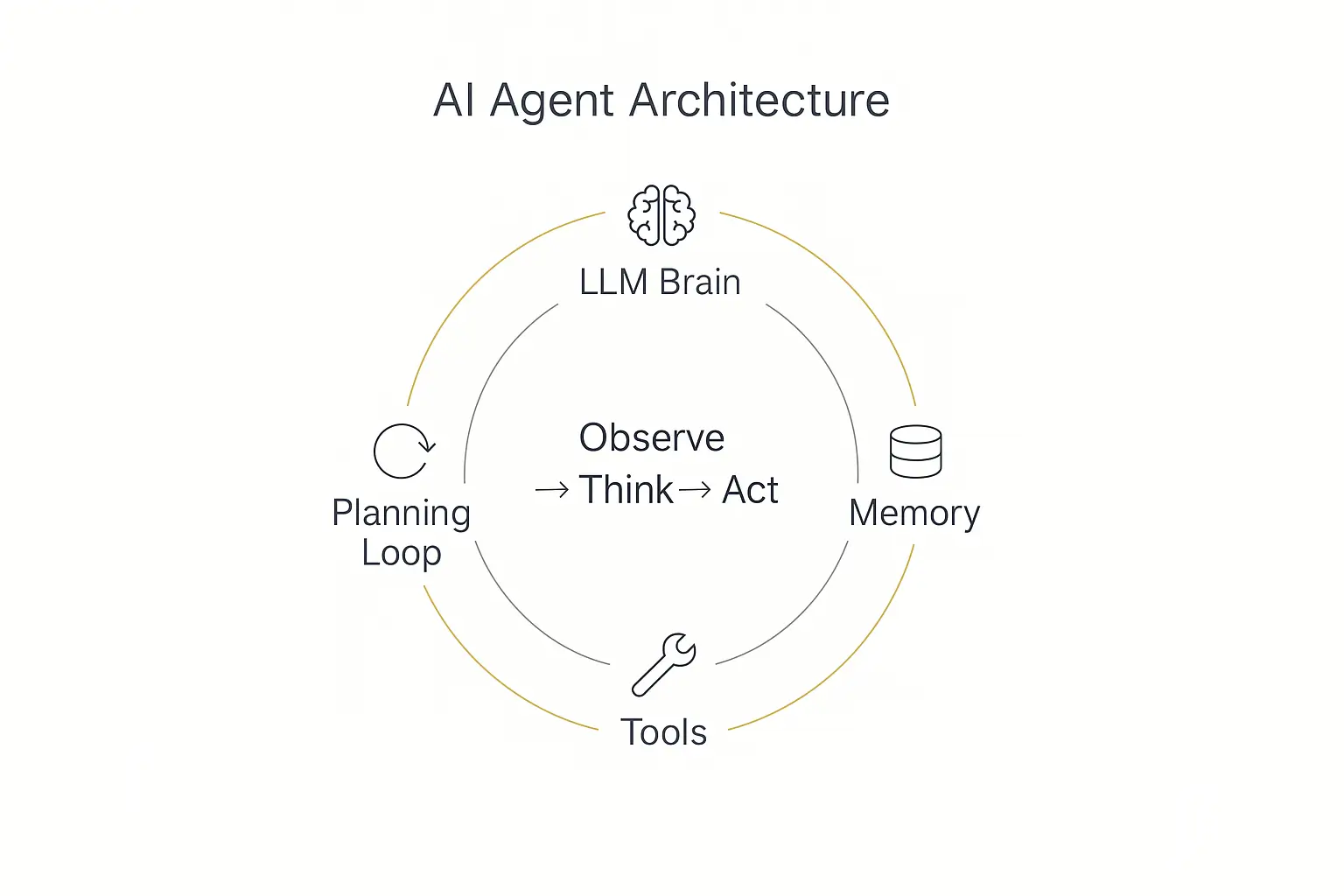
If you want the slightly more technical version, most AI agents follow what researchers call the observe-think-act loop:
- Observe: The agent takes in information — a user's message, data from a database, the result of a previous action.
- Think: The agent's LLM brain reasons about what to do next. It plans, evaluates options, and decides on the best step.
- Act: The agent executes that step — calling an API, sending an email, querying a knowledge base, writing a document.
Then it loops back to observe. It checks the result of its action, reassesses, and decides what to do next. This loop continues until the goal is achieved or the agent decides it needs human input.
That's really it. Everything else — the frameworks, the architectures, the multi-agent orchestration — is just layers on top of this fundamental loop.
IBM defines AI agents similarly: systems that use an LLM as their reasoning engine to determine which actions to take and in what order. Google Cloud's definition emphasizes the autonomy aspect — agents operate with varying degrees of independence to achieve user-defined objectives.
The key word across every credible definition? Action. An AI agent does things. Not just thinks things. Does them.
AI Agents vs Chatbots vs Copilots: The Actual Differences
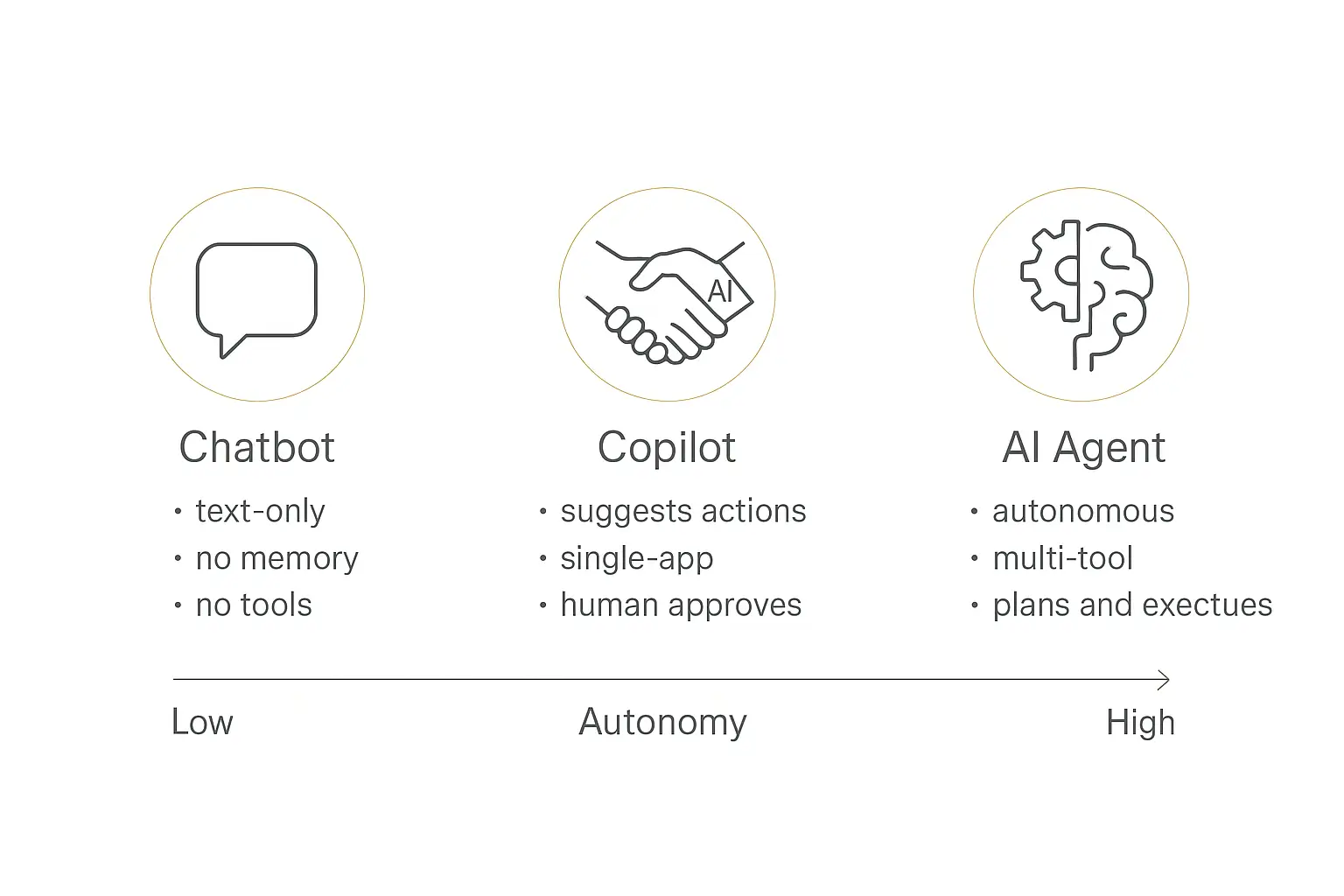
This is where most of the confusion lives. People use "AI agent," "chatbot," and "copilot" interchangeably, but they describe very different things.
I put together a comparison table that captures the real distinctions:
| Feature | Chatbot | Copilot | AI Agent |
|---|---|---|---|
| Autonomy level | None — responds only when prompted | Low — suggests, you approve | High — acts independently toward a goal |
| Can take actions? | No — text responses only | Limited — with human approval | Yes — calls APIs, sends emails, updates databases |
| Multi-step tasks? | No — single question, single answer | Partial — assists with individual steps | Yes — plans and executes full workflows |
| Memory / context | Session only (often none) | Session + some project context | Long-term memory, knowledge bases, conversation history |
| Tool access | None | IDE or single-app tools | Multiple external tools, APIs, databases |
| Use case examples | FAQ bot, simple customer Q&A | GitHub Copilot, writing assistants | Autonomous customer support, lead qualification, research agents |
Let me unpack each of these.
Autonomy
A chatbot has zero autonomy. It waits for your input and generates a text response. That's it. Think of the old-school FAQ bots that could only handle pre-programmed questions, or even modern LLM-powered chatbots that are limited to text-in, text-out conversations.
A copilot has limited autonomy. It sits alongside you and makes suggestions — autocompleting code, drafting email replies, recommending next steps. But you're always in the driver's seat. It proposes, you dispose.
An AI agent operates with significant autonomy. You set a goal ("qualify all inbound leads from yesterday and update the CRM"), and the agent figures out how to accomplish it. It might ask a clarifying question if genuinely stuck, but mostly it just goes and does the work.
Action-Taking
This is the most important distinction. Chatbots produce text. Agents produce outcomes.
A chatbot can tell you the steps to cancel a subscription. An AI agent can actually cancel the subscription — pulling up the account, verifying identity, processing the cancellation, sending the confirmation email, and updating the billing system.
Copilots fall in the middle. They can take some actions, but usually only within a single application and with explicit human approval at each step.
Multi-Step Reasoning
Ask a chatbot a complex question that requires multiple steps, and you'll quickly hit its limits. It can answer each piece individually, but you have to connect the dots yourself.
An AI agent handles the entire chain. It breaks a complex task into subtasks, executes them in order, handles errors along the way, and delivers the final result. I checked out several enterprise implementations where agents were handling 15-20 step workflows end-to-end.
Memory and Context
Most chatbots forget everything the moment you close the window. Even the better ones only remember the current conversation session.
AI agents work with persistent memory. They remember past interactions, reference knowledge bases full of documents and data, and build context over time. This is what allows them to get better at their specific job the more they're used. A newer class of agent pushes that further by writing its own skills between runs — see self-improving AI agents.
Tool Access
This is where AI agents really pull ahead. While chatbots are limited to generating text, agents can connect to external tools — CRMs, email platforms, databases, calendars, payment processors, and dozens of other systems.
It's the tool access that transforms AI agents from interesting novelties into genuinely useful business systems. Without tools, you have a very smart conversationalist. With tools, you have a worker that can actually get things done.
How AI Agents Actually Work (The Architecture)
I'm going to break down the architecture of an AI agent in a way that doesn't require a computer science degree to follow. There are four core components, and once you understand them, the rest clicks into place.
1. The LLM Brain
At the center of every AI agent is a large language model — the "brain" that does the reasoning. This could be GPT-4o, Claude, Gemini, Llama, or any number of models. The choice of model matters because different models have different strengths: some are better at reasoning, some are faster, some are cheaper, some handle tools more reliably.
The LLM's job is to understand the user's goal, break it into steps, and decide which tools to use at each step. It's the decision-maker.
But here's what people get wrong: the LLM alone is not the agent. The LLM is a component. The agent is the entire system wrapped around it — the memory, the tools, the planning loop. This is an important distinction because it means you can swap out the LLM brain and still have the same agent with the same knowledge and capabilities.
If you're curious about which models work best for different use cases, I put together a guide on the best LLM models that breaks it down.
2. Memory
Memory is what separates a one-off interaction from a persistent, useful agent. There are generally two types of memory in play: If that agent needs to keep working across sessions, our long-running AI agents guide explains how checkpoints and recovery fit alongside memory.
Short-term memory is the conversation context — what's been said in the current session. This is how the agent tracks the flow of a conversation and maintains coherence.
Long-term memory is the knowledge base and stored information that persists across sessions. This includes documents you've uploaded, data the agent has learned from past interactions, and explicit instructions you've given it about its role and behavior.
The knowledge base is often the most underrated part of an AI agent. You can have the most powerful LLM in the world, but if you don't feed it domain-specific knowledge, it's just going to give you generic answers. The knowledge base is what makes an agent an expert in your specific domain.
3. Tools (Actions)
Tools are the hands and feet of an AI agent. They're the integrations that let an agent interact with the outside world. Every time an agent sends an email, updates a spreadsheet, queries a database, or triggers a webhook, it's using a tool.
Common tool categories include:
- Communication tools: Email (SendGrid, Gmail), messaging (Slack, WhatsApp), SMS
- Data tools: CRM queries (HubSpot, Salesforce), database lookups, Google Sheets
- Workflow tools: Zapier triggers, Make scenarios, n8n automations
- Web tools: URL scraping, API calls, search queries
- Agent-to-agent tools: Routing to specialized sub-agents for complex tasks
The recent emergence of the Model Context Protocol (MCP) has made tool integration significantly easier. MCP is an open standard that gives AI agents a universal way to connect to external tools and data sources. If you want to go deeper on how this works, I wrote about MCP vs the A2A protocol and where each one fits.
4. The Planning Loop (ReAct)
The planning loop is the orchestration layer that ties everything together. It's the "brain stem" that manages the observe-think-act cycle I described earlier.
The most common pattern is called ReAct (Reasoning + Acting). Here's how it works in practice:
- User input: "Schedule a meeting with Sarah next week about the Q3 budget."
- Reason: The agent thinks — "I need to check Sarah's email, find available times next week, determine a good slot, and send a calendar invite with the topic."
- Act: The agent calls the contacts tool to find Sarah's email address.
- Observe: The agent gets the result — sarah.jones@company.com.
- Reason: "Now I need to check calendar availability for next week."
- Act: The agent calls the calendar tool to check both your schedule and Sarah's.
- Observe: Tuesday 2-3 PM and Thursday 10-11 AM are both open.
- Reason: "Tuesday 2 PM is the earliest available slot. I'll send the invite."
- Act: The agent creates the calendar event and sends the invitation.
- Observe: Invite sent successfully.
- Respond: "Done. I scheduled a meeting with Sarah Jones for Tuesday at 2 PM about the Q3 budget. Calendar invite sent."
That entire chain happened autonomously. The agent made decisions at each step, handled the information it received, and adapted its plan based on real results. No human approval needed between steps.
This is the fundamental pattern that makes AI agents qualitatively different from chatbots. It's not just better text generation. It's a different paradigm entirely.
Types of AI Agents: From Simple to Autonomous
Not all AI agents are created equal. There's a wide spectrum, from dead-simple rule followers to complex autonomous systems. I'll cover both the academic classifications and the more practical business categories, because honestly, the business categories are what most people actually need.
The Academic Classification
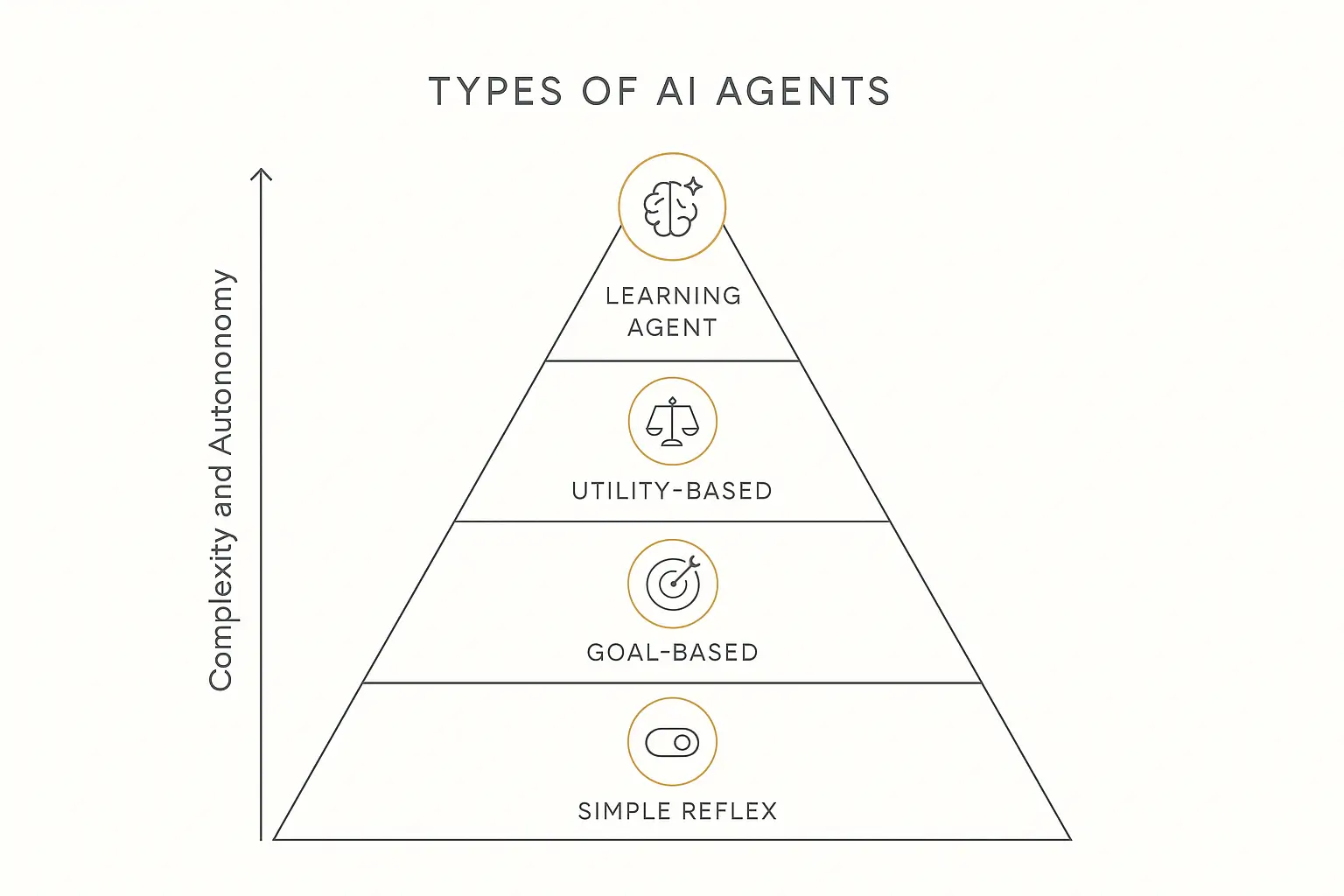
AI textbooks typically break agents into five types. This framework comes from Russell and Norvig's classic work on artificial intelligence, and it's still useful for understanding the spectrum:
Simple Reflex Agents operate on if-then rules. "If the customer asks about pricing, show the pricing page." No memory, no planning, no learning. These are essentially sophisticated decision trees. Most traditional chatbots fall here.
Model-Based Reflex Agents maintain an internal model of the world. They track state — what's happened so far, what the current situation looks like. A thermostat is a physical example: it knows the current temperature and the target, and adjusts accordingly. In AI terms, these agents remember context within a session.
Goal-Based Agents add planning to the mix. They have a specific goal and can reason about which sequence of actions will get them there. They consider future consequences of their decisions. Most useful AI agents today fall into this category.
Utility-Based Agents go a step further — they don't just achieve goals, they optimize for the best possible outcome. Given multiple paths to success, they pick the one that maximizes some measure of utility (speed, cost, quality, user satisfaction). Think of a flight-booking agent that doesn't just find any flight, but finds the best balance of price, timing, and convenience.
Learning Agents improve their performance over time based on feedback and experience. They start with some baseline behavior and get better the more they interact. This is the frontier — agents that genuinely learn from their mistakes and successes.
The Practical Business Categories
The academic taxonomy is nice for understanding the theory, but when you're actually building or buying AI agents for your business, these categories are more useful:
Conversational Agents are the most common type. They interact with users through natural language — answering questions, providing support, guiding people through processes. But unlike basic chatbots, conversational agents have access to knowledge bases and tools, so they can actually resolve issues rather than just deflect them. A customer support agent that can look up order status, process returns, and escalate to a human when needed is a conversational agent.
Task Automation Agents run behind the scenes without any user-facing conversation. They monitor triggers, process data, and complete workflows autonomously. An agent that watches your inbox for invoices, extracts the data, matches it against purchase orders, and flags discrepancies is a task automation agent. You might never interact with it directly — it just does its job. That example sits right on the boundary with plain automation, which we pull apart in agents vs agentic workflows vs automation.
Research Agents are built to gather, synthesize, and report information. They can search the web, crawl documentation, analyze datasets, and compile findings. A competitive intelligence agent that monitors competitor pricing, product launches, and press coverage is a research agent. These are particularly powerful because they can process orders of magnitude more information than a human researcher. The crawling half of that is a tooling question, and we worked through it in the 15 best web scraping tools.
Multi-Agent Systems are where things get really interesting. Instead of one agent handling everything, you have multiple specialized agents that work together. One agent qualifies the lead, another agent schedules the meeting, a third agent prepares the briefing document. They coordinate through a routing layer that decides which agent should handle which part of the task.
I'm seeing multi-agent architectures become increasingly popular in 2026, especially for complex enterprise workflows where no single agent can be an expert in everything. The "waterfall" approach — where a primary agent routes to specialists — tends to produce much better results than trying to make one agent do it all.
Real-World AI Agent Use Cases in 2026
Enough theory. Let me walk through where AI agents are actually delivering results right now, with specific examples and data points where I could find them. For a wider survey of what is actually shipping, see 16 AI agent examples doing real work.
Customer Service
This is the most mature use case for AI agents, and the data is compelling.
TELUS, one of Canada's largest telecommunications companies, deployed AI agents for customer support and reported saving 40 minutes per customer interaction. That's not a marginal improvement — that's a fundamental change in how support operates.
What makes customer service agents work well is the combination of knowledge base access (they know your product inside and out), tool integrations (they can actually pull up accounts, process refunds, update records), and escalation logic (they know when to hand off to a human).
The best customer service agents I've looked at aren't trying to replace human support entirely. They're handling the 60-80% of interactions that are routine — order status, password resets, billing questions, troubleshooting common issues — and freeing up human agents for the complex, emotionally sensitive cases that actually need a person.
If you're evaluating tools in this space, I compared the leading options in our roundup of AI customer service tools.
Sales and Marketing
Lead qualification is where AI agents are having the biggest impact in sales. An agent can engage every single inbound lead within seconds — asking qualifying questions, scoring them against your ICP, routing hot leads to sales reps, and nurturing cold leads with targeted content.
The math here is straightforward. If your sales team spends 30% of their time qualifying leads (which is typical), and an AI agent handles 80% of that qualification accurately, you've just given every rep almost a full extra day per week of selling time.
On the marketing side, agents are handling personalized outreach at scale. Not the "Hi {FIRST_NAME}" template stuff — genuinely personalized messages that reference the prospect's industry, recent activity, specific pain points, and relevant case studies. The agents pull in data from LinkedIn, company websites, and CRM notes to craft messages that sound like a human researcher wrote them.
Pipeline management agents are also gaining traction. They monitor deal stages, nudge reps when deals go stale, automatically update forecasts, and flag opportunities that match patterns of deals that have closed (or been lost) in the past.
Finance and Operations
Finance teams were some of the earliest enterprise adopters of AI agents, and I think the reason is obvious: finance workflows are rule-heavy, data-intensive, and repetitive — exactly the kind of work agents excel at. We go function by function through that work in AI agents for finance teams.
Invoice processing is the poster child. An agent can receive an invoice (via email or upload), extract all relevant data, match it against the corresponding purchase order, flag any discrepancies, route it for approval, and update the accounting system. What used to take a human AP clerk 15-20 minutes per invoice takes an agent seconds.
Expense auditing is another strong fit. Agents can review expense reports against company policy, flag out-of-policy items, check for duplicate submissions, and route approved reports for payment — all without a human touching it unless there's an exception.
Fraud detection agents monitor transactions in real-time, flagging patterns that match known fraud signatures. They can analyze thousands of transactions per minute and catch anomalies that human reviewers would miss simply due to volume.
Supply Chain
This is where some of the most ambitious AI agent deployments are happening.
Siemens and PepsiCo have both implemented digital twin systems powered by AI agents that model their entire supply chains. These agents continuously simulate scenarios — what happens if a supplier is late? What if demand spikes in a specific region? What if a shipping route gets disrupted? — and recommend adjustments before problems materialize.
Walmart's "Wally" is an internal AI agent that handles supply chain operations across thousands of stores. It monitors inventory levels, predicts demand patterns, optimizes routing, and coordinates replenishment. The scale is staggering — Wally processes millions of data points daily across Walmart's supply network.
Supply chain agents are particularly valuable because the domain is inherently complex, involves massive amounts of data, and benefits enormously from real-time responsiveness. A human planner reviewing a spreadsheet once a day simply can't compete with an agent monitoring conditions continuously.
HR and Recruiting
Recruiting is one of those industries where AI agents can save a ridiculous amount of time on tasks that are important but don't require human judgment.
Resume screening is the obvious one. An agent can review hundreds of applications against specific job requirements, extract relevant qualifications, score candidates, and surface the top matches — all in the time it takes a recruiter to read three resumes manually.
Interview scheduling is another win. The back-and-forth of finding a time that works for the candidate, the hiring manager, and the interview panel is pure administrative overhead. An agent handles it in a single step.
I went much deeper on this topic in our guide to AI agents for recruiting if this is relevant to your work.
Consulting and Agencies
This is the use case that I find most exciting, partly because it's where the business opportunity is most obvious.
Consultants and agencies are building custom AI agents for their clients as a service. Instead of (or in addition to) delivering reports and recommendations, they deliver working AI tools that continue providing value long after the engagement ends.
A marketing agency might build a content strategy agent for each client that knows the client's brand voice, content calendar, audience personas, and performance data. A consulting firm might build a financial modeling agent that knows the client's specific KPIs, benchmarks, and reporting requirements.
The same approach works for nonprofits, where donor FAQ and volunteer onboarding agents save staff dozens of hours each month. The economics are compelling. Building a custom agent takes hours, not weeks. You can charge a setup fee plus ongoing subscription. And the client gets genuinely useful, always-available AI assistance that's trained on their specific business.
If you're thinking about this model, our guide on how to start an AI agent agency covers the business side in detail. We also wrote about how to sell AI agents to local businesses if you're targeting the SMB market.
Build and deploy your first AI agent in under an hour
No code required. Connect your knowledge base, add actions, and ship it to users today.
How to Build Your Own AI Agent (Without Writing Code)
A year ago, building an AI agent required a software engineering team, weeks of development time, and a meaningful budget. That's not true anymore.
The no-code revolution hit AI agents hard. Today, platforms let you go from "I have an idea for an agent" to "it's live and users are interacting with it" in 15 to 60 minutes. I'm not exaggerating.
Here's the process at a high level.
Step 1: Define the Goal
Every good agent starts with a narrow, specific goal. Not "be a helpful AI assistant." Something like "qualify inbound leads and schedule meetings with the sales team" or "answer customer questions about our product using our documentation."
The more specific the goal, the better the agent performs. This is one of the biggest mistakes I see — people try to build one agent that does everything, and it ends up doing nothing well.
Step 2: Build the Knowledge Base
Feed the agent everything it needs to know. Product documentation. FAQs. Pricing sheets. Process guides. Company policies. Whatever domain knowledge is relevant to its goal.
This is where your agent goes from "generic AI" to "expert in your specific domain." Don't skip this step. The quality of the knowledge base is the single biggest determinant of agent performance.
Step 3: Write the Instructions
Instructions (sometimes called a role prompt or system prompt) tell the agent who it is, how to behave, what tone to use, and what it should and shouldn't do. Think of this as the agent's job description. Good instructions include the role, the boundaries, the tone, and examples of ideal responses. Once those instructions grow long enough to split into reusable files, you are in agent skills territory.
Step 4: Add Actions
Actions are the tools that let your agent do things beyond chatting. Send emails. Update spreadsheets. Call APIs. Trigger automations. The specific actions depend on what your agent needs to accomplish.
My recommendation: start with one or two actions and add more once you've validated that the core experience works. Agents with too many actions tend to get confused about when to use which tool.
Step 5: Test and Iterate
Test your agent with real scenarios. Ask it the questions your users will ask. Try to break it. Find the edge cases. Refine the instructions and knowledge base based on what you find.
Step 6: Deploy
Put it in front of users. This could mean embedding it on your website, sharing a direct link, deploying it through Slack or WhatsApp, or hosting it in a branded portal.
This is the workflow we use with Pickaxe, and it genuinely takes about 30 minutes for a well-scoped agent. The Agent Builder walks you through each step, the Knowledge Base lets you upload documents or connect sources like Google Drive and Notion, and Actions connect your agent to external tools. Once built, you deploy through portals, embeds, Slack, WhatsApp, email — whatever channel makes sense.
For a more detailed walkthrough, check out our guides on no-code AI agent builders and building an AI agent for client onboarding.
The AI Agent Tech Stack: What You Actually Need
Whether you're building agents with code or without, the underlying tech stack has the same layers. Here's how they break down and what to consider at each level.
The LLM Layer
You need to choose a foundation model. The major players right now are OpenAI (GPT-4o, GPT-4.1), Anthropic (Claude), Google (Gemini), and Meta (Llama for self-hosted). Each has tradeoffs around intelligence, speed, cost, and reliability.
For most business agents, model choice matters less than you think — the quality of your instructions and knowledge base has a bigger impact on output quality than the difference between top-tier models. That said, some models are notably better at tool use and structured outputs, which matters a lot for agents.
I'd recommend reading our best LLM models comparison, or checking out Pickaxe's model comparison page to see benchmarks side by side.
Memory and Knowledge Base
Your agent needs a way to store and retrieve domain knowledge. For no-code platforms, this is typically a built-in knowledge base where you upload documents, paste URLs, or connect data sources. For developers building custom agents, this usually means a vector database (like Pinecone, Weaviate, or ChromaDB) with a retrieval-augmented generation (RAG) pipeline.
The key consideration is retrieval quality. It doesn't matter how many documents you upload if the agent can't find the right information when it needs it. Look for platforms and tools that offer good chunking strategies, semantic search, and the ability to add context instructions to your knowledge sources.
Tool and Action Integrations
Your agent needs to connect to external systems. The Model Context Protocol (MCP) is rapidly becoming the standard here — it provides a universal interface for connecting AI models to tools and data sources. Major platforms including Make, Zapier, and n8n support MCP, which means your agent can potentially tap into thousands of integrations.
Beyond MCP, most agent platforms offer pre-built integrations for common services (email, CRM, calendar, etc.) and the ability to call custom APIs for anything else. The MCP vs A2A protocol comparison is worth reading if you want to understand the integration landscape.
Agent Frameworks (For Developers)
If you're building agents with code, you'll want a framework. The leading options include LangChain, LangGraph, CrewAI, AutoGen, and several others. Each has a different philosophy around agent architecture, multi-agent orchestration, and tool management.
Our guide to the top AI agent frameworks compares them in detail. The short version: LangGraph is the most flexible for complex workflows, CrewAI is the most intuitive for multi-agent setups, and you should evaluate based on your specific use case rather than hype.
No-Code Platforms (For Non-Developers)
If you don't code — or you code but don't want to spend weeks building infrastructure — no-code platforms are the fastest path. They bundle the LLM, knowledge base, tool integrations, and deployment into a single interface.
Pickaxe is the platform we build with, and the key differentiator is that it covers the full stack: build, deploy, and monetize in one place. You're not just building an agent — you're building a product. The Agent Builder handles creation, Portals handle deployment with branded multi-agent hubs, and the built-in monetization layer handles billing with Stripe integration.
Other notable platforms exist in this space, and we compared them in our no-code AI agent builders guide.
Deployment and Monetization
Building the agent is only half the equation. You also need to get it in front of users and, if applicable, get paid for it.
Deployment options typically include web embeds, direct links, API access, and messaging platform integrations (Slack, WhatsApp, email). The best platforms let you deploy the same agent across multiple channels simultaneously.
For monetization, you need billing infrastructure — subscription management, usage tracking, payment processing. This is the layer that most platforms miss, which is why so many people build agents but struggle to turn them into businesses. If you're thinking about the revenue side, our guide on how to monetize AI agents covers the main pricing models and strategies, and the AI agent pricing models breakdown gets into the specific numbers.
Common AI Agent Mistakes (And How to Avoid Them)
I've seen a lot of agent projects fail, and the reasons are almost always the same. Here are the five mistakes that come up again and again.
Mistake 1: Building One Agent That Does Everything
This is the most common mistake by far. Someone gets excited about AI agents and tries to build a single agent that handles customer support AND lead qualification AND internal operations AND content creation.
The fix: Build specialized agents with narrow scopes. One agent, one job. If you need a complex system, use a multi-agent architecture where specialized agents handle their respective domains and a routing layer connects them.
Mistake 2: Skipping Guardrails and Boundaries
An agent without clear boundaries is a liability. It will hallucinate answers, go off-topic, make commitments it shouldn't, and generally behave unpredictably. I've seen agents offer unauthorized discounts, make up company policies, and provide legal advice they had no business giving.
The fix: Define explicit boundaries in your instructions. What topics are off-limits? When should the agent escalate to a human? What actions require confirmation? What information should it never share? Be as specific as possible. "Don't do bad things" is not a guardrail. "Never discuss competitor products, never offer discounts above 15%, always escalate billing disputes to a human" — that's a guardrail.
Mistake 3: Ignoring the Knowledge Base
Some people build an agent, write some instructions, skip the knowledge base, and wonder why the agent gives generic, unhelpful answers. The knowledge base is the most important factor in agent quality. Period.
The fix: Invest time in curating your knowledge base. Upload your best documentation, FAQs, process guides, and reference materials. Organize them logically. Add context instructions that tell the agent how to use each source. And keep it updated — stale knowledge bases lead to stale answers. There is a full walkthrough of that curation process in adding a knowledge base to your AI agent.
Mistake 4: Not Measuring ROI
Building an AI agent is exciting. Measuring whether it's actually delivering business value is less exciting but far more important. Too many teams deploy agents and never circle back to measure whether they're actually saving time, money, or improving outcomes.
The fix: Define success metrics before you build. Time saved per task. Customer satisfaction scores. Resolution rates. Revenue generated. Cost per interaction. Then measure consistently. We put together a detailed guide on how to measure AI agent ROI with specific formulas and benchmarks.
Mistake 5: Over-Automating Too Fast
The temptation to automate everything at once is real. But deploying agents without proper testing, monitoring, and gradual rollout is a recipe for embarrassing failures. An agent that gives wrong answers confidently is worse than no agent at all.
The fix: Start small. Deploy to a subset of users or use cases. Monitor closely. Collect feedback. Iterate. Then expand. The companies that succeed with AI agents are the ones that treat deployment as a gradual process, not a big-bang launch.
Ready to build an AI agent for your business?
Pickaxe gives you the Agent Builder, Knowledge Base, and Actions to go from idea to live agent in minutes.
Where AI Agents Are Headed
I'll be honest — predictions about AI are hard because the pace of development is genuinely unprecedented. But there are a few trends that are already well underway and seem very likely to accelerate.
Multi-Agent Systems Go Mainstream
Single agents handling isolated tasks are table stakes. The next wave is agents orchestrating other agents. A manager agent receives a complex request, decomposes it into subtasks, delegates each to a specialized agent, reviews the results, and synthesizes the final output.
This mirrors how human organizations work — you don't have one person who does everything. You have specialists coordinated by managers. Agent systems are evolving the same way. Databricks' State of AI Agents report highlights multi-agent orchestration as one of the most significant trends in enterprise AI deployment.
Enterprise Adoption Hits Critical Mass
Gartner projects that 40% of enterprise applications will have embedded AI agents by the end of 2026. Not AI features. AI agents — with autonomous decision-making and action-taking capabilities.
McKinsey estimates the total annual value of AI agents at $2.6 to $4.4 trillion. That's not a typo. Trillion, with a T. The value comes from productivity gains, cost reduction, better decision-making, and entirely new business models that weren't possible before.
The Chief AI Officer Becomes Standard
More organizations are creating dedicated Chief AI Officer (CAIO) roles — senior leadership positions responsible for AI strategy, governance, and deployment across the organization. This signals that AI agents are moving from "IT project" to "core business strategy." When something gets a C-suite title, you know it's not a fad.
No-Code Democratization Accelerates
This is the trend I'm most excited about. A year ago, building useful AI agents required significant technical skill. Today, platforms have lowered the barrier so dramatically that a marketing consultant or a small business owner can build, deploy, and monetize an agent without writing a line of code.
This democratization is going to produce an explosion of specialized, niche agents. Instead of a handful of big players building generic AI assistants, we'll see hundreds of thousands of domain experts building agents that know their specific industry inside and out. The dental practice consultant who builds an appointment management agent. The real estate agency that builds a property matching agent. The accounting firm that builds a tax preparation assistant.
Grand View Research projects the AI agents market will grow at a compound annual rate exceeding 40% through 2030. No-code tools are a huge driver of that growth because they unlock demand from buyers who were previously priced out of custom AI development.
Agents Become Products
This is the shift that I think most people are underestimating. AI agents are evolving from internal tools into sellable products. Agencies are packaging agents for clients. Solopreneurs are building agent-powered SaaS businesses. Consultants are delivering agents as the primary deliverable.
The platforms that will win are the ones that treat this as a business problem, not just a technology problem. Building the agent is step one. Deploying it, controlling access, tracking usage, handling billing, and managing the customer relationship — that's the hard part, and that's where the real value lies.
Salesforce is already betting big on agent-as-product with Agentforce. The trend is clear: AI agents are the next product format.
Frequently Asked Questions About AI Agents
What's the difference between AI and an AI agent?
AI (artificial intelligence) is a broad field that includes everything from image recognition to language translation to recommendation algorithms. An AI agent is a specific type of AI system that can autonomously take actions to achieve goals. All AI agents are AI, but most AI is not an AI agent. The distinguishing factor is the ability to reason, plan, use tools, and act independently — not just process inputs and generate outputs.
Are AI agents safe to use for business?
Yes, with proper guardrails. The key is defining clear boundaries for what the agent can and cannot do, implementing human-in-the-loop checkpoints for high-stakes decisions, and using platforms that offer enterprise-grade security. Look for SOC2 compliance, GDPR compliance, and data encryption at rest and in transit. Start with lower-risk use cases (like customer FAQ) before deploying agents for sensitive operations (like financial transactions).
How much does it cost to build an AI agent?
The range is enormous. A simple no-code agent on a platform like Pickaxe can be built in under an hour at a cost of $19 to $49/month for the platform subscription, plus per-usage AI costs. A custom-coded enterprise agent built by a development team can cost $50,000 to $500,000+ depending on complexity, integrations, and compliance requirements. For most businesses, no-code platforms offer the best ROI because you're trading development cost for platform cost — and platform cost is orders of magnitude lower. Check Pickaxe pricing for current plan details.
Can I build an AI agent without coding?
Absolutely. This is one of the most significant shifts in the AI landscape in 2026. No-code platforms provide visual interfaces for every aspect of agent building — writing instructions, uploading knowledge, connecting tools, deploying across channels, and even monetizing with built-in billing. You don't need to understand APIs, vector databases, prompt engineering frameworks, or any other technical concepts to build a genuinely useful agent. Our guide to no-code AI agent builders reviews the top options.
What industries benefit most from AI agents?
Virtually every industry has strong use cases, but the industries seeing the fastest adoption are: customer service (highest maturity), financial services (rule-heavy workflows), healthcare (administrative automation), recruiting (high-volume screening), e-commerce (personalization and support), and professional services like consulting and legal (knowledge-intensive work). The common thread is industries with high volumes of repetitive, knowledge-intensive tasks that follow definable rules. That said, the no-code movement is rapidly expanding AI agent adoption into smaller niches — local businesses, niche consultancies, independent creators — that weren't previously part of the conversation.
The Bottom Line
AI agents represent a genuine shift in how work gets done. Not because the underlying AI is new — large language models have been around for a few years now. But because the agent architecture turns passive AI into active AI. AI that doesn't just answer questions, but accomplishes goals.
The market data backs this up. The adoption data backs this up. And the real-world use cases I've looked at — from customer service to supply chain to consulting — show that this isn't theoretical. Businesses are deploying agents, measuring results, and scaling what works.
If you've been waiting for the right time to start building AI agents, that time was probably six months ago. The second-best time is now.
Whether you're a developer who wants full control over the architecture, or a business owner who wants to build and deploy an agent this afternoon without writing a line of code, the tools exist. Platforms like Pickaxe let you go from an idea to a live, deployed agent in minutes — with a knowledge base, tool integrations, and even built-in billing if you want to sell access.
The only real mistake is waiting until everyone else has already built theirs.