
There's a gap that almost nobody warns you about.
You spend a weekend setting up a personal AI agent — it reads your email, files your notes, pings you when a deploy breaks — and it genuinely works. Then a client asks whether you could build them one, and you realize the thing on your laptop isn't a product. It's a pet.
It has your API keys in a config file. It has no login screen. If it goes down at 2am, the only support team is you. And if you hand a client the SSH details, you've just handed them your credentials too.
This guide is about closing that gap. I want to walk through how to build a client-facing AI agent without code — something you can put your client's logo on, charge for, and not lose sleep over.
Along the way I'll use the two most interesting open-source agents of 2026 — OpenClaw and Hermes — as reference architectures. Not because you should hand either one to a client (I'll make the case that you mostly shouldn't), but because between them they demonstrate almost every idea worth stealing.
What "client-facing" actually means
A personal agent and a client-facing agent look identical in a demo. They are completely different products.
The difference isn't intelligence. Both can call the same model. The difference is everything wrapped around the model.
A personal agent assumes one trusted user — you. You know its quirks. You know not to ask it the thing that makes it hallucinate. You're the QA team, the ops team, and the only person whose data is at risk.
A client-facing agent assumes the opposite: many untrusted users, none of whom will read your instructions.
That single assumption cascades into a long list of requirements:
- Identity — who is this person, and what are they allowed to see?
- Isolation — one client's documents must never surface in another client's answers.
- Branding — it has to look like the client's product, not like your dev environment.
- Billing — someone has to pay, on a schedule, without you sending invoices manually.
- Limits — a user who pastes a novel into the chat shouldn't burn your month's budget.
- Support — when it misbehaves, you need logs that tell you what happened.
- Compliance — if it touches customer data, someone will eventually ask where that data lives.
None of that is AI work. All of it is product work. And it's the part that takes 90% of the time if you try to build it yourself.
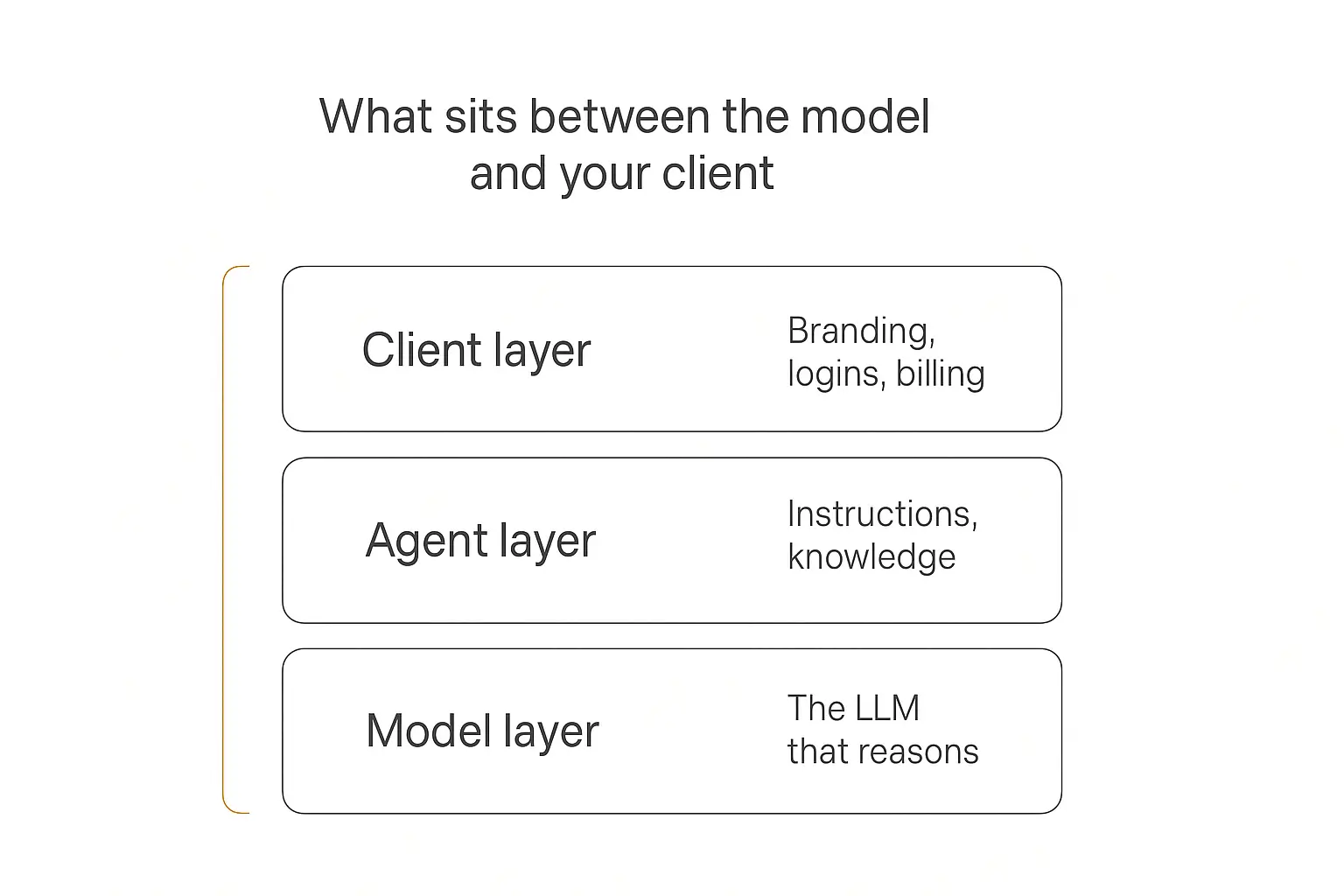
The three layers you're actually shipping
It helps to think of a client-facing agent as three stacked layers.
The model layer is the LLM doing the reasoning. This is the part everyone obsesses over and the part that matters least to your client. Models are close enough in capability now that swapping one for another rarely changes whether a project succeeds.
The agent layer is where the actual work lives: the instructions that define behaviour, the knowledge the agent can draw on, and the actions it can take in the outside world. This is your craft. It's what separates a useful agent from a chatbot that says "I'd be happy to help with that!"
The client layer is branding, logins, permissions, billing, and analytics. It's invisible when it works and fatal when it's missing.
Here's the trap: open-source agent frameworks give you a fantastic agent layer and almost no client layer. Meanwhile the client layer is the part your client is actually paying for.
If you want a broader primer on the vocabulary here, our guide to what AI agents are covers the fundamentals in more depth.
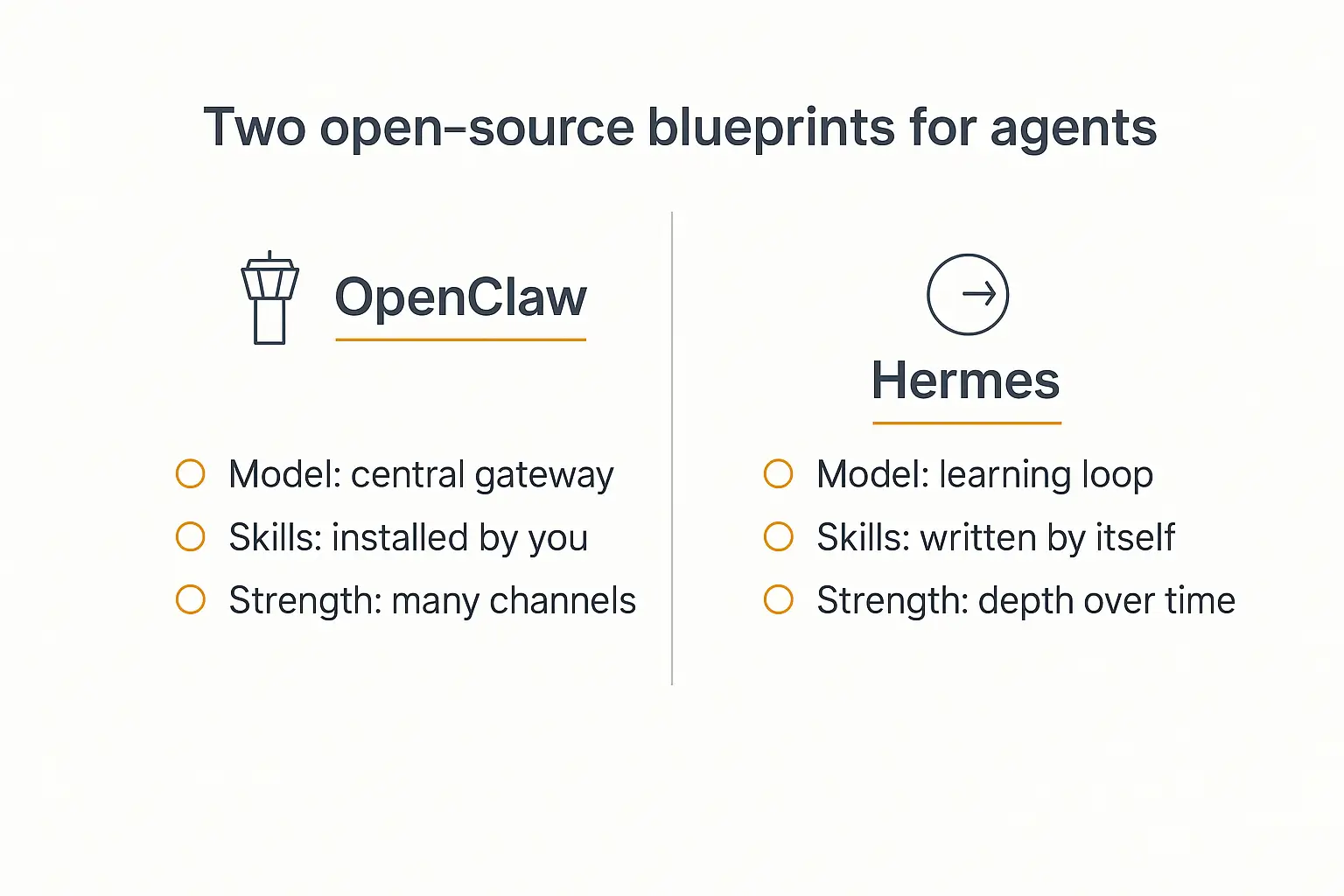
The two open-source blueprints: OpenClaw vs Hermes
Both of these projects exploded in 2026, and they solved the agent layer in opposite ways. Understanding the split is genuinely useful even if you never install either one.
OpenClaw: the gateway approach
OpenClaw — built by PSPDFKit founder Peter Steinberger and now sitting above 350,000 GitHub stars — is organised around a central gateway.
A long-running service sits in the middle. Messages arrive from whatever channel the user prefers — WhatsApp, Discord, Slack, Telegram, iMessage, Teams — and the gateway routes them into an agent loop, dispatches the right skill, and sends the answer back.
Its memory is deliberately boring: Markdown files, searchable via SQLite. You can open them in a text editor. When something goes wrong, you can read what the agent believed.
The headline feature is breadth. There's a large public marketplace of community-written skills, so if you want your agent to talk to some obscure service, someone has probably already written it. DigitalOcean's overview is a decent neutral explainer if you want the architecture in more detail.
Its governance changed in 2026, which is worth knowing if you're planning to depend on it. Steinberger announced he was joining OpenAI, with OpenClaw moving into an independent foundation — "open, independent, and just getting started," as he put it. Sam Altman confirmed the same day that OpenAI would continue supporting the project as open source.
Steinberger also walked through the origin story and the self-modifying-agent design at length on Lex Fridman's podcast, which is the best long-form explanation of the architecture I've come across.
Founder-to-foundation transitions usually work out fine for open source. But "who will be maintaining this in eighteen months" is a fair question to ask before you build a client's business on top of it.
We've written about what makes OpenClaw different from ChatGPT and Claude if you want the use-case angle.
Hermes: the learning-loop approach
Hermes, released by Nous Research in February 2026, starts from a different premise: the agent should write its own skills.
After a batch of tasks, Hermes evaluates its own performance, extracts the patterns that worked, and saves them as reusable skill files. Next time it meets a similar problem, it loads the skill instead of reasoning from scratch.
Its memory is considerably more sophisticated than OpenClaw's — layered session history, user profiling, full-text search with summarisation, and procedural memory, with hot and cold storage separated to keep token costs sane.
It grew fast. NVIDIA covered it as a flagship local-AI workload, and a desktop app landed in June 2026.
Where OpenClaw says "here are thousands of skills you can install," Hermes says "I'll write the skills myself."
Side by side
| OpenClaw | Hermes | |
|---|---|---|
| Core idea | Gateway that routes to skills | Agent that learns its own skills |
| Language | TypeScript / Node.js | Python |
| Skills | Community marketplace, installed by you | Auto-generated from experience |
| Memory | Markdown files + SQLite search | Multi-layer, with user profiling |
| Channels | Very wide (dozens) | Core set (Telegram, Slack, email, CLI, others) |
| Gets better on its own | No | Yes |
| Best at | Reach and integration breadth | Depth and personalisation over time |
| Multi-tenant billing | No | No |
| Client-ready out of the box | No | No |
We go much deeper on this in our full Hermes Agent vs OpenClaw comparison.
Notice the last two rows. That's the whole problem.
Why neither one is a client deliverable
I want to be fair here, because both projects are excellent and neither was ever pitched as client infrastructure. They're personal agents. Judging them as multi-tenant SaaS is judging a motorcycle for not being a bus.
But people are absolutely trying to resell them, so it's worth being blunt about what goes wrong.
There's no tenancy model. One instance, one user's memory, one set of credentials. Serving five clients means running five instances and manually keeping them apart. Serving fifty is a full-time ops job.
There's no billing. No subscriptions, no metering, no usage caps. You'd be wiring up Stripe, webhooks, dunning, and usage tracking yourself.
There's no access control your client can administer. If your client wants to add a team member, that's a support ticket to you.
And then there's security. This is the part I'd genuinely think hard about before putting a self-hosted agent in front of paying customers.
Self-hosted agents had a rough 2026. Security researchers catalogued well over a hundred CVEs against OpenClaw in roughly five months, including several rated critical — among them a privilege-escalation flaw rated 9.9. Another, CVE-2026-25253 — a one-click remote code execution bug — saw confirmed exploitation in the wild.
The skills marketplace became an attack surface too. Researchers tracked hundreds of malicious skills distributing credential-stealing malware, and scans found tens of thousands of publicly exposed instances, a majority of them with no authentication at all.
None of that means OpenClaw is bad software — a project growing that fast attracts that much scrutiny. It means patching, hardening, and monitoring an internet-facing agent is a real job, and when you resell one, that job is now yours, contractually.
Our write-up on AI agent security risks goes further into shadow AI and data leakage if that's a live concern for your clients.
Skip the infrastructure, keep the craft
Build the agent. Let the platform handle logins, billing, and uptime.
The client-facing checklist
Before you build anything, it's worth knowing what "done" looks like. This is the list I'd hold any client-facing agent to:
- One clear job. Not "an AI assistant for the business." Something you can describe in a sentence.
- Grounded answers. It answers from the client's actual material, not the model's general knowledge.
- A branded front door. The client's logo, colours, and ideally their domain.
- Real logins. Users sign in; you control who sees what.
- Metered usage. A cap, so one enthusiastic user can't drain your margin.
- Payment on autopilot. Subscriptions that renew without you touching them.
- Visible activity. You can see what people asked and where the agent struggled.
- A graceful failure mode. When it doesn't know, it says so and hands off to a human.
- Somewhere to send legal. Documented compliance posture you didn't have to write yourself.
If you're building all nine from scratch, you're building a SaaS company. Most consultants don't want to build a SaaS company — they want to ship the agent and get paid.
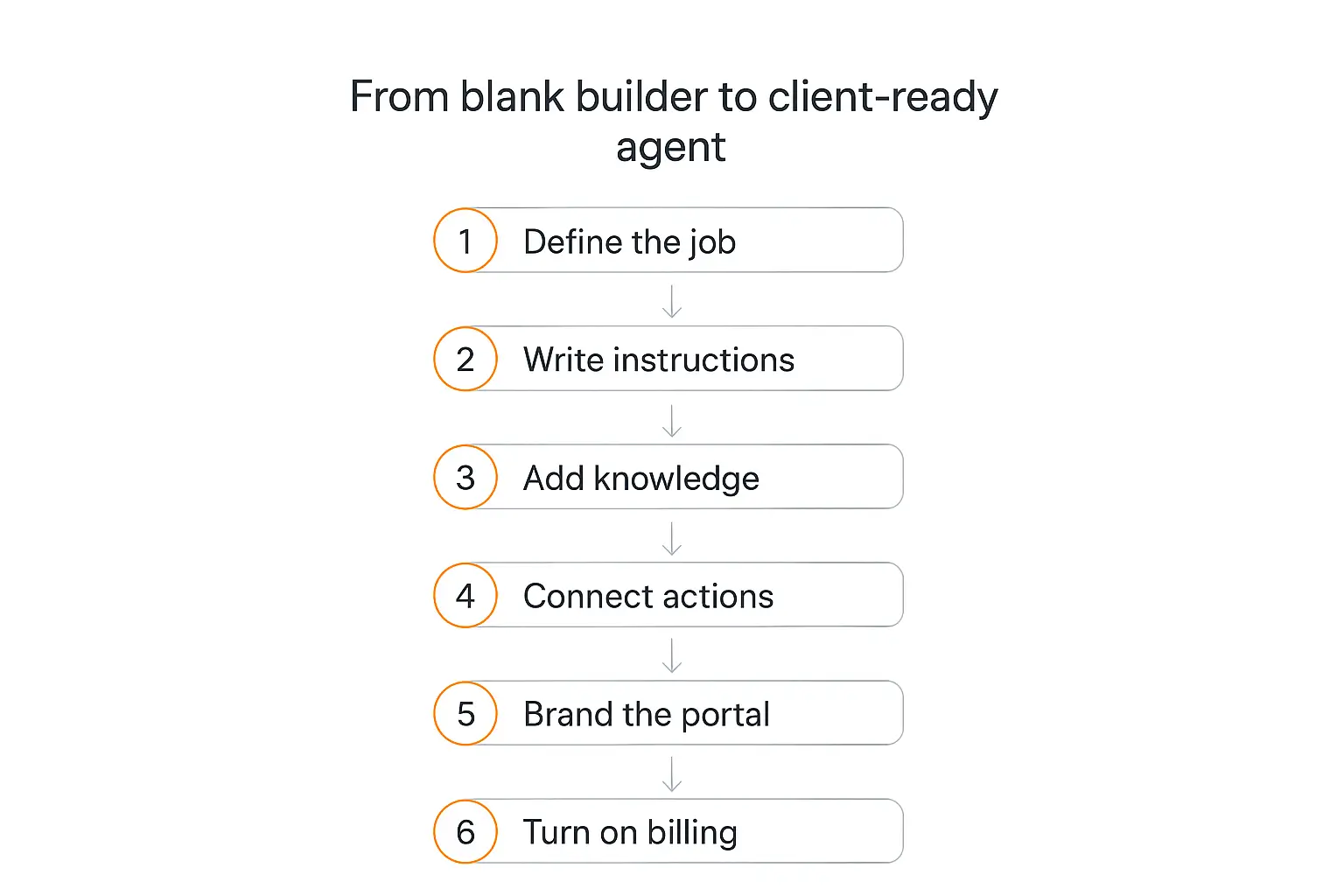
How to build it without writing code, step by step
Here's the workflow I'd actually follow. I'm using Pickaxe as the example because it's the platform we build, and because it's structured around exactly this problem — the agent layer and the client layer in one place. The general shape transfers to other no-code builders; the specifics won't.
Step 1 — Define one job
Resist the urge to build the everything-agent. Client-facing agents succeed when they're narrow.
"Answers questions about our policy documents for enrolled members" is a good scope. "Helps with anything" is not.
Write the job as a single sentence before you open the builder. If you can't, you don't understand the problem yet — go back to the client.
A useful test: what does the client currently pay a human to do, repeatedly, that's mostly reading and answering? That's your first agent.
Step 2 — Write the instructions
The instructions (the role prompt) are the single highest-leverage thing you'll write. They define the agent's purpose, tone, boundaries, and refusal behaviour.
Three things I'd always include:
- Scope boundaries. Say explicitly what the agent should decline, and what it should say when it declines.
- Source discipline. Tell it to answer from the knowledge base and to admit when the answer isn't there. This one line prevents most hallucination complaints.
- Escalation. Give it a specific handoff — an email address, a booking link — for anything out of scope.
If you want to go deeper here, our guide to prompt engineering for AI agents is built around exactly this.
Pickaxe also has a Model Reminder — an instruction quietly prepended to every user message. It's the right place for rules that must survive a long conversation, like "never quote a price."
Step 3 — Load the knowledge base
This is what makes the agent the client's, rather than a generic model with a new name.
Upload their documents, policies, transcripts, product data, and site content. Pickaxe handles PDFs, Word docs, spreadsheets, audio, video, and URLs, and can pull from Notion, Google Drive, and SharePoint with a daily refresh so the agent doesn't drift out of date.
Two things worth knowing:
Uploaded files get split into chunks — smaller searchable pieces the agent retrieves at answer time. Well-structured source documents chunk better, so a tidy FAQ beats a sprawling 200-page PDF.
Knowledge lives at two levels: workspace-wide (shared across agents) and agent-specific. For client work, keep client material agent-specific. It's the cleanest way to guarantee one client's content never leaks into another's answers.
Our walkthrough on adding a knowledge base to your agent covers the retrieval mechanics without the jargon.
Step 4 — Connect actions
Actions are what turn a question-answerer into something that does work — booking a meeting, creating a CRM record, sending an email, calling the client's API.
This is where the OpenClaw skills idea reappears in a managed form. You're composing capabilities rather than writing integrations.
One piece of hard-won advice: keep it to about four actions per agent. Past that, models start picking the wrong tool. If a workflow genuinely needs more, use a waterfall — a front-desk agent that routes to specialist sub-agents, each with its own small set of actions.
That routing pattern is, not coincidentally, the same idea as OpenClaw's gateway. It works for the same reason: narrow the decision before you make it.
See connecting your agent to Google Sheets, Slack, and other apps for concrete setups.
Step 5 — Pick the model
Do this after the instructions and knowledge are in place, not before. You can't evaluate a model against a prompt you haven't written.
Start with a strong general model, get the behaviour right, then try a cheaper one and see whether quality holds. For a lot of grounded question-answering, it does — and the margin difference across a year of client usage is significant.
Bear in mind models differ in how reliably they call tools. If your agent leans on actions, test that specifically. You can compare options on the Pickaxe models page, and switch at any time without rebuilding.
Step 6 — Test like a stranger
Preview mode is where you stop being the builder and start being the worst user imaginable.
Ask the question the client is embarrassed about. Ask something off-topic. Ask it to ignore its instructions. Paste in something enormous. Ask for a price it shouldn't quote.
Pickaxe's Preview lets you impersonate a specific user, which matters once access tiers are involved — you want to confirm a free-tier user genuinely can't reach premium content.
Write down every failure and fix it in the instructions. This loop is most of the quality. Our guide on testing and debugging an agent before deploying has a fuller checklist.
Step 7 — Brand the portal
Now the client layer starts.
A portal is the branded hub your client's users actually visit — one or more agents, organised into folders, with the client's logo, colours, and custom domain. On paid plans it's fully white-labelled, so there's no platform branding between your client and their customers.
This step is disproportionately important commercially. An agent on a generic URL feels like a demo. The same agent on ai.theirdomain.com feels like a product they bought.
If white-labelling is central to your business model, our roundup of white-label AI tools for agencies is worth a look.
Step 8 — Gate it with access groups
Access groups decide who gets in.
Public access groups are open — right for a lead-generation agent on a marketing site. Member access groups require signup or invitation — right for anything touching real customer data.
For most client work you'll want member access. It gives you a user list, per-user usage tracking, and the ability to revoke someone without redeploying anything.
You can also layer tiers: a free public agent that answers basic questions, and a paid member tier with the good stuff behind it.
Step 9 — Turn on billing
This is the step that turns a project into a business.
Connect Stripe, attach a price to an access group, and the platform handles checkout, renewals, and failed payments. Your client's customers subscribe; money arrives without you generating an invoice.
Usage is metered through credits (pay-per-usage tied to actual AI cost) or uses (one input equals one use). Uses are easier to explain to clients. Credits are more accurate when workloads vary wildly.
There are also offers — one-off purchases of a specific agent or folder, useful for selling a single tool without building a whole subscription tier around it.
Set a usage cap. Always. Someone will paste a book into the chat box.
Step 10 — Deploy everywhere it's needed
The portal is the main front door, but the same agent can also go out as an embedded widget on the client's site, a standalone page, a direct link, an email bot, a WhatsApp bot, a Slack bot, or through the API. If you are also building that client site, compare website builders by their editing and handoff options before choosing where the agent will live.
Access control and billing apply across all of them, which is the part that would be genuinely painful to build yourself.
Start with one channel. Add others when someone asks. Our guides on embedding an agent on a website and deploying to WhatsApp and Slack cover the specifics.
Borrowing the OpenClaw approach without self-hosting it
Here's the part that ties the two halves of this article together.
The most interesting ideas in OpenClaw and Hermes — sandboxed execution, real computer use, persistent memory — don't have to be things you self-host to benefit from. If you do need to manage execution yourself, compare sandbox platforms for AI agents before choosing the infrastructure.
Pickaxe runs OpenClaw as an optional AI engine. Switch it on at the workspace level and each agent runs as an isolated, sandboxed instance, with every user getting their own environment. That unlocks browsing the live web, generating PDFs, running code in a sandbox, and deeper memory — inside a platform that still handles logins, billing, and access control.
It's in beta, and I'd test it through a deployment rather than the builder to see how it really behaves. But it's the honest answer to "can I get the power of these open-source agents without the ops burden?" You largely can, and you skip the CVE treadmill.
The Hermes idea — an agent that improves itself — is the harder one to buy off the shelf today. In practice the no-code equivalent is you: reading conversation logs, spotting where the agent stumbled, and tightening the instructions. Less magical, considerably more predictable, and honestly what most client work needs.
One agent, your client's brand on it
Portals, access groups, and Stripe billing without a line of code.
When you should self-host after all
I'd be doing you a disservice if I pretended managed platforms always win. Sometimes self-hosting OpenClaw or Hermes is the right call:
- The agent is for you, not clients. Personal infrastructure is exactly what these projects are for. Use them.
- Data cannot leave the client's premises. Some defence, healthcare, and legal work has hard residency requirements no SaaS satisfies.
- You need behaviour no platform exposes. Custom model routing, unusual protocols, deep OS integration.
- The client has an ops team. If they'll own patching and monitoring, the calculus changes completely.
- You're being paid to build infrastructure. If the engagement is the deployment, self-hosting is the deliverable.
What I'd avoid is self-hosting by default because it feels more "real." Running an internet-facing agent for someone else is an operational commitment that lasts as long as the contract does.
If you're weighing this properly, our build vs buy vs wait framework lays out the tradeoffs.
How to price it
Pricing is where most people building client-facing agents leave money on the table.
The instinct is to charge for the build — a few thousand dollars, one time. The problem is you've just created something the client will use every day for years, and captured a single payment for it.
Better structures, roughly in order of how well they've worked for people I've talked to:
- Setup fee plus monthly. A build fee covering your time, then a recurring fee covering hosting, usage, and improvements. The recurring part is the business.
- Tiered subscriptions. If the agent serves the client's customers, sell tiers directly through the portal and take a revenue share.
- Per-seat. Clean when the agent is an internal tool with a known headcount.
- Outcome-based. Charge per qualified lead or per ticket deflected. Highest upside, hardest to measure — only attempt it with a client who already trusts you.
The economics are the reason this is worth doing well. Industry surveys put the average agency net margin around 13%, while agencies that lean on productised delivery report meaningfully higher margins and retention. A recurring agent subscription against a fixed platform cost is one of the better-shaped lines on an agency P&L.
Our deeper pieces on AI agent pricing models and selling agents to local businesses get into real numbers.
Five mistakes I'd avoid
1. Building before scoping. An agent with a vague job produces vague answers, and the client can't tell you why they're disappointed. Nail the sentence first.
2. Skipping the knowledge base. An agent running on general model knowledge is a worse ChatGPT. The client's documents are the entire value.
3. Too many actions. Four is a soft ceiling for a reason. Route to sub-agents instead of stuffing one agent full of tools.
4. No usage cap. Metered AI without a ceiling is an uncapped liability. Set it on day one.
5. Shipping without a handoff. Every agent needs an "I don't know, here's a human" path. Agents that bluff destroy trust faster than agents that decline.
Frequently asked questions
Do I need to know how to code?
No. Instructions, knowledge, actions, branding, access, and billing are all configuration. Coding only becomes necessary if you need a custom integration that isn't in the action library, and even then it's usually an API call rather than a codebase.
Can I really resell OpenClaw or Hermes to clients?
Both are open source, so licensing generally isn't the blocker — check the specific licence for your use. The blocker is operational: no multi-tenancy, no billing, no client-administered access, and a patching obligation you're taking on personally. For internal or highly technical clients it can work. For a portfolio of small business clients it usually doesn't.
How long does it take to build one?
A focused, well-scoped agent with a good knowledge base is typically an afternoon of building and a few days of testing and refinement. The client layer — portal, branding, access, billing — is under an hour once you've done it once. The long pole is almost always getting source material out of the client.
What does it cost to run?
Two costs: the platform subscription and AI usage. Pickaxe plans start at $37/month (or $29 billed annually) on Gold, which includes white-labelling, custom domains, and monthly usage credits; Pro at $147/month adds unlimited workspaces, unlimited actions, and API access. Model usage is metered on top. See pricing for current details.
How do I stop one client's data reaching another?
Keep client material in agent-level knowledge rather than workspace-level, give each client their own agent and access group, and — if you're on a plan that allows multiple workspaces — separate larger clients into their own workspace entirely.
What about compliance?
Ask early, because it's easier to design for than retrofit. Pickaxe is SOC 2, GDPR, and CCPA compliant, which handles most procurement questions. For regulated work, our AI agent compliance checklist covers GDPR, HIPAA, and the EU AI Act.
The takeaway
The open-source agent boom of 2026 proved something important: the hard problems in agent design — memory, tool use, routing, self-improvement — are basically solved, and solved in public.
What it didn't solve is everything that makes an agent sellable. Identity, isolation, branding, billing, and the unglamorous promise that it'll still be running next Tuesday.
So steal the architecture. Use OpenClaw's gateway pattern when a workflow gets complicated — route to specialists instead of building one omniscient agent. Borrow Hermes's discipline of reviewing performance and folding what you learn back into the instructions. Our guide to AI agent architecture patterns helps choose the coordination structure for that workflow.
Then put it somewhere that already handles the boring half, so the thing you hand your client is a product rather than a pet.
If you want to try it, you can build your first agent on Pickaxe and have a branded, gated, billable portal in front of a client this week. And if you're building this into a business rather than a one-off, our guide to starting an AI agent agency is the natural next read.