Most comparisons of AI image models are written for artists. This one isn't.
If you're plugging an image model into an agent — something that generates a product shot, a social graphic, or a client deliverable automatically, without a human sitting there re-rolling prompts — the criteria change completely. Nobody is going to hit regenerate four times. The first output has to be usable.
So I spent a while looking into the three models that actually matter for that job right now: OpenAI's GPT Image 2, xAI's Grok Imagine, and Google's current image model.
That last one needs a correction up front, because most articles on this topic are already out of date.
First: Imagen 4 is being shut down
If you've been reading comparisons that recommend Imagen 4 — and there are a lot of them — that recommendation is dead.
Google's own Imagen 4 documentation now carries a deprecation notice: the Imagen 4 standard, ultra, and fast endpoints "are deprecated and will be shut down on August 17, 2026."
The affected endpoints are imagen-4.0-generate-001, imagen-4.0-fast-generate-001, and imagen-4.0-ultra-generate-001.
On the Vertex AI / Agent Platform side it already happened — those Imagen 4.0 endpoints hit their deprecation date on June 30, 2026.
The replacement is Gemini 3.1 Flash Image, the model most people know as Nano Banana 2.
And here's the part that catches people: it is not a drop-in swap. Per Google's migration guide, the generate_images() method is gone entirely. Image generation now runs through generate_content(), the same call you'd use for text. Different method, different request shape, different response parsing.
If your agent still calls generate_images() after August 17, it doesn't degrade gracefully. It throws.
So this comparison uses Gemini 3.1 Flash Image as the Google contender — and as you'll see, swapping it in changes the cost conclusion substantially. Imagen 4 Fast was two cents an image. Its replacement is not.
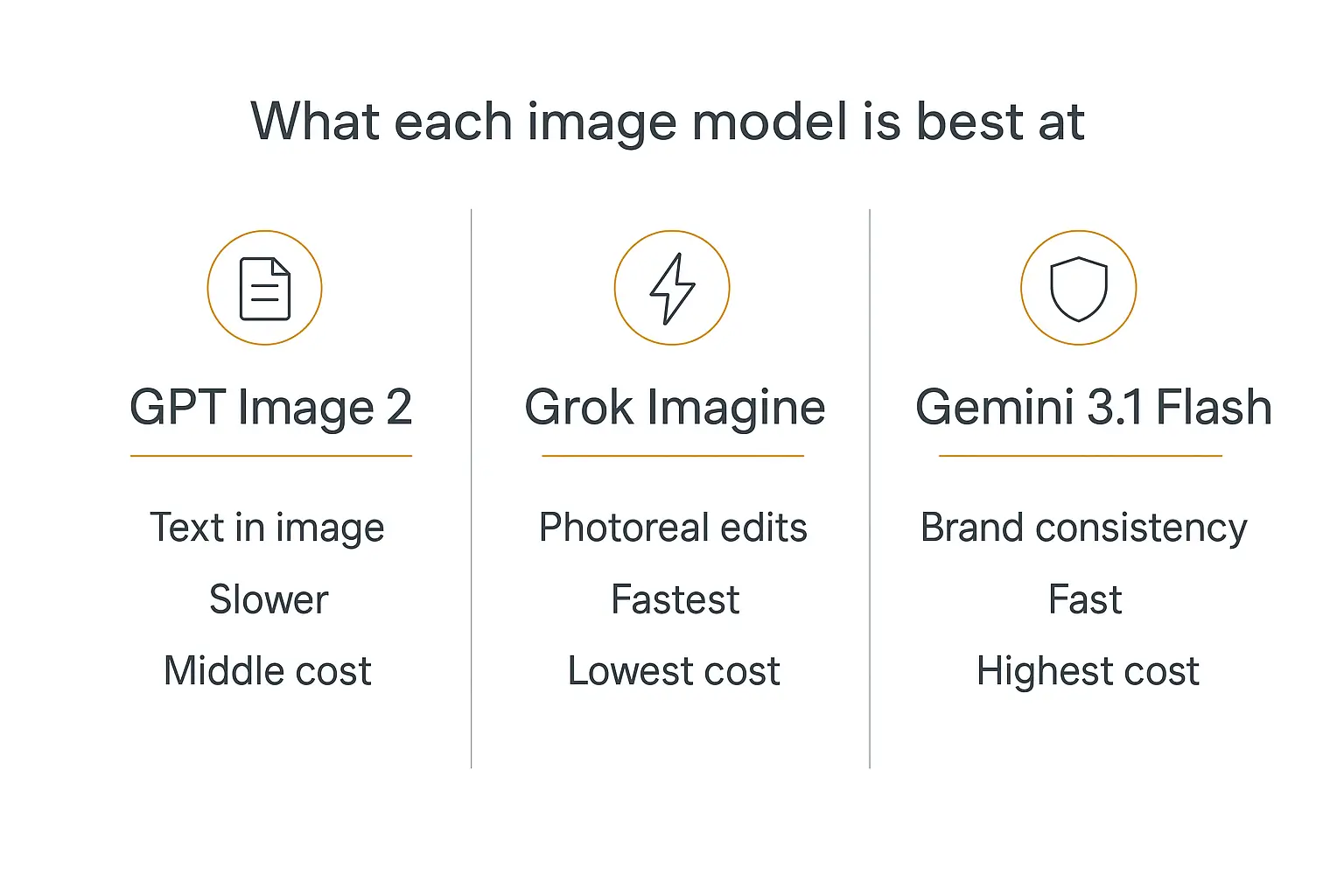
The three models at a glance
| GPT Image 2 | Grok Imagine | Gemini 3.1 Flash Image | |
|---|---|---|---|
| Maker | OpenAI | xAI | Google DeepMind |
| Also known as | ChatGPT Images 2.0 | Aurora / Grok Imagine | Nano Banana 2 |
| Cost per image | ~$0.006 low / ~$0.05 medium / ~$0.21 high | $0.02 standard, $0.05–$0.07 quality tier | $0.045 (512) / $0.067 (1K) / $0.101 (2K) / $0.15 (4K) |
| Batch discount | Yes, via Batch API | Not published | Flat 50% — 1K drops to $0.034 |
| Typical latency | ~5–10s (longer in Thinking mode) | ~5–8s | ~4–6s |
| Max resolution | Up to 4096×4096 | 1K and 2K | Up to 4K |
| Text in image | Best in class, multilingual | Weakest of the three | Good, not class-leading |
| Watermarking | C2PA metadata + invisible watermark | Visible watermark on some surfaces | SynthID, mandatory |
| Best agent job | Anything with words in the picture | High-volume, photoreal, cost-sensitive | Async batch work, Google-native stacks |
If you only read one line: default to GPT Image 2 at medium quality, drop to Grok Imagine when volume matters more than polish, and use Gemini 3.1 Flash Image when you're batching overnight or you need SynthID provenance.
Why choosing a model for an agent is a different problem
When you generate images by hand, a bad output costs you ten seconds and a click.
When an agent generates images, a bad output ships. It lands in a client's inbox, gets posted to a social account, or goes into a PDF that someone bills for.
That flips the priorities. For agent work, I care about roughly four things, in this order:
- Hit rate on the first try. Not peak quality — median quality. A model that produces a great image 40% of the time and a broken one 20% of the time is worse than one that's merely good 90% of the time.
- Instruction following. The agent wrote the prompt, not a human. It'll be verbose, structured, and full of constraints. The model has to actually respect them.
- Predictable cost. A model priced per token can surprise you at scale in a way that a model priced per image can't.
- Endpoint stability. The Imagen 4 shutdown is the whole argument for this one. An agent you deploy today has to still work in six months.
Raw aesthetic ceiling — the thing most reviews rank on — barely makes my list. It matters for a hero illustration. It doesn't matter for the 400th product thumbnail.
This is the same logic we've written about for text models in AI model routing: the best model for a workflow is rarely the best model on a leaderboard.
GPT Image 2: the one that can actually spell
OpenAI shipped GPT Image 2 on April 21, 2026, with API access following in early May. OpenAI's developer account pitched it as built "for production-grade workflows with stronger text rendering, layout, editing, resolution, and multilingual rendering" — which, unusually for a launch post, is an accurate description.
The headline capability is text inside the image. Every image model before this one produced convincing gibberish when asked for words. GPT Image 2 mostly doesn't.
It handles multilingual text too, including CJK scripts. If your agent generates assets for non-English markets, this is currently the only one of the three I'd trust with a headline in Japanese.
The Instant / Thinking split
GPT Image 2 has two modes, and the distinction matters for agent design.
Instant is the fast path — generate and return.
Thinking plans before it draws. It reasons about layout, can pull in web search, and can produce a set of consistent images in one go. It's slower and it costs more.
Per OpenAI's ChatGPT Images 2.0 system card, Thinking mode is gated to paid ChatGPT tiers on the consumer side. Through the API you're paying for the extra tokens either way.
For agents, my rule is simple: Instant for anything single-shot, Thinking only when the output is a multi-image set that has to look like it came from the same designer.
What it costs
Here's the wrinkle: GPT Image 2 is priced in tokens, not per image. OpenAI lists roughly $5.00 per 1M text input tokens, $8.00 per 1M image input tokens, and $30.00 per 1M image output tokens.
Translated to a 1024×1024 image, that lands around $0.006 at low quality, $0.05 at medium, and $0.21 at high.
That top number is the one to watch. But note where the medium tier now sits: at roughly five cents, GPT Image 2 medium is cheaper than Gemini 3.1 Flash Image at 1K. A year ago that would have been a strange sentence. We dug into this kind of math in more depth in our guide to AI agent cost and token economics.
Where it falls down
It's the slowest of the three, especially in Thinking mode. And the token-based pricing makes it genuinely hard to forecast spend — a reference-image-heavy workflow costs meaningfully more than a text-only one, and you won't know until the invoice arrives.
Use it when: the image contains words, needs a precise layout, or you want one sensible default and don't want to think about it further.
Grok Imagine: the fast, cheap one

xAI's Grok Imagine is the pragmatist's pick, and it's the one most agent builders overlook.
It splits into two models on the xAI API. The standard grok-imagine-image runs $0.02 per image at either 1K or 2K — note that you don't pay extra for the higher resolution, which is unusual. The premium grok-imagine-image-quality tier is $0.05 at 1K and $0.07 at 2K.
Reference images cost $0.002 each on the standard model and $0.01 on the quality tier. There's also grok-imagine-video at $0.05 per second of output, if your agent needs motion.
Generation lands in about 5 to 8 seconds, and it supports eight aspect ratios — 1:1, 3:2, 16:9, 21:9, 9:16, 2:3, 3:4, and 4:5. That 21:9 option is genuinely useful for banner work and neither competitor offers it.
What it's actually good at
Photoreal edits with tight instruction following. If you hand it a reference photo and say "same product, white background, softer shadow," it does that — reliably, cheaply, in under ten seconds.
For an e-commerce agent processing a few hundred product shots, that combination is hard to beat. At $0.02 a shot, 500 images costs ten dollars.
With Imagen 4 gone, Grok Imagine is now the cheapest credible option of the three by a wide margin — roughly a third the price of Gemini 3.1 Flash Image at 1K.
Where it falls down
Text rendering is the weak spot. If your prompt includes words that need to appear in the picture, this is the wrong model. Not marginally — clearly.
Moderation is also the strictest of the three in a specific way: xAI applies moderation at the output layer, meaning a prompt can pass, burn generation time, and then get blocked before the image comes back. For an unattended agent, that's a failure mode you have to handle explicitly — catch the block, and either retry with a softened prompt or fall back to another model.
On rights: xAI's terms give users ownership of inputs and outputs, including for commercial use, with attribution requested rather than required. Check the current terms yourself before you build a business on it, but as of now it's permissive.
Use it when: volume is high, the images are photoreal, and there's no text in frame.
Want image generation inside your agent without wiring up an API?
Pickaxe lets you switch image generation on per agent and pick the model from a dropdown.
Gemini 3.1 Flash Image: the one that replaced Imagen 4
Google's current image model — Gemini 3.1 Flash Image, or Nano Banana 2 — is a genuinely better model than Imagen 4 was. It is also, for agent work, a meaningfully more expensive one.
Pricing scales with resolution: $0.045 at 512px, $0.067 at 1K, $0.101 at 2K, and about $0.15 at 4K.
Compare that to the model it replaced. Imagen 4 Fast was $0.02 flat. The cheapest tier of its successor is more than double that, and the standard 1K tier is over three times the price.
If you built a cost model on Imagen 4 Fast, rebuild it.
The batch discount is the real story
There's one lever that changes the maths completely: the Batch API applies a flat 50% discount, which drops a 1K image from $0.067 to $0.034.
That matters enormously for agents, because a large share of agent image work is inherently asynchronous. A scheduled agent generating tomorrow's social assets overnight doesn't care about latency. It can batch.
At $0.034 batched, Gemini 3.1 Flash Image goes from "the expensive option" to "competitive with GPT Image 2 medium, at better consistency." If your workload is async, this is the tier to build on. We covered that pattern in scheduled AI agents.
Speed and the Lite tier
Generation lands around 4 to 6 seconds — comfortably in the middle of this group.
There's also Gemini 3.1 Flash Lite Image, which runs roughly 2.7× faster than the standard Flash Image model at lower cost. For high-volume, low-stakes thumbnails it's worth a look, though you give up quality to get there.
The consistency argument
Here's what still makes the Google option attractive despite the price: it's the most consistent across runs.
Feed it the same prompt structure twenty times and you get twenty images that look like they belong together. For brand assets — where the goal is "matches the other forty things we made" rather than "is stunning" — that predictability beats a higher ceiling.
Where it falls down
SynthID is not optional. Every output carries Google's invisible watermark, permanently. It survives cropping, resizing, compression, and colour adjustment.
That's a feature if you care about provenance and a constraint if you have a client who insists on unmarked assets. There's no toggle.
Google's content restrictions are also tighter than xAI's — some categories that generate fine elsewhere get refused.
And then there's the thing this whole section is about: Google deprecates aggressively. Imagen 4 shipped and was shut down inside roughly a year. Whatever you build on gemini-3.1-flash-image, assume you'll be migrating it again.
Use it when: your work batches, you want maximum run-to-run consistency, you're already in the Google ecosystem, or SynthID provenance is a selling point rather than a problem.
Cost: what you'll actually pay per image
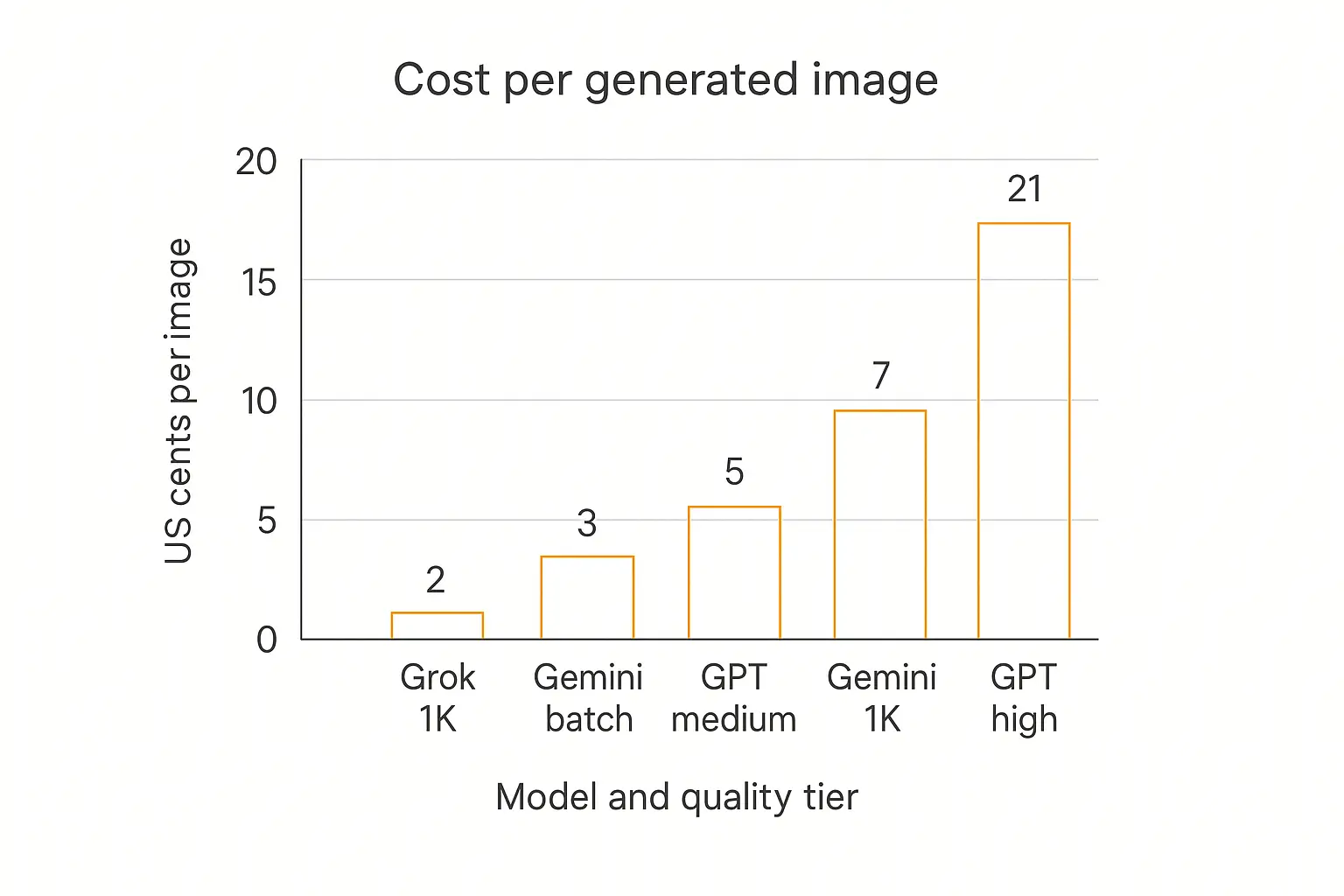
The chart above is the whole cost story. Grok Imagine at the bottom, GPT Image 2 high at the top, and everything else clustered in between.
Run the arithmetic at agent scale:
| Model / tier | Per image | 1,000 images | 10,000 images |
|---|---|---|---|
| Grok Imagine (standard, 1K or 2K) | $0.02 | $20 | $200 |
| Gemini 3.1 Flash Image (1K, batched) | $0.034 | $34 | $340 |
| Gemini 3.1 Flash Image (512px) | $0.045 | $45 | $450 |
| GPT Image 2 (medium) | ~$0.05 | ~$50 | ~$500 |
| Gemini 3.1 Flash Image (1K) | $0.067 | $67 | $670 |
| Grok Imagine (quality, 2K) | $0.07 | $70 | $700 |
| Gemini 3.1 Flash Image (2K) | $0.101 | $101 | $1,010 |
| GPT Image 2 (high) | ~$0.21 | ~$210 | ~$2,100 |
At 10,000 images a month, the spread between cheapest and most expensive is $1,900. That's not a rounding error — for most agent businesses, that's the margin.
Two things stand out.
First, the Imagen 4 shutdown made Google's option roughly three times more expensive at the equivalent tier. If you have an agent running on Imagen 4 Fast today, migrating it isn't just a code change — it's a cost change you should model before August 17.
Second, batching is the single biggest lever available. Halving your image spend by moving async work to the Batch API is a bigger win than most model switches.
Speed, and why it matters more than you think
Gemini 3.1 Flash Image at ~4–6 seconds. Grok Imagine at ~5–8 seconds. GPT Image 2 at ~5–10 seconds, more in Thinking mode.
In a chat interface, none of those feel bad.
In an agent, the picture changes. Image generation is usually one step in a chain — the agent gathers context, writes a prompt, generates, then does something with the result. If the image step is 10 seconds and the surrounding steps add another 15, you're at half a minute before anything appears.
That's where users abandon. If your agent is user-facing and synchronous, the gap between the fastest and slowest option here is the difference between "quick" and "is this broken?"
For background jobs, latency is irrelevant and you should optimise purely for cost and quality — which, again, points at batching.
Text rendering: the one capability that isn't close
Most model comparisons end in "it depends." This one doesn't.
If your image needs readable words in it, GPT Image 2 wins, and it isn't a close call. OpenAI claims near-perfect text accuracy, and the independent text-to-image arena — which pits anonymous outputs against each other and aggregates human votes into an Elo score — has it sitting at the top of the leaderboard as of August 2026, by the widest first-to-second margin that board has recorded.
Reporting at launch attributed the jump to the reasoning integration: the model plans the layout before it renders pixels, which is exactly the step that text generation was missing.
The practical consequence for agent builders is that a whole category of work just became automatable. Social graphics with a headline. Quote cards. Simple ad creative. Diagram labels. Certificates. Anything where a human previously had to open Canva and set the type.
Gemini 3.1 Flash Image is decent here — better than Imagen 4 was, usable for short labels, still not class-leading for dense text. Grok Imagine is the weakest and I'd route text work away from it entirely.
Editing, reference images, and character consistency
Generation is the easy half. Most real agent workflows need editing — take this image, change one thing about it.
All three support reference images, but they're tuned differently.
Grok Imagine is the strongest at photoreal edits with tight instruction following, and at $0.002 per reference image on the standard tier it's cheap to feed context. If your agent's job is "clean up this product photo," start here.
GPT Image 2 is the strongest when the edit is compositional — move this, add that, keep the layout. Thinking mode can generate up to eight consistent images in a single call, which is the cleanest option available for "make me a set" workflows like a carousel or a slide deck.
Gemini 3.1 Flash Image benefits from the move to generate_content(): because image generation now runs through the same conversational endpoint as text, multi-turn editing is more natural. You can iterate on an image across turns rather than re-specifying everything each time. That's an underrated win for agent workflows, and it partly justifies the migration pain.
If your agent handles user-uploaded images as input, that's a separate capability question — we walked through it in how to make a chatbot with image recognition.
Build the agent, sell the output.
Package an image-generating agent into a branded portal with billing and usage limits built in.
Provenance, watermarks, and what you can actually ship
This section is boring and it will save you a client conversation.
All three models mark their output. They do it differently, and the differences have practical consequences.
Gemini 3.1 Flash Image uses SynthID, Google DeepMind's invisible watermark. Two neural networks: one embeds a signal during generation, another detects it later. It's designed to survive cropping, resizing, compression, and colour adjustment — and it is mandatory on every output.
GPT Image 2 embeds C2PA metadata plus an invisible watermark. OpenAI has committed to the C2PA standard through its conformance program, and the C2PA spec is the industry framework for automated provenance disclosure.
The catch with C2PA specifically: metadata is fragile. Screenshot the image, crop it, or upload it somewhere that recompresses, and the metadata is gone. The invisible watermark is more durable, but the metadata layer alone shouldn't be your compliance story.
Grok Imagine applies visible watermarks on some surfaces, and xAI's terms grant users ownership of outputs including commercial use, with attribution requested per their brand guidelines rather than required.
What this means in practice, if you're delivering to clients:
- Tell them the images are AI-generated. All three embed signals that make this discoverable.
- If a contract requires no embedded watermark, the Google option is off the table — SynthID has no opt-out.
- Keep your generation records. Every provider's terms assume you can show what was generated and when.
- Read the current terms before launch. All three providers have revised theirs during 2026.
If you're building for regulated clients, our AI agent compliance checklist covers the broader picture.
How an agent actually calls an image model
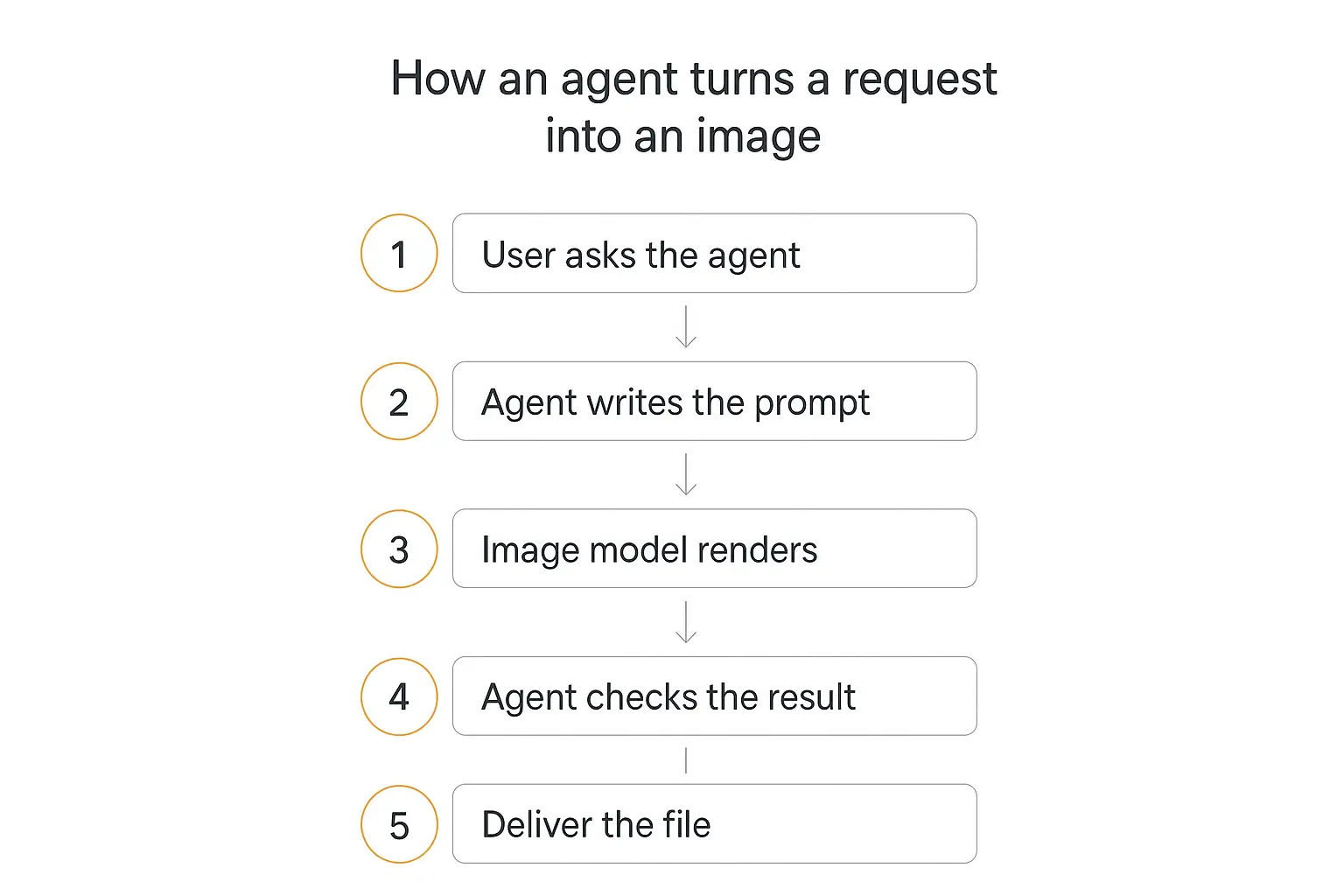
The five-stage flow above hides most of the engineering. Two stages are where things actually break.
Stage 2: the agent writes the prompt
This is the step people skip, and it's the one that determines output quality more than the model choice does.
Your agent shouldn't pass the user's words straight through. A user types "make me a logo for my bakery." That's a bad image prompt.
The agent should expand it — style, composition, aspect ratio, palette, what to exclude — before it ever hits the image API. In practice this means a dedicated prompt-writing instruction in the agent's role prompt, with a couple of worked examples of good output.
The same principles from good prompt design apply, with one addition: image models only render what you name explicitly. Anything you leave unspecified, the model invents.
Stage 4: the agent checks the result
Most implementations skip this entirely, and it's why unattended image agents embarrass people.
The cheap version: pass the generated image back to a vision-capable model with the original brief and ask "does this match?" If no, regenerate once, then give up and escalate to a human.
That single check catches the moderation blocks, the garbled text, and the wrong-aspect-ratio outputs before they reach anyone. It costs a fraction of a cent and it's the difference between an agent you can leave running and one you have to babysit.
Whether you need that check at all is really a question about autonomy level — see the 5 levels of AI agent autonomy and human-in-the-loop AI agents.
Build for the next deprecation, not this one
The Imagen 4 shutdown is worth one more paragraph, because the lesson generalises.
Image endpoints are the least stable part of the AI stack right now. Imagen 4 shipped and died inside about a year. The method signature changed, not just the model name. Anyone who hard-coded generate_images() into an agent is doing unplanned work this month.
Three things that make the next one cheaper:
- Put the image call behind your own function. One place to change the model, one place to change the request shape.
- Don't hard-code a model ID in a prompt or a config you can't hot-swap. Treat it like a setting, not a constant.
- Keep a fallback. If your primary provider throws, generating a slightly worse image beats generating nothing — especially in an unattended agent.
This is one of the quieter arguments for building on a platform rather than direct API calls. On Pickaxe, image generation is a capability you toggle on per agent, with model selection in the same place — so when a provider retires an endpoint, switching is a dropdown rather than a refactor across every agent you've shipped.
Which one should you pick?
Skip the nuance. Here are the rules I'd actually follow.
Pick GPT Image 2 if:
- The image contains readable text, in any language.
- You need a set of images that look like they came from one designer.
- You want one general-purpose default and don't want to think about it further — medium quality is mid-priced and the strongest all-rounder.
Pick Grok Imagine if:
- You're generating hundreds or thousands of images and cost dominates.
- The work is photoreal — product shots, edits, retouching.
- You want 2K without paying a 2K premium.
- You need 21:9, which neither competitor offers.
- No text in frame.
Pick Gemini 3.1 Flash Image if:
- Your work is asynchronous and can use the Batch API's 50% discount.
- Brand consistency across many assets is the goal.
- You're already on Google Cloud, or you want multi-turn conversational editing.
- SynthID watermarking is fine — or a positive.
Default recommendation: start on GPT Image 2 at medium quality. It's roughly five cents, it's the strongest instruction-follower, it's the only one that reliably handles text, and it sits in the middle of the price range rather than the top. Add the others as exceptions.
The better answer: don't pick one
The framing of "GPT Image 2 vs Grok Imagine vs Gemini 3.1 Flash Image" assumes you have to choose. For an agent, you usually don't.
The strongest setups I've seen route by job type:
- Does the prompt mention text in the image? → GPT Image 2.
- Is this a bulk photoreal job? → Grok Imagine.
- Can it wait until tonight? → Gemini 3.1 Flash Image, batched.
That's three lines of routing logic, and on a realistic workload it cuts cost substantially against standardising on any single option — while producing better results than standardising on the cheapest one.
This is exactly the argument for multi-model AI agents, applied to pixels instead of tokens.
The usual implementation pattern is a primary agent that classifies the request and hands off to a specialised sub-agent, which is the same waterfall setup we recommend for Actions. You can compare the available models at pickaxe.co/models.
Frequently asked questions
Is Imagen 4 still usable?
Only until August 17, 2026 on the Gemini API, and the Vertex AI / Agent Platform endpoints already passed their June 30, 2026 deprecation date. Migrate to Gemini 3.1 Flash Image, and budget for the fact that generate_images() no longer exists — the replacement runs through generate_content().
What is Nano Banana 2?
It's the nickname for Gemini 3.1 Flash Image, Google's current image generation model and the recommended replacement for Imagen 4. Same model, two names.
Is GPT Image 2 worth the price premium?
At medium quality there barely is one any more — it's cheaper than Gemini 3.1 Flash Image at 1K. At high quality, roughly 21 cents an image, reserve it for work where a failed generation costs more than the difference.
Which model is cheapest for high-volume agents?
Grok Imagine standard at $0.02, and it gives you 2K at that price. Gemini 3.1 Flash Image batched at $0.034 is the runner-up if you need the consistency or the provenance.
Can I use these images commercially?
Generally yes, across all three, but the details differ and the terms change. xAI's are currently the most permissive on ownership. Google's outputs carry mandatory SynthID watermarking. Read each provider's current terms before you build a business on them.
Do I need to remove the watermark?
No, and you mostly can't. SynthID is designed to survive editing. Attempting to strip provenance signals is a bad idea both technically and contractually — and increasingly, disclosure is what clients want anyway.
What about Midjourney, FLUX, or Nano Banana Pro?
Midjourney still has the best aesthetic ceiling and the worst API story, which makes it awkward for agents. FLUX 2 and Recraft V4.1 are solid alternatives further down the same arena leaderboard. Nano Banana Pro sits above Gemini 3.1 Flash Image in capability and price — around $0.13 per image at 1K–2K — and is worth a look if the Flash tier isn't landing. We covered the wider field in top AI image generators.
How do I stop my agent from shipping a bad image?
Add a verification step. Pass the output back to a vision model with the original brief, ask whether it matches, regenerate once on failure, escalate to a human on the second failure.
The bottom line
Three models, three genuinely different jobs — and one of them arrived because Google retired the model everyone was recommending.
GPT Image 2 made text-in-image a solved problem and, at medium quality, is now the sensible all-round default. Grok Imagine is the volume play — fast, cheap, strong on photoreal edits, weak on words. Gemini 3.1 Flash Image is the consistency and provenance option, and it gets genuinely competitive the moment you batch.
If you're building one agent and want one answer: GPT Image 2 at medium, and drop to Grok Imagine when volume starts to hurt.
If you're building something you intend to sell, route between them, and put the image call behind a function you can change in one place. The next deprecation is already scheduled — you just don't know the date yet.
And the part that's easy to lose sight of: the model is maybe a third of the outcome. The prompt your agent writes and the check it runs afterward matter at least as much as which API you point at. Get those right and any of these three will do fine.
If you want to try this without wiring up three separate APIs, Pickaxe lets you switch image generation on per agent, choose the model, and deploy the whole thing to a portal, an embed, or Slack — no code required.