
If you came here from a list of "the best AI video models," there's a good chance the list you read is wrong in two specific ways. Let's clear both up before we go anywhere else.
There is no Veo 4. A remarkable number of articles confidently compare it. Google's own Veo model page still lists Veo 3.1 as its leading video model, and Google's big 2026 video announcement wasn't Veo 4 at all — it was Gemini Omni.
And Sora is nearly gone. Not "losing ground." Gone. The consumer app shut down in April 2026, and per OpenAI's own deprecations page, sora-2, sora-2-pro, and the entire Videos API shut down on September 24, 2026. The "recommended replacement" column is empty.
So a comparison of "Seedance vs Sora vs Veo 4" is a comparison of one real model, one corpse, and one product that doesn't exist.
Here's the version that reflects what you can actually build on today — written specifically for people plugging video generation into an agent, where nobody is sitting there hitting regenerate four times until a clip looks right.
First, the thing everyone needs to hear: Sora's API dies September 24
On March 24, 2026, OpenAI announced it was winding down Sora. The shutdown came in two stages:
- April 26, 2026 — the Sora app and web experience shut down.
- September 24, 2026 — the API follows.
The API date is the one that matters if you've built anything. From OpenAI's deprecations page, everything below stops working on that date:
| Shutdown date | Model / system | Recommended replacement |
|---|---|---|
| 2026-09-24 | Videos API | — |
| 2026-09-24 | sora-2 | — |
| 2026-09-24 | sora-2-pro | — |
| 2026-09-24 | sora-2-2025-10-06 | — |
| 2026-09-24 | sora-2-2025-12-08 | — |
| 2026-09-24 | sora-2-pro-2025-10-06 | — |
That empty replacement column is the part worth sitting with. When OpenAI deprecates a text model, you usually swap a string and move on. Here there is no successor endpoint — video generation is leaving OpenAI's platform entirely, and ChatGPT is losing video generation along with it.
Migrating means picking a different vendor, learning a different request shape, and re-tuning every prompt you'd tuned for Sora. Prompts do not transfer cleanly between video models the way they roughly do between text models.
The reported reasons are brutal and worth knowing, because they tell you something about this whole category. Coverage from CNN and NBC News put it plainly: the economics didn't work. Video inference is expensive enough that a well-funded lab with an enormous distribution advantage decided the product wasn't worth running.
Keep that in mind when you design your integration. Video generation is the most expensive thing your agent will ever do, by an order of magnitude, and the vendor landscape is genuinely unstable.
What "best" means when an agent is the one pressing generate
Most video model comparisons are written for filmmakers. The criteria are things like "which one gives the most cinematic look," judged by a human cherry-picking the best of four takes.
That's the wrong frame for agents. If an agent generates a product clip for a client, or a social cut on a schedule, nobody is curating the output. So the criteria shift:
- First-output usability. Not "can it produce something great," but "what does an average, uncurated generation look like." Consistency beats peak quality.
- Reference control. Can you pin the character, the product, the brand colours? Agents need repeatability, not surprise.
- Latency and the async shape. Video takes minutes. Your agent's architecture has to survive that.
- Cost per finished second. At video prices, a sloppy retry loop is a real bill.
- Audio in the same pass. A separate voiceover step is another job to orchestrate and another thing to sync.
- Provenance and watermarking. Increasingly a legal requirement, not a preference.
Those criteria reorder the leaderboard substantially. The model that wins blind side-by-side votes is often not the one you want a bot driving unattended.
The best AI video models by arena rank — and why not to follow it blindly
The Artificial Analysis Video Arena runs blind head-to-head votes on generated clips. Here's the text-to-video (with audio) board as of August 2026:
| # | Model | Creator | Arena Elo |
|---|---|---|---|
| 1 | Wan 3.0 | Alibaba | 1,243 |
| 2 | Gemini Omni Flash | 1,238 | |
| 3 | MiniMax H3 | MiniMax | 1,227 |
| 4 | Dreamina Seedance 2.0 720p | ByteDance Seed | 1,220 |
| 5 | Wan2.7-260612 | Alibaba | 1,156 |
| 6 | HappyHorse-1.1 | Alibaba-ATH | 1,144 |
| 7 | HappyHorse-1.0 | Alibaba-ATH | 1,118 |
| 8 | Wan 2.7 | Alibaba | 1,107 |
| 9 | Kling 3.0 1080p (Pro) | KlingAI | 1,105 |
| 10 | SkyReels V4 | Skywork AI | 1,101 |
| 11 | Kling 3.0 720p (Standard) | KlingAI | 1,098 |
| 12 | Veo 3.1 | 1,088 |
Two things stand out.
Chinese labs dominate the top. Alibaba, ByteDance, and MiniMax hold most of the top ten. That's a real shift from 2025, and it's not close.
Veo 3.1 sits at #12 — below every Kling 3.0 variant. And yet I'd still recommend Veo for a large share of agent work, which tells you how much this particular ranking leaves out.
Here's why. Arena voters compare short, isolated clips with no context. That format rewards a punchy out-of-the-box look. It cannot measure the things that decide whether an agent integration works: does the API expose the controls you need, does output stay consistent across a hundred runs, is the vendor going to exist next year, does it watermark for you, can your legal team live with the terms.
Blind clip voting measures none of that. Treat this table as "which model looks nicest at a glance," not "which model should your product depend on."
The capability comparison, side by side
Before the individual write-ups, here's the whole field on the specs that actually change what you can build:
| Model | Max length | Max res | Native audio | Reference inputs | Status |
|---|---|---|---|---|---|
| Seedance 2.5 | 30 sec | 1080p | Yes, joint | Up to 50 | Live |
| Seedance 2.0 | 15 sec | 1080p (4K added) | Yes, multi-track | 9 img / 3 vid / 3 audio | Live |
| Veo 3.1 | 8 sec | 4K | Yes | Image-based direction | Live |
| Gemini Omni Flash | 10 sec (preview) | 720p (preview) | Yes | Text / img / audio / video | Preview |
| Kling 3.0 | 15 sec | 4K | Yes, lip-sync | Image-to-video | Live |
| Wan 3.0 | — | — | Yes | — | Closed beta |
| Sora 2 | 16–20 sec | 1080p (Pro) | Yes | Limited | Dies Sept 24 |
The column that should catch your eye is max length. Almost everything here tops out between 8 and 15 seconds.
That's a design constraint, not a detail. If your agent's job is "make a 60-second explainer," no model on this list does that in one call — you're generating six to eight clips and stitching them, which means you need consistency across generations, which loops right back to why reference inputs matter so much.
Seedance 2.5 — the reference-control king
ByteDance's Seedance line is the one I'd look at first if your agent needs the same character, product, or presenter across many clips.
Seedance 2.0 launched February 12, 2026 on a unified multimodal audio-video joint generation architecture — meaning sound and picture are generated together rather than stitched afterwards. It produces up to 15 seconds of multi-shot output with dual-channel stereo and multi-track audio (background music, ambient effects, and character voiceover as separate tracks).
The genuinely useful part is the reference system. Seedance 2.0 accepts up to 9 images, 3 video clips, and 3 audio clips alongside your text prompt.
Seedance 2.5 pushed that much further. Announced June 23, 2026 at Volcano Engine's FORCE conference, it does native 1080p up to 30 seconds with joint audio, and takes up to 50 reference inputs per generation — 30 images, 10 video clips, and 10 audio clips.
Fifty reference inputs is a different kind of tool. You're no longer writing a prompt and hoping; you're handing the model a small brand kit and asking it to stay inside it. For an agent producing client work at volume, that's the single most valuable capability on this list.
Where Seedance falls short
Pricing is the awkward part. ByteDance bills through Volcano Engine on a token basis rather than per second — roughly ¥70 per million billable tokens without video input, ¥42 per million with video input. Their own examples land around ¥3.36 for a five-second 480p clip and ¥7.56 for a five-second 720p clip.
Token-based video billing is hard to forecast, which matters when an agent is spending your money unattended. Third-party resellers repackage it per-second (Atlas Cloud lists around $0.134/second), which is easier to budget against but adds a middleman to your dependency chain.
There's also the practical question of whether your clients are comfortable with a ByteDance-hosted pipeline. For some industries that's a non-issue; for others it ends the conversation. Worth asking early rather than after you've built.
Google Veo 3.1 — the boring, dependable one
Veo 3.1 is currently the safest default for production agent work, and "safest" is doing real work in that sentence.
It generates 8-second clips with native audio — dialogue, sound effects, and ambient noise in the same request — at 1080p and 4K, per Google's Veo page. It supports video extension, frame-specific generation, and image-based direction through the standard generateContent API.
What makes it the sane default isn't the output quality. It's everything around it: documented and stable pricing, a real deprecation policy, SynthID watermarking applied for you, and an API shaped like every other Google model API you're already calling.
The pricing is unusually legible, straight from Google's pricing page:
| Tier | 720p | 1080p | 4K |
|---|---|---|---|
| Veo 3.1 Standard | $0.40/sec | $0.40/sec | $0.60/sec |
| Veo 3.1 Fast | $0.10/sec | $0.12/sec | $0.30/sec |
| Veo 3.1 Lite | $0.05/sec | $0.08/sec | not supported |
All three tiers include audio. That 8× spread between Lite and Standard is the most important number in this article for anyone building at volume — and it's the basis for a routing strategy I'll come back to.
One caution: Veo 3 and Veo 2 were phased out on June 30, 2026. If you're following a tutorial that calls veo-3.0-generate-001, it's already dead. Google does deprecate — the difference from OpenAI is that they publish the schedule and ship a successor.
Gemini Omni Flash — the most interesting shape
Omni Flash is the model I find most architecturally interesting for agents, even though it's the least mature.
Google launched it to consumers at I/O on May 19, 2026, then shipped the developer API on June 30. It's the first model in the Gemini Omni family: rather than a video generator bolted onto a pipeline, it's a single unified model that takes any combination of text, images, audio, and video in, and produces physics-aware video out.
The feature that matters for agents is multi-turn conversational editing. You can generate a clip, then say "replace the mug with a water bottle" or "show this from a lower angle" and get a revision — rather than re-rolling the whole generation and praying.
That maps almost perfectly onto how agents actually work. An agent that can iteratively refine a video across turns, holding the rest of the frame steady, is a fundamentally more useful collaborator than one that fires a prompt and returns whatever comes out.
It's also #2 on the arena board at 1,238 Elo — the highest-ranked non-Chinese model by a wide margin.
The catch
It's still a preview model, with preview limits: 10-second maximum generations and no 1080p output. Pricing works out to about $0.10/second at 720p (billed as $17.50 per million tokens).
So: excellent for short social cuts, previews, and anything iterative. Not yet a fit for a client deliverable that has to land at 1080p. If the limits lift, this is probably where the category is heading.
Kling 3.0 — when the look is the point
Kling 3.0 arrived February 4, 2026 with native 4K, clips from 3 to 15 seconds, and multilingual lip-sync. All four of its variants outrank Veo 3.1 on the arena board.
Kling has a distinctive out-of-the-box aesthetic — punchy, high-contrast, immediately impressive — which is exactly what wins blind votes and exactly what makes it good for social content where the first frame has to stop a scroll.
Third-party API access runs around $0.075/second, with 4K priced at roughly 3× the Professional rate. That premium restricts 4K to genuine broadcast deliverables rather than routine generation.
For agent work my honest take is that Kling is a strong second model rather than a first. Its look is a real asset when it fits the brief and a liability when it doesn't, because it's hard to talk it out of its own house style.
Wire any of these into an agent your clients can use
Pickaxe connects video APIs through Actions, then handles the billing and access control around them.
Wan 3.0, and the open-weights question
Wan 3.0 tops the arena board at 1,243 Elo, and Alibaba's Wan line has a reputation for being the open-weights option. That reputation is doing a lot of unearned work right now.
Alibaba Cloud Model Studio listed wan3.0-video on August 6, 2026 as a closed public beta and paid API. As best I can tell there's no downloadable checkpoint, no Hugging Face release, and no GitHub repo — access is through Alibaba's own channels.
Worth knowing: Alibaba hasn't open-sourced a Wan video model since Wan 2.2 in July 2025. Wan 2.5, 2.6, and 2.7 never had core weights published either, despite widespread assumptions otherwise. A number of sites claiming Apache 2.0 weights for Wan 3.0 appear to be lookalike domains rather than official sources.
If self-hosting is a hard requirement — for data residency, cost control, or independence from vendor shutdowns — verify the license and the actual checkpoint yourself before you plan around it. "Open" is currently more of a brand association than a fact in this category.
What a minute of video actually costs
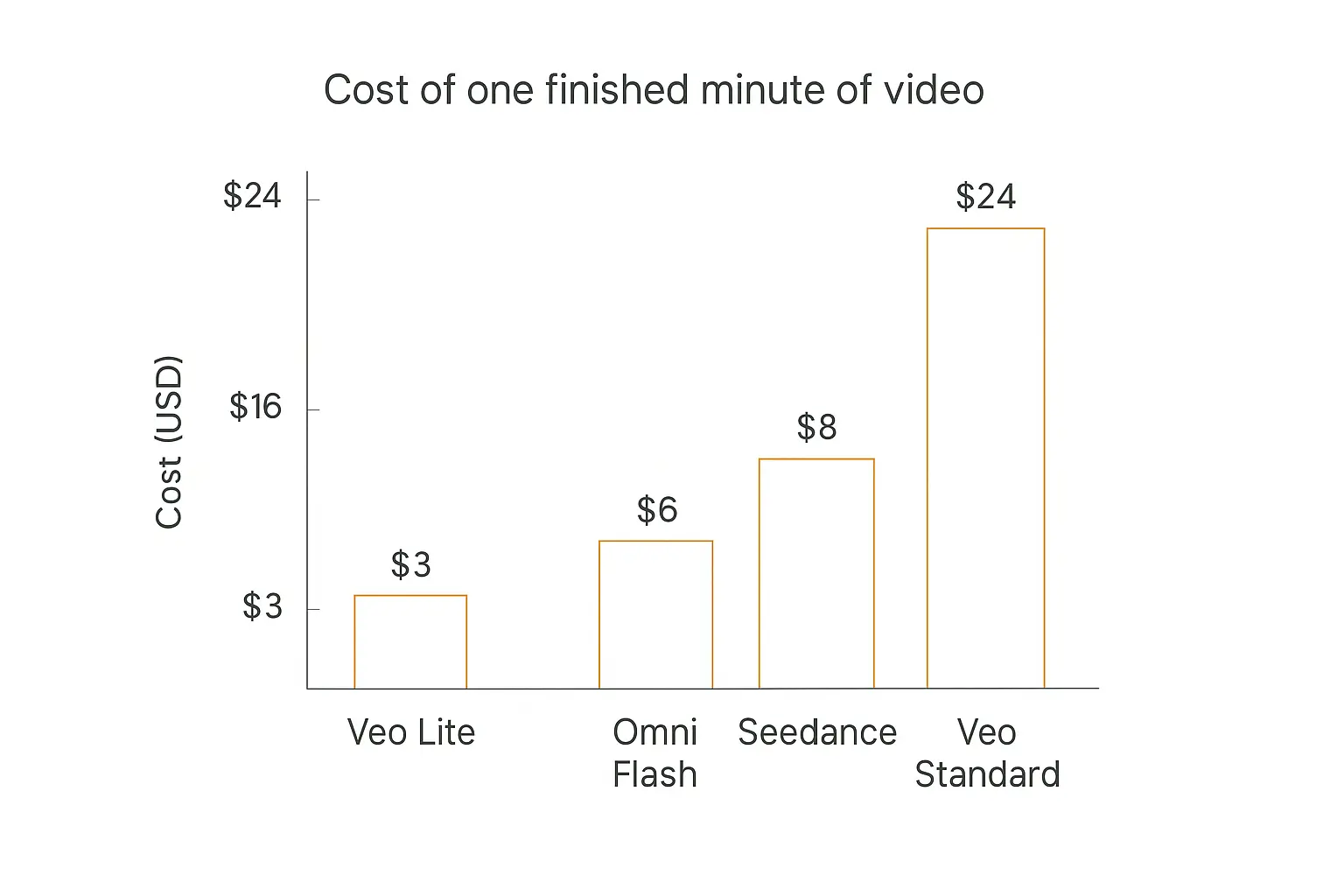
Per-second pricing hides how quickly this adds up. Here's the same numbers as a finished minute of video:
| Model / tier | Per second | Per 8-sec clip | Per finished minute |
|---|---|---|---|
| Veo 3.1 Lite (720p) | $0.05 | $0.40 | ~$3 |
| Veo 3.1 Fast (720p) | $0.10 | $0.80 | ~$6 |
| Gemini Omni Flash (720p) | ~$0.10 | $0.80 | ~$6 |
| Kling 3.0 (third-party) | ~$0.075 | $0.60 | ~$4.50 |
| Seedance 2.5 (third-party) | ~$0.134 | ~$1.07 | ~$8 |
| Veo 3.1 Standard (1080p) | $0.40 | $3.20 | ~$24 |
Now apply an agent's actual behaviour to that table.
Say your agent makes one 8-second clip per client per day, for 50 clients. On Veo Standard that's $160/day, roughly $4,800/month. On Veo Lite it's $600/month. Same workflow, same code, one parameter.
And that assumes every generation lands on the first try. Build in a naive "if the user doesn't like it, regenerate" loop and you can double or triple it without noticing until the invoice arrives.
This is why model routing matters more for video than anywhere else. The pattern that works: draft on the cheap tier, render finals on the expensive one. Generate previews on Veo Lite at $0.05/second, let the human approve, then re-render the approved prompt once on Standard. You pay the premium once per approved video rather than once per attempt.
If you're thinking about agent economics generally, the same logic in our guide to AI agent cost and token economics applies here — just with the decimal point moved a few places.
The async problem nobody warns you about
Here's the thing that breaks most first attempts at this, and it has nothing to do with which model you pick.
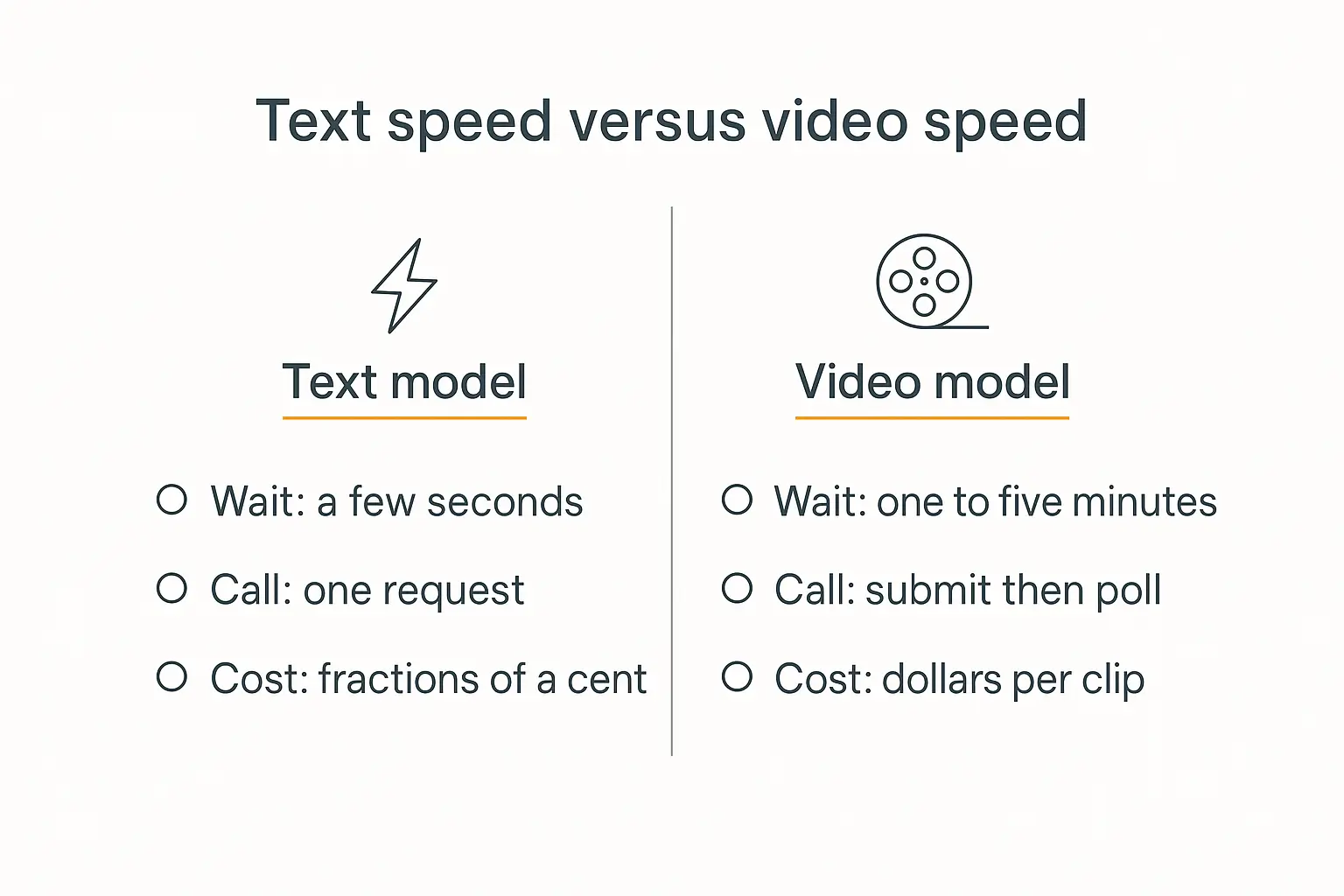
Text models respond in seconds. Video models take minutes.
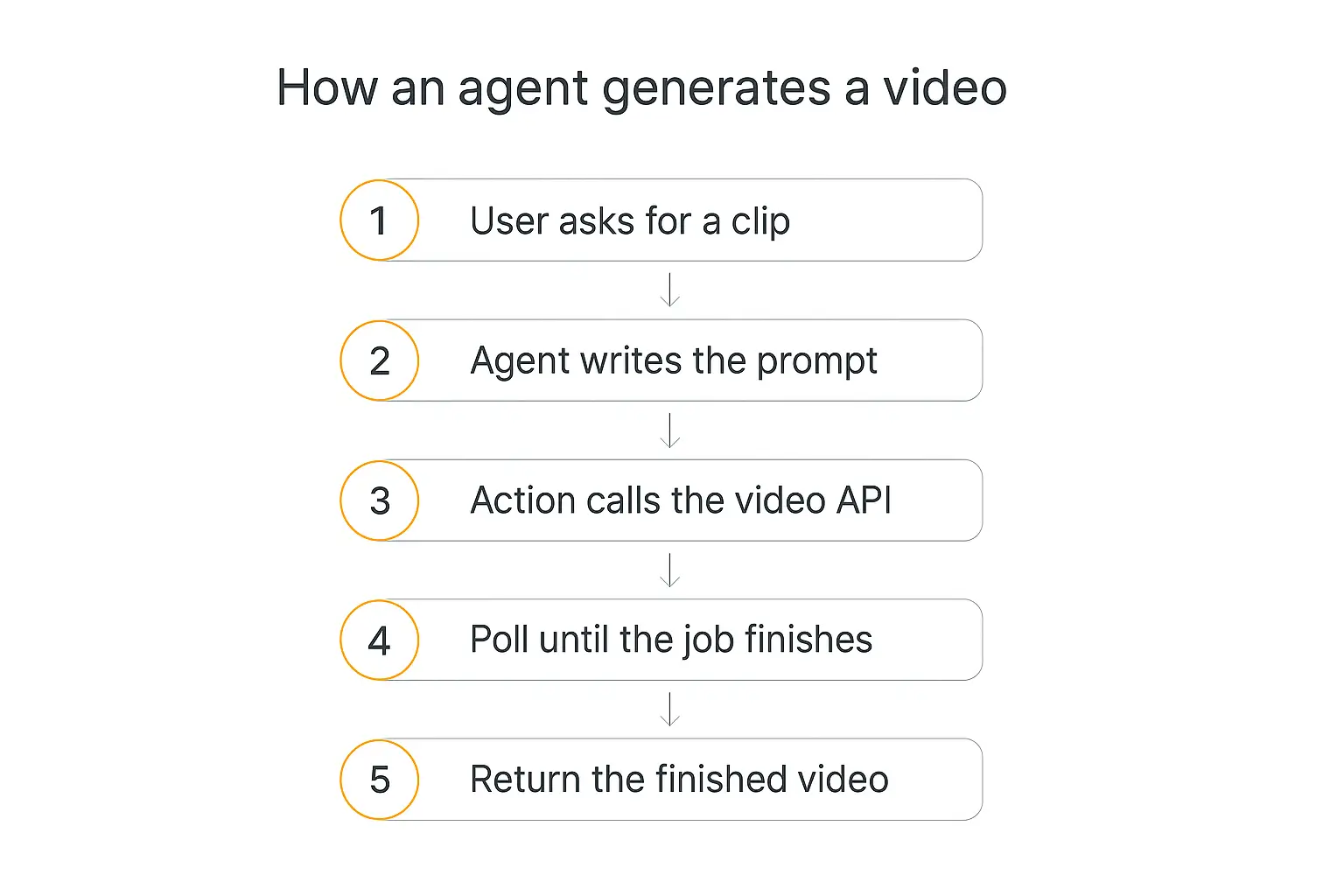
Every chat-shaped agent framework assumes a tool call returns quickly. Video generation doesn't return at all in the normal sense — you submit a job, get an operation ID, and poll until it's done. A one- to five-minute wait is normal.
That mismatch causes predictable failures:
- HTTP timeouts. Most default timeouts are well under the generation time. Your Action fails while the video generates fine on the vendor's side — and you're still billed.
- Retry storms. The agent sees a timeout, assumes failure, and retries. Now you're paying for three videos and shipping one.
- Dead chat UX. The user stares at a spinner for four minutes with no signal anything is happening.
- Expiring URLs. Vendors often serve results from short-lived links. If you don't copy the file to your own storage promptly, the deliverable evaporates.
The fix is to stop modelling video as a chat turn. Submit the job, return immediately with an acknowledgement, poll on a schedule, and notify the user when it's ready — email, a message, a link in a portal.
In Pickaxe terms that means splitting it across two Actions: one that submits and returns the job ID, one that checks status and fetches the result. A scheduled agent handles the polling. It's the same structure as any multi-step workflow — the only unusual part is how long the middle step takes.
And because generations are expensive and slow, this is a workflow that genuinely benefits from a human in the approval loop. Approve the prompt before you spend $3.20 on it, not after.
Writing video prompts an agent can reuse
The part that decides your output quality isn't the model. It's whether your agent writes a good prompt without a human editing it.
Video prompts behave differently from image prompts, and the differences trip people up:
Describe motion, not just the scene. An image prompt describes a frozen moment. A video prompt has to say what changes over the clip. "A coffee cup on a desk" gives you a nearly static shot. "Steam rising from a coffee cup as morning light moves across the desk" gives you a video.
Name the camera move explicitly. Slow push in, static tripod shot, handheld follow, orbit. If you don't specify, the model picks — and it often picks something busier than you want.
Budget your seconds. With an 8-second clip you get roughly one action. Prompts that describe three sequential events produce a rushed mess. One clip, one beat.
Write the audio too on models that generate it jointly. If you don't specify, you get generic ambience. Naming the sound — "quiet café murmur, no music" — is the difference between usable and obviously-AI.
Put the invariants in references, not words. This is the big one for agent work. Don't describe your client's product in prose and hope; pass an image. Text descriptions drift between generations, reference images don't.
In practice, the highest-leverage thing you can do is put a prompt template in the agent's instructions rather than letting it freestyle — fixed slots for subject, motion, camera, lighting, and audio, with the client's brief filling the slots. You get far more consistent output across runs, which is the whole game when nobody's reviewing each one. The same structural thinking from our guide to prompt engineering for agents applies, with motion and duration added.
Watermarks, provenance, and what you can legally ship
This section is less fun than the model comparisons and considerably more likely to cause you problems.
Every major commercial video model now labels its output by default. Google embeds SynthID across Imagen, Veo, and Lyria. In May 2026, OpenAI and Google announced a dual-layer provenance model combining C2PA Content Credentials metadata with SynthID watermarking, and OpenAI joined the C2PA steering committee.
This is now a compliance matter, not a nice-to-have:
- California SB 942 took effect January 1, 2026.
- EU AI Act Article 50 transparency rules entered enforcement in August 2026.
Two practical consequences for anyone shipping agent-generated video to clients.
You cannot quietly pass AI video off as filmed footage. The watermark is in the file whether or not you mention it, and it's detectable. If a client's expectation is live-action, say so up front.
Check what survives your pipeline. C2PA metadata is fragile — re-encoding, cropping, or a social platform's transcoder will often strip it. SynthID's embedded watermark is more durable. If provenance matters for your use case, verify what's actually left in the file after your editing steps, rather than assuming.
How to wire a video model into a Pickaxe agent
A quick note on where this fits, since it's the question I get most.
Pickaxe has image generation built in as a per-agent capability, with model selection. Video is different — you connect a video model through Actions, the same way you'd connect any external API.
The rough shape:
- Write the instructions so the agent knows how to turn a client's request into a good video prompt. This is most of the quality. A vague prompt on an expensive model is worse than a careful prompt on a cheap one.
- Add a submit Action that calls your chosen video API and returns the job ID.
- Add a status Action that checks the job and returns the finished URL.
- Store the result somewhere permanent before the vendor's link expires.
- Deploy it in a portal, an embed, or over email — wherever the client already is.
Keep it to a handful of Actions per agent; if the workflow grows, route to sub-agents rather than piling more onto one. And because video costs real money per run, this is a natural fit for Pickaxe's credits or uses system — you can price the agent so each generation is actually covered.
If you're packaging this as a client-facing product, the mechanics are the same ones covered in our AI content factory guide.
Charge for what the generations cost you
Credits and access groups let you meter expensive agents instead of absorbing the bill.
Which of the best AI video models to pick for each job
Rather than crowning a winner, here's how I'd actually decide:
| If you need… | Use | Why |
|---|---|---|
| The same character or product across many clips | Seedance 2.5 | Up to 50 reference inputs; nothing else is close |
| A dependable production default | Veo 3.1 Fast | Stable pricing, real deprecation policy, audio included |
| High-volume drafts and previews | Veo 3.1 Lite | $0.05/sec — 8× cheaper than Standard |
| A polished client-facing final cut | Veo 3.1 Standard | 4K, best control surface; pay only for approved renders |
| Iterative refinement in conversation | Gemini Omni Flash | Multi-turn editing fits how agents work |
| Scroll-stopping social content | Kling 3.0 | Strongest out-of-the-box look |
| Anything at all on Sora | Migrate now | Shuts down September 24, 2026 |
If I had to pick one for a client build starting today: Veo 3.1, routed across tiers — Lite for drafts, Standard for approved finals. Not because it wins the arena (it's #12), but because it's the option least likely to strand you, and the tier spread does more for your margins than any quality difference between vendors.
If your work is character- or product-consistent — a recurring presenter, a product line, a brand mascot — Seedance 2.5's reference system is worth the billing awkwardness and the vendor conversation.
Frequently asked questions
Is Sora still available?
Partly, and not for long. The consumer app shut down April 26, 2026. The API — sora-2, sora-2-pro, and the Videos API — shuts down September 24, 2026, with no recommended replacement from OpenAI.
Is there a Veo 4?
No. Veo 3.1 is Google's current model. Google's 2026 video announcement was Gemini Omni, not Veo 4. Any comparison citing Veo 4 specs is speculation.
What's the cheapest usable AI video model?
Veo 3.1 Lite at $0.05/second for 720p, with audio included — about $3 per finished minute. Kling 3.0 via third-party APIs is competitive at roughly $0.075/second.
Can I self-host an open-weights video model?
Less easily than the discourse suggests. Alibaba hasn't published core weights for a Wan video model since Wan 2.2 in July 2025, and Wan 3.0 shipped as a closed paid beta in August 2026. Verify the actual checkpoint and license before planning around it.
Do AI-generated videos have to be labelled?
Increasingly yes. California SB 942 took effect January 1, 2026 and EU AI Act Article 50 transparency rules entered enforcement in August 2026. The major models watermark by default via SynthID and C2PA regardless.
Why does video generation take so long?
It's a fundamentally heavier computation than text — an 8-second clip is hundreds of frames that must stay coherent, plus synchronised audio. One to five minutes is normal, which is why you submit a job and poll rather than waiting on a single request.
The short version
The best AI video models in 2026 are genuinely good, genuinely expensive, and attached to a vendor landscape that just watched OpenAI walk away from the category entirely.
Build accordingly. Treat the model as swappable — put it behind an Action you can repoint, not baked through your whole agent. Route by tier, because an 8× price spread inside one model family beats any cross-vendor optimisation. Design for async from the start, because retrofitting polling onto a chat-shaped agent is miserable. And get a human approving prompts before you spend real money on renders.
If Sora is in your stack, the deadline is September 24, 2026. That's the one item on this page with a date attached.
If you want to try building one of these, Pickaxe lets you connect any of these video APIs through Actions and put the result behind a client-ready portal with billing attached — which, at these prices, you'll want. You can compare the text models available for the prompt-writing half of the job at pickaxe.co/models.