
The best AI form builders help you collect information and turn it into something useful. A generated intake page is a useful start; a correct client record, a clear next step, and an accountable owner are the outcome I would buy.
I compared current product documentation and pricing for eight tools, with agency intake as the common job. My recommendations come from that review; the acceptance tests below are proposed exercises you can run with synthetic data.
My shortlist starts with Pickaxe for forms that turn structured inputs into AI outputs, Fillout for connected operational intake, and Tally for a generous free starting point. Jotform, Typeform, Paperform, forms.app, and involve.me each become more interesting when your delivery requirements get specific.
Here is how I would choose, including the billing details I would check before giving a client a quote.
AI form builders: the quick shortlist
Choose the destination of the answers first. The same questionnaire can feed an internal task queue, a sales funnel, a payment flow, or an ongoing client service, and those are different buying decisions.
On a narrow screen, scroll the table sideways to read every column.
| Tool | Where I would start | Question to settle in the pilot |
|---|---|---|
| Pickaxe | AI forms that produce assessments, drafts, and other useful outputs | Do the inputs reach the prompt correctly, and does the result meet the brief? |
| Fillout | Structured intake connected to business systems | Does each answer arrive in the correct destination field? |
| Tally | Simple, editable intake with room to grow | Which branding and administration controls require an upgrade? |
| Jotform | Forms alongside approvals, documents, and payments | Which account limit or product allowance will bind first? |
| Typeform | Branded interviews and customer-facing questionnaires | Does the chosen experience work for your actual respondents? |
| Paperform | Service intake that also collects an order or booking | What is the complete forms, domain, and workflow cost? |
| forms.app | A small collection of everyday forms | Do storage and published-form limits fit the account? |
| involve.me | Qualification quizzes with tailored outcomes | Are the score, outcome, and follow-up correct together? |
These are starting recommendations, not a measured conversion ranking. I would narrow the table to two candidates and give both the same intake brief before comparing their demos.
What AI form builders actually automate
There are three separate jobs hiding behind the AI label: building the form, processing submissions, and talking with the respondent. Ask which of those happens in the product you are evaluating.
Build-time AI can draft questions, suggest field types, or edit conditional logic. That saves setup work, but you still need to inspect the resulting rules and publish an approved version.
Post-submission AI can summarize answers or prepare a handoff. For example, Fillout documents AI steps for summarizing, tagging, scoring, and routing in its current form-builder overview.
Respondent-facing AI asks or clarifies questions while somebody completes the experience. An interface showing one question at a time does not establish that it can reason about an unexpected answer.
I would write down the behavior I need in plain language: “If the client chooses a website project, request the current URL; if they choose branding, skip it.” Then I would inspect the actual branch and try both answers.
This distinction also keeps the project scope sensible. Our client onboarding agent guide uses confirmed required information and a reviewable handoff as completion criteria, which is a useful standard for forms too.
1. Pickaxe: my pick for forms that generate useful AI outputs
I would choose Pickaxe AI Forms when a submitted brief should produce an assessment, a draft, a recommendation, or another useful AI result. The form is a native way to build and deliver the AI tool itself.
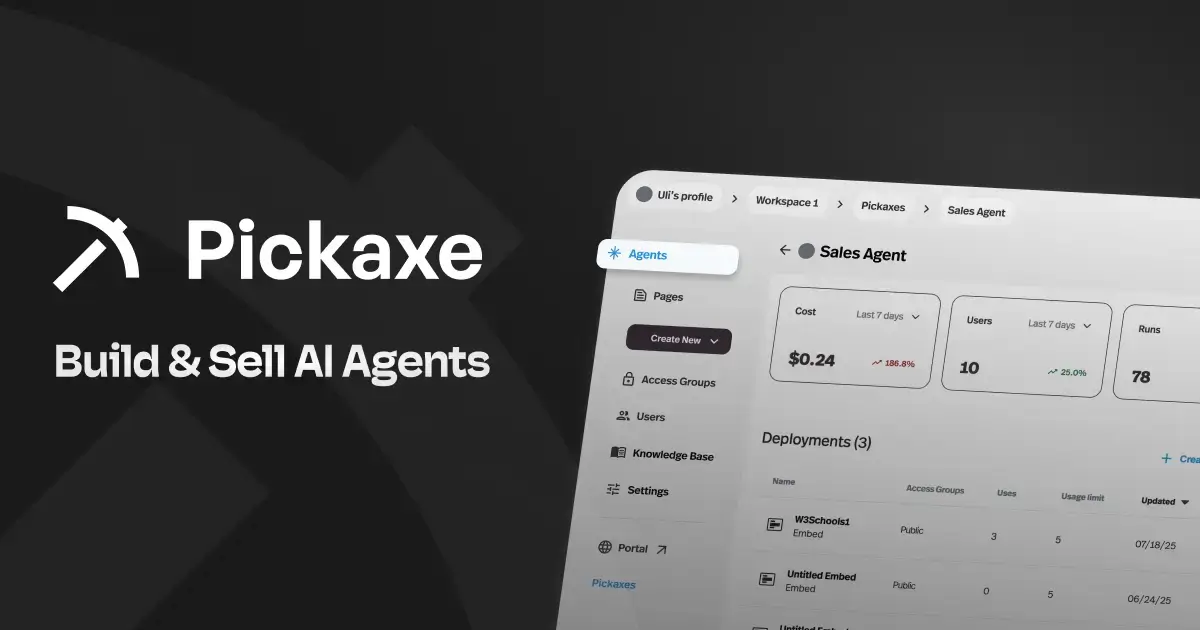
Pickaxe supports Form and Form + Chat alongside Chat. A Form collects structured inputs and runs your prompt with those answers; Form + Chat lets the user continue the experience in a conversation, as described in the Pickaxe user manual.
The current Agent Builder guide places Tool Type and the form's Prompt Frame in Build. The frame defines how the inputs become part of the request, while the system prompt sets the agent's job and response rules.
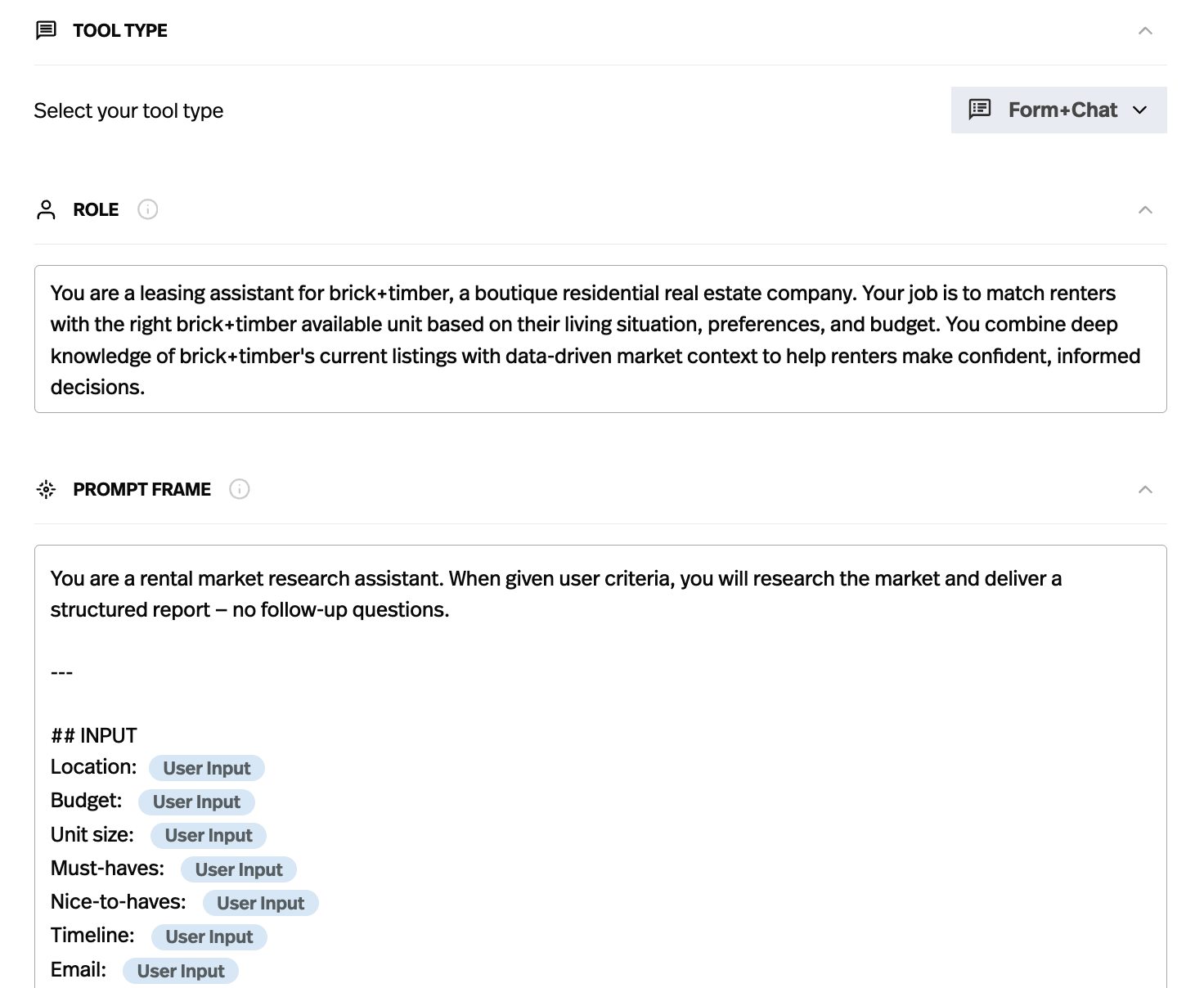
The attraction: I can turn a repeatable intake into a usable AI product. A consultant could collect a business goal, audience, constraints, and source material, then use the configured form to produce a draft project brief with missing information called out.
For that proposed example, I would connect approved reference material through the Knowledge Base and define the output sections in the prompt. If the client wants clarification afterward, I would choose Form + Chat so they can work with the result.
For distribution, Pickaxe supports website embeds, direct links, and branded portals. Its monetization documentation covers charging for access, making it a useful fit when the form delivers a paid assessment or another client-facing AI service.
Pricing: the pricing page checked October 21, 2026, shows Gold starting at $37 per month with monthly billing or $29 per month billed annually, with $15 in monthly AI credits. Plan cost, AI usage, API charges where applicable, and selling fees are separate parts of the quote.
What I would check: whether every input reaches the prompt correctly, the output follows the approved structure, and a required integration confirms its write. A useful generated brief and a successfully created CRM record are different outcomes to verify.
My proposed pilot would submit a complete brief, a brief with an unknown budget, and a contradictory request. I would check that the form preserves the client's answers, flags uncertainty, and lets a person review the result before relying on it.
2. Fillout: my starting point for connected intake
I would start with Fillout when the intake needs to become structured data in an existing business system. Its combination of editable forms and documented downstream connections makes that a sensible first pilot.
The AI builder supports prompting, manual editing, conditional questions, and connections to destinations including Airtable, Notion, and Google Sheets. AI usage remains subject to the selected plan's limits.
The pricing page lists a free allowance of 1,000 responses per month. Starter is $15 per month billed annually, with 2,000 monthly responses; branding removal is listed on Pro, and custom domains on Business, as checked October 21, 2026.
The attraction: I can begin with a precise intake schema and evaluate the full trip from form field to destination record. That is especially useful when an agency inherits a client's existing database.
The tradeoff: “It connects” leaves important questions unanswered. I would verify permissions, mappings, existing-record behavior, and who gets notified when a destination rejects a submission.
My proposed test would include an organization with punctuation in its name, an optional field left empty, and a second submission using the same contact email. I would compare the stored records with the approved answers.
I would choose Fillout if that handoff stays understandable after a colleague edits a field. A beautiful form that depends on one person's memory is an expensive thing to maintain.
3. Tally: my free-plan starting point
Tally is where I would begin for straightforward intake with a modest operational footprint. Its current documentation gives the free plan a much broader AI role than older “basic form editor” descriptions suggest.

Tally AI is available on every plan for generating, editing, branding, and troubleshooting forms. You can also work manually; using the assistant does not remove the need to review a generated rule.
The free plan offers unlimited forms and submissions within its fair-use policy. Pro showed $29 per month with monthly billing in the live pricing toggle on October 21, 2026, with branding removal, custom domains, and collaboration among its upgrades.
The attraction: I can prove whether the questionnaire itself is useful before committing to a bigger subscription. For a client still changing their intake process, that flexibility matters.
The tradeoff: Free collection and the administration a client expects are separate requirements. I would decide who can edit the form, where notifications go, and whether a branded URL is part of the promised deliverable.
My pilot would deliberately change a conditional question after creating the first draft. I would ask a second person to identify what changed, restore the intended behavior, and submit a fresh example.
If the client only needs a clear questionnaire and a dependable handoff, I would keep the design small. A large feature bundle is not a reason to complicate a working intake.
4. Jotform: for forms inside a broader operations process
I would shortlist Jotform when the team wants forms alongside documents, approvals, and payment collection. The breadth is useful when the intake is one piece of an established administrative process.

Jotform's AI Form Builder creates and customizes forms from prompts. Its broader product catalog includes workflows, PDFs, signatures, and AI Agents; those names should not be treated as one interchangeable capability.
On the live pricing page checked October 21, 2026, Starter included five forms and 100 monthly submissions. Bronze showed $39 per month with monthly billing or $34 per month billed annually, with 25 forms and 1,000 monthly submissions.
The attraction: A team already reviewing applications or preparing documents can evaluate the intake inside that wider process. I would make the receiving administrator part of the buying decision.
The tradeoff: A subscription has several constraints to inspect, including form, submission, storage, and product-specific allowances. An AI Agent allowance is not evidence of unlimited ordinary form submissions, or the reverse.
My proposed test would follow one synthetic request through collection, review, and its final administrative output. Each transition would need a named owner and a visible success state.
I would also check the experience when the reviewer is unavailable. A submission can be successfully received while the business process remains unfinished; the client's status message should make that distinction clear.
5. Typeform: for branded customer interviews
I would put Typeform on the shortlist when the respondent experience deserves close design attention. A client interview, feedback questionnaire, or qualification flow can justify spending time on how each question feels.
Typeform AI documents form creation, file context, translation, and a wider automation direction. Its page also labels some capabilities “Coming Soon,” so I would verify availability in the account before selling a workflow around them.
The main Core pricing cards checked October 21, 2026, showed Basic at $39 per month monthly or $28 per month billed yearly, including 100 responses per month and one user. The same page contained inconsistent secondary comparison pricing, so I would confirm the final checkout quote.
The attraction: It gives me a focused candidate for a carefully written interview. I would compare the respondent's ability to understand, revise, and finish the questionnaire, rather than assume a presentation style improves conversion.
The tradeoff: Response volume and workflow features can change the effective package. The pricing page excludes Free and Basic from its Contacts & Automations add-on; buying Basic is not proof that a planned automation is covered.
My test would ask somebody unfamiliar with the project to complete the flow on their phone. I would watch for unclear options, awkward back navigation, and context they need to remember across questions.
I would also ask them to correct an earlier answer. The revised response needs to reach the destination correctly, especially if that answer determines qualification or routing.
6. Paperform: for service intake with a transaction
I would evaluate Paperform when a service intake also needs an order, payment, or booking experience. Those projects benefit from reviewing the explanation and the transaction as one continuous customer journey.

The current product overview describes AI form drafting, calculations assistance, and response insights. Its plan matrix puts form creation on Free, while calculation assistance and report insights require a paid plan.
As checked October 21, 2026, Free included 30 submissions per month. Pro displayed $49 per month billed annually; a Pro custom domain adds $20 per month, and automation credits have separate allowances and paid expansion options. Unlimited usage remains subject to fair use.
The attraction: I can evaluate the customer-facing explanation, requested details, and transaction together. That is helpful when a service has choices that affect what the customer is buying.
The tradeoff: The form subscription alone is not the whole quote. I would itemize domains, automation usage, payment-provider charges, and any separate signature or workflow requirements.
For a proposed pilot, I would create a synthetic service order with two options and an intentionally incomplete address. The expected outcome would be an understandable correction path before any real transaction.
I would verify receipt wording too. A payment confirmation, a booking preference, and an accepted service request promise different things; the customer should know exactly which one occurred.
7. forms.app: for a compact everyday form toolkit
I would consider forms.app for a small team that wants several practical forms without designing a large operations system. Its free-plan shape makes published-form count and file storage particularly useful questions.

The AI generator supports drafting from a description, question rewriting, answer suggestions, and response insights. I would treat suggested wording as an editable starting point and check that it preserves the business meaning.
The pricing page checked October 21, 2026, listed five forms, unlimited responses, and 10 MB file storage on Free. The page returned EUR pricing with an active promotion, so I would use the local checkout for a paid quote rather than convert a promotional headline into a universal USD price.
The attraction: I can try a focused group of forms for enquiries, feedback, and registrations. A team can validate whether people maintain those forms before widening the setup.
The tradeoff: An unlimited response allowance does not mean unlimited file capacity or unlimited branded deployments. I would estimate uploaded document sizes separately from the number of submissions.
My proposed test would submit a plain-text enquiry, an enquiry with a representative synthetic attachment, and one with an unsupported or oversized attachment. The form should explain what the person can do next.
I would also review every AI-generated multiple-choice option. Missing “other” or “not sure” choices can force people into a misleading answer and create cleanup work downstream.
8. involve.me: for qualification with a tailored outcome
I would shortlist involve.me when the desired output is a scored qualification, recommendation, or calculator result. In that setting, the outcome and follow-up matter as much as the captured answers.
The AI Agent overview describes creating and editing forms, quizzes, calculators, scoring, and logic alongside a manual editor. I would verify the resulting calculations and branches before publishing any recommendation.
The Start plan checked October 21, 2026, showed $49 per month monthly with 50 AI credits per month, or $29 per month charged annually with 100 AI credits per month. Both list three live funnels and one user; the free account has a 50-submission or 500-visit monthly limit.
The attraction: The qualification logic can be reviewed as a complete journey: answers, score, outcome, and next step. Our lead qualification guide explains how explicit criteria help keep that handoff useful.
The tradeoff: Each meter needs its own forecast, and a lead score needs an explanation. I would avoid a system where nobody can say why a perfectly reasonable enquiry landed in the wrong segment.
My proposed pilot would include a prospect exactly at each score boundary. I would check the outcome page and follow-up against a written answer key, including the branch for somebody who is not a fit.
I would choose this approach when the business can explain the routing policy clearly. AI can help build the experience; the business still owns its decision criteria.
Design the intake contract before choosing a tool
I would give both shortlisted products the same brief. Start with the business outcome, then specify the fields, validation, branches, destination, and person responsible for exceptions.
For a proposed agency intake, my required fields would be organization, confirmed contact email, requested service, project goal, and preferred timing. Budget could be a range with a “not decided” option.
Every field needs a reason. If nobody uses company size to route, price, or prepare the project, I would remove it instead of asking AI to make the question more engaging.
Create an agency intake form for website and branding enquiries. Ask for organization, contact email, service, goal, and preferred timing. Ask for the current website only on the website branch. Make budget optional with a “not decided” choice. Explain that submission requests a review and does not confirm a quote or booking. Show a review summary before submission.
That prompt is an illustrative brief, not a guarantee that every product supports every requested behavior. I would inspect the generated output and record any manual work or unsupported requirement.
Then I would name the destination fields independently of the form labels. “What should we call you?” can change in the interface while the integration still needs a stable contact-name field.
Price the complete workflow, with matching units
A useful quote includes the subscription, required upgrades, automation usage, payment charges where relevant, and ongoing maintenance. I would also record which account owns each subscription.
Keep meters separate. Responses describe collected submissions; AI credits and automation actions describe other activity. There is no defensible conversion between them without the vendor's current rules.
Here is hypothetical planning arithmetic: a workflow receiving 800 submissions per month and making two destination writes per submission creates 1,600 planned writes before retries. That is a workload estimate, not 1,600 billable vendor actions.
If the pilot shows repeated delivery attempts or several AI steps, I would add those to the forecast using the actual service's accounting. I would not use the number of submitted forms as a proxy for all downstream work.
Annual offers should also remain visibly annual in the proposal. A monthly equivalent does not imply monthly cancellation, monthly cash outlay, or a guarantee that next year's price stays the same.
For a client-facing service, I would separate software expenses from my setup and maintenance fee. Our AI service pricing guide is a useful next step for packaging that work around a defined outcome.
Make the handoff recoverable
I would define three distinct states: received, delivered, and accepted. The first means the form stored the response; the second means the destination received it; the third means the business has taken responsibility for it.
That distinction prevents a misleading success page. If an enquiry was collected but its CRM delivery failed, the customer can receive an honest receipt while the team gets an exception to resolve.
Give each submission a stable reference. Keep the original response, its destination status, and the last delivery attempt together so a person can investigate a missing record.
I would ask the implementer how they prevent a retried delivery from creating a second task. Reusing a submission reference is a design requirement to evaluate, not a capability I assume every product provides automatically.
My handoff checklist would include a daily owner for failures, a documented retry procedure, and an export the client can understand. Our Actions and integrations guide covers the connection layer when an agent participates in that workflow.
Finally, I would test an unavailable destination with synthetic data. The valuable evidence is where the response waits and how it recovers, not whether the form's animation finishes.
Check data handling before collecting client material
I would map every place a response can travel: the form account, email notifications, storage, integrations, AI processing, and the final business system. A privacy page for the first tool does not answer questions about the rest.
Start with synthetic material during evaluation. Then ask the client to approve the actual fields, purposes, access, retention, and deletion process before real submissions begin.
Keep administrative context out of public fields. A hidden field may help attribution or routing, but I would not treat a browser-supplied client identifier as proof that someone is authorized to access a record.
I would also separate business contact permission from optional marketing choices. The form's copy should explain what happens next without asking for permissions unrelated to completing the requested service.
For attachments, I would decide which file types are necessary and who can open them. Passwords, API secrets, and unrestricted document collections belong outside an ordinary intake questionnaire.
These are procurement and implementation questions. A vendor security badge or an AI-written privacy paragraph does not establish that your particular collection and delivery process is approved.
Run a small acceptance pilot with an answer key
I would propose 12 synthetic cases for each shortlisted tool. This is a practical starting set, not a validated industry benchmark or a claim that I ran these tests on the eight products.
- A complete website enquiry with every expected field.
- A branding enquiry that should skip the website question.
- An optional budget left undecided.
- A missing required goal.
- An invalid email address.
- A corrected earlier answer that changes the branch.
- A second submission from the same contact.
- A mobile completion with a long organization name.
- A representative permitted synthetic attachment.
- An attachment outside the allowed rules.
- A temporarily unavailable destination.
- A repeated delivery attempt for the same submission.
For each case, record the expected screen, stored response, destination result, and notification. Mark unsupported requirements explicitly instead of quietly changing the test to fit the product.
I would accept a candidate only after the critical cases behave as intended or have an approved manual process. One duplicated business record can matter more than several minutes saved generating the form.
Then change one question and repeat the affected cases. A maintenance edit is a better predictor of ownership difficulty than the first polished demo.
Our guide to building an agent evaluation set extends this approach when an AI step interprets free-text answers or produces a handoff summary.
Build an AI form service with Pickaxe
For a client-facing assessment or brief generator, I would build the form and its AI output as one service. Pickaxe's native Form and Form + Chat types let the structured starting point and the resulting AI experience live together.
My proposed agency example would ask for the client's goal, audience, constraints, and preferred timing. The Prompt Frame would pass those answers into a request for a draft brief with sections for confirmed facts, open questions, and recommended next steps.
I would connect approved process documents through the Knowledge Base and test the same cases in Preview. In Form + Chat, the client could then ask for an explanation or refine the result without starting a separate tool.
Actions can connect the agent to external tools or workflows. I would configure and verify a destination write explicitly before claiming that the generated brief has been saved to a project system.
For a branded service, Pickaxe Portals can bundle forms, chat agents, and pages behind the relevant access rules. Our client portal guide explains how to give clients something useful to return to.
I would start with one form, one defined output, and one reviewed handoff. That gives the client a practical AI tool while keeping the first version easy to inspect and maintain.
Give clients help after the intake.
Build a focused Pickaxe agent around your approved process.
Questions I would settle before buying
Which AI form builder would I try first?
For structured inputs that should generate a useful AI result, I would start with Pickaxe. I would also pilot Fillout for connected operational intake or Tally for a simple questionnaire with a generous free starting point.
Does an AI-generated form need manual review?
Yes. I would check required fields, wording, validation, every branch, the success message, and the final stored record before inviting real respondents.
Is one question at a time the same as an AI interview?
No. Presentation, conditional branching, and generated clarification are separate behaviors; ask the vendor to demonstrate the exact interaction your client needs on the proposed plan.
Can I use a free plan for client work?
Possibly, if its current terms, branding, limits, administration, and data requirements fit the deliverable. I would write those assumptions into the scope and name the upgrade trigger.
Can Pickaxe combine a form and chat?
Yes. Choose Form + Chat to collect structured inputs, generate the AI result, and let the user continue in a conversation. I would test both the initial output and the follow-up against the same approved brief.
Choose the handoff you can maintain
My recommendation is to choose two candidates from the shortlist, give them the same intake contract, and run the synthetic cases all the way to the receiving system. Buy the one whose errors and maintenance work you understand.
The form should make the client's next step easier and give your team information it can trust. For forms that generate AI results and can continue in conversation, you can start building an AI form in Pickaxe and connect it to a reviewed intake process.