Every AI web app builder demo ends the same way. Ninety seconds, a prompt, and there's a working app on screen with a login page and a database behind it.
The demo is real. I've done it a dozen times and it still feels like a magic trick.
The honeymoon ends about two weeks later, when a client asks one of two questions: "Where does this actually live?" or "Can my developer take this over?" For client sites, our comparison of AI website builders turns those ownership questions into a practical handoff test.
That's when you find out which kind of AI web app builder you picked. Because on the thing that matters most after launch — who owns the code and where it runs — these platforms are not remotely the same product, and almost nobody's comparison mentions it.
So that's the lens I used. I looked into 12 AI web app builders and sorted them by what happens when you want to leave, not by how fast they get you to a demo.
If you're after the wider category — including mobile and spreadsheet-backed tools — we covered that separately in our roundup of the top AI app builders. This one is specifically about web apps.
The one question that sorts this entire market
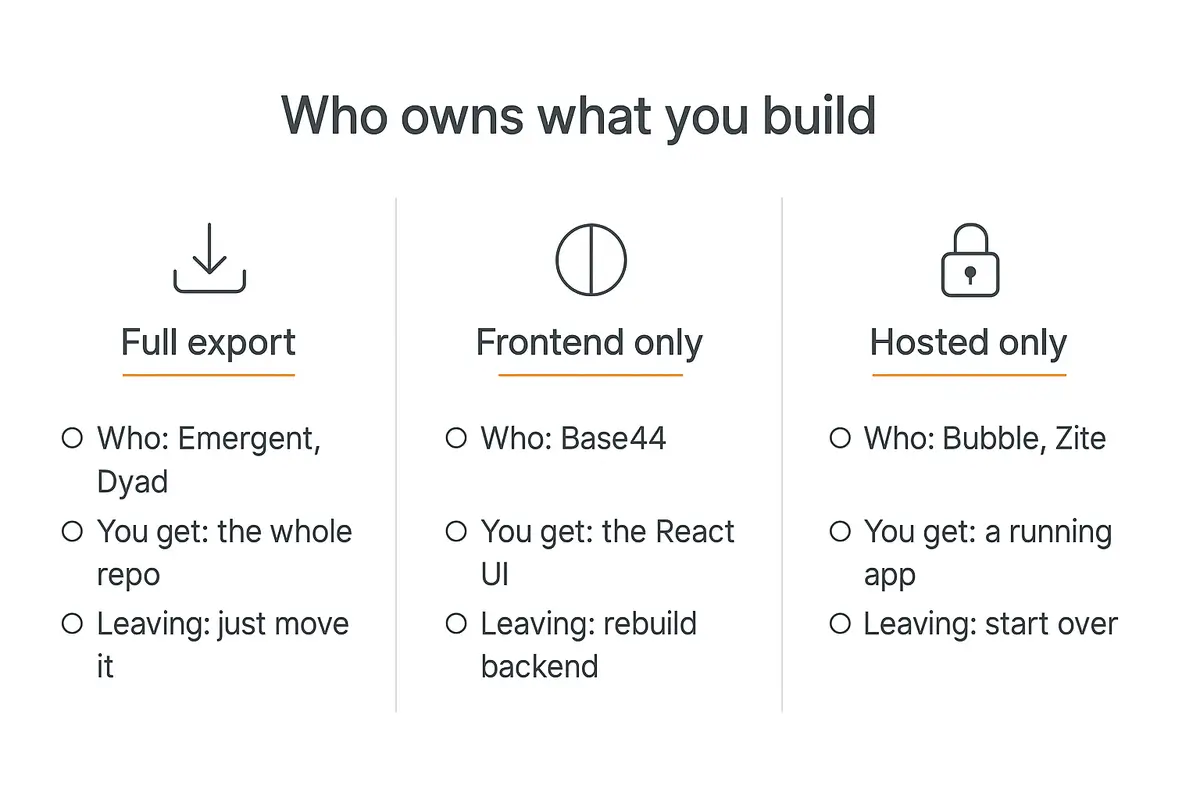
Ask any of these platforms for the source code and you'll get one of three answers.
Tier one: you get the whole repo. Emergent, Dyad, Lovable, Bolt and v0 hand you real code. Push it to GitHub, deploy it wherever, hire a developer to extend it. The platform was a starting point, not a landlord.
Tier two: you get half. Base44 exports the React frontend — but the database, auth flows, serverless functions and file storage stay on their servers. You own the paint, not the house. Leaving means rebuilding the backend from scratch.
Tier three: you get a running app and nothing else. Bubble has never allowed source export — it's a closed system by design. Zite's own documentation says the same: apps stay on Zite infrastructure. Leaving means starting over.
None of these tiers is wrong. A hosted app you never have to maintain is genuinely valuable, and most internal tools never need to move.
But the tier is a decision you make once and live with for years, and it's usually made by accident — by whoever's demo you saw first.
Quick comparison: 12 AI web app builders
| Tool | Best for | Code export | Starting price |
|---|---|---|---|
| Lovable | Prototype to product | Full | Free / $25 mo |
| Bolt.new | Fastest first draft | Full | Free / $25 mo |
| v0 by Vercel | React and Next.js work | Full | Free / $30 user mo |
| Replit | All-in-one, beginners | Full | $20 mo + usage |
| Base44 | Quick business apps | Frontend only | $20 mo |
| Emergent | Owning the repo | Full + GitHub | Free / $20 mo |
| Anything | Prompt-first products | Full | $19 mo |
| Zite | Ops-team internal tools | None | Free / $20 mo |
| Retool | Enterprise internal tools | Self-host | Free / $10 builder mo |
| ToolJet | Open-source internal tools | Self-host | Free / $24 builder mo |
| Bubble | Complex no-code apps | None | Free / $59 mo |
| Dyad | Local, no lock-in at all | It's already yours | Free |
Prices are the publicly listed rates in September 2026 and move constantly — check the vendor before you budget. Several of these bill on credits or usage on top of the subscription, which I'll flag where it bites.
Part 1: Prompt-to-app builders
These turn a description into a working full-stack web app. They're the category most people mean by "AI web app builder," and they're converging fast on features — which makes the ownership and billing differences the real decision points.
1. Lovable — the one I'd start with
Best for: going from an idea to something a real user can log into.
Lovable generates a React frontend and wires up auth, database and hosting through Lovable Cloud. The chat-plus-live-preview loop is the most pleasant in the category — you describe a change, watch it happen, keep going.
The thing that matters here: Lovable is explicit that you own the code. That's a written commitment, not an inference, and it puts them firmly in tier one.
Pricing is credit-based rather than per-seat, which is unusual and mostly good — unlimited collaborators on every plan, because you're paying for work done, not chairs. Pro is $25/month for 100 credits; Business is $50/month and buys governance (SSO, training opt-out) rather than more capacity.
Where it breaks: credits evaporate faster than you expect once an app gets big, because each message carries more context. And the free tier — 5 credits a day, capped at 30 a month — is a taster, not a workspace.
2. Bolt.new — fastest from nothing to something
Best for: the first draft, and for throwaway prototypes you're not precious about.
Bolt runs a full dev environment in the browser via StackBlitz — no local setup, no containers, npm just works. For "I need to show someone this idea tomorrow," it's still the shortest path.
The free tier is genuinely usable: 1M tokens a month with a 300K daily cap. Pro is $25/month for 10M tokens; Teams is $30/member.
Where it breaks: token burn scales with project size, so the same prompt costs more in week six than week one. Bolt is at its best before an app gets complicated, and at its worst after.
3. v0 by Vercel — if the destination is Next.js
Best for: teams already living in React, Next.js and Vercel.
v0 generates idiomatic React with shadcn/ui and Tailwind, and deploys to Vercel in a click. If your developer was going to build it that way anyway, v0 removes the blank page and nothing else — which is exactly the right amount of help.
Pricing changed shape in 2026 and is now per-seat plus credits: Free gives $5 of monthly credits with a 7-message daily cap; Plus is $30/user/month with $30 of credits; Business is $100/user/month.
Where it breaks: it's a UI generator that grew backend features, not the other way round. For data-heavy apps it's the weakest of this group, and the per-seat-plus-credits model is the most expensive way to let three people experiment.
4. Replit — everything in one tab, with a billing warning
Best for: beginners, and anyone who wants building and hosting in the same place.

Replit Agent builds, runs and deploys without you touching a terminal, and the education-to-production path is smoother than anything else here.
Now the part that deserves a bold warning. Replit's subscription is not its price. Core is $20/month billed annually ($25 monthly) and includes $20 of credits — but Agent checkpoints bill by effort on top, at around $0.25 each.
One documented billing period ran 632 Agent checkpoints and 965 Assistant checkpoints for $206.25 in overage alone. Replit's own docs acknowledge that power users pay three to four times their subscription. There is no spending cap by default.
Where it breaks: right there. Set a monthly spending limit in account settings before you build anything real. This is the single most common way people get a surprise bill in this category.
5. Base44 — fast, capable, and only half yours
Best for: internal business apps where you're confident you'll never migrate.
Base44 is genuinely good at turning a description into a working app with data, auth and integrations, and its pricing is refreshingly predictable — $20/month Starter, $50/month Builder for custom domains and GitHub integration.
But the export is the catch, and it's the clearest illustration of tier two in this whole roundup. You get the React frontend. The database, auth system, serverless functions, integrations and file storage stay with Base44.
That's not hidden — it's just easy to miss until the day you need it. If your app is a five-person internal tool, it may genuinely never matter. If it's a product you plan to sell, it matters enormously.
Where it breaks: the day a client's IT department asks for the repo.
6. Emergent — built around the export
Best for: people who want AI to write it and a developer to own it.
Emergent's pitch is the inverse of Base44's: the code is the deliverable. GitHub integration lands on the $20/month Standard plan, and the output is clean enough for a human to pick up.
Free gives 10 credits. Standard is $20/month for 100. Pro jumps to $200/month for 750 credits plus a 1M context window and custom agents — a big step, aimed at people doing this daily.
Where it breaks: the gap between $20 and $200 is steep with nothing in between, and credits go quickly on large projects. It's also younger than Lovable, which shows in the rough edges.
7. Anything — prompt-first, code included
Best for: solo builders who want export without a developer-shaped workflow.
Anything sits between Lovable's polish and Emergent's ownership stance: describe the thing, get an app, and code export is included on the entry plan at $19/month for 20K credits, with custom domains.
The Max tier at $199/month adds a visual QA agent that uses computer use to click through your own app and find what's broken — a genuinely interesting feature and the clearest sign of where this category is heading.
Where it breaks: it's the least established name here, and credit-based pricing at 20K/month is hard to translate into "how many apps" until you've burned some.
Part 2: Internal tools and business apps
Different job, different market. These platforms assume the app will be used by staff or clients rather than sold, and they optimise for permissions, data connections and not falling over — at the cost, usually, of you ever getting the code.
8. Zite — the best of the fully hosted ones
Best for: ops teams and non-technical founders who want an internal tool and genuinely never want to see source code.
Zite is aimed squarely at the thing most people actually need: a working internal app with a login, hosted somewhere reputable, that doesn't require anyone to become a developer. It ships SOC 2 Type II compliance and 256-bit encryption, which is a real differentiator when a client's security team gets involved.
Pricing is friendly: free forever to start, Pro at $20/month ($240 annually) to remove Zite branding and add a custom login screen, Business at $75/month.
Where it breaks: there is no source-code export. Apps stay on Zite's infrastructure, full stop. For a five-person ops tool that's a non-issue and arguably a feature — nobody wants to maintain a server. For anything a client might one day want to own, it's the whole ballgame. Know which one you're building before you start.
9. Retool — the incumbent, and still the safe answer
Best for: internal tools inside a company that has a security review.

Retool predates the AI wave and has absorbed it rather than been disrupted by it. What it still does better than the newcomers is connect to the messy things — your Postgres, your internal REST API, your legacy MySQL box — with permissions and audit logs that survive an IT review.
The pricing model is the one to understand here: it's split between builders and internal users. Free covers up to 5 users. Team is $10/builder/month annually ($12 monthly) plus $5 per internal user. Business is $50/builder ($65 monthly) plus $15 per internal user, and adds audit logging and external user access.
Crucially, self-hosting is available on every tier, not just Enterprise. That puts Retool in a different ownership category from Zite or Bubble even though you're not exporting a repo — the app can run on your own infrastructure.
Where it breaks: it looks like Retool. Internal tools built here are functional and slightly grey, and the per-internal-user pricing gets expensive fast if the whole company uses the thing.
10. ToolJet — the open-source answer to Retool
Best for: teams who want Retool's shape without per-end-user billing.
ToolJet is an open-source, AI-native platform for internal apps, dashboards and workflows. The community edition is free to self-host, which is the entire reason to look at it.
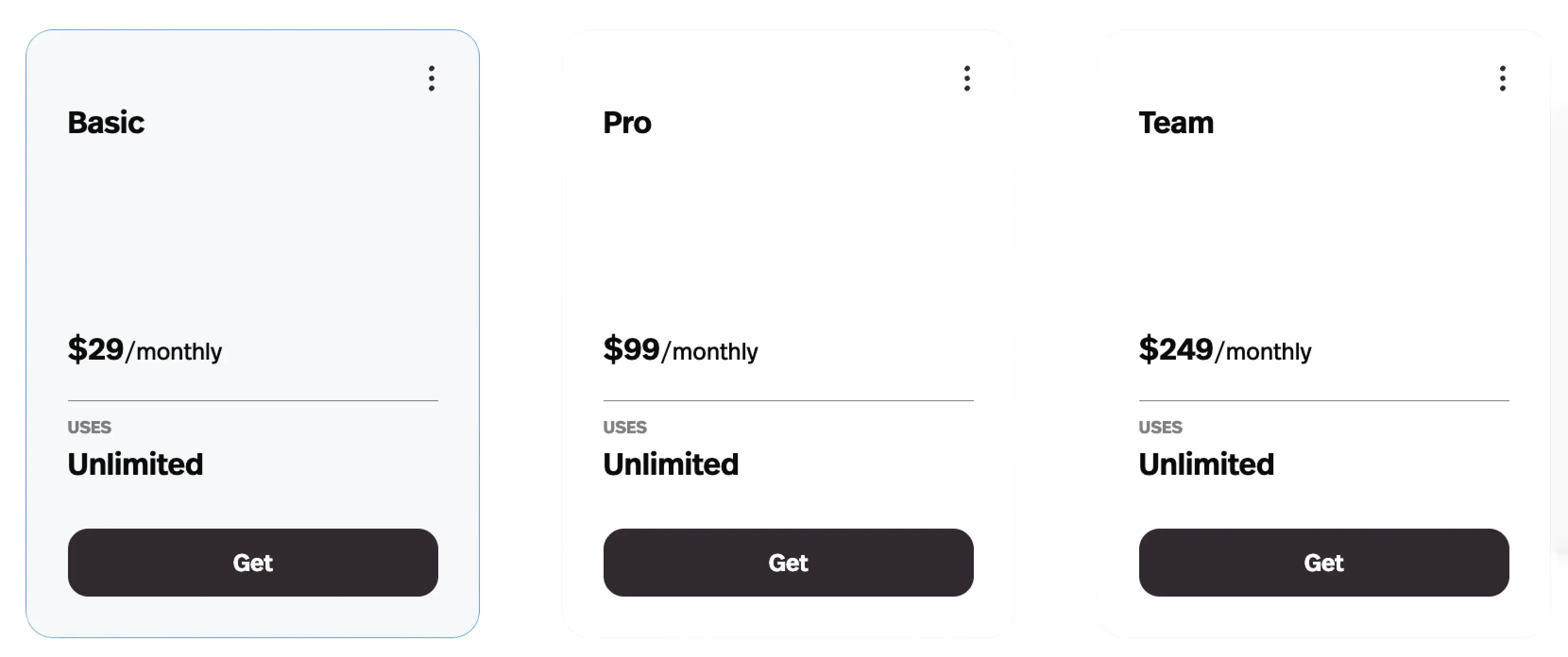
Cloud pricing is per builder rather than per end user: free for 2 builders and 50 end users, Starter at $24/builder/month, Pro at $99, Team at $249 with unlimited end users and apps. Enterprise starts around $3,000/month.
That per-builder model is the key difference from Retool. If you have two people building and four hundred people using, ToolJet's economics are dramatically better.
Where it breaks: self-hosting is free the way a puppy is free. You own the upgrades, the backups and the 2am outage. Budget for that or pay for cloud.
11. Bubble — the most powerful, and the most locked-in
Best for: genuinely complex applications where you're committing for years.

Bubble can build things the prompt-to-app tools simply cannot — real multi-tenant SaaS, intricate conditional logic, marketplaces with payment flows. A decade of maturity shows.
It's also the clearest lock-in on this page. Bubble has never allowed source-code export, and after ten years of people asking, that's a decision rather than a roadmap item. The mitigation they've publicly committed to is open-sourcing the runtime engine if the company ever shuts down — which is reassuring about Bubble disappearing, and irrelevant to you wanting to leave.
Pricing runs on Workload Units: free at 50K WU, Starter $59/month (annual) at 175K WU, Growth $209, Team $549. WU consumption is famously hard to predict before you've built something.
Where it breaks: the learning curve is steep enough that Bubble development is a career, and the WU model means a successful app gets more expensive in a way you can't fully model in advance.
Part 3: Own it outright
12. Dyad — free, local, and entirely yours
Best for: anyone who wants zero platform risk, and developers with strong privacy constraints.
Dyad is an open-source AI app builder that runs locally on your machine with your own model. There's no subscription, no credits, no hosting relationship and no company that can change the terms.
For agencies with clients in regulated industries, that last point isn't ideology — it's the difference between being able to take the engagement and not. Nothing leaves the laptop.
Where it breaks: it's the least polished experience here by some distance, you supply the model (and its costs), and "deploy it" is entirely your problem. This is the option you choose because of a constraint, not because it's the nicest to use.
When you don't need a web app at all
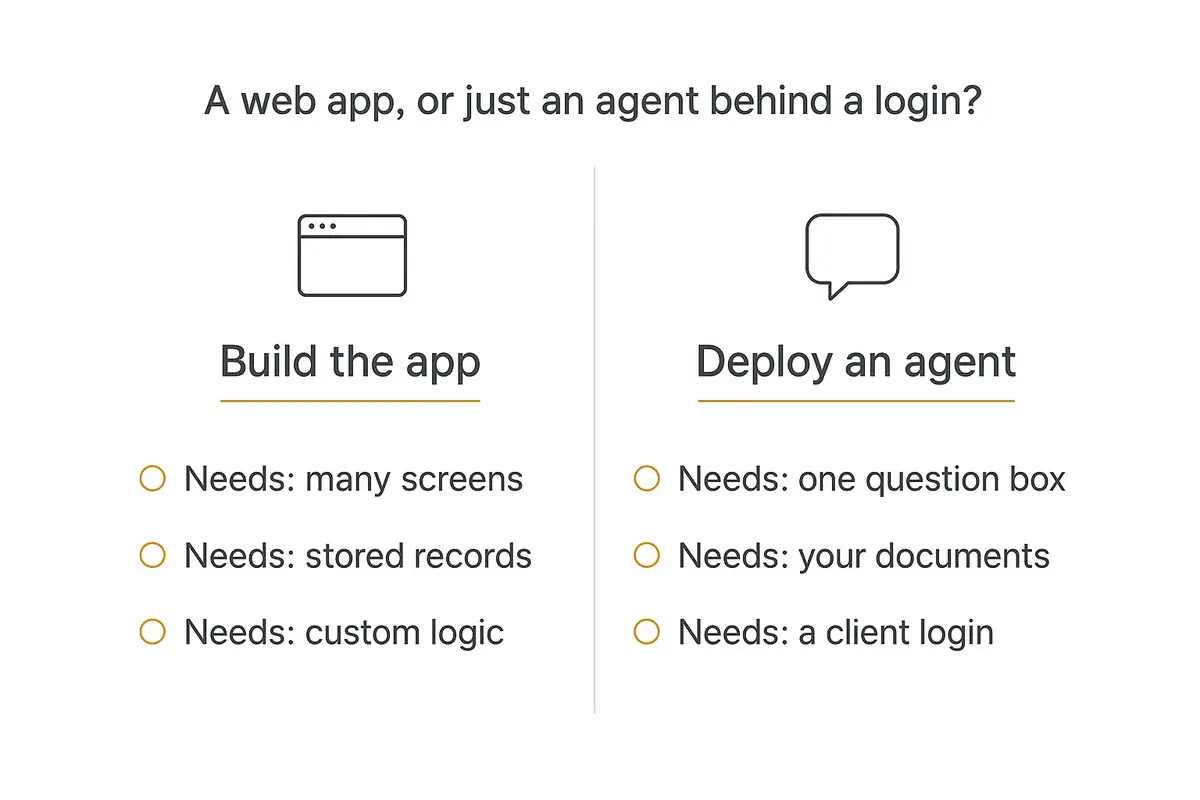
Here's the thing I'd want someone to tell me before I spent a weekend in one of these tools.
A large share of the briefs that arrive as "we need a web app" are actually one question box, some documents, and a login. A client wants their team to be able to ask questions of a 400-page policy manual. Or wants customers to get instant answers about their product catalogue.
You can absolutely build that as a web app. You'll spend the weekend on screens, auth, a database schema and a retrieval pipeline — and then own all of it forever.
Or you point an AI agent at the documents, put it behind a login, and ship it Tuesday.
This is the lane Pickaxe is built for, so treat this as the disclosed house pick rather than a neutral verdict. You upload the knowledge, write the instructions in plain English, connect Actions to tools like Gmail or Notion, and deploy it as an embed or inside a branded portal with access groups and Stripe billing.
If you'd rather compare that lane properly before committing, we ranked it in 12 best no-code AI agent builders, and the retrieval side is covered in adding a knowledge base to your agent.
The practical difference is what you're maintaining afterwards. A generated web app is a codebase you now support. An agent behind a portal is a configuration you can change in an afternoon.
Pricing: Gold is $37/month ($29 billed annually), Pro $147/month. There's no free plan, which is a real barrier if you're still validating the idea — one of the builders above with a free tier is the cheaper place to test whether the client actually wants this.
Where it breaks: if the brief genuinely needs many screens, stored records and custom business logic — an inventory system, a booking engine, a CRM — an agent is the wrong shape and you should go back up this page. We drew that line in more detail in building a client-facing AI agent without code.
Five questions to ask before you pick an AI web app builder
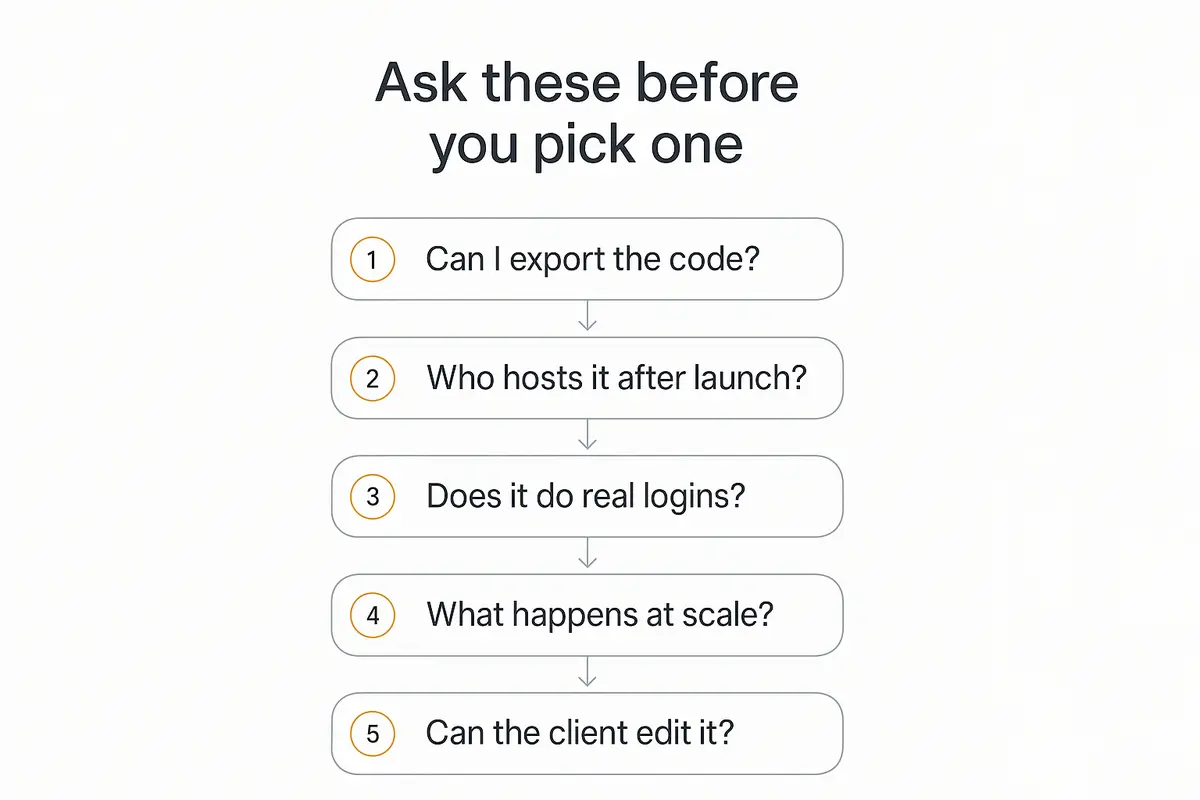
Run any platform through these before you build anything you care about. Every one of them is cheap to answer now and expensive to discover later.
1. Can I export the code? Get a yes, a no, or "the frontend." All three are acceptable answers; not knowing which one you got is not.
2. Who hosts it after launch? If the answer is the platform, your app's uptime is their uptime and your client's data lives on their infrastructure. Check that against whatever you signed.
3. Does it do real logins? Multiple users, roles, permissions, password resets. Demos skip this constantly and it's usually a third of the actual work.
4. What happens at scale? Not performance — billing. Ask specifically what a 10x traffic increase costs. Workload units, credits and per-user fees all behave differently, and only one of them is on the pricing page.
5. Can the client edit it without me? This decides whether you've sold a project or accidentally sold a lifetime support contract. Both are viable businesses — and if you're doing this for clients, the agency playbook covers the handover. Pick deliberately, and price it accordingly — we covered how in pricing AI services.
What I'd actually use
Concrete recommendations, by the situation you're actually in.
| If you're… | Use | Because |
|---|---|---|
| Testing an idea this weekend | Bolt.new or Lovable | Free tiers, fastest to something real |
| Building a product you'll sell | Lovable or Emergent | You keep the whole codebase |
| Handing it to a developer later | Emergent or v0 | Clean repo, GitHub-native |
| Building an ops tool nobody will migrate | Zite | Hosted, SOC 2, genuinely no code needed |
| Inside a company with a security review | Retool | Self-host on any tier, real audit logs |
| Serving hundreds of internal users | ToolJet | Per-builder, not per-end-user billing |
| Under strict data rules | Dyad | Runs locally, nothing leaves |
| Actually just needing Q&A over documents | Pickaxe | An agent behind a login, not an app |
Two patterns worth stating plainly.
If a client will ever own it, pick a tier-one tool. The convenience of a hosted platform is real, but you cannot hand over what you can't export, and discovering that during an offboarding conversation is a genuinely bad day.
If nobody will ever migrate it, stop paying the ownership tax. Wrestling a repo you have to host and maintain, for a tool five people use twice a week, is worse than a $20/month hosted app that just works.
FAQ
What is an AI web app builder?
A platform that turns a written description into a working web application — frontend, database, authentication and hosting — without you writing the code. The category splits between prompt-to-app tools aimed at products you'll ship, and internal-tool builders aimed at business software.
Which AI web app builder lets you export the code?
Lovable, Bolt.new, v0, Replit, Emergent, Anything and Dyad all give you the full codebase. Base44 exports the React frontend only — the backend stays on their servers. Bubble and Zite don't offer source export at all. Retool and ToolJet don't hand over a repo but can be self-hosted.
What's the cheapest AI web app builder?
Dyad is free and open source if you self-host and bring your own model. Among hosted tools, Bolt.new's free tier (1M tokens/month) and Zite's free plan are the most usable without paying. Most paid entry tiers land around $20–25/month.
Are AI web app builders good enough for production?
For internal tools, dashboards and straightforward business apps, yes — that's the mainstream use now. For consumer-facing products at scale, they're a strong starting point that usually needs a developer before launch. The honest test isn't whether it runs, it's whether someone can maintain it in six months.
What's the hidden cost people miss?
Usage billing on top of the subscription. Replit's Agent checkpoints are the sharpest example — one documented period ran $206.25 in overages against a $20 plan, and Replit's own docs note power users pay three to four times their subscription. Set a spending cap on day one.
Do I need a web app or an AI agent?
If the brief needs many screens, stored records and custom logic, build the app. If it's really "let people ask questions of our documents," an agent behind a login ships faster and is far cheaper to maintain. A surprising number of briefs are the second thing wearing the first thing's clothes.
The takeaway on AI web app builders
These tools are past the point of being impressive. All twelve will get you a working app, and the gap between the best and the middle of this list closes every month.
What doesn't close is the ownership question. A demo takes ninety seconds; the consequences of which tier you picked last three years.
So decide that first, deliberately, before the demo seduces you. If a client will ever own it, take the code. If nobody ever will, take the hosting and stop worrying about it. Both are good answers — drifting into one by accident is the only bad one.
And before you build anything: check whether the brief is a web app at all. A fair number of them are one agent, some documents and a login — and that's a Tuesday, not a quarter.