
Most teams get the order backwards. They pick an AI tool, get excited, and then go looking for a workflow to bolt it onto. Six weeks later the pilot quietly dies and nobody can say what it actually saved.
There's hard data behind that pattern. An MIT study published in 2025 found that 95% of enterprise generative AI pilots delivered no measurable impact on the bottom line — only 5% broke through to real operational or financial value (Fortune coverage of the MIT NANDA report). RAND found that over 80% of AI projects fail — roughly double the failure rate of non-AI software projects (RAND, The Root Causes of Failure for AI Projects).
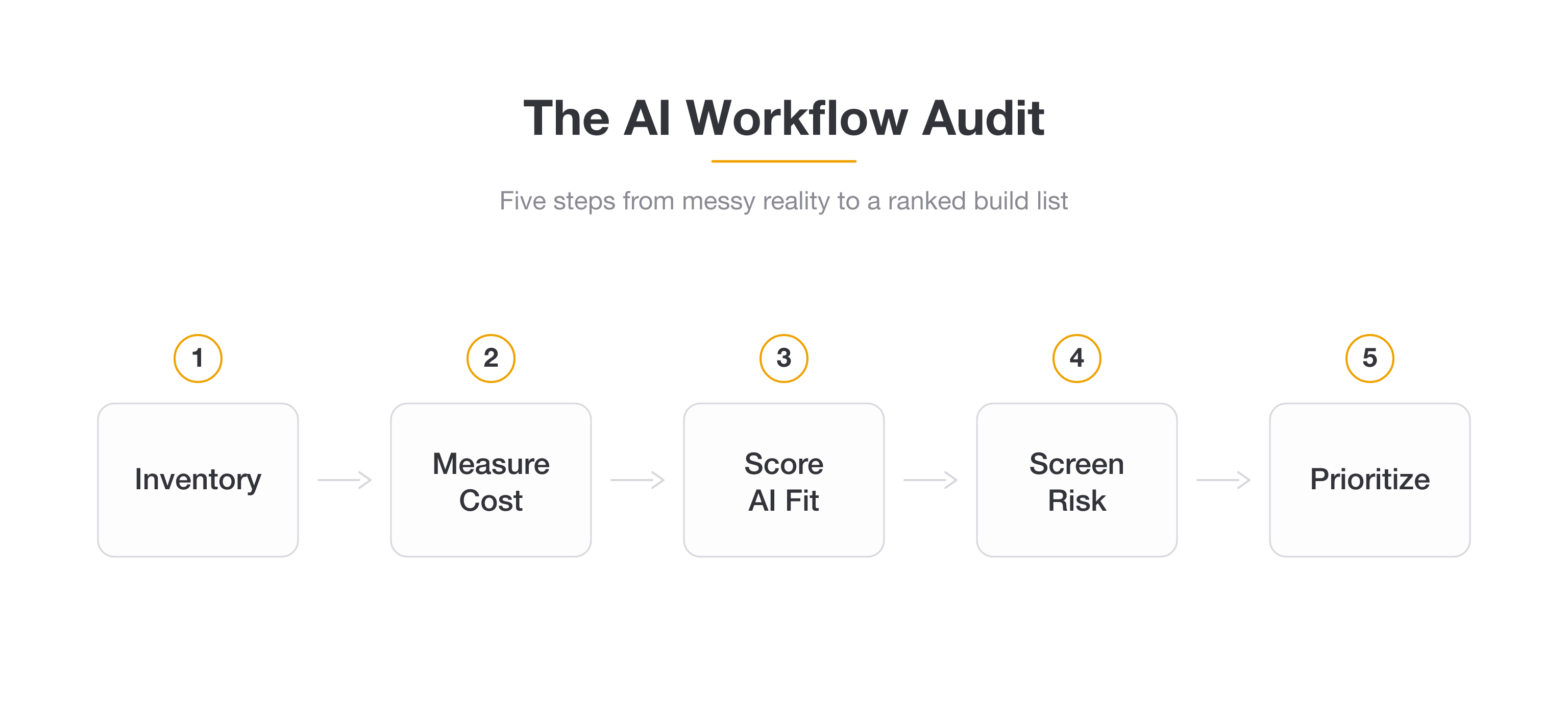
The teams that succeed do the unglamorous thing first: they run an AI workflow audit. They map what they actually do all day, score each workflow for whether AI can genuinely help, screen for risk, and only then pick a tool.
This is the checklist for doing that. It's the process I'd walk a client through — whether you're auditing your own business or running this as a paid deliverable for someone else's. No special software required: a spreadsheet, an honest week of attention, and the scoring rubric below.
What Is an AI Workflow Audit (and Why Do One Before You Buy Any Tools)?
An AI workflow audit is a structured review of how work actually gets done in your business, scored to find which workflows are the best candidates for AI agents — and which ones to leave alone.
It answers four questions in order:
- What do we actually do? (inventory)
- What does each task really cost? (time and money)
- Where can AI genuinely help? (suitability scoring)
- What's safe to automate, and what isn't? (risk and compliance)
Notice what's not on that list: "which tool should we buy." That comes last, on purpose.
The reason to audit first is that the opportunity is real but the failure rate is brutal. McKinsey's 2025 research found that 88% of organizations now use AI in at least one function — but only about 39% report any measurable impact on earnings (McKinsey, The State of AI). Everyone's adopting. Almost nobody's measuring a return.
That gap — adoption without impact — is exactly what an audit closes. Gartner predicted that 30% of generative AI projects would be abandoned after proof of concept by the end of 2025, citing poor data quality, weak risk controls, and unclear business value (Gartner press release). An audit catches all three before you've spent a dollar building.
The upside is just as concrete. McKinsey estimates that current technology could automate activities accounting for roughly 57% of US work hours, with AI agents specifically able to perform tasks occupying about 44% of work hours (McKinsey State of AI, 2025). The point of the audit is to find your slice of that — not the industry average.
If you're still fuzzy on what separates an AI agent from a chatbot or a basic automation, it's worth reading From Chatbot to AI Agent and What Are AI Agents first. The audit assumes you know roughly what an agent can do.
What You'll Need Before You Start (Scope, Team, and a Spreadsheet)
The fastest way to wreck an audit is to try to boil the ocean. Don't audit "the whole company." Audit one or two functions where the pain is loudest.
Set your scope. Pick a single department or a single end-to-end process — client onboarding, support, invoicing, lead intake. You can always run the audit again for the next function once you've proven the approach.
Assemble a small team. You want the people who actually do the work, not just the manager who thinks they know how it's done. The gap between the documented process and the real one is usually where the best AI opportunities hide.
Time-box it. A focused audit of one function takes about two weeks: a few days to inventory, a week to measure, a few days to score and prioritize. Don't let it sprawl into a quarter-long committee exercise.
Set up one spreadsheet. One row per workflow. Columns for owner, frequency, volume, time, cost, the suitability score, the risk flag, and a priority tier. That's the whole toolkit. Everything below fills in those columns.
Here's the inventory template you'll start with:
| Workflow | Owner | Frequency | Volume / week | Tools touched | Inputs → Outputs |
|---|---|---|---|---|---|
| New client intake | Ops | Daily | 15 | Email, CRM, Docs | Email → CRM record |
| Support triage | Support | Hourly | 120 | Inbox, Help desk | Ticket → routed reply |
| Monthly reporting | Finance | Monthly | 1 | Sheets, BI tool | Raw data → summary |
Step 1 — Build Your Workflow Inventory
You can't audit what you can't see. The first job is to list every repeatable task in your scoped function — not the org chart, not the projects, the actual recurring work.
For each one, capture: the task name, who owns it, how often it runs, how many times per week, which tools it touches, and what goes in versus what comes out.
Be ruthless about granularity. "Handle support" is not a workflow — it's ten of them. "Read incoming ticket, classify it, draft a first reply, route to the right person" is four workflows you can actually score.
One step almost everyone skips: run a Shadow AI pass. Ask your team, point blank, where they're already quietly pasting things into ChatGPT or Claude to get through the day.
That informal usage is gold. It's a list of workflows your own people have already decided AI can help with — they've just done it in an ungoverned, copy-paste way. Those are often your highest-confidence audit candidates, and surfacing them also flags a data-governance issue you'll want to fix.
By the end of Step 1 you should have 15–40 rows. If you have 3, you weren't granular enough. If you have 200, your scope was too wide.
Step 2 — Measure the True Cost of Each Workflow
Now put numbers on it. The instinct is to estimate from memory, and the estimate is always wrong. Track the real time for a week. A rough timer or a tally sheet beats a guess every time.
But raw hours undersell the real cost. There are five layers, and only the first is obvious:
- Direct labor. Hours × loaded hourly cost. The visible number.
- Error correction. Time spent fixing mistakes, re-doing work, and chasing down what went wrong.
- Speed penalty. What slowness costs you — the lead that went cold, the customer who churned while a ticket sat.
- Opportunity cost. What your skilled people aren't doing because they're stuck on this.
- Scaling ceiling. Work that breaks if volume doubles — the workflow that quietly caps your growth.
A workflow that looks cheap on direct labor can be wildly expensive once you count the other four. The classic example is manual data entry: a few hours a week on paper, but it's error-prone, it delays everything downstream, and it can't scale. That's a top-tier AI candidate hiding behind a small labor number.
For the workflows where the math gets fuzzy, our guide to measuring AI agent ROI has formulas you can drop straight into this column.
Found a workflow worth automating?
Pickaxe lets you build and deploy a no-code AI agent for it — no engineering team required.
Step 3 — Score Each Workflow for AI Suitability (Not Just "Automatability")
This is the step where most audits go wrong, and it's the one that matters most.
Old-school automation auditing scores tasks for whether they're rule-based and repetitive — perfect for traditional RPA, which follows fixed if-this-then-that logic. But AI agents are good at a different class of work: tasks involving language, judgment, and messy unstructured input that rules could never capture.
So you need to score for AI fit specifically, not generic automatability. Rate each workflow 1–5 on these six signals:
| Signal | What you're asking | High score (5) means |
|---|---|---|
| Volume & frequency | How often does it run? | Many times a day |
| Repetitiveness | Is it broadly the same each time? | Same shape, every time |
| Unstructured language | Does it involve reading/writing text? | Heavy text in and out |
| Judgment level | How much nuance is needed? | Pattern-based judgment, not deep expertise |
| Data availability | Is the needed info accessible? | Clean, reachable data |
| Error tolerance | What happens if it's occasionally wrong? | A mistake is cheap and recoverable |
Add them up for a score out of 30. The pattern to look for: high volume, lots of language, moderate judgment, forgiving of error. That's the sweet spot where AI agents shine and traditional automation can't reach.
Summarizing support tickets, drafting first-pass replies, classifying inbound leads, extracting fields from messy documents, researching prospects — these score high because they're language-heavy and pattern-based. An AI research agent is a great example: it reads unstructured sources and produces a structured summary, something RPA simply can't do. For a concrete implementation, see how to build an AI market research agent for competitive intelligence.
Score low: anything needing deep human expertise, high-stakes irreversible decisions, or genuine emotional nuance. A workflow can be repetitive and still be a terrible AI candidate if a wrong answer is expensive and hard to undo.
Step 4 — Screen for Risk and Compliance (Before You Automate Anything)
Here's the step that almost every "find automation opportunities" guide leaves out entirely — and it's the one that gets companies in trouble.
Before a high-scoring workflow goes on your build list, run it through a quick risk screen. You're not doing a full legal review; you're flagging anything that needs a closer look.
Use the NIST framework as your backbone. The US NIST AI Risk Management Framework organizes AI risk into four functions — Govern, Map, Measure, Manage — and it's the de facto standard for doing this responsibly. You don't need the full framework document for an audit; you need its mindset: name the risks, measure them, and assign someone to manage them.
Flag high-risk categories. The EU AI Act — the first comprehensive AI law, in force since August 2024 — designates specific uses as "high-risk": hiring and HR decisions, credit and lending, medical, education, and law enforcement, among others (see the official high-risk guidelines). If a workflow touches one of those, it doesn't mean you can't automate it — it means a human stays firmly in the loop and you document everything.
For each workflow, ask three questions:
- Data sensitivity: Does this touch personal, financial, or health data? If yes, governance gets stricter.
- Decision stakes: Could a wrong output harm a person or the business in a hard-to-reverse way?
- Human oversight: Does a regulation or your own risk tolerance require a person to review before action?
Tag each workflow green (low risk, automate freely), yellow (automate with a human reviewing), or red (high-risk, needs sign-off and documentation before anything ships). Europe's data-protection authorities even publish their own AI auditing checklist if you want a heavier governance template.
This screen costs you an afternoon and saves you from the kind of deployment that ends up in a compliance review. Shadow AI — the unofficial ChatGPT usage you found in Step 1 — is exactly the ungoverned risk this step is meant to bring into the open.
Step 5 — Prioritize: The Automate-Now / Redesign / Defer Matrix
Now you've got, for every workflow: a cost, a suitability score, and a risk tag. Time to turn that into a ranked build list.
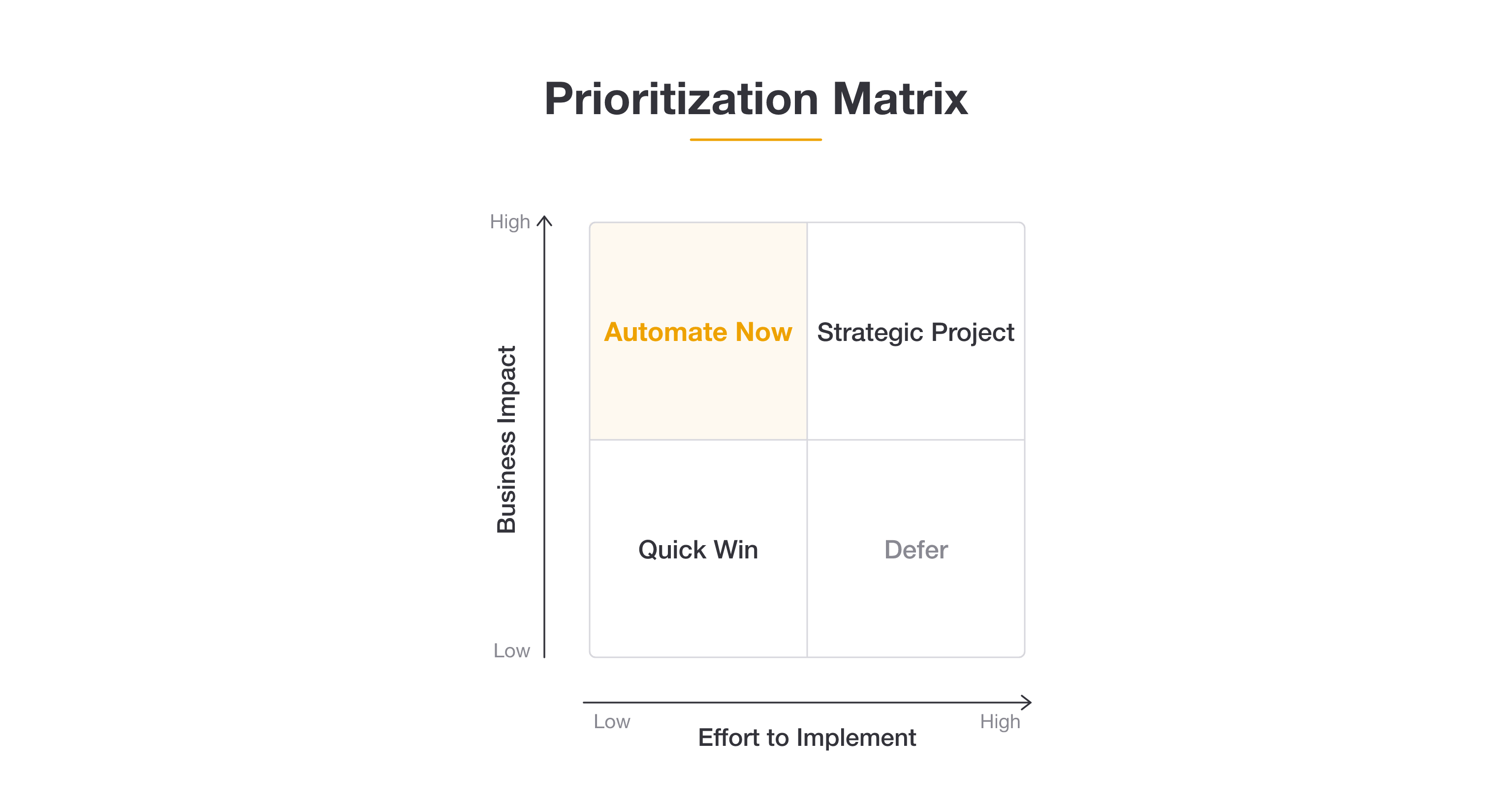
The simplest tool that works is a 2×2 matrix: business impact on one axis, effort to implement on the other.
- High impact, low effort → Automate Now. These are your first builds. High suitability score, real cost, green or yellow risk. Start here.
- High impact, high effort → Strategic Project. Worth doing, but plan for it. Often needs a workflow redesign first.
- Low impact, low effort → Quick Win. Easy, but small. Do them when you have spare cycles.
- Low impact, high effort → Defer. Don't. Not now, maybe not ever.
A useful set of thresholds, adapted from the way good automation consultants score: a suitability score of 20+ out of 30 means automate now; 15–19 means redesign the workflow first (the process is too messy to automate as-is); under 15 means defer. Then bump anything tagged red down a tier until the risk is handled.
The output of this step is a one-page ranked list: your top three to five workflows, in order, with the cost and score that justify each. That list is the deliverable. If you're running this for a client, it's what you present.
Resist the gravitational pull toward the flashy use case. The best first project is almost always a high-volume piece of drudgery — not the impressive-sounding one. Boring and frequent beats exciting and rare every time.
Step 6 — Decide the Right Level of Automation (Assist, Augment, or Fully Automate)
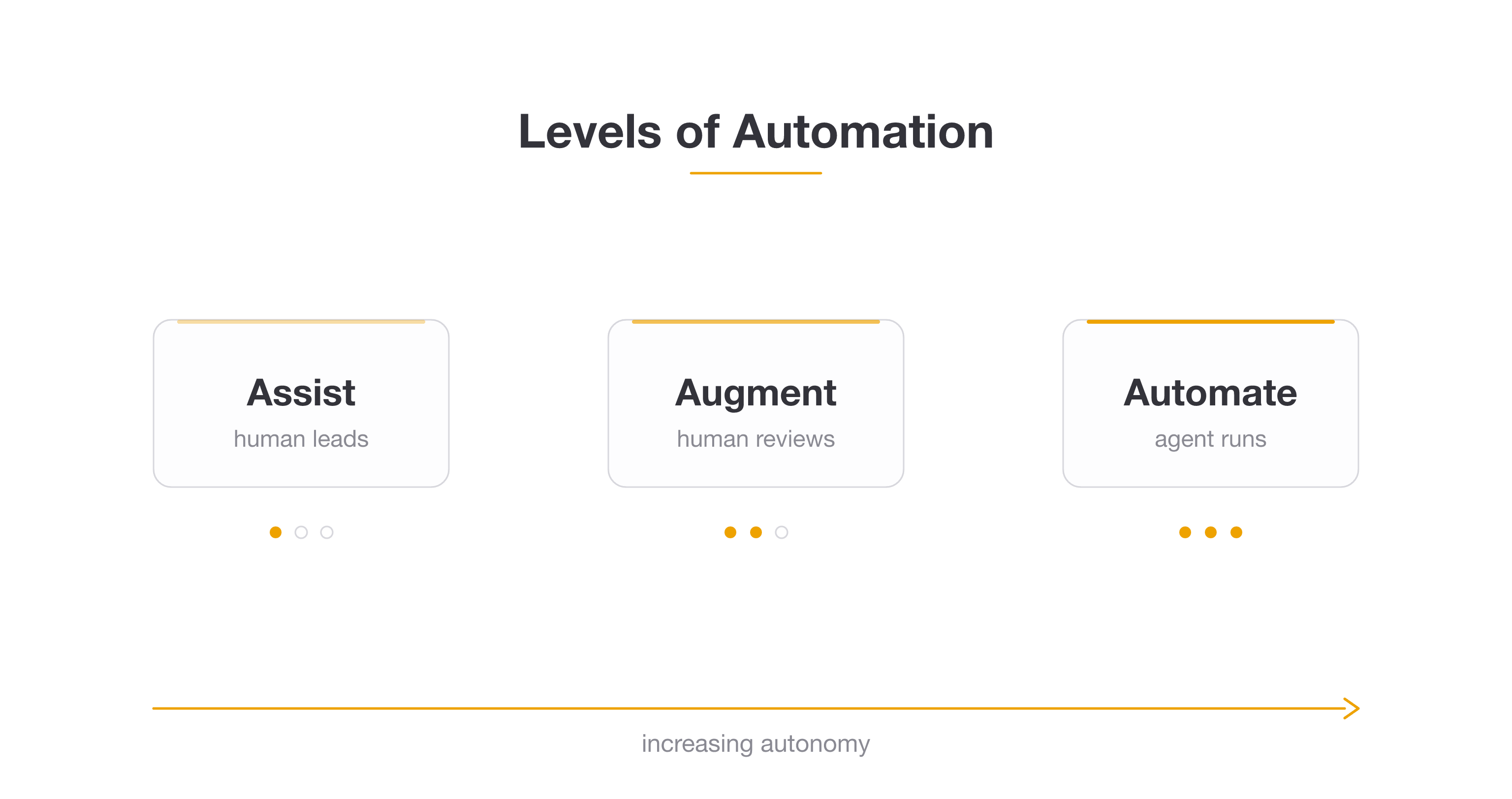
"Automate it" isn't one decision — it's a spectrum. For each workflow on your build list, pick how much autonomy the agent actually gets.
Assist (human leads). The agent suggests; the person decides and acts. Think of a draft reply the support rep edits and sends. Lowest risk, fastest to trust, great for anything you tagged yellow.
Augment (human reviews). The agent does the work and a person approves before it goes out. The agent drafts and queues the reply; a human clicks send. Good middle ground for moderate-stakes workflows.
Automate (agent runs). The agent handles it end to end, no human in the loop. Reserve this for green-tagged, error-tolerant, high-volume work where a mistake is cheap.
The mistake here is jumping straight to full automation because it sounds more impressive. Start most workflows at Assist or Augment, build trust as the agent proves itself, and graduate it to full autonomy only once the error rate is genuinely low. You can always loosen the leash; it's much more painful to tighten it after a public mistake.
This is also where having a real testing process pays off. Before you let any agent run unsupervised, put it through its paces — our guide on how to test and debug your AI agent before deploying it covers exactly what to check.
Step 7 — Build the Business Case and ROI Estimate
The audit isn't done until it produces numbers a decision-maker can act on. For each of your top workflows, estimate the projected savings.
The formula is simple: (hours saved per week × loaded hourly cost × 52) − (build + run cost) = annual net benefit. Layer in the error-reduction and speed gains from Step 2 where you can quantify them.
You don't have to invent the benchmarks. A Forrester Total Economic Impact study commissioned by Microsoft found that a composite organization using process automation saw a 248% ROI over three years, with high-volume repetitive-task workers saving roughly 200 hours per year each (Forrester TEI via Microsoft). Use figures like that as a sanity check, not a promise.
Be honest about the costs side, too. Gartner's more recent data found that only about 28% of AI projects deliver clear ROI (reporting on Gartner, 2026). The whole point of the audit is to land you in that 28% by only building what the numbers support.
If you're weighing whether to build in-house, buy an off-the-shelf agent, or wait, our build vs buy vs wait framework pairs neatly with this step. And if you're pricing this work as a service for clients, how to price AI services covers how to package the audit and the build.
From audit to working agent
Once you've ranked your workflows, build the agent on Pickaxe — connect your tools with Actions and deploy in days, not quarters.
The Complete AI Workflow Audit Checklist (Copy-Paste)
Here's the whole thing as a checklist you can lift straight into your own doc:
Setup
- ☐ Scope the audit to one function or end-to-end process
- ☐ Pull in the people who actually do the work
- ☐ Time-box it to ~2 weeks
- ☐ Set up one spreadsheet, one row per workflow
Step 1 — Inventory
- ☐ List every repeatable task (granular, not high-level)
- ☐ Capture owner, frequency, volume, tools, inputs → outputs
- ☐ Run a Shadow AI pass — where is the team already using AI?
Step 2 — Measure cost
- ☐ Time-track each workflow for a week
- ☐ Add the five cost layers: labor, error correction, speed penalty, opportunity cost, scaling ceiling
Step 3 — Score AI suitability (1–5 each, out of 30)
- ☐ Volume & frequency
- ☐ Repetitiveness
- ☐ Unstructured language
- ☐ Judgment level
- ☐ Data availability
- ☐ Error tolerance
Step 4 — Screen risk
- ☐ Check data sensitivity, decision stakes, oversight needs
- ☐ Flag EU AI Act high-risk categories
- ☐ Tag each workflow green / yellow / red
Step 5 — Prioritize
- ☐ Plot impact vs effort on a 2×2
- ☐ Apply thresholds: 20+ automate now, 15–19 redesign first, under 15 defer
- ☐ Bump red-tagged workflows down until risk is handled
Step 6 — Choose automation level
- ☐ Assign each build to Assist, Augment, or Automate
- ☐ Start most at Assist/Augment, graduate with proven reliability
Step 7 — Business case
- ☐ Estimate annual net benefit per workflow
- ☐ Produce a one-page ranked build list
Common Mistakes to Avoid in an AI Workflow Audit
Auditing projects instead of recurring work. AI agents earn their keep on tasks that repeat. A one-off doesn't make the list, no matter how painful it was this one time.
Chasing the flashy use case. The demo-worthy idea is rarely the highest-ROI one. High-volume drudgery wins. Score honestly and follow the numbers.
Skipping the risk screen. This is the step that separates a real audit from a wish list. Most guides skip it; the regulators won't.
No owner for follow-through. An audit that ends in a deck nobody acts on was a waste of two weeks. Every "automate now" workflow needs a named owner and a date.
Going straight to full automation. Trust is earned. Start assisted, prove the error rate, then loosen the leash.
Auditing once and never again. Your workflows change, and so do the models. Re-run the audit quarterly for your active functions.
From Audit to Action: Piloting, Measuring, and Scaling
An audit is only as good as what you build off it. Take the single top workflow from your ranked list — not all five, one — and run a scoped pilot.
Define success before you start. Pick one or two metrics: hours saved, response time, error rate, tickets deflected. Write down the target. If you can't measure it, you can't prove the ROI you estimated in Step 7.
Build small, ship fast. This is where a no-code platform earns its place. Instead of a months-long engineering project, you can stand up an agent for a single scored workflow in days. With Pickaxe, you connect the tools the workflow already touches using Actions and integrations, point the agent at your knowledge base, and deploy it to your site, Slack, or wherever the work happens. The whole reason the audit scores workflows is so you know exactly which one to build first.
Measure against your target, then scale. If the pilot hits its number, graduate it up the automation spectrum and move to the next workflow on the list. If it misses, you've learned something cheaply — adjust and re-score.
Then put a quarterly review on the calendar. The 5% of companies that get real value from AI aren't the ones with the fanciest tools — per the MIT research, they're the ones who picked the right workflows and integrated deeply rather than spraying AI everywhere. The audit is how you join them.
Frequently Asked Questions
How long does an AI workflow audit take?
For a single function, about two weeks: a few days to inventory, a week to measure real time and cost, a few days to score and prioritize. Auditing the whole company at once is the most common way to make it take three months and produce nothing.
Which workflows are the best candidates for AI agents?
High-volume, language-heavy, pattern-based tasks where an occasional mistake is cheap to fix: summarizing tickets, drafting first-pass replies, classifying leads, extracting data from messy documents, first-pass research. Score low for anything needing deep expertise or high-stakes irreversible judgment. Managed service providers score unusually well on almost every row of that list — here is what the MSP tooling stack looks like now.
Do I need a data scientist to run the audit?
No. The audit is a business exercise, not a technical one — a spreadsheet, the people who do the work, and the scoring rubric above. You only need technical help at the build stage, and a no-code agent builder removes most of even that.
What's the difference between an AI workflow audit and an automation audit?
A traditional automation audit scores tasks for fixed, rule-based steps suited to RPA. An AI workflow audit also scores for language, judgment, and unstructured input — the messy work that AI agents handle and rules can't. The suitability scoring in Step 3 is what makes it AI-specific.
How often should I re-run the audit?
Quarterly for any active function. Your workflows shift, your volumes grow, and the models improve fast — a workflow that scored a 14 last quarter might clear 20 today.
The Bottom Line
The gap between "we use AI" and "AI made us money" is enormous right now — 88% adoption, but only a sliver seeing real returns. The teams on the right side of that gap didn't have better tools. They picked better workflows.
An AI workflow audit is how you pick better workflows. Inventory what you do, cost it honestly, score it for genuine AI fit, screen the risk, and only build what the numbers support.
It's not glamorous. It's a spreadsheet and two weeks of attention. But it's the difference between being part of the 95% of pilots that fizzle and the 5% that pay for themselves many times over.
Run the audit first. Then, when you know exactly which workflow to build, Pickaxe is built to take you from a scored row in a spreadsheet to a deployed agent without an engineering team standing in the way.