
Invite-only access groups
Choose the workspace you want to configure, then follow the steps below.
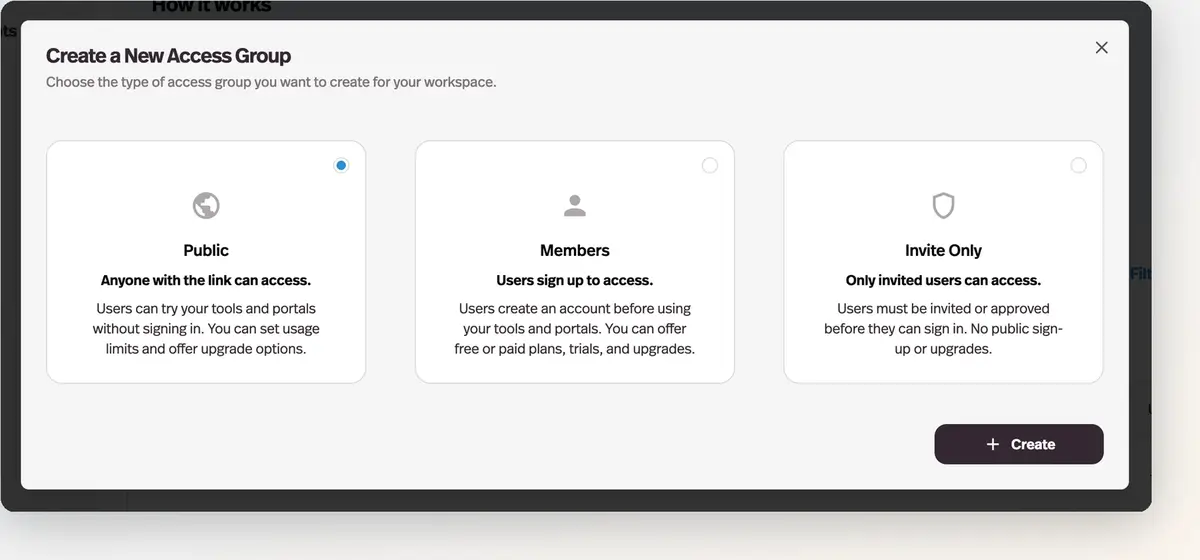
What it does
A new access group type where nobody can join by signing up — members exist only because you invited them.
Before this
An expansion of access groups. Public and member groups existed, and anyone could join either by signing up. There was no group type where membership was only ever something you granted.
Why it matters
The right shape for a client workspace, a pilot cohort, or an internal team, where an open signup form would be a liability.
How it works
You add people by email in the group editor's Users tab — comma-separated, with an optional invitation email and a choice of which portal or deployment the invite link opens. Anyone who was not invited is told the portal is invite-only and can submit a request for access, which lands in the notifications bell on your Users page.
- No trials
- Trials convert strangers; an invite-only group has none.
- No self-serve upgrades
- You place each person in the tier they belong in. Buy more uses or credits can still be enabled.
- Still monetizable
- A one-time price or a subscription works the same as on a member group.
- Multiple portals
- The one group type designed to connect to several portals at once.
Sharing the link openly and letting the request queue tell you who is interested is the pattern this enables: an open front door with you as the doorman, rather than a hidden URL.