
The workspace dashboard, reorganised
Choose a workspace or use your account navigation to follow the steps below.
What it does
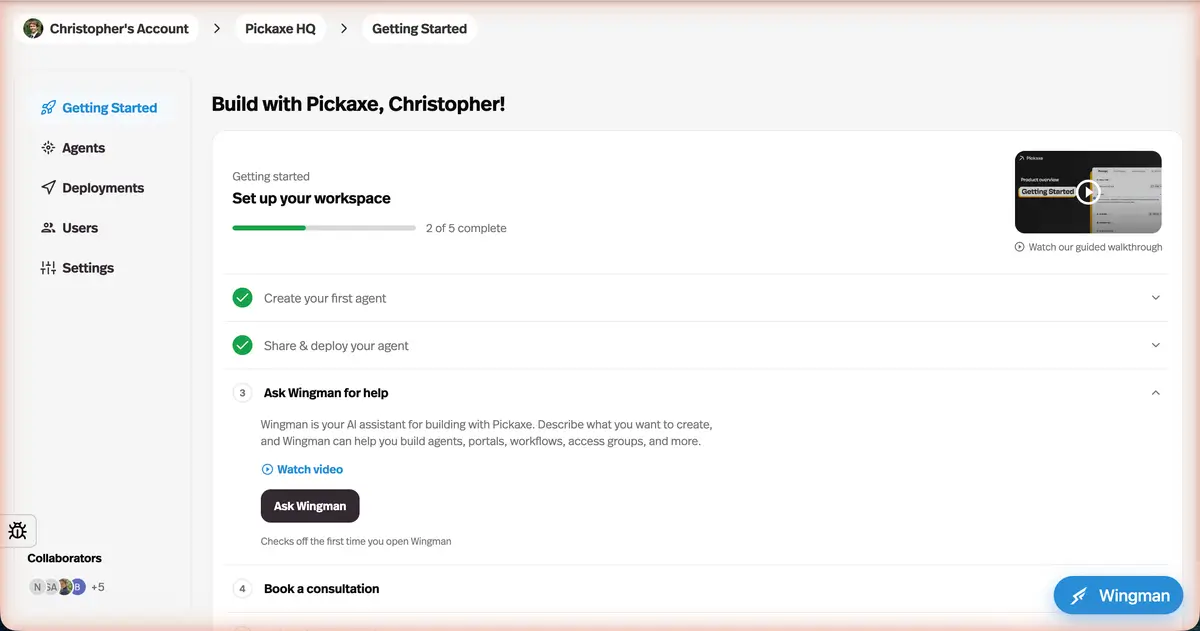
Tabs are grouped into four areas — Agents, Deployments, Users, and Settings — each holding the things that belong together, with a dedicated deployments page.
Before this
A reorganisation rather than a new capability. Everything was already there, laid out as one flat tab bar — and deployments had no page of their own at all.
Why it matters
The old flat tab bar stopped scaling as the platform grew. Related work now lives in one place instead of three tabs apart.
How it works
The flat tab bar became four areas, each holding the work that belongs together: Agents, Deployments, Users, and Settings — with deployments getting a page of their own rather than living inside each agent.
The dedicated deployments page is the practical win. Once a workspace has a dozen agents with several deployments each, the question you actually ask is "what is live right now?", and that question had no page to answer it.