
New featureAccess ·
Send Workspace mail from your own domain
Open workspaces
Choose the workspace you want to configure, then follow the steps below.
What it does
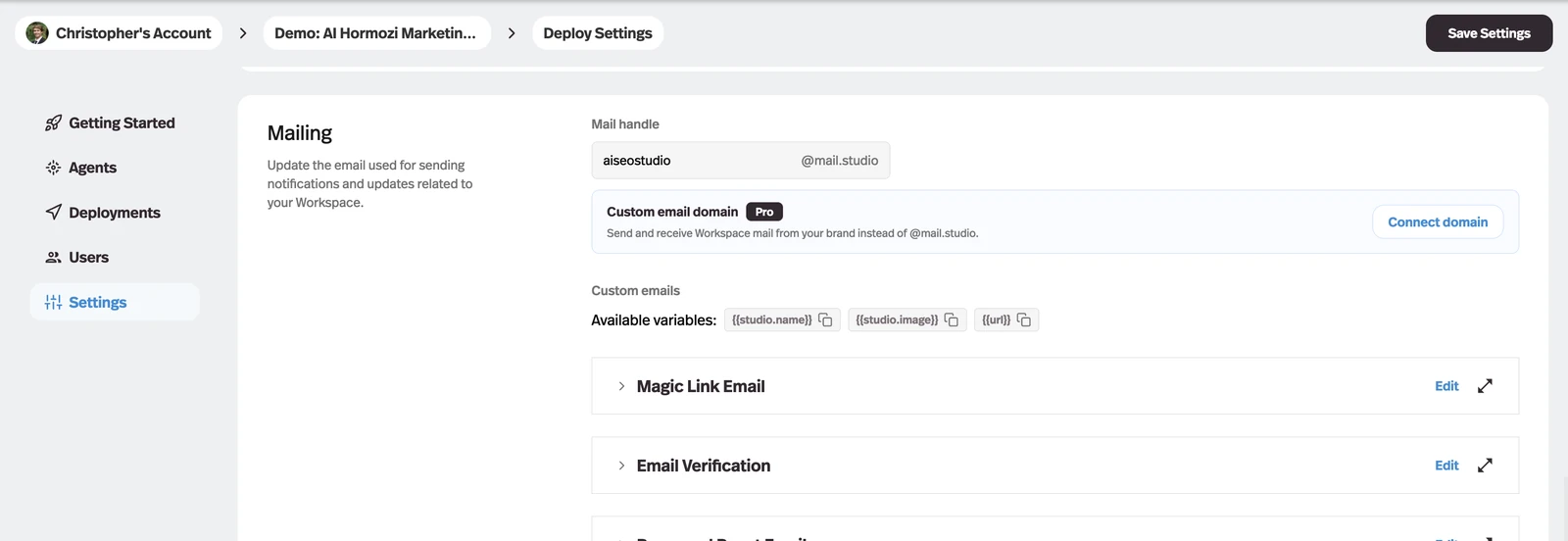
Workspaces on Gold and higher plans can connect a domain they own, so magic links, verification, password resets, and invitations arrive from their brand instead of @mail.studio.
Why it matters
The first email a new member gets is a sign-in link, and a platform address on it is the one part of the experience you could not white-label.
How it works
Launched on Pro; available on Gold and higher plans since October 8, 2026. The control is Connect domain, in Settings → Deploy → Mailing, directly under Mail handle.
- Which domain
- A dedicated subdomain such as mail.example.com, so the records do not collide with a Google Workspace or Outlook inbox on the root domain.
- Setup
- Pickaxe returns the DNS records to add at your registrar and shows each one's status; Check DNS re-runs verification.
- Cutover
- Nothing changes until the domain reports Active — your @mail.studio address keeps sending in the meantime, and Remove returns you to it.
- Replies
- Mail sent back to the custom address is forwarded to the workspace owner.
It covers the account emails a studio sends its own members. An Email Bot deployment keeps its own @tools.mail.studio address.