
Upgrade paths and connected portals
Choose the workspace you want to configure, then follow the steps below.
What it does
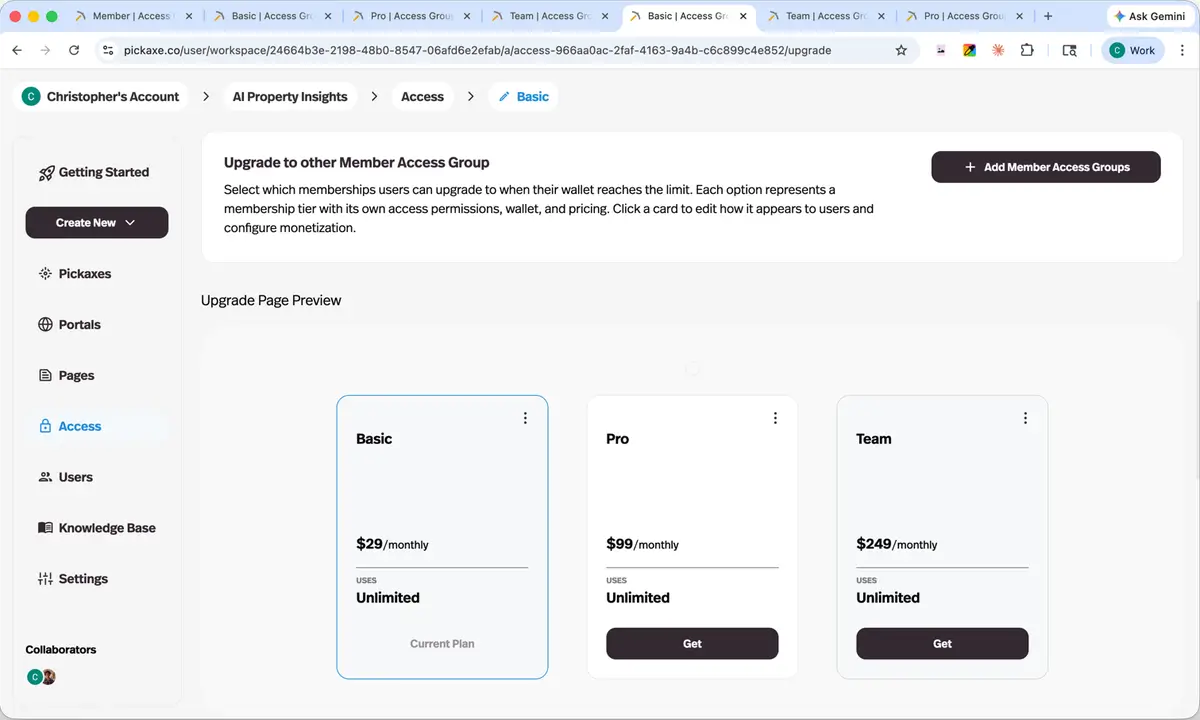
An access group can declare which groups it upgrades into, and which portals it grants access to, with the upgrade offer previewed as your users will see it.
Before this
An expansion. Groups and portals both existed but were not aware of each other, so an upgrade ladder was something you wired together by hand and kept in your head.
Why it matters
Lets you build a real ladder — free tier to paid tier to premium portal — instead of a set of disconnected groups you wire together by hand.
How it works
The Upgrade tab of an access group decides what happens when a member runs out of usage. Three things can be switched on, together or separately:
- Upgrade to another Access Group
- Name one or more groups as the tiers above this one. If an upgrade group has no portal yet, Pickaxe offers to connect it to the same one.
- Buy more uses or credits
- Let users top up their wallet instead of changing tier.
- Link out to an external site
- Send them to your own checkout. This one is manual — you grant the access or credits after the purchase.
A Pricing Page Preview shows the ladder exactly as your users will see it, and each card can be edited from there. Wiring tiers together by hand is what this replaced, and hand-wiring is where upgrade paths quietly break.