
Your agent can join meeting calls
Choose the workspace you want to configure, then follow the steps below.
What it does
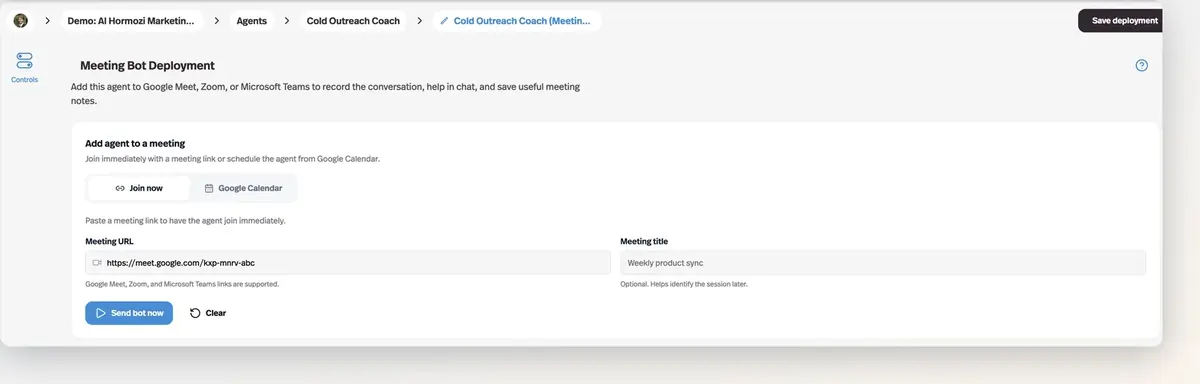
Add an agent to a Google Meet, Zoom, or Microsoft Teams call — by pasting a link or connecting Google Calendar — and it records the conversation, helps in chat, and writes up a report afterwards.
Before this
New. Nothing on the platform joined a call. Agents lived in chat, email, and messaging apps, and a meeting reached one only as a transcript somebody pasted in afterwards.
Why it matters
The post-meeting report lands with decisions, action items, owners, and due dates already separated out, and the transcript files itself into Documents or the agent's knowledge base.
How it works
Set it up like any other deployment — New Deployment → Meeting bot — and pick the agent that joins. It has to be a Chat agent, because the bot answers participants in the meeting chat.
- Joining
- Paste a Google Meet, Zoom, or Teams link, or connect Google Calendar and let it join scheduled meetings on its own.
- The report
- A summary, the decisions made, action items with an owner, due date, and status, and the full transcript.
- Where the report goes
- Either the deployment owner's Documents, or the agent's knowledge base — in which case every future conversation with that agent can draw on it.
- Video
- Optional recording alongside the transcript.
- User memory
- Meeting takeaways can be written to the memory of participants who have a workspace account.
The consent message the bot posts when it joins is required, not optional. Recording people without telling them is illegal in a lot of places, and the message is the platform's way of making sure that never depends on you remembering.