
The Vercel Railway stack is an appealing way to put an AI-built application online: deploy the web app on Vercel, run a backend and database on Railway, and connect the pieces. You get a flexible setup without starting by managing your own cloud servers.
I understand the appeal. But if I were an agency building client websites, I would also look at Fork before assembling that stack, because the bigger job is often helping a client keep the website useful after launch.
I’m one of the people building Fork at Pickaxe. We’re bringing AI website creation, controlled client editing, and the ongoing handoff into the same product; that is the alternative I want to explain alongside a practical Vercel and Railway setup.
This guide reflects documentation and public product pages checked on October 23, 2026. The setup is a reference architecture, not a claim that we ran a production benchmark or migrated a customer through it.
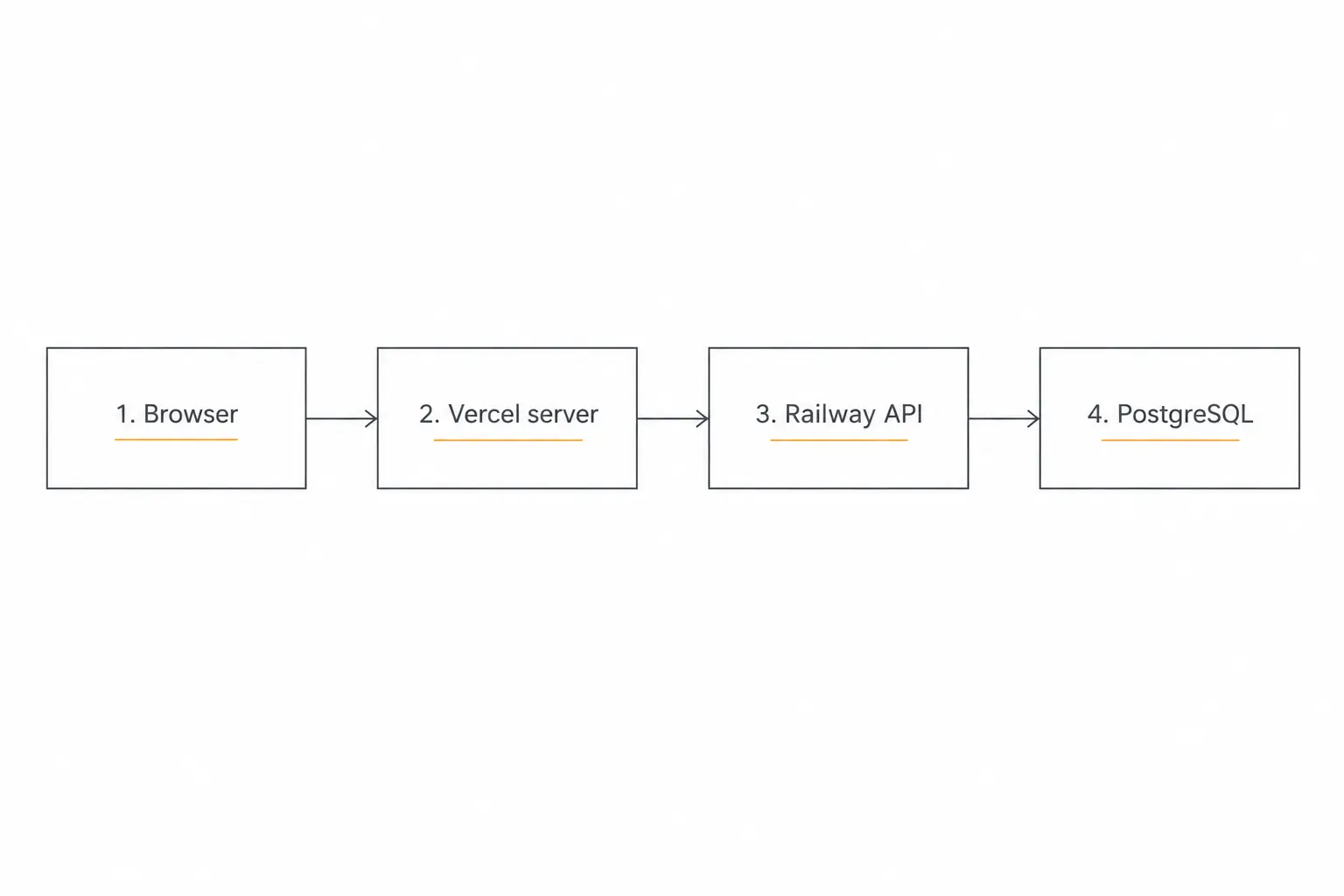
What the Vercel Railway stack actually does
The usual division is easy to understand. Vercel serves the web application and its frontend-facing server code; Railway runs a separate API and the services behind it, such as a database or worker.
What Vercel does
Vercel is a platform for building, deploying, and serving web applications. You give it your application code; its deployment workflow builds the project and makes it available at a web address.

In the split stack, I would use it for the pages a visitor sees and the web app’s server-side request handlers. For example, a client could open a project dashboard on Vercel while its server-side code retrieves project records from a separate Railway API.
Its platform documentation covers Git deployments, preview URLs, custom domains, content delivery, and backend compute. A preview URL gives the team a place to review a change before putting it on the production domain; Vercel also runs server-side application code, so calling it only a static frontend host would miss part of the product.
What Railway does
Railway is a cloud platform for deploying applications and the services they depend on. You can put an API, a database, and a background worker into a project rather than starting by configuring a server yourself.
Railway’s basic concepts guide explains the model: a project groups services and environments, while a service deploys code from a repository or a container image. Variables configure each service, and volumes provide persistent storage when a service needs it.
For the proposed project tracker, the Railway API would check which client is signed in, read or write the permitted PostgreSQL records, and return the result to the web app. A worker could handle a longer task separately; I would still need to implement the task logic, access rules, and failure handling.
What Fork does, and why I would consider it first
Fork is the product we’re building at Pickaxe for creating client websites with AI and giving clients controlled access to make updates. Its current public workflow brings together building the site, inviting the client, and deciding which parts the client can change.
The public product demonstration shows boundaries around copy, offers, design, integrations, and private data. The homepage also presents landing-page imports and AI lead magnets; I explain those workflows and how I would evaluate them later in this guide.
My reason to try Fork is the work after deployment. If I am delivering a client website, I want its next update to be part of the product experience, with clear boundaries, rather than a new development ticket every time the client changes an offer.
Vercel and Railway give developers infrastructure for their own applications. Fork packages a website-building and editing workflow for agencies and their clients; I would check its current capabilities against a custom application’s requirements before treating the products as interchangeable.
This is an established deployment pattern, rather than an entirely new invention. For example, Nexgent’s own deployment documentation describes a Next.js frontend on Vercel with an Express backend, PostgreSQL, and Redis on Railway.
That is evidence of a concrete implementation, not a market-share statistic. I would judge the architecture by whether its boundaries help your application.
The split is optional. Vercel’s current Functions and Services documentation cover backend capabilities, including multiple services within one project.
Railway also documents a complete Next.js application with a database, background jobs, and file storage on its platform. “Vercel for frontend, Railway for backend” is a choice about how to organize a product, not a rule about what either platform can do.
When I would choose the split stack
I would choose it when a separate backend already exists, when different parts of the application have different deployment needs, or when the engineering team has a clear reason to own that boundary. It can be a good fit for a custom product with application logic that extends well beyond a website.
For agency work, I would ask a different first question: does the client need a custom software platform, or a website they can keep improving without routing every small change through the agency?
| What you are delivering | Where I would start | What you still need to decide |
|---|---|---|
| Client website with AI-assisted updates | Fork | Editing boundaries, integrations, access, and handoff |
| Custom app with an existing separate API | Vercel plus Railway | API contract, authentication, environments, and operations |
| App that fits one provider’s capabilities | A single Vercel or Railway deployment | Whether a second platform adds useful separation |
That is a starting recommendation, not an assertion that Fork replaces every backend workload. Our guide to AI web app builders looks at the broader build-and-handoff decision.
Step 1: define the app before connecting hosting accounts
For the walkthrough, imagine a small client project tracker. Users sign in, view their own projects, and submit an update; a backend stores those records in PostgreSQL.
I would write down the user identity, the data each user can read, and the operation that proves the product works. “A signed-in client can add an update to their project and see it after refreshing” is a useful acceptance condition.
Keep the web app and API in separate directories or repositories with explicit build and start scripts. In a monorepo, a layout such as apps/web and apps/api makes their deployment roots easy to name.
Railway’s monorepo guide explains deployment configuration for shared repositories. Check whether your packages depend on a workspace root before changing a service’s root directory; a folder name alone does not describe the build graph.
For a client-facing product, I would also name the owner of the domain, hosting accounts, database, and billing. Those choices are easier to make before a client’s production data lives in an agency employee’s personal account.
Step 2: deploy the backend to Railway
In Railway, create a project and add the API from its GitHub repository. Select the intended branch and service root, then confirm the detected build and start commands against the application’s package scripts.
The official Express deployment guide walks through GitHub, CLI, template, and Docker options. Use the path that matches your backend; you do not need a container file just to make the diagram look more professional.
Make the application listen on Railway’s supplied PORT and an appropriate network interface. A process listening only on a laptop-style loopback address will not make a useful hosted API.
Add a small readiness endpoint, such as /health, and configure the service’s healthcheck path. Railway’s healthcheck documentation explains that it waits for a successful 2xx response before activating the new deployment.
That deployment check does not continue as an uptime monitor after launch. I would separately decide how the team will learn that a deployed application has stopped working.
Finally, open Settings, find Networking and Public Networking, and generate a domain. Railway’s public networking guide documents this step and HTTPS support.
Visit the health endpoint at the actual generated HTTPS address. A successful build is only the first check; inspect the serving process and response before configuring the frontend around that URL.
Step 3: add the database and keep its credentials on the backend
Add PostgreSQL to the Railway project, then connect the API service using a reference variable. The PostgreSQL guide describes its connection variables, and the variables guide explains referencing another service’s values.
For a service named Postgres, a reference can take the form ${{Postgres.DATABASE_URL}}. Use the actual service name and variable offered by your project rather than pasting a connection string from a tutorial.
Put that reference on the API service. In this architecture, the Vercel frontend calls the API and does not need direct database credentials.
Railway’s private networking documentation describes internal service addresses scoped to the project environment. A Railway internal hostname is for services on that private network; a Vercel deployment outside it cannot simply use the same address.
Run your application’s migrations against the intended environment, and create a synthetic test record. Plan backups and recovery before collecting important client data; a reachable database is not the same thing as a recoverable product.
For a new application, I would make the first acceptance test read and write through the API. That checks the connection your users will depend on, rather than only proving that a database dashboard opens.
Step 4: deploy the web app to Vercel
Import the Git repository into Vercel, choose the web application’s root directory, and confirm the detected framework and build settings. Keep the production branch intentional, especially when frontend and backend changes share a repository.
Vercel’s Git integration documentation explains branch deployments and the deployment workflow. A frontend preview is useful for reviewing changes, but it does not automatically create matching state in another hosting platform.
Add a server-only environment variable such as BACKEND_URL with the Railway API’s public HTTPS origin. Configure separate values for Preview and Production, using the appropriate backend for each.
The Vercel environment variable guide explains environment and branch scoping. Apply the intended values to a new deployment and verify them through application behavior without printing secrets.
If you are starting with an existing application, inventory its actual variables first. Authentication callbacks, external service credentials, and storage settings do not become correct just because the host recognizes Next.js.
At this point I would load a simple page on the deployed web app and confirm it can make a read-only request to the API. Leave payments, production imports, and destructive operations out of the initial smoke test.
Step 5: connect the Vercel Railway stack deliberately
There are two common paths: let browser code call the Railway API directly, or have the browser call server-side code in your Vercel application that talks to Railway. I would choose the latter for this walkthrough.
That gives the browser a same-origin application endpoint and keeps server credentials out of its bundle. The Railway API remains a separate service and still needs its own authentication and authorization checks.
A server-only Next.js route might read BACKEND_URL, call the upstream health endpoint with a timeout, and return a small health response. For actual client operations, validate the user and project scope before forwarding a request, and have the API enforce that scope too.
The Next.js backend-for-frontend guide describes this pattern. A proxy route is application code to maintain, so I would give it clear errors and avoid exposing arbitrary upstream paths.
If browser code calls Railway directly, configure allowed origins and authentication deliberately. CORS is a browser access mechanism, not proof that a request came from an authorized customer.
Also be careful with public environment variables. Next.js documents that NEXT_PUBLIC_ values are exposed to the browser and inlined at build time; do not put a database password or service secret behind that prefix.
Test a valid user, a logged-out request, and a user attempting to access another client’s project. Those are proposed application checks, not capabilities the deployment platforms automatically implement for your data model.
Step 6: make previews and releases work together
This is where a small split stack starts to feel like a product operations job. A preview frontend should point to a suitable preview backend and test data, rather than quietly writing to production.
Railway environments and Vercel’s environment scopes give you the building blocks. Your team still needs to map them and decide what happens when only one side of an API contract changes.
I would keep compatible API changes deployable independently. For a breaking change, use an explicit release sequence and a migration plan that accounts for old frontend deployments still receiving traffic.
Write a short release checklist: check the deployed frontend, submit a synthetic record, verify the backend stored it, reload the page, and try an unauthorized request. Add the application’s important integrations once that basic path works.
Then rehearse recovery. Rolling back a frontend does not necessarily reverse a database migration or restore a record that a user deleted.
Our guide to writing a useful implementation specification is relevant here: describe the intended behavior and acceptance conditions so the next person, or coding agent, has something more precise than “make deployment work.”
Price the whole workflow, including the work you own
I would avoid describing the combination as “a cheap frontend plus a cheap backend” and stopping there. The relevant budget includes compute, storage, network usage, databases, optional services, and the time required to support the application.
On the checked date, Vercel’s public pricing lists Pro at $20 per month, with included usage credit and resource billing details. Confirm seats and allowances for the actual team and workload.
Railway’s Pro plan lists a $20 monthly minimum usage with $20 of included usage credits; resource use above the allowance adds to the bill. The platform also lists separate CPU, memory, storage, and egress meters.
Those figures do not establish a flat $40 production stack. Choose the plans, region, resource needs, and billing terms you actually require, then calculate the combined cost without treating included credit as an extra free subscription.
For an agency, I would add the labor unit that hosting comparisons often omit: a client request. How does a headline change reach the right codebase, get reviewed, go live, and reach the client for approval?
Our AI service pricing guide helps separate infrastructure spend from the service you sell. A low hosting invoice can still sit underneath an awkward maintenance business.
Why we’re building Fork
I want an agency to be able to sell a website that stays easy to change. That is the reason I would put Fork in this conversation early, rather than treating it as another hosting provider at the end of a comparison.
With a custom stack, you can build a client editor, connect an AI assistant, manage its permissions, and create a handoff workflow. The question is whether building and maintaining that product is part of the work you want to take on for each site.
We are building those agency workflows into Fork. Its current public product page focuses on creating client websites with AI, inviting the client, and setting boundaries around what they can change.
The distinction matters to me because deploying a repository and handing over a website are different milestones. A site can be technically live while the client still needs to send a message for every routine update.
I want the everyday interaction to be much closer to: “Change this offer,” “Update this project description,” or “Add this announcement.” The agency should decide where that freedom belongs and where a reviewed change is still required.
This is our product direction, not a claim that AI edits never need checking. I would evaluate the experience with a real representative page, including the requests you expect a client to make and the changes they should not be allowed to make.
We know this audience through Pickaxe’s work on client-facing AI tools. Fork applies that interest to the website itself, where the design, editing experience, AI behavior, and client relationship need to work together.
What Fork changes about the client handoff
The Fork product demonstration shows the workflow as building with AI, inviting a client, and controlling access. The access example distinguishes page copy and offers from design, integrations, and private data.
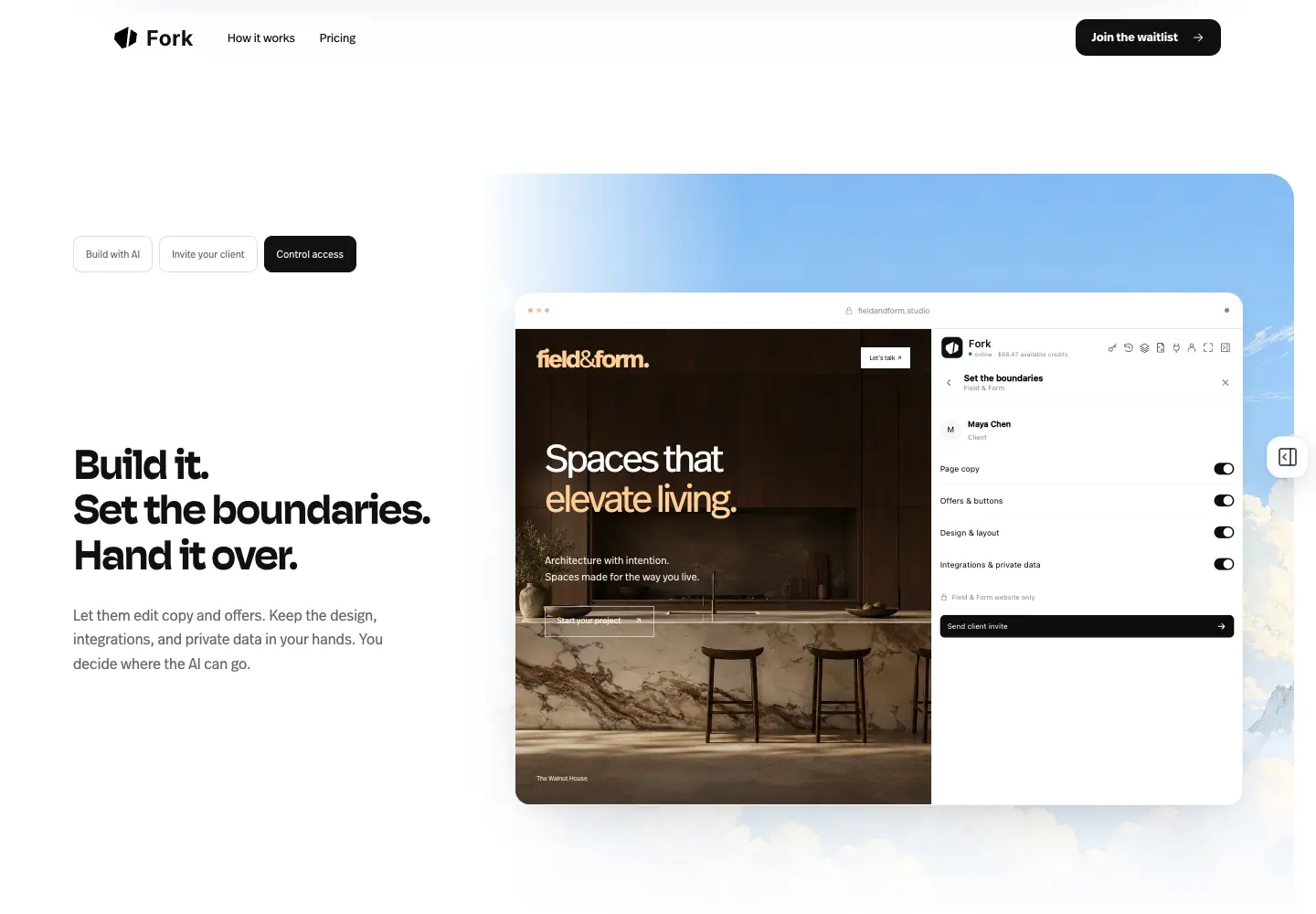
That is the handoff I would want an agency to evaluate. Can a client make a normal content change, understand what happened, and leave the parts they should not touch under the agency’s control?
Fork’s homepage also presents importing existing landing pages and adding AI lead magnets, such as a personalized audit, plan, or recommendation. I see these as connected parts of the same service: keep what already works, add useful interactions, and make the site easier to maintain.
An import still needs a review of its forms, URLs, mobile layout, analytics, and integrations. Recreating the visual page does not prove that every connected business workflow moved with it.
The lead-magnet example on the homepage is explicitly a demonstration. I would use it to discuss a proposed client experience, not turn its sample recommendations into a customer conversion claim.
Our guide to white-label AI tools for agencies explores the service side of this decision. The point is to deliver something a client can use and your team can support, with a clear account of what belongs in the ongoing package.
How I would try Fork on one client website
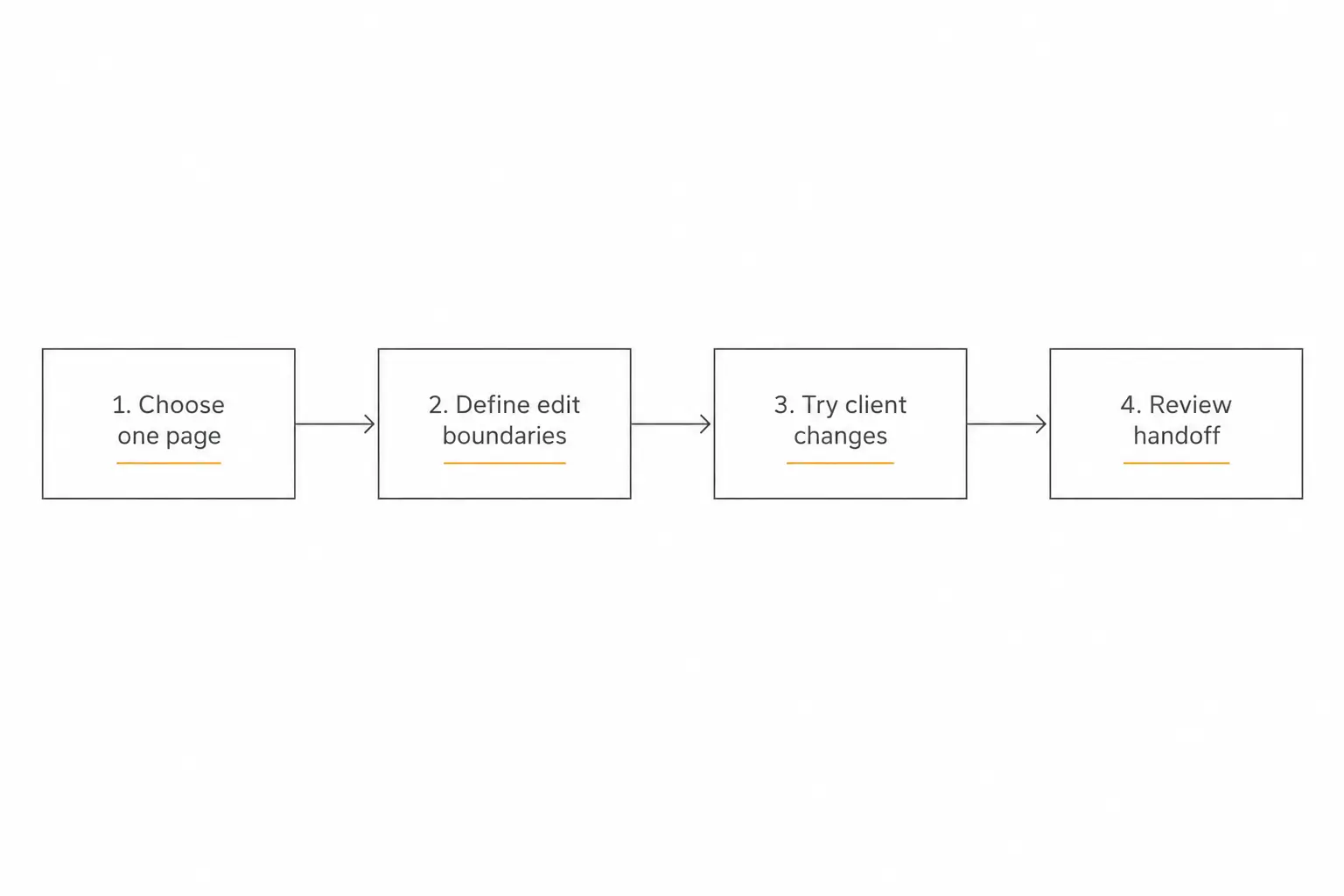
I would begin with an agency-owned example or a page the client has authorized you to rebuild. Choose something representative: a service page, a project portfolio, or a landing page with one important enquiry flow.
Visit Fork, explore the current product workflow, and confirm access for the work you want to do. The public homepage currently links to a waitlist, while the pricing page describes trial and paid project terms; access is being opened in batches.
Define three kinds of request before the pilot: a simple copy change, a normal structural change that needs review, and a request the client should not be permitted to make. Ask whether the experience makes those boundaries understandable to both sides.
Then review the whole page as a visitor. Submit the form using synthetic data, check mobile layouts, follow its main links, and make sure the intended contact or lead destination receives the right information.
On the checked date, Fork’s published pricing lists $30 per paid project per month, including one client sandbox, one custom domain, unlimited users and pages, full web import, and 10,000 AI forkaroonies for that project each month.
Extra usage is listed at $10 per additional 10,000 forkaroonies, and included allowances are not pooled between projects. The first-project trial is two weeks with a total 5,000-forkaroonie budget, not a recurring monthly allowance.
I would use those terms to price a small pilot, then decide what the agency charges for design, review, integrations, and support. A project subscription and a complete client service are different budgets.
Five paid projects would be $150 per month in project subscriptions before extra AI usage and the agency’s other costs. That is illustrative arithmetic, not a claim that five custom applications have identical requirements or that Fork is always cheaper than the split stack.
Build a website your client can keep improving
Explore Fork’s agency workflow and tell us what you want to build.
Where I would still choose a custom stack
I would keep Vercel and Railway on the shortlist for an application with specialized backend services, an existing engineering team, or infrastructure requirements that deserve direct control. I would also consider whether one provider can cover the application before splitting it.
Fork is the direction I would explore first for an agency website that benefits from AI creation and controlled client editing. I would verify a complex integration or unusual runtime requirement with the actual product before promising it in a client contract.
A requirement for a specific database, networking model, data region, or recovery objective needs a concrete answer. The current public product page is not a substitute for that technical assessment.
Neither path removes the need to test customer journeys. You still need accurate content, working forms, appropriate access, and a person who owns the result.
If your work is primarily delivering an AI agent inside an existing website, our embedding guide covers that narrower job. Rebuilding the website is a larger decision.
My recommendation: choose around the work after launch
The Vercel Railway stack is a practical option when its separation serves the application. Set up the backend, data, frontend, environment scopes, and authorization deliberately, then prove the full user journey before calling it ready.
For agencies selling client websites, my recommendation is to try Fork before building that whole operating workflow yourself. The client’s next request is part of the product, and it deserves as much attention as the first deployment.
That is what we are building: a way to create the site, give the client useful AI access, keep sensible boundaries, and continue improving the work in one place. I want agencies to spend more of their time delivering value a client can see.
Take a look at Fork’s current product and join the waitlist if that is the kind of website service you want to build. Start with one page and the handoff you would be happy to support.