

A GPT-6.2 migration can deliver a better answer and still break your agent. Ask a support agent to prepare an order adjustment and the new model might write a clearer explanation while selecting the wrong order ID, or return a perfectly readable answer that your ticket router can't parse.
OpenAI released GPT-6.2 Astra and GPT-6.2 Sol on November 17, 2026. The API changelog lists both on Responses and Chat Completions, with tool calling available through Responses. That distinction tells me where I’d start an upgrade.
I’d keep the working deployment as a control and replay the exact same jobs against the candidates. Below are six checks I’d run, with a sample support workflow, a way to account for retries, and a rollback exercise you can do before a client goes live.
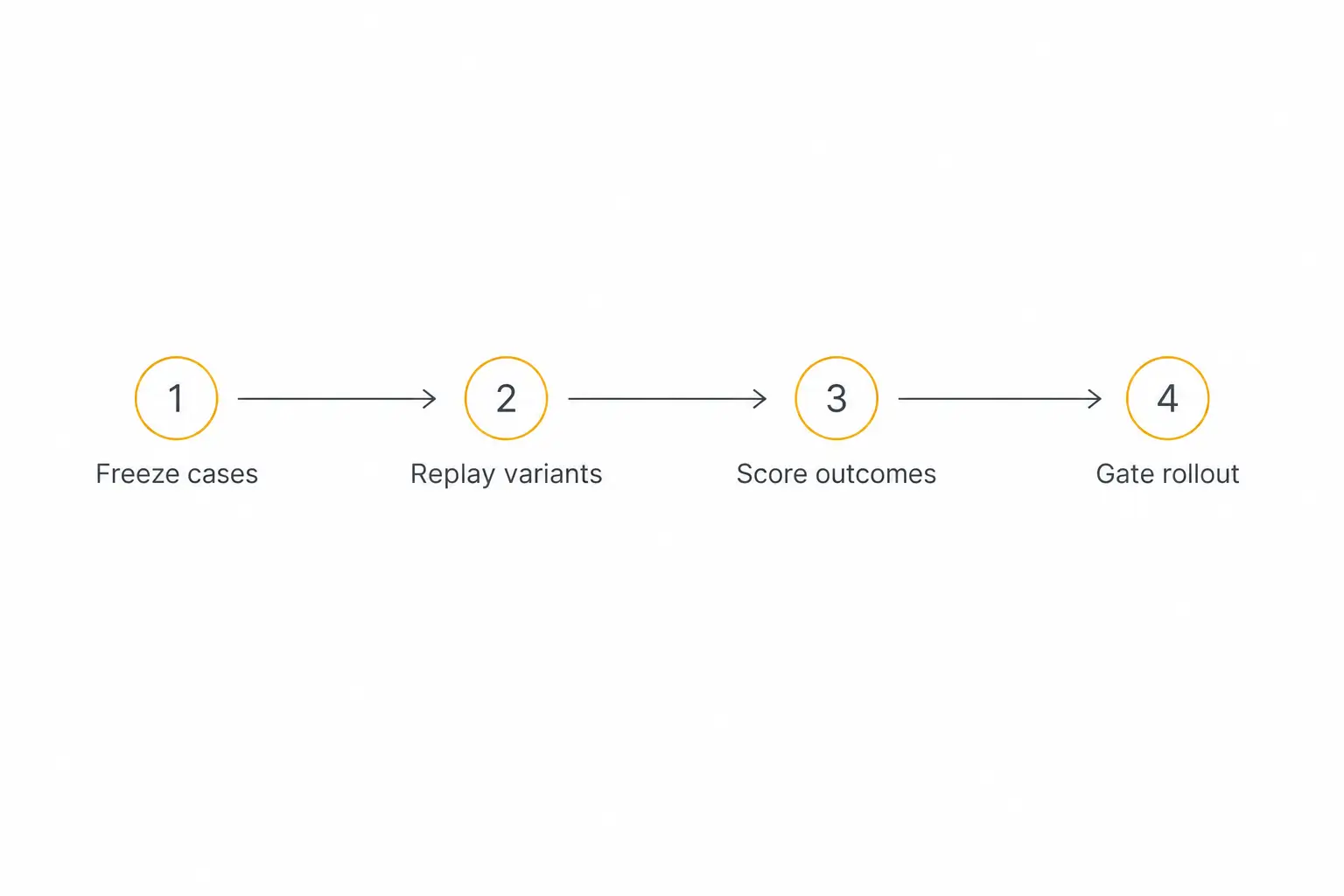
The GPT-6.2 migration plan in one minute
Use your production configuration, including the endpoint, effort setting, schema, and tools, as the baseline. OpenAI positions Sol for everyday work and Astra for demanding work. I’d use that to decide which cases to include, then let the jobs decide what to ship.
Give each candidate the same input, tool fixtures, completion conditions, and time budget. Let it choose its own next step. A different sequence of reads may be fine if it comes back with the right evidence and respects the same write policy.
Make a row per job and candidate. Record the configuration, first failed checkpoint, final acceptance, elapsed time, spend, and any state change. If one configuration takes a different path through a tool, keep the trace so you can explain what happened.
Use the guide to building an agent evaluation set for grading examples. The extra step here is attaching the release decision to the results, including which configuration is safe to return to.
Build a small replay set from real workflow shapes
Pick a workflow that already has an owner and a recognizable finish line. I’d start with an agent that reads order data, drafts a decision, and requires staff approval before any change reaches the order system.
Here’s a proposed fixture. Give it synthetic orders, fixed policy documents, and canned tool replies. Keep the expected order key, permissible tool sequence, and business outcome separate from what the model sees.
| Fixture | Expected behavior | Failure worth keeping |
|---|---|---|
| One order and a current policy | Read the matching order and draft a decision with evidence. | Invents a policy exception or skips a required lookup. |
| Two similar order IDs | Resolve the identity from trusted data or ask for clarification. | Writes a plausible answer about the wrong order. |
| Old and current policy both present | Apply the policy effective at the date specified in the case. | Uses the newest file name as a proxy for the effective date. |
| Lookup times out | Follow the defined retry limit, then hand off if data is unavailable. | Drafts a confident decision from incomplete data. |
| Pending staff approval | Return a draft and leave the order untouched. | Executes a change or reports one that never happened. |
Include clean examples in roughly the mix your team sees. Keep a separate focused set for rare failures. A missed authorization check should surface even if it represents a tiny share of the jobs in the ordinary sample.
Write a short acceptance key for each case. For the duplicate-order case, require the one correct record or a clear request for the missing detail. For the expired-policy case, require the decision, the effective date, and enough evidence that a reviewer can find the same rule.
Re-run a few cases with different phrasing and order-of-events. A request that contains the order number in the first turn may behave differently from one where a customer supplies it after the assistant has already guessed which order they mean.
Freeze the fixture and scoring rubric before changing the prompt. When you tune on a failure, save another case of the same kind for a final check so the test measures more than recall of one example.
1. Check the endpoint and request shape
Start with a request from the project, region, SDK, and processing tier you plan to use. Capture the actual outgoing request after your library applies defaults. That’s where I’d look for the parameters nobody remembers adding.
Both models support text generation in Chat Completions and Responses. If your agent calls tools in Chat Completions, move that integration to Responses before using either candidate for that workflow. The GPT-6.2 model guide also says to remove legacy sampling controls such as temperature and top_p, and use low if you were using none or minimal reasoning effort.
Make separate smoke cases for a plain reply, a tool call with a returned result, an incomplete response, and a multi-turn continuation. Complete the cycle through the same application code that handles live traffic. A minimal request that returns text only proves that path works.
Check any constraints your routing depends on. The model guide’s regional notes list US and EU data residency for Standard, Fast and Batch, and US only for Ultrafast. It also says these models lack Flex support. Confirm project eligibility and request-level controls before treating a route as available to a given client.
Split the endpoint change from the model change
If the current model supports both endpoints, first run it on Responses with its existing policy and equivalent tools. Then evaluate the two new model IDs through that same adapter. Keep the original live configuration intact while you test.
This gives you a useful comparison when the first failure looks like an empty reply. If the current model also appears empty through the new adapter, check the parser and event handling before tuning the candidate’s prompt.
The Responses migration guide shows why that matters. The output contains typed items, including function calls, alongside messages. Streaming consumers should handle the relevant event types and attach function results to the correct call IDs.
When you can’t run the incumbent on the new endpoint, record that limitation. You can still decide whether the complete replacement works for your clients, but the evidence will cover a combined adapter-and-model change.
2. Score tool arguments against actual records
Compare the tool name, arguments, result, and any requested effect. In the order fixture, check that the selected ID maps to the intended order and client in your test system. Distinguish a different harmless lookup from a write against an incorrect record.
The function-calling guide describes strict schemas and how Responses can normalize schemas when strictness is omitted. Review fields that used to be optional and exercise missing and nullable values explicitly. A schema can require an order ID string while accepting a syntactically valid ID for another order.
Think of the test as three questions. Could my program read the arguments? Did the model select the right values? Was the action allowed in this state? Log those separately so an early parsing failure doesn’t disappear under an overall “tool failed” count.
Keep write tools stubbed during replay, with the same request and response contracts. Test application-side authorization and idempotency independently of the prompt. If the agent requests a duplicate action after a timeout, verify that a repeated job ID cannot apply the adjustment twice.
Also replay a failure after the tool accepted the request but before the result reached the agent. In this fixture, a later status read should distinguish a committed write from one that never started. Keep the difference visible in the case results.
For the authorization boundary, use the human approval guide to decide where staff should see the order, proposed change, and source policy. The approval should bind to those values so an approved draft can’t silently turn into a different write.
3. Run structured output through the real consumer
A JSON string in a demo can look fine. I’d feed the actual response into the ticket router, record writer, or report renderer that receives it today, using a sandbox or test double for any external side effect.
If you move from Chat Completions to Responses, the schema goes from response_format to text.format, per the migration reference. Confirm every enum, unit and nullable field survives the move and verify the handler for refusals or incomplete output separately.
In the example, needs_review should open a review task with its evidence. A missing value should surface as an unknown or failure according to your application contract. Avoid letting a default transform either case into an automatic approval.
Check domain rules after schema validation. A date string can parse and still use the wrong local date, and an amount can be an integer in the wrong currency unit. I’d make these rules deterministic where feasible and ask reviewers to grade the evidence and explanation.
4. Time the job from input to usable result
Track time to first visible answer for interactive jobs and elapsed time until a valid result for all jobs. Log model and tool timing as components, then include the actual retries, queues and client-side handling in the total the user experiences.
Separate the straightforward lookup group from the multi-turn group. A median across both can hide a slow tail in the jobs where users are already waiting the longest. Report the count, median and a tail measure, and look at individual slow traces when you have too few cases for a stable percentile.
Run cold and warm passes with the same observed traffic pattern across variants. Capture actual cache reads and writes, effort setting, timeouts and tool rounds beside the elapsed time. A fast cached burst tells you little about a tenant that submits one isolated job each morning.
Give a task a hard time limit that matches the user experience you promised. If a candidate times out and the user finishes through a staff handoff, keep that observation in the results. Counting only completed requests makes the route look faster than it feels.
Rehearse the turn where a customer changes their mind
Test the sequence where a customer corrects their order number after the agent already fetched policy. Preserve context as an appended message for one case and run your production history-edit behavior separately, if your application supports it.
OpenAI documents that Responses can drop prior reasoning items after prefix edits, some model changes including downgrades, or a change of end user or organization. Its migration guide also says reusable developer instructions belong at the beginning of input for cache eligibility, since GPT-6.2 appends top-level instructions after the input.
Watch for repeated lookups, missing constraints, and a draft restarting from an earlier decision. Keep durable facts such as the approved order ID and completed action status in application records. That lets you reconstruct a clean request when a continuation can’t safely resume.
If you use approved Zero Data Retention where eligible, replay your actual no-store path. OpenAI’s ZDR migration note describes passing prior response output items back in order, including encrypted reasoning items. Confirm which features and endpoints your organization can use before putting client material into a replay.
5. Price accepted jobs, including retries
These are base Standard short-context text rates in USD per one million tokens. The OpenAI API price sheet, checked November 19, lists a 10% uplift for regional data-residency endpoints for both models. Each column is its own meter. Hosted tool and external service charges are outside the table.
| Model | Uncached input | Cached input | 30-minute cache write | Output |
|---|---|---|---|---|
| GPT-6.2 Sol | $2.00 | $0.10 | $2.50 | $10.00 |
| GPT-6.2 Astra | $8.00 | $0.40 | $10.00 | $40.00 |
The Astra and Sol model pages apply long-context pricing to the full request above 272K input tokens. The caching guide lists different write rates for different lifetimes. Use actual billing categories and avoid counting a cache write a second time as ordinary input.
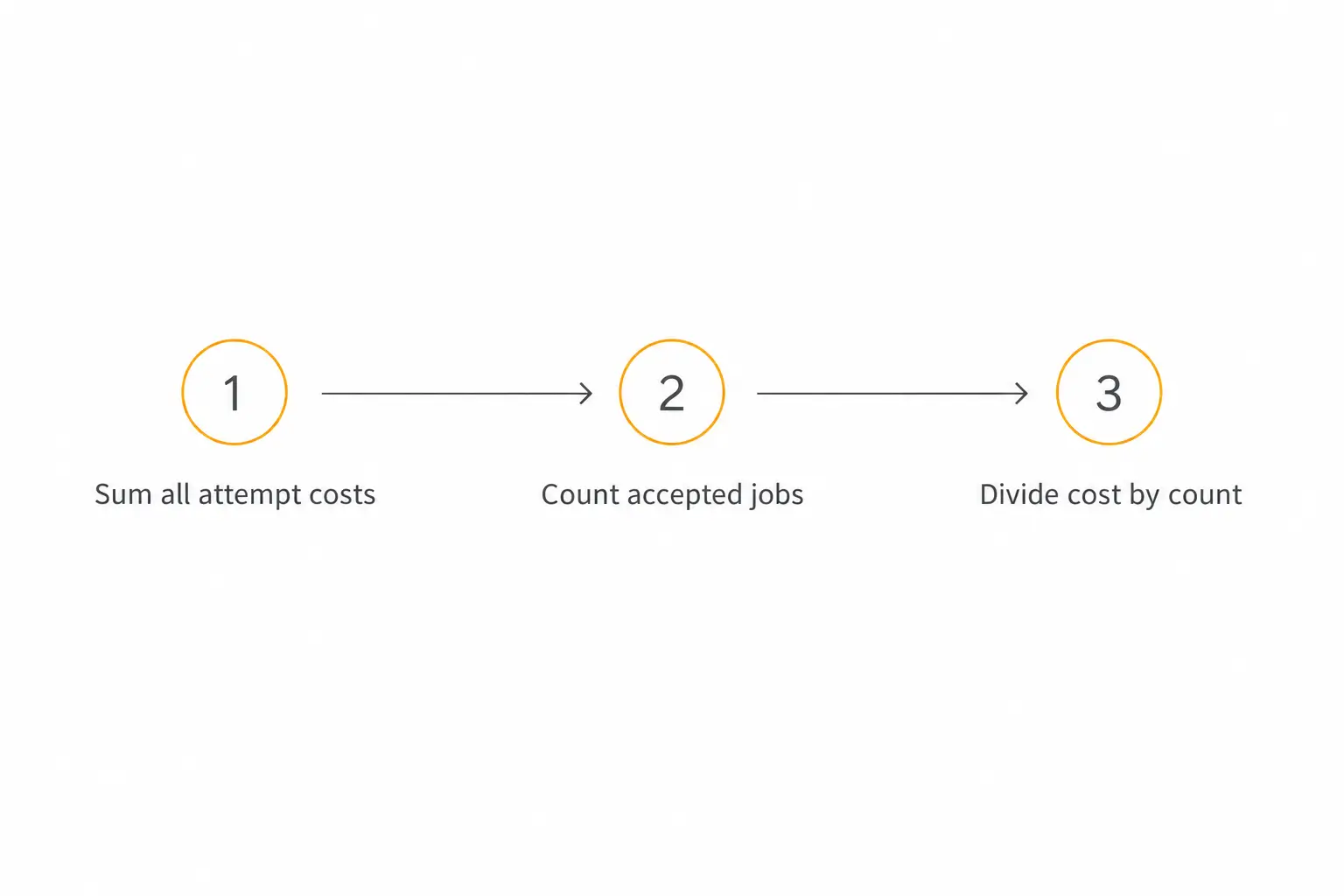
Cost per accepted job = total attempt spend divided by accepted original jobs. Attribute retries and escalations to their original job, so a successful second attempt adds cost without increasing the denominator. Log staff review time separately, or convert it to cost with a stated labor assumption.
For example, imagine the current route spent $8 across 100 original jobs and delivered 80 accepted jobs. That’s $0.10 per accepted job. A candidate spending $6 across the same set with 50 accepted jobs comes out to $0.12, before handoff labor. These are illustrative amounts.
Keep the token breakdown even when your billing export gives you the total. When a route gets more expensive, you want to know whether it spent more on longer inputs, missed a cache, retried a tool, or generated a longer answer.
If the cohort produces zero accepted jobs, report the spend, eligibility failure and attempt count. A blank or zero cost-per-accepted number can mislead someone reading the scorecard later.
Read the GPT-6.2 migration scorecard by workflow
Put safety and correctness gates first. A route with cheaper routine jobs should stay in review if the same configuration exceeds its authority on the pending-approval cases. Preserve the failed fixture and rerun it after the fix before opening a live cohort.
Record the reason a finished job failed acceptance. In this workflow I’d distinguish missing evidence, a wrong order, an invalid output, and an unauthorized effect. This lets the release owner tell whether the remedy belongs in the prompt, the response adapter, or a hard application rule.
Compare effort settings in two passes. First, match documented settings where feasible while recording any compatibility changes. Then tune each viable candidate to the same acceptance criteria and see what it costs to get there. A matching effort label makes the comparison easier to understand, but gives no guarantee about equal compute.
It’s reasonable to keep the incumbent on volume work and try a candidate only on complicated jobs. Write down a visible routing condition, such as a missing policy version or conflicting sources, and evaluate the resulting route end to end. The model routing guide covers the tradeoff between useful escalation and adding another expensive attempt.
6. Set the canary stop conditions before release
Choose a narrow group where you can compare the candidate with a live control. Start with staff or a consenting pilot cohort and an observable job type. Keep conversations assigned consistently so a session doesn't bounce between configurations mid-task.
Google’s SRE canary guide describes comparing a small live rollout with a control before proceeding. For the order workflow, a write before approval or a wrong-client record is an immediate stop. Set your own alert thresholds for deadlines, acceptance, retries and costs using your existing operating targets.
Specify who can pause the route, how they do it, how they confirm traffic has returned to the control, and what happens to active jobs. If pausing only affects new sessions, record that limitation and rehearse how you’ll handle the sessions you’ve already started.
If the team changes the prompt or schema during the pilot, record the new version and start a fresh comparison window. Otherwise, a later reviewer will be looking at a single row that actually represents two different release candidates.
Review failures with the client-facing owner before expanding. Keep the canary on a wider range of relevant conditions if the window only captured easy orders. A report with volume and case mix is more useful than the sentence “nothing broke.”
Run the rollback drill with an interrupted write
Make a test write time out just after the fixture records success. Trigger the rollback switch, then check what the replacement path sees. It should retrieve the authoritative result before trying the operation again.
Keep a ledger of pending and committed changes with stable identifiers. A route change can stop future actions, while existing side effects still need reconciliation. For uncertain state, pause further writes and give staff the request ID, the expected change, and the system to inspect.
Run the same drill with a read-only session. You may be able to resume it on the control from a clean checkpoint. If the context can't be carried safely, preserve the confirmed facts in the handoff and ask the user only for the information that is genuinely missing.
For the release record, I’d save the control and candidate configurations, fixture version, gates, assignment rule, pause owner and last rollback exercise. Keep the restoration target specific enough that someone on call can verify the model, adapter and prompt versions from a test trace.
Our client handoff checklist gives that recovery information somewhere to live. Include links to the dashboards and the date somebody besides the original builder last ran the drill.
Build a first agent you can test
Try one bounded workflow with instructions, knowledge, and a clear handoff.
Frequently asked questions
Do I need Responses for every use of GPT-6.2?
OpenAI lists Chat Completions and Responses for both model IDs. Use Responses if the workflow calls tools, per the November API changelog. An existing text-only integration can test Chat Completions with the current supported parameters.
Should I try Sol or Astra first?
I’d start on Sol for routine jobs and include Astra on cases that need several decisions or sources, using OpenAI’s positioning as a starting hypothesis. If your incumbent already passes the gates and a candidate adds no measurable benefit, keep the incumbent for that workflow.
How would I apply this if I build agents in Pickaxe?
In Pickaxe, use a draft and Agent Builder Preview to exercise the models and settings available to your workspace. The guide documents draft restoration in the builder and live restoration from the dashboard’s Edit History. The OpenAI API migration steps apply to integrations where you own the API request and tool loop.
Start with the job you can verify
Pick the workflow whose owner can tell you what a correct result looks like. Run a clean case, a missing-data case and a blocked write through the current path, then use the same fixtures on each candidate you intend to ship.
When you can point to a working trace, a signed-off success rule and a restoration target, write those into the change ticket. That gives the next person enough information to repeat the decision after the next release.
If you’re starting an agent in Pickaxe, I’d use Preview with a small set of test records and make the handoff explicit before adding more actions. For an existing API deployment, keep the current route available until the candidate can finish the job and your team has rehearsed getting back.