
Agent snapshots and revert
Choose the workspace where you want to use this feature, then follow the steps below.
What it does
Agents can be snapshotted, published from a snapshot, and reverted to an earlier one.
Before this
New. There was no history. An agent was whatever you last saved, and last week's prompt existed only if you had kept a copy of it somewhere yourself.
Why it matters
Change a prompt, watch quality drop, put it back — without reconstructing last week's configuration from memory.
How it works
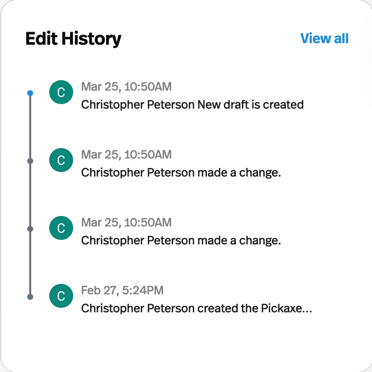
Every agent has an Edit History on its detail page — a list of snapshots with the time each was taken. Open one to see that configuration, and Revert to put the agent back to it.
The value is not really the restore. It is that changing a prompt stops being a decision you have to be sure about: try the rewrite, watch a day of real conversations, and put it back if quality dropped, without reconstructing last week's configuration from memory.