
If you're wondering how usage allowance works on Pickaxe, you're reading the right article. We operate a simple system to keep track of your usage of AI models. In this article we will go over how the Pickaxe usage system works and answer all the most frequently asked questions about it.
Let's dive in.
What is my usage allowance?
Usage allowance represents the amount of money each user has to spend on prompt runs.
Any time an AI model generates an output, it has a certain cost, which will vary based on the number of tokens used, the resources referenced, and many other factors. Usually, the cost per interaction is very small – a fraction of a cent. Here's another way to think about it: every time you push the “submit” or “test” button to run your pickaxe, you use a small amount of your allowance. When you run out of money, you can't generate more outputs.
How much usage do I get?
Every user gets $5 of usage when they sign up for a free account. This allowance replenishes monthly, on the 30-day anniversary of their sign-up date.Customers who sign up for a Gold subscription get $15 and users who sign up for Pro get $50.
When other people use my Pickaxe, do they use my credits?
Whenever an end-user uses your Pickaxe, they do so at your expense. Which means they use your credit.
This is true whether they use your Pickaxe as an unlisted tool, as a listed tool in a Studio, or as an embedded Pickaxe on another website.
Embedded pickaxes (on a third-party website)
Embedded pickaxes always debit the pickaxe owner's account. If you embed a pickaxe on your website, every time someone presses “submit” on the embedded tool, it uses one of your credits.
This system allows people to use pickaxes embedded on your website without signing up for a Pickaxe account. It’s a way to sponsor free usage of your tool. You can set a usage limit on your Pickaxe so that you can restrict the total amount of times the same person can use it. You can set use usage limit within the Embed Customization screen.
Pickaxes in a Studio
When you put a tool inside a Studio, usage works similarly to an embedded Pickaxe. Studio Pickaxes always debit the pickaxe owner's account. Importantly, in a studio you are controlling usage of your tools through your own credit system. And most likely, you are selling usage of your tools.
Can I limit use of my embedded pickaxe?
You can always control the amount of times an individual user can run an embedded pickaxe. To set a limit on each use, click "add a new embed" and then in the embed customization screen look for a slider labeled “prompt runs per user”.

Can I limit use of my studio pickaxe?
Yes. You can always control the amount of times an individual user can run a pickaxe in a studio. The studio has a robust system for setting usage tiers and prices. To set a limit on users, click on the Access tab of your Studio. Here you'll see dedicated sections for limiting Guest Users and Paid Users. For more information on creating Products within your Studio, check out this blog post.

How do I see how much money I have?
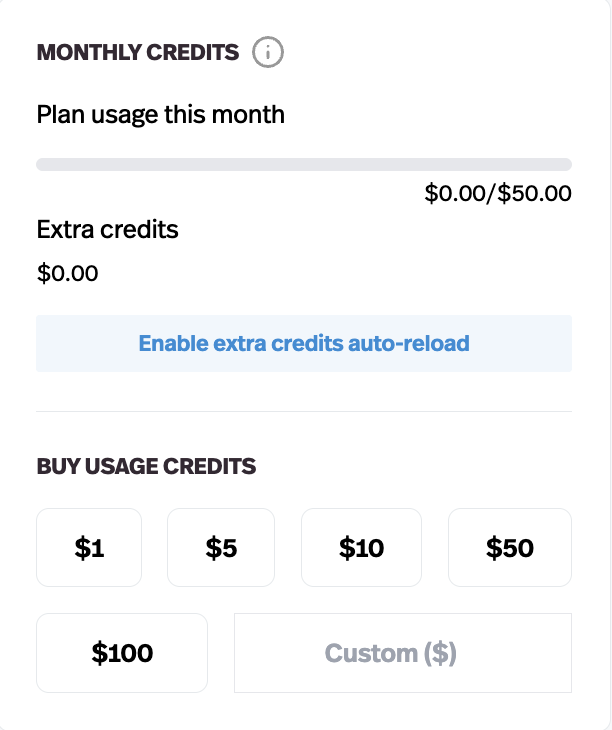
To see your credits balance, simply go to your account page. You credits will be listed there. You'll see the total credits remaining and the total monthly credits you get. Importantly the first number is the total amount of un-used credits you have remaining.
How do I see how much I am spending?
Each prompt run will cost a different amount, depending on a variety of factors, and you might find it useful both to see what costs more and the amount of money your users are taking from your allowance. All of these things can be checked in the Users tab of your Studio Dashboard. In the Activity section, you can select the ⓘ icon below any bot response to see a detailed breakdown of the cost, including a cost comparison with other messages within the same Pickaxe. Under the "Manage Users" tab, you can find a detailed breakdown of both the cost and credits usage of any member of your Studio, so you can keep track of spending on an individual level.

Can I buy more credits?
You can top up your account on Pickaxe by purchasing credits at any time. Any additional credits that you buy will never expire and roll over to any month. You can also upgrade to a subscription (Gold or Pro) to receive $15 or $50 of free monthly credits in addition to a variety of awesome features.
If you need more than your allotted number of credits, you can always purchase additional credits - your plan credits will always be used first, and your extra allowance purchases will only kick in if you go over this amount.
Once you run out of usage, you will no longer be able to use your tools. However, you can now enable auto-reload of credits - which will purchase additional credits if your usage allowance dips below a set value.
How do credits replenish on Gold and Pro plans?
Credits replenish every 30 days. Credits replenish in aggregate, meaning all at once. Credits do not stack. That means if you're on a Gold plan ($15 of free credits a month) and you don't use Pickaxe for 3 months, you will log in to find you have $15 of credits, not $45.
Do Actions or Knowledge Base cost credits?
The only thing that costs a credit is when your Pickaxe generates an output for the end-user. It does not cost credits to use Actions or reference the Knowledge Base.
Why use a credit system?
Every AI generation has a real underlying cost from the model provider. With Pickaxe we pass this cost directly on to you in one unified area, allowing you to access multiple models without setting up different accounts with every LLM provider.
We hope that our dollar-based system makes that cost transparent and flexible — you always know exactly what your usage is worth.